
uiautomatorviewer.bat使用方法
在android目录下找到uiautomatorviewer.bat,然后双击,页面的第二个按钮连接设备
D:\Program Files\android-sdk-windows\tools\uiautomatorviewer.bat
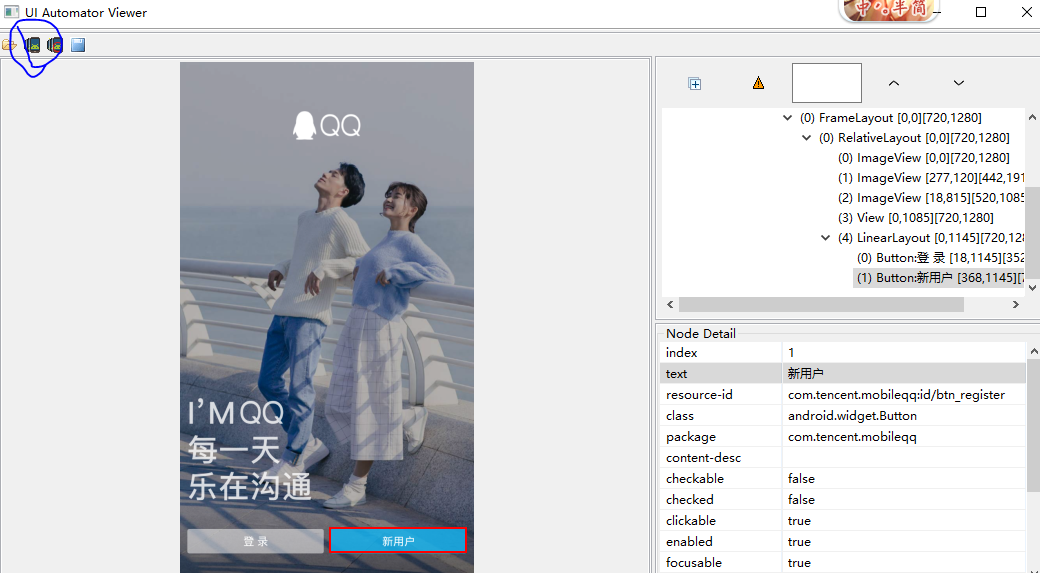
from appium import webdriver

caps = {}

caps["appPackage"] = "com.tencent.mobileqq"

# caps["appPackage"] = "com.android.settings"

caps["appActivity"] = "com.tencent.mobileqq.activity.SplashActivity"

# caps["appActivity"] = ".Settings"

caps["platformName"] = "Android"

caps["platformVersion"] = '4.4.2'

caps["deviceName"] = '127.0.0.1:62001'

caps["unicodeKeyboard"] = True

caps["resetKeyboard"] = True

caps["noReset"] = True

driver = webdriver.Remote("http://localhost:4723/wd/hub", caps)

#获取手机大小 {'width': 720, 'height': 1280}

size = driver.get_window_size()

print(size)

#如果安装了返回True

print(driver.is_app_installed("com.tencent.mobileqq"))

#关闭app

driver.close_app()

import time

time.sleep(3)

#启动app,启动是初始化的app

driver.launch_app()

#1、除默认的初始化app之外 还可以在启动其他app

driver.close_app()

driver.start_activity('com.android.settings', '.Settings')

#2、他可以跳过某些场景,达到某个页面

# element = driver.find_element_by_android_uiautomator('new UiSelector().text("新用户")')

# element.click()

print(driver.current_activity)

ele = driver.start_activity('com.tencent.mobileqq', '.activity.RegisterPhoneNumActivity')

print(driver.current_activity)

#如果send_keys 报错的话使用set_value
driver.set_value(ele, '123456')
# 返回当前session中的app类型
element = driver.find_element_by_id('com.android.browser:id/url')

element.send_keys('http://ui.imdsx.cn/uitester/')

time.sleep(5)

# key code Android按键码

driver.press_keycode(66)

time.sleep(2)

# 打印当前的app类型

print(driver.current_context)

# 从原生切换到H5

driver.switch_to.context(driver.contexts[1])

# 定位id为i1的元素

driver.find_element_by_css_selector('#i1').send_keys('')

# 打印切换玩的app类型

print(driver.current_context)
uiautomatorviewer.bat使用方法的更多相关文章
- Unable to find vcvarsall.bat解决方法
今天在安装scikit-learn时出现了 error: Unable to find vcvarsall.bat 在安装一些Python模块时,大部分是cpython写的模块时会发生如下错误 err ...
- bat使用方法汇总
前言 由于日常科研工作中使用C/C++比较多,在进行大规模运行时涉及到的批量处理操作较多,遂将目前遇到的情况记录如下,以便查看: 1.for循环 最基本的for循环操作为在一些数中遍历,如下例子.se ...
- C# 执行批处理文件(*.bat)的方法代码
代码如下: static void Main(string[] args){ Process proc = null; try { st ...
- C#: 执行批处理文件(*.bat)的方法
static void Main(string[] args) { Process proc = null; try { proc = new Process(); proc.StartInfo.Fi ...
- pip install scrapy报错:error: Unable to find vcvarsall.bat解决方法
今天在使用pip install scrapy 命令安装Scrapy爬虫框架时,出现了很让人头疼的错误,错误截图如下: 在网上查找解决方法时,大致知道了问题的原因.是因为缺少C语言的编译环境,其中一种 ...
- Android 10不能使用uiautomatorviewer定位元素的终极解决方法
Android app 元素定位除了使用Appium Inspector 外,还可以使用Android SDK 里tools中的uiautomatorviewer 工具.但今天打算使用 uiautom ...
- 6个可以隐藏运行bat,浏览器等程序的方法
在电脑启动时或者设置时间时运行指定的程序很容易实现.但是有时候还需要运行时不显示主界面,隐藏到后台运行.比如:开机时一段Bat批处理执行删除默认共享; 开机自动运行浏览器隐藏到后代打开指定网页等,希望 ...
- uiautomatorviewer提示Unable to connect to adb. Check if adb is installed correctly解决方法
转自:https://www.jianshu.com/p/c8581a70d1bc 解决方案: 1.打开 "E:\android-sdk_r24.4.1-windows\android-s ...
- app控件获取之uiautomatorviewer
初探 在Android的SDk提供了以下的工具来支持我们进行UI自动化测试: uiautomatorviewer:用来扫描和分析Android应用程序的UI控件的工具. uiautomator:一个包 ...
随机推荐
- Mac /Ubuntu/Windows 下安装nodejs
Mac If you're using the excellent homebrew package manager, you can install node with one command: b ...
- 利用 meta 标签重定向
页面定期刷新,如果加url的,则会重新定向到指定的网页,content后面跟的是时间(单位秒),把这句话加到指定网页的<head></head>里一般也用在实时性很强的应用 ...
- fs 小计
如果是export 就可以放到b-leg上 如果是set就可以对于a-leg
- net 将WebService生成dll文件
通过dll来引用webservice的方法 1.打开浏览器,然后写输入http://192.168.0.2/RentService.asmx?wsdl 2.然后选择浏览器->文件->另存为 ...
- php容易忽视的地方
一:bool in_array ( mixed $needle , array $haystack [, bool $strict ] ) 用的时候加最后一个参数,判断类型 <?php $a = ...
- Resources.FindObjectsOfTypeAll<T>()的坑(Ghost prefab)
今天遇到了一个Bug,因为调用Resources.FindObjectsOfTypeAll<T>()遍历整个场景,结果遍历出的对象不对.比较哈希一查果然是两个.原来prefab本身和pre ...
- Android图片二级缓存
点击下载源代码 想起刚開始写代码的时候,领导叫我写一个头像下载的方法,当时屁颠屁颠就写了一个图片下载的,每次都要去网络上请求,最后直接被pass掉了 当时的思路是这种 后来渐渐地就知道了有二级缓存这东 ...
- Oracle 版本号说明
Oracle 的版本非常多,先看11g的一个版本说明: 注意: 在oracle 9.2 版本号之后, oracle 的maintenance release number 是在第二数字位更改. 而在之 ...
- Python 常用内置模块(加密模块 hashlib,Base64)
Python的hashlib提供了常见的摘要算法,如MD5,SHA1等等. 什么是摘要算法呢?摘要算法又称哈希算法.散列算法.它通过一个函数,把任意长度的数据转换为一个长度固定的数据串(通常用16进制 ...
- Python 常用内建模块(time ,datetime)
1,在Python中,与时间处理有关的模块就包括:time,datetime以及calendar. 2,在Python中,通常有这几种方式来表示时间:1)时间戳 2)格式化的时间字符串 3)元组(st ...