
Flume示例
建议参考官方文档:http://flume.apache.org/FlumeUserGuide.html
示例一:用tail命令获取数据,下沉到hdfs
类似场景:

创建目录:
mkdir /home/hadoop/log
不断往文件中追加内容:
while true

do

echo  >> /home/hadoop/log/test.log

sleep 0.5

done
查看文件内容:
tail -F test.log
启动Hadoop集群。
检查下hdfs式否是salf模式:
hdfs dfsadmin -report
tail-hdfs.conf的内容如下:
# Name the components on this agent
a1.sources = r1
a1.sinks = k1
a1.channels = c1
#exec 指的是命令
# Describe/configure the source
a1.sources.r1.type = exec
#F根据文件名追中, f根据文件的nodeid追中
a1.sources.r1.command = tail -F /home/hadoop/log/test.log
a1.sources.r1.channels = c1
# Describe the sink
#下沉目标
a1.sinks.k1.type = hdfs
a1.sinks.k1.channel = c1
#指定目录, flum帮做目的替换
a1.sinks.k1.hdfs.path = /flume/events/%y-%m-%d/%H%M/
#文件的命名, 前缀
a1.sinks.k1.hdfs.filePrefix = events-
#10 分钟就改目录
a1.sinks.k1.hdfs.round = true
a1.sinks.k1.hdfs.roundValue = 10
a1.sinks.k1.hdfs.roundUnit = minute
#文件滚动之前的等待时间(秒)
a1.sinks.k1.hdfs.rollInterval = 3
#文件滚动的大小限制(bytes)
a1.sinks.k1.hdfs.rollSize = 500
#写入多少个event数据后滚动文件(事件个数)
a1.sinks.k1.hdfs.rollCount = 20
#5个事件就往里面写入
a1.sinks.k1.hdfs.batchSize = 5
#用本地时间格式化目录
a1.sinks.k1.hdfs.useLocalTimeStamp = true
#下沉后, 生成的文件类型,默认是Sequencefile,可用DataStream,则为普通文本
a1.sinks.k1.hdfs.fileType = DataStream
# Use a channel which buffers events in memory
a1.channels.c1.type = memory
a1.channels.c1.capacity = 1000
a1.channels.c1.transactionCapacity = 100
# Bind the source and sink to the channel
a1.sources.r1.channels = c1
a1.sinks.k1.channel = c1
执行命令:
bin/flume-ng agent -c conf -f conf/tail-hdfs.conf -n a1

前端页面查看下, master:50070


示例二:多个Agent串联
类似场景:

从tail命令获取数据发送到avro端口,另一个节点从avro端口接收数据,下沉到logger。
在weekend10机器上配置tail-avro.conf,在weekend01机器上配置avro-logger.conf。
tail-avro.conf配置文件:
# Name the components on this agent
a1.sources = r1
a1.sinks = k1
a1.channels = c1
# Describe/configure the source
a1.sources.r1.type = exec
a1.sources.r1.command = tail -F /home/hadoop/log/test.log
a1.sources.r1.channels = c1
# Describe the sink
#绑定的不是本机, 是另外一台机器的服务地址, sink端的avro是一个发送端, avro的客户端, 往weekend01这个机器上发
a1.sinks = k1
a1.sinks.k1.type = avro
a1.sinks.k1.channel = c1
a1.sinks.k1.hostname = weekend01
a1.sinks.k1.port = 4141
a1.sinks.k1.batch-size = 2
# Use a channel which buffers events in memory
a1.channels.c1.type = memory
a1.channels.c1.capacity = 1000
a1.channels.c1.transactionCapacity = 100
# Bind the source and sink to the channel
a1.sources.r1.channels = c1
a1.sinks.k1.channel = c1
avro-logger.conf配置文件:
# Name the components on this agent
a1.sources = r1
a1.sinks = k1
a1.channels = c1
# Describe/configure the source
#source中的avro组件是接收者服务, 绑定本机
a1.sources.r1.type = avro
a1.sources.r1.channels = c1
a1.sources.r1.bind = 0.0.0.0
a1.sources.r1.port = 4141
# Describe the sink
a1.sinks.k1.type = logger
# Use a channel which buffers events in memory
a1.channels.c1.type = memory
a1.channels.c1.capacity = 1000
a1.channels.c1.transactionCapacity = 100
# Bind the source and sink to the channel
a1.sources.r1.channels = c1
a1.sinks.k1.channel = c1
先在weekend01上启动:bin/flume-ng agent -c conf -f conf/avro-logger.conf -n a1 -Dflume.root.logger=INFO,console
再在weekend110上启动:bin/flume-ng agent -c conf -f conf/tail-avro.conf -n a1
并在weekend110执行:while true ; do echo 11111111 >> /home/hadoop/log/test.log; sleep 1; done
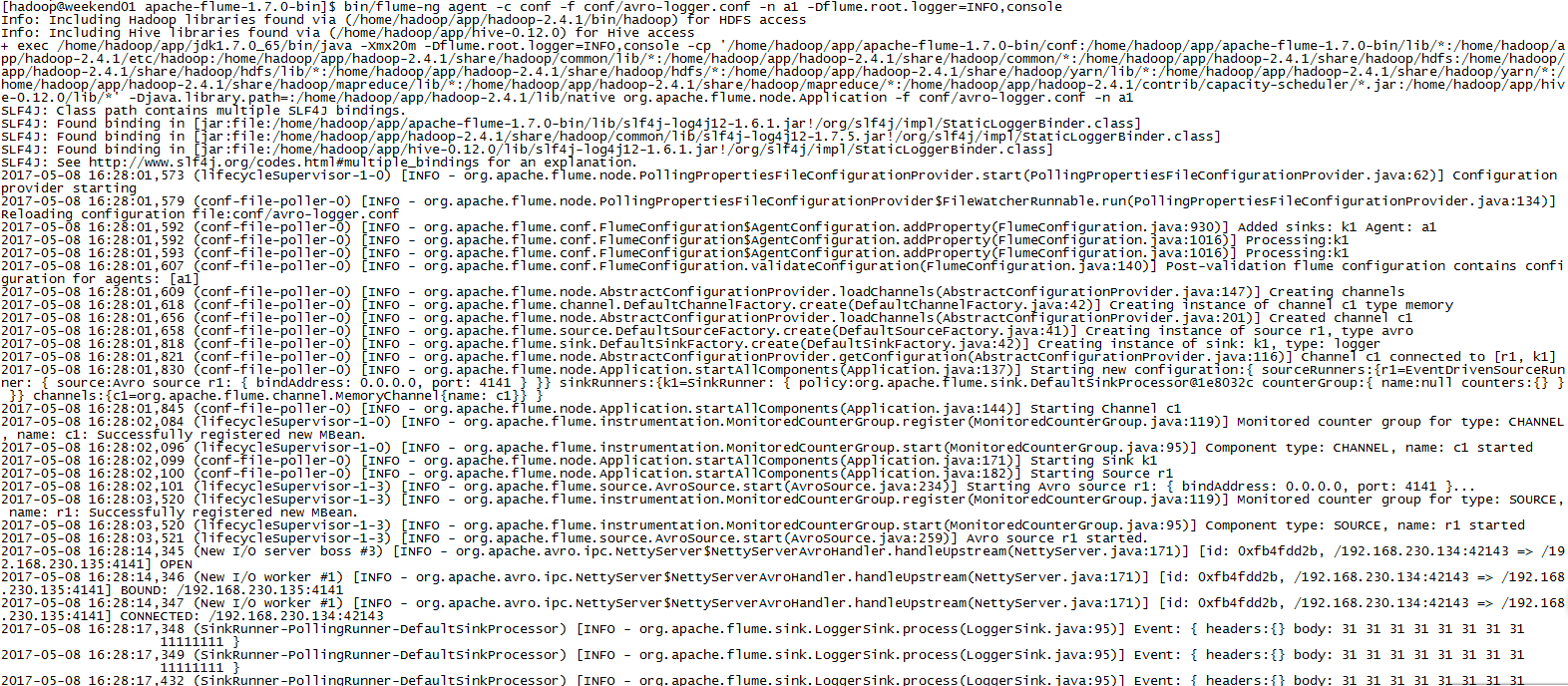
显示效果如下:

或者直接在weekend110上执行:bin/flume-ng avro-client -H weekend01 -p 4141 -F /home/hadoop/log/test.log
同样的效果。
Flume示例的更多相关文章
- Flume 示例
1.Syslog Tcp Source sysylog通过配置一个端口,flume能够监控这个端口的数据.如果通往这个端口发送数据可以被flume接收到.可以通过socket发送. #配置文件:sys ...
- Flume NG 简介及配置实战
Flume 作为 cloudera 开发的实时日志收集系统,受到了业界的认可与广泛应用.Flume 初始的发行版本目前被统称为 Flume OG(original generation),属于 clo ...
- 分布式日志收集收集系统:Flume(转)
Flume是一个分布式.可靠.和高可用的海量日志采集.聚合和传输的系统.支持在系统中定制各类数据发送方,用于收集数据:同时,Flume提供对数据进行简单处理,并写到各种数据接受方(可定制)的能力.Fl ...
- 04.flume+kafka环境搭建
1.flume下载 安装 测试 1.1 官网下载,通过xshell从winser2012传到cent0s的/opt/flume目录中,使用rz命令 1.2 解压安装 tar -zxvf apache- ...
- flume 1.4的介绍及使用示例
flume 1.4的介绍及使用示例 本文将介绍关于flume 1.4的使用示例,如果还没有安装flume的话可以参考:http://blog.csdn.net/zhu_xun/article/deta ...
- Spark Streaming + Flume整合官网文档阅读及运行示例
1,基于Flume的Push模式(Flume-style Push-based Approach) Flume被用于在Flume agents之间推送数据.在这种方式下,Spark Stre ...
- flume使用示例
flume的特点: flume是一个分布式.可靠.和高可用的海量日志采集.聚合和传输的系统.支持在日志系统中定制各类数据发送方,用于收集数据;同时,Flume提供对数据进行简单处理,并写到各种数据接受 ...
- Flume笔记--示例(使用配置文件)
例子参考资料:http://www.aboutyun.com/thread-8917-1-1.html 自定义sink实现和属性注入:http://www.coderli.com/flume-ng-s ...
- flume http source示例讲解
一.介绍 flume自带的Http Source可以通过Http Post接收事件. 场景:对于有些应用程序环境,它可能不能部署Flume SDK及其依赖项,或客户端代码倾向于通过HTTP而不是Flu ...
随机推荐
- SqlBulkCopy-从 bcp 客户端收到一个对 colid 1 无效的列长度
经过研究,问题是因为tatatable中的colid列1的数据字段长度超过了数据表中定义的字段长度. 解决方法就是将数据库该字段的长度增大问题就解决了.
- VS提示无法连接到已配置的开发web服务器的解决方法
VS2013每次启动项目调试好好的,今天出现了提示“提示无法连接到已配置的开发web服务器“,使用环境是本地IISExpress,操作系统为windows10,之前也出现过就是重启电脑又好了,这次是刚 ...
- .NET Framwork 之 托管代码的执行过程
源代码代码第一次编译形成IL中间语言的托管代码,在运行时被Class Loader装载后进行JIT第二次编译形成托管的本地代码.在执行过程中,它会不断地检查当前我们执行的代码的安全性和规范性. Cla ...
- 极光推送sdk使用
创建应用 进入极光控制台后,点击“创建应用”按钮,进入创建应用的界面. 填上你的应用程序的名称以及应用包名这二项就可以了, 最后点击最下方的 “创建我的应用”按钮,创建应用完毕. 创建应用 填 ...
- ES6 Promise catch
getJSON方法返回一个 Promise 对象,如果该对象状态变为resolved,则会调用then方法指定的回调函数:如果异步操作抛出错误,状态就会变为rejected,就会调用catch方法指定 ...
- XML Schema学习札记(1)——基础总览
内容整理自:www.w3school.com.cn 转载自:http://www.xgezhang.com/xml_schema_1.html 什么是XML Schema? XML Schema 是基 ...
- js重置form表单
CreateTime--2017年7月19日10:37:11Author:Marydon js重置form表单 需要使用的方法:reset() 示例: HTML部分 <form id=&qu ...
- LaTeX 图片插入
一般格式: \begin{figure} \centering \includegraphics[scale=0.2]{Figure211.png} \caption{In the case of a ...
- easy ui datagrid 数据分页
参照easyui官方网站提供的demo写了个datagrid数据分页的demo, 具体参数我就不一一罗列了,详细见官方网站, 这里只介绍一下具体的注意事项和常乃用到的几项, $('#test').da ...
- join和countDownLatch原理及区别详解
先上结论 原理 join 原理:在当前线程中调用另一个线程线程 thread 的 join() 方法时,会调用该 thread 的 wait() 方法,直到这个 thread 执行完毕(JVM在 ru ...