
使用harborv1.8.0-rc1 搭建docker私有镜像仓库
概述
搭建一个私有仓库
harbor介绍
harbor是一个开源的docker容器仓库,由下面几个组件组成
+ proxy:用来接收docker客户端和浏览器端的请求,并且把请求转发给后端的服务
+ registry:就是仓库,用来存储镜像的,
+ 核心服务:提供web ui,数据库,token认证,webhook等功能
+ 日志服务
- database:用来存储核心服务的一些数据
vmware出品,支持下面几种部署方式
- 在线安装
- 离线安装
- ova安装,这个直接在vcenter上导入就可以了
官方最小配置
- 2个cpu
- 4g内存
- 40g硬盘,因为是存储镜像的所以推荐硬盘大点
官方安装帮助
https://github.com/goharbor/harbor/blob/master/docs/installation_guide.md
Software
| Software | Version | Description |
|---|---|---|
| Python | version 2.7 or higher | Note that you may have to install Python on Linux distributions (Gentoo, Arch) that do not come with a Python interpreter installed by default |
| Docker engine | version 17.03.0-ce+ or higher | For installation instructions, please refer to: https://docs.docker.com/engine/installation/ |
| Docker Compose | version 1.18.0 or higher | For installation instructions, please refer to: https://docs.docker.com/compose/install/ |
| Openssl | latest is preferred | Generate certificate and keys for Harbor |
Network ports
| Port | Protocol | Description |
|---|---|---|
| 443 | HTTPS | Harbor portal and core API will accept requests on this port for https protocol |
| 4443 | HTTPS | Connections to the Docker Content Trust service for Harbor, only needed when Notary is enabled |
| 80 | HTTP | Harbor portal and core API will accept requests on this port for http protocol |
安装docker:
https://docs.docker.com/install/linux/docker-ce/centos/
可选安装docker方式1: curl -fsSL get.docker.com -o get-docker.sh
- 移除旧版
sudo yum remove docker \

                  docker-client \

                  docker-client-latest \

                  docker-common \

                  docker-latest \

                  docker-latest-logrotate \

                  docker-logrotate \

                  docker-engine
安装依赖包

```

sudo yum install -y yum-utils \

device-mapper-persistent-data \

lvm2

```

添加源

```

sudo yum-config-manager \

--add-repo \

https://download.docker.com/linux/centos/docker-ce.repo

```
安装和启动
sudo yum-config-manager --enable docker-ce-nightly
sudo yum install docker-ce docker-ce-cli containerd.io
sudo systemctl start docker
docker-compose安装:
- 安装和测试docker-compose
官网文档 https://docs.docker.com/compose/install/
下载docker-compose可执行文件
sudo curl -L "https://github.com/docker/compose/releases/download/1.24.0/docker-compose-$(uname -s)-$(uname -m)" -o /usr/local/bin/docker-compose
设可执行权限
sudo chmod +x /usr/local/bin/docker-compose
软连接到/usr/bin
sudo ln -s /usr/local/bin/docker-compose /usr/bin/docker-compose
查看安装是否成功
docker-compose --version
安装步骤:
Download the installer:
下载离线安装包:
https://github.com/goharbor/harbor/releasesOnline installer:
$ tar xvf harbor-online-installer-<version>.tgzOffline installer:
$ tar xvf harbor-offline-installer-<version>.tgzConfigure harbor.cfg/harbor.yml(新版已经改成harbor.yml);
- 修改配置,协议,证书,管理员密码
hostname = reg.lvusyy.com
ui_url_protocol = https
ssl_cert = ./ssl/reg.lvusyy.com.crt
ssl_cert_key = ./ssl/reg.lvusyy.com.key
harbor_admin_password = harbor12345 - 生成配置文件
证书可以从 letsencrypt 生成免费的证书..(默认浏览器和工具都不会提示不安全警告的.)
详情参考:https://github.com/Neilpang/acme.sh/wiki/说明
关于配置:
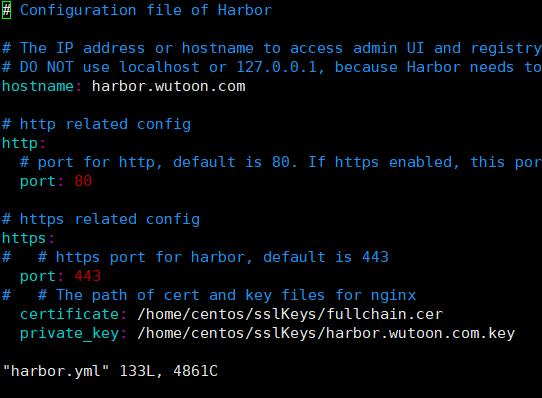
生成https证书(手动自签发的证书,没有根证书信任)
参考 https://github.com/goharbor/harbor/blob/master/docs/configure_https.md#生成key
`openssl genrsa -out ca.key 4096`
#根据key生成ca.crt
  openssl req -x509 -new -nodes -sha512 -days 3650 \

  -subj "/C=CN/ST=Hangzhou/L=Hangzhou/O=example/OU=Personal/CN=lvusyy.com" \

  -key ca.key \

  -out ca.crt
Create your own Private Key:
openssl genrsa -out reg.lvusyy.com.key 4096Generate a Certificate Signing Request:
openssl req -sha512 -new
-subj "/C=CN/ST=Hangzhou/L=Hangzhou/O=example/OU=Personal/CN=reg.lvusyy.com"
-key reg.lvusyy.com.key
-out reg.lvusyy.com.csrcat > v3.ext <<-EOF
authorityKeyIdentifier=keyid,issuer
basicConstraints=CA:FALSE
keyUsage = digitalSignature, nonRepudiation, keyEncipherment, dataEncipherment
extendedKeyUsage = serverAuth
subjectAltName = @alt_names [alt_names]
DNS.1=reg.lvusyy.com
DNS.2=lvusyy
DNS.3=harbor
EOF
openssl x509 -req -sha512 -days 3650
-extfile v3.ext
-CA ca.crt -CAkey ca.key -CAcreateserial
-in reg.lvusyy.com.csr
-out reg.lvusyy.com.crt
导入docker镜像
sudo docker load < harbor.v1.8.0.tar.gz生成配置
./prepare
- 修改配置,协议,证书,管理员密码
Run install.sh to install and start Harbor;
开始安装
- #注意网络问题哦
./install
到此 harbor 已经安装完成了。
- #注意网络问题哦
192.168.1.xx reg.lvusyy.com
你可以导入你的根证书让浏览器或wget 不报ssl警告
mkdir /usr/share/ca-certificates/harbor/
cp /media/makeit/Document/harborCa/ca.crt /usr/share/ca-certificates/harbor/
sudo update-ca-certificates
这样就ok了。
wget -q -O - https://reg.lvusyy.com
如果 curl 访问呢?
* Rebuilt URL to: https://reg.lvusyy.com/

*   Trying 10.1.1.53...

* TCP_NODELAY set

* Connected to reg.lvusyy.com (10.1.1.53) port 443 (#0)

* ALPN, offering http/1.1

* Cipher selection: ALL:!EXPORT:!EXPORT40:!EXPORT56:!aNULL:!LOW:!RC4:@STRENGTH

* successfully set certificate verify locations:

*   CAfile: /home/makeit/anaconda3/ssl/cacert.pem

  CApath: none
它使用 /home/makeit/anaconda3/ssl/cacert.pem ,我们把我们ca重定向进去就可以了呗。
转换格式 .cer 到 .pem
openssl x509 -inform der -in lvusyy.cer -out lvusyy.pem
追加到信任列表
cat lvusyy.pem >> /home/makeit/anaconda3/ssl/cacert.pem
妥了!
chrome呢,firefox,oprea呢
自己设置窗口导入即可。
enjoy!
使用harborv1.8.0-rc1 搭建docker私有镜像仓库的更多相关文章
- 基于 registry 搭建 Docker 私有镜像仓库
今天主要介绍使用 registry 来搭建 Docker私有镜像仓库,方便在公司内部项目中使用,registry 也是 Docker 官方提供的一个镜像,操作也很简单. dockerhub: http ...
- 搭建docker 私有镜像仓库
前期准备 服务器:centos 7.3 docker-ce: 18.06.1-ce docker-compose: 1.22.0 docker 安装 首先,更新系统 yum update yum up ...
- 使用Harbor搭建Docker私有镜像仓库
Harbor介绍:https://goharbor.io/ 前置条件 需要安装了docker和docker-compose 下载Harbor 在harbor下载页(https://github.com ...
- 搭建Harbor私有镜像仓库--v1.5.1
搭建Harbor私有镜像仓库--v1.5.1 1.介绍 Docker容器应用的开发和运行离不开可靠的镜像管理,虽然Docker官方也提供了公共的镜像仓库,但是从安全和效率等方面考虑,部署我们私有环境 ...
- 微服务架构 - 搭建docker本地镜像仓库并提供权限校验及UI界面
搭建docker本地镜像仓库并提供权限校验及UI界面 docker本地镜像仓库的作用跟maven私服差不多,特别是公司级或者是小组级开发好的docker仓库可以上传到本地镜像仓库中,需要用时,直接从本 ...
- Docker 私有镜像仓库的搭建及认证
DockerHub 为我们提供了很多官方镜像和个人上传的镜像,我们可以下载机构或个人提供的镜像,也可以上传我们自己的本地镜像,但缺点是: 由于网络的原因,从 DockerHub 下载和上传镜像速度可能 ...
- 容器技术之Docker私有镜像仓库docker-distribution
在前边的博客中我们说到docker的架构由docker客户端.服务端以及仓库组成:docker仓库就是用来存放镜像的地方:其实docker registry我们理解为存放docker镜像仓库的仓库比较 ...
- 容器技术之Docker私有镜像仓库harbor
前文我们聊到了docker的私有镜像仓库docker-distribution的搭建和简单的使用,回顾请参考https://www.cnblogs.com/qiuhom-1874/p/13058338 ...
- 使用Nexus3构建Docker私有镜像仓库
一.安装Nexus3 Nexus3是Sonatype提供的仓库管理平台,Nuexus Repository OSS3能够支持Maven.npm.Docker.YUM.Helm等格式数据的存储和发布:并 ...
随机推荐
- Qt里的原子操作QAtomicInteger,有挑战性,使用Q_ATOMIC_INT{nn}_IS_SUPPORTED测试系统是否支持
所谓原子操作,即一系列复杂的操作能一气呵成,中间不被其他的操作打断.这在多线程程序中尤其常见,但要实现这种功能,既要考虑程序的良好设计,又要关心特定平台的体系结构和相关编译器对原子特性的支持程度.所以 ...
- hdu 4745 two Rabits
题目:http://acm.hdu.edu.cn/showproblem.php?pid=4745 题解:首先要抽象出题目要求的是啥.首先对于环的问题, 我们可以倍增成链,然后环的所有情况可以通过链来 ...
- R语言错误的提示(中英文翻译)
# Chinese translations for R package # Copyright (C) 2005 The R Foundation # This file is distribute ...
- 体验三大JavaScript文件上传库(Uppy.js/Filepond/Dropzone)
最近发现了一个高颜值的前端上传组件Uppy.js,立即上手体验了一波,感觉还不错.然后又看到同类型的Filepond以及Dropzone.js,对比体验了一下,感觉都很优秀,但是在体验过程中,都遇到了 ...
- 结合python实现的netcat与python实现的tcp代理,建立一个流量隧道
在proxy中 python2 proxy.py 127.0.0.1 3334 192.158.1.111 80 true 作为服务器在本地3334端口进行监听, 作为客户端连接远程web服务器192 ...
- 数据结构与算法(周测2-AVL树)
判断题 1.The inorder traversal sequence of an AVL tree must be in sorted (non-decreasing) order. T ...
- C++线程同步之原子操作
所谓的原子操作就是指一个线程对于某一个资源做操作的时候能够保证没有其它的线程能够对此资源进行访问. 原子操作仅仅能够解决某一个变量的问题,只能使得一个整型数据做简单算术运算的时候是原子的. 以下案例需 ...
- 装机篇:将ubuntu 14.04安装在移动硬盘中
这样做有诸多好处,最大的好处莫过于获得新鲜感. 需要注意的只有一点,要把bootloader装在整个硬盘的MBR而不是单独某个分区的DBR里. 另,我所成功的版本为14.04.1,之前使用14.04. ...
- 批量删除redis
批量删除"aso_"开头的key:redis-cli keys aso_* | xargs redis-cli del
- bond模式详解
目录 bond模式详解 一.什么是bond? 二.为什么使用bond? 三.bond模式配置 1.配置linux bond 2.将bond绑定到ovs上面(可选) 四.bond模式 1.模式0 2.模 ...