
使用harborv1.8.0-rc1 搭建docker私有镜像仓库
概述
搭建一个私有仓库
harbor介绍
harbor是一个开源的docker容器仓库,由下面几个组件组成
+ proxy:用来接收docker客户端和浏览器端的请求,并且把请求转发给后端的服务
+ registry:就是仓库,用来存储镜像的,
+ 核心服务:提供web ui,数据库,token认证,webhook等功能
+ 日志服务
- database:用来存储核心服务的一些数据
vmware出品,支持下面几种部署方式
- 在线安装
- 离线安装
- ova安装,这个直接在vcenter上导入就可以了
官方最小配置
- 2个cpu
- 4g内存
- 40g硬盘,因为是存储镜像的所以推荐硬盘大点
官方安装帮助
https://github.com/goharbor/harbor/blob/master/docs/installation_guide.md
Software
| Software | Version | Description |
|---|---|---|
| Python | version 2.7 or higher | Note that you may have to install Python on Linux distributions (Gentoo, Arch) that do not come with a Python interpreter installed by default |
| Docker engine | version 17.03.0-ce+ or higher | For installation instructions, please refer to: https://docs.docker.com/engine/installation/ |
| Docker Compose | version 1.18.0 or higher | For installation instructions, please refer to: https://docs.docker.com/compose/install/ |
| Openssl | latest is preferred | Generate certificate and keys for Harbor |
Network ports
| Port | Protocol | Description |
|---|---|---|
| 443 | HTTPS | Harbor portal and core API will accept requests on this port for https protocol |
| 4443 | HTTPS | Connections to the Docker Content Trust service for Harbor, only needed when Notary is enabled |
| 80 | HTTP | Harbor portal and core API will accept requests on this port for http protocol |
安装docker:
https://docs.docker.com/install/linux/docker-ce/centos/
可选安装docker方式1: curl -fsSL get.docker.com -o get-docker.sh
- 移除旧版
sudo yum remove docker \

                  docker-client \

                  docker-client-latest \

                  docker-common \

                  docker-latest \

                  docker-latest-logrotate \

                  docker-logrotate \

                  docker-engine
安装依赖包

```

sudo yum install -y yum-utils \

device-mapper-persistent-data \

lvm2

```

添加源

```

sudo yum-config-manager \

--add-repo \

https://download.docker.com/linux/centos/docker-ce.repo

```
安装和启动
sudo yum-config-manager --enable docker-ce-nightly
sudo yum install docker-ce docker-ce-cli containerd.io
sudo systemctl start docker
docker-compose安装:
- 安装和测试docker-compose
官网文档 https://docs.docker.com/compose/install/
下载docker-compose可执行文件
sudo curl -L "https://github.com/docker/compose/releases/download/1.24.0/docker-compose-$(uname -s)-$(uname -m)" -o /usr/local/bin/docker-compose
设可执行权限
sudo chmod +x /usr/local/bin/docker-compose
软连接到/usr/bin
sudo ln -s /usr/local/bin/docker-compose /usr/bin/docker-compose
查看安装是否成功
docker-compose --version
安装步骤:
Download the installer:
下载离线安装包:
https://github.com/goharbor/harbor/releasesOnline installer:
$ tar xvf harbor-online-installer-<version>.tgzOffline installer:
$ tar xvf harbor-offline-installer-<version>.tgzConfigure harbor.cfg/harbor.yml(新版已经改成harbor.yml);
- 修改配置,协议,证书,管理员密码
hostname = reg.lvusyy.com
ui_url_protocol = https
ssl_cert = ./ssl/reg.lvusyy.com.crt
ssl_cert_key = ./ssl/reg.lvusyy.com.key
harbor_admin_password = harbor12345 - 生成配置文件
证书可以从 letsencrypt 生成免费的证书..(默认浏览器和工具都不会提示不安全警告的.)
详情参考:https://github.com/Neilpang/acme.sh/wiki/说明
关于配置:
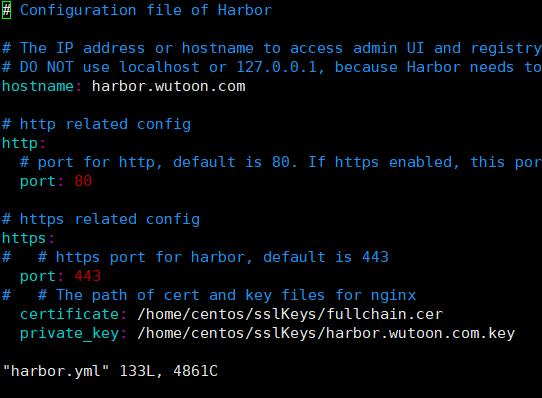
生成https证书(手动自签发的证书,没有根证书信任)
参考 https://github.com/goharbor/harbor/blob/master/docs/configure_https.md#生成key
`openssl genrsa -out ca.key 4096`
#根据key生成ca.crt
  openssl req -x509 -new -nodes -sha512 -days 3650 \

  -subj "/C=CN/ST=Hangzhou/L=Hangzhou/O=example/OU=Personal/CN=lvusyy.com" \

  -key ca.key \

  -out ca.crt
Create your own Private Key:
openssl genrsa -out reg.lvusyy.com.key 4096Generate a Certificate Signing Request:
openssl req -sha512 -new
-subj "/C=CN/ST=Hangzhou/L=Hangzhou/O=example/OU=Personal/CN=reg.lvusyy.com"
-key reg.lvusyy.com.key
-out reg.lvusyy.com.csrcat > v3.ext <<-EOF
authorityKeyIdentifier=keyid,issuer
basicConstraints=CA:FALSE
keyUsage = digitalSignature, nonRepudiation, keyEncipherment, dataEncipherment
extendedKeyUsage = serverAuth
subjectAltName = @alt_names [alt_names]
DNS.1=reg.lvusyy.com
DNS.2=lvusyy
DNS.3=harbor
EOF
openssl x509 -req -sha512 -days 3650
-extfile v3.ext
-CA ca.crt -CAkey ca.key -CAcreateserial
-in reg.lvusyy.com.csr
-out reg.lvusyy.com.crt
导入docker镜像
sudo docker load < harbor.v1.8.0.tar.gz生成配置
./prepare
- 修改配置,协议,证书,管理员密码
Run install.sh to install and start Harbor;
开始安装
- #注意网络问题哦
./install
到此 harbor 已经安装完成了。
- #注意网络问题哦
192.168.1.xx reg.lvusyy.com
你可以导入你的根证书让浏览器或wget 不报ssl警告
mkdir /usr/share/ca-certificates/harbor/
cp /media/makeit/Document/harborCa/ca.crt /usr/share/ca-certificates/harbor/
sudo update-ca-certificates
这样就ok了。
wget -q -O - https://reg.lvusyy.com
如果 curl 访问呢?
* Rebuilt URL to: https://reg.lvusyy.com/

*   Trying 10.1.1.53...

* TCP_NODELAY set

* Connected to reg.lvusyy.com (10.1.1.53) port 443 (#0)

* ALPN, offering http/1.1

* Cipher selection: ALL:!EXPORT:!EXPORT40:!EXPORT56:!aNULL:!LOW:!RC4:@STRENGTH

* successfully set certificate verify locations:

*   CAfile: /home/makeit/anaconda3/ssl/cacert.pem

  CApath: none
它使用 /home/makeit/anaconda3/ssl/cacert.pem ,我们把我们ca重定向进去就可以了呗。
转换格式 .cer 到 .pem
openssl x509 -inform der -in lvusyy.cer -out lvusyy.pem
追加到信任列表
cat lvusyy.pem >> /home/makeit/anaconda3/ssl/cacert.pem
妥了!
chrome呢,firefox,oprea呢
自己设置窗口导入即可。
enjoy!
使用harborv1.8.0-rc1 搭建docker私有镜像仓库的更多相关文章
- 基于 registry 搭建 Docker 私有镜像仓库
今天主要介绍使用 registry 来搭建 Docker私有镜像仓库,方便在公司内部项目中使用,registry 也是 Docker 官方提供的一个镜像,操作也很简单. dockerhub: http ...
- 搭建docker 私有镜像仓库
前期准备 服务器:centos 7.3 docker-ce: 18.06.1-ce docker-compose: 1.22.0 docker 安装 首先,更新系统 yum update yum up ...
- 使用Harbor搭建Docker私有镜像仓库
Harbor介绍:https://goharbor.io/ 前置条件 需要安装了docker和docker-compose 下载Harbor 在harbor下载页(https://github.com ...
- 搭建Harbor私有镜像仓库--v1.5.1
搭建Harbor私有镜像仓库--v1.5.1 1.介绍 Docker容器应用的开发和运行离不开可靠的镜像管理,虽然Docker官方也提供了公共的镜像仓库,但是从安全和效率等方面考虑,部署我们私有环境 ...
- 微服务架构 - 搭建docker本地镜像仓库并提供权限校验及UI界面
搭建docker本地镜像仓库并提供权限校验及UI界面 docker本地镜像仓库的作用跟maven私服差不多,特别是公司级或者是小组级开发好的docker仓库可以上传到本地镜像仓库中,需要用时,直接从本 ...
- Docker 私有镜像仓库的搭建及认证
DockerHub 为我们提供了很多官方镜像和个人上传的镜像,我们可以下载机构或个人提供的镜像,也可以上传我们自己的本地镜像,但缺点是: 由于网络的原因,从 DockerHub 下载和上传镜像速度可能 ...
- 容器技术之Docker私有镜像仓库docker-distribution
在前边的博客中我们说到docker的架构由docker客户端.服务端以及仓库组成:docker仓库就是用来存放镜像的地方:其实docker registry我们理解为存放docker镜像仓库的仓库比较 ...
- 容器技术之Docker私有镜像仓库harbor
前文我们聊到了docker的私有镜像仓库docker-distribution的搭建和简单的使用,回顾请参考https://www.cnblogs.com/qiuhom-1874/p/13058338 ...
- 使用Nexus3构建Docker私有镜像仓库
一.安装Nexus3 Nexus3是Sonatype提供的仓库管理平台,Nuexus Repository OSS3能够支持Maven.npm.Docker.YUM.Helm等格式数据的存储和发布:并 ...
随机推荐
- 设计Qt风格的C++API
在奇趣(Trolltech),为了改进Qt的开发体验,我们做了大量的研究.这篇文章里,我打算分享一些我们的发现,以及一些我们在设计Qt4时用到的原则,并且展示如何把这些原则应用到你的代码里. 优秀AP ...
- Codeforces 1249 E. By Elevator or Stairs?
传送门 首先显然下楼的操作一定是不优的,所以只要考虑上楼 设 $f[i]$ 表示到第 $i$ 层时需要的最少时间 那么首先考虑走楼梯,有转移,$f[i]=f[i-1]+a[i-1]$ 然后考虑坐电梯有 ...
- 时间格式_java
@Test public void testDate(){ Date date=new Date(); System.out.println(date); /*日期格式*/ DateFormat df ...
- 怎样获取当前对象的原型对象prototype
1. 使用 Object.getPrototypeOf(); function Person(name){ this.name = name; } var lilei = new Person(&qu ...
- 轻松搭建CAS 5.x系列(4)-Java客户端程序接入CAS单点登录,Hello World版
概述说明 按照本系列的前3篇文章描述的步骤,我们已经搭建好cas sso server.那应用程序怎么接入到实现sso呢? (如果您还没有搭建cas server,可以到<轻松搭建CAS 5.x ...
- (十二)SpringBoot之Spring-Data-Jpa(一)
一.Spring-Data-Jpa概念 JPA(Java Persistence API)定义了一系列对象持久化的标准,目前实现这一规范的产品有Hibernate.TopLink等. Spring D ...
- ELK日志分析系统的搭建
一.ELK简介 ELK是Elasticsearch.Logstash.Kibana的简称,这三者是核心组件. Elasticsearch是数据存储.搜索.分析引擎,功能非常强大:Logstash是日志 ...
- bat实现监控进程守护程序-保证平台服务的稳定执行
背景是平台所在的服务器经常因异常原因导致当前机器所在的服务关闭....直接贴代码吧. ********************************************************* ...
- Servlet实现图片读取显示
1.导入jar包:commons-io-1.4.jar 2.index.jsp: <%@ page language="java" import="java.uti ...
- [书籍翻译] 《JavaScript并发编程》第三章 使用Promises实现同步
本文是我翻译<JavaScript Concurrency>书籍的第三章 使用Promises实现同步,该书主要以Promises.Generator.Web workers等技术来讲解J ...