
微信小程序_(校园视)开发视频的展示页_下
微信小程序_(校园视) 开发用户注册登陆 传送门
微信小程序_(校园视) 开发上传视频业务 传送门
微信小程序_(校园视) 开发视频的展示页-上 传送门
微信小程序_(校园视) 开发视频的展示页-下 传送门
小程序的页面拦截
当页面点击右下角的小图标后,触发showMain()事件,跳转到mine.wxml,展示个人信息页面,点击做下表的小房子跳转到视频首页
            <!-- 我的按钮 -->

<cover-image class='' src='../resource/images/mine.png' class="size-bottom" bindtap='showMine'></cover-image>
            <!-- 首页按钮 -->

            <cover-image class='' src='../resource/images/index.png' class="size-bottom" bindtap='showIndex'></cover-image>
  showIndex:function(){

    wx.redirectTo({

      url: '../index/index',

    })

  },

  showMine:function(){

    var user = app.getGlobalUserInfo();

    if(user ==null || user == undefined||user == ''){

      wx.navigateTo({

        url: '../userLogin/login',

      })

    }else{

      wx.navigateTo({

        url: '../mine/mine',

      })

    }

  }
在api层添加MiniInterceptor.class对拦截器进行配置与注册
    //拦截请求,在controller调用之前

    @Override

    public boolean preHandle(HttpServletRequest request, HttpServletResponse response, Object handler)

            throws Exception {

        if(true)

        {

            System.out.println("请求拦截...");

            return false;

        }

        //false:请求被拦截

        //true:放行请求

        return true;

    }
package com.imooc;

import org.springframework.context.annotation.Bean;

import org.springframework.context.annotation.Configuration;

import org.springframework.web.servlet.config.annotation.InterceptorRegistry;

import org.springframework.web.servlet.config.annotation.ResourceHandlerRegistry;

import org.springframework.web.servlet.config.annotation.WebMvcConfigurerAdapter;

import com.imooc.controller.interceptor.MiniInterceptor;

@Configuration

public class WebMvcConfig extends WebMvcConfigurerAdapter {

    @Override

    public void addResourceHandlers(ResourceHandlerRegistry registry) {

        registry.addResourceHandler("/**")

                .addResourceLocations("classpath:/META-INF/resources/")

                .addResourceLocations("file:F:/imooc-video-gary/");

    }

    @Bean

    public MiniInterceptor miniInterceptor() {

        return new MiniInterceptor();

    }

    @Override

    public void addInterceptors(InterceptorRegistry registry) {

        registry.addInterceptor(miniInterceptor()).addPathPatterns("/user/**");

        super.addInterceptors(registry);

    }

}
WebMvcConfig.java
package com.imooc.controller.interceptor;

import javax.servlet.http.HttpServletRequest;

import javax.servlet.http.HttpServletResponse;

import org.springframework.web.servlet.HandlerInterceptor;

import org.springframework.web.servlet.ModelAndView;

public class MiniInterceptor implements HandlerInterceptor {

    //拦截请求,在controller调用之前

    @Override

    public boolean preHandle(HttpServletRequest request, HttpServletResponse response, Object handler)

            throws Exception {

        if(true)

        {

            System.out.println("请求拦截...");

            return false;

        }

        //false:请求被拦截

        //true:放行请求

        return true;

    }

    //请求controller之后,渲染视图之前

    @Override

    public void postHandle(HttpServletRequest request, HttpServletResponse response, Object handler,

            ModelAndView modelAndView) throws Exception {

        // TODO Auto-generated method stub

    }

    //请求controller之后,视图渲染之后

    @Override

    public void afterCompletion(HttpServletRequest request, HttpServletResponse response, Object handler, Exception ex)

            throws Exception {

        // TODO Auto-generated method stub

    }

}
MiniInterceptor.java
完善拦截并且限制用户只能在一台手机上登陆
在加载个人页面mine.js的header中添加userId和userToken两个参数
      header: {

        'content-type': 'application/json', // 默认值

        'userId':user.id,

        'userToken':user.userToken

      },
在MiniInterceptor.java中接收到小程序端传递的Header消息后进行拦截器的配置
//拦截请求,在controller调用之前

    @Override

    public boolean preHandle(HttpServletRequest request, HttpServletResponse response,

            Object handler)throws Exception {

        //获取来自小程序的两个参数

        String userId = request.getHeader("userId");

        String userToken  = request.getHeader("userToken");

        if(StringUtils.isNotBlank(userId)&&StringUtils.isNotBlank(userToken))

        {

            String uniqueToken = redis.get(USER_REDIS_SESSION + ":" + userId);

            if(StringUtils.isEmpty(uniqueToken)&&StringUtils.isBlank(uniqueToken)) {

                returnErrorResponse(response,new IMoocJSONResult().errorTokenMsg("请登录..."));

                return false;

            }else {

                if(!uniqueToken.equals(userToken)) {

                    returnErrorResponse(response,new IMoocJSONResult().errorTokenMsg("账号被挤出..."));

                    return false;

                }

            }

        }else{

            returnErrorResponse(response,new IMoocJSONResult().errorTokenMsg("请登录..."));

            return false;

        }

        //false:请求被拦截

        //true:放行请求

        return true;

    }
要将后端控制台的消息返回给小程序端,需要用到returnErrorResponse(HttpServletResponse response, IMoocJSONResult result) 将消息转换成JSON数据格式,再传递给小程序端口
//转换成JSON数据格式

    public void returnErrorResponse(HttpServletResponse response, IMoocJSONResult result)

            throws IOException, UnsupportedEncodingException {

        OutputStream out=null;

        try{

            response.setCharacterEncoding("utf-8");

            response.setContentType("text/json");

            out = response.getOutputStream();

            //抛出信息

            out.write(JsonUtils.objectToJson(result).getBytes("utf-8"));

            out.flush();

        } finally{

            if(out!=null){

                out.close();

            }

        }

    }
package com.imooc.controller.interceptor;

import java.io.IOException;

import java.io.OutputStream;

import java.io.UnsupportedEncodingException;

import javax.servlet.http.HttpServletRequest;

import javax.servlet.http.HttpServletResponse;

import org.apache.commons.lang3.StringUtils;

import org.springframework.beans.factory.annotation.Autowired;

import org.springframework.web.servlet.HandlerInterceptor;

import org.springframework.web.servlet.ModelAndView;

import com.imooc.utils.IMoocJSONResult;

import com.imooc.utils.JsonUtils;

import com.imooc.utils.RedisOperator;

public class MiniInterceptor implements HandlerInterceptor {

    @Autowired

    public RedisOperator redis;

    public static final String USER_REDIS_SESSION = "user-redis-session";

    //拦截请求,在controller调用之前

    @Override

    public boolean preHandle(HttpServletRequest request, HttpServletResponse response,

            Object handler)throws Exception {

        //获取来自小程序的两个参数

        String userId = request.getHeader("userId");

        String userToken  = request.getHeader("userToken");

        if(StringUtils.isNotBlank(userId)&&StringUtils.isNotBlank(userToken))

        {

            String uniqueToken = redis.get(USER_REDIS_SESSION + ":" + userId);

            if(StringUtils.isEmpty(uniqueToken)&&StringUtils.isBlank(uniqueToken)) {

                returnErrorResponse(response,new IMoocJSONResult().errorTokenMsg("请登录..."));

                return false;

            }else {

                if(!uniqueToken.equals(userToken)) {

                    returnErrorResponse(response,new IMoocJSONResult().errorTokenMsg("账号被挤出..."));

                    return false;

                }

            }

        }else{

            returnErrorResponse(response,new IMoocJSONResult().errorTokenMsg("请登录..."));

            return false;

        }

        //false:请求被拦截

        //true:放行请求

        return true;

    }

    //转换成JSON数据格式

    public void returnErrorResponse(HttpServletResponse response, IMoocJSONResult result)

            throws IOException, UnsupportedEncodingException {

        OutputStream out=null;

        try{

            response.setCharacterEncoding("utf-8");

            response.setContentType("text/json");

            out = response.getOutputStream();

            //抛出信息

            out.write(JsonUtils.objectToJson(result).getBytes("utf-8"));

            out.flush();

        } finally{

            if(out!=null){

                out.close();

            }

        }

    }

    //请求controller之后,渲染视图之前

    @Override

    public void postHandle(HttpServletRequest request, HttpServletResponse response, Object handler,

            ModelAndView modelAndView) throws Exception {

        // TODO Auto-generated method stub

    }

    //请求controller之后,视图渲染之后

    @Override

    public void afterCompletion(HttpServletRequest request, HttpServletResponse response, Object handler, Exception ex)

            throws Exception {

        // TODO Auto-generated method stub

    }

}
MiniInterceptor.java
前后端联调测试拦截器
注:IMoocJSONResult errorTokenMsg(String msg)方法返回的状态status是502
    public static IMoocJSONResult errorTokenMsg(String msg) {

        return new IMoocJSONResult(502, msg, null);

    }
在微信小程序端进行状态吗的判断
if (res.data.status == 502){

          wx.showToast({

            title: res.data.msg,

            duration:3000,

            icon:"none",

            success:function(){

              wx.redirectTo({

                url: '../userLogin/login',

              })

            }
实现点赞与取消点赞功能前后端联调
微信小程序点赞按钮前端模块
            <!-- 喜欢收藏按钮 -->

            <block wx:if="{{userLikeVideo}}">

                <cover-image class="size-me" src='../resource/images/like.png' style='margin-top:30rpx;' bindtap='likeVideoOrNot'></cover-image>

            </block>

            <block wx:else>

                <cover-image class="size-me" src='../resource/images/unlike.png' style='margin-top:30rpx;' bindtap='likeVideoOrNot'></cover-image>

            </block>
VideosMapperCustom.java类中添加视频喜欢的数量方法
    //对视频喜欢的数量进行累加

    public void addVideoLikeCount(String videoId);

    //对视频喜欢的数量进行累减

    public void reduceVideoLikeCount(String videoId);
VideosMapperCustom.xml中添加对数据库中进行查询的SQL语句
      <update  id="addVideoLikeCount" parameterType="String">

          update videos set like_counts = like_counts + 1 where id=#{videoId}

      </update>

      <update  id="reduceVideoLikeCount" parameterType="String">

          update videos set like_counts = like_counts - 1 where id=#{videoId}

      </update>
同理UsersMapper.java中添加用户对视频是否喜欢
    //用户受喜欢数累加

    public void addReceiveLikeCount(String userId);

    //用户受喜欢数累减

    public void reduceReceiveLikeCount(String userId);
在UsersMapper.xml中添加对数据库进行查询的语句
    <update  id="addReceiveLikeCount" parameterType="String">

          update users set receive_like_counts = receive_like_counts + 1 where id=#{userId}

      </update>

     <update  id="reduceReceiveLikeCount" parameterType="String">

          update users set receive_like_counts = receive_like_counts - 1 where id=#{userId}

      </update>
Service层中添加删除用户和视频的喜欢和点赞关联表
    @Transactional(propagation = Propagation.REQUIRED)

    @Override

    public void userLikeVideo(String userId, String videoId, String videoCreateId) {

        //保存用户和视频的喜欢点赞关联关系表

        String likeId = sid.nextShort();

        UsersLikeVideos ulv = new UsersLikeVideos();

        ulv.setId(likeId);

        ulv.setUserId(userId);

        ulv.setVideoId(videoId);

        usersLikeVideosMapper.insert(ulv);

        //视频喜欢数量累加

        videosMapperCustom.addVideoLikeCount(videoId);

        //用户受喜欢数量的累加

        usersMapper.addReceiveLikeCount(userId);

    }

    @Transactional(propagation = Propagation.REQUIRED)

    @Override

    public void userUnLikeVideo(String userId, String videoId, String videoCreateId) {

        //1.删除用户和视频的喜欢点赞关联关系表

        Example example = new Example(UsersLikeVideos.class);

        Criteria criteria = example.createCriteria();

        criteria.andEqualTo("userId",userId);

        criteria.andEqualTo("videoId",videoId);

        usersLikeVideosMapper.deleteByExample(example);

        //视频喜欢数量累减

        videosMapperCustom.reduceVideoLikeCount(videoId);

        //用户受喜欢数量的累减

        usersMapper.reduceReceiveLikeCount(userId);

    }
package com.imooc.server.impl;

import java.util.List;

import org.n3r.idworker.Sid;

import org.springframework.beans.factory.annotation.Autowired;

import org.springframework.stereotype.Service;

import org.springframework.transaction.annotation.Propagation;

import org.springframework.transaction.annotation.Transactional;

import com.github.pagehelper.PageHelper;

import com.github.pagehelper.PageInfo;

import com.imooc.mapper.BgmMapper;

import com.imooc.mapper.SearchRecordsMapper;

import com.imooc.mapper.UsersLikeVideosMapper;

import com.imooc.mapper.UsersMapper;

import com.imooc.mapper.VideosMapper;

import com.imooc.mapper.VideosMapperCustom;

import com.imooc.pojo.Bgm;

import com.imooc.pojo.SearchRecords;

import com.imooc.pojo.Users;

import com.imooc.pojo.UsersLikeVideos;

import com.imooc.pojo.Videos;

import com.imooc.pojo.vo.VideosVO;

import com.imooc.service.BgmService;

import com.imooc.service.UserService;

import com.imooc.service.VideoService;

import com.imooc.utils.PagedResult;

import tk.mybatis.mapper.entity.Example;

import tk.mybatis.mapper.entity.Example.Criteria;

@Service

public class VideoServiceImpl implements VideoService {

    @Autowired

    private VideosMapper videosMapper;

    @Autowired

    private UsersMapper usersMapper;

    @Autowired

    private VideosMapperCustom  videosMapperCustom;

    @Autowired

    private SearchRecordsMapper  searchRecordsMapper;

    @Autowired

    private UsersLikeVideosMapper usersLikeVideosMapper;

    @Autowired

    private Sid sid;

    @Transactional(propagation = Propagation.REQUIRED)

    @Override

    public String saveVideo(Videos video) {

        String id = sid.nextShort();

        video.setId(id);

        videosMapper.insertSelective(video);

        return id;

    }

    @Transactional(propagation = Propagation.REQUIRED)

    @Override

    public void updateVideo(String videoId, String coverPath) {

        Videos video = new Videos();

        video.setId(videoId);

        video.setCoverPath(coverPath);

        videosMapper.updateByPrimaryKeySelective(video);

    }

    @Transactional(propagation = Propagation.REQUIRED)

    @Override

    public PagedResult getAllVideos(Videos video,Integer isSaveRecord,

            Integer page, Integer pageSize) {

        //保存热搜词

        String desc = video.getVideoDesc();

        if(isSaveRecord!=null && isSaveRecord==1) {

            SearchRecords record = new SearchRecords();

            String recordId = sid.nextShort();

            record.setId(recordId);

            record.setContent(desc);

            searchRecordsMapper.insert(record);

        }

        PageHelper.startPage(page,pageSize);

        List<VideosVO> list= videosMapperCustom.queryAllVideos(desc);

        PageInfo<VideosVO> pageList = new PageInfo<>(list);

        PagedResult pagedResult = new PagedResult();

        pagedResult.setPage(page);

        pagedResult.setTotal(pageList.getPages());

        pagedResult.setRows(list);

        pagedResult.setRecords(pageList.getTotal());

        return pagedResult;

    }

    @Transactional(propagation = Propagation.SUPPORTS)

    @Override

    public List<String> getHotwords() {

        return searchRecordsMapper.getHotwords();

    }

    @Transactional(propagation = Propagation.REQUIRED)

    @Override

    public void userLikeVideo(String userId, String videoId, String videoCreateId) {

        //保存用户和视频的喜欢点赞关联关系表

        String likeId = sid.nextShort();

        UsersLikeVideos ulv = new UsersLikeVideos();

        ulv.setId(likeId);

        ulv.setUserId(userId);

        ulv.setVideoId(videoId);

        usersLikeVideosMapper.insert(ulv);

        //视频喜欢数量累加

        videosMapperCustom.addVideoLikeCount(videoId);

        //用户受喜欢数量的累加

        usersMapper.addReceiveLikeCount(userId);

    }

    @Transactional(propagation = Propagation.REQUIRED)

    @Override

    public void userUnLikeVideo(String userId, String videoId, String videoCreateId) {

        //1.删除用户和视频的喜欢点赞关联关系表

        Example example = new Example(UsersLikeVideos.class);

        Criteria criteria = example.createCriteria();

        criteria.andEqualTo("userId",userId);

        criteria.andEqualTo("videoId",videoId);

        usersLikeVideosMapper.deleteByExample(example);

        //视频喜欢数量累减

        videosMapperCustom.reduceVideoLikeCount(videoId);

        //用户受喜欢数量的累减

        usersMapper.reduceReceiveLikeCount(userId);

    }

}
VideoServiceImpl.java
package com.imooc.controller;

import java.io.File;

import java.io.FileOutputStream;

import java.io.InputStream;

import java.util.Date;

import java.util.UUID;

import org.apache.commons.lang3.StringUtils;

import org.apache.tomcat.util.http.fileupload.IOUtils;

import org.springframework.beans.factory.annotation.Autowired;

import org.springframework.web.bind.annotation.PostMapping;

import org.springframework.web.bind.annotation.RequestBody;

import org.springframework.web.bind.annotation.RequestMapping;

import org.springframework.web.bind.annotation.RequestParam;

import org.springframework.web.bind.annotation.RestController;

import org.springframework.web.multipart.MultipartFile;

import com.imooc.enums.VideoStatusEnum;

import com.imooc.pojo.Bgm;

import com.imooc.pojo.Users;

import com.imooc.pojo.Videos;

import com.imooc.service.BgmService;

import com.imooc.service.VideoService;

import com.imooc.utils.FetchVideoCover;

import com.imooc.utils.IMoocJSONResult;

import com.imooc.utils.MergeVideoMp3;

import com.imooc.utils.PagedResult;

import io.swagger.annotations.Api;

import io.swagger.annotations.ApiImplicitParam;

import io.swagger.annotations.ApiImplicitParams;

import io.swagger.annotations.ApiOperation;

import io.swagger.annotations.ApiParam;

@RestController

@Api(value="视频相关业务的接口",tags= {"视频相关业务的controller"})

@RequestMapping("/video")

public class VideoController extends BasicController{

    @Autowired

    private BgmService bgmService;

    @Autowired

    private VideoService videoService;

    @ApiOperation(value="上传视频", notes="上传视频的接口")

    @ApiImplicitParams({

        @ApiImplicitParam(name="userId",value="用户id",required=true,

                dataType="String" ,paramType="form"),

        @ApiImplicitParam(name="bgmId",value="背景音乐id",required=false,

                dataType="String" ,paramType="form"),

        @ApiImplicitParam(name="videoSeconds",value="背景音乐播放长度",required=true,

                dataType="String" ,paramType="form"),

        @ApiImplicitParam(name="videoWidth",value="视频的宽度",required=true,

                dataType="String" ,paramType="form"),

        @ApiImplicitParam(name="videoHeight",value="视频的高度",required=true,

                dataType="String" ,paramType="form"),

        @ApiImplicitParam(name="desc",value="视频的描述",required=false,

                dataType="String" ,paramType="form")

    })

    @PostMapping(value="/upload",headers="content-type=multipart/form-data")

    public IMoocJSONResult uploadFace(String userId,

            String bgmId,double videoSeconds,int videoWidth,int videoHeight,String desc,

            @ApiParam(value="短视频",required=true)

            MultipartFile file) throws Exception {

            if(StringUtils.isBlank(userId)) {

                return IMoocJSONResult.errorMsg("用户id不能为空...");

            }

            //文件保存命名空间

            //String fileSpace = "F:/imooc-video-gary";

            //保存到数据库中的相对路径

            String uploadPathDB = "/" + userId + "/video";

            String coverPathDB = "/" + userId + "/video";

            FileOutputStream fileOutputStream = null;

            InputStream inputStream = null;

            String finalVideoPath = "";

            try {

                if( file != null ) {

                    String fileName = file.getOriginalFilename();

                    //Gary.mp4  使用spilt进行分割

                    String fileNamePrefix = fileName.split("\\.")[0];

                    if(StringUtils.isNoneBlank(fileName)) {

                        //文件上传的最终保存路径

                        finalVideoPath = FILE_SPACE + uploadPathDB + "/" + fileName;

                        //设置数据库保存的路径

                        uploadPathDB += ("/" + fileName);

                        coverPathDB = coverPathDB + "/" + fileNamePrefix + ".jpg";

                        File outFile = new File(finalVideoPath);

                        if(outFile.getParentFile()!=null || !outFile.getParentFile().isDirectory()) {

                            //创建父文件夹

                            outFile.getParentFile().mkdirs();

                        }

                        fileOutputStream = new FileOutputStream(outFile);

                        inputStream = file.getInputStream();

                        IOUtils.copy(inputStream, fileOutputStream);

                    }

                }else {

                    return IMoocJSONResult.errorMsg("上传出错...");

                }

            } catch (Exception e) {

                // TODO Auto-generated catch block

                e.printStackTrace();

                return IMoocJSONResult.errorMsg("上传出错...");

            }finally {

                if(fileOutputStream != null) {

                    fileOutputStream.flush();

                    fileOutputStream.close();

                }

            }

            //判断bgmId是否为空,

            //如果不为空,那就查询bgm的信息,并且合并视频生成新的视频

            if(StringUtils.isNotBlank(bgmId)) {

                Bgm bgm = bgmService.queryBgmById(bgmId);

                String mp3InputPath = FILE_SPACE + bgm.getPath();

                //System.out.println("1:mp3InputPath + "+mp3InputPath);

                MergeVideoMp3 tool = new MergeVideoMp3(FFMPEG_EXE);

                String videoInputPath = finalVideoPath;

                String videdoOutputName = UUID.randomUUID().toString() + ".mp4";

                uploadPathDB = "/" + userId + "/video" + "/" +videdoOutputName;

                finalVideoPath = FILE_SPACE + uploadPathDB;

                tool.convertor(videoInputPath, mp3InputPath, videoSeconds, finalVideoPath);

            }

            //对视频封面进行截图

            FetchVideoCover videoInfo = new FetchVideoCover(FFMPEG_EXE);

            videoInfo.getCover(finalVideoPath,FILE_SPACE + coverPathDB);

            //保存视频信息到数据库

            Videos video = new Videos();

            video.setAudioId(bgmId);

            video.setUserId(userId);

            video.setVideoSeconds((float)videoSeconds);

            video.setVideoHeight(videoHeight);

            video.setVideoWidth(videoWidth);

            video.setVideoDesc(desc);

            video.setVideoPath(uploadPathDB);

            video.setCoverPath(coverPathDB);

            video.setStatus(VideoStatusEnum.SUCCESS.value);

            video.setCreateTime(new Date());

            String videoId = videoService.saveVideo(video);

            return IMoocJSONResult.ok(videoId);

    }

    @ApiOperation(value="上传封面", notes="上传封面的接口")

    @ApiImplicitParams({

        @ApiImplicitParam(name="userId",value="用户id",required=true,

                dataType="String" ,paramType="form"),

        @ApiImplicitParam(name="videoId",value="视频主键id",required=true,

                dataType="String" ,paramType="form")

    })

    @PostMapping(value="/uploadCover",headers="content-type=multipart/form-data")

    public IMoocJSONResult uploadCover(String userId,String videoId,

            @ApiParam(value="视频封面",required=true)

            MultipartFile file) throws Exception {

            if(StringUtils.isBlank(userId) ||StringUtils.isBlank(videoId) ) {

                return IMoocJSONResult.errorMsg("视频主键id和用户id不能为空...");

            }

            //文件保存命名空间

            //String fileSpace = "F:/imooc-video-gary";

            //保存到数据库中的相对路径

            String uploadPathDB = "/" + userId + "/video";

            FileOutputStream fileOutputStream = null;

            InputStream inputStream = null;

            String finalCoverPath = "";

            try {

                if( file != null ) {

                    String fileName = file.getOriginalFilename();

                    if(StringUtils.isNoneBlank(fileName)) {

                        //文件上传的最终保存路径

                        finalCoverPath = FILE_SPACE + uploadPathDB + "/" + fileName;

                        //设置数据库保存的路径

                        uploadPathDB += ("/" + fileName);

                        File outFile = new File(finalCoverPath);

                        if(outFile.getParentFile()!=null || !outFile.getParentFile().isDirectory()) {

                            //创建父文件夹

                            outFile.getParentFile().mkdirs();

                        }

                        fileOutputStream = new FileOutputStream(outFile);

                        inputStream = file.getInputStream();

                        IOUtils.copy(inputStream, fileOutputStream);

                    }

                }else {

                    return IMoocJSONResult.errorMsg("上传出错...");

                }

            } catch (Exception e) {

                // TODO Auto-generated catch block

                e.printStackTrace();

                return IMoocJSONResult.errorMsg("上传出错...");

            }finally {

                if(fileOutputStream != null) {

                    fileOutputStream.flush();

                    fileOutputStream.close();

                }

            }

            videoService.updateVideo(videoId, uploadPathDB);

            return IMoocJSONResult.ok();

    }

    //分页和搜索查询视频列表

    //isSaveRecord:1  需要保存  0  不需要保存或为空

    @PostMapping(value="/showAll")

    public IMoocJSONResult showAll(@RequestBody Videos video,Integer isSaveRecord ,

            Integer page) throws Exception {

        if(page == null) {

            page = 1;

        }

        PagedResult result = videoService.getAllVideos(video,isSaveRecord,page,PAGE_SIZE);

        return IMoocJSONResult.ok(result);

    }

    @PostMapping(value="/hot")

    public IMoocJSONResult hot() throws Exception {

        return IMoocJSONResult.ok(videoService.getHotwords());

    }

    @PostMapping(value="/userLike")

    public IMoocJSONResult userLike(String userId,String videoId,String videoCreateId) throws Exception {

        videoService.userLikeVideo(userId, videoId, videoCreateId);

        return IMoocJSONResult.ok();

    }

    @PostMapping(value="/userUnLike")

    public IMoocJSONResult userUnLike(String userId,String videoId,String videoCreateId) throws Exception {

        videoService.userUnLikeVideo(userId, videoId, videoCreateId);

        return IMoocJSONResult.ok();

    }

}
VideoController.java
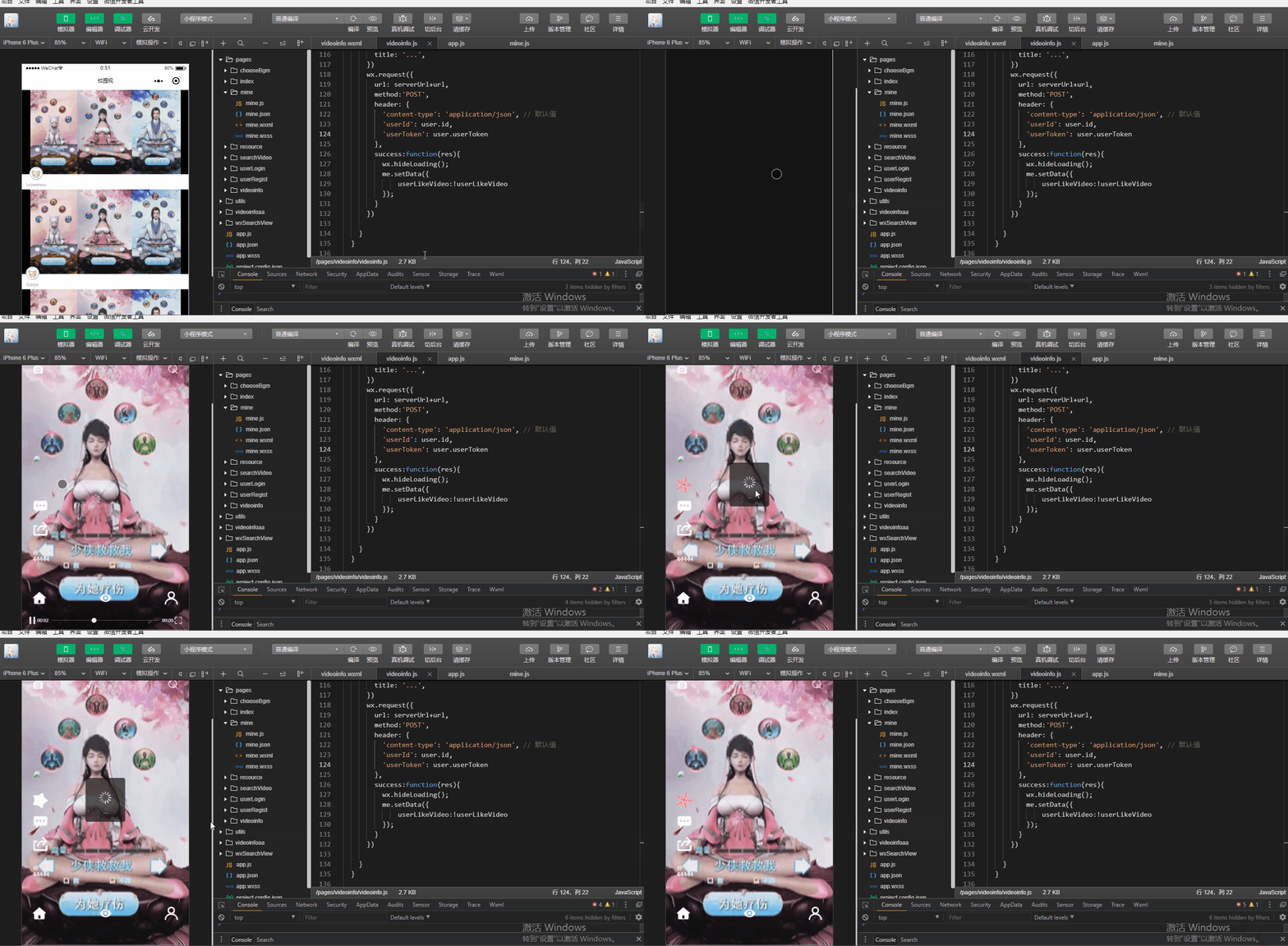
小程序点赞与取消点赞功能前后端联调
在videoinfo.js中编写用户点赞与取消功能
likeVideoOrNot:function(){

    var me = this;

    var videoInfo = me.data.videoInfo;

    var user = app.getGlobalUserInfo();

    if (user == null || user == undefined || user == '') {

      wx.navigateTo({

        url: '../userLogin/login',

      })

    } else {

      var userLikeVideo = me.data.userLikeVideo;

      var url = '/video/userLike?userId=' + user.id + '&videoId=' + videoInfo.id +'&videoCreaterId='+videoInfo.userId;

      if(userLikeVideo){

        var url = '/video/userUnLike?userId=' + user.id + '&videoId=' + videoInfo.id + '&videoCreaterId=' + videoInfo.userId;

      }

      var serverUrl = app.serverUrl;

      wx.showLoading({

        title: '...',

      })

      wx.request({

        url: serverUrl+url,

        method:'POST',

        header: {

          'content-type': 'application/json', // 默认值

          'userId': user.id,

          'userToken': user.userToken

        },

        success:function(res){

          wx.hideLoading();

          me.setData({

              userLikeVideo:!userLikeVideo

          });

        }

      })

    }

  }
<view style='width:100%;height:100%;'>

<video   id="myVideo" src="{{src}}"

muted="{{true}}"

autoplay="{{true}}"

loop="{{true}}"

enable-progress-gesture="{{false}}"

style='width:100%;height:100%;'

objectFit='{{cover}}'

>

<cover-view class='container'>

            <!-- 上传视频 -->

            <cover-image src='../resource/images/camera.png' style='width:50rpx;height:50rpx;' bindtap='upload'></cover-image>

            <!-- 搜索按钮 -->

            <cover-image src='../resource/images/search.png' style='width:45rpx;height:45rpx;' bindtap='showSearch'></cover-image>

</cover-view>

<cover-view class='container-me'>

            <!-- 头像 -->

            <cover-image class="face" src='{{publisher.faceImage}}' bindtap='showPublisher'></cover-image>

            <!-- 喜欢收藏按钮 -->

            <block wx:if="{{userLikeVideo}}">

                <cover-image class="size-me" src='../resource/images/like.png' style='margin-top:30rpx;' bindtap='likeVideoOrNot'></cover-image>

            </block>

            <block wx:else>

                <cover-image class="size-me" src='../resource/images/unlike.png' style='margin-top:30rpx;' bindtap='likeVideoOrNot'></cover-image>

            </block>

            <!-- 评论按钮 -->

            <cover-image class="size-me" src='../resource/images/comments.png' style='margin-top:30rpx;' bindtap='leaveComment'></cover-image>

            <!-- 分享按钮 -->

 <cover-image class="size-me" src='../resource/images/share.png' style='margin-top:30rpx;' bindtap='shareMe'></cover-image>

</cover-view>

 <cover-view class='container-words'>

            <cover-view>@{{publisher.nickname}}</cover-view>

            <cover-view class='video-desc'>{{videoInfo.videoDesc}}</cover-view>

</cover-view>

<cover-view class='container-bottom'>

            <!-- 首页按钮 -->

            <cover-image class='' src='../resource/images/index.png' class="size-bottom" bindtap='showIndex'></cover-image>

            <!-- 我的关注 -->

            <cover-image class='' src='../resource/images/follow.png' class="size-bottom" bindtap='showFollow'></cover-image>

            <!-- 我的按钮 -->

<cover-image class='' src='../resource/images/mine.png' class="size-bottom" bindtap='showMine'></cover-image>

</cover-view>

</video>

</view>
videoinfo.wxml
var videoUtil = require('../../utils/videoUtil.js')

const app = getApp()

Page({

  data: {

    cover:"cover",

    videoId:"",

    src:"",

    videoInfo:{},

    userLikeVideo:false

  },

  videoCtx:{

  },

  onLoad:function(params){

    var me = this;

    me.videoCtx = wx.createVideoContext("myVideo", me);

    //获取上一个页面传入的参数

    var videoInfo = JSON.parse(params.videoInfo);

    var height = videoInfo.videoHeight;

    var width = videoInfo.videoWidth;

    var cover = "cover";

    if(width>=height){

      cover="";

    }

    me.setData({

      videoInfo: videoInfo.id,

      src:app.serverUrl + videoInfo.videoPath,

      videoInfo: videoInfo,

      cover:cover

    });

  },

  onShow:function(){

    var me = this;

    me.videoCtx.play();

  },

  onHide:function(){

    var me = this;

    me.videoCtx.pause();

  },

  showSearch:function(){

    wx.navigateTo({

      url: '../searchVideo/searchVideo',

    })

  },

  upload:function(){

    var me = this;

    var user = app.getGlobalUserInfo();

    var videoInfo = JSON.stringify(me.data.videoInfo);

    var realUrl = '../videoinfo/videoinfo#videoInfo@'+videoInfo;

    if (user == null || user == undefined || user == '') {

      wx.navigateTo({

        url: '../userLogin/login?redirectUrl=' +realUrl,

      })

    } else {

      videoUtil.uploadVideo();

    }

  },

  showIndex:function(){

    wx.redirectTo({

      url: '../index/index',

    })

  },

  showMine:function(){

    var user = app.getGlobalUserInfo();

    if(user ==null || user == undefined||user == ''){

      wx.navigateTo({

        url: '../userLogin/login',

      })

    }else{

      wx.navigateTo({

        url: '../mine/mine',

      })

    }

  },

  likeVideoOrNot:function(){

    var me = this;

    var videoInfo = me.data.videoInfo;

    var user = app.getGlobalUserInfo();

    if (user == null || user == undefined || user == '') {

      wx.navigateTo({

        url: '../userLogin/login',

      })

    } else {

      var userLikeVideo = me.data.userLikeVideo;

      var url = '/video/userLike?userId=' + user.id + '&videoId=' + videoInfo.id +'&videoCreaterId='+videoInfo.userId;

      if(userLikeVideo){

        var url = '/video/userUnLike?userId=' + user.id + '&videoId=' + videoInfo.id + '&videoCreaterId=' + videoInfo.userId;

      }

      var serverUrl = app.serverUrl;

      wx.showLoading({

        title: '...',

      })

      wx.request({

        url: serverUrl+url,

        method:'POST',

        header: {

          'content-type': 'application/json', // 默认值

          'userId': user.id,

          'userToken': user.userToken

        },

        success:function(res){

          wx.hideLoading();

          me.setData({

              userLikeVideo:!userLikeVideo

          });

        }

      })

    }

  }

})
videoinfo.js
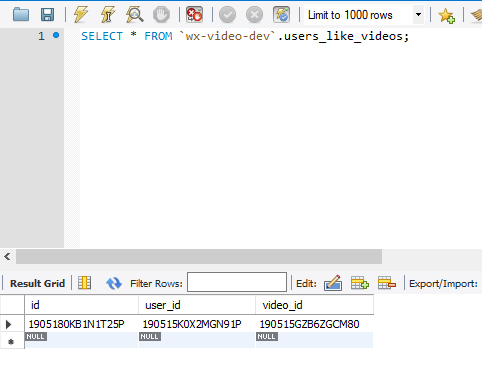
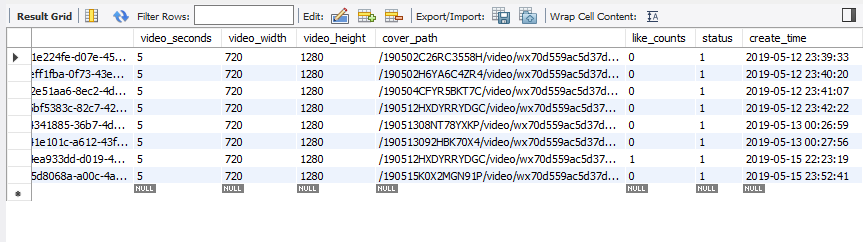
当用户对某一视频点赞后,数据库中后台会得到该用户与点赞视频对应的属性值与视频点赞数量
进入视频展示页面查询后端接口信息
UserController.java中编写后端queryPublisher请求信息
@PostMapping("/queryPublisher")

    public IMoocJSONResult queryPublisher(String loginUserId,String videoId,

            String publishUserId) throws Exception {

            if(StringUtils.isBlank(publishUserId)) {

                return IMoocJSONResult.errorMsg("");

            }

            //查询视频发布者的信息

            Users  userInfo = userService.queryUserInfo(publishUserId);

            UsersVO publisher = new UsersVO();

            BeanUtils.copyProperties(userInfo, publisher);

            //查询当前登陆者和视频的点赞关系

            boolean userLikeVideo = userService.isUserLikeVideo(loginUserId, videoId);

            PublisherVideo bean = new PublisherVideo();

            bean.setPublisher(publisher);

            bean.setUserLikeVideo(userLikeVideo);

            return IMoocJSONResult.ok(bean);

    }
videoindo.js中编写获得用户信息请求方法
 wx.request({

      url: serverUrl + '/user/queryPublisher?loginUserId=' + loginUserId + "&videoId=" + videoInfo.id +"&publishUserId="+videoInfo.userId,

      method:'POST',

      success:function(res){

        var publisher = res.data.data.publisher;

        var userLikeVideo = res.data.data.userLikeVideo;

        me.setData({

          serverUrl: serverUrl,

          publisher: publisher,

          userLikeVideo: userLikeVideo,

        });

      }

    })

  },
进入index.js视频页面后,会展示该视频上传用户者头像及是否被当前用户点赞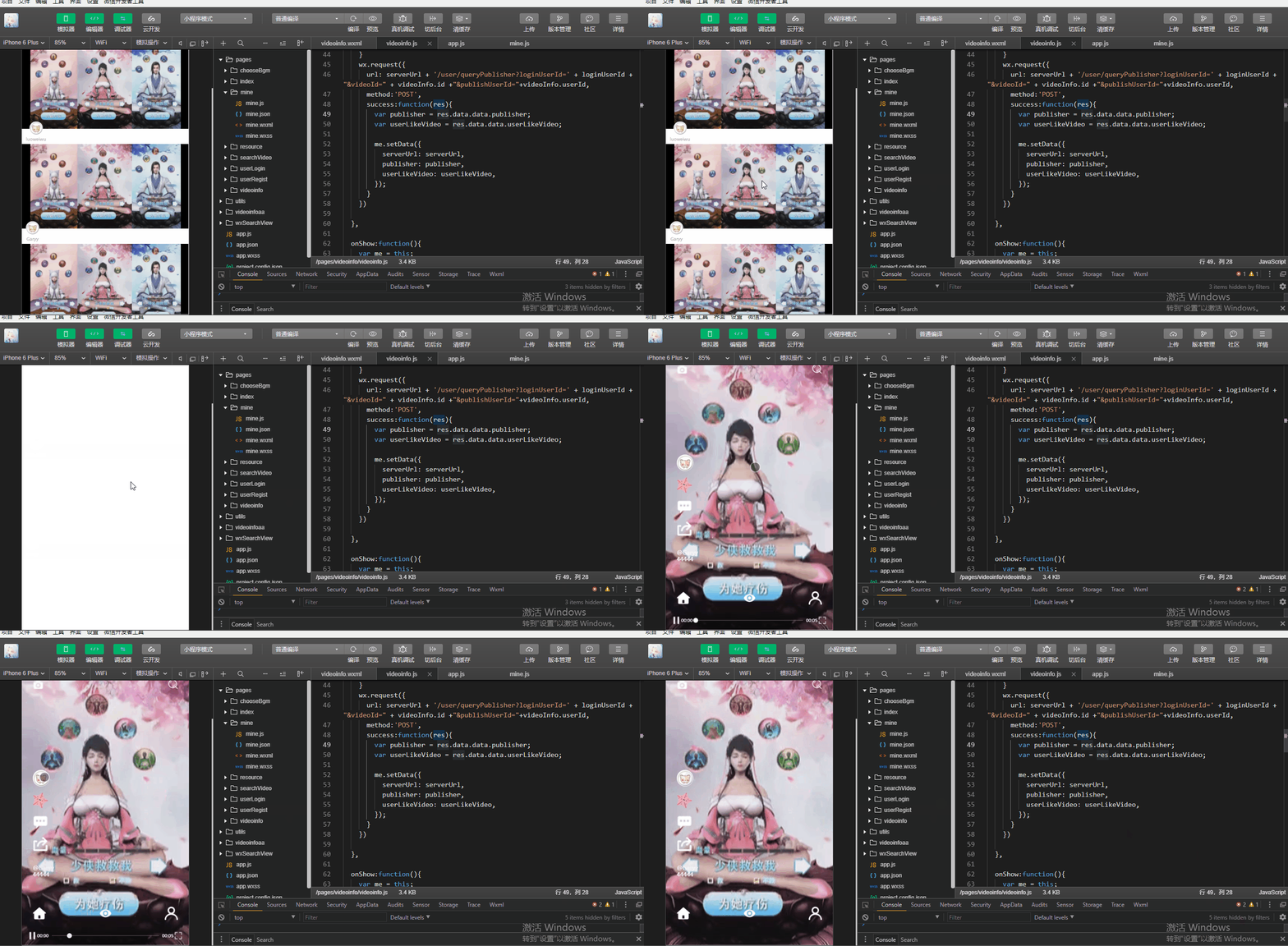
var videoUtil = require('../../utils/videoUtil.js')

const app = getApp()

Page({

  data: {

    cover:"cover",

    videoId:"",

    src:"",

    videoInfo:{},

    userLikeVideo:false

  },

  videoCtx:{

  },

  onLoad:function(params){

    var me = this;

    me.videoCtx = wx.createVideoContext("myVideo", me);

    //获取上一个页面传入的参数

    var videoInfo = JSON.parse(params.videoInfo);

    var height = videoInfo.videoHeight;

    var width = videoInfo.videoWidth;

    var cover = "cover";

    if(width>=height){

      cover="";

    }

    me.setData({

      videoInfo: videoInfo.id,

      src:app.serverUrl + videoInfo.videoPath,

      videoInfo: videoInfo,

      cover:cover

    });

    var serverUrl = app.serverUrl;

    var user = app.getGlobalUserInfo();

    var loginUserId = "";

    if (user != null && user != undefined && user != '') {

          loginUserId = user.id;

    }

    wx.request({

      url: serverUrl + '/user/queryPublisher?loginUserId=' + loginUserId + "&videoId=" + videoInfo.id +"&publishUserId="+videoInfo.userId,

      method:'POST',

      success:function(res){

        var publisher = res.data.data.publisher;

        var userLikeVideo = res.data.data.userLikeVideo;

        me.setData({

          serverUrl: serverUrl,

          publisher: publisher,

          userLikeVideo: userLikeVideo,

        });

      }

    })

  },

  onShow:function(){

    var me = this;

    me.videoCtx.play();

  },

  onHide:function(){

    var me = this;

    me.videoCtx.pause();

  },

  showSearch:function(){

    wx.navigateTo({

      url: '../searchVideo/searchVideo',

    })

  },

  upload:function(){

    var me = this;

    var user = app.getGlobalUserInfo();

    var videoInfo = JSON.stringify(me.data.videoInfo);

    var realUrl = '../videoinfo/videoinfo#videoInfo@'+videoInfo;

    if (user == null || user == undefined || user == '') {

      wx.navigateTo({

        url: '../userLogin/login?redirectUrl=' +realUrl,

      })

    } else {

      videoUtil.uploadVideo();

    }

  },

  showIndex:function(){

    wx.redirectTo({

      url: '../index/index',

    })

  },

  showMine:function(){

    var user = app.getGlobalUserInfo();

    if(user ==null || user == undefined||user == ''){

      wx.navigateTo({

        url: '../userLogin/login',

      })

    }else{

      wx.navigateTo({

        url: '../mine/mine',

      })

    }

  },

  likeVideoOrNot:function(){

    var me = this;

    var videoInfo = me.data.videoInfo;

    var user = app.getGlobalUserInfo();

    if (user == null || user == undefined || user == '') {

      wx.navigateTo({

        url: '../userLogin/login',

      })

    } else {

      var userLikeVideo = me.data.userLikeVideo;

      var url = '/video/userLike?userId=' + user.id + '&videoId=' + videoInfo.id +'&videoCreaterId='+videoInfo.userId;

      if(userLikeVideo){

        var url = '/video/userUnLike?userId=' + user.id + '&videoId=' + videoInfo.id + '&videoCreaterId=' + videoInfo.userId;

      }

      var serverUrl = app.serverUrl;

      wx.showLoading({

        title: '...',

      })

      wx.request({

        url: serverUrl+url,

        method:'POST',

        header: {

          'content-type': 'application/json', // 默认值

          'userId': user.id,

          'userToken': user.userToken

        },

        success:function(res){

          wx.hideLoading();

          me.setData({

              userLikeVideo:!userLikeVideo

          });

        }

      })

    }

  }

})
videoinfo.js
package com.imooc.controller;

import java.io.File;

import java.io.FileOutputStream;

import java.io.InputStream;

import java.util.UUID;

import org.apache.commons.lang3.StringUtils;

import org.apache.tomcat.util.http.fileupload.IOUtils;

import org.springframework.beans.BeanUtils;

import org.springframework.beans.factory.annotation.Autowired;

import org.springframework.web.bind.annotation.PostMapping;

import org.springframework.web.bind.annotation.RequestBody;

import org.springframework.web.bind.annotation.RequestMapping;

import org.springframework.web.bind.annotation.RequestParam;

import org.springframework.web.bind.annotation.RestController;

import org.springframework.web.multipart.MultipartFile;

import com.imooc.pojo.Users;

import com.imooc.pojo.vo.PublisherVideo;

import com.imooc.pojo.vo.UsersVO;

import com.imooc.service.UserService;

import com.imooc.utils.IMoocJSONResult;

import com.imooc.utils.MD5Utils;

import io.swagger.annotations.Api;

import io.swagger.annotations.ApiImplicitParam;

import io.swagger.annotations.ApiOperation;

@RestController

@Api(value="用户相关业务的接口",tags= {"用户相关业务的controller"})

@RequestMapping("/user")

public class UserController extends BasicController {

    @Autowired

    private UserService userService;

    @ApiOperation(value="用户上传头像", notes="用户上传头像的接口")

    @ApiImplicitParam(name="userId",value="用户id",required=true,

    dataType="String" ,paramType="query")

    @PostMapping("/uploadFace")

    public IMoocJSONResult uploadFace(String userId,

            @RequestParam("file") MultipartFile[] files) throws Exception {

            if(StringUtils.isBlank(userId)) {

                return IMoocJSONResult.errorMsg("用户id不能为空...");

            }

            //文件保存命名空间

            String fileSpace = "F:/imooc-video-gary";

            //保存到数据库中的相对路径

            String uploadPathDB = "/" + userId + "/face";

            FileOutputStream fileOutputStream = null;

            InputStream inputStream = null;

            try {

                if( files != null && files.length>0 ) {

                    String fileName = files[0].getOriginalFilename();

                    if(StringUtils.isNoneBlank(fileName)) {

                        //文件上传的最终保存路径

                        String finalFacePath = fileSpace + uploadPathDB + "/" + fileName;

                        //设置数据库保存的路径

                        uploadPathDB += ("/" + fileName);

                        File outFile = new File(finalFacePath);

                        if(outFile.getParentFile()!=null || !outFile.getParentFile().isDirectory()) {

                            //创建父文件夹

                            outFile.getParentFile().mkdirs();

                        }

                        fileOutputStream = new FileOutputStream(outFile);

                        inputStream = files[0].getInputStream();

                        IOUtils.copy(inputStream, fileOutputStream);

                    }

                }else {

                    return IMoocJSONResult.errorMsg("上传出错...");

                }

            } catch (Exception e) {

                // TODO Auto-generated catch block

                e.printStackTrace();

                return IMoocJSONResult.errorMsg("上传出错...");

            }finally {

                if(fileOutputStream != null) {

                    fileOutputStream.flush();

                    fileOutputStream.close();

                }

            }

            Users user = new Users();

            user.setId(userId);

            user.setFaceImage(uploadPathDB);

            userService.updateUserInfo(user);

            return IMoocJSONResult.ok(uploadPathDB);

    }

    @ApiOperation(value="查询用户信息", notes="查询用户信息的接口")

    @ApiImplicitParam(name="userId",value="用户id",required=true,

    dataType="String" ,paramType="query")

    @PostMapping("/query")

    public IMoocJSONResult query(String userId) throws Exception {

            if(StringUtils.isBlank(userId)) {

                return IMoocJSONResult.errorMsg("用户id不能为空...");

            }

            Users  userInfo = userService.queryUserInfo(userId);

            UsersVO userVO = new UsersVO();

            BeanUtils.copyProperties(userInfo, userVO);

            return IMoocJSONResult.ok(userVO);

    }

    @PostMapping("/queryPublisher")

    public IMoocJSONResult queryPublisher(String loginUserId,String videoId,

            String publishUserId) throws Exception {

            if(StringUtils.isBlank(publishUserId)) {

                return IMoocJSONResult.errorMsg("");

            }

            //查询视频发布者的信息

            Users  userInfo = userService.queryUserInfo(publishUserId);

            UsersVO publisher = new UsersVO();

            BeanUtils.copyProperties(userInfo, publisher);

            //查询当前登陆者和视频的点赞关系

            boolean userLikeVideo = userService.isUserLikeVideo(loginUserId, videoId);

            PublisherVideo bean = new PublisherVideo();

            bean.setPublisher(publisher);

            bean.setUserLikeVideo(userLikeVideo);

            return IMoocJSONResult.ok(bean);

    }

}
UserController.java
查看视频发布者信息
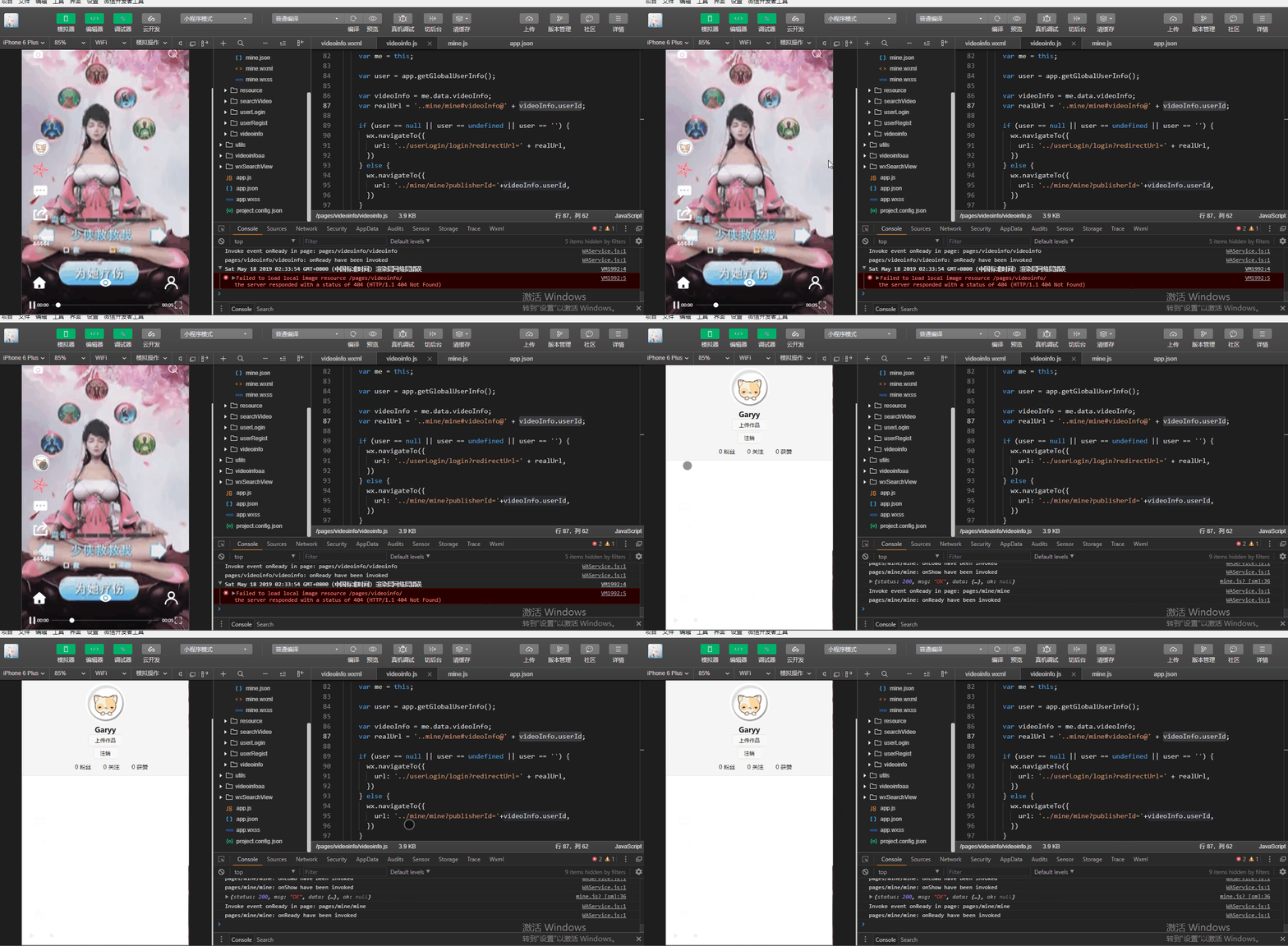
编写用户点击上传视频者头像后跳转到该用户首页信息方法showPublisher()
            <!-- 头像 -->

            <cover-image class="face" src='{{serverUrl}}{{publisher.faceImage}}' bindtap='showPublisher'></cover-image>
  showPublisher:function(){

    var me = this;

    var user = app.getGlobalUserInfo();

    var videoInfo = me.data.videoInfo;

    var realUrl = '../mine/mine#publisherId@' + videoInfo.user;

    if (user == null || user == undefined || user == '') {

      wx.navigateTo({

        url: '../userLogin/login?redirectUrl=' + realUrl,

      })

    } else {

      wx.navigateTo({

        url: '../mine/mine?publisherId='+videoInfo.user,

      })

    }

  },
在mine.js中修改onLoad()函数并给一个参数值params作为获得缓存中用户信息
 onLoad: function (params) {

    var me = this;

    //  var user = app.userInfo;

    //fixme 修改原有的全局对象为本地缓存

    var user = app.getGlobalUserInfo();

    var userId = user.id;

    var publisherId = params.publisherId;

    if (publisherId != null && publisherId != '' && publisherId!=undefined)    {

      userId = publisherId;

    }

    wx.showLoading({

      title: '请等待...',

    });

    // 调用后端

    var serverUrl = app.serverUrl;

    wx.request({

      url: serverUrl + '/user/query?userId=' + userId,

      method: "POST",

      header: {

        'content-type': 'application/json', // 默认值

        'userId':user.id,

        'userToken':user.userToken

      },

      success: function (res) {

        console.log(res.data);

        wx.hideLoading();

        if (res.data.status == 200) {

          var userInfo= res.data.data;

          var faceUrl = "../resource/images/noneface.png";

          if (userInfo.faceImage != null && userInfo.faceImage != '' && userInfo.faceImage!=undefined){

            faceUrl = serverUrl + userInfo.faceImage;

          }

          me.setData({

            faceUrl: faceUrl,

            fansCounts: userInfo.fansCounts,

            followCounts: userInfo.followCounts,

            receiveLikeCounts: userInfo.receiveLikeCounts,

            nickname: userInfo.nickname

          });

        } else if (res.data.status == 502){

          wx.showToast({

            title: res.data.msg,

            duration:3000,

            icon:"none",

            success:function(){

              wx.redirectTo({

                url: '../userLogin/login',

              })

            }

          })

        }

      }

    })

  },
var videoUtil = require('../../utils/videoUtil.js')

const app = getApp()

Page({

  data: {

    cover: "cover",

    videoId: "",

    src: "",

    videoInfo: {},

    userLikeVideo: false

  },

  videoCtx: {

  },

  onLoad: function (params) {

    var me = this;

    me.videoCtx = wx.createVideoContext("myVideo", me);

    //获取上一个页面传入的参数

    var videoInfo = JSON.parse(params.videoInfo);

    var height = videoInfo.videoHeight;

    var width = videoInfo.videoWidth;

    var cover = "cover";

    if (width >= height) {

      cover = "";

    }

    me.setData({

      videoInfo: videoInfo.id,

      src: app.serverUrl + videoInfo.videoPath,

      videoInfo: videoInfo,

      cover: cover

    });

    var serverUrl = app.serverUrl;

    var user = app.getGlobalUserInfo();

    var loginUserId = "";

    if (user != null && user != undefined && user != '') {

      loginUserId = user.id;

    }

    wx.request({

      url: serverUrl + '/user/queryPublisher?loginUserId=' + loginUserId + "&videoId=" + videoInfo.id + "&publishUserId=" + videoInfo.userId,

      method: 'POST',

      success: function (res) {

        var publisher = res.data.data.publisher;

        var userLikeVideo = res.data.data.userLikeVideo;

        me.setData({

          serverUrl: serverUrl,

          publisher: publisher,

          userLikeVideo: userLikeVideo,

        });

      }

    })

  },

  onShow: function () {

    var me = this;

    me.videoCtx.play();

  },

  onHide: function () {

    var me = this;

    me.videoCtx.pause();

  },

  showSearch: function () {

    wx.navigateTo({

      url: '../searchVideo/searchVideo',

    })

  },

  showPublisher: function () {

    var me = this;

    var user = app.getGlobalUserInfo();

    var videoInfo = me.data.videoInfo;

    var realUrl = '..mine/mine#videoInfo@' + videoInfo.userId;

    if (user == null || user == undefined || user == '') {

      wx.navigateTo({

        url: '../userLogin/login?redirectUrl=' + realUrl,

      })

    } else {

      wx.navigateTo({

        url: '../mine/mine?publisherId='+videoInfo.userId,

      })

    }

  },

  upload: function () {

    var me = this;

    var user = app.getGlobalUserInfo();

    var videoInfo = JSON.stringify(me.data.videoInfo);

    var realUrl = '../videoinfo/videoinfo#videoInfo@' + videoInfo;

    if (user == null || user == undefined || user == '') {

      wx.navigateTo({

        url: '../userLogin/login?redirectUrl=' + realUrl,

      })

    } else {

      videoUtil.uploadVideo();

    }

  },

  showIndex: function () {

    wx.redirectTo({

      url: '../index/index',

    })

  },

  showMine: function () {

    var user = app.getGlobalUserInfo();

    if (user == null || user == undefined || user == '') {

      wx.navigateTo({

        url: '../userLogin/login',

      })

    } else {

      wx.navigateTo({

        url: '../mine/mine',

      })

    }

  },

  likeVideoOrNot: function () {

    var me = this;

    var videoInfo = me.data.videoInfo;

    var user = app.getGlobalUserInfo();

    if (user == null || user == undefined || user == '') {

      wx.navigateTo({

        url: '../userLogin/login',

      })

    } else {

      var userLikeVideo = me.data.userLikeVideo;

      var url = '/video/userLike?userId=' + user.id + '&videoId=' + videoInfo.id + '&videoCreaterId=' + videoInfo.userId;

      if (userLikeVideo) {

        var url = '/video/userUnLike?userId=' + user.id + '&videoId=' + videoInfo.id + '&videoCreaterId=' + videoInfo.userId;

      }

      var serverUrl = app.serverUrl;

      wx.showLoading({

        title: '...',

      })

      wx.request({

        url: serverUrl + url,

        method: 'POST',

        header: {

          'content-type': 'application/json', // 默认值

          'userId': user.id,

          'userToken': user.userToken

        },

        success: function (res) {

          wx.hideLoading();

          me.setData({

            userLikeVideo: !userLikeVideo

          });

        }

      })

    }

  }

})
videoinfo.js
var videoUtil = require('../../utils/videoUtil.js')

const app = getApp()

Page({

  data: {

    faceUrl: "../resource/images/noneface.png",

  },

  onLoad: function (params) {

    var me = this;

    //  var user = app.userInfo;

    //fixme 修改原有的全局对象为本地缓存

    var user = app.getGlobalUserInfo();

    var userId = user.id;

    var publisherId = params.publisherId;

    if (publisherId != null && publisherId != '' && publisherId!=undefined)    {

      userId = publisherId;

    }

    wx.showLoading({

      title: '请等待...',

    });

    // 调用后端

    var serverUrl = app.serverUrl;

    wx.request({

      url: serverUrl + '/user/query?userId=' + userId,

      method: "POST",

      header: {

        'content-type': 'application/json', // 默认值

        'userId':user.id,

        'userToken':user.userToken

      },

      success: function (res) {

        console.log(res.data);

        wx.hideLoading();

        if (res.data.status == 200) {

          var userInfo= res.data.data;

          var faceUrl = "../resource/images/noneface.png";

          if (userInfo.faceImage != null && userInfo.faceImage != '' && userInfo.faceImage!=undefined){

            faceUrl = serverUrl + userInfo.faceImage;

          }

          me.setData({

            faceUrl: faceUrl,

            fansCounts: userInfo.fansCounts,

            followCounts: userInfo.followCounts,

            receiveLikeCounts: userInfo.receiveLikeCounts,

            nickname: userInfo.nickname

          });

        } else if (res.data.status == 502){

          wx.showToast({

            title: res.data.msg,

            duration:3000,

            icon:"none",

            success:function(){

              wx.redirectTo({

                url: '../userLogin/login',

              })

            }

          })

        }

      }

    })

  },

  logout:function(params){

    //var user = app.userInfo;

    //fixme 修改原有的全局对象为本地缓存

    var user = app.getGlobalUserInfo();

    var serverUrl = app.serverUrl;

    wx.showLoading({

      title: '请等待...',

    });

    // 调用后端

    wx.request({

      url: serverUrl + '/logout?userId='+user.id,

      method: "POST",

      header: {

        'content-type': 'application/json' // 默认值

      },

      success: function (res) {

        console.log(res.data);

        wx.hideLoading();

        if (res.data.status == 200) {

          // 注销成功

          wx.showToast({

             title: '注销成功',

             icon: 'success',

             duration: 2000

            });

          //清除全局用户对象

          //app.userInfo = null;

          //注销以后,清空缓存

          wx.removeStorageSync('userInfo')

          //页面跳转

          wx.navigateTo({

            url: '../userLogin/login',

          })

        }

      }

    })

  },

  changeFace:function(){

    var me = this;

    wx.chooseImage({

      count: 1,

      sizeType: ['compressed'],

      sourceType: ['album'],

      success:function(res) {

        var tempFilePaths = res.tempFilePaths;

        console.log(tempFilePaths);

        wx.showLoading({

          title: '上传中...',

        })

        var serverUrl = app.serverUrl;

        //fixme 修改原有的全局对象为本地缓存

        var userInfo = app.getGlobalUserInfo();

        wx.uploadFile({

          url: serverUrl+'/user/uploadFace?userId='+userInfo.id,

          filePath: tempFilePaths[0],

          name: 'file',

          header: {

            'content-type': 'application/json' // 默认值

          },

          success: function (res) {

            var data = JSON.parse(res.data);

            console.log(data);

            wx.hideLoading();

            if(data.status == 200){

              wx.showToast({

                title: '上传成功',

                icon: "success"

              });

              var imageUrl = data.data;

              me.setData({

                faceUrl: serverUrl+imageUrl

              });

            } else if (data.status == 500){

              wx.showToast({

                title: data.msg

              });

            }

          }

        })

      }

    })

  },

  uploadVideo:function(){

    //  videoUtil.uploadVideo();

    var me =this;

    wx.chooseVideo({

      sourceType: ['album'],

      success(res) {

        console.log(res);

        var duration = res.duration;

        var tmpheight = res.height;

        var tmpwidth = res.width;

        var tmpVideoUrl = res.tempFilePath;

        var tmpCoverUrl = res.thumbTempFilePath;

        if(duration>300){

          wx.showToast({

            title: '视频长度不能超过5分钟...',

            icon:"none",

            duration:2500

          })

        } else if(duration<3){

          wx.showToast({

            title: '视频长度太短,请上传超过3秒的视频...',

            icon: "none",

            duration: 2500

          })

        }else{

          //打开选择bgm页面

          wx.navigateTo({

            url: '../chooseBgm/chooseBgm?duration=' + duration

              + "&tmpheight=" + tmpheight

              + "&tmpwidth=" + tmpwidth

              + "&tmpVideoUrl=" + tmpVideoUrl

              + "&tmpCoverUrl=" + tmpCoverUrl

            ,

          })

        }

      }

    })

  }

})
mine.js
关注于取消关注接口
查看数据库中user表
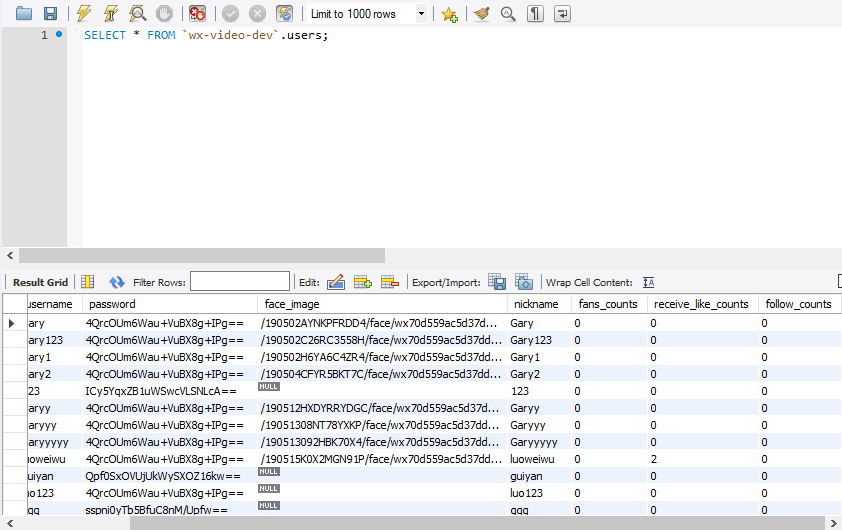
在UserMapper.java中编写增加粉丝数、增加关注数、减少粉丝数量、减少关注数量方法
    //增加粉丝数

    public void addFansCount(String userId);

    //增加关注数

    public void addFollersCount(String userId);

    //减少粉丝数量

    public void reduceFanCount(String userId);

    //减少关注数量

    public void reduceFollersCount(String userId);
在UserMapper.xml中实现SQL语句的编写
     <!-- 粉丝  -->

      <update id="addFansCount" parameterType="String">

          update users set fans_counts = fans_counts + 1 where id=#{userId}

      </update>

       <update id="reduceFanCount" parameterType="String">

          update users set fans_counts = fans_counts - 1 where id=#{userId}

      </update>

      <!-- 关注度 -->

      <update id="addFollersCount" parameterType="String">

          update users set follow_counts = follow_counts + 1 where id=#{userId}

      </update>

      <update id="reduceFollersCount" parameterType="String">

          update users set follow_counts = follow_counts - 1 where id=#{userId}

      </update>
Service层实现增加用户粉丝和减少用户粉丝方法
    @Transactional(propagation = Propagation.REQUIRED)

    @Override

    public void saveUserFanRelation(String userId, String fanId) {

        String relId = sid.nextShort();

        UsersFans userFan = new UsersFans();

        userFan.setId(relId);

        userFan.setUserId(userId);

        userFan.setFanId(fanId);

        usersFansMapper.insert(userFan);

        userMapper.addFansCount(userId);

        userMapper.addFollersCount(fanId);

    }

    @Transactional(propagation = Propagation.REQUIRED)

    @Override

    public void deleteUserFanRelation(String userId, String fanId) {

        Example example = new Example(UsersFans.class);

        Criteria criteria = example.createCriteria();

        criteria.andEqualTo("userId",userId);

        criteria.andEqualTo("fanId",fanId);

        usersFansMapper.deleteByExample(example);

        userMapper.reduceFollersCount(userId);

        userMapper.reduceFollersCount(fanId);

    }
Controller层去实现增加粉丝数beyourfans方法和减少粉丝数dontbeyourfans方法
@PostMapping("/beyourfans")

    public IMoocJSONResult beyourfans(String userId,String fanId) throws Exception {

            if(StringUtils.isBlank(userId)) {

                return IMoocJSONResult.errorMsg("");

            }

            userService.saveUserFanRelation(userId, fanId);

            return IMoocJSONResult.ok("关注成功");

    }

    @PostMapping("/dontbeyourfans")

    public IMoocJSONResult dontbeyourfans(String userId,String fanId) throws Exception {

            if(StringUtils.isBlank(userId)) {

                return IMoocJSONResult.errorMsg("");

            }

            userService.deleteUserFanRelation(userId, fanId);

            return IMoocJSONResult.ok("取消关注成功");

    }
@PostMapping("/beyourfans")

    public IMoocJSONResult beyourfans(String userId,String fanId) throws Exception {

            if(StringUtils.isBlank(userId)) {

                return IMoocJSONResult.errorMsg("");

            }

            userService.saveUserFanRelation(userId, fanId);

            return IMoocJSONResult.ok("关注成功");

    }

    @PostMapping("/dontbeyourfans")

    public IMoocJSONResult dontbeyourfans(String userId,String fanId) throws Exception {

            if(StringUtils.isBlank(userId)) {

                return IMoocJSONResult.errorMsg("");

            }

            userService.deleteUserFanRelation(userId, fanId);

            return IMoocJSONResult.ok("取消关注成功");

    }
<?xml version="1.0" encoding="UTF-8" ?>

<!DOCTYPE mapper PUBLIC "-//mybatis.org//DTD Mapper 3.0//EN" "http://mybatis.org/dtd/mybatis-3-mapper.dtd" >

<mapper namespace="com.imooc.mapper.UsersMapper" >

  <resultMap id="BaseResultMap" type="com.imooc.pojo.Users" >

    <!--

      WARNING - @mbg.generated

    -->

    <id column="id" property="id" jdbcType="VARCHAR" />

    <result column="username" property="username" jdbcType="VARCHAR" />

    <result column="password" property="password" jdbcType="VARCHAR" />

    <result column="face_image" property="faceImage" jdbcType="VARCHAR" />

    <result column="nickname" property="nickname" jdbcType="VARCHAR" />

    <result column="fans_counts" property="fansCounts" jdbcType="INTEGER" />

    <result column="receive_like_counts" property="receiveLikeCounts" jdbcType="INTEGER" />

    <result column="follow_counts" property="followCounts" jdbcType="INTEGER" />

  </resultMap>

      <!-- 受喜欢程度 -->

    <update  id="addReceiveLikeCount" parameterType="String">

          update users set receive_like_counts = receive_like_counts + 1 where id=#{userId}

      </update>

     <update  id="reduceReceiveLikeCount" parameterType="String">

          update users set receive_like_counts = receive_like_counts - 1 where id=#{userId}

      </update>

      <!-- 粉丝  -->

      <update id="addFansCount" parameterType="String">

          update users set fans_counts = fans_counts + 1 where id=#{userId}

      </update>

       <update id="reduceFanCount" parameterType="String">

          update users set fans_counts = fans_counts - 1 where id=#{userId}

      </update>

      <!-- 关注度 -->

      <update id="addFollersCount" parameterType="String">

          update users set follow_counts = follow_counts + 1 where id=#{userId}

      </update>

      <update id="reduceFollersCount" parameterType="String">

          update users set follow_counts = follow_counts - 1 where id=#{userId}

      </update>

</mapper>
UsersMapper.xml
package com.imooc.server.impl;

import java.util.List;

import org.apache.commons.lang3.StringUtils;

import org.n3r.idworker.Sid;

import org.springframework.beans.factory.annotation.Autowired;

import org.springframework.stereotype.Service;

import org.springframework.transaction.annotation.Propagation;

import org.springframework.transaction.annotation.Transactional;

import com.imooc.mapper.UsersFansMapper;

import com.imooc.mapper.UsersLikeVideosMapper;

import com.imooc.mapper.UsersMapper;

import com.imooc.pojo.Users;

import com.imooc.pojo.UsersFans;

import com.imooc.pojo.UsersLikeVideos;

import com.imooc.service.UserService;

import com.imooc.utils.IMoocJSONResult;

import tk.mybatis.mapper.entity.Example;

import tk.mybatis.mapper.entity.Example.Criteria;

@Service

public class UserServiceImpl implements UserService {

    @Autowired

    private UsersMapper userMapper;

    @Autowired

    private UsersFansMapper usersFansMapper;

    @Autowired

    private UsersLikeVideosMapper usersLikeVideosMapper;

    @Autowired

    private Sid sid;

    @Transactional(propagation = Propagation.SUPPORTS)

    @Override

    public boolean queryUsernameIsExist(String username) {

        Users user = new Users();

        user.setUsername(username);

        Users result = userMapper.selectOne(user);

        return result==null?false:true;

    }

    @Transactional(propagation = Propagation.REQUIRED)

    @Override

    public void saveUser(Users user) {

        String userId = sid.nextShort();

        user.setId(userId);

        userMapper.insert(user);

    }

    @Transactional(propagation = Propagation.SUPPORTS)

    @Override

    public Users queryUserForLogin(String username, String password) {

        Example userExample = new Example(Users.class);

        Criteria criteria = userExample.createCriteria();

        criteria.andEqualTo("username", username);

        criteria.andEqualTo("password", password);

        Users result = userMapper.selectOneByExample(userExample);

        return result;

    }

    @Transactional(propagation = Propagation.REQUIRED)

    @Override

    public void updateUserInfo(Users user) {

        Example userExample = new Example(Users.class);

        Criteria criteria = userExample.createCriteria();

        criteria.andEqualTo("id",user.getId());

        userMapper.updateByExampleSelective(user, userExample);

    }

    @Transactional(propagation = Propagation.SUPPORTS)

    @Override

    public Users queryUserInfo(String userId) {

        Example userExample = new Example(Users.class);

        Criteria criteria = userExample.createCriteria();

        criteria.andEqualTo("id",userId);

        Users user = userMapper.selectOneByExample(userExample);

        return user;

    }

    @Transactional(propagation = Propagation.SUPPORTS)

    @Override

    public Boolean isUserLikeVideo(String userId, String videoId) {

        if(StringUtils.isBlank(userId)||StringUtils.isBlank(videoId)) {

            return false;

        }

        Example example = new Example(UsersLikeVideos.class);

        Criteria criteria = example.createCriteria();

        criteria.andEqualTo("userId", userId);

        criteria.andEqualTo("videoId", videoId);

        List<UsersLikeVideos> list = usersLikeVideosMapper.selectByExample(example);

        if(list!=null &&list.size()>0) {

            return true;

        }

        return null;

    }

    @Transactional(propagation = Propagation.REQUIRED)

    @Override

    public void saveUserFanRelation(String userId, String fanId) {

        String relId = sid.nextShort();

        UsersFans userFan = new UsersFans();

        userFan.setId(relId);

        userFan.setUserId(userId);

        userFan.setFanId(fanId);

        usersFansMapper.insert(userFan);

        userMapper.addFansCount(userId);

        userMapper.addFollersCount(fanId);

    }

    @Transactional(propagation = Propagation.REQUIRED)

    @Override

    public void deleteUserFanRelation(String userId, String fanId) {

        Example example = new Example(UsersFans.class);

        Criteria criteria = example.createCriteria();

        criteria.andEqualTo("userId",userId);

        criteria.andEqualTo("fanId",fanId);

        usersFansMapper.deleteByExample(example);

        userMapper.reduceFollersCount(userId);

        userMapper.reduceFollersCount(fanId);

    }

}
UserServiceImpl.java
package com.imooc.controller;

import java.io.File;

import java.io.FileOutputStream;

import java.io.InputStream;

import java.util.UUID;

import org.apache.commons.lang3.StringUtils;

import org.apache.tomcat.util.http.fileupload.IOUtils;

import org.springframework.beans.BeanUtils;

import org.springframework.beans.factory.annotation.Autowired;

import org.springframework.web.bind.annotation.PostMapping;

import org.springframework.web.bind.annotation.RequestBody;

import org.springframework.web.bind.annotation.RequestMapping;

import org.springframework.web.bind.annotation.RequestParam;

import org.springframework.web.bind.annotation.RestController;

import org.springframework.web.multipart.MultipartFile;

import com.imooc.pojo.Users;

import com.imooc.pojo.vo.PublisherVideo;

import com.imooc.pojo.vo.UsersVO;

import com.imooc.service.UserService;

import com.imooc.utils.IMoocJSONResult;

import com.imooc.utils.MD5Utils;

import io.swagger.annotations.Api;

import io.swagger.annotations.ApiImplicitParam;

import io.swagger.annotations.ApiOperation;

@RestController

@Api(value="用户相关业务的接口",tags= {"用户相关业务的controller"})

@RequestMapping("/user")

public class UserController extends BasicController {

    @Autowired

    private UserService userService;

    @ApiOperation(value="用户上传头像", notes="用户上传头像的接口")

    @ApiImplicitParam(name="userId",value="用户id",required=true,

    dataType="String" ,paramType="query")

    @PostMapping("/uploadFace")

    public IMoocJSONResult uploadFace(String userId,

            @RequestParam("file") MultipartFile[] files) throws Exception {

            if(StringUtils.isBlank(userId)) {

                return IMoocJSONResult.errorMsg("用户id不能为空...");

            }

            //文件保存命名空间

            String fileSpace = "F:/imooc-video-gary";

            //保存到数据库中的相对路径

            String uploadPathDB = "/" + userId + "/face";

            FileOutputStream fileOutputStream = null;

            InputStream inputStream = null;

            try {

                if( files != null && files.length>0 ) {

                    String fileName = files[0].getOriginalFilename();

                    if(StringUtils.isNoneBlank(fileName)) {

                        //文件上传的最终保存路径

                        String finalFacePath = fileSpace + uploadPathDB + "/" + fileName;

                        //设置数据库保存的路径

                        uploadPathDB += ("/" + fileName);

                        File outFile = new File(finalFacePath);

                        if(outFile.getParentFile()!=null || !outFile.getParentFile().isDirectory()) {

                            //创建父文件夹

                            outFile.getParentFile().mkdirs();

                        }

                        fileOutputStream = new FileOutputStream(outFile);

                        inputStream = files[0].getInputStream();

                        IOUtils.copy(inputStream, fileOutputStream);

                    }

                }else {

                    return IMoocJSONResult.errorMsg("上传出错...");

                }

            } catch (Exception e) {

                // TODO Auto-generated catch block

                e.printStackTrace();

                return IMoocJSONResult.errorMsg("上传出错...");

            }finally {

                if(fileOutputStream != null) {

                    fileOutputStream.flush();

                    fileOutputStream.close();

                }

            }

            Users user = new Users();

            user.setId(userId);

            user.setFaceImage(uploadPathDB);

            userService.updateUserInfo(user);

            return IMoocJSONResult.ok(uploadPathDB);

    }

    @ApiOperation(value="查询用户信息", notes="查询用户信息的接口")

    @ApiImplicitParam(name="userId",value="用户id",required=true,

    dataType="String" ,paramType="query")

    @PostMapping("/query")

    public IMoocJSONResult query(String userId) throws Exception {

            if(StringUtils.isBlank(userId)) {

                return IMoocJSONResult.errorMsg("用户id不能为空...");

            }

            Users  userInfo = userService.queryUserInfo(userId);

            UsersVO userVO = new UsersVO();

            BeanUtils.copyProperties(userInfo, userVO);

            return IMoocJSONResult.ok(userVO);

    }

    @PostMapping("/queryPublisher")

    public IMoocJSONResult queryPublisher(String loginUserId,String videoId,

            String publishUserId) throws Exception {

            if(StringUtils.isBlank(publishUserId)) {

                return IMoocJSONResult.errorMsg("");

            }

            //查询视频发布者的信息

            Users  userInfo = userService.queryUserInfo(publishUserId);

            UsersVO publisher = new UsersVO();

            BeanUtils.copyProperties(userInfo, publisher);

            //查询当前登陆者和视频的点赞关系

            boolean userLikeVideo = userService.isUserLikeVideo(loginUserId, videoId);

            PublisherVideo bean = new PublisherVideo();

            bean.setPublisher(publisher);

            bean.setUserLikeVideo(userLikeVideo);

            return IMoocJSONResult.ok(bean);

    }

    @PostMapping("/beyourfans")

    public IMoocJSONResult beyourfans(String userId,String fanId) throws Exception {

            if(StringUtils.isBlank(userId)) {

                return IMoocJSONResult.errorMsg("");

            }

            userService.saveUserFanRelation(userId, fanId);

            return IMoocJSONResult.ok("关注成功");

    }

    @PostMapping("/dontbeyourfans")

    public IMoocJSONResult dontbeyourfans(String userId,String fanId) throws Exception {

            if(StringUtils.isBlank(userId)) {

                return IMoocJSONResult.errorMsg("");

            }

            userService.deleteUserFanRelation(userId, fanId);

            return IMoocJSONResult.ok("取消关注成功");

    }

}
UserController.java
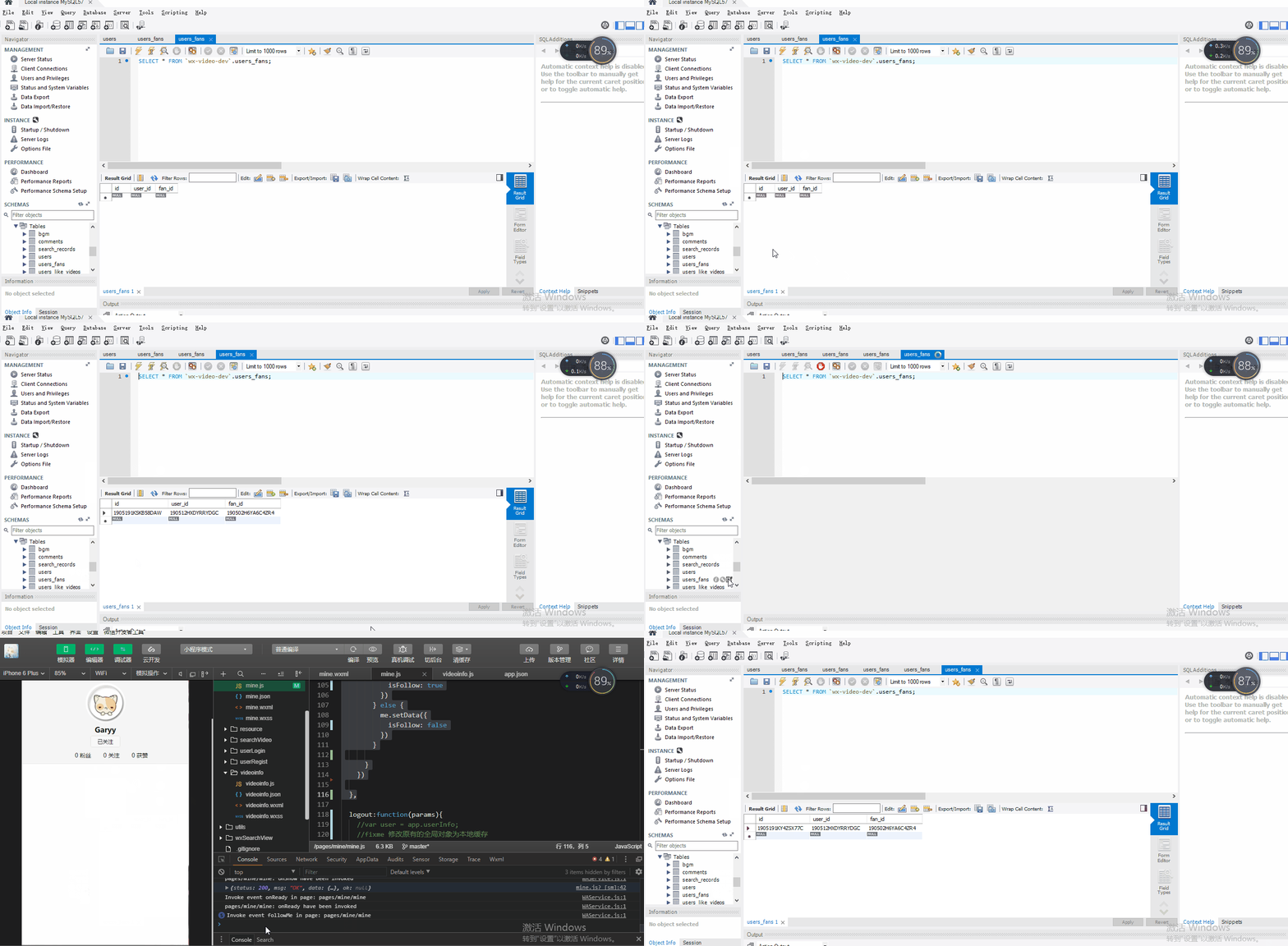
微信小程序关注用户粉丝前后端联调
在mine.js中添加粉丝followMe()函数方法
 followMe:function(e){

    var me = this;

    var user = app.getGlobalUserInfo();

    var userId = user.id;

    var publisherId = me.data.publisherId;

    var followType = e.currentTarget.dataset.followtype;

    //1:关注    0:取消关注

    var url ='';

    if (followType == '1') {

      url = '/user/beyourfans?userId=' + publisherId + '&fanId=' + userId;

    } else {

      url = '/user/dontbeyourfans?userId=' + publisherId + '&fanId=' + userId;

    }

    wx.showLoading();

    wx.request({

      url: app.serverUrl+url,

      method:'POST',

      header: {

        'content-type': 'application/json', // 默认值

        'headerUserId': user.id,

        'headerUserToken': user.userToken

      },

      success:function(){

        wx.hideLoading();

        if (followType == '1') {

          me.setData({

            isFollow: true

          })

        } else {

          me.setData({

            isFollow: false

          })

        }

      }

    })

  },
var videoUtil = require('../../utils/videoUtil.js')

const app = getApp()

Page({

  data: {

    faceUrl: "../resource/images/noneface.png",

    isMe:true,

    isFollow:false

  },

  onLoad: function (params) {

    var me = this;

    //  var user = app.userInfo;

    //fixme 修改原有的全局对象为本地缓存

    var user = app.getGlobalUserInfo();

    var userId = user.id;

    var publisherId = params.publisherId;

    if (publisherId != null && publisherId != '' && publisherId!=undefined)    {

      userId = publisherId;

      me.setData({

        isMe:false,

        publisherId: publisherId

      })

    }

    wx.showLoading({

      title: '请等待...',

    });

    var serverUrl = app.serverUrl;

    wx.request({

      url: serverUrl + '/user/query?userId=' + userId,

      method: "POST",

      header: {

        'content-type': 'application/json', // 默认值

        'userId':user.id,

        'userToken':user.userToken

      },

      success: function (res) {

        console.log(res.data);

        wx.hideLoading();

        if (res.data.status == 200) {

          var userInfo= res.data.data;

          var faceUrl = "../resource/images/noneface.png";

          if (userInfo.faceImage != null && userInfo.faceImage != '' && userInfo.faceImage!=undefined){

            faceUrl = serverUrl + userInfo.faceImage;

          }

          me.setData({

            faceUrl: faceUrl,

            fansCounts: userInfo.fansCounts,

            followCounts: userInfo.followCounts,

            receiveLikeCounts: userInfo.receiveLikeCounts,

            nickname: userInfo.nickname

          });

        } else if (res.data.status == 502){

          wx.showToast({

            title: res.data.msg,

            duration:3000,

            icon:"none",

            success:function(){

              wx.redirectTo({

                url: '../userLogin/login',

              })

            }

          })

        }

      }

    })

  },

  followMe:function(e){

    var me = this;

    var user = app.getGlobalUserInfo();

    var userId = user.id;

    var publisherId = me.data.publisherId;

    var followType = e.currentTarget.dataset.followtype;

    //1:关注    0:取消关注

    var url ='';

    if (followType == '1') {

      url = '/user/beyourfans?userId=' + publisherId + '&fanId=' + userId;

    } else {

      url = '/user/dontbeyourfans?userId=' + publisherId + '&fanId=' + userId;

    }

    wx.showLoading();

    wx.request({

      url: app.serverUrl+url,

      method:'POST',

      header: {

        'content-type': 'application/json', // 默认值

        'headerUserId': user.id,

        'headerUserToken': user.userToken

      },

      success:function(){

        wx.hideLoading();

        if (followType == '1') {

          me.setData({

            isFollow: true

          })

        } else {

          me.setData({

            isFollow: false

          })

        }

      }

    })

  },

  logout:function(params){

    //var user = app.userInfo;

    //fixme 修改原有的全局对象为本地缓存

    var user = app.getGlobalUserInfo();

    var serverUrl = app.serverUrl;

    wx.showLoading({

      title: '请等待...',

    });

    // 调用后端

    wx.request({

      url: serverUrl + '/logout?userId='+user.id,

      method: "POST",

      header: {

        'content-type': 'application/json' // 默认值

      },

      success: function (res) {

        console.log(res.data);

        wx.hideLoading();

        if (res.data.status == 200) {

          // 注销成功

          wx.showToast({

             title: '注销成功',

             icon: 'success',

             duration: 2000

            });

          //清除全局用户对象

          //app.userInfo = null;

          //注销以后,清空缓存

          wx.removeStorageSync('userInfo')

          //页面跳转

          wx.navigateTo({

            url: '../userLogin/login',

          })

        }

      }

    })

  },

  changeFace:function(){

    var me = this;

    wx.chooseImage({

      count: 1,

      sizeType: ['compressed'],

      sourceType: ['album'],

      success:function(res) {

        var tempFilePaths = res.tempFilePaths;

        console.log(tempFilePaths);

        wx.showLoading({

          title: '上传中...',

        })

        var serverUrl = app.serverUrl;

        //fixme 修改原有的全局对象为本地缓存

        var userInfo = app.getGlobalUserInfo();

        wx.uploadFile({

          url: serverUrl+'/user/uploadFace?userId='+userInfo.id,

          filePath: tempFilePaths[0],

          name: 'file',

          header: {

            'content-type': 'application/json', // 默认值

            'headerUserId':userInfo.id,

            'headerUserToken':userInfo.userToken

          },

          success: function (res) {

            var data = JSON.parse(res.data);

            console.log(data);

            wx.hideLoading();

            if(data.status == 200){

              wx.showToast({

                title: '上传成功',

                icon: "success"

              });

              var imageUrl = data.data;

              me.setData({

                faceUrl: serverUrl+imageUrl

              });

            } else if (data.status == 500){

              wx.showToast({

                title: data.msg

              });

            }

          }

        })

      }

    })

  },

  uploadVideo:function(){

    //  videoUtil.uploadVideo();

    var me =this;

    wx.chooseVideo({

      sourceType: ['album'],

      success(res) {

        console.log(res);

        var duration = res.duration;

        var tmpheight = res.height;

        var tmpwidth = res.width;

        var tmpVideoUrl = res.tempFilePath;

        var tmpCoverUrl = res.thumbTempFilePath;

        if(duration>300){

          wx.showToast({

            title: '视频长度不能超过5分钟...',

            icon:"none",

            duration:2500

          })

        } else if(duration<3){

          wx.showToast({

            title: '视频长度太短,请上传超过3秒的视频...',

            icon: "none",

            duration: 2500

          })

        }else{

          //打开选择bgm页面

          wx.navigateTo({

            url: '../chooseBgm/chooseBgm?duration=' + duration

              + "&tmpheight=" + tmpheight

              + "&tmpwidth=" + tmpwidth

              + "&tmpVideoUrl=" + tmpVideoUrl

              + "&tmpCoverUrl=" + tmpCoverUrl

            ,

          })

        }

      }

    })

  }

})
mine.js
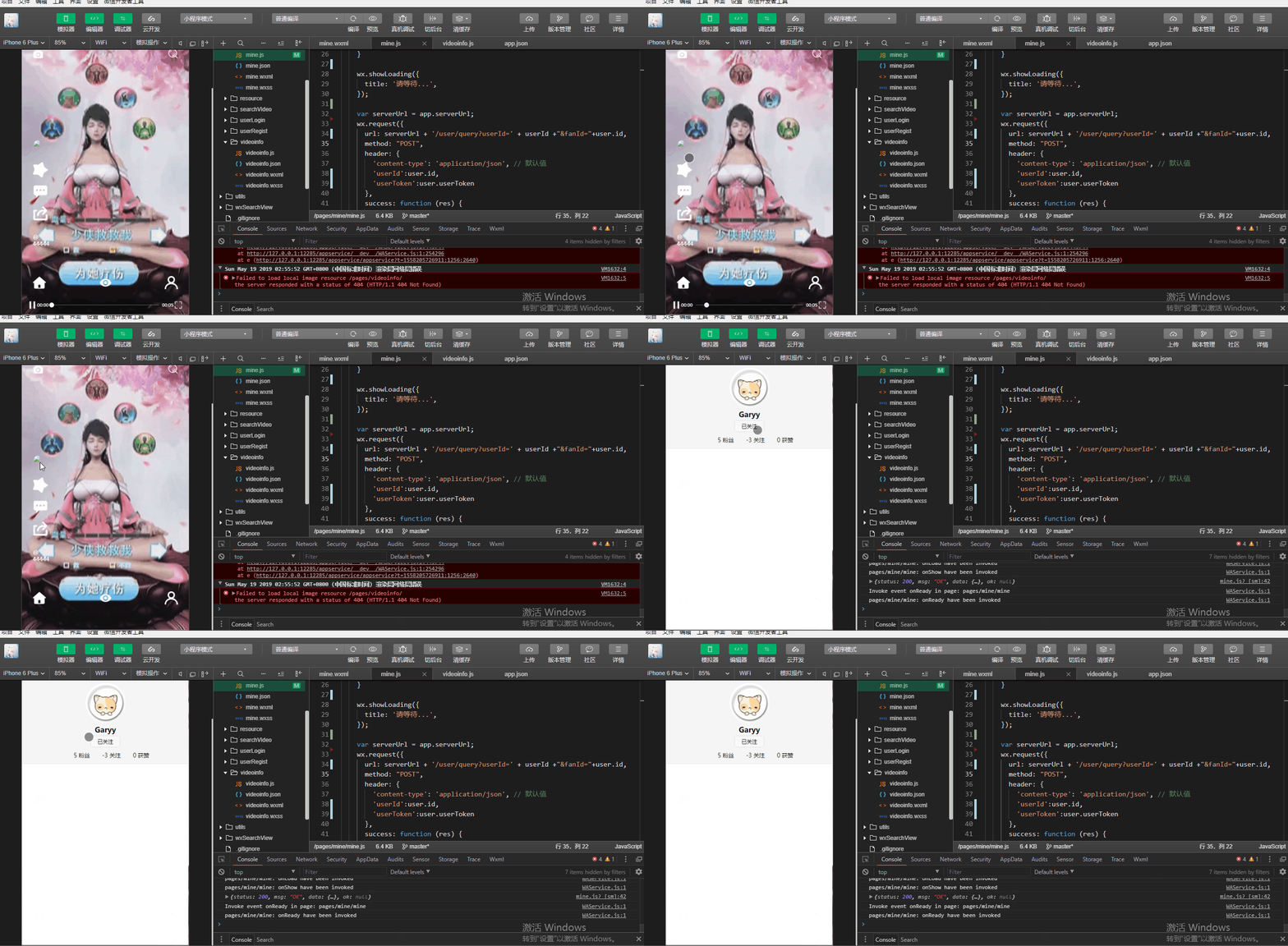
是否关注动态展示
在微信小程序端动态获得添加关注信息,当关注某一用户后,下一次进该用户首页时,自动为关注该用户
@Override

    public boolean queryIfFollow(String userId, String fanId) {

        Example example = new Example(UsersFans.class);

        Criteria criteria = example.createCriteria();

        criteria.andEqualTo("userId",userId);

        criteria.andEqualTo("fanId",fanId);

        List<UsersFans> list = usersFansMapper.selectByExample(example);

        if(list!=null && !list.isEmpty() &&list.size()>0) {

            return true;

        }

        return false;

    }
var videoUtil = require('../../utils/videoUtil.js')

const app = getApp()

Page({

  data: {

    faceUrl: "../resource/images/noneface.png",

    isMe:true,

    isFollow:false

  },

  onLoad: function (params) {

    var me = this;

    //  var user = app.userInfo;

    //fixme 修改原有的全局对象为本地缓存

    var user = app.getGlobalUserInfo();

    var userId = user.id;

    var publisherId = params.publisherId;

    if (publisherId != null && publisherId != '' && publisherId!=undefined)    {

      userId = publisherId;

      me.setData({

        isMe:false,

        publisherId: publisherId

      })

    }

    wx.showLoading({

      title: '请等待...',

    });

    var serverUrl = app.serverUrl;

    wx.request({

      url: serverUrl + '/user/query?userId=' + userId +"&fanId="+user.id,

      method: "POST",

      header: {

        'content-type': 'application/json', // 默认值

        'userId':user.id,

        'userToken':user.userToken

      },

      success: function (res) {

        console.log(res.data);

        wx.hideLoading();

        if (res.data.status == 200) {

          var userInfo= res.data.data;

          var faceUrl = "../resource/images/noneface.png";

          if (userInfo.faceImage != null && userInfo.faceImage != '' && userInfo.faceImage!=undefined){

            faceUrl = serverUrl + userInfo.faceImage;

          }

          me.setData({

            faceUrl: faceUrl,

            fansCounts: userInfo.fansCounts,

            followCounts: userInfo.followCounts,

            receiveLikeCounts: userInfo.receiveLikeCounts,

            nickname: userInfo.nickname,

            isFollow: userInfo.follow

          });

        } else if (res.data.status == 502){

          wx.showToast({

            title: res.data.msg,

            duration:3000,

            icon:"none",

            success:function(){

              wx.redirectTo({

                url: '../userLogin/login',

              })

            }

          })

        }

      }

    })

  },

  followMe:function(e){

    var me = this;

    var user = app.getGlobalUserInfo();

    var userId = user.id;

    var publisherId = me.data.publisherId;

    var followType = e.currentTarget.dataset.followtype;

    //1:关注    0:取消关注

    var url ='';

    if (followType == '1') {

      url = '/user/beyourfans?userId=' + publisherId + '&fanId=' + userId;

    } else {

      url = '/user/dontbeyourfans?userId=' + publisherId + '&fanId=' + userId;

    }

    wx.showLoading();

    wx.request({

      url: app.serverUrl+url,

      method:'POST',

      header: {

        'content-type': 'application/json', // 默认值

        'headerUserId': user.id,

        'headerUserToken': user.userToken

      },

      success:function(){

        wx.hideLoading();

        if (followType == '1') {

          me.setData({

            isFollow: true

          })

        } else {

          me.setData({

            isFollow: false

          })

        }

      }

    })

  },

  logout:function(params){

    //var user = app.userInfo;

    //fixme 修改原有的全局对象为本地缓存

    var user = app.getGlobalUserInfo();

    var serverUrl = app.serverUrl;

    wx.showLoading({

      title: '请等待...',

    });

    // 调用后端

    wx.request({

      url: serverUrl + '/logout?userId='+user.id,

      method: "POST",

      header: {

        'content-type': 'application/json' // 默认值

      },

      success: function (res) {

        console.log(res.data);

        wx.hideLoading();

        if (res.data.status == 200) {

          // 注销成功

          wx.showToast({

             title: '注销成功',

             icon: 'success',

             duration: 2000

            });

          //清除全局用户对象

          //app.userInfo = null;

          //注销以后,清空缓存

          wx.removeStorageSync('userInfo')

          //页面跳转

          wx.navigateTo({

            url: '../userLogin/login',

          })

        }

      }

    })

  },

  changeFace:function(){

    var me = this;

    wx.chooseImage({

      count: 1,

      sizeType: ['compressed'],

      sourceType: ['album'],

      success:function(res) {

        var tempFilePaths = res.tempFilePaths;

        console.log(tempFilePaths);

        wx.showLoading({

          title: '上传中...',

        })

        var serverUrl = app.serverUrl;

        //fixme 修改原有的全局对象为本地缓存

        var userInfo = app.getGlobalUserInfo();

        wx.uploadFile({

          url: serverUrl+'/user/uploadFace?userId='+userInfo.id,

          filePath: tempFilePaths[0],

          name: 'file',

          header: {

            'content-type': 'application/json', // 默认值

            'headerUserId':userInfo.id,

            'headerUserToken':userInfo.userToken

          },

          success: function (res) {

            var data = JSON.parse(res.data);

            console.log(data);

            wx.hideLoading();

            if(data.status == 200){

              wx.showToast({

                title: '上传成功',

                icon: "success"

              });

              var imageUrl = data.data;

              me.setData({

                faceUrl: serverUrl+imageUrl

              });

            } else if (data.status == 500){

              wx.showToast({

                title: data.msg

              });

            }

          }

        })

      }

    })

  },

  uploadVideo:function(){

    //  videoUtil.uploadVideo();

    var me =this;

    wx.chooseVideo({

      sourceType: ['album'],

      success(res) {

        console.log(res);

        var duration = res.duration;

        var tmpheight = res.height;

        var tmpwidth = res.width;

        var tmpVideoUrl = res.tempFilePath;

        var tmpCoverUrl = res.thumbTempFilePath;

        if(duration>300){

          wx.showToast({

            title: '视频长度不能超过5分钟...',

            icon:"none",

            duration:2500

          })

        } else if(duration<3){

          wx.showToast({

            title: '视频长度太短,请上传超过3秒的视频...',

            icon: "none",

            duration: 2500

          })

        }else{

          //打开选择bgm页面

          wx.navigateTo({

            url: '../chooseBgm/chooseBgm?duration=' + duration

              + "&tmpheight=" + tmpheight

              + "&tmpwidth=" + tmpwidth

              + "&tmpVideoUrl=" + tmpVideoUrl

              + "&tmpCoverUrl=" + tmpCoverUrl

            ,

          })

        }

      }

    })

  }

})
mine.js
发现点击是否关注时粉丝数量没有进行同步,在mine.js中进行粉丝数量动态显示
success:function(){

        wx.hideLoading();

        if (followType == '1') {

          me.setData({

            isFollow: true,

            fansCounts:++me.data.fansCounts

          })

        } else {

          me.setData({

            isFollow: false,

             fansCounts: --me.data.fansCounts

          })

        }
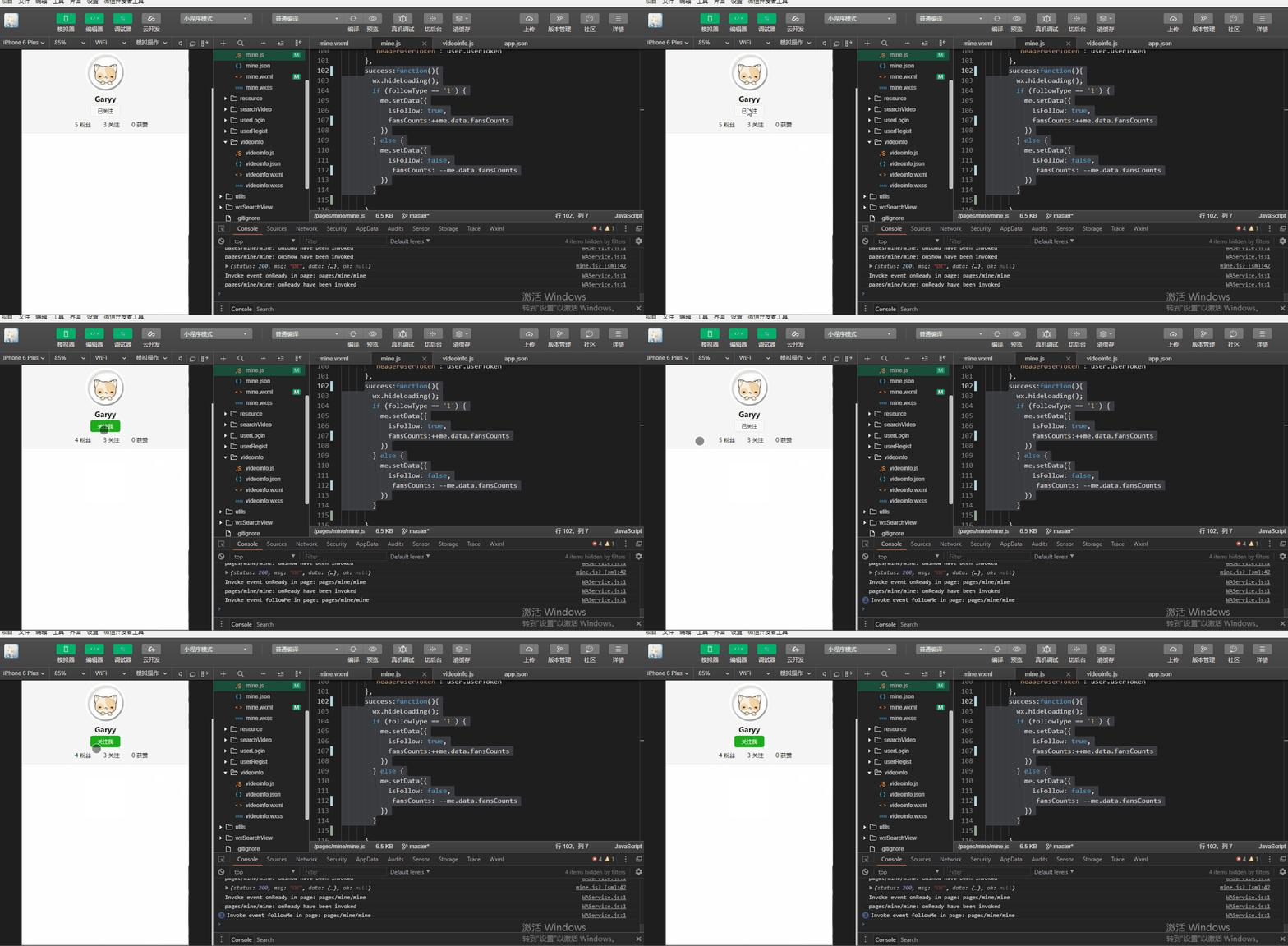
var videoUtil = require('../../utils/videoUtil.js')

const app = getApp()

Page({

  data: {

    faceUrl: "../resource/images/noneface.png",

    isMe:true,

    isFollow:false

  },

  onLoad: function (params) {

    var me = this;

    //  var user = app.userInfo;

    //fixme 修改原有的全局对象为本地缓存

    var user = app.getGlobalUserInfo();

    var userId = user.id;

    var publisherId = params.publisherId;

    if (publisherId != null && publisherId != '' && publisherId!=undefined)    {

      userId = publisherId;

      me.setData({

        isMe:false,

        publisherId: publisherId

      })

    }

    wx.showLoading({

      title: '请等待...',

    });

    var serverUrl = app.serverUrl;

    wx.request({

      url: serverUrl + '/user/query?userId=' + userId +"&fanId="+user.id,

      method: "POST",

      header: {

        'content-type': 'application/json', // 默认值

        'userId':user.id,

        'userToken':user.userToken

      },

      success: function (res) {

        console.log(res.data);

        wx.hideLoading();

        if (res.data.status == 200) {

          var userInfo= res.data.data;

          var faceUrl = "../resource/images/noneface.png";

          if (userInfo.faceImage != null && userInfo.faceImage != '' && userInfo.faceImage!=undefined){

            faceUrl = serverUrl + userInfo.faceImage;

          }

          me.setData({

            faceUrl: faceUrl,

            fansCounts: userInfo.fansCounts,

            followCounts: userInfo.followCounts,

            receiveLikeCounts: userInfo.receiveLikeCounts,

            nickname: userInfo.nickname,

            isFollow: userInfo.follow

          });

        } else if (res.data.status == 502){

          wx.showToast({

            title: res.data.msg,

            duration:3000,

            icon:"none",

            success:function(){

              wx.redirectTo({

                url: '../userLogin/login',

              })

            }

          })

        }

      }

    })

  },

  followMe:function(e){

    var me = this;

    var user = app.getGlobalUserInfo();

    var userId = user.id;

    var publisherId = me.data.publisherId;

    var followType = e.currentTarget.dataset.followtype;

    //1:关注    0:取消关注

    var url ='';

    if (followType == '1') {

      url = '/user/beyourfans?userId=' + publisherId + '&fanId=' + userId;

    } else {

      url = '/user/dontbeyourfans?userId=' + publisherId + '&fanId=' + userId;

    }

    wx.showLoading();

    wx.request({

      url: app.serverUrl+url,

      method:'POST',

      header: {

        'content-type': 'application/json', // 默认值

        'headerUserId': user.id,

        'headerUserToken': user.userToken

      },

      success:function(){

        wx.hideLoading();

        if (followType == '1') {

          me.setData({

            isFollow: true,

            fansCounts:++me.data.fansCounts

          })

        } else {

          me.setData({

            isFollow: false,

             fansCounts: --me.data.fansCounts

          })

        }

      }

    })

  },

  logout:function(params){

    //var user = app.userInfo;

    //fixme 修改原有的全局对象为本地缓存

    var user = app.getGlobalUserInfo();

    var serverUrl = app.serverUrl;

    wx.showLoading({

      title: '请等待...',

    });

    // 调用后端

    wx.request({

      url: serverUrl + '/logout?userId='+user.id,

      method: "POST",

      header: {

        'content-type': 'application/json' // 默认值

      },

      success: function (res) {

        console.log(res.data);

        wx.hideLoading();

        if (res.data.status == 200) {

          // 注销成功

          wx.showToast({

             title: '注销成功',

             icon: 'success',

             duration: 2000

            });

          //清除全局用户对象

          //app.userInfo = null;

          //注销以后,清空缓存

          wx.removeStorageSync('userInfo')

          //页面跳转

          wx.navigateTo({

            url: '../userLogin/login',

          })

        }

      }

    })

  },

  changeFace:function(){

    var me = this;

    wx.chooseImage({

      count: 1,

      sizeType: ['compressed'],

      sourceType: ['album'],

      success:function(res) {

        var tempFilePaths = res.tempFilePaths;

        console.log(tempFilePaths);

        wx.showLoading({

          title: '上传中...',

        })

        var serverUrl = app.serverUrl;

        //fixme 修改原有的全局对象为本地缓存

        var userInfo = app.getGlobalUserInfo();

        wx.uploadFile({

          url: serverUrl+'/user/uploadFace?userId='+userInfo.id,

          filePath: tempFilePaths[0],

          name: 'file',

          header: {

            'content-type': 'application/json', // 默认值

            'headerUserId':userInfo.id,

            'headerUserToken':userInfo.userToken

          },

          success: function (res) {

            var data = JSON.parse(res.data);

            console.log(data);

            wx.hideLoading();

            if(data.status == 200){

              wx.showToast({

                title: '上传成功',

                icon: "success"

              });

              var imageUrl = data.data;

              me.setData({

                faceUrl: serverUrl+imageUrl

              });

            } else if (data.status == 500){

              wx.showToast({

                title: data.msg

              });

            }

          }

        })

      }

    })

  },

  uploadVideo:function(){

    //  videoUtil.uploadVideo();

    var me =this;

    wx.chooseVideo({

      sourceType: ['album'],

      success(res) {

        console.log(res);

        var duration = res.duration;

        var tmpheight = res.height;

        var tmpwidth = res.width;

        var tmpVideoUrl = res.tempFilePath;

        var tmpCoverUrl = res.thumbTempFilePath;

        if(duration>300){

          wx.showToast({

            title: '视频长度不能超过5分钟...',

            icon:"none",

            duration:2500

          })

        } else if(duration<3){

          wx.showToast({

            title: '视频长度太短,请上传超过3秒的视频...',

            icon: "none",

            duration: 2500

          })

        }else{

          //打开选择bgm页面

          wx.navigateTo({

            url: '../chooseBgm/chooseBgm?duration=' + duration

              + "&tmpheight=" + tmpheight

              + "&tmpwidth=" + tmpwidth

              + "&tmpVideoUrl=" + tmpVideoUrl

              + "&tmpCoverUrl=" + tmpCoverUrl

            ,

          })

        }

      }

    })

  }

})
mine.js
微信小程序_(校园视)开发视频的展示页_下的更多相关文章
- 微信小程序_(校园视)开发视频的展示页_上
微信小程序_(校园视) 开发用户注册登陆 传送门 微信小程序_(校园视) 开发上传视频业务 传送门 微信小程序_(校园视) 开发视频的展示页-上 传送门 微信小程序_(校园视) 开发视频的展示页-下 ...
- 微信小程序_(校园视)开发上传视频业务
微信小程序_(校园视) 开发用户注册登陆 传送门 微信小程序_(校园视) 开发上传视频业务 传送门 微信小程序_(校园视) 开发视频的展示页-上 传送门 微信小程序_(校园视) 开发视频的展示页-下 ...
- 微信小程序_(校园视)开发用户注册登陆
微信小程序_(校园视) 开发用户注册登陆 传送门 微信小程序_(校园视) 开发上传视频业务 传送门 微信小程序_(校园视) 开发视频的展示页-上 传送门 微信小程序_(校园视) 开发视频的展示页-下 ...
- 从微信小程序到鸿蒙js开发【13】——list加载更多&回到顶部
鸿蒙入门指南,小白速来!从萌新到高手,怎样快速掌握鸿蒙开发?[课程入口] 目录: 1.list加载更多 2.list回到顶部 3.<从微信小程序到鸿蒙js开发>系列文章合集 1.list加 ...
- 微信小程序购物商城系统开发系列-目录结构
上一篇我们简单介绍了一下微信小程序的IDE(微信小程序购物商城系统开发系列-工具篇),相信大家都已经蠢蠢欲试建立一个自己的小程序,去完成一个独立的商城网站. 先别着急我们一步步来,先尝试下写一个自己的 ...
- 微信小程序购物商城系统开发系列-工具篇
微信小程序开放公测以来,一夜之间在各种技术社区中就火起来啦.对于它 估计大家都不陌生了,对于它未来的价值就不再赘述,简单一句话:可以把小程序简单理解为一个新的操作系统.新的生态,未来大部分应用场景都将 ...
- 微信小程序购物商城系统开发系列
微信小程序购物商城系统开发系列 微信小程序开放公测以来,一夜之间在各种技术社区中就火起来啦.对于它 估计大家都不陌生了,对于它未来的价值就不再赘述,简单一句话:可以把小程序简单理解为一个新的操作系统. ...
- 从微信小程序到鸿蒙js开发【11】——页面路由
目录: 1.router.push()&wx.navigateTo() 2.router.replace()&wx.redirectTo() 3.router.back()&w ...
- 从微信小程序到鸿蒙js开发【12】——storage缓存&自动登录
鸿蒙入门指南,小白速来!从萌新到高手,怎样快速掌握鸿蒙开发?[课程入口] 正文: 在应用开发时,我们常需要将一些数据缓存到本地,以提升用户体验.比如在一个电商的app中,如果希望用户登录成功后,下次打 ...
随机推荐
- luogu题解 UVA11992 【Fast Matrix Operations】
题目链接: https://www.luogu.org/problemnew/show/UVA11992 题目大意: 一个r*c的矩阵,一开始元素都是0,然后给你m次三种操作,分别是将一个子矩阵中所有 ...
- ThreadLocal的原理与使用
前言 在java web项目中,经常会使用到单例对象,从服务器启动那一时刻就实例化全局对象.然后会对某些全局对象的属性进行修改之类的操作,但是我们知道项目一般都是部署到tomcat.Jboss之类的服 ...
- 将xml作为输入参数传递给存储过程
1 查看存储过程的方式 exec sp_helptext 'GetTrackingFeedLogByMaxId' select definition from sys.sql_modules wher ...
- vue 编辑
点击文字修改 <div class="baseInfo"> <p class="title">基本信息</p> <p ...
- mybatis报错,There is no getter for property named 'templateName' in 'class
There is no getter for property named 'templateName' in 'class 主要原因是因为mapper.xml 的语句有错误,导致在bean里找不到相 ...
- 第十五章·Kibana深入-Dev Tools及Lucene语法
Dev Tools介绍 Dev Tools 页面包含开发工具,您可以使用这些Dev Tools与Kibana中的数据进行交互. 原先的交互式控制台Sense,使用户方便的通过浏览器直接与Elastic ...
- Java 通过Math.random() 生成6位随机数
public static void main(String[] args) { String sjs=""; for (int i = 0; i < 6; i++) { i ...
- 使用比特币轻量钱包Electrum
一.选择对应的钱包安装程序 浏览器打开 https://electrum.org/#download 选择windwos版本的安装程序 点击下载,并安装 二.运行Electrum的 testnet版本 ...
- PLSQL功能一览(1/2)
用了Oracle几年了,除了PLSQL几乎就没用过别的工具.临时起义想看看PLSQL有哪些功能是我平时没注意的,别是一直有好办法,我却用着笨办法. 本文针对PLSQL12.0.7 1.登录以后使用My ...
- python: 错误处理try详解 ,traceback调用栈, 调试(logging)
摘录:https://www.liaoxuefeng.com/wiki/1016959663602400/1017598873256736 错误处理 调试 错误处理 高级语言都会使用内置的一套try. ...