
https web service in Tibco & PC
Error:
1.Certificate signature validation failed , Signature does not match
use wrong public certification
2.java.net.SocketException:Connection reset
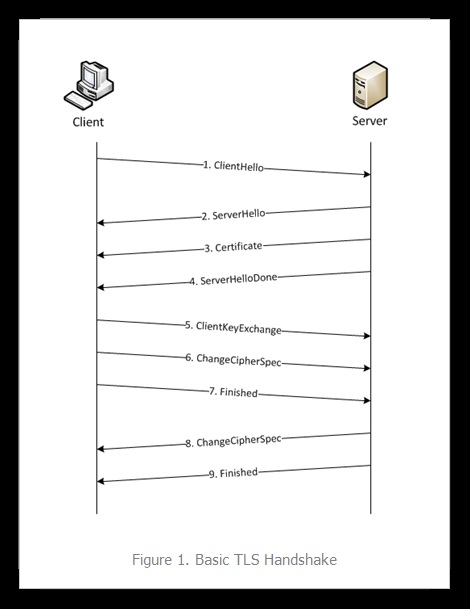
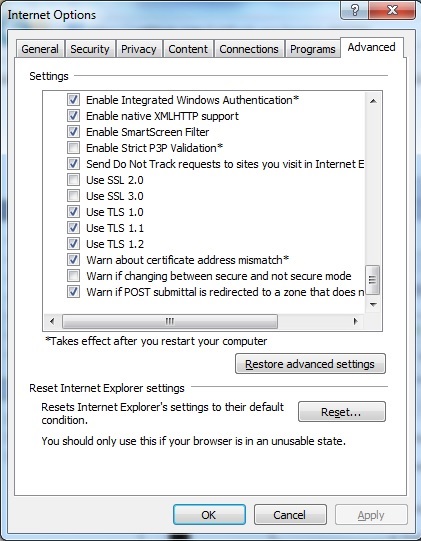
the client tls protocol version not match
3.javax.net.ssl.SSLException:Unrecognized SSL message,plaintext connection?
将SSL发去80或者将non-ssl发去443
4.javax.net.ssl.SSLPeerUnverifiedException:peer not authenticated
When use Fiddler to monitor SoapUI request , require to import certification into c:\Program Files(X86)\SmartBear\SoapUI-4.6.2\jre\lib\security\cacerts
5.javax.security.auth.login.FailedLoginException:key '...' cannot be retrieved,no key for alias '...' found a cerfificate entry instead in key store
If JKS use in server side, it should include private key and public certificatin . But there's no import key parameter in keytool function , so can use openssl convert the key and cert to PFX file and then use keytool to convert PFX file to JKS file.
Refers link:
tibco web service over ssl
https://tibcobwblog.com/2015/03/09/implementing-https-service-with-tibco-businessworks-6-1/comment-page-1/
c# web service over ssl
https://msdn.microsoft.com/en-us/library/hh556232(v=vs.110).aspx
解决PKIX(PKIX path building failed) 问题 unable to find valid certification path to requested target
http://www.cnblogs.com/wanghaixing/p/5630070.html java InstallCert 172.16.4.133
TLS/SSL Tools and Settings
https://technet.microsoft.com/en-us/library/cc776467(v=ws.10).aspx#w2k3tr_schan_tools_hivv
openssl制作双向认证经过验证可行
http://www.360doc.com/content/12/0524/15/2150778_213390447.shtml
verify TLS version
OpenSSL> s_client -showcerts -connect 172.16.3.170:443
OpenSSL> s_client -debug -connect 172.16.3.170:443
[解决]小程序要求的 TLS 版本必须大于等于 1.2
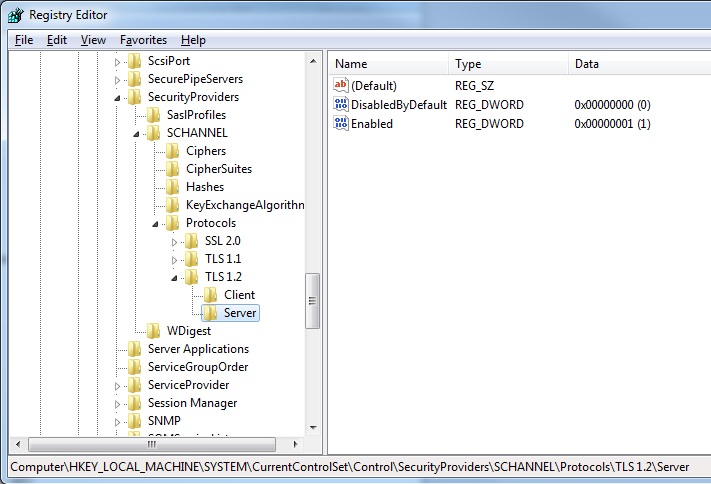
http://www.cnblogs.com/minamiko/p/6128455.html "HKLM:\SYSTEM\CurrentControlSet\Control\SecurityProviders\SCHANNEL\Protocols\TLS 1.2" DisabledByDefault Enabled DWord 32bit Restatt!
generate CSR from JKS
http://www.entrust.net/knowledge-base/technote.cfm?tn=8425
keytool -certreq -keyalg RSA -alias myalias -file certreq.txt -keystore c:\yoursite.mykeystore
generate CERT from JKS
keytool -export -alias certificatekey -keystore keystore.jks -rfc -file public.cert
keytool -importcert -file d:\temp\129\cert.cert -keystore d:\temp\qareq.jks -alias "qaca"
openssl、x509、crt、cer、key、csr、ssl、tls 这些都是什么鬼?
http://www.cnblogs.com/yjmyzz/p/openssl-tutorial.html
How to enable Schannel event logging in IIS
https://support.microsoft.com/en-us/help/260729/how-to-enable-schannel-event-logging-in-iis
SoapUI not working with fiddler for REST service testing
http://stackoverflow.com/questions/22569356/soapui-not-working-with-fiddler-for-rest-service-testing
keytool -importcert -file c:\FiddlerRoot.cer -keystore cacerts
TLS Cipher Suites in Windows 7
https://msdn.microsoft.com/en-us/library/windows/desktop/mt767780(v=vs.85).aspx
TLS 1.3 & TLS 1.2 Handshake & Resumption Supporting tagline
http://abbypan.github.io/2016/09/27/tls-13-resumption
Cipher suite
https://en.wikipedia.org/wiki/Cipher_suite
SSL协议详解
http://kb.cnblogs.com/page/162080/
密码套件格式:每个套件都以“SSL”开头,紧跟着的是密钥交换算法。用“With”这个词把密钥交换算法、加密算法、散列算法分开,例如:SSL_DHE_RSA_WITH_DES_CBC_SHA, 表示把DHE_RSA(带有RSA数字签名的暂时Diffie-HellMan)定义为密钥交换算法;把DES_CBC定义为加密算法;把SHA定义为散列算法。
How to restrict the use of certain cryptographic algorithms and protocols in Schannel.dll
https://support.microsoft.com/en-us/help/245030/how-to-restrict-the-use-of-certain-cryptographic-algorithms-and-protocols-in-schannel.dll
CertMgr.msc
How to disable SSL 2.0 or SSL 3.0 from IIS Server
https://blogs.msdn.microsoft.com/webapps/2014/10/29/how-to-disable-ssl-2-0-or-ssl-3-0-from-iis-server/
https web service in Tibco & PC的更多相关文章
- 走进云背后:微软Azure web 项目通过web service部署web site
探索云那不为人知的故事(一):Web Services部署web site 前奏:Windows Azure是微软基于云计算的操作系统,现在更名为“Microsoft Azure”,和Azure Se ...
- web service, wcf, wcf rest, web api之间的区别
在.NET Framework中,有很多种技术可以创建基于http协议的服务,譬如说web service, wcf,wcf rest和web api等等.网上有很多的文章教我们如何开发.使用这几种技 ...
- WCF、Web API、WCF REST、Web Service比较
原文地址:http://www.dotnet-tricks.com/Tutorial/webapi/JI2X050413-Difference-between-WCF-and-Web-API-and- ...
- Web Service和WCF的区别。其实二者不属于一个范畴!!!
Web Service和WCF的区别 [1]Web Service:严格来说是行业标准,也就是Web Service 规范. 它有一套完成的规范体系标准,而且在持续不断的更新完善中. 它使用XML扩展 ...
- Difference between WCF and Web API and WCF REST and Web Service
The .Net framework has a number of technologies that allow you to create HTTP services such as Web S ...
- Spring 4 集成Apache CXF开发JAX-RS Web Service
什么是JAX-RS 在JSR-311规范中定义,即Java API for RESTful Web Services,一套Java API,用于开发 RESTful风格的Webservice. 工程概 ...
- HTTPS Web配置举例
http://www.h3c.com.cn/Products___Technology/Technology/Security_Encrypt/Other_technology/Representat ...
- WCF 、Web API 、 WCF REST 和 Web Service 的区别
WCF .Web API . WCF REST 和 Web Service 的区别 The .Net framework has a number of technologies that allow ...
- 翻译-使用Spring调用SOAP Web Service
原文链接: http://spring.io/guides/gs/consuming-web-service/ 调用SOAP web service 本指南将指导你使用Spring调用一个基于SOAP ...
随机推荐
- 机器学习之Adaboost与XGBoost笔记
提升的概念 提升是一个机器学习技术,可以用于回归和分类问题,它每一步产生一个弱预测模型(如决策树),并加权累加到总模型中:如果每一步的弱预测模型生成都是依据损失函数的梯度方向,则称之为梯度提升(Gra ...
- Cow Brainiacs
#include<stdio.h> int main() { ,i; scanf("%d %d",&n,&b); ;i<=n;i++) { f*= ...
- mininet安装配置
mininet安装配置 安装mininet mininet使用 在VM中运行mininet 安装VMware,在VMware中打开下载好的mininet虚拟机映像 启动虚拟机,虚拟机的初始账号密码均为 ...
- Java 8 新特性--Lambda表达式作为方法参数
Lambda表达式的使用场景: 当方法的参数是一个函数式接口时,可以使用Lambda表达式进行简化—— 首先,前提是Runnable接口是一个函数式接口,经过查看源码得知,确实如此: 将Runnabl ...
- Win自带mastc远程Cenots7桌面
1.Centos7安装桌面 yum -y groups install "GNOME Desktop" startx 2.安装xrdp 操作需要root用户权限,所以,我们先切换为 ...
- 基于MFC的网页ActiveX控件开发全程实录2(js向ActiveX控件传递参数)
原文转自 https://blog.csdn.net/qianbin3200896/article/details/81452822 1.ActiveX控件部分(JS到ActiveX控件)继续上一篇博 ...
- wget的url获取方式
获取方式 每次用wget都是在网上查相应的url,但以前没怎么关注过这个url是怎么获取到的,这里总结一下 这里以下载jekins为例: 打开jekins网站:https://jenkins.io/d ...
- J.U.C之AQS:阻塞和唤醒线程
此篇博客所有源码均来自JDK 1.8 在线程获取同步状态时如果获取失败,则加入CLH同步队列,通过通过自旋的方式不断获取同步状态,但是在自旋的过程中则需要判断当前线程是否需要阻塞,其主要方法在acqu ...
- Django Rest framework实现流程
目录 一 什么是restful架构 二 Django REST framework简介 三 Django REST framework原理 四 Django REST framework源码流程 五 ...
- mycat使用--schema配置
<?xml version="1.0"?> <!DOCTYPE schema SYSTEM "schema.dtd"> -<myc ...