
Java Redis+Spring-data-redis 队列 单机版
1、redis.properties
##redisIP地址

#redis.host=10.14.2.212

redis.host=127.0.0.1

##redis默认端口号

redis.port=6379

#redis密码

redis.pass=a7217sec!@#

##redis.database=0     ##指定使用第几个库

redis.maxIdle=300

redis.maxActive=600

redis.maxWait=1000

redis.testOnBorrow=true

redis.timeout=1000

redis.pool.maxActive=200

redis.pool.maxIdle=50

redis.pool.minIdle=0

redis.pool.maxWait=15000

##向调用者输出链接资源时,是否检测是否有效,如果无效则从连接池中移除,尝试继续获取,默认为false,建议保留默认值

redis.pool.testOnBorrow=false

##向连接池“归还”链接时,是否检测“链接”对象的有效性。默认为false。建议保持默认值.

redis.pool.testOnReturn=false

##maxActive: 链接池中最大连接数,默认为8.

##maxIdle: 链接池中最大空闲的连接数,默认为8.

##minIdle: 连接池中最少空闲的连接数,默认为0.

##maxWait: 当连接池资源耗尽时,调用者最大阻塞的时间,超时将跑出异常。单位,毫秒数;默认为-1.表示永不超时.

##minEvictableIdleTimeMillis: 连接空闲的最小时间,达到此值后空闲连接将可能会被移除。负值(-1)表示不移除。

##softMinEvictableIdleTimeMillis: 连接空闲的最小时间,达到此值后空闲链接将会被移除,且保留“minIdle”个空闲连接数。默认为-1.

##numTestsPerEvictionRun: 对于“空闲链接”检测线程而言,每次检测的链接资源的个数。默认为3.

##testOnBorrow: 向调用者输出“链接”资源时,是否检测是有有效,如果无效则从连接池中移除,并尝试获取继续获取。默认为false。建议保持默认值.

##testOnReturn:  向连接池“归还”链接时,是否检测“链接”对象的有效性。默认为false。建议保持默认值.

##testWhileIdle:false  向调用者输出“链接”对象时,是否检测它的空闲超时;默认为false。如果“链接”空闲超时,将会被移除。建议保持默认值.

##timeBetweenEvictionRunsMillis:  “空闲链接”检测线程,检测的周期,毫秒数。如果为负值,表示不运行“检测线程”。默认为-1.

##whenExhaustedAction: 当“连接池”中active数量达到阀值时,即“链接”资源耗尽时,连接池需要采取的手段, 默认为1:

## -> 0 : 抛出异常,

## -> 1 : 阻塞,直到有可用链接资源

## -> 2 : 强制创建新的链接资源
2、spring-redis.xml
<?xml version="1.0" encoding="UTF-8"?>

<beans xmlns="http://www.springframework.org/schema/beans"

       xmlns:xsi="http://www.w3.org/2001/XMLSchema-instance"

       xmlns:context="http://www.springframework.org/schema/context"

       xmlns:p="http://www.springframework.org/schema/p"

       xsi:schemaLocation="

        http://www.springframework.org/schema/beans http://www.springframework.org/schema/beans/spring-beans-4.0.xsd

        http://www.springframework.org/schema/context http://www.springframework.org/schema/context/spring-context-4.0.xsd">

    <context:annotation-config />

    <!-- 引入外部属性文件. -->

    <context:property-placeholder location="classpath*:redis.properties" ignore-unresolvable="true" />

    <!-- 注册 -->

    <context:component-scan base-package="com.xiaomei.queue.redis.demo01"/>

    <bean id="poolConfig" class="redis.clients.jedis.JedisPoolConfig">

        <!--<property name="maxTotal" value="${redis.pool.maxActive}" />-->

        <!--最大空闲连接数 -->

        <property name="maxIdle" value="${redis.pool.maxIdle}" />

        <!--初始化连接数 -->

        <property name="minIdle" value="${redis.pool.minIdle}" />

        <!--最大等待时间 -->

        <property name="maxWaitMillis" value="${redis.pool.maxWait}" />

        <!--对拿到的connection进行validateObject校验 -->

        <property name="testOnBorrow" value="${redis.pool.testOnBorrow}" />

        <!--在进行returnObject对返回的connection进行validateObject校验 -->

        <property name="testOnReturn" value="${redis.pool.testOnReturn}" />

        <!--定时对线程池中空闲的链接进行validateObject校验 -->

        <property name="testWhileIdle" value="false" />

    </bean>

    <bean id="connectionFactory" class="org.springframework.data.redis.connection.jedis.JedisConnectionFactory"

          p:host-name="${redis.host}" p:port="${redis.port}" p:password="mxb123"  p:pool-config-ref="poolConfig"/>

    <bean id="redisTemplate" class="org.springframework.data.redis.core.StringRedisTemplate">

        <property name="connectionFactory"   ref="connectionFactory" />

        <property name="keySerializer">

            <bean class="org.springframework.data.redis.serializer.StringRedisSerializer" />

        </property>

        <property name="valueSerializer">
        <!-- 采用jdk序列 -->

            <bean class="org.springframework.data.redis.serializer.JdkSerializationRedisSerializer" />

        </property>

    </bean>

  <!-- 发送邮件的队列,这边只是个例子 -->

    <bean id="sentEmailQueue" class="com.xiaomei.queue.redis.demo01.SendEmailQueue">

        <property name="redisQueue"  >

            <bean class="com.xiaomei.queue.redis.demo01.RedisQueue" destroy-method="destroy">

                <property name="redisTemplate" ref="redisTemplate"></property>

                <property name="queueName" value="email"></property>

            </bean>

        </property>

    </bean>

</beans>
3、IRedisQueue.java
package com.xiaomei.queue.redis.demo01;

import java.util.concurrent.TimeUnit;

/**

 * @author xiaomei

 * @version V1.0

 * @Title: IRedisQueue

 * @Package com.xiaomei.queue.redis.demo01

 * @Description:

 * @date 11/7/17

 */

public interface IRedisQueue<T> {

    /**

     * 从头开始拿

     * 拿出,没有就等待

     * @return

     * @throws InterruptedException

     */

    public T take() throws InterruptedException;

    /**

     * 从尾开始拿

     * 拿出,没有就等待

     * @return

     * @throws InterruptedException

     */

    public T takeOpposite() throws InterruptedException;

    /**

     * 从头开始拿

     * 拿出,没有就等待 seconds 秒

     * @param seconds

     * @return

     * @throws InterruptedException

     */

    public T poll(int seconds) throws InterruptedException;

    /**

     * 从头开始拿

     * 拿出,没有就等待 seconds 秒

     * @param seconds

     * @return

     * @throws InterruptedException

     */

    public T pollOpposite(int seconds) throws InterruptedException;

    /**

     * 从尾开始放

     * 入队

     * @param value

     * @return

     * @throws InterruptedException

     */

    public void add(T value);

    /**

     * 从头开始放

     * 入队

     * @param value

     * @return

     * @throws InterruptedException

     */

    public void addOpposite(T value);

//

//    /**

//     * 从头开始删除

//     * @return

//     */

//    public T remove();

//

//

//    /**

//     * 从尾开始删除

//     * @return

//     */

//    public T removeOpposite();

//

    /**

     *  删除所有

     */

    public void clearAll();

}
4、RedisQueue.java
package com.xiaomei.queue.redis.demo01;

import org.springframework.beans.factory.DisposableBean;

import org.springframework.beans.factory.InitializingBean;

import org.springframework.data.redis.connection.RedisConnection;

import org.springframework.data.redis.connection.RedisConnectionFactory;

import org.springframework.data.redis.core.BoundListOperations;

import org.springframework.data.redis.core.RedisConnectionUtils;

import org.springframework.data.redis.core.RedisTemplate;

import org.springframework.util.CollectionUtils;

import java.util.List;

import java.util.concurrent.locks.Lock;

import java.util.concurrent.locks.ReentrantLock;

/**

 * @author xiaomei

 * @version V1.0

 * @Title: RedisQueue

 * @Package com.xiaomei.queue.redis.demo01

 * @Description:

 * @date 11/7/17

 */

public class RedisQueue<T> implements InitializingBean,DisposableBean,IRedisQueue<T> {

    //队列名称

    public String queueName;

    //原生key

    private byte[] rawKey;

    private RedisTemplate redisTemplate;

    private RedisConnectionFactory factory;

    private RedisConnection connection; //为了堵塞

    private BoundListOperations<String, T> listOperations;

    private Lock lock = new ReentrantLock();//基于底层IO阻塞考虑  如果分布式的话,就是用分式式的锁

    @Override

    public T take() throws InterruptedException {

        return poll(0);

    }

    @Override

    public T takeOpposite() throws InterruptedException {

        return pollOpposite(0);

    }

    @Override

    public T poll(int seconds) throws InterruptedException {

        lock.lockInterruptibly();

        try{

            List<byte[]> results = connection.bRPop(seconds, rawKey);

            if(CollectionUtils.isEmpty(results)){

                return null;

            }

            return (T)redisTemplate.getValueSerializer().deserialize(results.get(1));

        }finally{

            lock.unlock();

        }

    }

    @Override

    public T pollOpposite(int seconds) throws InterruptedException {

        lock.lockInterruptibly();

        try{

            List<byte[]> results = connection.bLPop(seconds, rawKey);

            if(CollectionUtils.isEmpty(results)){

                return null;

            }

            return (T)redisTemplate.getValueSerializer().deserialize(results.get(1));

        }finally{

            lock.unlock();

        }

    }

    @Override

    public void add(T value) {

        listOperations.rightPush(value);

    }

    @Override

    public void addOpposite(T value) {

        listOperations.leftPush(value);

    }

    @Override

    public void clearAll() {

//        listOperations.

    }

    @Override

    public void afterPropertiesSet() throws Exception {

        factory = redisTemplate.getConnectionFactory();

        connection = RedisConnectionUtils.getConnection(factory);

        rawKey = redisTemplate.getKeySerializer().serialize(queueName);

        listOperations = redisTemplate.boundListOps(queueName);

    }

    @Override

    public void destroy() throws Exception {

        RedisConnectionUtils.releaseConnection(connection, factory);

    }

    public void setQueueName(String queueName) {

        this.queueName = queueName;

    }

    public void setRedisTemplate(RedisTemplate redisTemplate) {

        this.redisTemplate = redisTemplate;

    }

}
5、SendEmailQueue
package com.xiaomei.queue.redis.demo01;

import com.xiaomei.queue.redis.demo01.entity.EmailEntity;

import org.springframework.beans.factory.annotation.Autowired;

import org.springframework.context.support.ClassPathXmlApplicationContext;

import org.springframework.data.redis.core.RedisTemplate;

/**

 * @author xiaomei

 * @version V1.0

 * @Title: SendEmailQueue

 * @Package com.xiaomei.queue.redis.demo01

 * @Description:

 * @date 11/7/17

 */

public class SendEmailQueue implements Runnable{

    //@Autowired

    private IRedisQueue<EmailEntity> redisQueue;

    public IRedisQueue<EmailEntity> getRedisQueue() {

        return redisQueue;

    }

    public void setRedisQueue(IRedisQueue<EmailEntity> redisQueue) {

        this.redisQueue = redisQueue;

    }

    public void sentEmail(EmailEntity emailEntity) {

        redisQueue.add(emailEntity);

    }

    public EmailEntity getEmail() throws InterruptedException {

        return redisQueue.poll(1);

    }

    @Override

    public void run() {

        try {

            while (true){

                System.out.println("take"+getEmail());

            }

        } catch (InterruptedException e) {

            e.printStackTrace();

        }

    }

    public static void main(String[] args) {

        ClassPathXmlApplicationContext applicationContext = new ClassPathXmlApplicationContext("spring-redis.xml");

        SendEmailQueue sendEmailQueue = (SendEmailQueue) applicationContext.getBean("sentEmailQueue");

//        Thread thread = new Thread(){

//            @Override

//            public void run() {

//                for (int i = 0 ; i <100 ; i++){

//                    EmailEntity emailEntity = new EmailEntity();

//                    emailEntity.setEmailAddr(i+"-- - @qq.com");

//                    emailEntity.setUserName("name:"+i);

//                    sendEmailQueue.sentEmail(emailEntity);

//                }

//            }

//        };

//        thread.run();

        sendEmailQueue.run();

    }

}
6、EmailEntity.java 注意必须 实现Serializeable 不然不能序列化
package com.xiaomei.queue.redis.demo01.entity;

import java.io.Serializable;

/**

 * @author 梅谢兵

 * @version V1.0

 * @Title: EmailEntity

 * @Package com.xiaomei.queue.redis.demo01.entity

 * @Description:

 * @date 11/7/17

 */

public class EmailEntity implements Serializable {

    private String userName;

    private String emailAddr;

    public String getUserName() {

        return userName;

    }

    public void setUserName(String userName) {

        this.userName = userName;

    }

    public String getEmailAddr() {

        return emailAddr;

    }

    public void setEmailAddr(String emailAddr) {

        this.emailAddr = emailAddr;

    }

    @Override

    public String toString() {

        return "EmailEntity{" +

                "userName='" + userName + '\'' +

                ", emailAddr='" + emailAddr + '\'' +

                '}';

    }

}
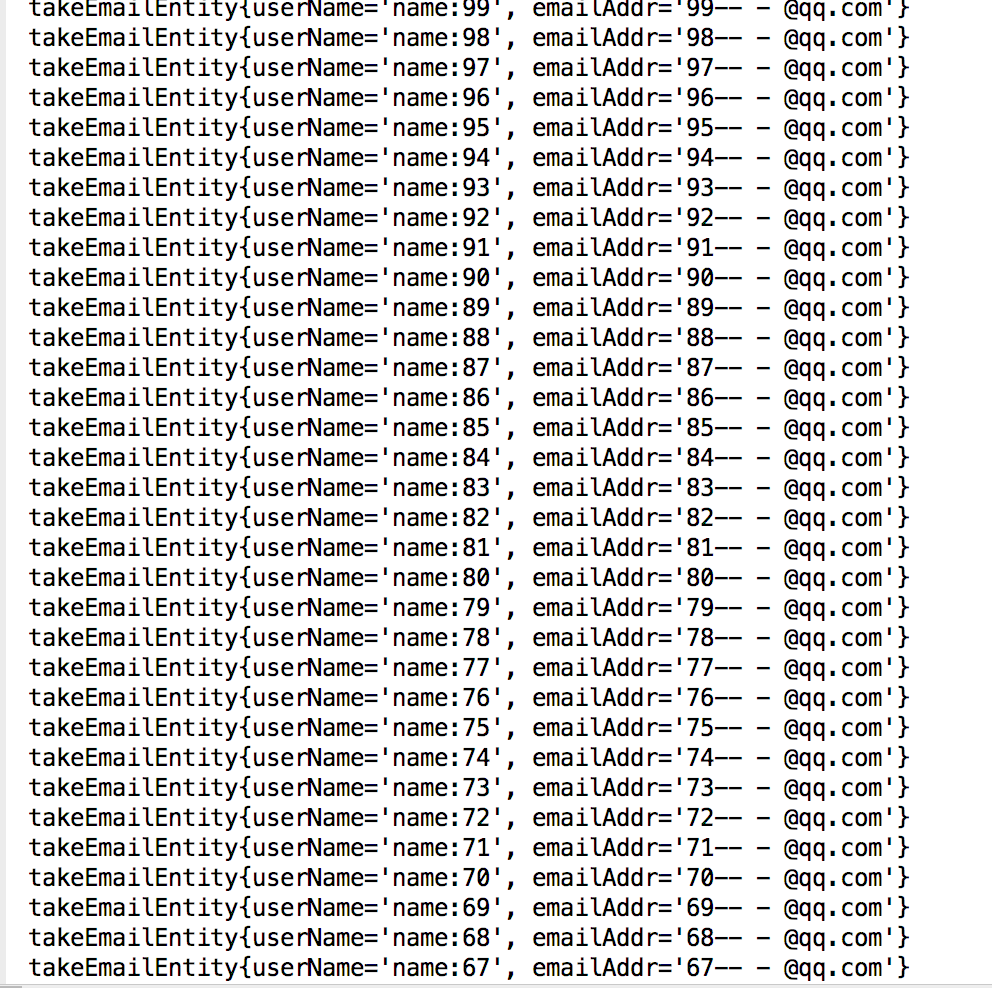
采用的是生产者和消费者的模式。
最后加上一直图
Java Redis+Spring-data-redis 队列 单机版的更多相关文章
- Spring Data Redis实现消息队列——发布/订阅模式
一般来说,消息队列有两种场景,一种是发布者订阅者模式,一种是生产者消费者模式.利用redis这两种场景的消息队列都能够实现. 定义:生产者消费者模式:生产者生产消息放到队列里,多个消费者同时监听队列, ...
- 使用Spring Data Redis操作Redis(单机版)
说明:请注意Spring Data Redis的版本以及Spring的版本!最新版本的Spring Data Redis已经去除Jedis的依赖包,需要自行引入,这个是个坑点.并且会与一些低版本的Sp ...
- Spring Data Redis—Pub/Sub(附Web项目源码)
一.发布和订阅机制 当一个客户端通过 PUBLISH 命令向订阅者发送信息的时候,我们称这个客户端为发布者(publisher). 而当一个客户端使用 SUBSCRIBE 或者 PSUBSCRIBE ...
- Spring Data Redis—Pub/Sub(附Web项目源码) (转)
一.发布和订阅机制 当一个客户端通过 PUBLISH 命令向订阅者发送信息的时候,我们称这个客户端为发布者(publisher). 而当一个客户端使用 SUBSCRIBE 或者 PSUBSCRIBE ...
- spring data redis RedisTemplate操作redis相关用法
http://blog.mkfree.com/posts/515835d1975a30cc561dc35d spring-data-redis API:http://docs.spring.io/sp ...
- spring mvc Spring Data Redis RedisTemplate [转]
http://maven.springframework.org/release/org/springframework/data/spring-data-redis/(spring-data包下载) ...
- Spring Data Redis简介以及项目Demo,RedisTemplate和 Serializer详解
一.概念简介: Redis: Redis是一款开源的Key-Value数据库,运行在内存中,由ANSI C编写,详细的信息在Redis官网上面有,因为我自己通过google等各种渠道去学习Redis, ...
- Spring data redis的一个bug
起因 前两天上线了一个新功能,导致线上业务的缓存总是无法更新,报错也是非常奇怪,redis.clients.jedis.exceptions.JedisConnectionException: Unk ...
- spring data redis 理解
前言 Spring Data Redis project,应用了Spring概念来开发使用键值形式的数据存储的解决方案.我们(官方)提供了一个 "template" ,这是一个高级 ...
- Spring Data Redis 详解及实战一文搞定
SDR - Spring Data Redis的简称. Spring Data Redis提供了从Spring应用程序轻松配置和访问Redis的功能.它提供了与商店互动的低级别和高级别抽象,使用户免受 ...
随机推荐
- C++实现2048小游戏
代码如下: #define _CRT_SECURE_NO_WARNINGS//去掉编译器内部扩增问题 #include<stdio.h> #include<stdlib.h> ...
- 面向对象分析与设计—OOD部分
第三部分 面向对象设计 3.1 面向对象设计(OOD)的定义? 在面向对象分析阶段,已经针对用户需求建立起用面向对象概念描述的系统分析模型.在设计阶段,要考虑为实现系统而采用的计算机设备.操作系统.网 ...
- EAFP vs LBYL
EAFP vs LBYL 检查数据可以让程序更健壮,用术语来说就是防御性编程.检查数据的时候,有EAFP和LBYL两种不同的编程风格,具体的意思如下: LBYL: Look Before You Le ...
- php获取当前月的天数
<?php //php获取当前月份的所有天数 $start_day = date('Ym01', time()); $end_day = date('Ymd', strtotime(" ...
- iview前台端口设置,跨域端口设置
前台启动默认端口: 跨域端口: 完毕
- THUPC2019/CTS2019/APIO2019/PKUSC2019游记
THUPC2019/CTS2019/APIO2019/PKUSC2019游记 5.10 中铺,火车好晃啊 5.11 打了THUPC2019的练习赛,华容道好评(四个小兵,杠鸭!) 5.12 打了THU ...
- 关闭ShowDialog的模态窗口
[DllImport("user32.dll")] private static extern IntPtr FindWindow(string a, string b); [Dl ...
- 线程一(lock)
对于线程同步操作最简单的一种方式就是使用 lock 关键字,通过 lock 关键字能保证加锁的线程只有在执行完成后才能执行其他线程. lock 的语法形式如下. lock(object) { ...
- ajax中的事件
blur : 当光标移开时(点击)触发 change : 当光标移开并且文本框中的内容和上一次不一致时(点击)触发
- 【转载】Sqlserver中使用Round函数对计算结果四舍五入
在实际应用的计算中,很多时候我们需要对最后计算结果四舍五入,其实在Sqlserver中也有对应的四舍五入函数,就是Round函数,Round函数的格式为Round(column_name,decima ...