
Beginning Linux Programming 学习-chapter2-Shell programming-Pipes and Redirection
“为了从事创造性工作,人类需要孤独,可是在孤独中,广义的人类仍存在于内心。”——(德国)奥铿

uninx, linux的初衷是不使用图形界面,而是使用commnd line,随着不断发展,command line不断壮大,shell对lilnux来说是一个非常重要的部分,对于自动完成一些任务是非常方便的!
为什么用shell?
首先,shell编程方便,快捷,另外,最基本的linux系统中也可以支持shell,可以用shell 快速实现你的一些想法!
shell与windows中的command prompt类似,但是更加强大。 shell program一般被叫做script,一边运行一遍编译。
什么是Shell:
A shell is a program that acts as the interface between you and the Linux system, enabling you to enter commands for the operating system to execute. In that respect, it resembles the Windows command prompt, but as mentioned earlier, Linux shells are much more powerful.
For example, input and output can be redirected using < and >, data piped between simultaneously executing programs using |, and output from a subprocess grabbed by using $(...).
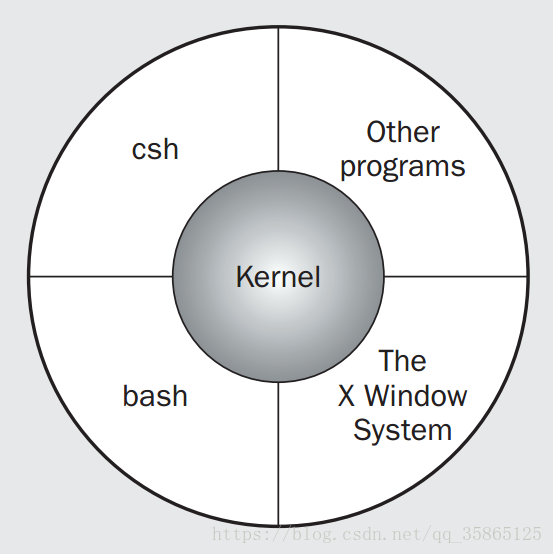
系统中可以有多种shell程序: On Linux it’s quite feasible to have multiple shells installed, with different users able to pick the one they prefer. The following Figure shows how the shell (two shells actually, both bash and csh) and other programs sit around the Linux kernel.
bash是最常用的一种shell:
On Linux, the standard shell that is always installed as /bin/sh is called bash (the GNU Bourne-Again SHell), from the GNU suite of tools. On most Linux distributions, the program /bin/sh, the default shell, is actually a link to the program /bin/bash.
You can check the version of bash you have with the following command:
$ /bin/bash --version
GNU bash, version 3.2.9(1)-release (i686-pc-linux-gnu)
Copyright (C) 2005 Free Software Foundation, Inc.
如果系统中默认的shell 不是bash,如何使用bash呢:
To change to a different shell — if bash isn’t the default on your system, for example —just execute the desired shell’s program (e.g., /bin/bash) to run the new shell and change the command prompt.
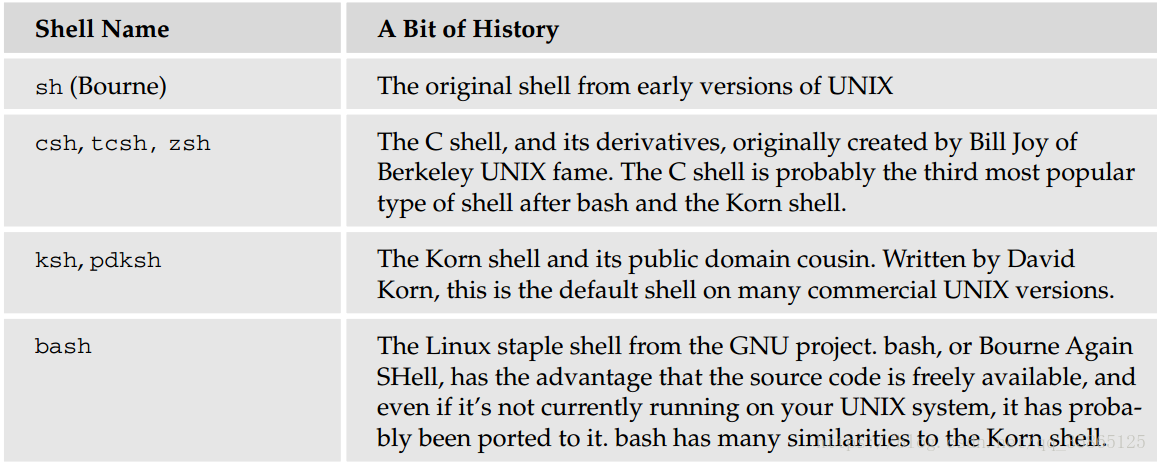
各种shell小结:
Pipes and Redirection 管道和重定向
$ ls -l > lsoutput.txt saves the output of the ls command into a file called lsoutput.txt. Redirects the standard output into a file by using the > operator . By default, if the file already exists, then it will be overwritten. If you want to change the default behavior, you can use the command set -o noclobber (or set -C)(禁止重定向覆盖已存文件 ), which sets the noclobber option to prevent a file from being overwritten using redirection. You can cancel this option using set +o noclobber(允许重定向覆盖已存文件 ).
File descriptor 0 is the standard input to a program,
file descriptor 1 is the standard output
file descriptor 2 is the standard error output.
You can redirect each of these independently. In fact, you can also redirect other file descriptors, but it’s unusual to want to redirect any other than the standard ones: 0, 1, and 2.
将指令的输出追加到文件末尾:
ps >> lsoutput.txt will append the output of the ps command to the end of the specified file
To redirect the standard error output, preface the > operator with the number of the file descriptor you wish to redirect. Because the standard error is on file descriptor 2, use the 2> operator. This is often useful to discard error information and prevent it from appearing on the screen.
将指令的标准输出和错误输出输出到同两个文件中:
Suppose you want to use the kill command to kill a process from a script. There is always a slight risk that the process will die before the kill command is executed. If this happens, kill will write an error message to the standard error output, which, by default, will appear on the screen. By redirecting both the standard output and the error, you can prevent the kill command from writing any text to the screen.
$ kill -HUP 1234 >killout.txt 2>killerr.txt will put the output and error information into separate files
将指令的标准输出和错误输出输出到同一个文件中:
If you prefer to capture both sets of output into a single file, you can use the >& operator to combine the two outputs. Therefore,
$ kill -1 1234 >killouterr.txt 2>&1
will put both the output and error outputs into the same file. Notice the order of the operators. This reads as “redirect standard output to the file killouterr.txt, and then direct standard error to the same place as the standard output.” If you get the order wrong, the redirect won’t work as you expect.
将指令的标准输出和错误输出全部discard:
Because you can discover the result of the kill command using the return code , you don’t often want to save either standard output or standard error. You can use the Linux universal “bit bucket” of /dev/null to efficiently discard the entire output, like this:
$ kill -1 1234 >/dev/null 2>&1
Redirecting Input:
Rather like redirecting output, you can also redirect input. For example,
$ more < killout.txt --------??
Obviously, this is a rather trivial example under Linux; the Linux more command is quite happy to accept filenames as parameters, unlike the Windows command-line equivalent.
Pipes 管道
You can connect processes using the pipe operator ( | ). In Linux, unlike in MS-DOS, processes connected by pipes can run simultaneously and are automatically rescheduled as data flows between them. As a simple example, you could use the sort command to sort the output from ps.
If you don’t use pipes, you must use several steps, like this:
$ ps > psout.txt
$ sort psout.txt > pssort.out //sort是排序命令
A much more elegant solution is to connect the processes with a pipe:
$ ps | sort > pssort.out //sort作用于ps的输出,sort的输出保存在passort.out中
Because you probably want to see the output paginated on the screen, you could connect a third process, more, all on the same command line:
$ ps | sort | more
There's practically no limit to the permissible number of connected processes. Suppose you want to see all the different process names that are running excluding shells. You could use
$ ps –xo comm | sort | uniq | grep -v sh | more // ps -xo comm的输出被送给sort指令。uniq用于去掉重复的东西;grep -v sh to remove the process named sh.
注意:If you have a string of commands, the output file is created or written to immediately when the set of commands is created, so never use the same filename twice in a string of commands. If you try to do something like
cat mydata.txt | sort | uniq > mydata.txt
you will end up with an empty file, because you will overwrite the mydata.txt file before you read it.
@@@@@@@@@@@@@@@@@@@@@@@@@@@@@@@@@@@@@@@@
Shell 编程方式之一: Interactive Programs
Just typing the shell script on the command line is a quick and easy way of trying out small code fragments. 例如,又很多c文件,你想搜索包含POSIX字符串的文件:
$ for file in * //file是循环变量
> do
> if grep -l POSIX $file //使用一个定义过的变量,只要在变量名前面加美元符号即可
> then
> more $file //displays the whole contents of the file to the screen
> fi
> done
说明: grep -l 是 列出文件内容符合指定的范本样式的文件名称。
用到了基本的if-then-fi 判断语句
当shell希望你继续输入时,提示符会由$变为>。当你最后输入done之后,shell会自动判断你输入完毕,然后马上执行你写的整个东西。
Shell 编程方式之二: Writing Scripts
例子:
#!/bin/sh

# first

# This file looks through all the files in the current

# directory for the string POSIX, and then prints the names of

# those files to the standard output.

for file in *

do

    if grep -q POSIX $file

    then

        echo $file

    fi

done

exit 0
行注释以#开头; #!/bin/sh, is a special form of comment, the #! characters tell the system that the argument that follows on the line is the program to be used to execute this file. In this case, /bin/sh is the default shell program.
The exit command ensures that the script returns a sensible exit code (more on this later in the chapter). This is rarely checked when programs are run interactively, but if you want to invoke this script from another script and check whether it succeeded, returning an appropriate exit code is very important. Even if you never intend to allow your script to be invoked from another, you should still exit with a reasonable code. Have faith in the usefulness of your script: Assume it may need to be reused as part of another script someday. A zero denotes success in shell programming.
linux不在文件的后缀:Linux, and UNIX in general, rarely makes use of the filename extension to determine the type of a file. You could have used .sh or added a different extension, but the shell doesn’t care.
Making a Script Executable
假设你写了一个脚本名字为first,然后你可用下面的方式运行它
1)直接使用shell程序 /bin/sh first 需要first就在当前你的command 窗口的当前目录中;如果不在
那就需要你将first的路径写全。
2)执行chmod +x first使得first脚本可执行,然后 ./first,你也可以在PATH中添加它
你可以专门建立一个目录存储你自己写的可执行脚本,例如/usr/local/bin,加入PATH路径,以后可以方便实用。
Shell Syntax:
以后用到再具体看。The shell is quite an easy programming language to learn, not least because it's easy to test small program fragments interactively before combining them into bigger scripts. You can
use the bash shell to write quite large, structured programs.
Beginning Linux Programming 学习-chapter2-Shell programming-Pipes and Redirection的更多相关文章
- Beginning Linux Programming 学习--chapter 17 Programming KDE using QT
KDE: KDE,K桌面环境(K Desktop Environment)的缩写.一种著名的运行于 Linux.Unix 以及FreeBSD 等操作系统上的自由图形桌面环境,整个系统采用的都是 Tro ...
- linux视频学习3(shell和网络)
1.shell的学习. shell的种类比较多,主要有三种: /bin/sh, /bin/csh, /bin/ksh. 查看当前使用的是哪种shell : 命令env (显示当前操作系统的环境变量). ...
- Linux 学习 (八) Shell
Linux达人养成计划 I 学习笔记 Shell 是什么: Shell 是一个命令解释器 Shell 还是一个功能相当强大的编程语言,易编写,易调试,灵活性较强 Shell 的分类: Bourne S ...
- Beginning Scala study note(4) Functional Programming in Scala
1. Functional programming treats computation as the evaluation of mathematical and avoids state and ...
- linux 学习10 shell 基础
10.1 Shell概述 .Shell是什么 Shell是一个命令行解释器,它为用户提供了一个向Linux内核发送请求以便运行程序的界面系统级程序,用户可以用Shell来启动.挂起.停止甚至是编写一 ...
- Linux基础学习(10)--Shell基础
第十章——Shell基础 一.Shell概述 1.Shell是什么: (1)Shell是一个命令行解释器,它为用户提供了一个向Linux内核发送请求以便运行程序的界面系统级程序,用户可以用Shell来 ...
- 别出心裁的Linux系统调用学习法
别出心裁的Linux系统调用学习法 操作系统与系统调用 操作系统(Operating System,简称OS)是计算机中最重要的系统软件,是这样的一组系统程序的集成:这些系统程序在用户对计算机的使用中 ...
- Linux驱动学习步骤(转载)
1. 学会写简单的makefile 2. 编一应用程序,可以用makefile跑起来 3. 学会写驱动的makefile 4. 写一简单char驱动,makefile编译通过,可以insmod, ls ...
- 关于Linux内核学习的误区以及相关书籍介绍
http://www.hzlitai.com.cn/article/ARM9-article/system/1605.html 写给Linux内核新手-关于Linux内核学习的误区 先说句正经的:其实 ...
随机推荐
- 2019 ICPC Asia Xuzhou Regional
目录 Contest Info Solutions A. Cat B. Cats line up C. <3 numbers E. Multiply F. The Answer to the U ...
- [TJOI2019]大中锋的游乐场——最短路+DP
题目链接: [TJOI2019]大中锋的游乐场 题目本质要求的还是最短路,但因为有第二维权值(汽水看成$+1$,汉堡看成$-1$)的限制,我们在最短路的基础上加上一维$f[i][j]$表示到达$i$节 ...
- 算法练习 —— LeetCode 1-20题
一.两数之和 1.1 题目描述 给定一个整数数组和一个目标值,找出数组中和为目标值的两个数. 你可以假设每个输入只对应一种答案,且同样的元素不能被重复利用. 示例: 给定 nums = [2, 7, ...
- git前期准备
git小结 设置用户名 git config –global user.name 'itcast' 设置用户名邮箱 git config –global user.email 'itcast' 查看设 ...
- Flutter移动电商实战 --(43)详细页_补充首页跳转到详细页
首页轮播点击到详细页 修改我们轮播这里的代码:SwiperDiy这个类这里的代码 return InkWell( onTap: (){ Application.router.navigateTo(co ...
- 如果前面的IO操作出问题了,按照我们代码的意思,不就try catch 了吗,这样的话线程就没关闭了,就会造成线程泄露。 那怎么解决这个问题呢,其实也简单,把关闭线程的方法写到finally里就可以了。
https://mp.weixin.qq.com/s/WaNVT2bZFGHNO_mb5nK6vw 连HDFS源码大神都会犯的错之线程泄露(1) 西瓜老师 西瓜老师爱大数据 1月11日
- Qt编写自定义控件47-面板区域控件
一.前言 在很多web网页上,经常可以看到一个设备对应一个面板,或者某种同等类型的信息全部放在一个面板上,该面板还可以拖来拖去的,这个控件首次用在智能访客管理平台中,比如身份证信息一个面板,访客信息一 ...
- web自动化-selenium+Chrome驱动国内下载地址+驱动对应Chrome版本号
selenium各版本下载地址 http://selenium-release.storage.googleapis.com/index.html 国内下载:http://npm.taobao.org ...
- [CareerCup] Guards in a museum 博物馆的警卫
A museum was represented by a square matrix that was filled with O, G, and W where O represented ope ...
- 第十九章 动态URL权限控制——《跟我学Shiro》
目录贴:跟我学Shiro目录贴 用过Spring Security的朋友应该比较熟悉对URL进行全局的权限控制,即访问URL时进行权限匹配:如果没有权限直接跳到相应的错误页面.Shiro也支持类似的机 ...