window snmp服务开启及测试

转自:https://blog.csdn.net/qq_33314107/article/details/80031446

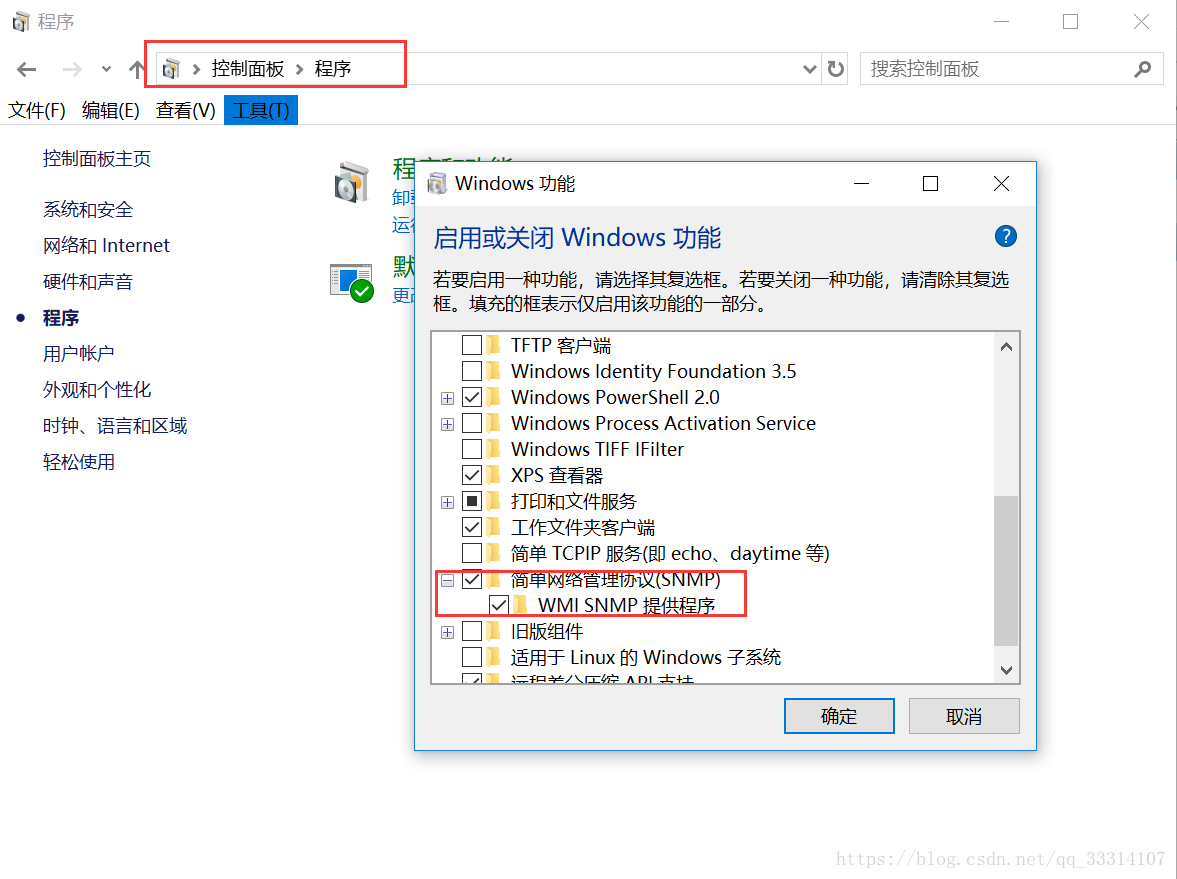
一 安装
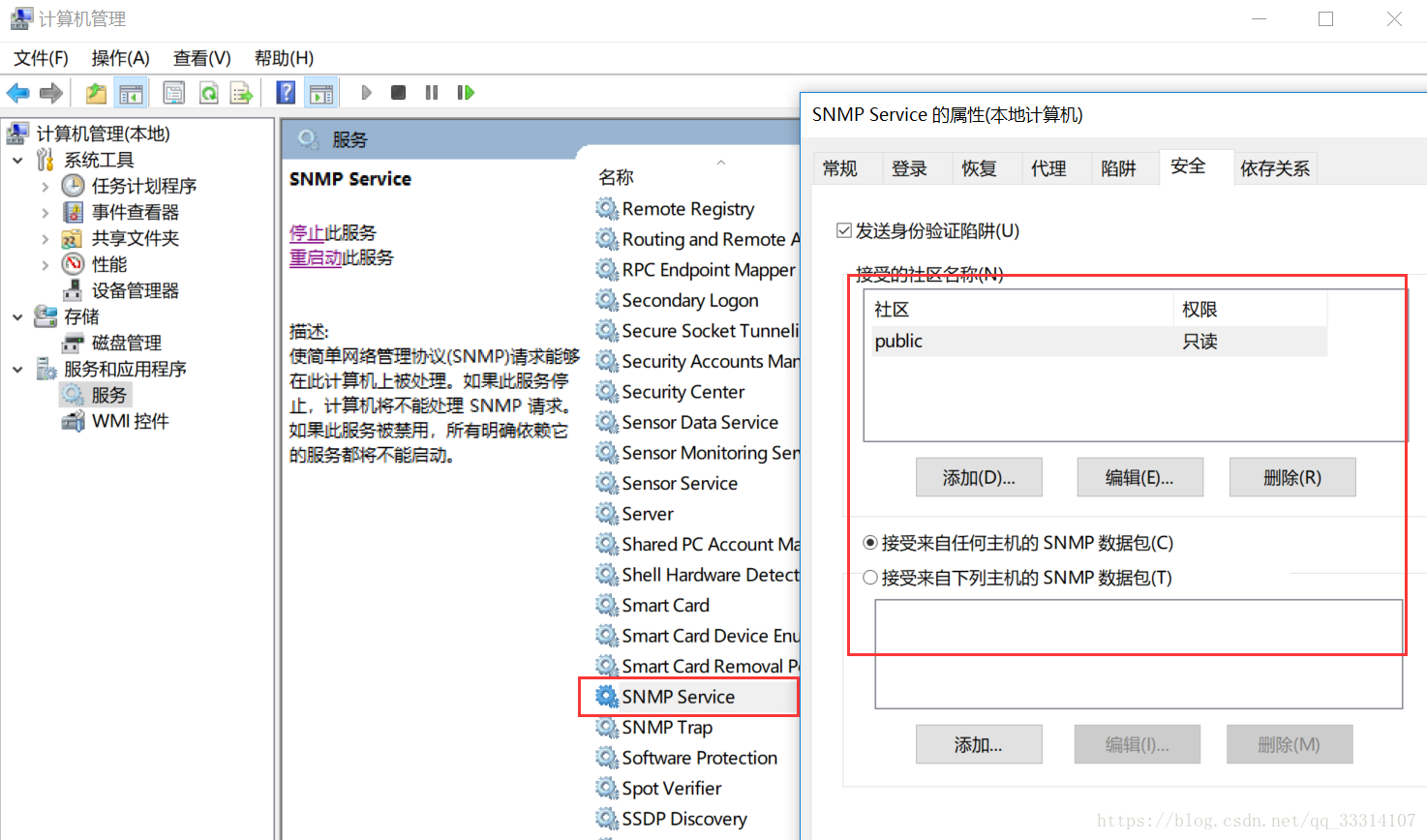
二 开启服务
Linux下安装与配置snmp服务

https://blog.csdn.net/macrothunder/article/details/50394566

三 测试

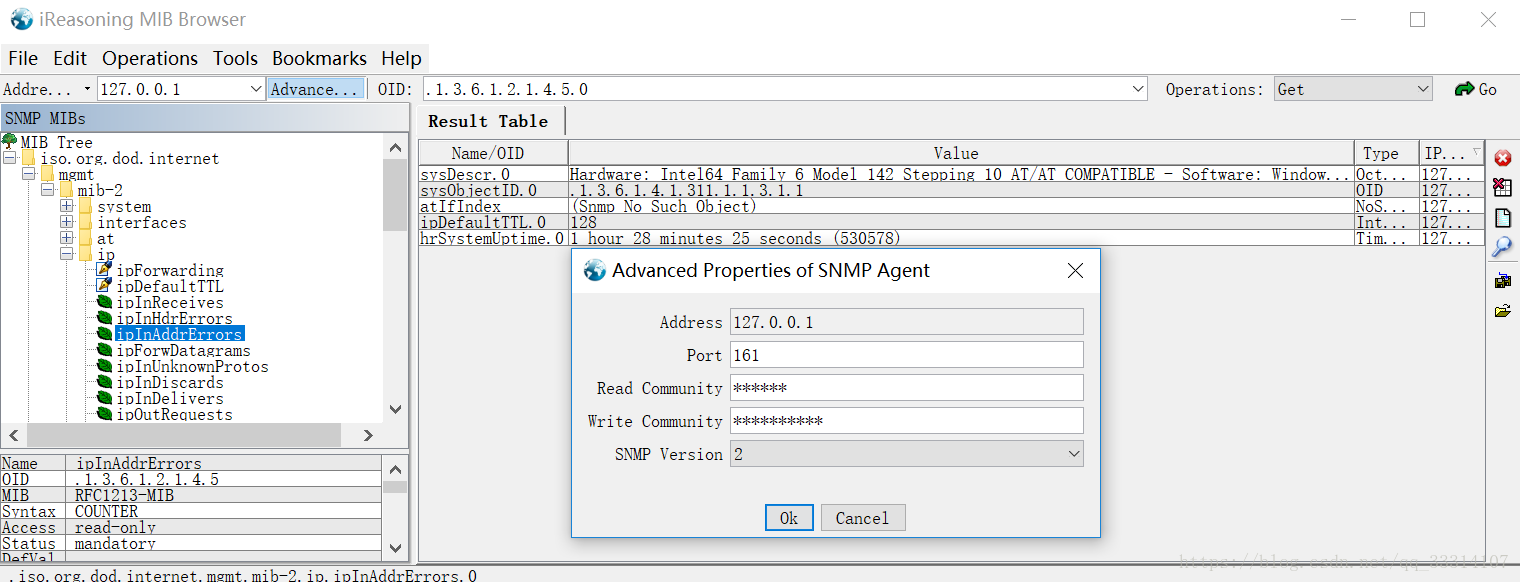
3.1  MIB 浏览器测试

iReasoning MIB Browser下载地址:http://ireasoning.com/download.shtml
3.2  程序测试

maven导入依赖:

<!--snmp-->
<dependency>
<groupId>org.snmp4j</groupId>
<artifactId>snmp4j</artifactId>
<version>2.5.0</version>
</dependency>

oid列表:

参照:https://blog.csdn.net/qq_28657577/article/details/82834442

public enum IndicatorOIDName {
//网络接口信息描述 网络接口类型 接口发送和接收的最大IP数据报[BYTE] 接口当前带宽[bps] 接口的物理地址 接口当前操作状态[up|down]
TEST("test", "测试", ".1.3.6.1.2.1.2.2.1.2," +
".1.3.6.1.2.1.2.2.1.3," +
".1.3.6.1.2.1.2.2.1.4," +
".1.3.6.1.2.1.2.2.1.5" +
".1.3.6.1.2.1.2.2.1.6," +
".1.3.6.1.2.1.2.2.1.8"), CPURATE("cpuRate", "总cpu占用率", "1.3.6.1.2.1.25.3.3.1.2"), //y
DISK_USE_RATE("diskUseRate", "磁盘使用率", "1.3.6.1.2.1.25.2.3.1.5,1.3.6.1.2.1.25.2.3.1.6"), //y ,前-总,后-已使用
//1:Physical memory ;3:Virtual memory; 6:Memory buffers;7:Cached memory
PHY_MEM_USE_PERCENT("phyMemUsePercent", "物理内存利用率","1.3.6.1.2.1.25.2.3.1.3," +
"1.3.6.1.2.1.25.2.3.1.5," +
"1.3.6.1.2.1.25.2.3.1.6"),
UP_STREAM("upStream", "上行流量监控(专用)", ".1.3.6.1.2.1.2.2.1.16"),
DOWN_STREAM("downStream", "下行流量监控(专用)", ".1.3.6.1.2.1.2.2.1.10"),
STREAM_SUM("streamSum", "上下行流量总和", ".1.3.6.1.2.1.2.2.1.10,.1.3.6.1.2.1.2.2.1.16"),
//网络接口信息描述 网络接口类型
NETWORK_INTERFACE("networkInterface", "网络接口", ".1.3.6.1.2.1.2.2.1.2,.1.3.6.1.2.1.2.2.1.3"); private String name;
private String mes;
private String oid; IndicatorOIDName(String name, String mes, String oid) {
this.name = name;
this.mes = mes;
this.oid = oid;
} public static IndicatorOIDName getByName(String name) {
for (IndicatorOIDName IndicatorOIDName : IndicatorOIDName.values()) {
if (name.startsWith(IndicatorOIDName.getName())) {
return IndicatorOIDName;
}
}
throw new RuntimeException("不支持类型 IndicatorOIDName.name=" + name);
} public String getName() {
return name;
} public String getMes() {
return mes;
} public String getOid() {
return oid;
}
}
Snmp4Uitl .java 测试类
public class Snmp4Uitl {
private static final Logger log = LoggerFactory.getLogger(Snmp4Uitl.class); public static void main(String[] args) throws IOException {
//ord aPublic 1.3.6.1.2.1.25.3.3.1.2 10.253.46.140 10.243.141.114
List<ChildIndicatorVo> indicatorVos= getChildIndicatorList("10.243.141.114",IndicatorOIDName.NETWORK_INTERFACE);
System.out.println(JSON.toJSONString(indicatorVos));
}
/***
* @Date: @Auth:xinsen.liao @Desc(V1.06): 获取磁盘内存指标
*/
public static List<ChildIndicatorVo> getChildIndicatorList(String ip,IndicatorOIDName indicatorOIDName) throws IOException { List<ChildIndicatorVo> indicatorVoList=new ArrayList<>();
List<TableEvent> aPublic = getTable(ip, indicatorOIDName.getOid().split(","), "public");
// System.out.println(JSON.toJSONString(aPublic));
for (TableEvent event : aPublic) {
OID oid = event.getIndex();
Integer index = oid.get(0);
VariableBinding[] valueBinds = event.getColumns();
Variable value = event.getColumns()[0].getVariable();
if(value!=null){
ChildIndicatorVo vo=new ChildIndicatorVo();
switch (indicatorOIDName.getName()){
case "cpuRate":
case "upStream":
case "downStream":
case "streamSum":
vo.setIndex(index);
vo.setOid(indicatorOIDName.getOid());
indicatorVoList.add(vo);
break;
case "networkInterface":
case "diskUseRate":
if(value.toString().toUpperCase().indexOf("MEMORY")>=0){
continue;
}
if(value!=null)
vo.setField(value.toString());
vo.setIndex(index);
vo.setOid(indicatorOIDName.getOid());
indicatorVoList.add(vo);
break;
}
}
}
return indicatorVoList;
}
public static PDU send(String ip, String oid, String community) throws IOException {
TransportMapping<UdpAddress> transportMapping = new DefaultUdpTransportMapping();
Snmp snmp = new Snmp(transportMapping);
try {
snmp.listen();
ResponseEvent response = null;
PDU pdu = new PDU();
pdu.add(new VariableBinding(new OID(oid)));
pdu.setType(PDU.GET);
String address = ip + "/" + 161;
Address targetAddress = new UdpAddress(address);
CommunityTarget target = new CommunityTarget();
target.setCommunity(new OctetString(community)); // 改字符串是我们在上面配置的
target.setAddress(targetAddress);
target.setRetries(2);
target.setTimeout(3000);
target.setVersion(SnmpConstants.version2c);
response = snmp.get(pdu, target);
PDU result = response.getResponse();
if (result == null) {
throw new RuntimeException("连接失败" + address + " community:" + community);
}
return result;
} catch (Exception ex) {
throw ex;
} finally {
snmp.close();
}
} public static List<TableEvent> getTable(String ip, String[] oids, String community) throws IOException {
TransportMapping transport = null;
Snmp snmp = null;
CommunityTarget target;
try {
transport = new DefaultUdpTransportMapping();
snmp = new Snmp(transport);//创建snmp
snmp.listen();//监听消息
target = new CommunityTarget();
target.setCommunity(new OctetString(community));
target.setRetries(2);
target.setAddress(GenericAddress.parse("udp:" + ip + "/161"));
target.setTimeout(8000);
target.setVersion(SnmpConstants.version2c);
TableUtils tableUtils = new TableUtils(snmp, new PDUFactory() {
@Override
public PDU createPDU(Target arg0) {
PDU request = new PDU();
request.setType(PDU.GET);
return request;
} @Override
public PDU createPDU(MessageProcessingModel messageProcessingModel) {
PDU request = new PDU();
request.setType(PDU.GET);
return request;
}
});
OID[] columns = new OID[oids.length];
for (int i = 0; i < oids.length; i++)
columns[i] = new OID(oids[i]);
List<TableEvent> list = tableUtils.getTable(target, columns, null, null);
return list;
} catch (Exception e) {
throw e;
} finally {
try {
if (transport != null)
transport.close();
if (snmp != null)
snmp.close();
} catch (IOException e) {
log.error("Snmp4Uitl[]getTable[]error", e);
}
}
}
}

windows下安装和配置SNMP的更多相关文章

  1. 网络基础 Windows下安装和配置net-snmp 代理

    Windows 下安装和配置net-snmp 代理[摘录] by:授客 QQ:1033553122   A.   安装  1.   安装前准备 ActivePerl-5.10.0.1004-MSWin ...

  2. PHP学习之-Mongodb在Windows下安装及配置

    Mongodb在Windows下安装及配置 1.下载 下载地址:http://www.mongodb.org/ 建议下载zip版本. 2.安装 下载windows版本安装就和普通的软件一样,直接下一步 ...

  3. windows下安装和配置redis

    1.windows下安装和配置redis 1.1 下载: 官网(linux下载地址):https://redis.io/ Windows系统下载地址:https://github.com/MSOpen ...

  4. windows下安装和配置多个版本的JDK

    https://jingyan.baidu.com/article/47a29f2474ba55c015239957.html 如何在windows下安装和配置多个版本的jdk,本文将带你在windo ...

  5. 基于svnserve的SVN服务器(windows下安装与配置)

    基于svnserve的SVN服务器(windows下安装与配置) 基于svnserve的SVN服务器(windows下安装与配置)关键字: svn 安装SVNserve 从http://subvers ...

  6. windows下安装和配置mongoDB

    上次在mac下安装和配置了mongodb,这次在windows下也尝试安装和配置mongodb. 1.首先下载mongodb压缩包,下载后解压到D盘或E盘.如下: 2.配置环境变量:桌面—计算机右键— ...

  7. windows下安装并配置mysql

    前言:前面三篇文章将django的环境搭建完后,还只能编写静态网页,如果要用到数据库编写动态网页,那么还需要数据库 本章讲解mysql5.6数据库的安装和配置,对于其他版本仅供参考,不一定试用!推荐使 ...

  8. 烂泥:Windows下安装与配置Nginx web服务器

    本文由秀依林枫提供友情赞助,首发于烂泥行天下. 前几篇文章,我们使用nginx都是在linux环境下,今天由于工作的需要.需要在windows环境也使用nginx搭建web服务器. 下面记录下有关ng ...

  9. windows下安装,配置gcc编译器

    在Windows下使用gcc编译器: 1.首先介绍下MinGW MinGW是指仅仅用自由软件来生成纯粹的Win32可运行文件的编译环境,它是Minimalist GNU on Windows的略称. ...

随机推荐

  1. 2018CCPC桂林站G Greatest Common Divisor

    题目描述 There is an array of length n, containing only positive numbers.Now you can add all numbers by ...

  2. E. Intergalaxy Trips

    完全图,\(1 \leq n \leq 1000\)每一天边有 \(p_{i,j}=\frac{A_{i,j}}{100}\) 的概率出现,可以站在原地不动,求 \(1\) 号点到 \(n\) 号点期 ...

  3. 基础 Linux 命令速查清单

    jaywcjlove/linux-command: Linux命令大全搜索工具,内容包含Linux命令手册.详解.学习.搜集.https://git.io/linux  https://github. ...

  4. JavaScript判断数据类型的4中方法

    一: typeof typeof 是一种运算符,它的值有如下几种(number.boolean.string.undefined.null.function.object.symbol) consol ...

  5. 在Windows下安装scrapy

    第一步: 安装pywin32 下载地址:https://sourceforge.net/projects/pywin32/files/pywin32/,下载对应版本的pywin32,直接双击安装即可 ...

  6. 【零基础】入门51单片机图文教程(Proteus+Keil)

    参考资料: https://www.jianshu.com/p/88dfc09e7403 https://blog.csdn.net/feit2417/article/details/80890218 ...

  7. LeetCode109----链表转为二叉搜索树

    给定一个单链表,其中的元素按升序排序,将其转换为高度平衡的二叉搜索树. 本题中,一个高度平衡二叉树是指一个二叉树每个节点 的左右两个子树的高度差的绝对值不超过 1. 示例:给定的有序链表: [-10, ...

  8. 九款Web服务器性能压力测试工具

    一.http_load 程序非常小,解压后也不到100Khttp_load以并行复用的方式运行,用以测试web服务器的吞吐量与负载.但是它不同于大多数压力测试工具,它可以以一个单一的进程运行,一般不会 ...

  9. 10分钟梳理MySQL核心知识点

    数据库的使用,是开发人员的基本功,对它掌握越清晰越深入,你能做的事情就越多. 做业务,要懂基本的SQL语句:做性能优化,要懂索引,懂引擎:做分库分表,要懂主从,懂读写分离... 今天我们用10分钟,重 ...

  10. VC++实现标准型计算器步骤及源码

    VC++实现标准型计算器步骤及源码 2013年06月19日 09:48:47 无敌的成长日记 阅读数:4686       最近一段时间一直在做这个东西,刚刚拿到题目的时候认为这是一个简单的程序,可是 ...