
从头造轮子:python3 asyncio之 gather (3)
前言
书接上文:,本文造第三个轮子,也是asyncio包里面非常常用的一个函数gather
一、知识准备
● 相对于前两个函数,gather的使用频率更高,因为它支持多个协程任务“同时”执行
● 理解__await__ __iter__的使用
● 理解关键字async/await,async/await是3.5之后的语法,和yield/yield from异曲同工
● 今天的文章有点长,请大家耐心看完
二、环境准备
| 组件 | 版本 |
|---|---|
| python | 3.7.7 |
三、
run的实现
先来看下官方gather的使用方法:
|># more main.py

import asyncio

async def hello():

    print('enter hello ...')

    return 'return hello ...'

async def world():

    print('enter world ...')

    return 'return world ...'

async def helloworld():

    print('enter helloworld')

    ret = await asyncio.gather(hello(), world())

    print('exit helloworld')

    return ret

if __name__ == "__main__":

    ret = asyncio.run(helloworld())

    print(ret)

|># python3 main.py

enter helloworld

enter hello ...

enter world ...

exit helloworld

['return hello ...', 'return world ...']
来看下造的轮子的使用方式:
 more main.py

import wilsonasyncio

async def hello():

    print('enter hello ...')

    return 'return hello ...'

async def world():

    print('enter world ...')

    return 'return world ...'

async def helloworld():

    print('enter helloworld')

    ret = await wilsonasyncio.gather(hello(), world())

    print('exit helloworld')

    return ret

if __name__ == "__main__":

    ret = wilsonasyncio.run(helloworld())

    print(ret)

 python3 main.py

enter helloworld

enter hello ...

enter world ...

exit helloworld

['return hello ...', 'return world ...']
自己造的轮子也很好的运行了,下面我们来看下轮子的代码
四、代码解析
1)代码组成
|># tree

.

├── eventloops.py

├── futures.py

├── main.py

├── tasks.py

├── wilsonasyncio.py
| 文件 | 作用 |
|---|---|
| eventloops.py | 事件循环 |
| futures.py | futures对象 |
| tasks.py | tasks对象 |
| wilsonasyncio.py | 可调用方法集合 |
| main.py | 入口 |
2)代码概览:
eventloops.py
| 类/函数 | 方法 | 对象 | 作用 | 描述 |
|---|---|---|---|---|
| Eventloop | 事件循环,一个线程只有运行一个 | |||
__init__ |
初始化两个重要对象 self._ready 与 self._stopping |
|||
self._ready |
所有的待执行任务都是从这个队列取出来,非常重要 | |||
self._stopping |
事件循环完成的标志 | |||
call_soon |
调用该方法会立即将任务添加到待执行队列 | |||
run_once |
被run_forever调用,从self._ready队列里面取出任务执行 |
|||
run_forever |
死循环,若self._stopping则退出循环 |
|||
run_until_complete |
非常重要的函数,任务的起点和终点(后面详细介绍) | |||
create_task |
将传入的函数封装成task对象,这个操作会将task.__step添加到__ready队列 |
|||
Handle |
所有的任务进入待执行队列(Eventloop.call_soon)之前都会封装成Handle对象 |
|||
__init__ |
初始化两个重要对象 self._callback 与 self._args |
|||
self._callback |
待执行函数主体 | |||
self._args |
待执行函数参数 | |||
_run |
待执行函数执行 | |||
get_event_loop |
获取当前线程的事件循环 | |||
_complete_eventloop |
将事件循环的_stopping标志置位True |
|||
run |
入口函数 | |||
gather |
可以同时执行多个任务的入口函数 | 新增 | ||
_GatheringFuture |
将每一个任务组成列表,封装成一个新的类 | 新增 |
tasks.py
| 类/函数 | 方法 | 对象 | 作用 | 描述 |
|---|---|---|---|---|
| Task | 继承自Future,主要用于整个协程运行的周期 | |||
__init__ |
初始化对象 self._coro ,并且call_soon将self.__step加入self._ready队列 |
|||
self._coro |
用户定义的函数主体 | |||
__step |
Task类的核心函数 | |||
__wakeup |
唤醒任务 | 新增 | ||
ensure_future |
如果对象是一个Future对象,就返回,否则就会调用create_task返回,并且加入到_ready队列 |
futures.py
| 类/函数 | 方法 | 对象 | 作用 | 描述 |
|---|---|---|---|---|
| Future | 主要负责与用户函数进行交互 | |||
__init__ |
初始化两个重要对象 self._loop 与 self._callbacks |
|||
self._loop |
事件循环 | |||
self._callbacks |
回调队列,任务暂存队列,等待时机成熟(状态不是PENDING),就会进入_ready队列 |
|||
add_done_callback |
添加任务回调函数,状态_PENDING,就虎进入_callbacks队列,否则进入_ready队列 |
|||
set_result |
获取任务执行结果并存储至_result,将状态置位_FINISH,调用__schedule_callbacks |
|||
__schedule_callbacks |
将回调函数放入_ready,等待执行 |
|||
result |
获取返回值 | |||
__await__ |
使用await就会进入这个方法 | 新增 | ||
__iter__ |
使用yield from就会进入这个方法 | 新增 |
3)执行过程
3.1)入口函数
main.py
if __name__ == "__main__":

    ret = wilsonasyncio.run(helloworld())

    print(ret)
ret = wilsonasyncio.run(helloworld())使用run,参数是用户函数helloworld(),进入run,run的流程可以参考上一小节run-->run_until_complete
3.2)事件循环启动,同之前
3.3)第一次循环run_forever --> run_once
- 将
_ready队列的内容(即:task.__step)取出来执行,这里的coro是helloworld()
    def __step(self, exc=None):

        coro = self._coro

        try:

            if exc is None:

                result = coro.send(None)

            else:

                result = coro.throw(exc)

        except StopIteration as exc:

            super().set_result(exc.value)

        else:

            blocking = getattr(result, '_asyncio_future_blocking', None)

            if blocking:

                result._asyncio_future_blocking = False

                result.add_done_callback(self.__wakeup, result)

        finally:

            self = None
__step较之前的代码有改动result = coro.send(None),进入用户定义函数
async def helloworld():

    print('enter helloworld')

    ret = await wilsonasyncio.gather(hello(), world())

    print('exit helloworld')

    return ret
ret = await wilsonasyncio.gather(hello(), world()),这里没啥可说的,进入gather函数
def gather(*coros_or_futures, loop=None):

    loop = get_event_loop()

    def _done_callback(fut):

        nonlocal nfinished

        nfinished += 1

        if nfinished == nfuts:

            results = []

            for fut in children:

                res = fut.result()

                results.append(res)

            outer.set_result(results)

    children = []

    nfuts = 0

    nfinished = 0

    for arg in coros_or_futures:

        fut = tasks.ensure_future(arg, loop=loop)

        nfuts += 1

        fut.add_done_callback(_done_callback)

        children.append(fut)

    outer = _GatheringFuture(children, loop=loop)

    return outer
loop = get_event_loop()获取事件循环def _done_callback(fut)这个函数是回调函数,细节后面分析,现在只需要知道任务(hello()与world())执行完之后就会回调就行for arg in coros_or_futuresfor循环确保每一个任务都是Future对象,并且add_done_callback将回调函数设置为_done_callback,还有将他们加入到_ready队列等待下一次循环调度- 3个重要的变量:
children里面存放的是每一个异步任务,在本例是hello()与world()
nfuts存放是异步任务的数量,在本例是2
nfinished存放的是异步任务完成的数量,目前是0,完成的时候是2 - 继续往下,来到了
_GatheringFuture,看看源码:
class _GatheringFuture(Future):

    def __init__(self, children, *, loop=None):

        super().__init__(loop=loop)

        self._children = children
_GatheringFuture最主要的作用就是将多个异步任务放入self._children,然后用_GatheringFuture这个对象来管理。需要注意,这个对象继承了Future- 至此,
gather完成初始化,返回了outer,其实就是_GatheringFuture - 总结一下
gather,初始化了3个重要的变量,后面用来存放状态;给每一个异步任务添加回调函数;将多个异步子任务合并,并且使用一个Future对象去管理
3.3.1)gather完成,回到helloworld()
async def helloworld():

    print('enter helloworld')

    ret = await wilsonasyncio.gather(hello(), world())

    print('exit helloworld')

    return ret
ret = await wilsonasyncio.gather(hello(), world())gather返回_GatheringFuture,随后使用await,就会进入Future.__await__
    def __await__(self):

        if self._state == _PENDING:

            self._asyncio_future_blocking = True

            yield self

        return self.result()
- 由于
_GatheringFuture的状态是_PENDING,所以进入if,遇到yield self,将self,也就是_GatheringFuture返回(这里注意yield的用法,流程控制的功能) - 那
yield回到哪儿去了呢?从哪儿send就回到哪儿去,所以,他又回到了task.__step函数里面去
    def __step(self, exc=None):

        coro = self._coro

        try:

            if exc is None:

                result = coro.send(None)

            else:

                result = coro.throw(exc)

        except StopIteration as exc:

            super().set_result(exc.value)

        else:

            blocking = getattr(result, '_asyncio_future_blocking', None)

            if blocking:

                result._asyncio_future_blocking = False

                result.add_done_callback(self.__wakeup, result)

        finally:

            self = None
- 这里是本函数的第一个核心点,流程控制/跳转,需要非常的清晰,如果搞不清楚的同学,再详细的去阅读有关
yield/yield from的文章 - 继续往下走,由于用户函数
helloworld()没有结束,所以不会抛异常,所以来到了else分支 blocking = getattr(result, '_asyncio_future_blocking', None)这里有一个重要的状态,那就是_asyncio_future_blocking,只有调用__await__,才会有这个参数,默认是true,这个参数主要的作用:一个异步函数,如果调用了多个子异步函数,那证明该异步函数没有结束(后面详细讲解),就需要添加“唤醒”回调result._asyncio_future_blocking = False将参数置位False,并且添加self.__wakeup回调等待唤醒__step函数完成
这里需要详细讲解一下_asyncio_future_blocking 的作用
- 如果在异步函数里面出现了await,调用其他异步函数的情况,就会走到
Future.__await__将_asyncio_future_blocking设置为true
async def helloworld():

    print('enter helloworld')

    ret = await wilsonasyncio.gather(hello(), world())

    print('exit helloworld')

    return ret

class Future:

    def __await__(self):

        if self._state == _PENDING:

            self._asyncio_future_blocking = True

            yield self

        return self.result()
- 这样做了之后,在
task.__step中就会把该任务的回调函数设置为__wakeup - 为啥要
__wakeup,因为helloworld()并没有执行完成,所以需要再次__wakeup来唤醒helloworld()
这里揭示了,在Eventloop里面,只要使用await调用其他异步任务,就会挂起父任务,转而去执行子任务,直至子任务完成之后,回到父任务继续执行
先喝口水,休息一下,下面更复杂。。。
3.4)第二次循环run_forever --> run_once
eventloops.py
    def run_once(self):

        ntodo = len(self._ready)

        for _ in range(ntodo):

            handle = self._ready.popleft()

            handle._run()
- 从队列中取出数据,此时
_ready队列有两个任务,hello()world(),在gather的for循环时添加的
async def hello():

    print('enter hello ...')

    return 'return hello ...'

async def world():

    print('enter world ...')

    return 'return world ...'
- 由于
hello()world()没有await调用其他异步任务,所以他们的执行比较简单,分别一次task.__step就结束了,到达set_result()处 set_result()将回调函数放入_ready队列,等待下次循环执行
3.5)第三次循环run_forever --> run_once
- 我们来看下回调函数
    def _done_callback(fut):

        nonlocal nfinished

        nfinished += 1

        if nfinished == nfuts:

            results = []

            for fut in children:

                res = fut.result()

                results.append(res)

            outer.set_result(results)
- 没错,这是本文的第二个核心点,我们来仔细分析一下
- 这段代码最主要的逻辑,其实就是,只有当所有的子任务执行完之后,才会启动父任务的回调函数,本文中只有
hello()world()都执行完之后if nfinished == nfuts:,才会启动父任务_GatheringFuture的回调outer.set_result(results) results.append(res)将子任务的结果取出来,放进父任务的results里面- 子任务执行完成,终于到了唤醒父任务的时候了
task.__wakeup
    def __wakeup(self, future):

        try:

            future.result()

        except Exception as exc:

            raise exc

        else:

            self.__step()

        self = None
3.6)第四次循环run_forever --> run_once
future.result()从_GatheringFuture取出结果,然后进入task.__step
    def __step(self, exc=None):

        coro = self._coro

        try:

            if exc is None:

                result = coro.send(None)

            else:

                result = coro.throw(exc)

        except StopIteration as exc:

            super().set_result(exc.value)

        else:

            blocking = getattr(result, '_asyncio_future_blocking', None)

            if blocking:

                result._asyncio_future_blocking = False

                result.add_done_callback(self.__wakeup, result)

        finally:

            self = None
result = coro.send(None)其实就是helloworld() --> send又要跳回到当初yield的地方,那就是Future.__await__
    def __await__(self):

        if self._state == _PENDING:

            self._asyncio_future_blocking = True

            yield self

        return self.result()
return self.result()终于返回到helloworld()函数里面去了
async def helloworld():

    print('enter helloworld')

    ret = await wilsonasyncio.gather(hello(), world())

    print('exit helloworld')

    return ret
helloworld终于也执行完了,返回了ret
3.7)第五次循环run_forever --> run_once
- 循环结束
- 回到
run
3.8)回到主函数,获取返回值
if __name__ == "__main__":

    ret = wilsonasyncio.run(helloworld())

    print(ret)
3.9)执行结果
 python3 main.py

enter helloworld

enter hello ...

enter world ...

exit helloworld

['return hello ...', 'return world ...']
五、流程总结
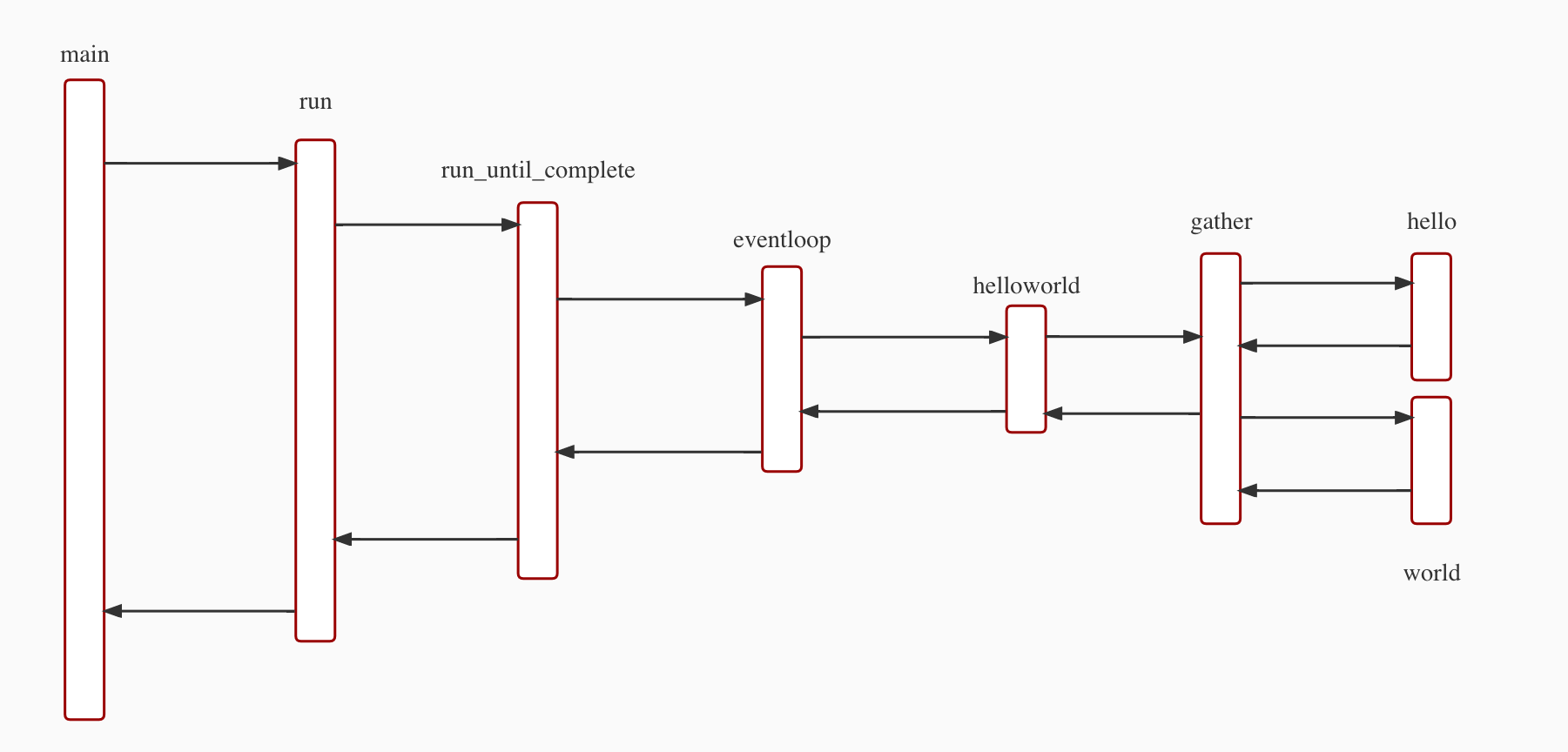
六、小结
● 终于结束了,这是一个非常长的小节了,但是我感觉很多细节还是没有说到,大家有问题请及时留言探讨
● _GatheringFuture一个非常重要的对象,它不但追踪了hello() world()的执行状态,唤醒helloworld(),并且将返回值传递给helloworld
● await async yield对流程的控制需要特别关注
● 本文中的代码,参考了python 3.7.7中asyncio的源代码,裁剪而来
● 本文中代码:代码
至此,本文结束
在下才疏学浅,有撒汤漏水的,请各位不吝赐教...
更多文章,请关注我:wilson.chai
从头造轮子:python3 asyncio之 gather (3)的更多相关文章
- 从头造轮子:asyncio之 run_until_complete (1)
前言 今天开始聊一聊python3的asyncio.关于asyncio,大家肯定都有自己的理解,并且网上大神也把基础概念也解释的比较透彻. 本文写作的初衷,主要是理解asyncio的原理并且实现一遍. ...
- 从头造轮子:python3 asyncio之 sleep (4)
前言 书接上文:,本文造第四个轮子,也是asyncio包里面非常常用,并且非常复杂的一个函数sleep 一.知识准备 ● time.sleep直接让当前线程睡觉,但是这种方式显然是不能接受的,如果当前 ...
- 从头造轮子:python3 asyncio 之 run(2)
前言 书接上文,本文造第二个轮子,也是asyncio包里面非常常用的一个函数run 一.知识准备 ● 相对于run_until_complete,改动并不大,就是将入口函数重新封装了一下,基础知识主要 ...
- 避免重复造轮子的UI自动化测试框架开发
一懒起来就好久没更新文章了,其实懒也还是因为忙,今年上半年的加班赶上了去年一年的加班,加班不息啊,好了吐槽完就写写一直打算继续的自动化开发 目前各种UI测试框架层出不穷,但是万变不离其宗,驱动PC浏览 ...
- 【疯狂造轮子-iOS】JSON转Model系列之二
[疯狂造轮子-iOS]JSON转Model系列之二 本文转载请注明出处 —— polobymulberry-博客园 1. 前言 上一篇<[疯狂造轮子-iOS]JSON转Model系列之一> ...
- 【疯狂造轮子-iOS】JSON转Model系列之一
[疯狂造轮子-iOS]JSON转Model系列之一 本文转载请注明出处 —— polobymulberry-博客园 1. 前言 之前一直看别人的源码,虽然对自己提升比较大,但毕竟不是自己写的,很容易遗 ...
- h5engine造轮子
基于学习的造轮子,这是一个最简单,最基础的一个canvas渲染引擎,通过这个引擎架构,可以很快的学习canvas渲染模式! 地址:https://github.com/RichLiu1023/h5en ...
- 我为什么还要造轮子?欠踹?Monk.UI表单美化插件诞生记!
背景 目前市场上有很多表单美化的UI,做的都挺不错,但是他们都有一个共同点,那就是90%以上都是前端工程师开发的,导致我们引入这些UI的时候,很难和程序绑定.所以作为程序员的我,下了一个决定!我要自己 ...
- 「iOS造轮子」之UIButton 用Block响应事件
俗语说 一个不懒的程序员不是好程序员 造轮子,也只是为了以后更好的coding. coding,简易明了的代码更是所有程序员都希望看到的 无论是看自己的代码,还是接手别人的代码 都希望一看都知道这代码 ...
随机推荐
- Mac终端学习C笔记
Mac终端自带Clang,是一个C语言.C++.Objective-C语言的轻量级编译器,也可以进行c程序编译.具体Clang和gcc区别不做详细介绍. 终端自动vi编辑器. 终端命令笔记: gcc ...
- 开启ipv6支持
CentOS6 开启ipv6模块操作在/etc/sysconfig/modules 目录下创建一个脚本,比如叫做 ipv6.modules,脚本中内容如下:#!/bin/shif [ ! -c /p ...
- SpringBoot整合quartz框架启动定时任务报错:the given trigger will never fire.
org.quartz.SchedulerException: Based on configured schedule, the given trigger 'DEFAULT.cron_b1a91e1 ...
- js中字符串和数组的常用转换处理方法
1.split("分割条件(正则表达式或者字符)") 字符串 ==> 数组 默认返回数组 (1) 将单词分割为字符 "hello".split(" ...
- Qt5获取可用串口
概述 本文将介绍Qt5使用类QSerialPortInfo获取可以用串口号 效果 机器上配置的虚拟串口 程序获取结果 源码开始 .pro文件中添加下面的代码 QT += serialport 然后,执 ...
- c++ vector释放概述
这里仅为概述,具体的详情分析,可以Google下,会得到更详尽的解释. 1.函数clear和erase都将数组的size清空,但对应的空间并没有回收,而且,一直push_baclk, 对应的capac ...
- 再谈多线程模型之生产者消费者(多生产者和多消费者 )(c++11实现)
0.关于 为缩短篇幅,本系列记录如下: 再谈多线程模型之生产者消费者(基础概念)(c++11实现) 再谈多线程模型之生产者消费者(单一生产者和单一消费者)(c++11实现) 再谈多线程模型之生产者消费 ...
- 【LeetCode】448. Find All Numbers Disappeared in an Array 解题报告(Python)
作者: 负雪明烛 id: fuxuemingzhu 个人博客: http://fuxuemingzhu.cn/ 目录 题目描述 题目大意 方法一:暴力求解 方法二:原地变负做标记 方法三:使用set ...
- 湫湫系列故事——消灭兔子(hdu4544)
湫湫系列故事--消灭兔子 Time Limit: 3000/1000 MS (Java/Others) Memory Limit: 65535/32768 K (Java/Others)Tota ...
- Pikachu漏洞练习-SQL-inject(持续更新)
本来在bup中repeater模式可以多次测试,但不知为何总是出错 这里把我们想查询的数据库和版本进行联合查询,放包,页面回显数据库名称和版本分别为pikachu,5.7.26 数据库版本大于5那么i ...