
Asp.NetCore3.1 WebApi 获取配置json文件中的数据
下面只是做一个简单的测试:
1:定义好appsetting.Json文件的配置信息如下:


{

  "Logging": {

    "LogLevel": {

      "Default": "Information",

      "Microsoft": "Warning",

      "Microsoft.Hosting.Lifetime": "Information"

    }

  },

  "Appset01": {

    "name": "小张",

    "age": "18",

    "sex": "男"

  },

  "personnel": {

    "name": "小张",

    "addr": "湖南怀化",

    "books": [

      {

        "bookid": "b001",

        "bname": "西游记"

      },

      {

        "bookid": "b002",

        "bname": "水浒传"

      }

    ]

  },

  "AllowedHosts": "*"

}
2:根据内容获取或者设置实体来:
using System;

using System.Collections.Generic;

using System.Linq;

using System.Threading.Tasks;

namespace WebApiDemo

{

    public class Appset01

    {

        public string name { get; set; }

        public string age { get; set; }

        public string sex { get; set; }

    }

}
using System;

using System.Collections.Generic;

using System.Linq;

using System.Threading.Tasks;

namespace WebApiDemo

{

    public class Person

    {

        public string name { get; set; }

        public string addr { get; set; }

        public Book[] books { get; set; }

    }

    public class Book

    {

        public string bookid { get; set; }

        public string bname { get; set; }

    }

}
3:Startup内容中配置好服务信息:
using Microsoft.AspNetCore.Builder;

using Microsoft.AspNetCore.Hosting;

using Microsoft.Extensions.Configuration;

using Microsoft.Extensions.DependencyInjection;

using Microsoft.Extensions.Hosting;

using Microsoft.Extensions.Options;

namespace WebApiDemo

{

    public class Startup

    {

        public Startup(IConfiguration configuration)

        {

            Configuration = configuration;

        }

        public IConfiguration Configuration { get; }

        // This method gets called by the runtime. Use this method to add services to the container.

        public void ConfigureServices(IServiceCollection services)

        {

            services.AddControllers();

            services.Configure<Person>(Configuration.GetSection("personnel"));

        }

        // This method gets called by the runtime. Use this method to configure the HTTP request pipeline.

        public void Configure(IApplicationBuilder app, IWebHostEnvironment env,IOptions<Appset01>appOptions)

        {

            if (env.IsDevelopment())

            {

                app.UseDeveloperExceptionPage();

            }

            app.UseRouting();

            app.UseAuthorization();

            app.UseEndpoints(endpoints =>

            {

                endpoints.MapControllers();

            });

        }

    }

}
4:在Controller中使用:
using System;

namespace WebApiDemo.Controllers

{

    using Microsoft.AspNetCore.Mvc;

    using Microsoft.Extensions.Configuration;

    using Microsoft.Extensions.Options;

    [ApiController]

    [Route("api/[controller]")]

    public class AppSetjsonController : ControllerBase

    {

        private IConfiguration _Configuration;

        public Person _person { get; set; }

        public Appset01 _jwtobj { get; set; }

        public AppSetjsonController(IConfiguration configuration, IOptions<Person> options)

        {

            this._Configuration = configuration;

            this._person = options.Value;

        }

        [HttpGet]

        [Route("getAppSetting")]

        public ApiResult<Appset01> getAppSetting()

        {

            ApiResult<Appset01> dic = new ApiResult<Appset01>();

            try

            {

                //BindNonPublicProperties 默认为false全部获取,true为不获取私有的字段

                dic.data = _Configuration.GetSection("Appset01").Get<Appset01>(c => c.BindNonPublicProperties = true);

                Console.WriteLine("addr=" + _person.addr + ",name=" + _person.name + ", book[0].name=" + _person.books[0].bname);

                dic.message = "获取成功!";

            }

            catch (Exception ex)

            {

                dic.message = "获取失败:" + ex.Message;

            }

            return dic;

        }

    }

}
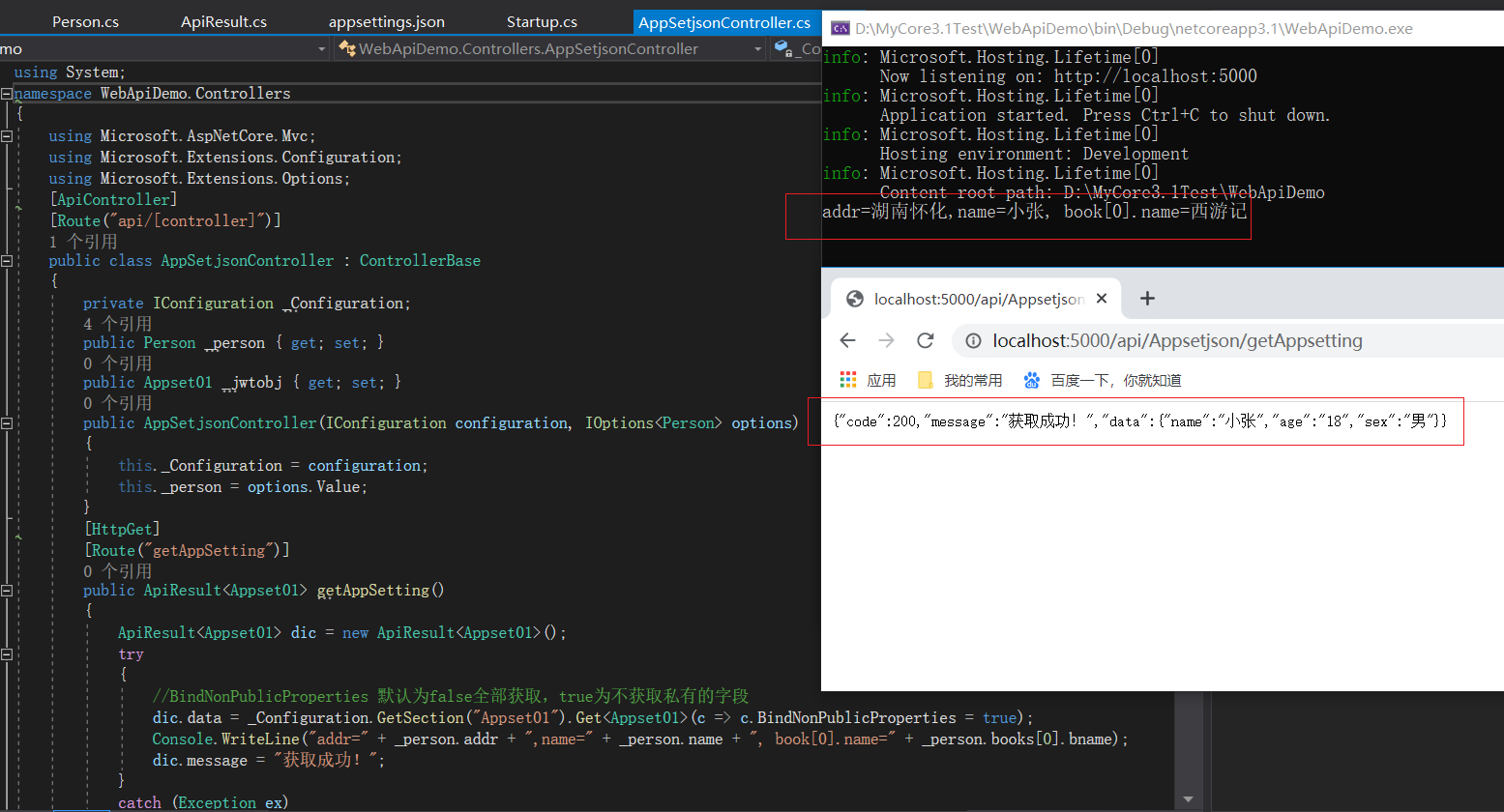
5:查询的效果展示:
6:获取自定义路径下的json配置文件信息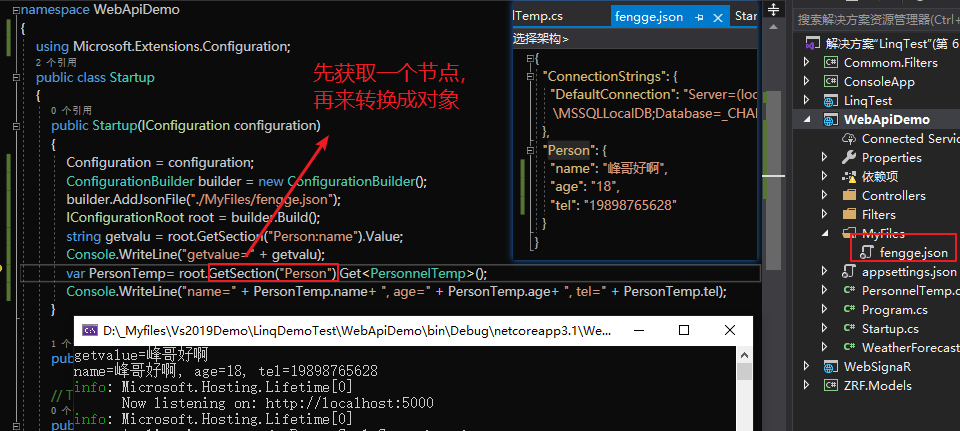
其他方法获取(下标)
  using Microsoft.Extensions.Configuration;

 public IConfiguration _configuration { get; set; }

public BasisApiResult doJson(int index)

{

BasisApiResult result = new BasisApiResult();

List<Dictionary<string, string>> dict = new List<Dictionary<string, string>>();

_configuration.GetSection("OSS").Bind(dict);

dict[index].TryGetValue("AccessKeyId", out string qq);

Console.WriteLine("qq=" + qq);

result.data = qq;

return result;

}
Asp.NetCore3.1 WebApi 获取配置json文件中的数据的更多相关文章
- 接口自动化(三)--读取json文件中的数据
上篇讲到实际的请求数据放置在json文件内,这一部分记述一下python读取json文件的实现. 代码如下(代码做了简化,根据需要调优:可做一些容错处理): 1 import json 2 3 cla ...
- Android中通过代码获取arrays.xml文件中的数据
android工程res/valuse文件夹下的arrays.xml文件中用于放各种数组数据,比如字符串数组.整型数组等,数组中的数据可能是具体的值,也有可能是对资源数据的引用,下面针对这两种情况通过 ...
- NetCore 获取appsetting.json 文件中的配置
1. using Microsoft.Extensions.Configuration public class HomeController : Controller { public IConfi ...
- [数据科学] 从text, json文件中提取数据
文本文件是基本的文件类型,不管是csv, xls, json, 还是xml等等都可以按照文本文件的形式读取. #-*- coding: utf-8 -*- fpath = "data/tex ...
- ASP.NET Core 在 JSON 文件中配置依赖注入
前言 在上一篇文章中写了如何在MVC中配置全局路由前缀,今天给大家介绍一下如何在在 json 文件中配置依赖注入. 在以前的 ASP.NET 4+ (MVC,Web Api,Owin,SingalR等 ...
- 转载:ASP.NET Core 在 JSON 文件中配置依赖注入
在以前的 ASP.NET 4+ (MVC,Web Api,Owin,SingalR等)时候,都是提供了专有的接口以供使用第三方的依赖注入组件,比如我们常用的会使用 Autofac.Untiy.Stri ...
- 谷歌通过ajax获取本地JSON文件,为什么会显示跨域?转载的
在本地写了一段JSON代码,然后用ajax读取后,在浏览器打开,发现谷歌提示涉及到跨域问题, 但是跨域是由于协议,域名,端口中有一个不同,才会跨域,我在本地访问自己的文件,怎么和跨域扯上关系了?? 谷 ...
- 谷歌通过ajax获取本地JSON文件,为什么会提示跨域?
在本地写了一段JSON代码,然后用ajax读取后,在浏览器打开,发现谷歌提示涉及到跨域问题, 但是跨域是由于协议,域名,端口中有一个不同,才会跨域,我在本地访问自己的文件,怎么和跨域扯上关系了?? 下 ...
- 六种获取配置properties文件的方法
总结一下六种获取配置properties文件的方法,代码如下: package com.xujingyang.test ; import java.io.BufferedInputStream ; i ...
随机推荐
- P4774-屠龙勇士-扩展中国剩余定理
屠龙勇士 很久很久以前,巨龙突然出现,带来了灾难带走公主又消失不见.王国十分危险,世间谁最勇敢,一位英雄出现-- 学习于该大佬博客 那么你就是这位英雄,不过不同的是,你面对的是一群巨龙,虽然巨龙都不会 ...
- 数据结构与算法-排序(二)选择排序(Selection Sort)
摘要 选择排序的逻辑是先遍历比较出序列中最大的,然后把最大的放在最后位置. 遵循这个逻辑,用代码实现时,做到1.减少比较次数之外,这里引入一个新的指标 - 稳定性,2.保证排序过程中的稳定性也是一个优 ...
- C++ 定义默认值void locals_index(int reg, int offset = 1);
看jvm源码的时候怎么也看不懂,来回看了几次了就是关于iload 6 指令的解析 def(Bytecodes::_lload , ubcp|____|____|____, vtos, ltos, ll ...
- mysql采坑笔记
mysqld --initialize-insecure // 初始化数据 mysql -u root -p // 登录 navicat for mysql 1251错误解决方法 ALTER USER ...
- jquery.autocomplete 使用解析
页面引用 <script type="text/javascript" src="${base}/autocom/jquery-1.8.2.min.js" ...
- 【动画消消乐|CSS】调皮逃跑的小方块 077
前言 Hello!小伙伴! 非常感谢您阅读海轰的文章,倘若文中有错误的地方,欢迎您指出- 自我介绍 ଘ(੭ˊᵕˋ)੭ 昵称:海轰 标签:程序猿|C++选手|学生 简介:因C语言结识编程,随后转入计 ...
- JVM 常用监控工具
概述 给一个系统定位问题的时候,知识.经验是关键基础,数据是依据,工具是运用知识处理数据的手段. 这里说的数据包括但不限于异常堆栈.虚拟机运行日志.垃圾收集器日志.线程快照(threaddump/ja ...
- RocketMQ原理分析&场景问题
硬核干货分享,欢迎关注[Java补习课]成长的路上,我们一起前行 ! <高可用系列文章> 已收录在专栏,欢迎关注! 一.RocketMQ的基本原理 RocketMQ基本架构图如下 从这个架 ...
- Eclipse的变量标记开关
例如有如下代码: int var_a = 0; int var_b = var_a + 2; 当光标在var_a变量上时,Eclipse会将代码进行如下标记: int var_a = 0; int v ...
- Java基础技术基础面试【笔记】
Java基础技术基础面试[笔记] String.StringBuilder以及StringBuffer三者之间的区别? 三者的区别可以从可变性,线程安全性,性能这三个部分进行说明 可变性 从可变性来说 ...