
navigator导航页面跳转与绑定事件
效果图:
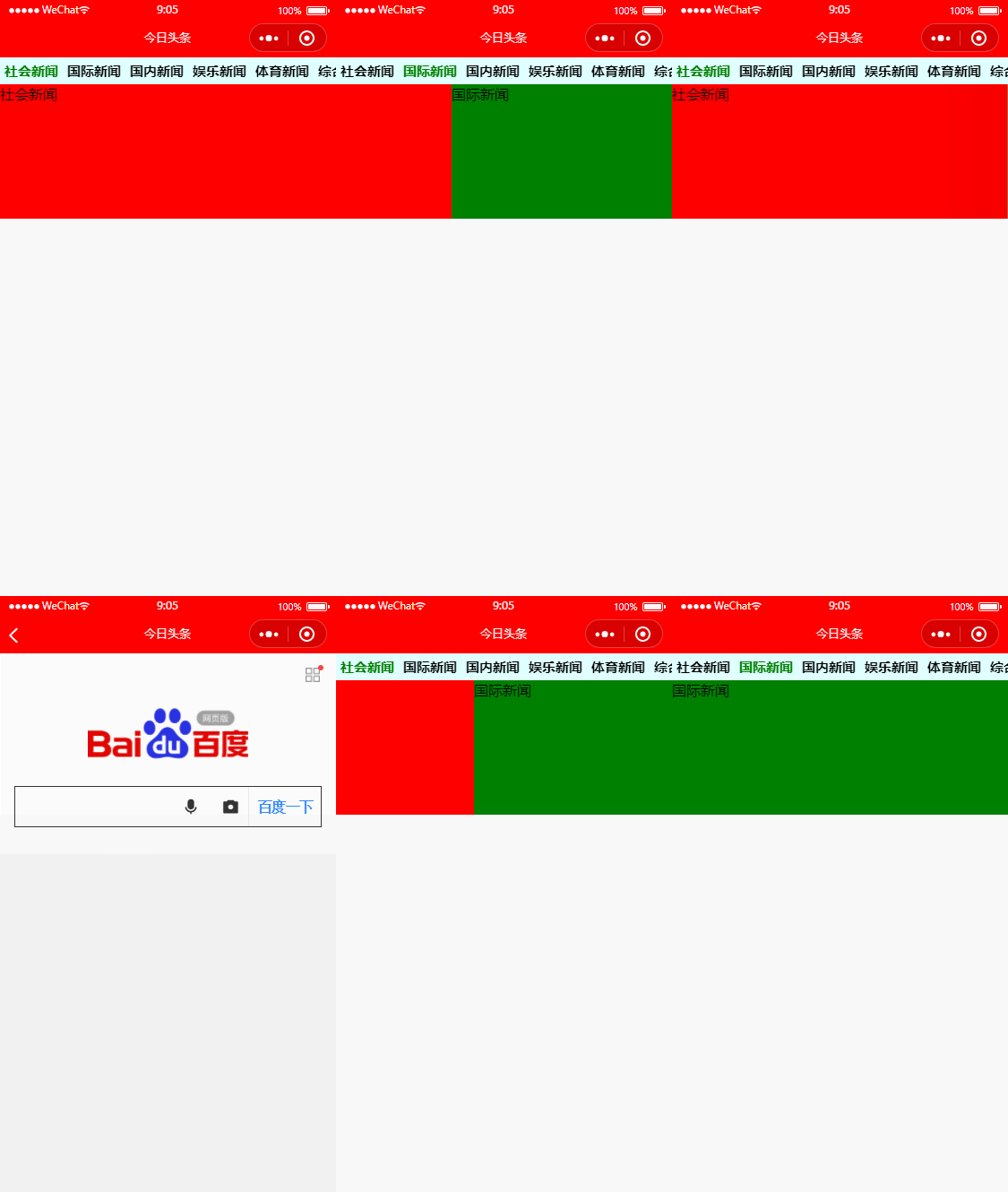
1. 新建一个index页面
主页面分为两块,上面是导航条,下面是轮播图。
导航条:
  <view class='menu'>

    <scroll-view scroll-x>

      <view class='scroll-nav'>

        <navigator url="/pages/baidupage/baidupage" data-navindex='0' bindtap="navNews" class="{{currentTab!=0?'color-black': 'color-green'}}">社会新闻</navigator>

        <navigator url="" data-navindex='1' bindtap="navNews" class="{{currentTab!=1?'color-black': 'color-green'}}">国际新闻</navigator>

        <navigator url="" data-navindex='2' bindtap="navNews">国内新闻</navigator>

        <navigator url="" data-navindex='3' bindtap="navNews">娱乐新闻</navigator>

        <navigator url="" data-navindex='4' bindtap="navNews">体育新闻</navigator>

        <navigator url="" data-navindex='5' bindtap="navNews">综合新闻</navigator>

      </view>

    </scroll-view>

  </view>
scroll-x表示可以横向滚动,导航条内容较长,因此需要横向滚动。
navigator是导航条,
url里面是跳转链接,这个链接页面必须在app.json里面存在。当点击这个导航时会跳转到baidupage的页面,这个页面里面的内容是打开https://wap.baidu.com,一般小程序是没有权限打开百度页面的,这里是模拟,所以关闭了验证,具体原因参考https://blog.csdn.net/qq_32113629/article/details/79483213
bindtap是绑定事件,当点击这个导航时会触发navNews函数,这个函数在Index.js中定义的。
class里面是导航的颜色显示,当在当前tab下面时,字体是绿色,当切换到其他导航时,颜色变为黑色。
轮播图:
  <view>

    <swiper current="{{currentTab}}" bindchange="swiperView">

      <swiper-item>

        <view class="swiper-view1">社会新闻</view>

      </swiper-item>

      <swiper-item>

        <view class="swiper-view2">国际新闻</view>

      </swiper-item>

    </swiper>

  </view>
社会新闻的页面是swiper-view1,为红色。国际新闻的页面是swiper-view2,为绿色,其中currentTab这个变量就是个关键,将导航条和轮播图联系起来。
总的代码:
app.json


{

  "pages": [

    "pages/index/index",

    "pages/baidupage/baidupage"

  ],

  "window": {

    "backgroundColor": "#F6F6F6",

    "backgroundTextStyle": "light",

    "navigationBarBackgroundColor": "#F00",

    "navigationBarTitleText": "今日头条",

    "navigationBarTextStyle": "white"

  },

  "sitemapLocation": "sitemap97.json"

}
app.js
//app.js

App({

  onLaunch: function () {

    if (!wx.cloud) {

      console.error('请使用 2.2.3 或以上的基础库以使用云能力')

    } else {

      wx.cloud.init({

        // env 参数说明:

        //   env 参数决定接下来小程序发起的云开发调用(wx.cloud.xxx)会默认请求到哪个云环境的资源

        //   此处请填入环境 ID, 环境 ID 可打开云控制台查看

        //   如不填则使用默认环境(第一个创建的环境)

        // env: 'my-env-id',

        traceUser: true,

      })

    }

    this.globalData = {}

  }

})
app.wxss
/**app.wxss**/

.container {

  height: 100%;

  box-sizing: border-box;

}

page {

  height: 100%;

}
index.js
// miniprogram/pages/index/index.js

Page({

  /**

   * Page initial data

   */

  data: {

    currentTab:0

  },

  //swiper切换操作

  swiperView:function(event){

    // console.log(event)

    var currentIndex = event.detail.current

    this.setData({

      currentTab: currentIndex

    })

  },

  // 新闻点击操作

  navNews:function(event){

    // console.log(event)

    // console.log(event.currentTarget.dataset.navindex)

    var navIndex = event.currentTarget.dataset.navindex

    // 需要修改currentTab变量

    this.setData({

      currentTab:navIndex

    })

  },

  /**

   * Lifecycle function--Called when page load

   */

  onLoad: function (options) {

  },

  /**

   * Lifecycle function--Called when page is initially rendered

   */

  onReady: function () {

  },

  /**

   * Lifecycle function--Called when page show

   */

  onShow: function () {

  },

  /**

   * Lifecycle function--Called when page hide

   */

  onHide: function () {

  },

  /**

   * Lifecycle function--Called when page unload

   */

  onUnload: function () {

  },

  /**

   * Page event handler function--Called when user drop down

   */

  onPullDownRefresh: function () {

  },

  /**

   * Called when page reach bottom

   */

  onReachBottom: function () {

  },

  /**

   * Called when user click on the top right corner to share

   */

  onShareAppMessage: function () {

  }

})
index.json
{

  "usingComponents": {}

}
index.wxml
<!--miniprogram/pages/index/index.wxml-->

<view class="container">

  <view class='menu'>

    <scroll-view scroll-x>

      <view class='scroll-nav'>

        <navigator url="/pages/baidupage/baidupage" data-navindex='0' bindtap="navNews" class="{{currentTab!=0?'color-black': 'color-green'}}">社会新闻</navigator>

        <navigator url="" data-navindex='1' bindtap="navNews" class="{{currentTab!=1?'color-black': 'color-green'}}">国际新闻</navigator>

        <navigator url="" data-navindex='2' bindtap="navNews">国内新闻</navigator>

        <navigator url="" data-navindex='3' bindtap="navNews">娱乐新闻</navigator>

        <navigator url="" data-navindex='4' bindtap="navNews">体育新闻</navigator>

        <navigator url="" data-navindex='5' bindtap="navNews">综合新闻</navigator>

      </view>

    </scroll-view>

  </view>

  <view>

    <swiper current="{{currentTab}}" bindchange="swiperView">

      <swiper-item>

        <view class="swiper-view1">社会新闻</view>

      </swiper-item>

      <swiper-item>

        <view class="swiper-view2">国际新闻</view>

      </swiper-item>

    </swiper>

  </view>

</view>
index.wxss
/* miniprogram/pages/index/index.wxss */

.menu{

  background-color: lightcyan;

}

.scroll-nav{

  background-color: lightcyan;

  display: flex;

  white-space: nowrap;

  font-size: 30rpx;

  height: 60rpx;

  line-height: 60rpx;

}

.scroll-nav navigator{

  font-weight: bold;

  margin: 0 10rpx;

}

.swiper-view1{

  width: 100%;

  height: 400rpx;

  background-color: red;

}

.swiper-view2{

  width: 100%;

  height: 400rpx;

  background-color: green;

}

.color-black{

  color: black;

}

.color-green{

  color: green;

}
baidupage.wxml
<!--miniprogram/pages/baidupage/baidupage.wxml-->

<web-view src="https://wap.baidu.com/"></web-view>
OK.
navigator导航页面跳转与绑定事件的更多相关文章
- jquerymobile页面跳转和参数传递
http://blog.csdn.net/chen052210123/article/details/7481578 页面跳转: 页面跳转时pagebeforechange事件会被触发两次,通过$(d ...
- 微信小程序开发:学习笔记[8]——页面跳转及传参
微信小程序开发:学习笔记[8]——页面跳转及传参 页面跳转 一个小程序拥有多个页面,我们可以通过wx.navigateTo推入一个新的页面.在首页使用2次wx.navigateTo后,页面层级会有三层 ...
- jquery html 动态添加元素绑定事件
由于实际的需要,有时需要往网页中动态的插入HTML内容,并在插入的节点中绑定事件处理函数.我们知道,用Javascript向HTML文档中 插入内容,有两种方法, 一种是在写HTML代码写入JS,然后 ...
- react-native-http请求后navigator导航跳转
琢磨react-native有一段时间了.对于我来说,它的确是前端开发工作者的福音,因为我可以利用它来写app的代码,而且基本可以一套代码,多个平台使用. 早就想写一篇随笔记录一下react nati ...
- Android实现页面跳转、ListView及其事件
Android实现页面跳转.ListView及其事件 开发工具:Andorid Studio 1.3 运行环境:Android 4.4 KitKat 工程内容 进入主页面后,使用ListView实现特 ...
- 原创+转发:微信小程序navigator、redirectTo、switchTab几种页面跳转方式
什么是事件? 事件是视图层到逻辑层的通讯方式. 事件可以将用户的行为反馈到逻辑层进行处理. 详解(以常见的tap点击事情为例) 模板.wxml代码: <view id="tapTest ...
- 【Flutter学习】页面跳转之路由及导航
一,概述 移动应用通常通过成为‘屏幕’或者‘页面’的全屏元素显示其内容,在Flutter中,这些元素统称为路由,它们由导航器Navigator组件管理.导航器管理一组路由Route对象,并提供了管理堆 ...
- Flutter 使用Navigator进行局部跳转页面
老孟导读:Navigator组件使用的频率不是很高,但在一些场景下非常适用,比如局部表单多页填写.底部导航一直存在,每个tab各自导航场景. Navigator 是管理路由的控件,通常情况下直接使用N ...
- android 学习第一天 了解事件机制,页面跳转等常用操作
点击时间2种 第一种,通过初始化页面 写入点击事件 protected void onCreate(Bundle savedInstanceState) { super.onCreate(savedI ...
随机推荐
- yum的配置
1. 创建两台虚拟机[root@room9pc01 ~]# clone-vm7Enter VM number: 8 [root@room9pc01 ~]# clone-vm7Enter VM numb ...
- 玩转STM32MP157- 使用fbtft驱动 lcd ili9341
之前使用了 fbtft 成功驱动了lcd st7735r,现在尝试下驱动 ili9341, 配置 跟之前用 fbtft 驱动 st7735r 一样,先用 make menuconfig 配置内核,添加 ...
- linux 下安装 docker 环境
一分钟了解 Docker Docker 是一个开源的应用容器引擎,基于 Go 语言 并遵从Apache2.0协议开源.Docker 可以让开发者打包他们的应用以及依赖包到一个轻量级.可移植的容器中,然 ...
- Windows10上开启WSL2(Windows Subsystem for Linux 2)及Docker Desktop For Windows
什么是WSL2 WSL2(Windows Subsystem for Linux 2)是适用于Linux的Windows子系统体系结构的一个新版本,它支持适用于Linux的Windows子系统在Win ...
- Java反射机制开发经验总结
我在实际项目当中有经常用到反射机制,故而将学会的反射用法做一些汇总笔记,当做以后复盘所用. 存在这样一个类: package com.example.demo; import com.alibaba. ...
- MySQL 数据库恢复一张表中的数据
如果使用 mysqldump -uroot -p123 user > test.sql备份了user数据库中的所有数据,但是当前只想要恢复该数据库的某张表数据,该怎么处理呢? 已知恢复整个数据库 ...
- 深入理解 PHP7 中全新的 zval 容器和引用计数机制
深入理解 PHP7 中全新的 zval 容器和引用计数机制 最近在查阅 PHP7 垃圾回收的资料的时候,网上的一些代码示例在本地环境下运行时出现了不同的结果,使我一度非常迷惑. 仔细一想不难发现问题所 ...
- 文末送书四本 | 这篇Java反射机制太经典!不看后悔!
先看再点赞,给自己一点思考的时间,如果对自己有帮助,微信搜索[程序职场]关注这个执着的职场程序员. 价值:Java技能,面试经验指导,简历优化,职场规划指导,技能提升方法,讲不完的职场故事,个人成长经 ...
- Leetcode No.167 Two Sum II - Input array is sorted(c++实现)
1. 题目 1.1 英文题目 Given an array of integers numbers that is already sorted in non-decreasing order, fi ...
- STM32笔记二
1.STM32编程通常有两种方法:一种是寄存器编程,另外一种是固件库编程.寄存器编程是基础,而固件库是寄存器编程的基础上升级而来的编程方法,是需要重点掌握的编程方法. 2.STM32F103采用的是C ...