
powerdesigner连接postgresql数据库生成pdm及word文档
1、准备软件:
powerdesigner165与postgresql的驱动:psqlodbc_11_01_0000
2、安装并破解完成powerdesigner165
参看链接:https://www.cnblogs.com/zksfyz/p/8966594.html
3、安装postgresql的驱动:psqlodbc_11_01_0000
参看链接:https://blog.51cto.com/fengyuzaitu/2438827
4、配置postgresql的驱动
搜索开始栏ODBC,用户DSN,添加驱动
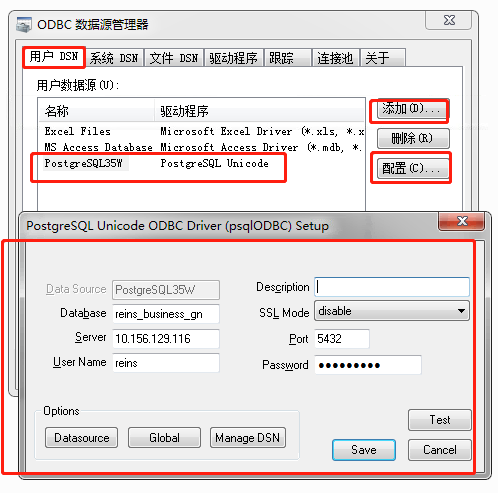
参看链接:https://blog.51cto.com/fengyuzaitu/2438827
5、powerdesigner连接数据库
搜索关键词:
powerdesigner连接postgresql数据库生成pdm及word文档
powerdesigner导出word文档
(1)创建model
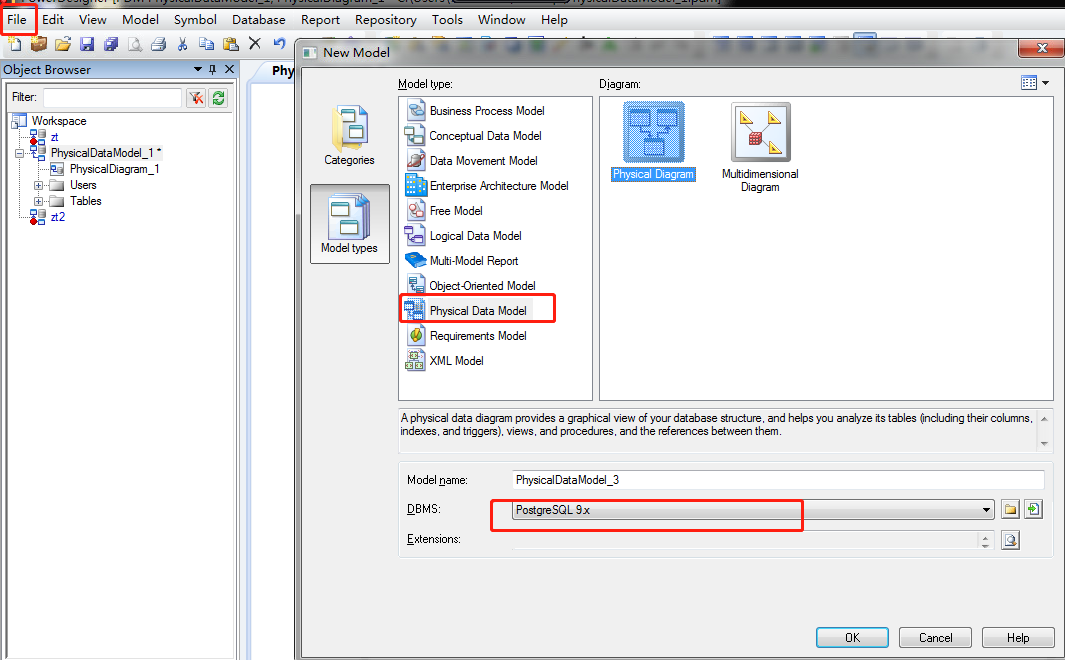 (2)连接数据库
第一步:
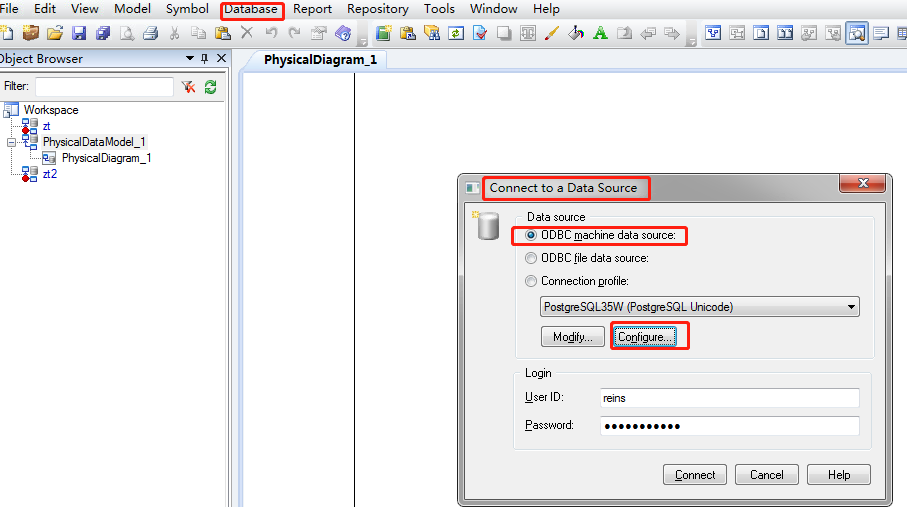
第二步:

第三步:
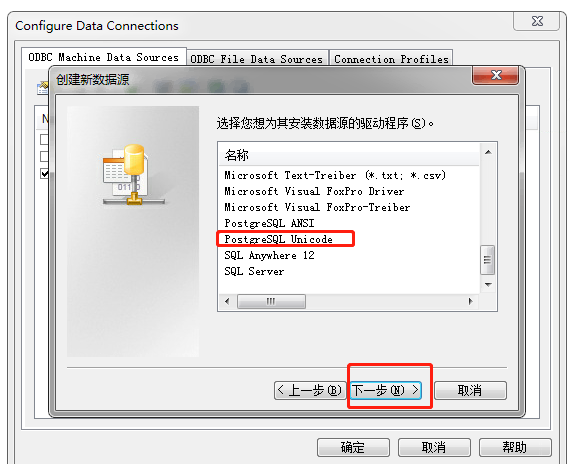
第四步:
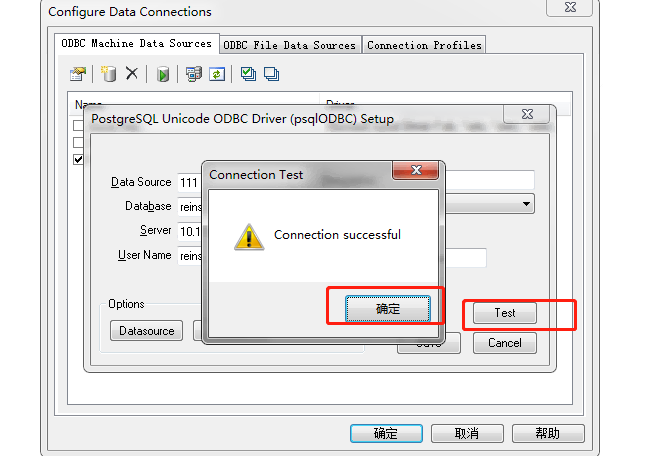
第五步:
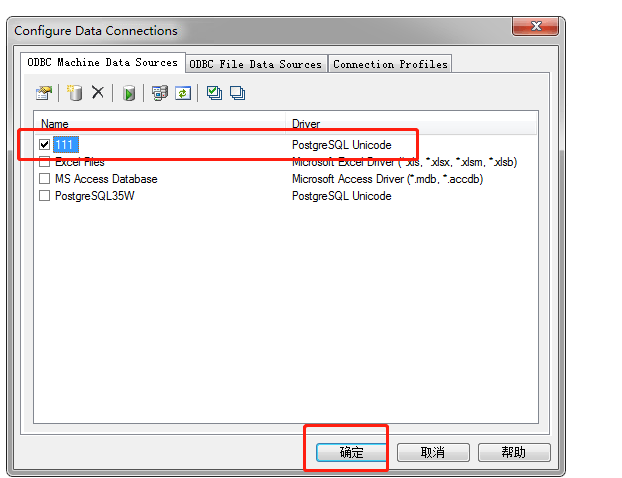
第六步:

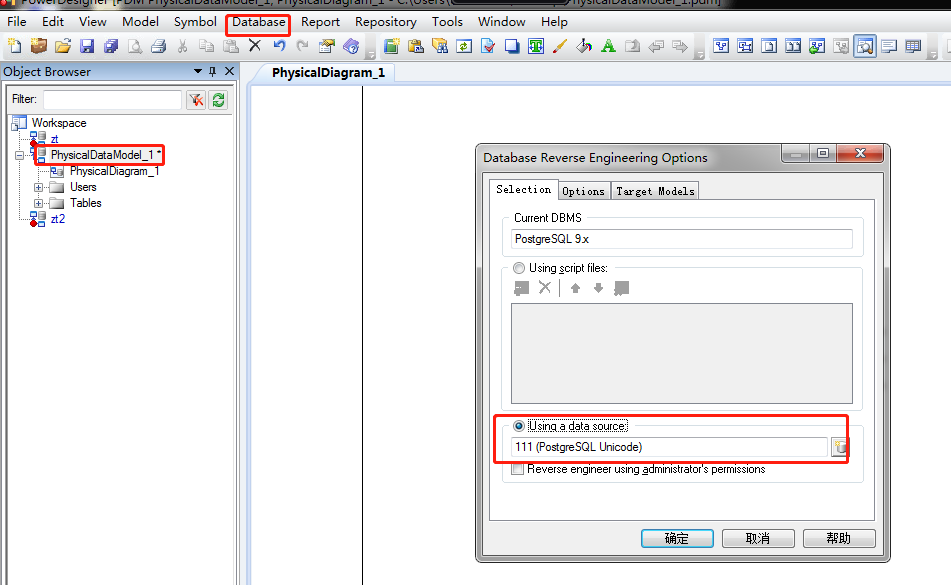
(3)model连接数据库生成pdm
选中新创建的model,
Database–>Update Model from Database…
(4)创建word模板
一、创建导出模版
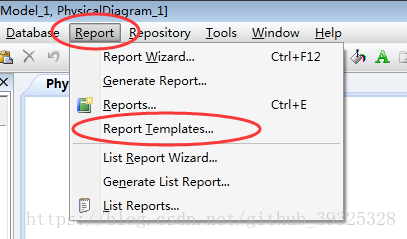
1.Report下点击Report Templates...
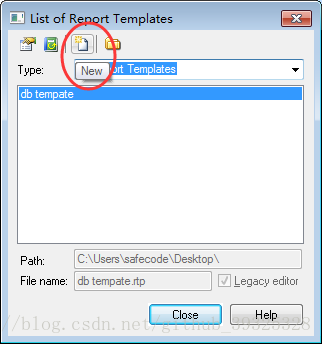
2.点击新建
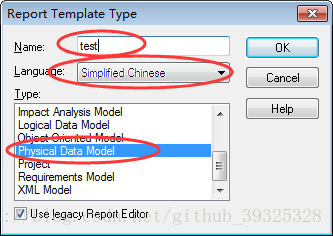
3.配置模版:模版名,简体中文,物理模型
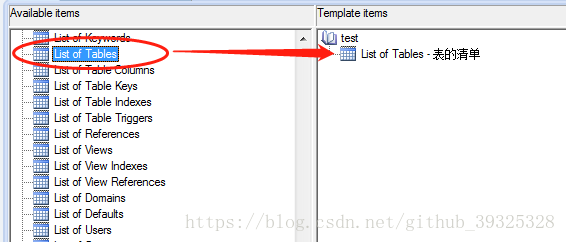
4.配置模版显示项
Available items -- List of Tables 双击移动至右侧,用于显示全部表信息
Available items -- Table -- List of Table Columns 双击移动至右侧,用于显示单表信息

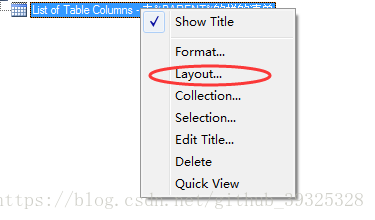
List of Table Columns -- 右键 -- Layout... -- 自定义要显示的字段和宽度
一般选择以下几项:是否主键、字段名、数据类型、注释

5.配置模版显示风格
双击节点可以编辑中文描述
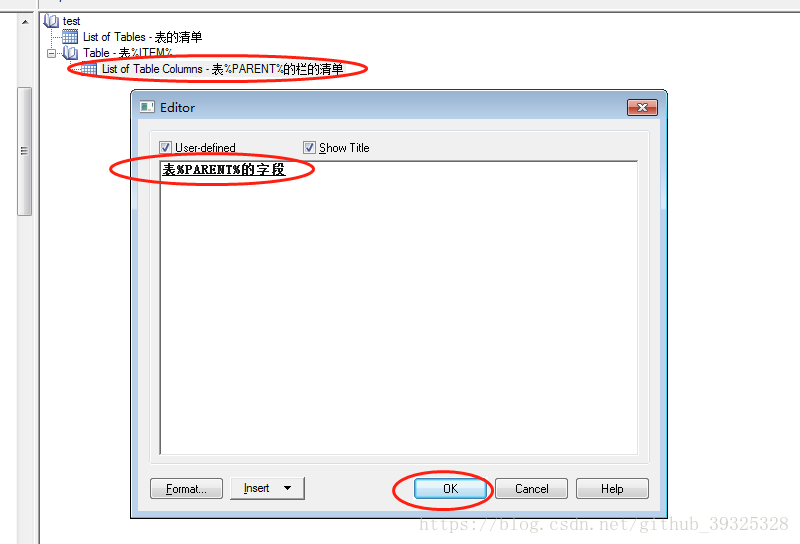
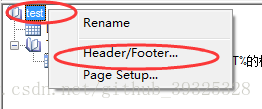
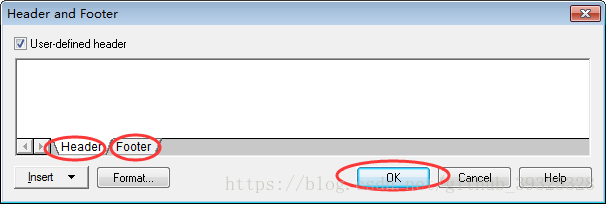
模版名称 -- 右键 -- Header/Footer... -- 自定义页眉页脚
这里不需要,直接删除
6.保存模版
建议将自己创建.rtp模版文件,保存到PowerDesigner默认模版目录中:PowerDesigner 16.5\Resource Files\Report Templates

二、根据模版生成数据库文档
1.导入sql反向生成物理模型
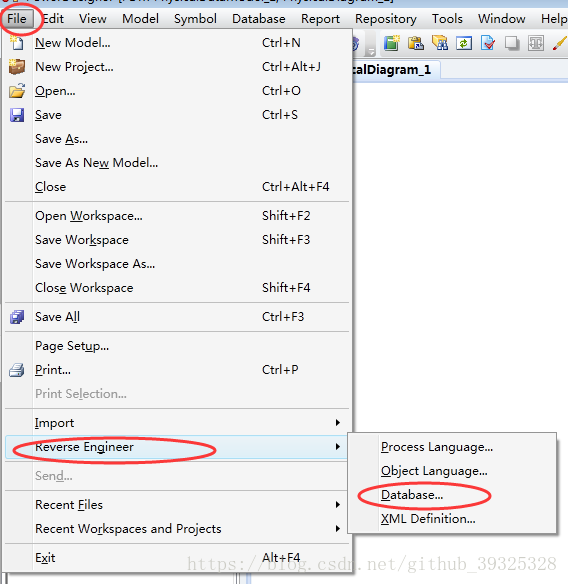
根据数据库选择,我用的是mysql
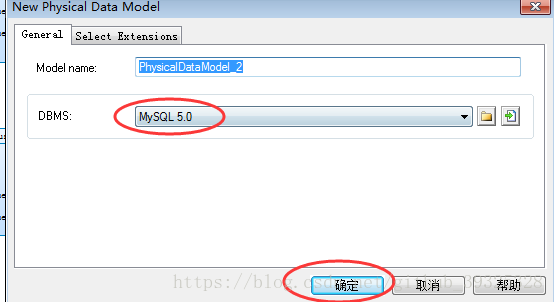
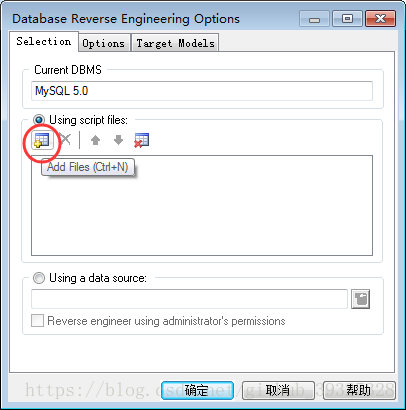
添加.sql文件,点击确定
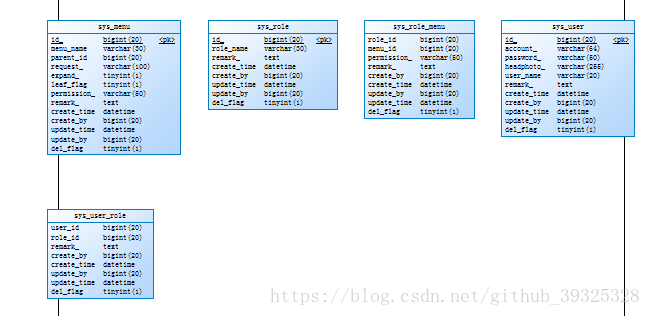
成功反向生成物理模型
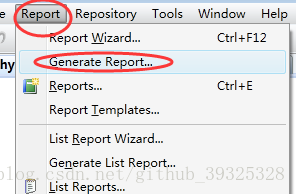
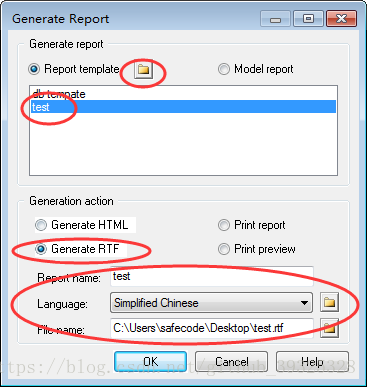
2.Report下点击Generate Report...
找到刚刚保存的模版,并生成RTF
3.rtf转doc或docx
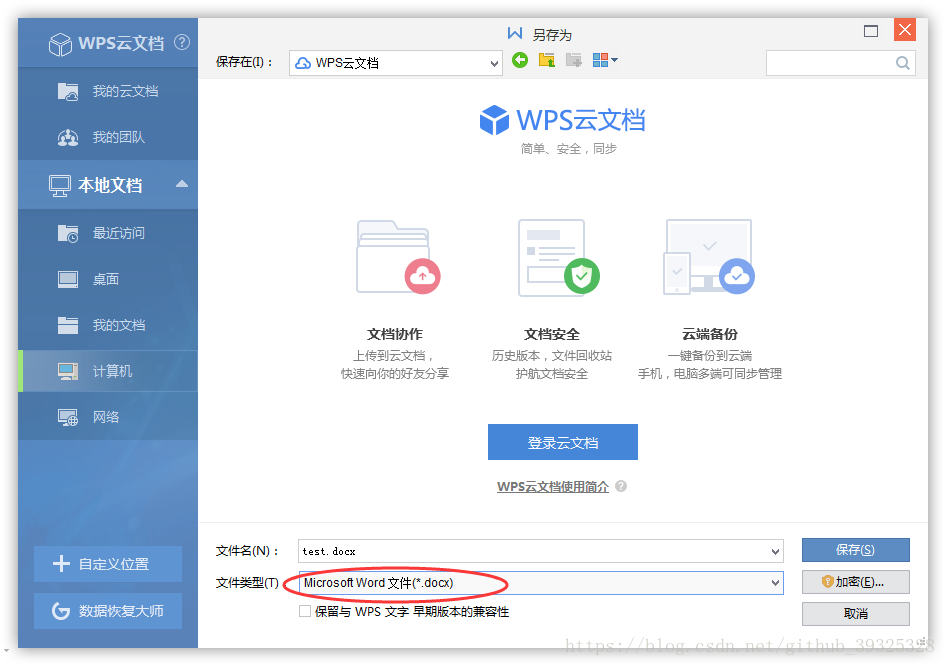
打开生成rtf文件,点击另存为,选择文件类型*.doc或者*.docx
参看链接:
https://blog.csdn.net/move_on_on/article/details/89175490
https://blog.csdn.net/github_39325328/article/details/80902471
6、修改pdm文档的表name为中文名(均需要保证数据库有注释comment)
PowerDesigner中NAME和COMMENT的互相转换,需要执行语句
由于PDM 的表中 Name 会默认=Code 所以很不方便, 所以需要将 StereoType 显示到表的外面来
打开[工具]->[显示属性](英文:Display Preferences) ->Content->Table->右边面板Columns框中 勾选: StereoType ,这样再在 StereoType中填入code字段相同内容就会显示在图形界面上了
使用说明: 在【Tools】-【Execute Commands】-【Edit/Run Script】 下。输入下面你要选择的语句即可,也可以保存起来,以便下次使用,后缀为.vbs。
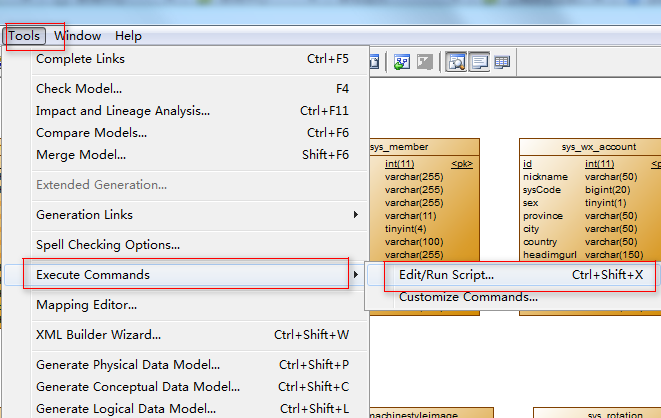
需要注意的问题是:运行语句时必须在Module模式下,如果是导出报表时执行会出现错误提示。
1.Name转到Comment注释字段。一般情况下只填写NAME,COMMENT可以运行语句自动生成。
将该语句保存为name2comment.vbs
'把pd中那么name想自动添加到comment里面

'如果comment为空,则填入name;如果不为空,则保留不变,这样可以避免已有的注释丢失.

Option   Explicit

ValidationMode   =   True

InteractiveMode   =   im_Batch

Dim   mdl   '   the   current   model

'   get   the   current   active   model

Set   mdl   =   ActiveModel

If   (mdl   Is   Nothing)   Then

      MsgBox   "There   is   no   current   Model "

ElseIf   Not   mdl.IsKindOf(PdPDM.cls_Model)   Then

      MsgBox   "The   current   model   is   not   an   Physical   Data   model. "

Else

      ProcessFolder   mdl

End   If

'   This   routine   copy   name   into   comment   for   each   table,   each   column   and   each   view

'   of   the   current   folder

Private   sub   ProcessFolder(folder)

      Dim   Tab   'running     table

      for   each   Tab   in   folder.tables

            if   not   tab.isShortcut then

                     if  trim(tab.comment)="" then'如果有表的注释,则不改变它.如果没有表注释.则把name添加到注释里面.

                        tab.comment   =   tab.name

                     end if

                  Dim   col   '   running   column

                  for   each   col   in   tab.columns

                        if trim(col.comment)="" then '如果col的comment为空,则填入name,如果已有注释,则不添加;这样可以避免已有注释丢失.

                           col.comment=   col.name

                        end if

                  next

            end   if

      next

      Dim   view   'running   view

      for   each   view   in   folder.Views

            if   not   view.isShortcut and trim(view.comment)=""  then

                  view.comment   =   view.name

            end   if

      next

      '   go   into   the   sub-packages

      Dim   f   '   running   folder

      For   Each   f   In   folder.Packages

            if   not   f.IsShortcut   then

                  ProcessFolder   f

            end   if

      Next

end   sub
2.将Comment内容保存到NAME中,comment2name.vbs 实习互换。语句为:
Option   Explicit

ValidationMode   =   True

InteractiveMode   =   im_Batch

Dim   mdl   '   the   current   model

'   get   the   current   active   model

Set   mdl   =   ActiveModel

If   (mdl   Is   Nothing)   Then

      MsgBox   "There   is   no   current   Model "

ElseIf   Not   mdl.IsKindOf(PdPDM.cls_Model)   Then

      MsgBox   "The   current   model   is   not   an   Physical   Data   model. "

Else

      ProcessFolder   mdl

End   If

Private   sub   ProcessFolder(folder)

On Error Resume Next

      Dim   Tab   'running     table

      for   each   Tab   in   folder.tables

            if   not   tab.isShortcut   then

                  tab.name   =   tab.comment

                  Dim   col   '   running   column

                  for   each   col   in   tab.columns

                  if col.comment="" then

                  else

                        col.name=   col.comment

                  end if

                  next

            end   if

      next

      Dim   view   'running   view

      for   each   view   in   folder.Views

            if   not   view.isShortcut   then

                  view.name   =   view.comment

            end   if

      next

      '   go   into   the   sub-packages

      Dim   f   '   running   folder

      For   Each   f   In   folder.Packages

            if   not   f.IsShortcut   then

                  ProcessFolder   f

            end   if

      Next

end   sub
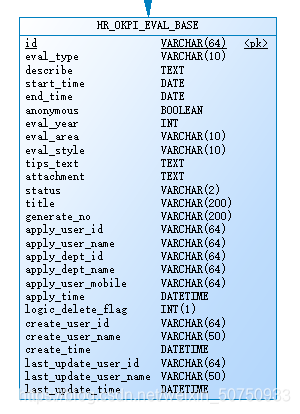
3、执行效果
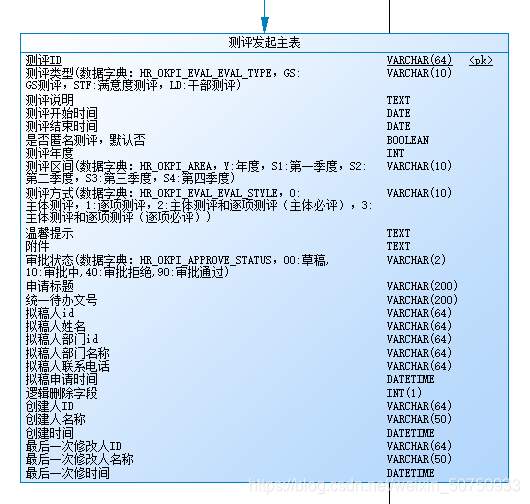
参看链接:
https://blog.csdn.net/weixin_50750933/article/details/108667494
https://www.cnblogs.com/happy2010/p/10882019.html
powerdesigner连接postgresql数据库生成pdm及word文档的更多相关文章
- 使用 powerdesigner 将数据库表结构逆向工程生成对应的word文档
本机系统win10 + mysql 5.7.17 + powerDesigner 16.5 + mysql-connector-odbc-5.3.9-winx32.msi 1 使用 PowerDesi ...
- PowerDesigner连接mysql逆向生成pdm
常用的建模工具有:PowerDesigner和ERWin,后者已快被淘汰,但前者依然活跃.相信大家都遇到过项目组已经运营很很久,但是竟然连一个ER图都没有,今天就讲解一下PowerDesigner连接 ...
- PowerDesigner导出word,PowerDesigner把表导出到word,PDM导出word文档
PowerDesigner导出word,PowerDesigner把表导出到word,PDM导出word文档 >>>>>>>>>>>& ...
- 自动生成并导出word文档
今天很荣幸又破解一现实难题:自动生成并导出word文档 先看页面效果: word效果: 代码: 先搭建struts2项目 创建action,并在struts.xml完成注册 <?xml vers ...
- C# WebForm 使用NPOI 2 生成简单的word文档(.docx)
使用NPOI可以方便的实现服务端对Word.Excel的读写.要实现对Word的读写操作,需要引用NPOI.OOXML.dll,应用命名空间XWPF. 本文使用NPOI 2.0实现对Word的基本生成 ...
- PowerDesigner连接Oracle数据库生成数据模型【本地连接方式】
步骤1:选择数据库 步骤2:选择要连接的数据库的版本 步骤3:新建数据库连接 步骤4:提供3种连接数据库方式(在此选择第3种),并且点击配置按钮,进行下一步 步骤5:点击此按钮,填 ...
- Java中用Apache POI生成excel和word文档
概述: 近期在做项目的过程中遇到了excel的数据导出和word的图文表报告的导出功能.最后决定用Apache POI来完毕该项功能.本文就项目实现过程中的一些思路与代码与大家共享.同一时候.也作为自 ...
- PowerDesigner连接Oracle数据库生成数据模型【数据源连接方式】
1.进入操作系统的管理工具 2.选择ODBC数据源[32位或64位] 3.列表中是当前数据库已有的数据源,右侧点击添加按钮,添加适合自己的数据源 4.在列表中选择索要连接数据库的ODBC驱动[这里我要 ...
- 根据Excel的内容和word模板生成对应的word文档
Sub setname() Dim I As Integer Dim pspname As String Dim pspnumber As String Dim path As String Dim ...
随机推荐
- Spring Cache缓存技术,Cacheable、CachePut、CacheEvict、Caching、CacheConfig注解的使用
前置知识: 在Spring Cache缓存中有两大组件CacheManager和Cache.在整个缓存中可以有多个CacheManager,他们负责管理他们里边的Cache.一个CacheManage ...
- NOIP模拟测试19「count·dinner·chess」
反思: 我考得最炸的一次 怎么说呢?简单的两个题0分,稍难(我还不敢说难,肯定又有人喷我)42分 前10分钟看T1,不会,觉得不可做,完全不可做,把它跳了 最后10分钟看T1,发现一个有点用的性质,仍 ...
- Linux Oracle 中文乱码解决
1.Linux操作系统Oracle11g设置别名的时候发现中文乱码 2.直接修改环境变量 添加 export NLS_LANG=AMERICAN_AMERICA.ZHS16GBK 3.执行命令使环境变 ...
- win10下简单截图
win10 下面可以 win+shift+s 拖动截图,个人感觉是最简单的
- 用vue ui创建的项目怎么关闭eslint校验
在Vue Cli的控制面板找到配置-ESLint configuration,然后关闭保存时检查就可以了
- Go语言中slice作为参数传递时遇到的一些“坑”
前言 相信看到这个题目,可能大家都觉得是一个老生常谈的月经topic了.一直以来其实把握一个"值传递"基本上就能理解各种情况了,不过最近遇到了更深一点的"小坑" ...
- 流程自动化RPA,Power Automate Desktop系列 - 不讲武德的Windows10内置应用
简介 Power Automate Desktop 扩展Power Automate中的现有机器人流程自动化(RPA)功能,并使您能够自动化所有重复的桌面流程. 使用预生成的拖放操作或记录您自己的桌面 ...
- 11、ssh自动化脚本编写
11.1.如何一键自动化安装50台规模集群网站搭建: 1.自动化思路: kickstart无人值守安装linux系统(自动创建用户.密码.优化): 分发机上创建秘钥对.批量发走公钥(expect): ...
- 12、如何删除windows服务
12.1.步骤一: 同时按住"windows"徽标键和"r"键,在弹出的"运行"框中输入"services.msc", ...
- 19、oracle的启动和关闭过程
19.1.oracle数据库实例的启动分三步: 1.启动oracle例程: startup nomount; #读初始化参数文件,启动实例,但不安装数据库.当数据库以这个模式启动时,参数文件被读取, ...