
基于Spring MVC + Spring + MyBatis的【银行账户信息管理系统】
资源下载:https://download.csdn.net/download/weixin_44893902/45604661
练习点设计: 模糊查询、删除、新增、修改
一、语言和环境
- 实现语言:JAVA语言。
- 环境要求:MyEclipse/Eclipse + Tomcat + MySql。
- 使用技术:
Jsp+Servlet+JavaBean或SpringMVC+Spring+Mybatis。
二、实现功能
现需要制作银行账户信息管理系统,主要功能如下:
1.首页默认显示所有银行账户信息,如图 1 所示。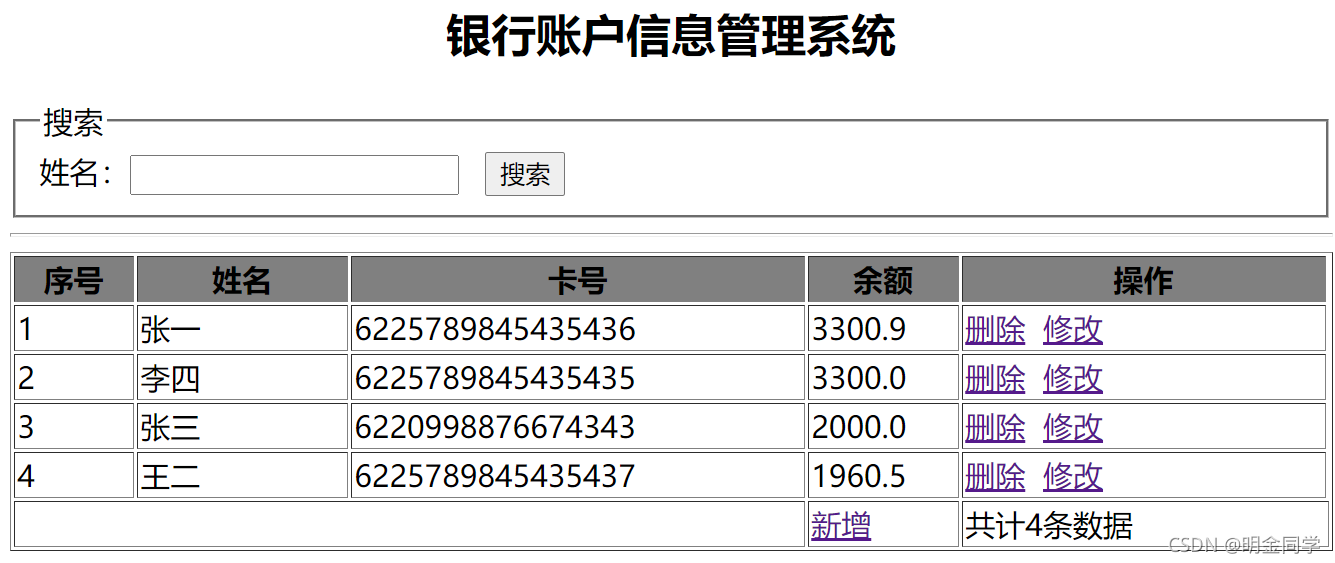
2.用户输入账户名称,则完成模糊查询,显示查询结果,如图 3 所示。
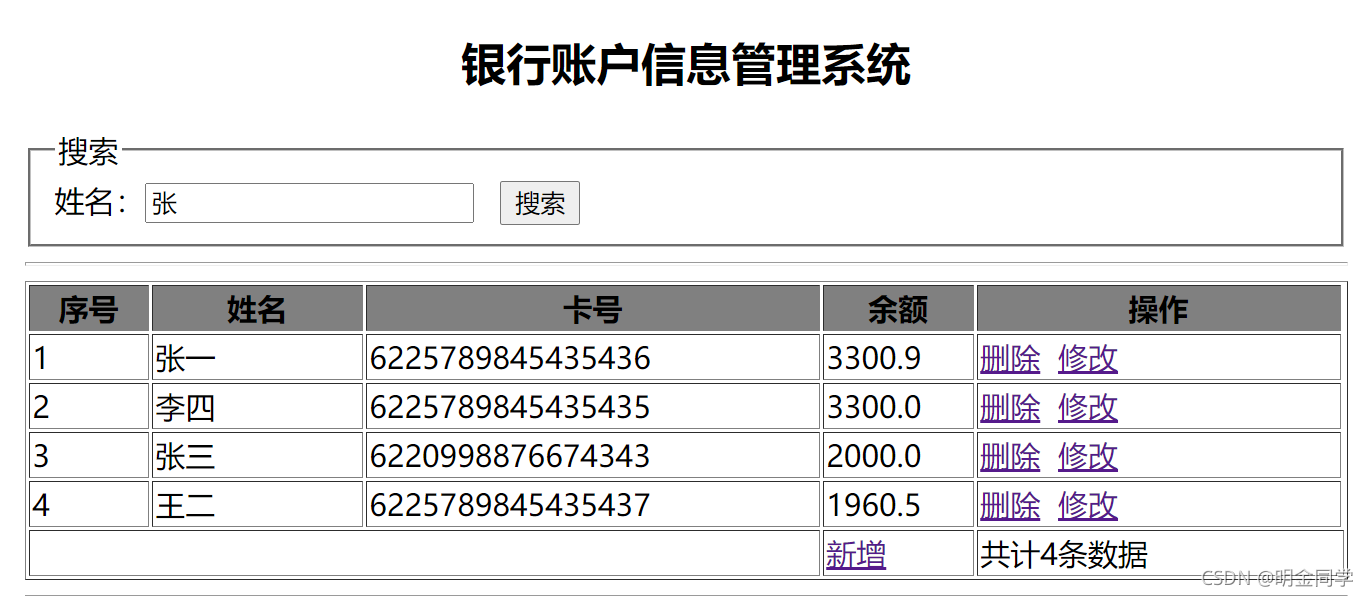
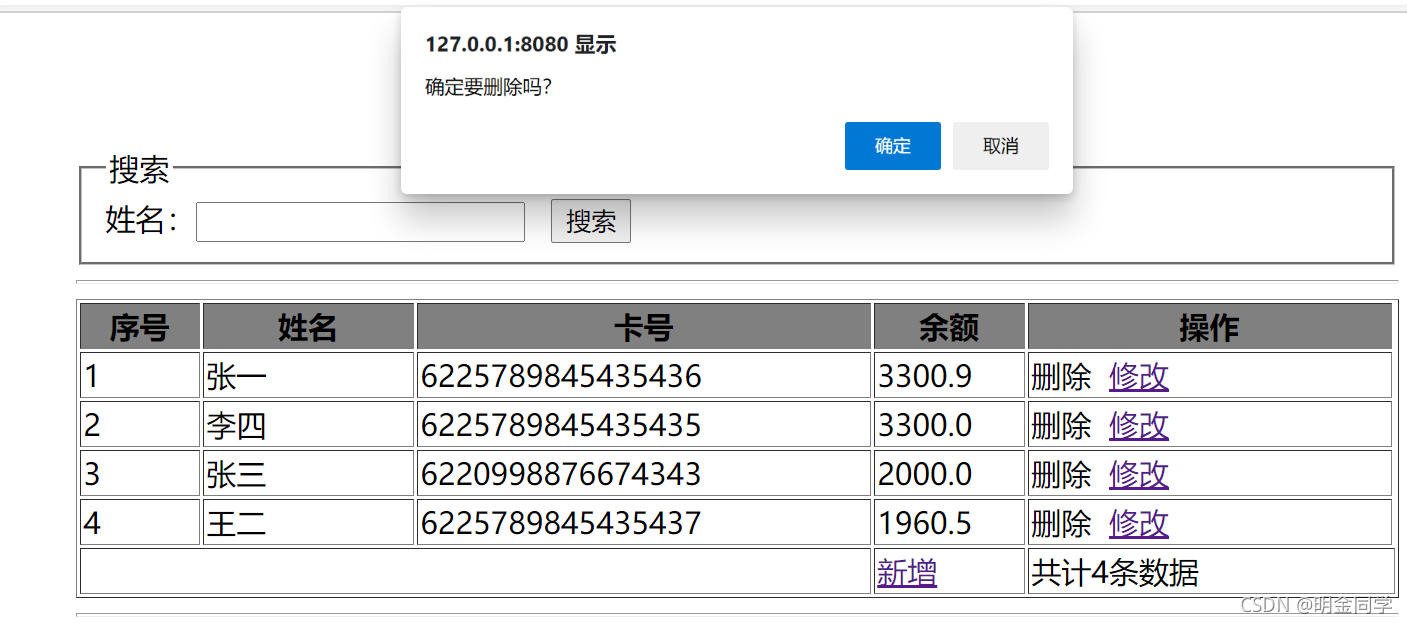
3.用户点击删除,则弹出提示框,用户点击确定后,删除选中数据并显示最新数据,如图 4 和图 5 所示。
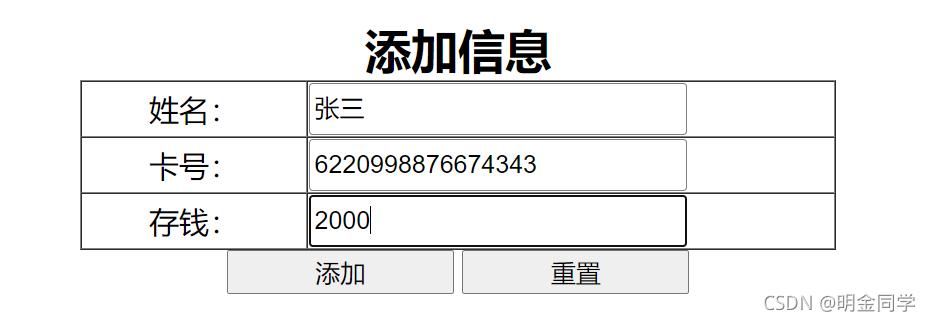
4.用户点击“新增”链接,则打开新增页面,填写完相关信息后点击添加按钮,增加银行账户信息数据到数据库,且页面跳转到列表页面展示最新数据,如图 6 和图 7 所示。
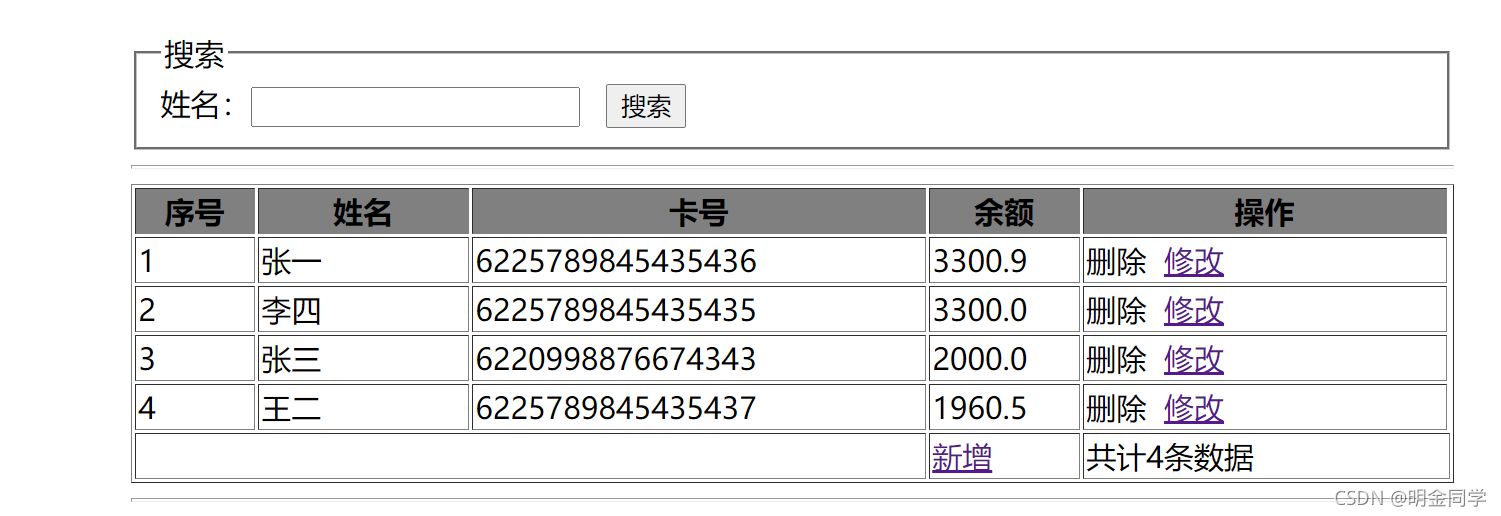
三、 数据库设计
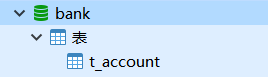
- 创建数据库(bank)。
- 创建数据表(t_account),结构如下

四、推荐实现步骤
1.JSP 版本的实现步骤如下:
(1)按以上数据库要求建库、建表,并添加测试数据。
(2)创建 Web 工程并创建各个包,导入工程所需的 jar 文件。
(3)创建实体类。
(4)创建 Servlet 获取用户不同的请求,并将这些请求转发至业务处理层相应的业务方法。
(5)创建业务处理层,在其中定义业务方法实现系统需求,在这些业务方法中需要执行 DAO 方法。
(6)创建 BaseDAO 工具类,使用 JDBC 完成数据表数据的查询、删除和添加。
(7)编写 JSP 页面,展示数据的查询结果。
2.SSM 版本的实现步骤如下:
(1)创建数据库和数据表,添加测试数据(至少添加 5 条测试数据)。 (2)创建 Web 工程并创建各个包,导入工程所需的 jar 文件。
(3)添加相关 SSM 框架支持。
(4)配置项目所需要的各种配置文件(mybatis 配置文件、spring 配置文件、springMVC 配置文件)。
(5)创建实体类。
(6)创建 MyBatis 操作数据库所需的 Mapper 接口及其 Xml 映射数据库操作语句文件。
(7)创建业务逻辑相应的接口及其实现类,实现相应的业务,并在类中加入对 DAO/Mapper 的引用和注入。
(8)创建 Controller 控制器类,在 Controller 中添加对业务逻辑类的引用和注入,并配置 springMVC 配
置文件。
(9)创建相关的操作页面,并使用 CSS 对页面进行美化。
(10)实现页面的各项操作功能,并在相关地方进行验证,操作要人性化。
(11)调试运行成功后导出相关的数据库文件并提交。
五、实现代码
1、MySQL数据库
bank
2、项目Java代码
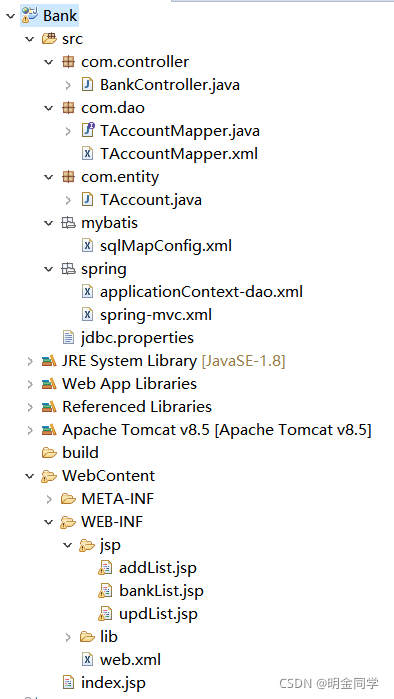
目录结构
Bank
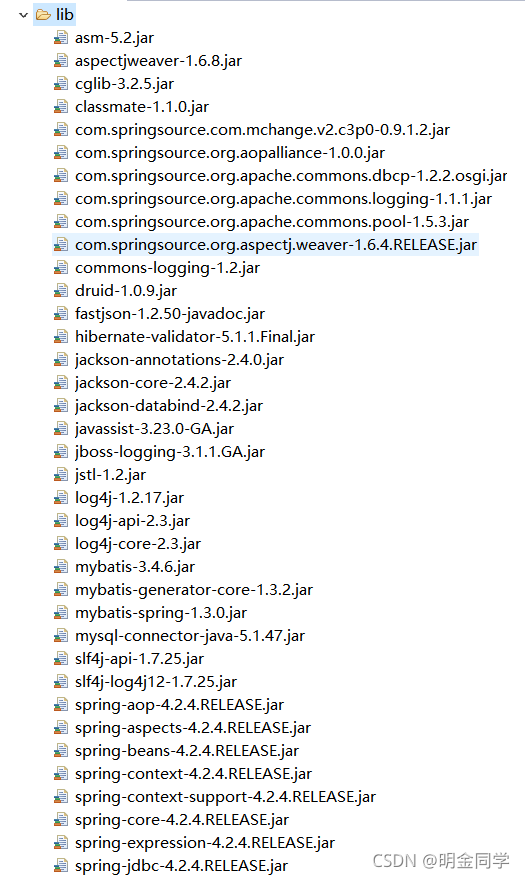
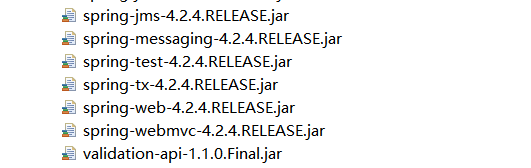
JAR包:
src
com.controller
BankController.java
package com.controller;

import java.util.List;

import javax.annotation.Resource;

import org.springframework.stereotype.Controller;

import org.springframework.ui.Model;

import org.springframework.web.bind.annotation.RequestMapping;

import org.springframework.web.servlet.ModelAndView;

import com.dao.TAccountMapper;

import com.entity.TAccount;

@Controller

public class BankController {

	@Resource

	TAccountMapper tAccountMapper;

	//主界面表格显示

	@RequestMapping("/BankList")

	public ModelAndView MainList(String name) {

		List<TAccount> selectAll = tAccountMapper.selectAll(name);

		ModelAndView modelAndView = new ModelAndView();

		modelAndView.addObject("selectAll", selectAll);

		modelAndView.setViewName("bankList");

		return modelAndView;

	}

	//删除

	@RequestMapping("/delList")

	public String delList(int id) {

		int deleteByPrimaryKey = tAccountMapper.deleteByPrimaryKey(id);

		if (deleteByPrimaryKey>0) {

			return "redirect:/BankList.do";

		}

		return "redirect:/BankList.do";

	}

	//跳转修改界面的方法

	@RequestMapping("/updListT")

	public String updListT(Model model,int id) {

		List<TAccount> select = tAccountMapper.selectByPrimaryKey(id);

		model.addAttribute("select", select);

		return "updList";

	}

	//修改

	@RequestMapping("/updList")

	public String updList(TAccount account,Model model) {

		int updateByPrimaryKey = tAccountMapper.updateByPrimaryKey(account);

		if (updateByPrimaryKey>0) {

			return "redirect:/BankList.do";

		}

		return "redirect:/BankList.do";

	}

	//跳转添加界面

	@RequestMapping("/addListT")

	public String addList() {

		return "addList";

	}

	//添加

	@RequestMapping("/addList")

	public String addList(TAccount account,Model model) {

		int insert = tAccountMapper.insert(account);

		if (insert>0) {

			return "redirect:/BankList.do";

		}

		return "redirect:/BankList.do";

	}

}
com.dao
TAccountMapper.java
package com.dao;

import java.util.List;

import org.apache.ibatis.annotations.Param;

import com.entity.TAccount;

public interface TAccountMapper {

    int deleteByPrimaryKey(Integer id);

    int insert(TAccount record);

    List<TAccount> selectByPrimaryKey(Integer id);

    List<TAccount> selectAll(@Param("name")String name);

    int updateByPrimaryKey(TAccount record);

}
TAccountMapper.xml
<?xml version="1.0" encoding="UTF-8" ?>

<!DOCTYPE mapper PUBLIC "-//mybatis.org//DTD Mapper 3.0//EN" "http://mybatis.org/dtd/mybatis-3-mapper.dtd" >

<mapper namespace="com.dao.TAccountMapper" >

  <resultMap id="BaseResultMap" type="com.entity.TAccount" >

    <id column="id" property="id" jdbcType="INTEGER" />

    <result column="number" property="number" jdbcType="VARCHAR" />

    <result column="name" property="name" jdbcType="VARCHAR" />

    <result column="money" property="money" jdbcType="DECIMAL" />

  </resultMap>

  <delete id="deleteByPrimaryKey" parameterType="java.lang.Integer" >

    delete from t_account

    where id = #{id,jdbcType=INTEGER}

  </delete>

  <insert id="insert" parameterType="com.entity.TAccount" >

    insert into t_account (id, number, name,

      money)

    values (#{id,jdbcType=INTEGER}, #{number,jdbcType=VARCHAR}, #{name,jdbcType=VARCHAR},

      #{money,jdbcType=DECIMAL})

  </insert>

  <update id="updateByPrimaryKey" parameterType="com.entity.TAccount" >

    update t_account

    set number = #{number,jdbcType=VARCHAR},

      name = #{name,jdbcType=VARCHAR},

      money = #{money,jdbcType=DECIMAL}

    where id = #{id,jdbcType=INTEGER}

  </update>

  <select id="selectByPrimaryKey" resultMap="BaseResultMap" parameterType="java.lang.Integer" >

    select id, number, name, money

    from t_account

    where id = #{id}

  </select>

  <select id="selectAll" resultMap="BaseResultMap" >

    select id, number, name, money

    from t_account

    <where>

		<if test="name!= null">name like "%"#{name}"%"   </if>

	</where>

  </select>

</mapper>
com.entity
TAccount.java
package com.entity;

import java.math.BigDecimal;

public class TAccount {

    private Integer id;

    private String number;

    private String name;

    private BigDecimal money;

    public Integer getId() {

        return id;

    }

    public void setId(Integer id) {

        this.id = id;

    }

    public String getNumber() {

        return number;

    }

    public void setNumber(String number) {

        this.number = number == null ? null : number.trim();

    }

    public String getName() {

        return name;

    }

    public void setName(String name) {

        this.name = name == null ? null : name.trim();

    }

    public BigDecimal getMoney() {

        return money;

    }

    public void setMoney(BigDecimal money) {

        this.money = money;

    }

}
mybatis
sqlMapConfig.xml
<?xml version="1.0" encoding="UTF-8"?>

<!DOCTYPE configuration PUBLIC "-//mybatis.org//DTD Config 3.0//EN"

	"http://mybatis.org/dtd/mybatis-3-config.dtd">

<configuration>

	<!-- 别名 -->

	<typeAliases>

		<package name="com.entity" />

	</typeAliases>

</configuration>
spring
applicationContext-dao.xml
<?xml version="1.0" encoding="UTF-8"?>

<beans xmlns:xsi="http://www.w3.org/2001/XMLSchema-instance"

	xmlns="http://www.springframework.org/schema/beans"

	xmlns:p="http://www.springframework.org/schema/p"

	xmlns:context="http://www.springframework.org/schema/context"

	xmlns:aop="http://www.springframework.org/schema/aop"

	xmlns:tx="http://www.springframework.org/schema/tx"

	xsi:schemaLocation="http://www.springframework.org/schema/beans

	http://www.springframework.org/schema/beans/spring-beans-4.2.xsd

	http://www.springframework.org/schema/context

	http://www.springframework.org/schema/context/spring-context-4.2.xsd

	http://www.springframework.org/schema/aop

	http://www.springframework.org/schema/aop/spring-aop-4.2.xsd

	http://www.springframework.org/schema/tx

	http://www.springframework.org/schema/tx/spring-tx.xsd

	http://www.springframework.org/schema/mvc

		http://www.springframework.org/schema/mvc/spring-mvc-4.2.xsd ">

	<!-- 指定spring容器读取db.properties文件 -->

	<context:property-placeholder location="classpath:jdbc.properties"></context:property-placeholder>

	<!-- 将连接池注册到bean容器中 -->

	<bean id="dataSource" class="com.alibaba.druid.pool.DruidDataSource">

		<property name="driverClassName" value="${jdbc.driver}"></property>

		<property name="Url" value="${jdbc.url}"></property>

		<property name="username" value="${jdbc.username}"></property>

		<property name="password" value="${jdbc.password}"></property>

	</bean>

	<!-- 配置SqlSessionFactory -->

	<bean class="org.mybatis.spring.SqlSessionFactoryBean">

		<!-- 设置MyBatis核心配置文件 -->

		<property name="configLocation" value="classpath:mybatis/sqlMapConfig.xml" />

		<!-- 设置数据源 -->

		<property name="dataSource" ref="dataSource" />

	</bean>

	<!-- 配置Mapper扫描 -->

	<bean class="org.mybatis.spring.mapper.MapperScannerConfigurer">

		<!-- 设置Mapper扫描包 -->

		<property name="basePackage"  value="com.dao" />

	</bean>

	<!-- 配置事务管理器 -->

		<bean id="transactionManager" class="org.springframework.jdbc.datasource.DataSourceTransactionManager">

			<property name="dataSource" ref="dataSource"></property>

		</bean>

		<!-- 开启注解方式管理AOP事务 -->

		<tx:annotation-driven transaction-manager="transactionManager" />

</beans>
spring-mvc.xml
<?xml version="1.0" encoding="UTF-8"?>

<beans  xmlns:xsi="http://www.w3.org/2001/XMLSchema-instance"

		xmlns="http://www.springframework.org/schema/beans"

		xmlns:context="http://www.springframework.org/schema/context"

		xmlns:aop="http://www.springframework.org/schema/aop"

		xmlns:tx="http://www.springframework.org/schema/tx"

		xmlns:mvc="http://www.springframework.org/schema/mvc"

		xsi:schemaLocation="http://www.springframework.org/schema/beans

		http://www.springframework.org/schema/beans/spring-beans-4.2.xsd

		http://www.springframework.org/schema/context

		http://www.springframework.org/schema/context/spring-context-4.2.xsd

		http://www.springframework.org/schema/aop

		http://www.springframework.org/schema/aop/spring-aop-4.2.xsd

		http://www.springframework.org/schema/tx

		http://www.springframework.org/schema/tx/spring-tx-4.2.xsd

		http://www.springframework.org/schema/mvc

		http://www.springframework.org/schema/mvc/spring-mvc-4.2.xsd ">

		<!-- 配置Controller扫描 -->

		<context:component-scan base-package="com.controller" />

		<!-- 配置注解驱动 -->

		<mvc:annotation-driven />

		<!-- 配置视图解析器 -->

		<bean class="org.springframework.web.servlet.view.InternalResourceViewResolver">

			<!-- 前缀 -->

			<property name="prefix" value="/WEB-INF/jsp/" />

			<!-- 后缀 -->

			<property name="suffix" value=".jsp" />

		</bean>

</beans>
jdbc.properties
jdbc.url=jdbc:mysql://localhost:3306/bank?useUnicode=true&characterEncoding=UTF-8&useSSL=false

jdbc.username=root

jdbc.password=123456

jdbc.driver=com.mysql.jdbc.Driver
WebContent
web.xml
<?xml version="1.0" encoding="UTF-8"?>

<web-app xmlns:xsi="http://www.w3.org/2001/XMLSchema-instance" xmlns="http://java.sun.com/xml/ns/javaee" xsi:schemaLocation="http://java.sun.com/xml/ns/javaee http://java.sun.com/xml/ns/javaee/web-app_3_0.xsd" id="WebApp_ID" version="3.0">

  <display-name>Bank</display-name>

  <welcome-file-list>

    <welcome-file>index.html</welcome-file>

    <welcome-file>index.htm</welcome-file>

    <welcome-file>index.jsp</welcome-file>

    <welcome-file>default.html</welcome-file>

    <welcome-file>default.htm</welcome-file>

    <welcome-file>default.jsp</welcome-file>

  </welcome-file-list>

  <context-param>

    <param-name>contextConfigLocation</param-name>

    <param-value>classpath:spring/applicationContext-*.xml</param-value>

  </context-param>

  <listener>

    <listener-class>org.springframework.web.context.ContextLoaderListener</listener-class>

  </listener>

  <servlet>

    <servlet-name>springmvc</servlet-name>

    <servlet-class>org.springframework.web.servlet.DispatcherServlet</servlet-class>

    <init-param>

      <param-name>contextConfigLocation</param-name>

      <param-value>classpath:spring/spring-mvc.xml</param-value>

    </init-param>

    <load-on-startup>1</load-on-startup>

  </servlet>

  <servlet-mapping>

    <servlet-name>springmvc</servlet-name>

    <url-pattern>*.do</url-pattern>

  </servlet-mapping>

  <filter>

    <filter-name>CharacterEncodingFilter</filter-name>

    <filter-class>org.springframework.web.filter.CharacterEncodingFilter</filter-class>

    <init-param>

      <param-name>encoding</param-name>

      <param-value>UTF-8</param-value>

    </init-param>

  </filter>

  <filter-mapping>

    <filter-name>CharacterEncodingFilter</filter-name>

    <url-pattern>/*</url-pattern>

  </filter-mapping>

</web-app>
JSP
index.jsp
<%@ page language="java" import="java.util.*" pageEncoding="UTF-8"%>

<!DOCTYPE html>

<%

String path = request.getContextPath();

String basePath = request.getScheme()+"://"+request.getServerName()+":"+request.getServerPort()+path;

%>

<html>

<head>

<meta http-equiv="Content-Type" content="text/html; charset=UTF-8">

<title>XXX系统</title>

</head>

<body>

<script>

	window.location.href="<%=basePath%>/BankList.do";

</script>

</body>

</html>
addList.jsp
<%@ page language="java" contentType="text/html; charset=utf-8"

	pageEncoding="utf-8"%>

<!DOCTYPE html>

<html>

<head>

<meta charset="utf-8">

<title>添加界面</title>

</head>

<style>

#warp {

	text-align: center;

	width: 500px;

	margin: 100px auto;

}

tr {

	width: 150%;

	height: 40px;

}

.lable {

	width: 200px;

	text-align: center;

	font-size: 16px;

}

.input {

	width: 390px;

}

.text {

	width: 390px;

	height: 40px;

}

</style>

<body>

	<div id="warp">

		<h1>添加信息</h1>

		<form action="addList.do" method="post">

			<table border="1" cellspacing="0" cellpadding="0">

				<tr>

					<td class="lable">姓名:</td>

					<td class="input"><input class="text" type="text"

						placeholder="请输入姓名" name="name" id="" value="" /></td>

				</tr>

				<tr>

					<td class="lable">卡号:</td>

					<td class="input"><input class="text" type="text"

						placeholder="请输入卡号" name="number" id="" value="" /></td>

				</tr>

				<tr>

					<td class="lable">余额:</td>

					<td class="input"><input class="text" type="text"

						placeholder="请输入余额" name="money" id="" value="" /></td>

				</tr>

			</table>

			<div id="">

				<input

					style="width: 100px; margin-top: 10px; padding: 5px; background-color: #EFEFEF;"

					type="submit" value="添加" /><input

					style="width: 100px; margin-top: 10px; padding: 5px; background-color: #EFEFEF; margin-left: 10%"

					type="reset" value="重置" />

			</div>

		</form>

	</div>

</body>

</html>
bankList.jsp
<%@page import="com.entity.TAccount"%>
<%@page import="java.util.List"%>
<%@ page language="java" contentType="text/html; charset=utf-8"
pageEncoding="utf-8"%>-
<%@ taglib uri="http://java.sun.com/jsp/jstl/core" prefix="c"%>
<!DOCTYPE html>
<html>
<head>
<meta charset="utf-8">
<style type="text/css">
#warp {
width: 800px;
margin: 0 auto;
text-align: center;
}
table {
margin: 0 auto;
text-align: center;
width: 100%;
}
th {
font-weight: bold;
background-color: #808080;
color: #fff;
}
tr td:hover {
background-color: #9b9b9b;
}
a {
text-decoration: none;
}
a:hover {
color: red;
}
</style>
<title>银行账户信息管理系统</title>
</head>
<body>
<div id="warp">
<h1>银行账户信息管理系统</h1>
<fieldset id="" align="left">
<legend>搜索</legend>
<form action="BankList.do" method="post">
姓名: <input type="text" name="name" /> <input type="submit"
value="搜索" />
</form>
</fieldset>
<table border="1" cellspacing="0" cellpadding="0">
<tr>
<th>序号</th>
<th>姓名</th>
<th>卡号</th>
<th>余额</th>
<th>功能</th>
</tr>
<c:forEach items="${selectAll }" var="selectAll">
<tr>
<td>${selectAll.id }</td>
<td>${selectAll.name }</td>
<td>${selectAll.number }</td>
<td>${selectAll.money }</td>
<td><a href="javascript:void(0);"
onclick="del(${selectAll.id })">删除</a>
<a href="updListT.do?id=${selectAll.id }">修改</a>
</td>
</tr>
</c:forEach>
<tr align="right">
<td colspan="5"><a href="addListT.do">新增 </a>共计${selectAll.size()}条数据</td>
</tr>
</table>
</div>
</body>
<script type="text/javascript">
function del(id) {
if (confirm("确定删除该数据?")) {
window.location.href="delList.do?id="+id;
}
}
</script>
</html>
updList.jsp
<%@ page language="java" contentType="text/html; charset=utf-8"

	pageEncoding="utf-8"%>

<%@ taglib uri="http://java.sun.com/jsp/jstl/core" prefix="c"%>

<!DOCTYPE html>

<html>

<head>

<meta charset="utf-8">

<title>修改界面</title>

</head>

<style>

#warp {

	text-align: center;

	width: 500px;

	margin: 100px auto;

}

tr {

	width: 150%;

	height: 40px;

}

.lable {

	width: 200px;

	text-align: center;

	font-size: 16px;

}

.input {

	width: 390px;

}

.text {

	width: 390px;

	height: 40px;

}

</style>

<body>

	<div id="warp">

		<h1>修改信息</h1>

		<form action="updList.do" method="post">

			<table border="1" cellspacing="0" cellpadding="0">

				<c:forEach items="${select }" var="select">

					<input type="hidden" name="id" id="" value="${select.id }" />

					<tr>

						<td class="lable">姓名:</td>

						<td class="input"><input class="text" type="text"

							placeholder="请输入姓名" name="name" id="" value="${select.name}" />

						</td>

					</tr>

					<tr>

						<td class="lable">卡号:</td>

						<td class="input"><input class="text" type="text"

							placeholder="请输入卡号" name="number" id="" value="${select.number}" />

						</td>

					</tr>

					<tr>

						<td class="lable">余额:</td>

						<td class="input"><input class="text" type="text"

							placeholder="请输入余额" name="money" id="" value="${select.money}" />

						</td>

					</tr>

				</c:forEach>

			</table>

			<div id="">

				<input

					style="width: 100px; margin-top: 10px; padding: 5px; background-color: #EFEFEF;

					type="submit" value="保存" /><input

					style="width: 100px; margin-top: 10px; padding: 5px; background-color: #EFEFEF; margin-left: 10%"

					type="reset" value="重置" />

			</div>

		</form>

		</form>

	</div>

</body>

</html>
基于Spring MVC + Spring + MyBatis的【银行账户信息管理系统】的更多相关文章
- 基于Spring MVC + Spring + MyBatis的【医院就诊挂号系统】
资源下载:https://download.csdn.net/download/weixin_44893902/21727306 一.语言和环境 1.实现语言: JAVA语言. 2.环境要求: MyE ...
- Spring、Spring MVC、MyBatis
Spring.Spring MVC.MyBatis整合文件配置详解 使用SSM框架做了几个小项目了,感觉还不错是时候总结一下了.先总结一下SSM整合的文件配置.其实具体的用法最好还是看官方文档. Sp ...
- 转载 Spring、Spring MVC、MyBatis整合文件配置详解
Spring.Spring MVC.MyBatis整合文件配置详解 使用SSM框架做了几个小项目了,感觉还不错是时候总结一下了.先总结一下SSM整合的文件配置.其实具体的用法最好还是看官方文档. ...
- spring MVC、mybatis配置读写分离
spring MVC.mybatis配置读写分离 1.环境: 3台数据库机器,一个master,二台slave,分别为slave1,slave2 2.要实现的目标: ①使数据写入到master ②读数 ...
- spring mvc与mybatis收集到博客
mybaits-spring 官方教程 http://mybatis.github.io/spring/zh/ SpringMVC 基础教程 框架分析 http://blog.csdn.net/swi ...
- 搭建Spring、Spring MVC、Mybatis和Freemarker
搭建Spring.Spring MVC.Mybatis和Freemarker 1.pom文件 <project xmlns="http://maven.apache.org/POM/4 ...
- Spring Mvc和Mybatis的多数据库访问配置过程
Spring Mvc 加Mybatis的多数据库访问源配置访问过程如下: 在applicationContext.xml进行配置 <?xml version="1.0" en ...
- freemarker + spring mvc + spring + mybatis + mysql + maven项目搭建
今天说说搭建项目,使用freemarker + spring mvc + spring + mybatis + mysql + maven搭建web项目. 先假设您已经配置好eclipse的maven ...
- IDEA下创建Maven项目,并整合使用Spring、Spring MVC、Mybatis框架
项目创建 本项目使用的是IDEA 2016创建. 首先电脑安装Maven,接着打开IDEA新建一个project,选择Maven,选择图中所选项,下一步. 填写好GroupId和ArtifactId, ...
随机推荐
- Angular 中 [ngClass]、[ngStyle] 的使用
1.ngStyle 基本用法 1 <div [ngStyle]="{'background-color':'green'}"></<div> 判断添加 ...
- Android WifiP2p实现
Android WifiP2p实现 Wifi Direct功能早在Android 4.0就以经加入Android系统了,但是一直没有很好的被支持,主要原因是比较耗电而且连接并不是很稳定.但是也有很大的 ...
- Mysql的表级锁
我们首先需要知道的一个大前提是:mysql的锁是由具体的存储引擎实现的.所以像Mysql的默认引擎MyISAM和第三方插件引擎 InnoDB的锁实现机制是有区别的.可根据不同的场景选用不同的锁定机制. ...
- Linux后台启动服务
systemctl 启动/关闭/启用/禁用服务 总结 启动服务 systemctl start test.service 关闭服务 systemctl stop test.service 重启服务 s ...
- 【编程思想】【设计模式】【创建模式creational】原形模式Prototype
Python版 https://github.com/faif/python-patterns/blob/master/creational/prototype.py #!/usr/bin/env p ...
- 【C/C++】习题3-5 谜题/算法竞赛入门经典/数组和字符串
[题目] 有一个5*5的网络,恰好有一个格子是空的(空格),其他格子各有一个字母. 指令:A, B, L, R 把空格上.下.左.右的相邻字母移到空格中. [输入] 初始网格和指令序列(以数字0结束) ...
- numpy基础教程--clip函数的使用
在numpy中,clip函数的原型为clip(self, min=None, max=None, out=None),意思是把小于min的数全部置换为min,大于max的数全部置换为max,在[min ...
- 进程(process)和线程(thread)
来源:阮一峰 进程(process)和线程(thread)是操作系统的基本概念,但是它们比较抽象,不容易掌握. 其实做一个很好的类比,就可以把它们解释地清晰易懂. 1.计算机的核心是CPU,它承担了所 ...
- KNN分类
1. KNN简介 K近邻(K-Nearest Neighbor)简称KNN.它可以做分类算法,也可以做回归算法.个人经验:KNN在做分类问题时非常有效. 2. KNN算法思想 在样本空间中,我们认为两 ...
- 报表(Project)
<Project2016 企业项目管理实践>张会斌 董方好 编著 好吧,今天这一篇,偷懒放水,不就是[报表]嘛,想看的话一个一个功能按钮点出来看就知道是咋肥四了,我就不一一截图了哈. 嗯, ...