
maven打包插件详解
maven-jar-plugin插件的使用及详解
该插件的xml配置及详解如下:
<plugin>

	<groupId>org.apache.maven.plugins</groupId>

	<artifactId>maven-jar-plugin</artifactId>

	<version>2.4</version>

	<configuration>

		<archive>

			<!-- 生成的jar中,包含pom.xml和pom.properties这两个文件 -->

			<addMavenDescriptor>true</addMavenDescriptor>

			<!-- 生成MANIFEST.MF的设置 -->

			<manifest>

				<!--这个属性特别关键,如果没有这个属性,有时候我们引用的包maven库

				下面可能会有多个包,并且只有一个是正确的,其余的可能是带时间戳的,

				此时会在classpath下面把那个带时间戳的给添加上去,

				然后我们在依赖打包的时候,打的是正确的,所以两头会对不上,报错。 -->

				<useUniqueVersions>false</useUniqueVersions>

				<!-- 为依赖包添加路径, 这些路径会写在MANIFEST文件的Class-Path下 -->

				<addClasspath>true</addClasspath>

				<!-- 这个jar所依赖的jar包添加classPath的时候的前缀,如果这个jar本身

				和依赖包在同一级目录,则不需要添加 -->

				<classpathPrefix>lib/</classpathPrefix>

				<!-- jar启动入口类 -->

				<mainClass>com.ht.pojo.Test</mainClass>

			</manifest>

			<manifestEntries>

				<!-- 在Class-Path下添加配置文件的路径 -->

				<Class-Path>../config/</Class-Path>

				<!-- 假如这个项目可能要引入一些外部资源,但是你打包的时候并不想把

				这些资源文件打进包里面,这个时候你必须在这边额外指定一些这些资源

				文件的路径,这个位置指定的话,要根据你预期的这些位置去设置,我这边

				所有jar都在lib下,资源文件都在config下,lib和config是同级的

				同时还需要注意另外一个问题,假如你的pom文件里面配置了

				<scope>system</scope>,就是你依赖是你本地的资源,这个时候使用

				这个插件,classPath里面是不会添加,所以你得手动把这个依赖添加进

				这个地方,用空格隔开就行 -->

			</manifestEntries>

		</archive>

		<!-- jar包的位置 -->

		<outputDirectory>${project.build.directory}/lib</outputDirectory>

		<includes>

			<!-- 打jar包时,打包class文件和config目录下面的 properties文件 -->

			<!-- 有时候可能需要一些其他文件,这边可以配置,包括剔除的文件等等 -->

			<include>**/*.class</include>

			<include>**/*.properties</include>

		</includes>

	</configuration>

</plugin>
使用clean package命令打包成功后,目录结构如下所示:

打开meventest-0.0.1-SNAPSHOT.jar文件,查看打包成功后的项目结构

maven-dependency-plugin插件的使用及详解
简介
maven-dependency-plugin是处理与依赖相关的插件。它有很多可用的goal,大部分是和依赖构建、分析和解决相关的goal,这部分goal可以直接用maven的命令操作,例如:mvn dependency:tree、mvn dependency:analyze 。
但是我们最常用到的是 dependency:copy,dependency:copy-dependencies 及dependency:unpack ,dependency:unpack-dependencies 这四个。
使用
插件声明:
<plugin>

    <groupId>org.apache.maven.plugins</groupId>

    <artifactId>maven-dependency-plugin</artifactId>

    <version>2.8</version>

</plugin>
dependency:copy
将一系列在此插件内列出的artifacts ,将他们copy到一个特殊的地方,重命名或者去除其版本信息。这个可以解决远程仓库存在但是本地仓库不存在的依赖问题,copy操作可以用来将某个(些)maven artifact(s)拷贝到某个目录下。添加phase和goal如下
<build>

    <plugins>

        <plugin>

            <groupId>org.apache.maven.plugins</groupId>

            <artifactId>maven-dependency-plugin</artifactId>

            <version>2.8</version>

            <executions>

                <execution>

                    <phase>package</phase>

                    <goals>

                        <goal>copy</goal>

                    </goals>

                </execution>

            </executions>

        </plugin>

    </plugins>

</build>
比如把junit拷到libs目录下
<plugin>

    <groupId>org.apache.maven.plugins</groupId>

    <artifactId>maven-dependency-plugin</artifactId>

    <version>2.8</version>

    <executions>

        <execution>

            <phase>package</phase>

            <goals>

                <goal>copy</goal>

            </goals>

            <configuration>

                <artifactItems>

                    <artifactItem>

                        <groupId>junit</groupId>

                        <artifactId>junit</artifactId>

                        <version>4.11</version>

                        <outputDirectory>${project.build.directory}/libs</outputDirectory>

                    </artifactItem>

                </artifactItems>

            </configuration>

        </execution>

    </executions>

</plugin>
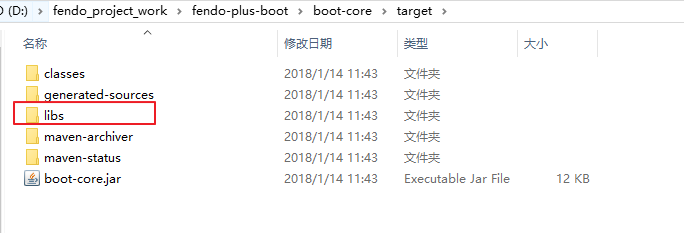
执行mvn package打包命令之后,会多出libs目录
dependency:unpack
unpack和copy类似,只不过它会把拷来的包解开,例如:
<plugin>

    <groupId>org.apache.maven.plugins</groupId>

    <artifactId>maven-dependency-plugin</artifactId>

    <version>2.8</version>

    <executions>

        <execution>

            <phase>package</phase>

            <goals>

                <goal>unpack</goal>

            </goals>

            <configuration>

                <artifactItems>

                    <artifactItem>

                        <groupId>org.slf4j</groupId>

                        <artifactId>slf4j-log4j12</artifactId>

                        <version>1.7.7</version>

                    </artifactItem>

                    <artifactItem>

                        <groupId>junit</groupId>

                        <artifactId>junit</artifactId>

                        <version>4.11</version>

                        <outputDirectory>${project.build.directory}/libs</outputDirectory>

                    </artifactItem>

                </artifactItems>

                <outputDirectory>lib</outputDirectory>

            </configuration>

        </execution>

    </executions>

</plugin>
执行mvn package打包命令之后,slf4j复制到lib目录下,junit复制到libs目录下
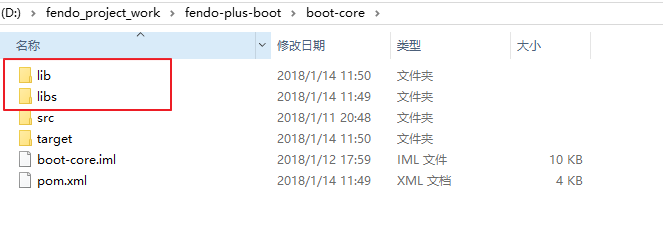
junit和slf4j-log4j12拷完以后,放到lib和libs下的不再是Jar包,还是Jar包里的内容。
copy-dependencies 和 unpack-dependencies
上面介绍的copy 和 unpack操作是由要拷某个包,这个包需要具体指定要拷哪个包,与当前工程的依赖没有关系。
copy-dependencies和它有点类似,但是它是用来拷当前工程的依赖包的,典型的,例如我们有一个web应用,当打成war包的时候,它所有的依赖也需要被打到应用中。
copy-dependencies的参数有很多,详细的可以参考:copy-dependencies Doc,但是几乎所有都有默认值。所以一个最简单的定义如下:
<plugin>

    <groupId>org.apache.maven.plugins</groupId>

    <artifactId>maven-dependency-plugin</artifactId>

    <version>2.8</version>

    <executions>

        <execution>

            <phase>package</phase>

            <goals>

                <goal>copy-dependencies</goal>

            </goals>

        </execution>

    </executions>

</plugin>
这里没有指定任何配置,所有的参数都用默认值,则当前工程的所有依赖(直接、间接的)都会被拷到target/dependency目录下。
也可以使用outputDirectory指定存放在。另外,以下几个参数可以控制哪些依赖将被拷出(或排除):
Name Type Since Description
| excludeArtifactIds | String |
2.0 |
Comma separated list of Artifact names to exclude. User property is: excludeArtifactIds. |
| excludeClassifiers | String |
2.0 |
Comma Separated list of Classifiers to exclude. Empty String indicates don't exclude anything (default). User property is: excludeClassifiers. |
| excludeGroupIds | String |
2.0 |
Comma separated list of GroupId Names to exclude. User property is: excludeGroupIds. |
| excludeScope | String |
2.0 |
Scope to exclude. An Empty string indicates no scopes (default). User property is: excludeScope. |
| excludeTransitive | boolean |
2.0 |
If we should exclude transitive dependencies Default value is: false. User property is: excludeTransitive. |
| excludeTypes | String |
2.0 |
Comma Separated list of Types to exclude. Empty String indicates don't exclude anything (default). User property is: excludeTypes. |
| includeArtifactIds | String |
2.0 |
Comma separated list of Artifact names to include. User property is: includeArtifactIds. |
| includeClassifiers | String |
2.0 |
Comma Separated list of Classifiers to include. Empty String indicates include everything (default). User property is: includeClassifiers. |
| includeGroupIds | String |
2.0 |
Comma separated list of GroupIds to include. User property is: includeGroupIds. |
| includeScope | String |
2.0 |
Scope to include. An Empty string indicates all scopes (default). The scopes being interpreted are the scopes as Maven sees them, not as specified in the pom. In summary:runtime scope gives runtime and compile dependencies,compile scope gives compile, provided, and system dependencies,test (default) scope gives all dependencies,provided scope just gives provided dependencies,system scope just gives system dependencies. User property is: includeScope. |
| includeTypes | String |
2.0 |
Comma Separated list of Types to include. Empty String indicates include everything (default). User property is: includeTypes. |
例如当前工程有以下依赖:
<dependencies>

    <dependency>

        <groupId>junit</groupId>

        <artifactId>junit</artifactId>

        <version>4.11</version>

        <scope>test</scope>

    </dependency>

    <dependency>

        <groupId>org.slf4j</groupId>

        <artifactId>slf4j-log4j12</artifactId>

        <version>1.7.7</version>

        <scope>test</scope>

    </dependency>

    <dependency>

        <groupId>org.apache.camel</groupId>

        <artifactId>camel-script</artifactId>

        <version>2.13.2</version>

    </dependency>

    <dependency>

        <groupId>org.apache.camel</groupId>

        <artifactId>camel-spring</artifactId>

        <version>2.13.2</version>

    </dependency>

    <dependency>

        <groupId>org.apache.camel</groupId>

        <artifactId>camel-xstream</artifactId>

        <version>2.13.2</version>

    </dependency>

    <dependency>

        <groupId>org.springframework</groupId>

        <artifactId>spring-jms</artifactId>

        <version>3.2.4.RELEASE</version>

    </dependency>

    <dependency>

        <groupId>org.springframework</groupId>

        <artifactId>spring-tx</artifactId>

        <version>3.2.4.RELEASE</version>

    </dependency>

    <dependency>

        <groupId>org.apache.activemq</groupId>

        <artifactId>activemq-all</artifactId>

        <version>5.10.0</version>

    </dependency>

    <dependency>

        <groupId>com.thoughtworks.xstream</groupId>

        <artifactId>xstream</artifactId>

        <version>1.4.7</version>

    </dependency>

    <dependency>

        <groupId>org.ogce</groupId>

        <artifactId>xpp3</artifactId>

        <version>1.1.6</version>

    </dependency>

</dependencies>
要排除所有scope为test的依赖:
<plugin>

    <groupId>org.apache.maven.plugins</groupId>

    <artifactId>maven-dependency-plugin</artifactId>

    <version>2.8</version>

    <executions>

        <execution>

            <phase>package</phase>

            <goals>

                <goal>copy-dependencies</goal>

            </goals>

        </execution>

    </executions>

    <configuration>

        <includeScope>compile</includeScope>

    </configuration>

</plugin>
注意:这里不能<excludeScope>test</excludeScope>,这样会把所有compile级别的也排除。看下图:
Copied From: Dependencies Scopes
| scope/phase-> | compile | test | run | assembly |
|---|---|---|---|---|
| compile | U | U | U | U |
| provided | U | ! | ! | ! |
| runtime | ! | U | U | U |
| test | ! | U | ! | ! |
说明:最左侧是表示dependency的scope级别,顶行表示maven的阶段,可以看出:compile级别的dependency会在所有阶段都被使用。
要排除所有camel的依赖,如下:
<configuration>

    <excludeGroupIds>org.apache.camel</excludeGroupIds>

</configuration>
要排除除camel-spring外的所有其他依赖如下:
<configuration>

    <includeArtifactIds>camel-spring</includeArtifactIds>

</configuration>
例子
打包需求描述
1、导出单独的项目jar包(精简,不包含依赖jar)
2、项目依赖的所有jar包导出到lib目录下
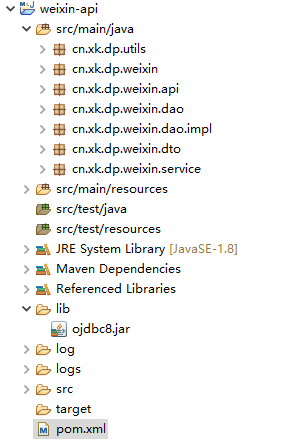
3、项目依赖oracle ojdbc8.jar,假设在maven仓库中并不存在,需要一并导出并添加进MANIFEST.MF文件中的Class-Path。--也可以将ojdbc8安装到本地maven仓库后直接导出
工程目录:
maven pom.xml
<project xmlns="http://maven.apache.org/POM/4.0.0"

	xmlns:xsi="http://www.w3.org/2001/XMLSchema-instance"

	xsi:schemaLocation="http://maven.apache.org/POM/4.0.0

    http://maven.apache.org/xsd/maven-4.0.0.xsd">

	<modelVersion>4.0.0</modelVersion>

	<parent>

		<groupId>cn.xk.dp</groupId>

		<artifactId>thirdparty</artifactId>

		<version>0.0.1-SNAPSHOT</version>

	</parent>

	<artifactId>weixin-api</artifactId>

	<properties>

		<project.build.sourceEncoding>UTF-8</project.build.sourceEncoding>

		<log4j.version>2.13.0</log4j.version>

	</properties>

	<dependencies>

		<dependency>

			<groupId>org.slf4j</groupId>

			<artifactId>slf4j-api</artifactId>

			<version>1.7.30</version>

		</dependency>

		<dependency>

			<groupId>org.apache.logging.log4j</groupId>

			<artifactId>log4j-core</artifactId>

			<version>${log4j.version}</version>

		</dependency>

		<dependency>

			<groupId>org.apache.logging.log4j</groupId>

			<artifactId>log4j-slf4j-impl</artifactId>

			<version>${log4j.version}</version>

		</dependency>

		<dependency>

			<groupId>org.apache.httpcomponents</groupId>

			<artifactId>httpclient</artifactId>

			<version>4.5.11</version>

			<exclusions>

				<exclusion>

					<groupId>commons-logging</groupId>

					<artifactId>commons-logging</artifactId>

				</exclusion>

			</exclusions>

		</dependency>

		<dependency>

			<groupId>org.slf4j</groupId>

			<artifactId>jcl-over-slf4j</artifactId>

			<version>1.7.30</version>

		</dependency>

		<dependency>

			<groupId>com.alibaba</groupId>

			<artifactId>fastjson</artifactId>

			<version>1.2.66</version>

		</dependency>

		<dependency> <!--添加本地jar包依赖-->

   			<groupId>oracle</groupId>

   			<artifactId>ojdbc8</artifactId>

   			<version>1.0</version>

   			<scope>system</scope>

   			<systemPath>${pom.basedir}/lib/ojdbc8.jar</systemPath>

		</dependency>

	</dependencies>

	<build>

		<plugins>

		 <plugin>

                <groupId>org.apache.maven.plugins</groupId>

                <artifactId>maven-jar-plugin</artifactId>

                <version>3.2.0</version>

                <configuration>

                    <archive>

                        <manifest>

                            <addClasspath>true</addClasspath>

                            <useUniqueVersions>false</useUniqueVersions>

                            <classpathPrefix>lib/</classpathPrefix>

                            <mainClass>cn.xk.dp.weixin.Driver</mainClass>

                        </manifest>

                        <manifestEntries>  <!--将ojdbc8-1.0.jar写进MANIFEST.MF文件中的Class-Path-->

   				           <Class-Path>lib/ojdbc8-1.0.jar</Class-Path>

  			            </manifestEntries>

                    </archive>

                    <excludes>   <!--排除用于测试的日志配置资源文件-->

                        <exclude>log4j2-test.xml</exclude>

                    </excludes>

                </configuration>

           </plugin>

		<plugin>  <!--在打包阶段将依赖的jar包导出到lib目录下-->

		  <groupId>org.apache.maven.plugins</groupId>

		  <artifactId>maven-dependency-plugin</artifactId>

		  <executions>

		    <execution>

			<id>copy-dependencies</id>

                        <phase>package</phase>

			<goals>

			  <goal>copy-dependencies</goal>

			</goals>

			<configuration>

			  <type>jar</type>

			  <includeTypes>jar</includeTypes>

	          <outputDirectory>${project.build.directory}/lib</outputDirectory>

			</configuration>

		    </execution>

		  </executions>

	     </plugin>

      </plugins>

	</build>

</project>
maven打包插件详解的更多相关文章
- Maven系列第6篇:生命周期和插件详解,此篇看过之后在maven的理解上可以超越同级别90%的人!
maven系列目标:从入门开始开始掌握一个高级开发所需要的maven技能. 这是maven系列第6篇. 整个maven系列的内容前后是有依赖的,如果之前没有接触过maven,建议从第一篇看起,本文尾部 ...
- 【maven】maven pom文件详解
maven pom文件详解 最近配置maven中的pom文件,maven中有些属性不太清楚,在这里记录一下 <project xmlns="http://maven.apache.or ...
- 用Advanced Installer制作DotNetBar for Windows Forms 12.0.0.1_冰河之刃重打包版详解
关于 DotNetBar for Windows Forms 12.0.0.1_冰河之刃重打包版 --------------------11.8.0.8_冰河之刃重打包版-------------- ...
- Uploadify 上传文件插件详解
Uploadify 上传文件插件详解 Uploadify是JQuery的一个上传插件,实现的效果非常不错,带进度显示.不过官方提供的实例时php版本的,本文将详细介绍Uploadify在Aspnet中 ...
- 转 vagrant package[打包命令]详解
转 vagrant package[打包命令]详解 vagrant的一个非常重要的功能就是在你的同事之间分享你的box从而使大家的开发环境保持同步,打包[package]正是实现这一功能的关键所在 ...
- Google自写插件详解
谷歌插件详解,跳转至个人主页查看. GoogleExtension
- ThreeJS系列1_CinematicCameraJS插件详解
ThreeJS系列1_CinematicCameraJS插件详解 接着上篇 ThreeJS系列1_CinematicCameraJS插件介绍 看属性的来龙去脉 看方法作用 通过调整属性查看效果 总结 ...
- maven生命周期和插件详解
生命周期 什么是生命周期? maven的生命周期就是对所有的构建过程进行抽象和统一.maven从大量项目和构建工具中总结了一套高度完善的.易扩展的生命周期.这个生命周期包含项目的清理.初始化.编译.测 ...
- maven pom文件详解
http://www.blogjava.net/hellxoul/archive/2013/05/16/399345.html http://blog.csdn.net/houpengfei111/a ...
随机推荐
- Unicode、UTF-8、UTF-16 终于懂了
计算机起源于美国,上个世纪,他们对英语字符与二进制位之间的关系做了统一规定,并制定了一套字符编码规则,这套编码规则被称为ASCII编码 ASCII 编码一共定义了128个字符的编码规则,用七位二进制表 ...
- Salesforce Consumer Goods Cloud 浅谈篇一之基础介绍
本篇参考: https://baike.baidu.com/item/%E6%B6%88%E8%B4%B9%E5%93%81/425802?fr=aladdin https://help.salesf ...
- 记录线上APP一个排序比较引发的崩溃 Comparison method violates its general contract!
最近在做产品需求的时候上线了一个新的产品需求,给用户多了一种新的排序排序规则,更加方便用户找到自己想要的东西.新版本发布后,QA 给我发了一个 线上崩溃 bug 链接,具体内容如下: 看到上面的链接, ...
- HCNP Routing&Switching之BGP团体属性和团体属性过滤器
前文我们了解了BGP的路由过滤已经as-path过滤器的使用相关话题,回顾请参考https://www.cnblogs.com/qiuhom-1874/p/15542559.html:今天我们来聊一聊 ...
- 设计模式学习-使用go实现外观模式
外观模式 定义 适用范围 代码实现 优点 缺点 关于接口粒度的思考 参考 外观模式 定义 外观模式也叫门面模式 外观模式(Facade),为子系统中的一组接口提供一个一致的界面,此模式定义了一个高层接 ...
- UDP端口检查告警SHELL脚本(企业微信版机器人版)
脚本准备 0Batch_Check.sh 1port_check.sh 2wechat_bot_alert.sh CheckList CheckList #支持大/小写 10.1.1.5 Udp 53 ...
- [cf1290D]Coffee Varieties
思路 统计数的种类数,也等价于统计有多少个数满足其之前没有与其相同的数 将序列以$\frac{k}{2}$为块大小分块,那么即会有$m=\frac{2n}{k}$个块 (关于$k=1$的情况,以1为块 ...
- 消息抽象层设计和实现-OSS.DataFlow
前面已经介绍了消息生产消费中间类库(OSS.DataFlow)的简单使用,这篇主要介绍内部的设计实现.主要内容包含: 1. 消息生产消费的抽象设计. 2. 具体使用示例 一. 消息生产消费的抽象设计. ...
- go程序不停机重启
让我们给http服务写一个版本更新接口,让它自动更新版本并重启服务吧. 初步例子 注:为了精简,文中代码都去除了err处理 main.go var Version = "1.0" ...
- git使用大全
创建四个分支: 查看分支:git branch查看仓库里面所有的分支 git branch -a刷新分支 git remote update origin --prune创建分支:git branch ...