
视图:dba_hist_wr_control查询到两套库的awr保留策略
问题描述:有一个问题,有同事在查询awr报告收集策略的时候,发现有两个库的策略,一套自己的,另一套已经找不到属于谁了,那么究竟是什么情景会出现这样的场景呢?

1.一开始网上找解答也没有得到解决,询问技术群和同事得到了两种解答,得到了两种比较靠谱的答案。一种是怀疑这个库之前导入过AWR报告;一种是说这个库之前做过不完全恢复,导致遗留了两种不通的DBID
2.测试了导入导出AWR报告的方式,将一个库的AWR报告导入到另一个库中,测试中使用的是11g到19c的环境
导出AWR:@$ORACLE_HOME/rdbms/admin/awrextr.sql
导入AWR:@$ORACLE_HOME/rdbms/admin/awrload.sql
3.11g导出AWR报告:
SQL> @$ORACLE_HOME/rdbms/admin/awrextr.sql

~~~~~~~~~~~~~

AWR EXTRACT

~~~~~~~~~~~~~

~~~~~~~~~~~~~~~~~~~~~~~~~~~~~~~~~~~~~~~~~~~~~~~~~~~~~~~~~~~~~~~~~~~~

~  This script will extract the AWR data for a range of snapshots  ~

~  into a dump file.  The script will prompt users for the       ~

~  following information:                       ~

~     (1) database id                           ~

~     (2) snapshot range to extract                   ~

~     (3) name of directory object                   ~

~     (4) name of dump file                       ~

~~~~~~~~~~~~~~~~~~~~~~~~~~~~~~~~~~~~~~~~~~~~~~~~~~~~~~~~~~~~~~~~~~~~

Databases in this Workload Repository schema

~~~~~~~~~~~~~~~~~~~~~~~~~~~~~~~~~~~~~~~~~~~~

   DB Id     DB Name      Host

------------ ------------ ------------

* 459838110  PROD      orcl

The default database id is the local one: ' 459838110'.  To use this

database id, press <return> to continue, otherwise enter an alternative.

Enter value for dbid: 459838110

Using 459838110 for Database ID

Specify the number of days of snapshots to choose from

~~~~~~~~~~~~~~~~~~~~~~~~~~~~~~~~~~~~~~~~~~~~~~~~~~~~~~

Entering the number of days (n) will result in the most recent

(n) days of snapshots being listed.  Pressing <return> without

specifying a number lists all completed snapshots.

Enter value for num_days: 10

Listing the last 10 days of Completed Snapshots

DB Name        Snap Id      Snap Started

------------ --------- ------------------

PROD           141 03 Jun 2021 15:16

           142 03 Jun 2021 16:00

           143 11 Jun 2021 11:15

           144 11 Jun 2021 12:06

Specify the Begin and End Snapshot Ids

~~~~~~~~~~~~~~~~~~~~~~~~~~~~~~~~~~~~~~

Enter value for begin_snap: 141

Begin Snapshot Id specified: 141

Enter value for end_snap: 144

End   Snapshot Id specified: 144

Specify the Directory Name

~~~~~~~~~~~~~~~~~~~~~~~~~~

Directory Name               Directory Path

------------------------------ -------------------------------------------------

DATA_FILE_DIR               /u01/app/oracle/product/11.2.0/dbhome_1/demo/sche

                   ma/sales_history/

DATA_PUMP_DIR               /u01/app/oracle/admin/PROD/dpdump/

GGS_DDL_TRACE               /u01/app/oracle/diag/rdbms/prod/PROD/trace

LOG_FILE_DIR               /u01/app/oracle/product/11.2.0/dbhome_1/demo/sche

                   ma/log/

MEDIA_DIR               /u01/app/oracle/product/11.2.0/dbhome_1/demo/sche

                   ma/product_media/

Directory Name               Directory Path

------------------------------ -------------------------------------------------

ORACLE_OCM_CONFIG_DIR           /u01/app/oracle/product/11.2.0/dbhome_1/ccr/hosts

                   /orcl/state

ORACLE_OCM_CONFIG_DIR2           /u01/app/oracle/product/11.2.0/dbhome_1/ccr/state

SS_OE_XMLDIR               /u01/app/oracle/product/11.2.0/dbhome_1/demo/sche

                   ma/order_entry/

SUBDIR                   /u01/app/oracle/product/11.2.0/dbhome_1/demo/sche

                   ma/order_entry//2002/Sep

XMLDIR                   /u01/app/oracle/product/11.2.0/dbhome_1/rdbms/xml

Choose a Directory Name from the above list (case-sensitive).

Enter value for directory_name: DATA_PUMP_DIR

Using the dump directory: DATA_PUMP_DIR

Specify the Name of the Extract Dump File

~~~~~~~~~~~~~~~~~~~~~~~~~~~~~~~~~~~~~~~~~

The prefix for the default dump file name is awrdat_141_144.

To use this name, press <return> to continue, otherwise enter

an alternative.

这里schema名称必须是oracle数据库中不存在的,不然会异常退出,必须是两个数据库之间没有的schema名字

Enter value for file_name: AWREXPIMP

Using the dump file prefix: AWREXPIMP

|

| ~~~~~~~~~~~~~~~~~~~~~~~~~~~~~~~~~~~~~~~~~~~~~

|  The AWR extract dump file will be located

|  in the following directory/file:

|   /u01/app/oracle/admin/PROD/dpdump/

|   AWREXPIMP.dmp

| ~~~~~~~~~~~~~~~~~~~~~~~~~~~~~~~~~~~~~~~~~~~~~

|

|  *** AWR Extract Started ...

|

|  This operation will take a few moments. The

|  progress of the AWR extract operation can be

|  monitored in the following directory/file:

|   /u01/app/oracle/admin/PROD/dpdump/

|   AWREXPIMP.log

|

Channel(Socket) closed from remote host(ks) at 12:29:37.
查询当前库的DBID
SQL> select dbid from v$database;

      DBID

----------

 459838110
4.导入AWR到19c库,将需要导入的dmp文件提前放到目标库的directories下,导入过程输入的时候注意不要加文件后缀,要不然会遇到各种报错
SQL> @?/rdbms/admin/awrload

~~~~~~~~~~

AWR LOAD

~~~~~~~~~~

~~~~~~~~~~~~~~~~~~~~~~~~~~~~~~~~~~~~~~~~~~~~~~~~~~~~~~~~~~~~~~~

~  This script will load the AWR data from a dump file. The   ~

~  script will prompt users for the following information:    ~

~     (1) name of directory object                  ~

~     (2) name of dump file                      ~

~     (3) staging schema name to load AWR data into          ~

~~~~~~~~~~~~~~~~~~~~~~~~~~~~~~~~~~~~~~~~~~~~~~~~~~~~~~~~~~~~~~~

Specify the Directory Name

~~~~~~~~~~~~~~~~~~~~~~~~~~

Directory Name               Directory Path

------------------------------ -------------------------------------------------

DATA_PUMP_DIR               /u01/app/oracle/admin/test/dpdump/

JAVA$JOX$CUJS$DIRECTORY$       /u01/app/oracle/product/19.2.0/db_1/javavm/admin/

OPATCH_INST_DIR            /u01/app/oracle/product/19.2.0/db_1/OPatch

OPATCH_LOG_DIR               /u01/app/oracle/product/19.2.0/db_1/rdbms/log

OPATCH_SCRIPT_DIR           /u01/app/oracle/product/19.2.0/db_1/QOpatch

ORACLE_BASE               /u01/app/oracle

ORACLE_HOME               /u01/app/oracle/product/19.2.0/db_1

ORACLE_OCM_CONFIG_DIR           /u01/app/oracle/product/19.2.0/db_1/ccr/state

ORACLE_OCM_CONFIG_DIR2           /u01/app/oracle/product/19.2.0/db_1/ccr/state

SDO_DIR_ADMIN               /u01/app/oracle/product/19.2.0/db_1/md/admin

SDO_DIR_WORK

XMLDIR                   /u01/app/oracle/product/19.2.0/db_1/rdbms/xml

XSDDIR                   /u01/app/oracle/product/19.2.0/db_1/rdbms/xml/sch

                   ema

Choose a Directory Name from the list above (case-sensitive).

Enter value for directory_name: DATA_PUMP_DIR

Using the dump directory: DATA_PUMP_DIR

Specify the Name of the Dump File to Load

~~~~~~~~~~~~~~~~~~~~~~~~~~~~~~~~~~~~~~~~~

Please specify the prefix of the dump file (.dmp) to load:

Enter value for file_name: AWREXPIMP

Loading from the file name: AWREXPIMP.dmp

Staging Schema to Load AWR Snapshot Data

~~~~~~~~~~~~~~~~~~~~~~~~~~~~~~~~~~~~~~~~

The next step is to create the staging schema

where the AWR snapshot data will be loaded.

After loading the data into the staging schema,

the data will be transferred into the AWR tables

in the SYS schema.

The default staging schema name is AWR_STAGE.

To use this name, press <return> to continue, otherwise enter

an alternative.

Enter value for schema_name: AWRUSE

Using the staging schema name: AWRUSE

Choose the Default tablespace for the AWRUSE user

~~~~~~~~~~~~~~~~~~~~~~~~~~~~~~~~~~~~~~~~~~~~~~~~~~~~

Choose the AWRUSE users's default tablespace.  This is the

tablespace in which the AWR data will be staged.

TABLESPACE_NAME

------------------------------------------------------------

CONTENTS                   DEFAULT TABLESPACE

------------------------------------------ ------------------

SYSAUX

PERMANENT                   *

USERS

PERMANENT

Pressing <return> will result in the recommended default

tablespace (identified by *) being used.

Enter value for default_tablespace: USERS

Using tablespace USERS as the default tablespace for the AWRUSE

Choose the Temporary tablespace for the AWRUSE user

~~~~~~~~~~~~~~~~~~~~~~~~~~~~~~~~~~~~~~~~~~~~~~~~~~~~~~~

Choose the AWRUSE user's temporary tablespace.

TABLESPACE_NAME

------------------------------------------------------------

CONTENTS                   DEFAULT TEMP TABLESPACE

------------------------------------------ -----------------------

TEMP

TEMPORARY                   *

Pressing <return> will result in the database's default temporary

tablespace (identified by *) being used.

Enter value for temporary_tablespace: TEMP

Using tablespace TEMP as the temporary tablespace for AWRUSE

... Creating AWRUSE user

|

| ~~~~~~~~~~~~~~~~~~~~~~~~~~~~~~~~~~~~~~~~~~

|  Loading the AWR data from the following

|  directory/file:

|   /u01/app/oracle/admin/test/dpdump/

|   AWREXPIMP.dmp

| ~~~~~~~~~~~~~~~~~~~~~~~~~~~~~~~~~~~~~~~~~~

|

|  *** AWR Load Started ...

|

|  This operation will take a few moments. The

|  progress of the AWR load operation can be

|  monitored in the following directory/file:

|   /u01/app/oracle/admin/test/dpdump/

|   AWREXPIMP.log

|

... Dropping AWRUSE user

End of AWR Load
查询目标库19c的DBID
SQL> select DBID from v$database;

      DBID

----------

2371813226
查询当前的dba_hist_wr_control
SQL> r

  1* select * from dba_hist_wr_control

      DBID SNAP_INTERVAL                                   RETENTION                                   TOPNSQL            CON_ID   SRC_DBID SRC_DBNAME

---------- --------------------------------------------------------------------------- --------------------------------------------------------------------------- -------------------- ---------- ---------- ----------------------------------------------------------------------------------------------------------------------------------------------------------------------------------------------------------------------------------------------------------------

2371813226 +00000 01:00:00.0                                   +00008 00:00:00.0                               DEFAULT             0 2371813226 test

 459838110 +00000 01:00:00.0                                   +00008 00:00:00.0                               DEFAULT             0  459838110

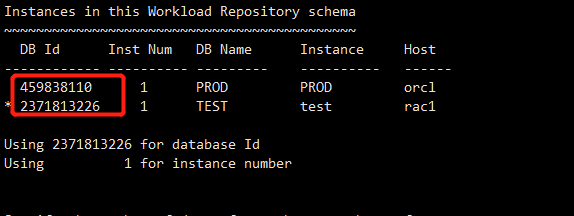
在生成awr报告的时候也可以看到
Instances in this Workload Repository schema

~~~~~~~~~~~~~~~~~~~~~~~~~~~~~~~~~~~~~~~~~~~~

  DB Id      Inst Num    DB Name      Instance      Host

------------ ---------- ---------    ----------   ------

  459838110     1    PROD         PROD      orcl

* 2371813226     1    TEST         test      rac1
如果想要清理掉这个信息
SQL> exec dbms_swrf_internal.unregister_database(459838110);

PL/SQL procedure successfully completed.

SQL> select * from dba_hist_wr_control;

      DBID SNAP_INTERVAL                                   RETENTION                                   TOPNSQL            CON_ID   SRC_DBID SRC_DBNAME

---------- --------------------------------------------------------------------------- --------------------------------------------------------------------------- -------------------- ---------- ---------- ----------------------------------------------------------------------------------------------------------------------------------------------------------------------------------------------------------------------------------------------------------------

2371813226 +00000 01:00:00.0                                   +00008 00:00:00.0                               DEFAULT             0 2371813226 test

5.再有一种可能是不完全恢复会不会导致出现两种DBID,还没有测试,
incarnation:
Resetlogs命令表示一个数据库逻辑生存期的结束和另一个数据库逻辑生存期的开始,Oracle把这个数据库逻辑生存期称为incarnation;每次使用resetlogs打开数据库,就会使incarnation + 1,也就是产生一个新的incarnation;如果想要恢复到之前incarnation的scn/time,就需要先恢复到之前的incarnation;
RMAN> list incarnation;

using target database control file instead of recovery catalog

List of Database Incarnations

DB Key  Inc Key DB Name  DB ID            STATUS  Reset SCN  Reset Time

------- ------- -------- ---------------- --- ---------- ----------

1       1       TEST     2371813226       PARENT  1          2019:04:1700:55:59

2       2       TEST     2371813226       CURRENT 1920977    2021:05:2716:46:36
参考这个文档在同一套库上恢复的,DBID是不会发生改变的
https://www.cnblogs.com/bicewow/p/11205685.html
视图:dba_hist_wr_control查询到两套库的awr保留策略的更多相关文章
- SQL语法精讲(包括建库、建表、建视图、查询、增加、删除、)
SQL语法精讲(包括建库.建表.建视图.查询.增加.删除.修改) SQL分类: DDL—数据定义语言(CREATE,ALTER,DROP,DECLARE) DML—数据操纵语言(SELECT,DELE ...
- 物化视图基础概念、mview跨库迁移表
概念:物化视图是一种特殊的物理表,“物化”(Materialized)视图是相对普通视图而言的.普通视图是虚拟表,应用的局限性大,任何对视图的查询,Oracle都实际上转换为视图SQL语句的查询.这样 ...
- 深入理解JDK、JRE(两套)、JVM、以及不同目录下的java.exe
内容来自:http://blog.sina.com.cn/s/blog_7ffb8dd501011sgc.html 1.jdk下bin目录里的java.exe与外部jre中的java.exe的秘密 ...
- SQL Server索引视图以(物化视图)及索引视图与查询重写
本位出处:http://www.cnblogs.com/wy123/p/6041122.html 经常听Oracle的同学说起来物化视图,物化视图的作用之一就是可以实现查询重写,听起来有一种高大上的感 ...
- 两套JRE
JDK就是Java Development Kit.简单的说JDK是面向开发人员使用的SDK,它提供了Java的开发环境和运行环境. SDK是Software Development Kit 一般指软 ...
- advapi32.dll kernel32.dll 中的两套注册表API
日前遇到一件事:WebBrowser中的网页会用到一个“大众”ActiveX控件,为了保证兼容性以及和其它程序互不干扰,我们采用这样一种方案: 1. 我们的软件会自带该控件: 2. 如果系统中已注册有 ...
- SpringBoot中使用Spring Data Jpa 实现简单的动态查询的两种方法
软件152 尹以操 首先谢谢大佬的简书文章:http://www.jianshu.com/p/45ad65690e33# 这篇文章中讲的是spring中使用spring data jpa,使用了xml ...
- qt 维护x86和arm两套编译环境
1.中间库: 中间库都放在middlewares目录,include头文件相同,所以不需要特殊处理,只要特殊处理lib安装目录, 示例pro文件如下: TEMPLATE = lib TARGET = ...
- SQL SERVER视图对查询效率的提高
SQL SERVER视图不仅可以实现许多我们需要的功能,而且对于SQL SERVER查询效率的提高也有帮助,下面一起来了解一下. 有两张数据表:A和B,其中A的记录为2万条左右,而B中的数据为200万 ...
随机推荐
- linux命令解压压缩rar文件
一.widonds下打包rar文件并上传 yum install lrzsz rz test.rar 二.下载并安装rar软件 2.1 下载 mkdir -p /home/oldboy/tools c ...
- vuex、localStorage、sessionStorage之间的区别
vuex存储在内存中,localStorage以文件形式存储在本地,sessionStorage针对一个session(阶段)进行数据存储. 当页面刷新时vuex存储的数据会被清除,localStor ...
- 腾讯暑期 前后七面 + hr(已拿offer面经)
以下是时间线 魔方 魔术师工作室 3.19 一面(120mins) c++ struct和union区别? 指针和引用的区别? 左值和右值? 字节对齐的作用? 什么情况下需要自定义new? mallo ...
- ssh-的搭建和使用
ssh的作用 : 可实现远程客户端登录服务器并对服务器的文件进行操作 ssh服务器的安装 farsight@ubuntu:~$ sudo apt-get install openssh-server ...
- Java集合详解(三):HashMap原理解析
概述 本文是基于jdk8_271版本进行分析的. HashMap是Map集合中使用最多的.底层是基于数组+链表实现的,jdk8开始底层是基于数组+链表/红黑树实现的.HashMap也会动态扩容,与Ar ...
- [Qt]《开发指南》3.1源码分析
界面: ButterflyGraph: 可以看出,本工程在主程序main里调用窗口界面qmywidget,窗口界面继承了QWidget,并调用自定义类qperson,推测是qmywidget类中的一个 ...
- Linux Centos7设置UTF-8编码,防止中文乱码
Linux Centos7设置UTF-8编码,防止中文乱码 # localeLANG=zh_CN.gb2312LC_CTYPE="zh_CN.gb2312"LC_NUMERIC=& ...
- Win10屏幕亮度不能调节,调节无效怎么办?
Win10屏幕亮度不能调节,调节无效怎么办? 听语音 浏览:1027 | 更新:2019-11-22 11:43 1 2 3 4 5 6 7 分步阅读 一些用户在使用win10系统之后,出现了电脑屏幕 ...
- Windows 电脑的四种运行状态工作状态 (Working), S0 睡眠状态 (Sleep), S1 或 S3 休眠状态 (Hibernate), S4 关机状态 (Shutdown), S5
== Windows 电脑的四种运行状态 == 这四种运行状态(或称电源状态)是: 工作状态 (Working), S0 睡眠状态 (Sleep), S1 或 S3 休眠状态 (Hibernate), ...
- 攻防世界-WEB-新手练习区
附:|>>>攻防世界-WEB-高手进阶区<<<|