
OSPF-三张表+路由器角色+router-id
验证理论:
1.剖析OSPF的三张表:邻居表,拓扑表,路由表
dis ospf peer brief
dis ospf lsdb
dis ip routing-table protocol ospf
2.查看OSPF路由器的角色
dis ospf abr-asbr
3.OSPFrouter id选举机制
1.手动指定
2.选择loopback接口(选择较大IP,是否在OSPF进程中并不重要)
3.选择物理接口(选择较大IP,是否在OSPF进程中并不重要)
*123规则,先配置会优先生效
*router-id选举机制不具有抢占性。修改router-id如果要生效的话需要重启进程生效reset ospf process
*查看router-id命令:dis ospf peer brief
实验拓扑:
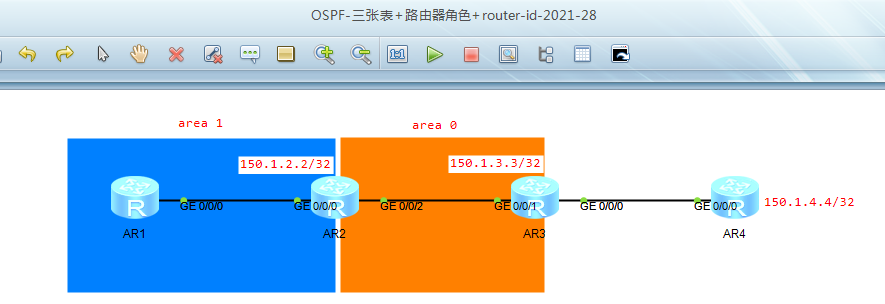
初始配置:
*说明,为方便后面验证router-id,AR123都是先在互联接口上使能OSPF
[AR3]ip route-static 150.1.4.4 32 155.1.34.4
[AR3-ospf-1]import-route static
[AR4]ip route-static 0.0.0.0 0.0.0.0 155.1.34.3
初始结果:
[AR1]dis ip routing-table protocol ospf
Route Flags: R - relay, D - download to fib
------------------------------------------------------------------------------
Public routing table : OSPF
Destinations : 4 Routes : 4
OSPF routing table status : <Active>
Destinations : 4 Routes : 4
Destination/Mask Proto Pre Cost Flags NextHop Interface
150.1.2.2/32 OSPF 10 1 D 155.1.12.2 GigabitEthernet0/0/0
150.1.3.3/32 OSPF 10 2 D 155.1.12.2 GigabitEthernet0/0/0
150.1.4.4/32 O_ASE 150 1 D 155.1.12.2 GigabitEthernet0/0/0
155.1.23.0/24 OSPF 10 2 D 155.1.12.2 GigabitEthernet0/0/0
OSPF routing table status : <Inactive>
Destinations : 0 Routes : 0
一.
实验目的:
剖析OSPF三张表项
1.邻居表-dis ospf peer
[AR3]dis ospf peer brief
OSPF Process 1 with Router ID 155.1.23.3
Peer Statistic Information
----------------------------------------------------------------------------
Area Id Interface Neighbor id State
0.0.0.0 GigabitEthernet0/0/1 155.1.12.2 Full
----------------------------------------------------------------------------
可查看信息:
1.该邻居是在本地的哪个OSPF进程内:OSPF Process 1
2.本路由器的router-id:Router ID 155.1.23.3
3.接口及邻居互联接口所属区域:Area Id
4.本路由器用来和邻居建立关系的接口:Interface
5.邻居的router-id: Neighbor id
6.本路由器与邻居建立的关系当前的状态:State
扩展:dis ospf peer
[AR3]dis ospf peer
OSPF Process 1 with Router ID 155.1.23.3
Neighbors
Area 0.0.0.0 interface 155.1.23.3(GigabitEthernet0/0/1)'s neighbors
Router ID: 155.1.12.2 Address: 155.1.23.2
State: Full Mode:Nbr is Slave Priority: 1
DR: 155.1.23.3 BDR: 155.1.23.2 MTU: 0
Dead timer due in 31 sec
Retrans timer interval: 5
Neighbor is up for 00:05:00
Authentication Sequence: [ 0 ]
可查看信息:
1.该邻居是在本地的哪个OSPF进程内+本路由器的router-id:OSPF Process 1 with Router ID 155.1.23.3
2.接口及邻居互联接口所属区域+本路由器用来和邻居建立关系的接口地址和接口号:Area 0.0.0.0 interface 155.1.23.3(GigabitEthernet0/0/1)'s neighbors
3.邻居router id+邻居与本路由器互联接口的IP地址:Router ID: 155.1.12.2 Address: 155.1.23.2
4.本路由器与邻居建立的关系当前的状态+主从选举结果
5.邻居状态(可能为down,attempt,init,two-way,exstart,exchange,loading,full)+邻居在进行DD报文选举过程中的主从状态,邻居的优先级:State: Full Mode:Nbr is Slave Priority: 1
6.指定路由器地址,备份路由器地址,邻居接口MTU的值:DR: 155.1.23.3 BDR: 155.1.23.2 MTU: 0
7.dead计时器在31s后到时:Dead timer due in 31 sec
8.重传LSA的时间间隔,单位为秒:Retrans timer interval: 5
9.距离邻居建立的时间:Neighbor is up for 00:05:00
10.认证序列号:Authentication Sequence: [ 0 ]
2.拓扑表
dis ospf lsdb
[AR1]dis ospf lsdb
OSPF Process 1 with Router ID 155.1.12.1
Link State Database
Area: 0.0.0.1
Type LinkState ID AdvRouter Age Len Sequence Metric
Router 155.1.12.2 155.1.12.2 982 48 80000005 1
Router 155.1.12.1 155.1.12.1 981 48 80000004 1
Network 155.1.12.2 155.1.12.2 982 32 80000001 0
Sum-Net 150.1.3.3 155.1.12.2 968 28 80000001 1
Sum-Net 155.1.23.0 155.1.12.2 1006 28 80000001 1
Sum-Asbr 155.1.34.3 155.1.12.2 68 28 80000001 1
AS External Database
Type LinkState ID AdvRouter Age Len Sequence Metric
External 150.1.4.4 155.1.34.3 1004 36 80000001 1
可查看信息:
1.该邻居是在本地的哪个OSPF进程内+本路由器的router-id:OSPF Process 1 with Router ID 155.1.12.1
2.显示LSDB信息的区域:Area: 0.0.0.1
3.LSA类型(Router/Network/Sum-Net/Sum-Asbr/NSSA/External/Opq-Link/Opq-Area/Opq-As):type
4.LSA报头中的链路状态ID:LinkState ID
5.发布或产生LSA的设备:AdvRouter
6.Lsa老化时间,Lsa大小,Lsa序列号:age ,length,sequence
7.度量值:Metric
3.路由表
dis ip routing-table protocol ospf
[AR1]dis ip routing-table protocol ospf
Route Flags: R - relay, D - download to fib
------------------------------------------------------------------------------
Public routing table : OSPF
Destinations : 4 Routes : 4
OSPF routing table status : <Active>
Destinations : 4 Routes : 4
Destination/Mask Proto Pre Cost Flags NextHop Interface
150.1.2.2/32 OSPF 10 1 D 155.1.12.2 GigabitEthernet0/0/0
150.1.3.3/32 OSPF 10 2 D 155.1.12.2 GigabitEthernet0/0/0
150.1.4.4/32 O_ASE 150 1 D 155.1.12.2 GigabitEthernet0/0/0
155.1.23.0/24 OSPF 10 2 D 155.1.12.2 GigabitEthernet0/0/0
OSPF routing table status : <Inactive>
Destinations : 0 Routes : 0
可查看信息:
proto为协议,ospf代表OSPF自己学到的,O-ASE代表外部引入的
二.
实验目的:
查看路由器角色
实验步骤:
dis ospf abr-asbr
[AR1]dis ospf abr-asbr
OSPF Process 1 with Router ID 155.1.12.1
Routing Table to ABR and ASBR
RtType Destination Area Cost Nexthop Type
Intra-area 155.1.12.2 0.0.0.1 1 155.1.12.2 ABR
Inter-area 155.1.34.3 0.0.0.1 2 155.1.12.2 ASBR
可查看信息:
1.表示区域内路由器或者是区域间路由器:RtType
2.显示ABR或者ASBR的router-id: Destination
3.本地区域号: Area
4.从设备到达ABR或ASBR的开销: Cost
5.发送报文到ABR或ASBR的下一跳IP地址:Nexthop
6.区域边界路由器(ABR)或自治系统边界路由器(ASBR):Type
三.
实验目的:
验证OSPF router-id选举机制
1.手动指定
2.选择loopback接口(选择较大IP,是否在OSPF进程中并不重要)
3.选择物理接口(选择较大IP,是否在OSPF进程中并不重要)
*123规则,先配置会优先生效
*router-id选举机制不具有抢占性。修改router-id如果要生效的话需要重启进程生效reset ospf process
*查看router-id命令:dis ospf peer brief
实验步骤:
第一步:因为是先在互联口上enable的ospf,所以现在OSPF的router id 都是互联口了
所以,先配先成为router-id
第二步:AR1重启OSPF进程
<AR1>reset ospf process
[AR1]dis ospf peer brief
OSPF Process 1 with Router ID 155.1.12.1
Peer Statistic Information
----------------------------------------------------------------------------
Area Id Interface Neighbor id State
0.0.0.1 GigabitEthernet0/0/0 155.1.12.2 Full
----------------------------------------------------------------------------
仍然是互联口router-id。保存配置后重启路由器,仍然是互联口router-id,动态选举未验证成功
此时手动指定router-id并重置路由进程
[AR3]ospf router-id 150.1.3.3
[AR3]dis ospf peer brief
OSPF Process 1 with Router ID 150.1.3.3
所以,手动指定优于动态选举
将lo 0口移出OSPF,查看OSPF的router id是否发生变化
[AR3-LoopBack0]undo ospf en a 0
[AR3]dis ospf peer brief
OSPF Process 1 with Router ID 150.1.3.3
所以,ospf的router id与接口是否在进程中并没有关系
将Lo 0 口地址删除并重启OSPF进程,查看OSPF的router id是否发生变化
[AR3-LoopBack0]undo ip add
[AR3]dis ospf peer brief
OSPF Process 1 with Router ID 150.1.3.3
所以,OSPF手动指定rouer id ,这个只是作为路由器标识,只要不重复,即使不存在于这个路由器上都没关系
OSPF-三张表+路由器角色+router-id的更多相关文章
- Ajax案例:三级联动查询员工的信息(三张表进行内连接)
需求分析: 通过数据库连接池,可以查询到数据库中员工的各种信息,通过点击下拉框的方式实现三级联动,即:没有点击city下拉框,后面两个下拉框中没有值,这样,点击city下拉框,department下拉 ...
- Yii的Relational Active Record三张表连接查询
需求如下: 查询book表信息,同时关联entitystags表,以entitystags的字段eid关联book的主键,再关联查询tags表,以entitystags表的tid字段关联tags表的主 ...
- $Django 多对多-自定义第三张表 基于双下划线的跨表查询(补充)
自定义第三张表的好处:可以定义多个字段, 缺点:查询不方便(有方法解决) 1.第三张表设置外键,联合唯一(查询不方便) class Books(models.Model): name=models.C ...
- 转 A 、B两张表,找出ID字段中,存在A表,但是不存在B表的数据
A.B两张表,找出ID字段中,存在A表,但是不存在B表的数据,A表总共13W数据,去重后大约3万条数据,B表有2W条数据,且B表的ID有索引. 方法一 使用not in,容易理解,效率低. selec ...
- Django框架(十一)-- 补充:inclusion_tag、defer、only、choice、事务、创建多对多的第三张表、mvc和mtv模式
一.inclusion_tag 1.作用 用于生成HTML片段,是数据由参数传入而变成动态 2.使用 # 1.app下新建一个模块,templatetags # 2.创建一个py文件(mytag.py ...
- 【Oracle/Java】向三张表各插入百万数据,共用时18分3秒,平均每张表6分钟
三张表DDL如下: CREATE TABLE tb01 ( "ID" ,) not null primary key, "NAME" NVARCHAR2() n ...
- [转载]详解网络传输中的三张表,MAC地址表、ARP缓存表以及路由表
[转载]详解网络传输中的三张表,MAC地址表.ARP缓存表以及路由表 虽然学过了计算机网络,但是这部分还是有点乱.正好在网上看到了一篇文章,讲的很透彻,转载过来康康. 本文出自 "邓奇的Bl ...
- Django:常用字段、手动自动第三张表单、元信息
一.常用字段和非常用字段 二.手动,自动创建第三张表 三.元信息 四.defer和only 一.常用字段和非常用字段 -常用字段 AutoField int自增列,必须填入参数 primary_key ...
- Django框架(十二)—— 补充:inclusion_tag、defer、only、choice、事务、创建多对多的第三张表
目录 补充:inclusion_tag.defer.only.choice.事务.创建多对多的第三张表 一.inclusion_tag 1.作用 2.使用 二.defer与only 1.定义 2.使用 ...
随机推荐
- 路由器逆向分析------sasquatch和squashfs-tools工具的安装和使用
本文博客地址:http://blog.csdn.net/qq1084283172/article/details/68942660 一.sasquatch工具的安装和使用 sasquatch工具支持对 ...
- DexHunter的原理分析和使用说明(一)
本文博客地址:http://blog.csdn.net/qq1084283172/article/details/53710357 Android通用脱壳工具DexHunter是2015年下半年,大牛 ...
- hdu3786 Floyd或搜索 水题
题意: 找出直系亲属 Time Limit: 2000/1000 MS (Java/Others) Memory Limit: 32768/32768 K (Java/Others) Total ...
- hdu2155 小黑的镇魂曲(dp)
题意: 小黑的镇魂曲 Problem Description 这个事情发生在某一天,当小黑和SSJ正在约会的时候,邪恶的Guner抓走了SSJ, ...
- Redis笔记整理
Redis 遵守BSD协议.支持网络.可基于内存亦可持久化的日志型.Key-Value数据库.数据结构服务器. 特点: 1.Redis支持数据的持久化,可以将内存中的数据保存在磁盘中,重启的时 ...
- 音视频开发:为什么推荐使用Jetpack CameraX?
我们的生活已经越来越离不开相机,从自拍到直播,扫码再到VR等等.相机的优劣自然就成为了厂商竞相追逐的赛场.对于app开发者来说,如何快速驱动相机,提供优秀的拍摄体验,优化相机的使用功耗,是一直以来追求 ...
- Kubernetes入门,使用minikube 搭建本地k8s 环境
这是一篇 K8S 的 HelloWorld,在学习K8S官方文档时搭建环境搭建的一个记录,照着文档下来还是比较顺利的. 一.安装kubectl 下载 kubectl curl -LO "ht ...
- c#私钥加密统一JAVA
public static string RSADecryptByPavKey(string pavKey,string strEncryptString) { string clearText = ...
- OO第一单元总结-多项式求导
OO第一单元总结-多项式求导 一.第一.第二次作业总结 因为前两次作业设计复杂度差别不大,因而放在这里统一总结. 基于度量分析程序结构: 前两次作业确实存在缺乏可拓展设计的构想,基本还是面向过程的思维 ...
- [网络编程之Socket套接字介绍,套接字工作流程,基于TCP协议的套接字程序]
[网络编程之Socket套接字介绍,套接字工作流程,基于TCP协议的套接字程序] 为何学习socket套接字一定要先学习互联网协议: 1.首先:要想开发一款自己的C/S架构软件,就必须掌握socket ...