
完美解决JavaIO流报错 java.io.FileNotFoundException: F:\ (系统找不到指定的路径。)
完美解决JavaIO流报错 java.io.FileNotFoundException: F:\ (系统找不到指定的路径。)
错误原因
读出文件的路径需要有被拷贝的文件名,否则无法解析地址
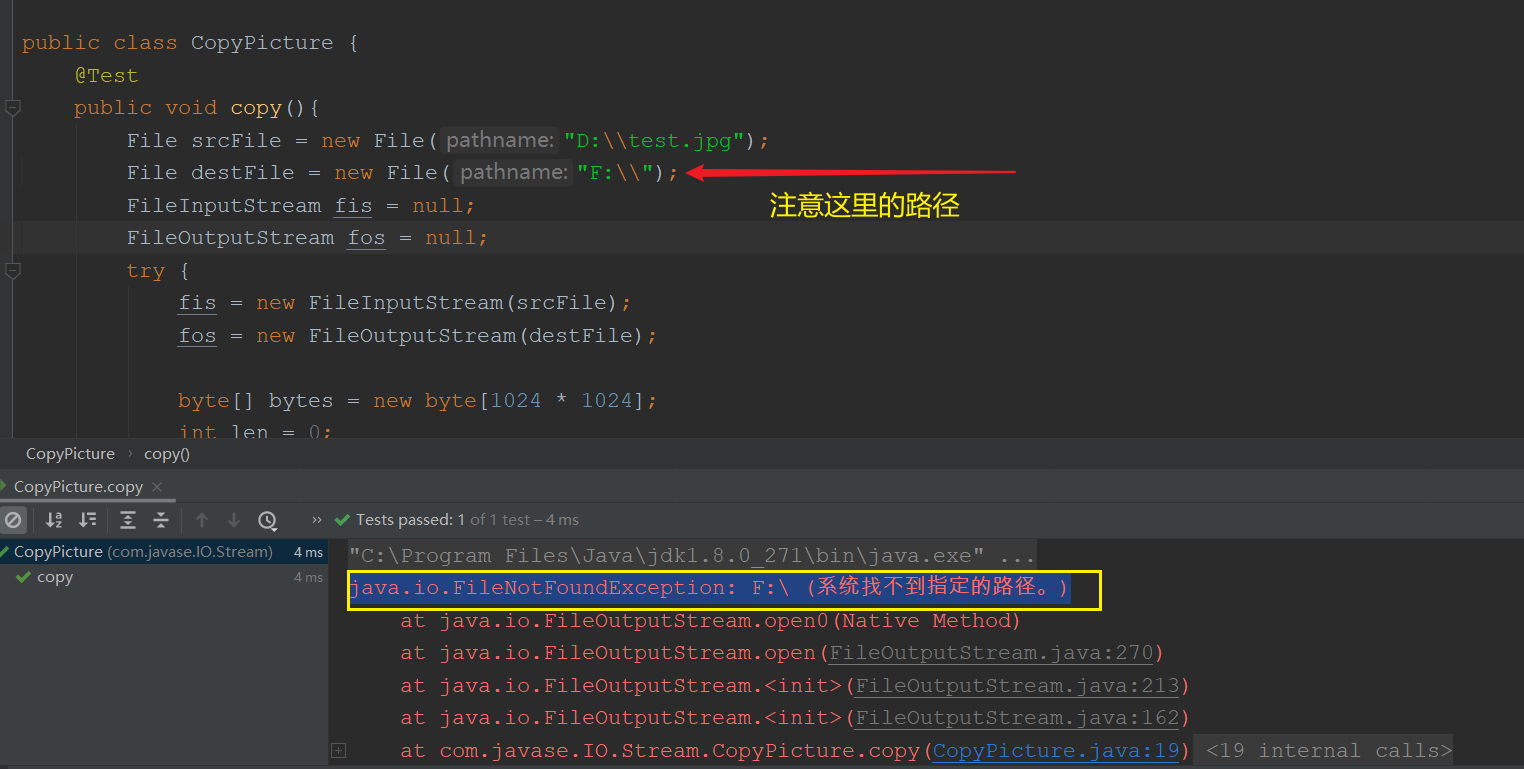
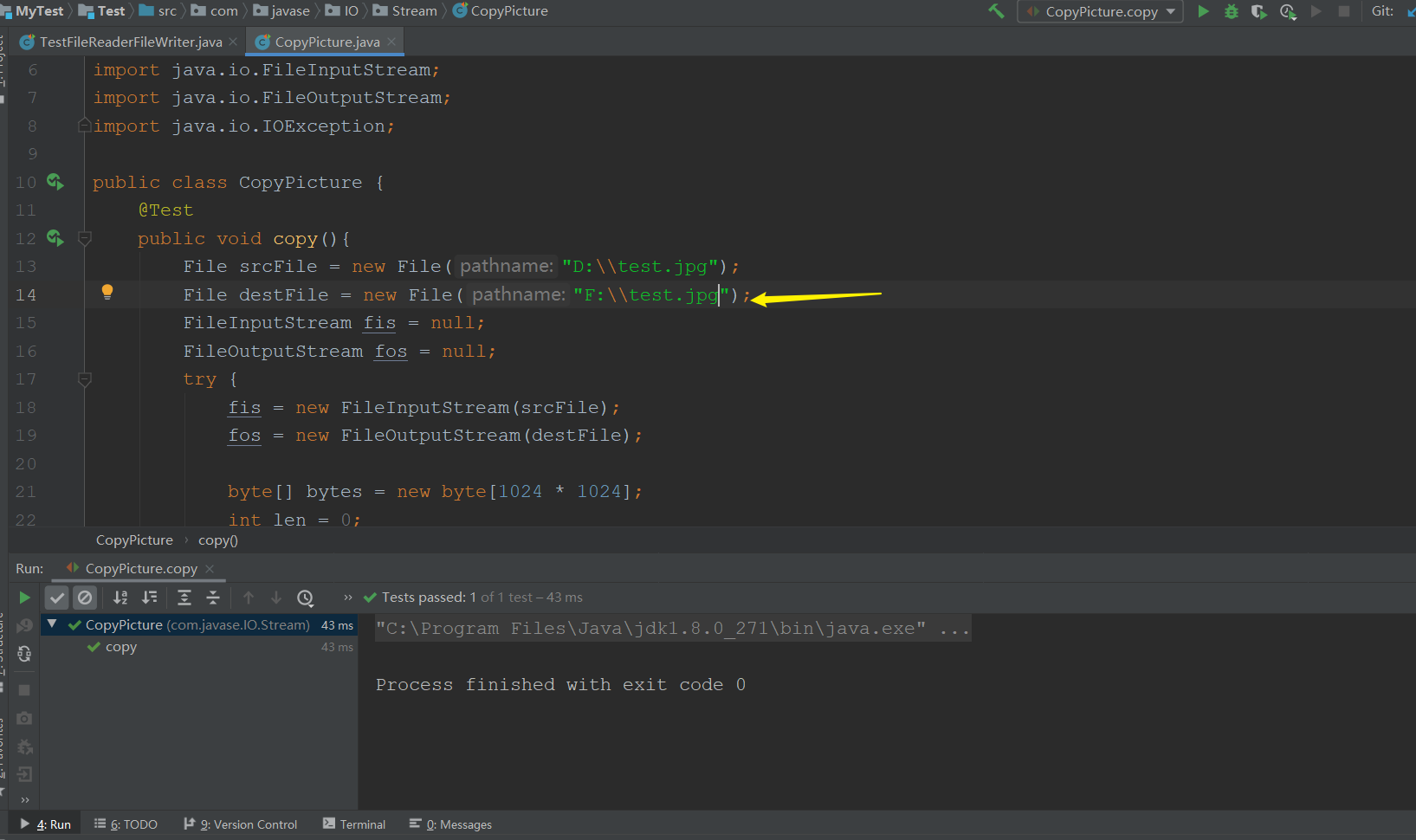
源代码(用于拷贝)
package com.javase.IO.Stream;

import org.junit.Test;

import java.io.File;

import java.io.FileInputStream;

import java.io.FileOutputStream;

import java.io.IOException;

public class CopyPicture {

    @Test

    public void copy(){

        File srcFile = new File("D:\\test.jpg");

        File destFile = new File("F:\\");

        FileInputStream fis = null;

        FileOutputStream fos = null;

        try {

            fis = new FileInputStream(srcFile);

            fos = new FileOutputStream(destFile);

            byte[] bytes = new byte[1024 * 1024];

            int len = 0;

            while((len = fis.read(bytes)) != -1){

                fos.write(bytes,0,len);

            }

            fos.flush();

        } catch (IOException e) {

            e.printStackTrace();

        } finally {

            try {

                if (fis != null) {

                    fis.close();

                }

            } catch (IOException e) {

                e.printStackTrace();

            }

            try {

                if (fos != null) {

                    fos.close();

                }

            } catch (IOException e) {

                e.printStackTrace();

            }

        }

    }

}
修改后的代码
package com.javase.IO.Stream;

import org.junit.Test;

import java.io.File;

import java.io.FileInputStream;

import java.io.FileOutputStream;

import java.io.IOException;

public class CopyPicture {

    @Test

    public void copy(){

        File srcFile = new File("D:\\test.jpg");

        File destFile = new File("F:\\test.jpg");

        FileInputStream fis = null;

        FileOutputStream fos = null;

        try {

            fis = new FileInputStream(srcFile);

            fos = new FileOutputStream(destFile);

            byte[] bytes = new byte[1024 * 1024];

            int len = 0;

            while((len = fis.read(bytes)) != -1){

                fos.write(bytes,0,len);

            }

            fos.flush();

        } catch (IOException e) {

            e.printStackTrace();

        } finally {

            try {

                if (fis != null) {

                    fis.close();

                }

            } catch (IOException e) {

                e.printStackTrace();

            }

            try {

                if (fos != null) {

                    fos.close();

                }

            } catch (IOException e) {

                e.printStackTrace();

            }

        }

    }

}
完美解决JavaIO流报错 java.io.FileNotFoundException: F:\ (系统找不到指定的路径。)的更多相关文章
- python setup.py install 报错:error: [WinError 3] 系统找不到指定的路径。: 'C:\\Program Files (x86)\\Microsoft Visual Studio 14.0\\VC\\PlatformSDK\\lib
Outline 在通过 setup.py 安装python模块时,遇到了以下报错: # 执行 python setup.py install # 报错: error: [WinError 3] 系统找 ...
- 解决 mysql 启动报错--发现系统错误2,系统找不到指定的文件
HKEY_LOCAL_MACHINE-SYSTEM-CurrentControlSet-services-mysql(服务名)-ImagePath 更改为(自己的):"C:\Program ...
- 关于SpringMVC项目报错:java.io.FileNotFoundException: Could not open ServletContext resource [/WEB-INF/xxxx.xml]
关于SpringMVC项目报错:java.io.FileNotFoundException: Could not open ServletContext resource [/WEB-INF/xxxx ...
- 文件上传报错java.io.FileNotFoundException拒绝访问
局部代码如下: File tempFile = new File("G:/tempfileDir"+"/"+fileName); if(!tempFile.ex ...
- 关于spark入门报错 java.io.FileNotFoundException: File file:/home/dummy/spark_log/file1.txt does not exist
不想看废话的可以直接拉到最底看总结 废话开始: master: master主机存在文件,却报 执行spark-shell语句: ./spark-shell --master spark://ma ...
- Spark启动报错|java.io.FileNotFoundException: File does not exist: hdfs://hadoop101:9000/directory
at org.apache.spark.deploy.history.FsHistoryProvider.<init>(FsHistoryProvider.scala:) at org.a ...
- Java properties | FileNotFoundException: properties (系统找不到指定的文件。)
文件存储路径的问题 错误描述 :FileNotFoundException: init.properties (系统找不到指定的文件.) 1.方法一 InputStream fis =TestProp ...
- 转:Java properties | FileNotFoundException: properties (系统找不到指定的文件。)
原文地址:https://blog.csdn.net/cor_twi/article/details/44514871 web项目 (dynamic web project ) 读取propertie ...
- mysql 启动报错--发现系统错误2,系统找不到指定的文件。
解决方法: 控制面板--找到mysql程序--修复
随机推荐
- 聊一聊中台和DDD(领域驱动设计)
本次分享价值:本次分享主要针对中台.微服务和领域模型的理念.本质及其构建方法论进行探讨.对领域分析的价值所在就是寻求"千变万化"中相对的"稳定性.第一性",然后 ...
- idea中的springboot的maven项目报错Failed to clean project: Failed to delete D:\new_shunyi\shunyi\target\shunyi\WEB-INF\classes\static\
正准备打包上传到测试环境,本想先clean下,没想到报了个这个错,意思大概是无法删除target下的某个文件,没有权限(一脸懵逼): 后来百度发现可能是因为我之前启动了tomcat,未关闭,然后关闭了 ...
- jQuery中的常用方法:empty()、each()、$.each()、$.trim()、focus()(二)
<!DOCTYPE html> <html> <head> <title>02_commonMethod.html</title> < ...
- vscode如何配置ts的lint,如何配置才能让eslint和prettier不冲突一键格式化代码(vue开发使用)
最近在使用ts,发觉tslint在vscode上使用很不方便,不如eslint一键格式化高效,就想着能不能配置下vscode让其像写js一样爽 这篇文章主要解决2个问题,第一个是如何让vscode使用 ...
- HTTP系列之:HTTP中的cookies
目录 简介 cookies的作用 创建cookies cookies的生存时间 cookies的权限控制 第三方cookies 总结 简介 如果小伙伴最近有访问国外的一些标准网站的话,可能经常会弹出一 ...
- Linux centos7 find 命令
2021-08-13 1. 命令简介 find 命令用来在指定目录下查找文件.任何位于参数之前的字符串都将被视为欲查找的目录名.如果使用该命令时,不设置任何参数,则 find 命令将在当前目录下查找子 ...
- cmd(命令行)超好用的技巧,很不错的打开方式
超快速打开管理cmd widows + x 按a 直接打开文件位置,在地址栏输入cmd 地址----直接cmd打开到所在文件位置 ex:cmd D:\work cd ../../../ 返回上几层的方 ...
- Markdown Sublime flowchart.js 流程图
先亮出来一个 flowchart.js 的 Sample 给 Sublime 安装 MarkdownPreview,这个不必多说了 Sublime Text -> Preferences -&g ...
- Why TypeScript?
本文经作者授权,翻译总结自 TypeScript Team 的成员 orta 的个人博客 <Understanding TypeScript's Popularity>. 原作者: ort ...
- WEB漏洞——RCE
RCE(remote command/code execute)远程命令/代码执行漏洞,可以让攻击者直接向后台服务器远程注入操作系统命令或者代码,从而控制后台系统. RCE漏洞 应用程序有时需要调用一 ...