
python pip安装报错: ConnectTimeoutError
错误:
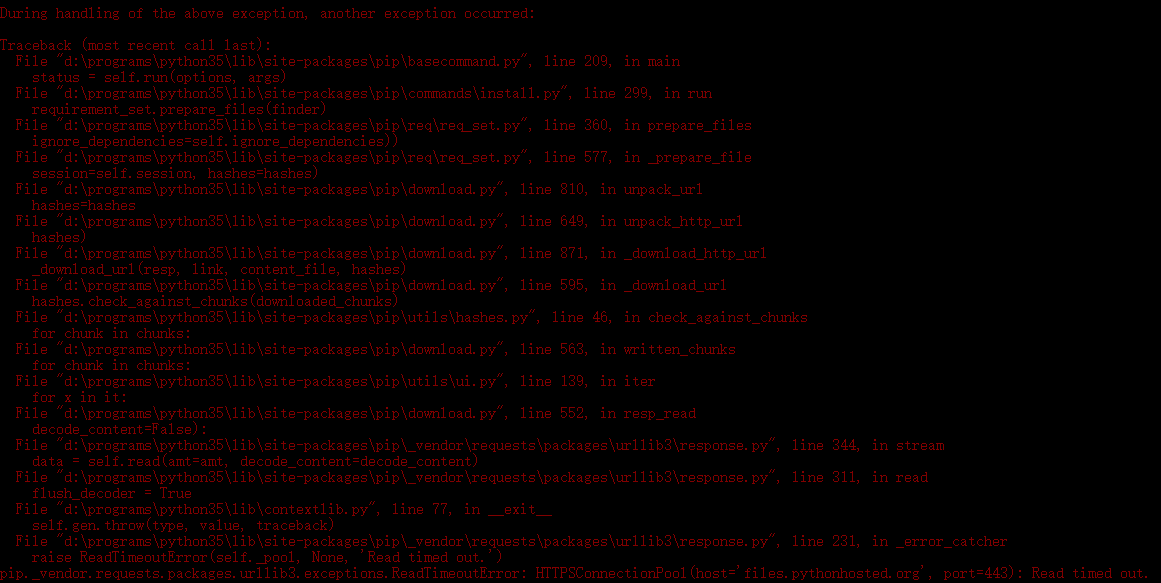
解决方案:
 https://pypi.douban.com/simple https://pypi.douban.com/simple
 File "d:\programs\python35\lib\site-packages\pip\_vendor\requests\packages\urllib3\
response.py
", line 226, in _error_catcher
yield
File "d:\programs\python35\lib\site-packages\pip\_vendor\requests\packages\urllib3\response.py
", line 301, in read
data = self._fp.read(amt)
File "d:\programs\python35\lib\site-packages\pip\_vendor\cachecontrol\filewrapper.py
", line 49, in read
data = self.__fp.read(amt)
File "d:\programs\python35\lib\http\client.py
", line 448, in read
n = self.readinto(b)
File "d:\programs\python35\lib\http\client.py
", line 488, in readinto
n = self.fp.readinto(b)
File "d:\programs\python35\lib\socket.py
", line 575, in readinto
return self._sock.recv_into(b)
File "d:\programs\python35\lib\ssl.py
", line 929, in recv_into
return self.read(nbytes, buffer)
File "d:\programs\python35\lib\ssl.py
", line 791, in read
return self._sslobj.read(len, buffer)
File "d:\programs\python35\lib\ssl.py
", line 575, in read
v = self._sslobj.read(len, buffer)
socket.timeout: The read operation timed out
During handling of the above exception, another exception occurred:
Traceback (most recent call last):
File "d:\programs\python35\lib\site-packages\pip\basecommand.py
", line 209, in main
status = self.run(options, args)
File "d:\programs\python35\lib\site-packages\pip\commands\install.py
", line 299, in run
requirement_set.prepare_files(finder)
File "d:\programs\python35\lib\site-packages\pip\req\req_set.py
", line 360, in prepare_files
ignore_dependencies=self.ignore_dependencies))
File "d:\programs\python35\lib\site-packages\pip\req\req_set.py
", line 577, in _prepare_file
session=self.session, hashes=hashes)
File "d:\programs\python35\lib\site-packages\pip\download.py
", line 810, in unpack_url
hashes=hashes
File "d:\programs\python35\lib\site-packages\pip\download.py
", line 649, in unpack_http_url
hashes)
File "d:\programs\python35\lib\site-packages\pip\download.py
", line 871, in _download_http_url
_download_url(resp, link, content_file, hashes)
File "d:\programs\python35\lib\site-packages\pip\download.py
", line 595, in _download_url
hashes.check_against_chunks(downloaded_chunks)
File "d:\programs\python35\lib\site-packages\pip\utils\hashes.py
", line 46, in check_against_chunks
for chunk in chunks:
File "d:\programs\python35\lib\site-packages\pip\download.py
", line 563, in written_chunks
for chunk in chunks:
File "d:\programs\python35\lib\site-packages\pip\utils\ui.py
", line 139, in iter
for x in it:
File "d:\programs\python35\lib\site-packages\pip\download.py
", line 552, in resp_read
decode_content=False):
File "d:\programs\python35\lib\site-packages\pip\_vendor\requests\packages\urllib3\response.py
", line 344, in stream
data = self.read(amt=amt, decode_content=decode_content)
File "d:\programs\python35\lib\site-packages\pip\_vendor\requests\packages\urllib3\response.py
", line 311, in read
flush_decoder = True
File "d:\programs\python35\lib\contextlib.py
", line 77, in __exit__
self.gen.throw(type, value, traceback)
File "d:\programs\python35\lib\site-packages\pip\_vendor\requests\packages\urllib3\response.py
", line 231, in _error_catcher
raise ReadTimeoutError(self._pool, None, 'Read timed out.')
pip._vendor.requests.packages.urllib3.exceptions.ReadTimeoutError: HTTPSConnectionPool(host='files.pythonhosted.org
', port=443): Read timed out.
python pip安装报错: ConnectTimeoutError的更多相关文章
- Python——pip安装报错:is not a supported wheel on this platform
pip安装报错:is not a supported wheel on this platform 可能的原因1:安装的不是对应python版本的库,下载的库名中cp35代表python3.5,其它同 ...
- python pip安装报错python setup.py egg_info failed with error code 1
安装locust遇到点问题折腾了好一会儿,记录一下. 使用命令pip install locustio提示python setup.py egg_info failed with error cod ...
- 安装Tensorflow过程pip安装报错:is not a supported wheel on this platform
安装Tensorflow过程pip安装报错:is not a supported wheel on this platform 通过pip安装wheel镜像时,安装指令为: pip install - ...
- pip安装报错: Retrying (Retry(total=4, connect=None, read=None, redirect=None, status=None)) after connection broken by 'ProxyError('Cannot connect to proxy
pip安装报错 解决办法: pip install selenium -i http://pypi.douban.com/simple --trusted-host pypi.douban.com
- 使用pip安装报错的处理方法
在新的机子上使用pip安装程序一直报错: Retrying (Retry(total=4, connect=None, read=None, redirect=None)) after connect ...
- pip安装报错处理+PyPi源切换教程
一.pip安装出错类型 1.1 pip版本过旧导致不能安装 报错提示: You are using pip version 9.0.3, however version 10.0.1 is avail ...
- 【python】pip安装报错UnicodeDecodeError: 'ascii' codec can't decode byte 0xc4 in position 7: ordinal not in range(128)
刚安装完python,准备pip安装第三方库的时候出现了一个错误: UnicodeDecodeError: ‘ascii’ code can’t decode byte 0xef in positio ...
- python中使用pip安装报错:Fatal error in launcher... 解决方法
python安装了2和3版本在 cmd 中用pip报的错误为:Fatal error in launcher:Unable to create process using 这是因为你安装了python ...
- Python中pip安装报错Unable to create process using '....'
因为我本人在电脑上安装了python2和python3,所以在安装的时候,把两个python的安装目录都安装到G盘了.然后两个python的执行文件分别改成了 python2.exe 和 pytho ...
随机推荐
- BZOJ1660: [Usaco2006 Nov]Bad Hair Day 乱发节(单调栈)
题意 题目链接 Sol 单调栈板子题.. 找到向左第一个比他大的位置,然后判断一下就可以了 #include<bits/stdc++.h> //#define int long long ...
- HTTPS 常见部署问题及解决方案
在最近几年里,我写了很多有关 HTTPS 和 HTTP/2 的文章,涵盖了证书申请.Nginx 编译及配置.性能优化等方方面面.在这些文章的评论中,不少读者提出了各种各样的问题,我的邮箱也经常收到类似 ...
- 【代码笔记】iOS-GCD用法
代码: - (void)viewDidLoad { [super viewDidLoad]; // Do any additional setup after loading the view. // ...
- hihocoder 1485----hiho字符串
hihocoder 1485:hiho字符串 描述 如果一个字符串恰好包含2个'h'.1个'i'和1个'o',我们就称这个字符串是hiho字符串. 例如"oihateher".&q ...
- Android RxJava+Retrofit完美封装
作者简介 本篇来自 小河马 的投稿,分享了自己是如何进行 RxJava+Retrofit 的封装.本文的技术点自然没话说,另外对于这种模块化的思路,希望能帮助到大家.最后提前祝大家周末愉快以及圣诞快乐 ...
- 网络 私有IP和子网掩码设置
私有IP不需要花钱 节约使用公网IP有两个方法,一个方法是动态IP(关机回收IP),一个方法是私有IP,尤其是私有IP作用巨大. 私有IP不具有唯一性,不能直接访问公网.比如,我以私有IP192.16 ...
- Pig load 用法举例
users = load '/users.data' using PigStorage() as (name:chararray, age:int, address:chararray); loa ...
- 回归JavaScript基础(七)
主题:引用类型Function的介绍. 今天首先说的就是Function类型.下面就是定义函数的两种方法,第一种使用函数声明语法定义,第二种使用函数表达式定义.这两种定义函数的方式几乎没有什么区别. ...
- 转载:java基础之单例
转载:https://blog.csdn.net/goodlixueyong/article/details/51935526 https://www.cnblogs.com/cielosun/p/6 ...
- 通过ffplay实现摄像头preview
通过ffplay实现摄像头preview 硬件平台:Jetson TK1 开发板(NVIDIA Tegra K1 Mobile Processor 32bit),宁波舜宇光电SP103A(OV1682 ...