
Hadoop源码编译环境搭建
准备工具:
maven 3.0.0版本或者更高版本(配置中心库)
http://www.zlib.net/
git bash(Windows环境可以用此工具执行编译命令)

下载源码:
http://hadoop.apache.org/releases.html
http://mirror.bit.edu.cn/apache/hadoop/common/

当前稳定版本为hadoop 2.9.2
编译源码:
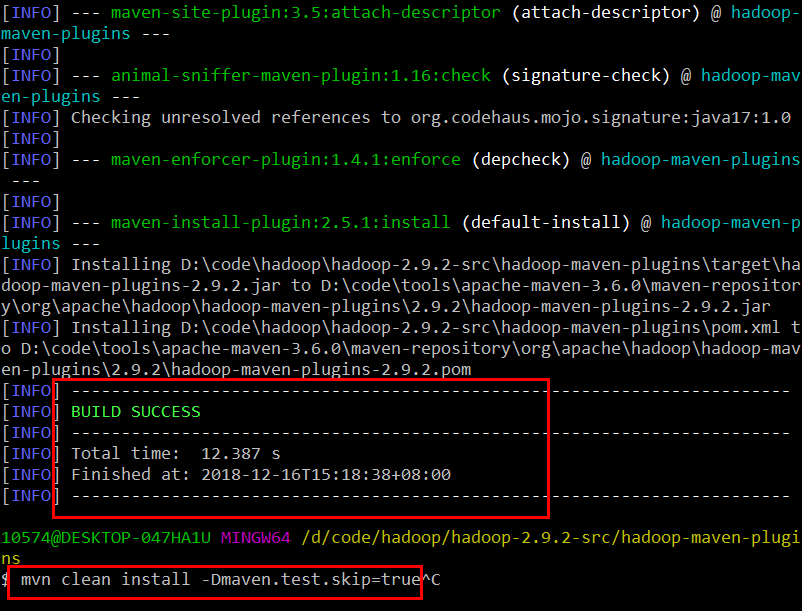
在目录hadoop-maven-plugins下执行maven命令
mvn clean package -Pdist -DskipTests
mvn clean install -DskipTests
mvn clean install -Dmaven.test.skip=true
在目录hadoop-2.9.2-src下执行
mvn eclipse:eclipse -DskipTests
或者
mvn eclipse:eclipse -Dmaven.test.skip=true
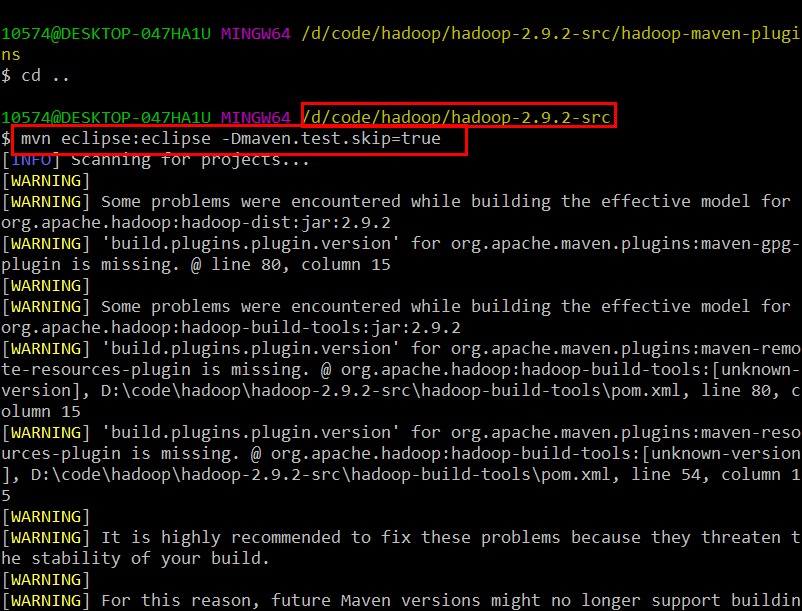
然而编译到最后,挂红了、、

定位如下:

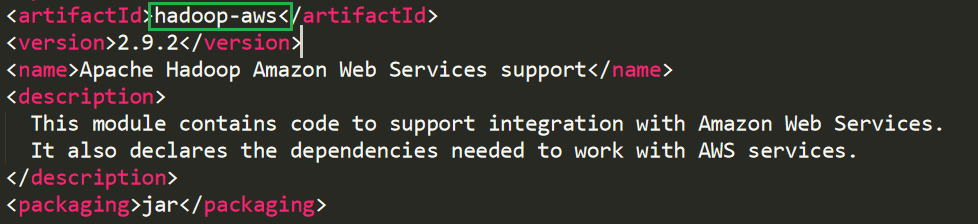
原来是hadoop-aws工程报错。尝试注掉该工程(注释掉该工程,不影响正常阅读Hadoop源码):
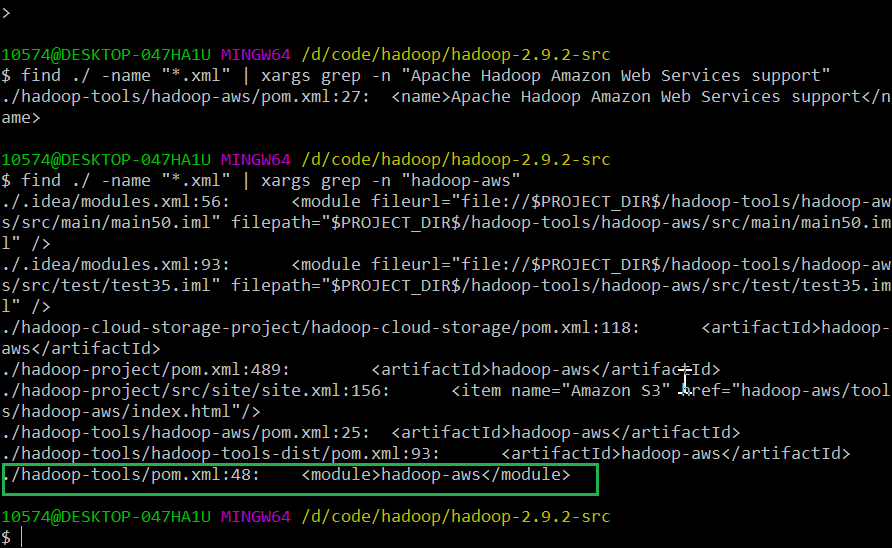

重新编译:
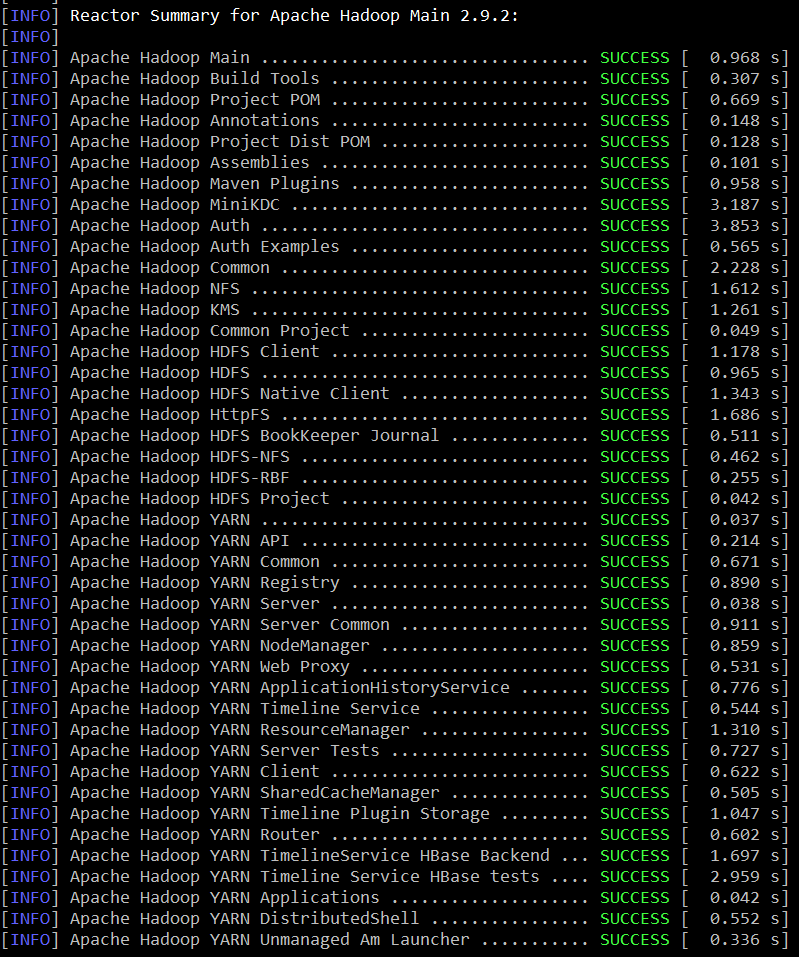

共80个工程项目(hadoop-aws)失败
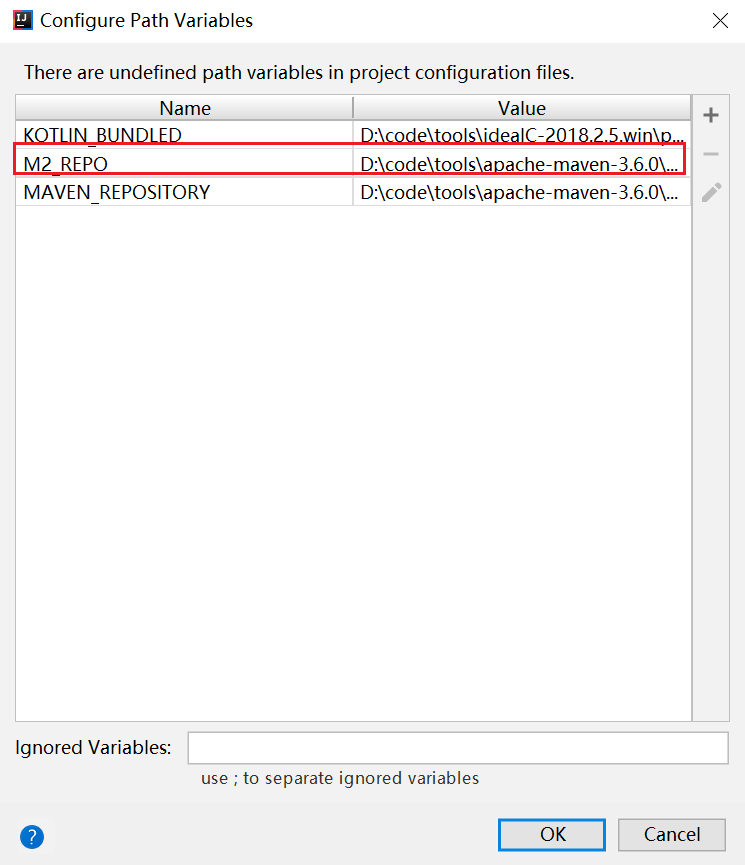
将Eclipse工程导入到IDEA,需要设置或更改M2_REPO和JDK版本(Hadoop 2.9.2使用JDK 1.7)
----------------------------------------------------------------------------------

Building on Windows

----------------------------------------------------------------------------------

Requirements:

* Windows System

* JDK 1.8

* Maven 3.0 or later

* ProtocolBuffer 2.5.

* CMake 3.1 or newer

* Visual Studio  Professional or Higher

* Windows SDK 8.1 (if building CPU rate control for the container executor)

* zlib headers (if building native code bindings for zlib)

* Internet connection for first build (to fetch all Maven and Hadoop dependencies)

* Unix command-line tools from GnuWin32: sh, mkdir, rm, cp, tar, gzip. These

  tools must be present on your PATH.

* Python ( for generation of docs using 'mvn site')

Unix command-line tools are also included with the Windows Git package which

can be downloaded from http://git-scm.com/downloads

If using Visual Studio, it must be Professional level or higher.

Do not use Visual Studio Express.  It does not support compiling for -bit,

which is problematic if running a -bit system.

The Windows SDK 8.1 is available to download at:

http://msdn.microsoft.com/en-us/windows/bg162891.aspx

Cygwin is not required.

----------------------------------------------------------------------------------

Building:

Keep the source code tree in a short path to avoid running into problems related

to Windows maximum path length limitation (for example, C:\hdc).

There is one support command file located in dev-support called win-paths-eg.cmd.

It should be copied somewhere convenient and modified to fit your needs.

win-paths-eg.cmd sets up the environment for use. You will need to modify this

file. It will put all of the required components in the command path,

configure the bit-ness of the build, and set several optional components.

Several tests require that the user must have the Create Symbolic Links

privilege.

All Maven goals are the same as described above with the exception that

native code is built by enabling the 'native-win' Maven profile. -Pnative-win

is enabled by default when building on Windows since the native components

are required (not optional) on Windows.

If native code bindings for zlib are required, then the zlib headers must be

deployed on the build machine. Set the ZLIB_HOME environment variable to the

directory containing the headers.

set ZLIB_HOME=C:\zlib-1.2.

At runtime, zlib1.dll must be accessible on the PATH. Hadoop has been tested

with zlib 1.2., built using Visual Studio  out of contrib\vstudio\vc10 in

the zlib 1.2. source tree.

http://www.zlib.net/

----------------------------------------------------------------------------------

Building distributions:

 * Build distribution with native code    : mvn package [-Pdist][-Pdocs][-Psrc][-Dtar][-Dmaven.javadoc.skip=true]

----------------------------------------------------------------------------------

Running compatibility checks with checkcompatibility.py

Invoke `./dev-support/bin/checkcompatibility.py` to run Java API Compliance Checker

to compare the public Java APIs of two git objects. This can be used by release

managers to compare the compatibility of a previous and current release.

As an example, this invocation will check the compatibility of interfaces annotated as Public or LimitedPrivate:

./dev-support/bin/checkcompatibility.py --annotation org.apache.hadoop.classification.InterfaceAudience.Public --annotation org.apache.hadoop.classification.InterfaceAudience.LimitedPrivate --include "hadoop.*" branch-2.7. trunk

----------------------------------------------------------------------------------

Changing the Hadoop version declared returned by VersionInfo

If for compatibility reasons the version of Hadoop has to be declared as a .x release in the information returned by

org.apache.hadoop.util.VersionInfo, set the property declared.hadoop.version to the desired version.

For example: mvn package -Pdist -Ddeclared.hadoop.version=2.11

If unset, the project version declared in the POM file is used.

----------------------------------------------------------------------------------

Building distributions:

Create binary distribution without native code and without documentation:

  $ mvn package -Pdist -DskipTests -Dtar -Dmaven.javadoc.skip=true

Create binary distribution with native code and with documentation:

  $ mvn package -Pdist,native,docs -DskipTests -Dtar

Create source distribution:

  $ mvn package -Psrc -DskipTests

Create source and binary distributions with native code and documentation:

  $ mvn package -Pdist,native,docs,src -DskipTests -Dtar

Create a local staging version of the website (in /tmp/hadoop-site)

  $ mvn clean site -Preleasedocs; mvn site:stage -DstagingDirectory=/tmp/hadoop-site

----------------------------------------------------------------------------------

Installing Hadoop

Look for these HTML files after you build the document by the above commands.

  * Single Node Setup:

    hadoop-project-dist/hadoop-common/SingleCluster.html

  * Cluster Setup:

    hadoop-project-dist/hadoop-common/ClusterSetup.html
README
Hadoop源码编译环境搭建的更多相关文章
- Hadoop源码阅读环境搭建(IDEA)
拿到一份Hadoop源码之后,经常关注的两件事情就是 1.怎么阅读?涉及IDEA和Eclipse工程搭建.IDEA搭建,选择源码,逐步导入即可:Eclipse可以选择后台生成工程,也可以选择IDE导入 ...
- hadoop源码eclipse环境搭建-源码获取阶段
就目前了解,结合eclipse阅读和编译hadoop源码用两种方式:svn和git. 根据官方指南http://wiki.apache.org/hadoop/EclipseEnvironment 推荐 ...
- ffmpeg源码编译环境搭建
ffmpeg是视频开发最常用到的开源软件,FFmpeg功能强大,用途广泛,提供几乎所有你能够想到的与视频开发相关的操作,许多商业软件都以ffmpeg为基础进行开发定制. FFmpeg: FFmpeg ...
- android 5.0 (lollipop)源码编译环境搭建(Mac OS X)
硬件环境:MacBook Pro Retina, 13-inch, Late 2013 处理器 2.4 GHz Intel Core i5 内存 8 GB 1600 MHz DDR3 硬盘60G以 ...
- Android 源码编译环境搭建(64位Ubuntu)各种依赖包安装
1.准备: 普通PC(要求能上网), PC的操作系统Ubuntu 10.04 LTS(64位的),已经下载好的Android 1.6_r1的源代码. 2.Linux的依赖package安装: 为了更快 ...
- Jmeter3.2源码编译环境搭建
1.下载jmeter3.2源码 https://github.com/apache/jmeter/tree/v3_2 https://blog.csdn.net/fly_to_higher/artic ...
- Jmeter3.2源码编译环境搭建(转)
1.下载jmeter3.2源码 https://github.com/apache/jmeter/tree/v3_2 https://blog.csdn.net/fly_to_higher/artic ...
- 【转】Linux(ubuntu14.04)上编译Android4.4源码的环境搭建及编译全过程
原文网址:http://jileniao.net/linux-android-building.html sublime text让我伤心.本来很信任sublime text的自动保存功能,之前使用一 ...
- Mac搭建Hadoop源码阅读环境
1.本次Hadoop源码阅读环境使用的阅读工具是idea,Hadoop版本是2.7.3.需要安装的工具包括idea.jdk.maven.protobuf等 2.jdk,使用的版本是1.8版,在jdk官 ...
随机推荐
- C++ Primer Plus 第15章 友元、异常和其它
版权声明:本文为博主原创文章,未经博主同意不得转载. https://blog.csdn.net/chudaxiakkk/article/details/30502807 第15章 友元.异常和其它 ...
- 【洛谷】【堆】P1801 黑匣子_NOI导刊2010提高(06)
[题目描述:] Black Box是一种原始的数据库.它可以储存一个整数数组,还有一个特别的变量i.最开始的时候Black Box是空的.而i等于0.这个Black Box要处理一串命令. 命令只有两 ...
- access数据库及其分页的方法
首先access数据库的话,感觉针对比较小型的网站比较适合.携带方便,不需要按照特定的sql环境. 当然如果使用access数据库的话 1.首先你先要下载办公五合一(access也是其中之一) 2.w ...
- javascript:apply方法 以及和call的区别 (转载)
javascript:apply方法 1. apply和call的区别在哪里 2. 什么情况下用apply,什么情况下用call 3. apply的其他巧 ...
- regex_replace
Regex_iterator方法需要输入一个正则表达式,以及一个用于替换匹配的字符串的格式化字符串:这个格式化的字符串可以通过表的转义序列引用匹配子字符串的部分内容: 转义序列 $n 替换第n个捕获的 ...
- 命令行编译执行java
命令行编译运行java程序 使用命令 javac进行编译 和 java进行执行. javac 后面跟着的是java文件的文件名,例如 HelloWorld.java. 该命令用于将 java 源文件编 ...
- vue组件懒加载(Load On Demand)
在Web应用程序中,系统的瓶颈常在于系统的响应速度.如果系统响应速度过慢,用户就会出现埋怨情绪,系统的价值也因此会大打折扣.因此,提高系统响应速度,是非常重要的. 懒加载(Load On Demand ...
- 【转】比较详细的Asp伪静态化方法及Asp静态化探讨
目前,各大搜索引擎如google.百度.雅虎已经对动态页面诸如asp,php有着不错的支持了,只要动态页面后面的参数不要太长,如控制在3个参数内,页面内容做点优化,各大搜索对该类页面收录甚至不比静态h ...
- EDB*Plus的当前路径问题
磨砺技术珠矶,践行数据之道,追求卓越价值 回到上一级页面: PostgreSQL基础知识与基本操作索引页 回到顶级页面:PostgreSQL索引页 [作者 高健@博客园 luckyjackg ...
- c++ switch语句
一.认识switch格式 switch(表达式) { case 常量表达式: 语句1; break; case 常量表达式: 语句2; break; case 常量表达式: 语句3; break; . ...