
Ubuntu16.04 安装RabbitMQ
转载https://www.cnblogs.com/hongdada/p/7203589.html
安装RabbitMQ
由于rabbitMq需要erlang语言的支持,在安装rabbitMq之前需要安装erlang,执行命令:
sudo apt-get install erlang-nox
安装rabbitMq命令:
2.$ sudo apt-get update

3.$ sudo apt-get install rabbitmq-server
启动、停止、重启、状态rabbitMq命令:
启动:sudo rabbitmq-server start

关闭: sudo rabbitmq-server stop

重启: sudo rabbitmq-server restart

查看状态:sudo rabbitmqctl status
安装好了以后可以使用 ps -ef|grep rabbit查看RabbitMQ的情况

hongdada@ubuntu:~$ ps -ef|grep rabbit

rabbitmq   7991      1  0 00:12 ?        00:00:00 /bin/sh /usr/sbin/rabbitmq-server

rabbitmq   7999   7991  0 00:12 ?        00:00:00 /bin/sh -e /usr/lib/rabbitmq/bin/rabbitmq-server

rabbitmq   8077      1  0 00:12 ?        00:00:00 /usr/lib/erlang/erts-7.3/bin/epmd -daemon

rabbitmq   8137   7999  0 00:12 ?        00:00:03 /usr/lib/erlang/erts-7.3/bin/beam.smp -W w -A 64 -P 1048576 -K true -B i -- -root /usr/lib/erlang -progname erl -- -home /var/lib/rabbitmq -- -pa /usr/lib/rabbitmq/lib/rabbitmq_server-3.5.7/sbin/../ebin -noshell -noinput -s rabbit boot -sname rabbit@ubuntu -boot start_sasl -kernel inet_default_connect_options [{nodelay,true}] -sasl errlog_type error -sasl sasl_error_logger false -rabbit error_logger {file,"/var/log/rabbitmq/rabbit@ubuntu.log"} -rabbit sasl_error_logger {file,"/var/log/rabbitmq/rabbit@ubuntu-sasl.log"} -rabbit enabled_plugins_file "/etc/rabbitmq/enabled_plugins" -rabbit plugins_dir "/usr/lib/rabbitmq/lib/rabbitmq_server-3.5.7/sbin/../plugins" -rabbit plugins_expand_dir "/var/lib/rabbitmq/mnesia/rabbit@ubuntu-plugins-expand" -os_mon start_cpu_sup false -os_mon start_disksup false -os_mon start_memsup false -mnesia dir "/var/lib/rabbitmq/mnesia/rabbit@ubuntu" -kernel inet_dist_listen_min 25672 -kernel inet_dist_listen_max 25672

rabbitmq   8256   8137  0 00:12 ?        00:00:00 inet_gethost 4

rabbitmq   8257   8256  0 00:12 ?        00:00:00 inet_gethost 4

hongdada   8631   6788  0 00:18 pts/18   00:00:00 grep --color=auto rabbit

hongdada@ubuntu:~$ cd /usr/lib/rabbitmq/bin/
看起来没有问题,现在进入安装文件夹查看Rabbit的状态:
hongdada@ubuntu:~$ cd /usr/lib/rabbitmq/bin/

hongdada@ubuntu:/usr/lib/rabbitmq/bin$ sudo ./rabbitmqctl status

Status of node rabbit@ubuntu ...

Error: unable to connect to node rabbit@ubuntu: nodedown

DIAGNOSTICS

===========

attempted to contact: [rabbit@ubuntu]

rabbit@ubuntu:

  * connected to epmd (port 4369) on ubuntu

  * epmd reports node 'rabbit' running on port 25672

  * TCP connection succeeded but Erlang distribution failed

  * suggestion: hostname mismatch?

  * suggestion: is the cookie set correctly?

  * suggestion: is the Erlang distribution using TLS?

current node details:

- node name: 'rabbitmq-cli-8673@ubuntu'

- home dir: /home/hongdada

- cookie hash: 0PRVafcTz6WKsC1GZlmK7Q==
有错误,要修改配置,先停止服务
hongdada@ubuntu:/usr/lib/rabbitmq/bin$ invoke-rc.d rabbitmq-server stop

==== AUTHENTICATING FOR org.freedesktop.systemd1.manage-units ===

需要通过认证才能停止“rabbitmq-server.service”。

Authenticating as: hongda,,, (hongdada)

Password:

==== AUTHENTICATION COMPLETE ===
进入安装文件夹/usr/lib/rabbitmq/bin
修改rabbitmqctl文件
添加一行Home配置:加红色的地方
#!/bin/sh -e

##  The contents of this file are subject to the Mozilla Public License

##  Version 1.1 (the "License"); you may not use this file except in

##  compliance with the License. You may obtain a copy of the License

##  at http://www.mozilla.org/MPL/

##

##  Software distributed under the License is distributed on an "AS IS"

##  basis, WITHOUT WARRANTY OF ANY KIND, either express or implied. See

##  the License for the specific language governing rights and

##  limitations under the License.

##

##  The Original Code is RabbitMQ.

##

##  The Initial Developer of the Original Code is GoPivotal, Inc.

##  Copyright (c) 2007-2015 Pivotal Software, Inc.  All rights reserved.

##

# Get default settings with user overrides for (RABBITMQ_)<var_name>

# Non-empty defaults should be set in rabbitmq-env

. `dirname $0`/rabbitmq-env

# We specify Mnesia dir and sasl error logger since some actions

# (e.g. forget_cluster_node --offline) require us to impersonate the

# real node.

RABBITMQ_USE_LONGNAME=${RABBITMQ_USE_LONGNAME} \

HOME=/var/lib/rabbitmq  \

exec ${ERL_DIR}erl \

    -pa "${RABBITMQ_HOME}/ebin" \

    -noinput \

    -hidden \

    ${RABBITMQ_CTL_ERL_ARGS} \

    -boot "${CLEAN_BOOT_FILE}" \

    -sasl errlog_type error \

    -mnesia dir "\"${RABBITMQ_MNESIA_DIR}\"" \

    -s rabbit_control_main \

    -nodename $RABBITMQ_NODENAME \

    -extra "$@"
启用web管理台:
hongdada@ubuntu:/usr/lib/rabbitmq/bin$ sudo ./rabbitmq-plugins enable rabbitmq_management

The following plugins have been enabled:

  mochiweb

  webmachine

  rabbitmq_web_dispatch

  amqp_client

  rabbitmq_management_agent

  rabbitmq_management

Applying plugin configuration to rabbit@ubuntu... failed.

 * Could not contact node rabbit@ubuntu.

   Changes will take effect at broker restart.

 * Options: --online  - fail if broker cannot be contacted.

            --offline - do not try to contact broker.
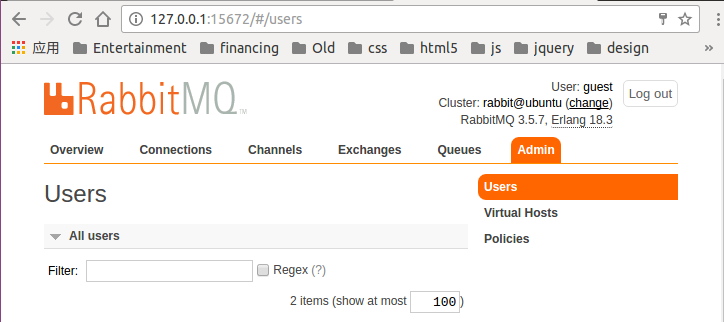
查看web管理器
127.0.0.1:15672
Ubuntu16.04 安装RabbitMQ的更多相关文章
- Ubuntu16.04安装rabbitmq(实战)
安装Erlang 由于RabbitMQ需要基于Erlang/OTP,所以在安装RabbitMQ之前需要先安装Erlang/OTP.同样的,在Ubuntu标准的repositories中,Erlang/ ...
- ubuntu14.04安装rabbitmq
ubuntu14.04安装rabbitmq及配置 1.修改/etc/apt/sources.list文件 命令:vi /etc/apt/sources.list 在最后一行加上:deb http: ...
- ubuntu16.04安装jdk,tomcat
ubuntu16.04安装jdk,tomcat 最近装了一下tomcat,网上的教程很多,我也试了很多次,但是有一些教程关于tomcat配置是错误的,让我走上了歧途.差点重装系统,还好王总及时出手帮助 ...
- Ubuntu16.04 安装openjdk-7-jdk
Ubuntu16.04 安装openjdk-7-jdk sudo apt-get install openjdk-7-jre 或者sudo apt-get install openjdk-7-jdk ...
- Ubuntu16.04安装GTK3主题:OSX-Arc
Ubuntu16.04安装GTK3主题:OSX-Arc GTK3主题:OSX-Arc描述: 前几个月,Gnome3.20升3.22的时候,出现了大量主题崩溃的现象,其中包括Arc.Flatabulou ...
- Ubuntu16.04安装opencv for python/c++
Ubuntu16.04安装opencv for python/c++ 网上关于opencv的安装已经有了不少资料,但是没有一篇资料能让我一次性安装成功,因此花费了大量时间去解决各种意外,希望这篇能给一 ...
- ubuntu16.04安装不上有道词典的解决办法
转自:http://www.linuxdiyf.com/linux/21143.html ubuntu16.04安装不上有道词典,提示: le@hu-pc:~/下载$ sudo dpkg -i you ...
- Ubuntu16.04安装mongodb
Ubuntu16.04安装mongodb copy from: http://blog.csdn.net/zhushh/article/details/52451441 1.导入软件源的公钥 sudo ...
- 【Tools】ubuntu16.04安装搜狗输入法
Ubuntu16,04 安装搜狗输入法 1.下载搜狗输入法的安装包 下载地址为:http://pinyin.sogou.com/linux/ 2.按键Ctr+Alt+T打开终端,输入以下命令切换到下载 ...
随机推荐
- 第六章 HashSet源码解析
6.1.对于HashSet需要掌握以下几点 HashSet的创建:HashSet() 往HashSet中添加单个对象:即add(E)方法 删除HashSet中的对象:即remove(Object ke ...
- SQL基础(一):SQL语法和命令
一.语法: 1.SQL 对大小写不敏感:SELECT 与 select 是相同的. 2.某些数据库系统要求在每条 SQL 语句的末端使用分号.分号是在数据库系统中分隔每条 SQL 语句的标准方法,这样 ...
- .NET破解之迅捷PDF转换器(续)
在以前的博文<.NET破解之迅捷PDF转换器>中使用了暴力破解的方法,现在软件版本从5.0升级到6.3,所以也尝试用新的方法. 方法一:暴力破解法 如往常一样,查找搜索到关键的函数,即Is ...
- linux more 上一页,下一页
linux more 上一页,下一页 使用more命令可以分页查看内容: 如: more install.txt 分页查看文本内容: 按回车:默认下一行数据: 按空格键盘,默认下一页,以当前屏幕为单位 ...
- [每日一题] OCP1z0-047 :2013-08-24 FLASHBACK—TABLE/PRIMARY KEY(FOREIGN KEY?)......98
正确答案:D 根据题意如下操作: 一.创建表dept gyj@OCM> CREATE TABLE DEPT 2 (DEPTNO NUMBER(2,0), 3 DNAME VARCHAR2(14) ...
- PHP高级教程-Session
PHP Session PHP session 变量用于存储关于用户会话(session)的信息,或者更改用户会话(session)的设置.Session 变量存储单一用户的信息,并且对于应用程序中的 ...
- npm之使用淘宝源
暂时使用: npm --registry https://registry.npm.taobao.org i express 永久使用: npm conf set registry https://r ...
- Struts2(七)基础小结
一.struts2和action 二.Result 三.struts.xml 四.namespace 第一种绝对路径 <form action="${pageContext.reque ...
- Java File 与 Bytes相互转换
public static byte[] fileToBytes(String filePath) { byte[] buffer = null; File file = new File(fileP ...
- 1z0-052 q209_3
3: Identify two situations in which you can use Data Recovery Advisor for recovery. (Choose two.) —° ...