
【ASP.NET Core】运行原理(2):启动WebHost
本系列将分析ASP.NET Core运行原理
- 【ASP.NET Core】运行原理[1]:创建WebHost
- 【ASP.NET Core】运行原理[2]:启动WebHost
- 【ASP.NET Core】运行原理[3]:认证
本节将分析WebHost.StartAsync();代码,确定是如何一步一步到我们注册的中间件,并介绍几种Configure的方式。
源代码参考.NET Core 2.0.0
目录
- Server.StartAsync
- Server
- IHttpApplication
- HttpContextFactory
- HttpContext
- Configure
- IApplicationBuilder
- Use
- Run
- UseMiddleware
- UseWhen
- MapWhen
- Map
Server.StartAsync
在上节我们知道WebHost.StartAsync内部是调用Server.StartAsync的。
public async Task StartAsync<TContext>(IHttpApplication<TContext> application, CancellationToken cancellationToken)

{

    async Task OnBind(ListenOptions endpoint)

    {

        var connectionHandler = new ConnectionHandler<TContext>(endpoint, ServiceContext, application);

        var transport = _transportFactory.Create(endpoint, connectionHandler);

        _transports.Add(transport);

        await transport.BindAsync().ConfigureAwait(false);

    }

    await AddressBinder.BindAsync(_serverAddresses, Options.ListenOptions, Trace, OnBind).ConfigureAwait(false);

}
参数application即为之前的new HostingApplication。在这里说下大概的流程:
KestrelServer.StartAsync -> new ConnectionHandler<TContext>().OnConnection -> new FrameConnection().StartRequestProcessing() ->

new Frame<TContext>().ProcessRequestsAsync() -> _application.CreateContext(this) && _application.ProcessRequestAsync(context)
如果你需要更细节的流程,可参考如下:
LibuvTransportFactory -> LibuvTransport.BindAsync() -> ListenerPrimary.StartAsync() ->

listener.ListenSocket.Listen(LibuvConstants.ListenBacklog, ConnectionCallback, listener) -> listener.OnConnection(stream, status) -> ConnectionCallback() ->

new LibuvConnection(this, socket).Start() -> ConnectionHandler.OnConnection() -> connection.StartRequestProcessing() ->

ProcessRequestsAsync -> CreateFrame -> await _frame.ProcessRequestsAsync()
- _application 为上面的HostingApplication;
- 每个WebHost.StartAsync 将创建唯一的一个HostingApplication实例并在每次请求时使用。
- 由Frame类调用HostingApplication的方法。
下面展示Frame以及HostingApplication:
Frame
public class Frame<TContext> : Frame

{

    public override async Task ProcessRequestsAsync()

    {

        while (!_requestProcessingStopping)

        {

            Reset();

            EnsureHostHeaderExists();

            var messageBody = MessageBody.For(_httpVersion, FrameRequestHeaders, this);

            InitializeStreams(messageBody);

            var context = _application.CreateContext(this);

            try

            {

                await _application.ProcessRequestAsync(context);

            }

            finally

            {

                _application.DisposeContext(context, _applicationException);

            }

        }

    }

}
HostingApplication
public class HostingApplication : IHttpApplication<HostingApplication.Context>

{

    private readonly RequestDelegate _application;

    private readonly IHttpContextFactory _httpContextFactory;

    public HostingApplication(

        RequestDelegate application,

        IHttpContextFactory httpContextFactory)

    {

        _application = application;

        _httpContextFactory = httpContextFactory;

    }

    // Set up the request

    public Context CreateContext(IFeatureCollection contextFeatures)

    {

        var context = new Context();

        var httpContext = _httpContextFactory.Create(contextFeatures);

        context.HttpContext = httpContext;

        return context;

    }

    // Execute the request

    public Task ProcessRequestAsync(Context context)

    {

        return _application(context.HttpContext);

    }

    // Clean up the request

    public void DisposeContext(Context context, Exception exception)

    {

        var httpContext = context.HttpContext;

        _httpContextFactory.Dispose(httpContext);

    }

    public struct Context

    {

        public HttpContext HttpContext { get; set; }

    }

}
由此我们发现HttpContext是由HttpContextFactory创建的,其中_httpContextFactory则是上节在WebHostBuilder的BuildCommon注入的
同时在HostingApplication的ProcessRequestAsync方法中,我们看到我们的_application(Startup注册的中间件)被调用了。
IHttpContextFactory。
HttpContextFactory
public HttpContext Create(IFeatureCollection featureCollection)

{

    var httpContext = new DefaultHttpContext(featureCollection);

    if (_httpContextAccessor != null)

        _httpContextAccessor.HttpContext = httpContext;

    return httpContext;

}
而创建的HttpContext则是DefaultHttpContext类型:
public class DefaultHttpContext : HttpContext

{

    public virtual void Initialize(IFeatureCollection features)

    {

        _features = new FeatureReferences<FeatureInterfaces>(features);

        _request = InitializeHttpRequest();

        _response = InitializeHttpResponse();

    }

    public override HttpRequest Request => _request;

    public override HttpResponse Response => _response;

}
Configure
IApplicationBuilder
我们知道在Startup的Configure方法中,通过IApplicationBuilder可以注册中间件。
public interface IApplicationBuilder

{

    IServiceProvider ApplicationServices { get; set; }

    RequestDelegate Build();

    IApplicationBuilder Use(Func<RequestDelegate, RequestDelegate> middleware);

}
默认实现类为:
public class ApplicationBuilder : IApplicationBuilder

{

    private readonly IList<Func<RequestDelegate, RequestDelegate>> _components = new List<Func<RequestDelegate, RequestDelegate>>();

    public IApplicationBuilder Use(Func<RequestDelegate, RequestDelegate> middleware)

    {

        _components.Add(middleware);

        return this;

    }

    public RequestDelegate Build()

    {

        RequestDelegate app = context =>

        {

            context.Response.StatusCode = 404;

            return Task.CompletedTask;

        };

        foreach (var component in _components.Reverse())

            app = component(app);

        return app;

    }

}
其中Use方法为注册中间件。中间件的本质就是一个Func<RequestDelegate, RequestDelegate>对象。
该对象的传入参数为下一个中间件,返回对象为本中间件。
而Build方法为生成一个RequestDelegate,在HostingApplication构造函数中的参数即为该对象。
在Build方法中,我们看到最后一个中间件为404中间件。其他的中间件都是通过Use方法注册到内部维护的_components对象上。
Use
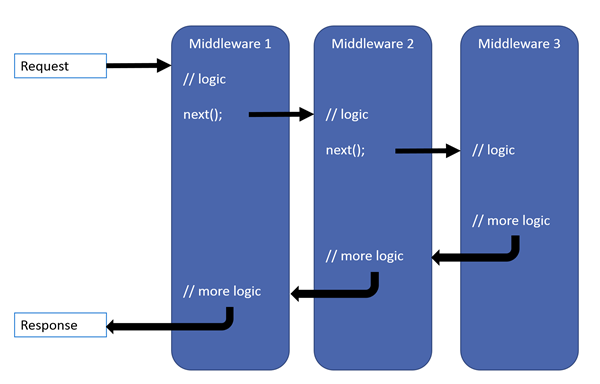
我们通过一个Use示例,来看下中间件的流程:
public void Configure(IApplicationBuilder app, IHostingEnvironment env)

{

    app.Use(next => async context =>

    {

        Console.WriteLine("A begin");

        await next(context);

        Console.WriteLine("A end");

    });

    app.Use(next => async context =>

    {

        Console.WriteLine("B begin");

        await next(context);

        Console.WriteLine("B end");

    });

}
访问结果:
A begin
B begin
B end
A end
流程图:
Run
当我们不使用next 下一个中间件的时候,我们可以使用Run方法来实现
Run方法接受一个RequestDelegate对象,本身是IApplicationBuilder的扩展方法。
public static void Run(this IApplicationBuilder app, RequestDelegate handler);

{

    app.Use(_ => handler);

}
Run示例
app.Run(context=>context.Response.WriteAsync("Run Core"));
该示例相当于:
app.Use(next => context => context.Response.WriteAsync("Run Core"));
UseMiddleware
而通常我们添加中间件的方式是通过UseMiddleware来更加方便的操作。
先看下IMiddleware:
public interface IMiddleware

{

    Task InvokeAsync(HttpContext context, RequestDelegate next);

}
参数next即为下一个中间件。
有2种实现UseMiddleware的方式:
- 实现IMiddleware接口。
- 基于接口约定的方法。
IMiddleware接口
public class DemoMiddle : IMiddleware

{

    public Task InvokeAsync(HttpContext context, RequestDelegate next)

    {

        return context.Response.WriteAsync("hello middleware");

    }

}
在使用IMiddleware接口的时候,还需要注册该类到DI系统中。
约定
public class DemoMiddle

{

    private RequestDelegate _next;

    public DemoMiddle(RequestDelegate next)

    {

        _next = next;

    }

    public Task InvokeAsync(HttpContext context)

    {

        return context.Response.WriteAsync("hello middleware");

    }

}
这种方式,不用再注册到DI中,如果需要对该类构造函数传入参数,直接在app.UseMiddleware<DemoMiddle>("hi1");传入参数即可。
UseWhen
app.Use(next => async context => { await context.Response.WriteAsync("Begin"); await next(context); });

app.UseWhen(context => context.Request.Path.Value == "/hello", branch => branch.Use(

    next => async context => { await context.Response.WriteAsync("hello"); await next(context); }));

app.Run(context => context.Response.WriteAsync("End"));
当我们访问/hello时,结果为:BeginhelloEnd
分析源码得知在构建管道的时候,克隆一个另外的IApplicationBuilder。
public static IApplicationBuilder UseWhen(this IApplicationBuilder app, Predicate predicate, Action<IApplicationBuilder> configuration)

{

    var branchBuilder = app.New();

    configuration(branchBuilder);

    return app.Use(main =>

    {

        // This is called only when the main application builder

        // is built, not per request.

        branchBuilder.Run(main);// 添加(调用)原来的中间件

        var branch = branchBuilder.Build();

        return context => predicate(context) ? branch(context): main(context);

    });

}
MapWhen
app.Use(next => async context => { await context.Response.WriteAsync("Begin"); await next(context); });

app.MapWhen(context => context.Request.Path.Value == "/hello", app2 => app2.Run(context => context.Response.WriteAsync("hello")));

app.Run(context => context.Response.WriteAsync("End"));
当我们访问/hello时,结果为:Beginhello。
分析源码得知在构建管道的时候,新分支并没有再调用原来的中间件。
public static IApplicationBuilder MapWhen(this IApplicationBuilder app, Predicate predicate, Action<IApplicationBuilder> configuration)

{

    var branchBuilder = app.New();

    configuration(branchBuilder);

    var branch = branchBuilder.Build();

    return app.Use(next => context => predicate(context) ? branch(context): next(context));

}
Map
app.Map("/hello", app2 => app2.Run(context => context.Response.WriteAsync("hello")));
当我们访问/hello时,结果为:Beginhello。与MapWhen效果一样。
如果我们只是判断URLPath的话,通常我们会使用Map方法。
以上是常用的注册中间件的方式。
本文链接:http://neverc.cnblogs.com/p/8029419.html
【ASP.NET Core】运行原理(2):启动WebHost的更多相关文章
- 【ASP.NET Core】运行原理之启动WebHost
ASP.NET Core运行原理之启动WebHost 本节将分析WebHost.CreateDefaultBuilder(args).UseStartup<Startup>().Build ...
- ASP.NET Core 运行原理解剖[1]:Hosting
ASP.NET Core 是新一代的 ASP.NET,第一次出现时代号为 ASP.NET vNext,后来命名为ASP.NET 5,随着它的完善与成熟,最终命名为 ASP.NET Core,表明它不是 ...
- ASP.NET Core 运行原理解剖[2]:Hosting补充之配置介绍
在上一章中,我们介绍了 ASP.NET Core 的启动过程,主要是对 WebHost 源码的探索.而本文则是对上文的一个补充,更加偏向于实战,详细的介绍一下我们在实际开发中需要对 Hosting 做 ...
- ASP.NET Core 运行原理解剖[4]:进入HttpContext的世界
HttpContext是ASP.NET中的核心对象,每一个请求都会创建一个对应的HttpContext对象,我们的应用程序便是通过HttpContext对象来获取请求信息,最终生成响应,写回到Http ...
- ASP.NET Core 运行原理剖析1:初始化WebApp模版并运行
ASP.NET Core 运行原理剖析1:初始化WebApp模版并运行 核心框架 ASP.NET Core APP 创建与运行 总结 之前两篇文章简析.NET Core 以及与 .NET Framew ...
- ASP.NET Core 运行原理解剖[3]:Middleware-请求管道的构成
在 ASP.NET 中,我们知道,它有一个面向切面的请求管道,有19个主要的事件构成,能够让我们进行灵活的扩展.通常是在 web.config 中通过注册 HttpModule 来实现对请求管道事件监 ...
- ASP.NET Core 运行原理剖析
1. ASP.NET Core 运行原理剖析 1.1. 概述 1.2. 文件配置 1.2.1. Starup文件配置 Configure ConfigureServices 1.2.2. appset ...
- ASP.NET Core 运行原理剖析2:Startup 和 Middleware(中间件)
ASP.NET Core 运行原理剖析2:Startup 和 Middleware(中间件) Startup Class 1.Startup Constructor(构造函数) 2.Configure ...
- ASP.NET Core 运行原理解剖[5]:Authentication
在现代应用程序中,认证已不再是简单的将用户凭证保存在浏览器中,而要适应多种场景,如App,WebAPI,第三方登录等等.在 ASP.NET 4.x 时代的Windows认证和Forms认证已无法满足现 ...
随机推荐
- 第八章 计时器(DIGCLOCK)
/*-------------------------------------- DIGCLOCK.C -- Digital Clock (c) Charles Petzold, 1998 ----- ...
- JS代码高亮编辑器 ace.js
JS代码高亮编辑器 ace.js 字数254 阅读2 评论0 喜欢0 瞎扯 ace 是 js 实现的代码编辑器 编译打包之后的 ACE 代码 官网,未提供编译好的文件 ACE 拥有的特点 语法高亮超过 ...
- 2.3 Python语言基础
2.3 Python语言基础 1 语言语义(Language Semantics) 缩进,而不是括号 Python使用空格(tabs or spaces)来组织代码结构,而不是像R,C++,Java那 ...
- 1818: [Cqoi2010]内部白点
Time Limit: 10 Sec Memory Limit: 64 MB Submit: 1394 Solved: 625 [Submit][Status][Discuss] Descriptio ...
- 配置网卡绑卡 --RHEL7
配置网卡绑卡 1)网卡绑定(team方式) # 创建组接口nmcli connection add type team ifname team0 con-name team0 config '{&qu ...
- c# datetime用法总结
备忘:YYYY-mm-dd HH:MM:SS部分解释 d 月中的某一天.一位数的日期没有前导零. dd 月中的某一天.一位数的日期有一个前导零. ddd 周中某天的缩写名称,在 Abbreviated ...
- Python自动化之session反解案例
session反解案例 from django.contrib.sessions.models import Session sess = Session.objects.get(pk='a92d67 ...
- .NET平台下开源三维 GIS (地形与游戏)平台资料
.net平台下开源(免费)三维(地形,游戏)GIS平台 open source (free) 3d (terrain,game) gis platform based on .net (C#) Axi ...
- python 编码规范起源:PEP8 编码规范中文版
PEP: 8 标题: Python代码的样式指南 版: c451868df657 最后修改: 2016-06-08 10:43:53 -0400(2016年6月8日星期三) 作者: Guido van ...
- P1877 [HAOI2012]音量调节
题目描述 一个吉他手准备参加一场演出.他不喜欢在演出时始终使用同一个音量,所以他决定每一首歌之前他都需要改变一次音量.在演出开始之前,他已经做好一个列表,里面写着每首歌开始之前他想要改变的音量是多少. ...