
(三)使用XML配置SQL映射器
SqlSessionFactoryUtil.java
 package com.javaxk.util;

 import java.io.IOException;

 import java.io.InputStream;

 import org.apache.ibatis.io.Resources;

 import org.apache.ibatis.session.SqlSession;

 import org.apache.ibatis.session.SqlSessionFactory;

 import org.apache.ibatis.session.SqlSessionFactoryBuilder;

 public class SqlSessionFactoryUtil {

     private static SqlSessionFactory sqlSessionFactory;

     public static SqlSessionFactory getSqlSessinFactory() {

         if (sqlSessionFactory == null) {

             String resource = "mybatis-config.xml";

             InputStream inputStream = null;

             try {

                 inputStream = Resources.getResourceAsStream(resource);

             } catch (IOException e) {

                 // TODO Auto-generated catch block

                 e.printStackTrace();

             }

             sqlSessionFactory=new SqlSessionFactoryBuilder().build(inputStream);

         }

         return sqlSessionFactory;

     }

     public static SqlSession openSession() {

         return getSqlSessinFactory().openSession();

     }

 }
Student.java
 package com.javaxk.model;

 public class Student {

     private int id;

     private String name;

     private int age;

     public Student() {

         super();

     }

     public Student(int id, String name, int age) {

         super();

         this.id = id;

         this.name = name;

         this.age = age;

     }

     public Student(String name, int age) {

         super();

         this.name = name;

         this.age = age;

     }

     public int getId() {

         return id;

     }

     public void setId(int id) {

         this.id = id;

     }

     public String getName() {

         return name;

     }

     public void setName(String name) {

         this.name = name;

     }

     public int getAge() {

         return age;

     }

     public void setAge(int age) {

         this.age = age;

     }

     @Override

     public String toString() {

         return "Student [id=" + id + ", name=" + name + ", age=" + age + "]";

     }

 }
mybatis-config.xml
 <?xml version="1.0" encoding="UTF-8" ?>

 <!DOCTYPE configuration

 PUBLIC "-//mybatis.org//DTD Config 3.0//EN"

 "http://mybatis.org/dtd/mybatis-3-config.dtd">

 <configuration>

     <!-- <properties resource="jdbc.properties"/> -->

     <properties>

         <property name="jdbc.driverClassName" value="com.mysql.jdbc.Driver"/>

         <property name="jdbc.url" value="jdbc:mysql://localhost:3306/db_mybatis?characterEncoding=utf-8"/>

         <property name="jdbc.username" value="root"/>

         <property name="jdbc.password" value="root"/>

     </properties>

     <!--

     <typeAliases>

         <typeAlias alias="Student" type="com.javaxk.model.Student"/>

     </typeAliases>

      -->

      <typeAliases>

          <package name="com.javaxk.model"/>

      </typeAliases>

     <environments default="development">

         <environment id="development">

             <transactionManager type="JDBC" />

             <dataSource type="POOLED">

                 <property name="driver" value="${jdbc.driverClassName}" />

                 <property name="url" value="${jdbc.url}" />

                 <property name="username" value="${jdbc.username}" />

                 <property name="password" value="${jdbc.password}" />

             </dataSource>

         </environment>

         <environment id="test">

             <transactionManager type="JDBC" />

             <dataSource type="POOLED">

                 <property name="driver" value="${jdbc.driverClassName}" />

                 <property name="url" value="${jdbc.url}" />

                 <property name="username" value="${jdbc.username}" />

                 <property name="password" value="${jdbc.password}" />

             </dataSource>

         </environment>

     </environments>

     <mappers>

     <!--

         <mapper resource="com/javaxk/mappers/StudentMapper.xml" />

     -->

         <package name="com.javaxk.mappers"/>

     </mappers>

 </configuration>
StudentMapper.java
 package com.javaxk.mappers;

 import java.util.List;

 import com.javaxk.model.Student;

 public interface StudentMapper {

     public int add(Student student);

     public int update(Student student);

     public int delete(Integer id);

     public Student findById(Integer id);

     public List<Student> find();

 }
StudentMapper.xml
 <?xml version="1.0" encoding="UTF-8" ?>

 <!DOCTYPE mapper

 PUBLIC "-//mybatis.org//DTD Mapper 3.0//EN"

 "http://mybatis.org/dtd/mybatis-3-mapper.dtd">

 <mapper namespace="com.javaxk.mappers.StudentMapper">

     <resultMap type="Student" id="StudentResult">

         <id property="id" column="id"/>

         <result property="name" column="name"/>

         <result property="age" column="age"/>

     </resultMap>

     <insert id="add" parameterType="Student"  >

         insert into t_student values(null,#{name},#{age})

     </insert>

     <update id="update" parameterType="Student">

         update t_student set name=#{name},age=#{age} where id=#{id}

     </update>

     <delete id="delete" parameterType="Integer">

         delete from t_student where id=#{id}

     </delete>

     <select id="findById" parameterType="Integer" resultType="Student">

         select * from t_student where id=#{id}

     </select>

     <select id="find" resultMap="StudentResult">

         select * from t_student

     </select>

 </mapper>
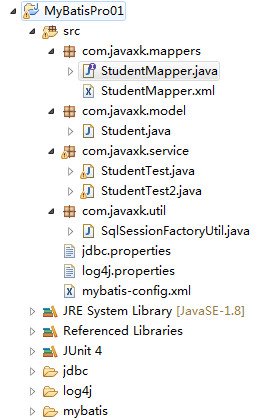
所有的主测试类都在JUtil的测试方法前后中调用
 private static Logger logger = Logger.getLogger(StudentTest2.class);

      private SqlSession sqlSession = null;

      private StudentMapper studentMapper = null;

      /**

       * 测试方法前调用

       * @throws Exception

       */

     @Before

     public void setUp() throws Exception {

         sqlSession = SqlSessionFactoryUtil.openSession();

         studentMapper = sqlSession.getMapper(StudentMapper.class);

     }

     /**

      * 测试方法后调用

      * @throws Exception

      */

     @After

     public void tearDown() throws Exception {

         sqlSession.close();

     }
第一节:insert映射语句
添加映射配置文件
     <insert id="add" parameterType="Student"  >

         insert into t_student values(null,#{name},#{age})

     </insert>
     @Test

     public void testAdd() {

         logger.info("添加学生");

         Student student = new Student("小宁" ,88);

         studentMapper.add(student);

         sqlSession.commit();

     }
第二节:update映射语句
     <update id="update" parameterType="Student">

         update t_student set name=#{name},age=#{age} where id=#{id}

     </update>
     @Test

     public void testUpdate() {

         logger.info("更新学生");

         Student student = new Student(20,"小宁22",99);

         studentMapper.update(student);

         sqlSession.commit();

     }
第三节:delete映射语句
     <delete id="delete" parameterType="Integer">

         delete from t_student where id=#{id}

     </delete>
     @Test

     public void testDelete() {

         logger.info("删除学生");

         studentMapper.delete(20);

         sqlSession.commit();

     }
第四节:select映射语句
(1)通过ID查找学生
     <select id="findById" parameterType="Integer" resultType="Student">

         select * from t_student where id=#{id}

     </select>
     @Test

     public void testFindById() {

         logger.info("通过ID查找学生");

         Student student=studentMapper.findById(1);

         System.out.println(student);

     }
(2)查找所有学生
     <resultMap type="Student" id="StudentResult">

         <id property="id" column="id"/>

         <result property="name" column="name"/>

         <result property="age" column="age"/>

     </resultMap>

     <select id="find" resultMap="StudentResult">

         select * from t_student

     </select>
     @Test

     public void testFind() {

         logger.info("查找所有学生");

         List<Student> studentlist = studentMapper.find();

         for (Student s : studentlist) {

             System.out.println(s);

         }

     }
(三)使用XML配置SQL映射器的更多相关文章
- Java Persistence with MyBatis 3(中文版) 第三章 使用XML配置SQL映射器
关系型数据库和SQL是经受时间考验和验证的数据存储机制.和其他的ORM 框架如Hibernate不同,MyBatis鼓励开发者可以直接使用数据库,而不是将其对开发者隐藏,因为这样可以充分发挥数据库服务 ...
- Mybatis基于XML配置SQL映射器(二)
Mybatis之XML注解 之前已经讲到通过 mybatis-generator 生成mapper映射接口和相关的映射配置文件: 下面我们将详细的讲解具体内容 首先我们新建映射接口文档 sysUse ...
- Mybatis基于XML配置SQL映射器(一)
Durid和Mybatis开发环境搭建 SpringBoot搭建基于Spring+SpringMvc+Mybatis的REST服务(http://www.cnblogs.com/nbfujx/p/76 ...
- Mybatis基于XML配置SQL映射器(三)
Mybatis之动态SQL mybatis 的动态sql语句是基于OGNL表达式的.可以方便的在 sql 语句中实现某些逻辑. 总体说来mybatis 动态SQL 语句主要有以下几类: if choo ...
- MyBatis学习笔记3--使用XML配置SQL映射器
<resultMap type="Student" id="StudentResult"> <id property="id&quo ...
- MyBatis 3 使用注解配置SQL映射器
l 在映射器Mapper接口上使用注解 l 映射语句 @Insert,@Update,@Delete,@SeelctStatements l 结果映射 一对一映射 一对多映射 l 动态SQL @Sel ...
- 使用注解配置SQL映射器
在上一章,我们看到了我们是怎样在映射器Mapper XML配置文件中配置映射语句的.MyBatis也支持使用注解来配置映射语句.当我们使用基于注解的映射器接口时,我们不再需要在XML配置文件中配置了. ...
- MyBatis 3(中文版) 第四章 使用注解配置SQL映射器
本章将涵盖以下话题: l 在映射器Mapper接口上使用注解 l 映射语句 @Insert,@Update,@Delete,@SeelctStatements l 结果映射 一对一映射 一对多映射 l ...
- Mybatis基于接口注解配置SQL映射器(一)
上文已经讲解了基于XML配置的SQL映射器,在XML配置的基础上MyBatis提供了简单的Java注解,使得我们可以不配置XML格式的Mapper文件,也能方便的编写简单的数据库操作代码. Mybat ...
随机推荐
- 解题:POI 2008 Plot purchase
题面 原来看过然后没做,结果板板把这道题改了改考掉了,血亏=.= 首先看看有没有符合条件的点.如果没有开始寻找解,先把所有的大于$2*k$的点设为坏点,然后求最大子矩形,只要一个最大子矩形的权值和超过 ...
- pickle 在python2 to python3 编码出现错误
pickle.load(file) UnicodeDecodeError: 'ascii' codec can't decode byte 0xf5 in position 2: ordinal no ...
- 支付宝当面付功能demo运行解读
下载java版本的sdk的demo: 然后拷入idea中: 准备工作: (1)验签工具下载:蚂蚁金服上面下载: https://openclub.alipay.com/read.php?tid=955 ...
- 面向对象SOLID原则的自我理解
S.O.L.I.D 是面向对象设计(OOD)和面向对象编程(OOP)中的几个重要编码原则(Programming Priciple)的首字母缩写.面向对象设计的原则SRP The Single Res ...
- 利用Azure Media Services Explorer发布VOD视频
1.连接Media Services账号, 填入Media Services的账号以及Account Key 如果使用中国的Azure的话,需要在Endpoint节上更改一下,因为国内的Azure的接 ...
- Redis 3.2.8集群+Sentinel部署
Redis3.2.8集群搭建 采用官方推荐的三主三从分片方案,本例中所有节点部署在一台主机上. 软件安装: tar zxvf redis-3.2.8.tar.gz cd redis-3.2.8 ma ...
- P2306 被yyh虐的mzc
P2306 被yyh虐的mzc 容量为 \(V\), 有 \(n\) 件物品, 反正直接背包绝对超时 , 每个有重量和价值 \(a_{i}, b_{i}(a_{i}, b_{i} <= 10)\ ...
- org.hibernate.NonUniqueObjectException: a different object with the same identifier value was already associated with the session异常解决办法
org.hibernate.NonUniqueObjectException: a different object with the same identifier value was alread ...
- 科学计算三维可视化---TraitsUI(View定义界面)
View定义界面 使用View来自定义界面 class ModelManager(HasTraits): model_name = Str category = Str model_file = St ...
- java 修饰符总结
java中的修饰符分为类修饰符,字段修饰符,方法修饰符.根据功能的不同,主要分为以下几种. 1.权限访问修饰符 public,protected,default,private,这四种级别 ...