
天津政府应急系统之GIS一张图(arcgis api for flex)讲解(五)地图切换以及图层显示模块
config.xml文件的配置如下:
<widget right="20" top="55"

        config="widgets/MapSwitcher/MapSwitcherWidget.xml" url="widgets/MapSwitcher/MapSwitcherWidget.swf" />
源代码目录如下:
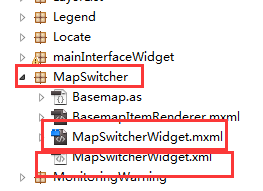
该模块的源代码原理解析,详细的代码在下载的开源flexviewer自带的:
大概的思路如下:MapSwitcherWidget.xml是模块的配置文件,MapSwitcherWidget.mxml是widget;
MapSwitcherWidget.xml:layerlist是图层列表里面的图层数据,excludelayer是选择排除的图层
 <?xml version="1.0" ?>

 <configuration>

     <layerlist visible="true">

         <!-- <excludelayer>The Label Of Some Layer In Main Config File</excludelayer> -->

     </layerlist>

 </configuration>
config.xml文件:map节点里面配置
 <operationallayers>

             <layer label="企业" type="feature" visible="false" alpha="1.0"

                 url="http://localhost:6080/arcgis/rest/services/nsBusiness/FeatureServer/7"

                 popupconfig="popups/PopUp_Ecoomy.xml">

             </layer>

             <layer label="物资装备" type="feature" visible="false" alpha="1.0"

                 url="http://localhost:6080/arcgis/rest/services/nsBusiness/FeatureServer/2"

                 popupconfig="popups/PopUp_Materials_equipment.xml">

             </layer>

             <layer label="庇护场所" type="feature" visible="true" alpha="1.0"

                 url="http://localhost:6080/arcgis/rest/services/nsBusiness/FeatureServer/4"

                 popupconfig="popups/PopUp_Refuge.xml">

             </layer>

             <layer label="保护对象" type="feature" visible="true" alpha="1.0"

                 url="http://localhost:6080/arcgis/rest/services/nsBusiness/FeatureServer/5"

                 popupconfig="popups/PopUp_Protection.xml">

             </layer>

              <layer label="应急仓库" type="feature" visible="false" alpha="1.0"

                 url="http://localhost:6080/arcgis/rest/services/nsBusiness/FeatureServer/6"

                 popupconfig="popups/PopUp_Warehouse.xml">

             </layer>

             <layer label="救援队伍" type="feature" visible="false" alpha="1.0"

                 url="http://localhost:6080/arcgis/rest/services/nsBusiness/FeatureServer/3"

                 popupconfig="popups/PopUp_Rescue_teams.xml">

             </layer>

             <layer label="应急专家" type="feature" visible="false" alpha="1.0"

                 url="http://localhost:6080/arcgis/rest/services/nsBusiness/FeatureServer/1"

                 popupconfig="popups/PopUp_Experts.xml">

             </layer>

             <layer label="危险隐患" type="feature" visible="true" alpha="1.0"

                 url="http://localhost:6080/arcgis/rest/services/nsBusiness/FeatureServer/0"

                 popupconfig="popups/PopUp_DangerSource.xml">

             </layer>

         </operationallayers>
这里配置图层列表的具体图层数据
         <basemaps>

             <layer label="南沙地图" type="tiled" visible="true" alpha="1" url="http://localhost:6080/arcgis/rest/services/ns_new/MapServer" />

         </basemaps>
这里可以配置不同的切换底图
备注:
GIS技术交流QQ群:432512093
天津政府应急系统之GIS一张图(arcgis api for flex)讲解(五)地图切换以及图层显示模块的更多相关文章
- 天津政府应急系统之GIS一张图(arcgis api for flex)讲解(一)GIS一张图的系统开发环境以及flexviewer框架
系统的GIS功能实现是基于arcgis api for flex,首先附上系统的主界面图,接下来的是对主界面的模块功能详细讲解: 一.GIS环境软件安装 (1)arcgis desktop的安装,要是 ...
- 天津政府应急系统之GIS一张图(arcgis api for flex)讲解(十)态势标绘模块
config.xml文件的配置如下: <widget label="态势标绘" icon="assets/images/impact_area_over.png&q ...
- 天津政府应急系统之GIS一张图(arcgis api for flex)讲解(八)资源搜索模块
config.xml文件的配置如下: <widget label="资源搜索" icon="assets/images/public_impact_over.png ...
- 天津政府应急系统之GIS一张图(arcgis api for flex)讲解(二)鹰眼模块
讲解GIS功能模块实现之前,先大概说一下flexviewer的核心配置文件config.xml,系统额GIS功能widget菜单布局.系统的样式.地图资源等等都是在这里配置的,这里对flexviewe ...
- 天津政府应急系统之GIS一张图(arcgis api for flex)解说(二)鹰眼模块
解说GIS功能模块实现之前,先大概说一下flexviewer的核心配置文件config.xml,系统额GIS功能widget菜单布局.系统的样式.地图资源等等都是在这里配置的,这里对flexviewe ...
- 天津政府应急系统之GIS一张图(arcgis api for flex)讲解(十三)台风模块
config.xml文件的配置如下: <widget label="台风" icon="assets/images/typhoon.png" config ...
- 天津政府应急系统之GIS一张图(arcgis api for flex)讲解(十一)路径导航模块
config.xml文件的配置如下: <widget label="路径导航" icon="assets/images/lujingdaohang.png" ...
- 天津政府应急系统之GIS一张图(arcgis api for flex)讲解(六)地图搜索模块
config.xml文件的配置如下: <widget label="地图搜索" icon="assets/images/emergency_resource_ove ...
- 天津政府应急系统之GIS一张图(arcgis api for flex)讲解(四)地图导航控件模块
config.xml文件的配置如下: <widget left="10" top="50" config="widgets/Navigation ...
- 天津政府应急系统之GIS一张图(arcgis api for flex)讲解(三)显示地图坐标系模块
config.xml文件的配置如下: <widget left="3" bottom="3" config="widgets/Coordinat ...
随机推荐
- VMware 中如何打开U盘弹出U盘或者移动硬盘的(两种方法)
1.U盘如下,插入后都是直接在win里面显示的 2.选择连接u盘 3.u盘就可以在虚拟机里面显示了 4.弹出则选择断开连接 扩展:如果无效:请参考这种方法 (给虚拟机分配一个临时硬盘,然后设置这个临时 ...
- jQuery源码分析系列(40): 动画设计
前言 jQuery动画是通过animate这个API设置执行的,其内部也是按照每一个animate的划分封装了各自动画组的行为, 包括数据过滤.缓动公式.一些动画默认参数的设置.元素状态的调整.事件的 ...
- Npoi导出Excel 实战篇(Webform)
开篇语 废话不多说,直接上遇到的问题 需求:在这个界面点击导出,导出页面数据,苦于没有做过webfrom项目,弄了半天还是没想到原生态的好方法,所以在网上看了下有没有导出的好例子,结果发现有人推荐使用 ...
- jQuery-easyui实现关闭全部tabs
有时候当我们打开很多tabs选项卡时,要关闭它只能一个一个的进行关闭,显然太麻烦,这时可以在选项卡的最右边添加一个按钮 实现关闭全部. function openTab(text, url, icon ...
- Android Drawable、Bitmap、byte[]之间的转换
转自http://blog.csdn.net/june5253/article/details/7826597 1.Bitmap-->Drawable Bitmap drawable2Bitma ...
- Web APi之过滤器创建过程原理解析【一】(十)
前言 Web API的简单流程就是从请求到执行到Action并最终作出响应,但是在这个过程有一把[筛子],那就是过滤器Filter,在从请求到Action这整个流程中使用Filter来进行相应的处理从 ...
- linux下遍历目录
遍历目录的主要思想 由于目录就是一颗树,所以遍历目录就转换为遍历一棵树.谈到树的遍历就再熟悉不过了,有树的前序.层次和后序遍历,我使用的是前序遍历,后序遍历和前序遍历本质上一样,而层次遍历要比前两个麻 ...
- 如何远程备份MySQL binlog
以前备份binlog时,都是先在本地进行备份压缩,然后发送到远程服务器中.但是这其中还是有一定风险的,因为日志的备份都是周期性的,如果在某个周期中,服务器宕机了,硬盘损坏了,就可能导致这段时间的bin ...
- PostgreSql+PostGIS和uDig的安装
文章版权由作者李晓晖和博客园共有,若转载请于明显处标明出处:http://www.cnblogs.com/naaoveGIS/. 1.前言 总体来说,这两款开源软件均是很好安装的,一般按照提示一步一步 ...
- Android之实现ViewPagerIndicator
PS:最近一直忙于学习任务,一直没有时间去写博客.今天周六,终于有时间了. 学习任务: 1.打造一个自己的ViewPagerIndicator 最近被安排了一大堆的学习任务,感觉老板还是很好的,让 ...