
DevOps之Pipeline集成junit、jacoco、SonarQube(二)
一、准备工作
1、准备一个持续集成的代码工程
工程下载地址:
Github地址为:https://github.com/zbbkeepgoing/springboot-demo
2、springboot-demo代码工程介绍
整个Web工程有一个Index页面,上面有两个按钮,分别对应两个接口,其中一个接口直接返回信息,另外一个接口则是内存中请求一次延时1s,最大延时为10s。而对应Index会有一个接口,所以Web工程一共有3个接口。延时接口主要是为了后续性能测试
①工程结构
└── src

    ├── main

    │   ├── java

    │   │   └── com

    │   │       └── dxc

    │   │           └── ddccloud

    │   │               └── demo

    │   │                   ├── controller

    │   │                   │   └── DemoController.java  #控制器,接口定义类

    │   │                   └── DemoApplication.java   #启动类

    │   └── resources

    │       ├── application.properties #配置文件

    │       └── templates

    │           └── index.html  #首页Index

    └── test

        └── java

            └── com

                └── dxc

                    └── ddccloud

                        └── demo

                            └── DemoControllerTests.java #单元测试类
②DemoController.java
package com.dxc.ddccloud.demo.controller;

import java.util.Map;

import org.springframework.web.bind.annotation.RequestMapping;

import org.springframework.web.bind.annotation.RestController;

import org.springframework.web.servlet.ModelAndView;

@RestController

public class DemoController {

    public int tmp = ;

    @RequestMapping("/")   #首页接口

    public ModelAndView index(ModelAndView mv) {

        mv.setViewName("index");

        mv.addObject("requestname","This request is IndexApi");

        return mv;

    }

    @RequestMapping("/rightaway")  #立即返回接口

    public ModelAndView returnRightAway(ModelAndView mv) {

        mv.setViewName("index");

        mv.addObject("requestname","This request is RightawayApi");

        return mv;

    }

    @RequestMapping("/sleep")   #延时接口

    public ModelAndView returnSleep(ModelAndView mv) throws InterruptedException {

        Thread.sleep(tmp*);

        if(tmp < ) {

            tmp++;

        }

        mv.setViewName("index");

        mv.addObject("requestname","This request is SleepApi"+",it will sleep "+ tmp +"s !");

        return mv;

    }

}
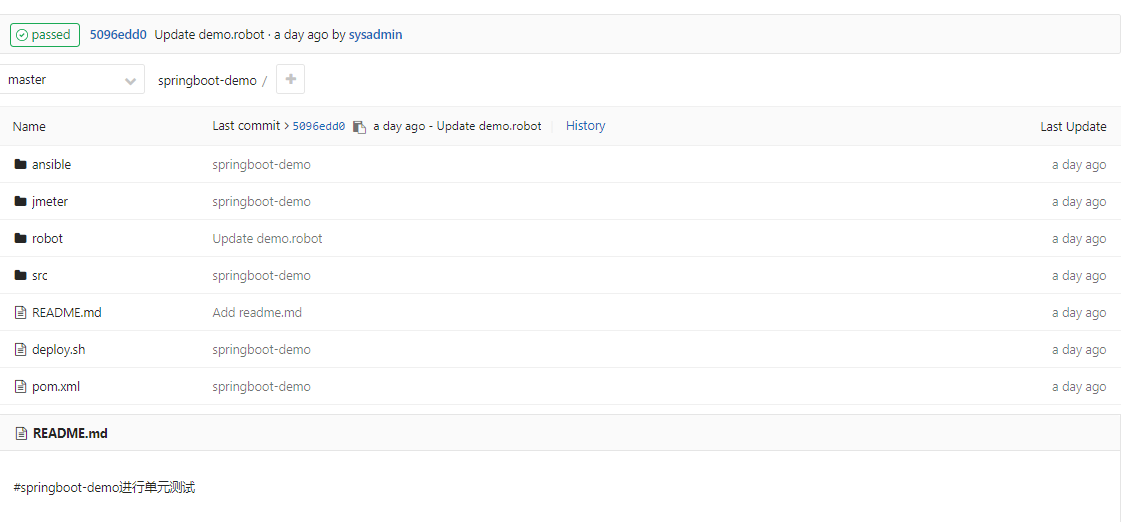
3、下载代码工程放到公司内部私有仓库GitLab
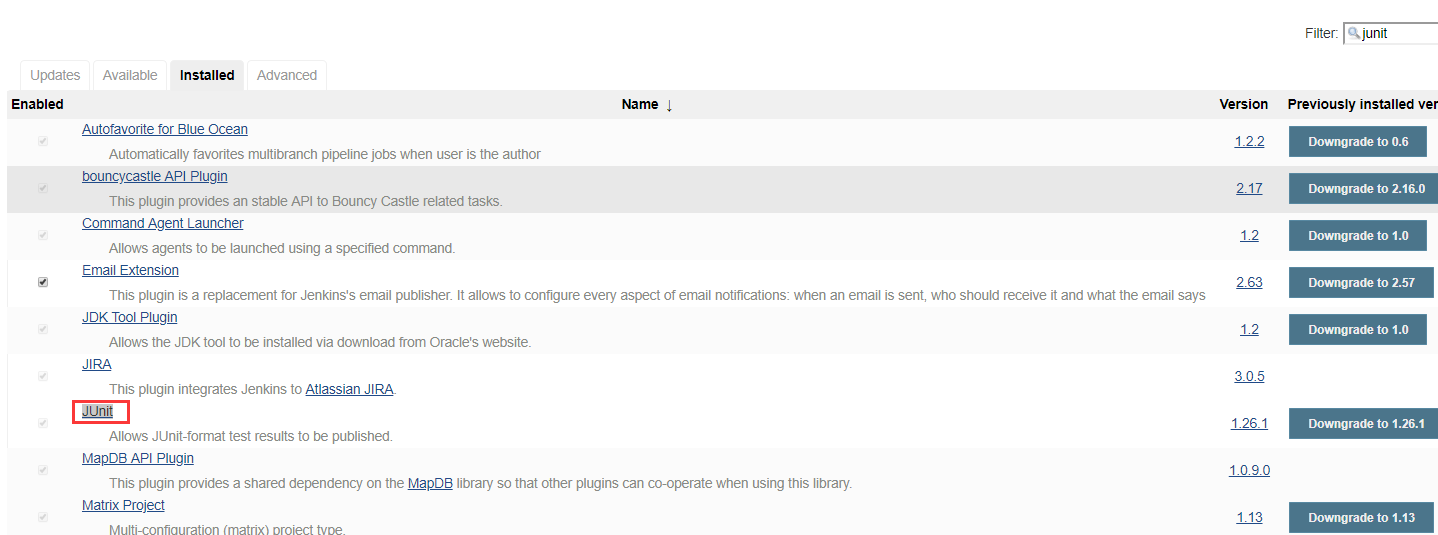
①安装Junit插件
②安装jacoco插件

③安装SonarQube Scanne
说明:上述插件具体怎么配置,请自行爬楼参考以前的博客
二、新建Pipeline工程springboot-demo
1、Pipeline内容
node('build-slave01') {

    gitlabCommitStatus(name:"Commit Build"){

  stage('拉取代码'){

     git credentialsId: 'd1627e89-1967-458e-84a8-07c9a9599957', url: 'git@10.0.0.56:springboot/springboot-demo.git'  #私有仓库地址

  }

}

    stage('Build'){

        dir(env.WORKSPACE){

        sh "mvn clean compile"  #maven编译

        sh "mvn package"        #maven打包

        }

    }

    stage('Junit'){

        dir(env.WORKSPACE){

        junit allowEmptyResults: true, keepLongStdio: true, testResults: 'target/surefire-reports/*.xml' #Junit插件收集单元测试结果

        }

    }

    stage('jacoco'){

        dir(env.WORKSPACE){

        jacoco exclusionPattern: 'src/main/java', inclusionPattern: '**/classes'  #jacoco

        }

    }

    //这里需要注意的配置

    //  Path to exec files: **/jacoco.exec 可执行文件路径

    //  Path to class directories: 这个配置的是源代码编译后的字节码目录,也就是classes目录不是test-classes目录,如果有多个可以指定多个

    //  Path to source directories: 这个配置的是源代码的目录,也就是src/main/java目录,如果有多个可以指定多个

     stage('SonarQube') {

        withSonarQubeEnv('SonarQube') {

            sh "${SONAR_SCANNER_HOME}/bin/sonar-scanner \

            -Dsonar.projectKey=springboot-demo \

            -Dsonar.projectName=springboot-demo \

            -Dsonar.sources=.\

            -Dsonar.host.url=SonarQube地址 \

            -Dsonar.language=java \

            -Dsonar.sourceEncoding=UTF- \

        }

    }

}
2、Jacoco配置

这里需要注意的配置:
- Path to exec files: **/jacoco.exec 可执行文件路径
- Path to class directories: 这个配置的是源代码编译后的字节码目录,也就是
classes目录不是test-classes目录,如果有多个可以指定多个 - Path to source directories: 这个配置的是源代码的目录,也就是
src/main/java目录,如果有多个可以指定多个
3、执行Pipeline
①Junit执行日志
Tests run: , Failures: , Errors: , Skipped: , Time elapsed: 2.896 sec - in com.dxc.ddccloud.demo.DemoControllerTests

-- ::23.072  INFO  --- [       Thread-] o.s.w.c.s.GenericWebApplicationContext   : Closing org.springframework.web.context.support.GenericWebApplicationContext@6497b078: startup date [Sun Jun  :: CST ]; root of context hierarchy

Results :

Tests run: , Failures: , Errors: , Skipped:
②JaCoCo执行日志
[JaCoCo plugin] Collecting JaCoCo coverage data...

[JaCoCo plugin] **/**.exec;**/classes;**/src/main/java; locations are configured

[JaCoCo plugin] Number of found exec files for pattern **/**.exec: 0

[JaCoCo plugin] Saving matched execfiles:

[JaCoCo plugin] Saving matched class directories for class-pattern: **/classes:

[JaCoCo plugin]  - /app/idc/apps/jenkins/work/workspace/springboot-demo/target/classes  files

[JaCoCo plugin] Saving matched source directories for source-pattern: **/src/main/java:

[JaCoCo plugin] Source Inclusions: **/*.java

[JaCoCo plugin] Source Exclusions:

[JaCoCo plugin] - /app/idc/apps/jenkins/work/workspace/springboot-demo/src/main/java 2 files

[JaCoCo plugin] Loading inclusions files..

[JaCoCo plugin] inclusions: [**/classes]

[JaCoCo plugin] exclusions: [src/main/java]

[JaCoCo plugin] Thresholds: JacocoHealthReportThresholds [minClass=, maxClass=, minMethod=, maxMethod=, minLine=, maxLine=, minBranch=, maxBranch=, minInstruction=, maxInstruction=, minComplexity=, maxComplexity=]

[JaCoCo plugin] Publishing the results..

[JaCoCo plugin] Loading packages..

[JaCoCo plugin] Done.

[JaCoCo plugin] Overall coverage: class: , method: , line: , branch: , instruction:
③SonarQube执行日志
INFO: SonarQube Scanner 2.8

INFO: Java 1.8.0_11 Oracle Corporation (-bit)

INFO: Linux 3.10.-.el7.x86_64 amd64

INFO: User cache: /root/.sonar/cache

INFO: Publish mode

INFO: Load global settings

INFO: Load global settings (done) | time=129ms

INFO: Server id: 5A0D13D1-AWNtCf_MnAfLtVTozgug

WARN: Property 'sonar.jdbc.url' is not supported any more. It will be ignored. There is no longer any DB connection to the SQ database.

WARN: Property 'sonar.jdbc.username' is not supported any more. It will be ignored. There is no longer any DB connection to the SQ database.

WARN: Property 'sonar.jdbc.password' is not supported any more. It will be ignored. There is no longer any DB connection to the SQ database.

INFO: User cache: /root/.sonar/cache

INFO: Load plugins index

INFO: Load plugins index (done) | time=54ms

INFO: Plugin [l10nzh] defines 'l10nen' as base plugin. This metadata can be removed from manifest of l10n plugins since version 5.2.

INFO: SonarQube server 6.7.

INFO: Default locale: "en_US", source code encoding: "UTF-8"

INFO: Process project properties

INFO: Load project repositories

INFO: Load project repositories (done) | time=46ms

INFO: Load quality profiles

INFO: Load quality profiles (done) | time=35ms

INFO: Load active rules

INFO: Load active rules (done) | time=328ms

INFO: Load metrics repository

INFO: Load metrics repository (done) | time=23ms

INFO: Project key: springboot-demo

INFO: -------------  Scan springboot-demo

INFO: Load server rules

INFO: Load server rules (done) | time=47ms

INFO: Base dir: /app/idc/apps/jenkins/work/workspace/springboot-demo

INFO: Working dir: /app/idc/apps/jenkins/work/workspace/springboot-demo/.sonar
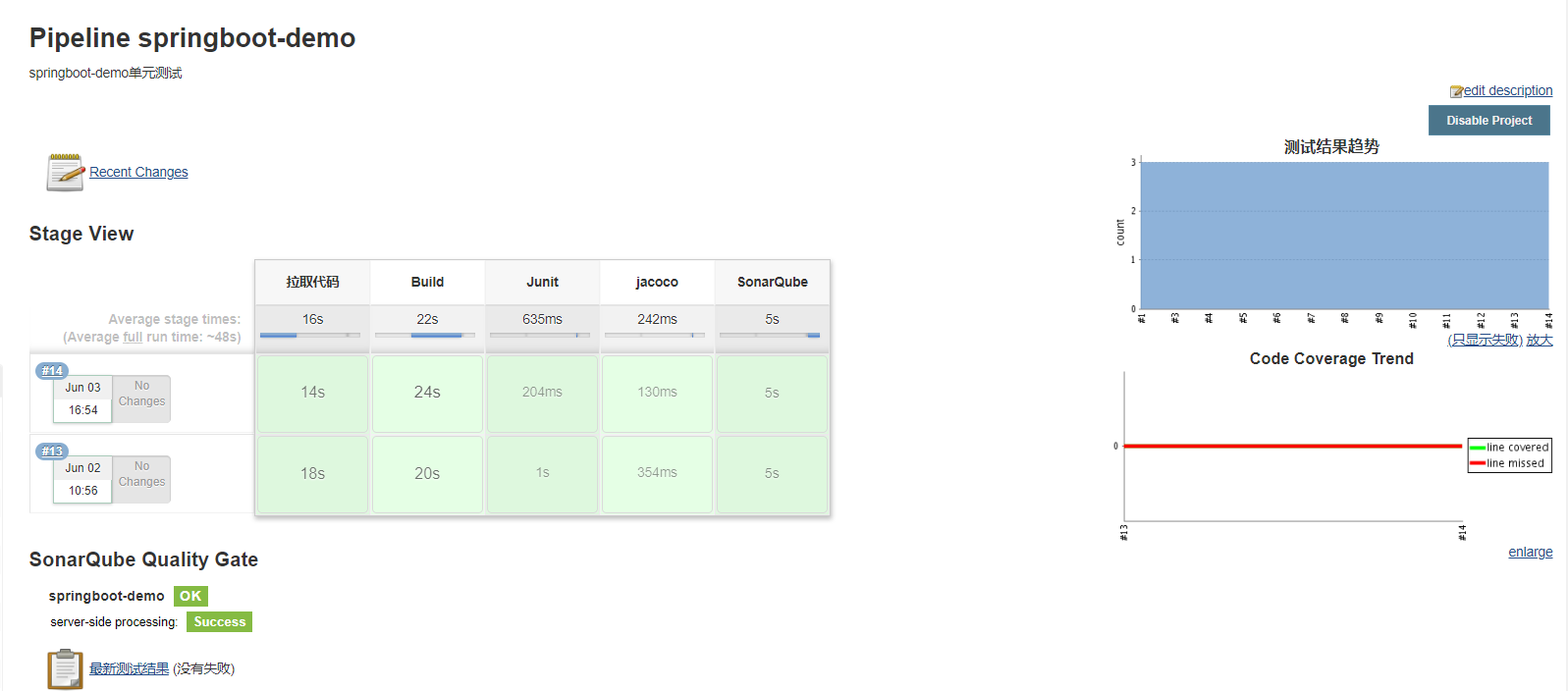
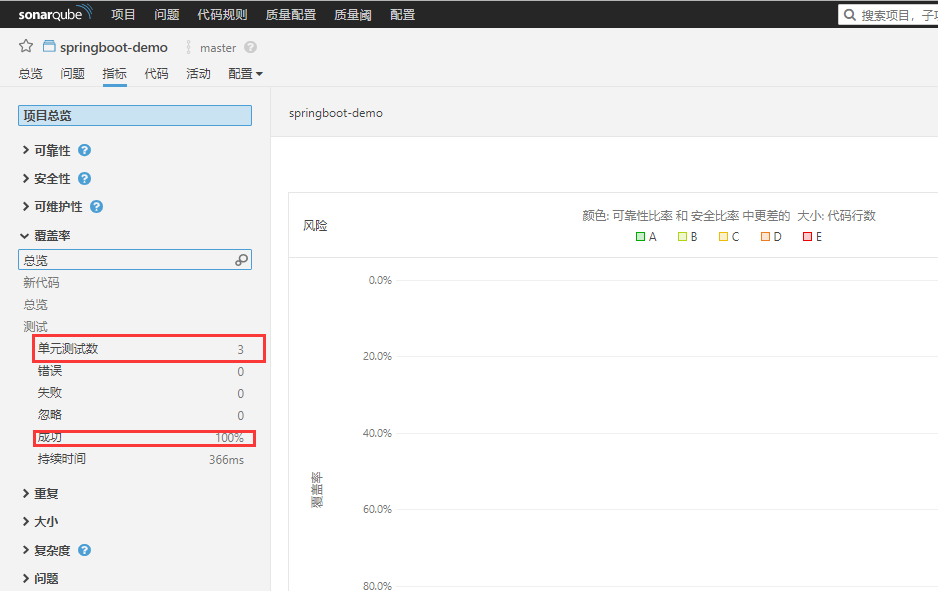
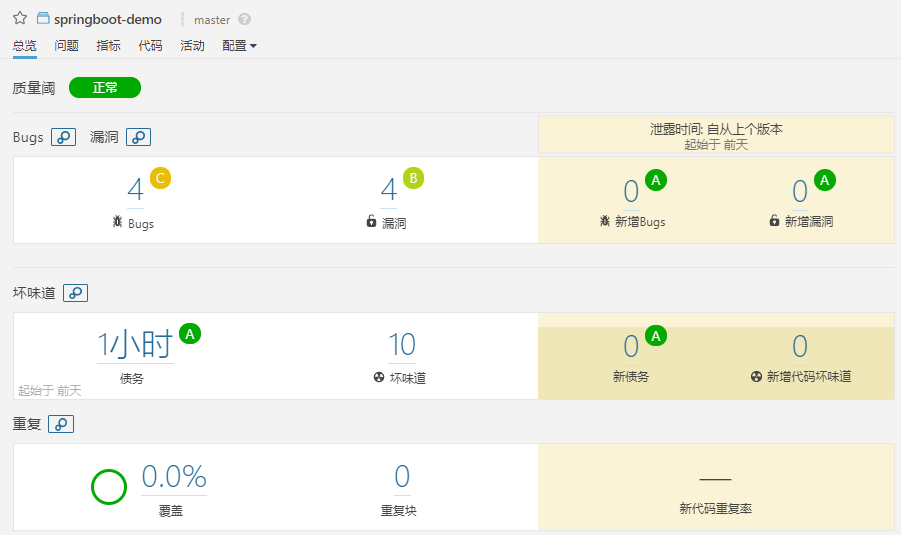
4、效果展示
①Junit单元测试
②SonarQube展示
DevOps之Pipeline集成junit、jacoco、SonarQube(二)的更多相关文章
- DevOps之持续集成SonarQube代码质量扫描
一.SonarQube介绍 SonarQube是一个用于代码质量检测管理的开放平台,可以集成不同的检测工具,代码分析工具,以及持续集成工具.SonarQube 并不是简单地把不同的代码检查 ...
- Spring系列之新注解配置+Spring集成junit+注解注入
Spring系列之注解配置 Spring是轻代码而重配置的框架,配置比较繁重,影响开发效率,所以注解开发是一种趋势,注解代替xml配置文件可以简化配置,提高开发效率 你本来要写一段很长的代码来构造一个 ...
- 研发过程及工具支撑 DevOps 工具链集成
https://mp.weixin.qq.com/s/NYm63nkCymIV3DbL4O01dg 腾讯重新定义敏捷 |Q推荐 小智 InfoQ 2020-09-03 敏捷开发奠基人 Robert C ...
- Spring完全基于Java配置和集成Junit单元测试
要点: 配置继承WebApplicationInitializer的类作为启动类,相当于配置web.xml文件 使用@Configuration注解一个类,在类中的方式使用@Bean注解,则表名该方法 ...
- 李洪强iOS之集成极光推送二iOS 证书 设置指南
李洪强iOS之集成极光推送二iOS 证书 设置指南 创建应用程序ID 登陆 iOS Dev Center 选择进入iOS Provisioning Portal. 在 iOS Provisioning ...
- springboot集成junit测试与javamail测试遇到的问题
1.springboot如何集成junit测试? 导入junit的jar包 使用下面注解: @RunWith()关于这个的解释看下这两篇文章: http://www.imooc.com/qadetai ...
- Docker+GitLab+Jenkins+kubernetes实现DevOps 持续化集成和持续化部署概念图
Docker+GitLab+Jenkins+kubernetes实现DevOps 持续化集成和持续化部署概念图 转载自:原创 IT综合 作者:百联达 时间:2017-05-09 15:48:08 41 ...
- SpringBoot 集成JUnit
项目太大,不好直接测整个项目,一般都是切割成多个单元,单独测试,即单元测试. 直接在原项目上测试,会把项目改得乱七八糟的,一般是单独写测试代码. 进行单元测试,这就需要集成JUnit. (1)在pom ...
- 集成JUnit测试
集成JUnit测试 既然使用了Spring,那么怎么集成到JUnit中进行测试呢,首先大家能够想到的肯定是: public class TestMain { @Test public void tes ...
随机推荐
- 【并行计算】Windows系统下搭建MPI环境
Windows系统下搭建MPI环境 MPI的全称是Message Passing Interface即标准消息传递界面,可以用于并行计算.MPI的具体实现一般采用MPICH.下面介绍如何在Window ...
- 【Python开发】python读写文件,和设置文件的字符编码比如utf-8
一. python打开文件代码如下: f = open("d:\test.txt", "w") 说明: 第一个参数是文件名称,包括路径: 第二个参数是打开的模式 ...
- python copy与deepcopy (拷贝与深拷贝)
copy与deepcopy python 中的copy与deepcopy是内存数据的操作,但是两个函数有一定的区别. 1.copy import copy list = [1, [4, 5, 6], ...
- 记录Linq中lambda动态表达式的使用方式
项目中有的时候我们会用到动态表达式的方式去查询数据,这里简单记录下个人的使用方式,方便使用↓ //构建参数表达式 ParameterExpression parameter = Expression. ...
- mysql下的sqlmode详解
转自:https://www.cnblogs.com/Zender/p/8270833.html 阅读目录 一,sql_mode值的含义 二,ANSI模式 三,STRICT_TRANS_TABLES模 ...
- 【案例分享】使用ActiveReports报表工具,在.NET MVC模式下动态创建报表
提起报表,大家会觉得即熟悉又陌生,好像常常在工作中使用,又似乎无法准确描述报表.今天我们来一起了解一下什么是报表,报表的结构.构成元素,以及为什么需要报表. 什么是报表 简单的说:报表就是通过表格.图 ...
- mvn打包到私服
mvn打包到私服 1 命令行打包 待定... 2 idea打包 1> 配置 pom.xml <!-- 发布 --><distributionManagement> < ...
- python 爬虫--下载图片,下载音乐
#下载图片 imgUrl='http://www.pptbz.com/pptpic/UploadFiles_6909/201211/2012111719294197.jpg' r=requests.g ...
- 多模块环境下修改包名Rename directory与Rename package
选中包名->右键Refactor->Rename,如果会弹出的警告框让选择Rename directory和Rename package时,若选择Rename directory,则是只修 ...
- Ubuntu 系统安装 Docker
安装 Docker CE 有多种方法,下面是最简单的通过Docker仓库的安装方法,其他方法参见官方文档. 设置仓库 刷新软件包 sudo apt-get update 安装必要的软件包 sudo a ...