
网络通讯数据.传输json(java<==>C#)
ZC:主要是测试解决 时间转成JSON不一样的问题
ZC:java中转换时间格式的关键是“JSONUtils.getMorpherRegistry().registerMorpher(new DateMorpher(new String[]{ strDatetimeFormat }));”
ZC:C#中转换时间格式的关键是“IsoDateTimeConverter timeConverter = new IsoDateTimeConverter(); timeConverter.DateTimeFormat = "yyyy-MM-dd HH:mm:ss.fff";”
1、java
导入 第三方:

1.1、TestJson.java
package shh.Main;

import java.io.FileOutputStream;

import java.io.IOException;

import java.io.ObjectOutputStream;

import java.sql.Timestamp;

import java.text.SimpleDateFormat;

import java.util.Date;

import net.sf.ezmorph.object.DateMorpher;

import net.sf.json.JSONArray;

import net.sf.json.JSONObject;

import net.sf.json.JsonConfig;

import net.sf.json.util.JSONUtils;

import shh.GlobalParam.GlobalParam;

import shh.entity.communicate.JsonDateValueProcessor;

import shh.entity.db.RealTimeCoalFlowWidth;

// java中json的使用和解析 - Java_Panda - 博客园.html “https://www.cnblogs.com/LearnAndGet/p/10009646.html”

// JSON数据转换之net.sf.json包的使用 - 娜娜娜娜小姐姐 - 博客园.html “https://www.cnblogs.com/nananana/p/9263708.html”

public class TestJson

{

    public static void main(String[] args) throws Exception

    {

        String strDatetimeFormat = "yyyy-MM-dd HH:mm:ss.SSS";

        // ZC: 用于 java object --> json

        JsonConfig jsonConfig = new JsonConfig();

        jsonConfig.registerJsonValueProcessor(Date.class, new JsonDateValueProcessor(strDatetimeFormat));


     // ZC: 测试下来 下面你的这个是关键!! 上面的 jsonConfig 用不用都无所谓...

        // ZC: 用于 json --> java object

        JSONUtils.getMorpherRegistry().registerMorpher(new DateMorpher(new String[]{ strDatetimeFormat }));

    // ***

        System.out.println("");

        long l01 = System.currentTimeMillis();

        java.util.Date pp = new Timestamp(l01);

        System.out.println("pp : " + pp);

        SimpleDateFormat sdf=new SimpleDateFormat("yyyy-MM-dd HH:mm:ss.SSS");

        RealTimeCoalFlowWidth cfw = new RealTimeCoalFlowWidth();

        cfw.setCameraID(1);

        cfw.setCoalFlowDateTime(new Timestamp(l01));

        cfw.setCoalFlowWidth((short)3);

        cfw.setCoalFlowSectionArea((short)4);

        cfw.setCoalFlowVelocity((short)5);

        RealTimeCoalFlowWidth cfw1 = new RealTimeCoalFlowWidth();

        cfw1.setCameraID(2);

        cfw1.setCoalFlowDateTime(new Timestamp(l01-100));

        cfw1.setCoalFlowWidth((short)30);

        cfw1.setCoalFlowSectionArea((short)40);

        cfw1.setCoalFlowVelocity((short)50);

        RealTimeCoalFlowWidth[] cfws = {cfw, cfw1};

        JSONArray jarr = JSONArray.fromObject(cfws, jsonConfig);

        System.out.println(jarr);

    // ***

        JSONArray jarr1 = JSONArray.fromObject(jarr.toString());

        RealTimeCoalFlowWidth[] ttt = (RealTimeCoalFlowWidth[])JSONArray.toArray(jarr1, RealTimeCoalFlowWidth.class);

        System.out.println("ttt.length :" + ttt.length);

        for (int i=0; i<ttt.length; i++)

        {

            RealTimeCoalFlowWidth t = ttt[i];

            System.out.println("["+i+"] :" + t.getCameraID()+", "+sdf.format(t.getCoalFlowDateTime())+", "

                    +t.getCoalFlowWidth()+", "+t.getCoalFlowSectionArea()+", "+t.getCoalFlowVelocity());

//            System.out.println("["+i+"] :" + t.getCameraID()+", "+(t.getCoalFlowDateTime())+", "

//                    +t.getCoalFlowWidth()+", "+t.getCoalFlowSectionArea()+", "+t.getCoalFlowVelocity());

        }

        //Json_CoalFlowWidth();

    }

    // 分析结果数据(DB:煤流宽度表)

    public static void Json_CoalFlowWidth() throws IOException

    {

        System.out.println("");

        long l01 = System.currentTimeMillis();

        java.util.Date pp = new Timestamp(l01);

        System.out.println("pp : " + pp);

        SimpleDateFormat sdf=new SimpleDateFormat("yyyy-MM-dd HH:mm:ss.SSS");

        System.out.println("sdf.format(pp) : " + sdf.format(pp));

        System.out.println("sdf.format(pp) : " + sdf.format(new Timestamp(l01-100)));

        RealTimeCoalFlowWidth cfw = new RealTimeCoalFlowWidth();

        cfw.setCameraID(1);

        cfw.setCoalFlowDateTime(new Timestamp(l01));

        cfw.setCoalFlowWidth((short)3);

        cfw.setCoalFlowSectionArea((short)4);

        cfw.setCoalFlowVelocity((short)5);

        RealTimeCoalFlowWidth cfw1 = new RealTimeCoalFlowWidth();

        cfw1.setCameraID(2);

        cfw1.setCoalFlowDateTime(new Timestamp(l01-100));

        cfw1.setCoalFlowWidth((short)30);

        cfw1.setCoalFlowSectionArea((short)40);

        cfw1.setCoalFlowVelocity((short)50);

        GlobalParam.JsonConfig1.setRootClass(RealTimeCoalFlowWidth.class);

        RealTimeCoalFlowWidth[] cfws = {cfw, cfw1};

        JSONArray jarr = JSONArray.fromObject(cfws, GlobalParam.JsonConfig1);

        System.out.println(jarr);

        RealTimeCoalFlowWidth[] ttt = (RealTimeCoalFlowWidth[])JSONArray.toArray(jarr, RealTimeCoalFlowWidth.class);

        System.out.println("ttt.length :" + ttt.length);

        for (int i=0; i<ttt.length; i++)

        {

            RealTimeCoalFlowWidth t = ttt[i];

            System.out.println("["+i+"] :" + t.getCameraID()+", "+sdf.format(t.getCoalFlowDateTime())+", "

                    +t.getCoalFlowWidth()+", "+t.getCoalFlowSectionArea()+", "+t.getCoalFlowVelocity());

            //System.out.println(t.getCoalFlowDateTime());

        }

    }

}
1.2、RealTimeCoalFlowWidth.java
package shh.entity.db;

import java.io.Serializable;

// sqlserver数据库类型对应Java中的数据类型 - _萨瓦迪卡 - 博客园.html(https://www.cnblogs.com/cunkouzh/p/5504052.html)

// ZC: Timestamp没有默认构造函数,无法反射...

import java.util.Date;

public class RealTimeCoalFlowWidth

{

    int CameraID;

    //Timestamp CoalFlowDateTime;

    Date CoalFlowDateTime;

    short CoalFlowWidth;

    short CoalFlowSectionArea;

    short CoalFlowVelocity;

    public int getCameraID() {

        return CameraID;

    }

    public void setCameraID(int cameraID) {

        CameraID = cameraID;

    }

//    public Timestamp getCoalFlowDateTime() {

//        return CoalFlowDateTime;

//    }

//    public void setCoalFlowDateTime(Timestamp coalFlowDateTime) {

//        CoalFlowDateTime = coalFlowDateTime;

//    }

    public Date getCoalFlowDateTime() {

        return CoalFlowDateTime;

    }

    public void setCoalFlowDateTime(Date coalFlowDateTime) {

        CoalFlowDateTime = coalFlowDateTime;

    }

    public short getCoalFlowWidth() {

        return CoalFlowWidth;

    }

    public void setCoalFlowWidth(short coalFlowWidth) {

        CoalFlowWidth = coalFlowWidth;

    }

    public short getCoalFlowSectionArea() {

        return CoalFlowSectionArea;

    }

    public void setCoalFlowSectionArea(short coalFlowSectionArea) {

        CoalFlowSectionArea = coalFlowSectionArea;

    }

    public short getCoalFlowVelocity() {

        return CoalFlowVelocity;

    }

    public void setCoalFlowVelocity(short coalFlowVelocity) {

        CoalFlowVelocity = coalFlowVelocity;

    }

}
1.3、JsonDateValueProcessor.java
package shh.entity.communicate;

import java.text.SimpleDateFormat;

import java.util.Date;

import java.util.Locale;

import net.sf.ezmorph.object.DateMorpher;

import net.sf.json.JsonConfig;

import net.sf.json.processors.JsonValueProcessor;

import net.sf.json.util.JSONUtils;

// net.sf.json 时间格式的转化 - LinVan - 博客园.html(https://www.cnblogs.com/linvan/p/5979820.html)

public class JsonDateValueProcessor implements JsonValueProcessor

{

    private String format = "";//"yyyy-MM-dd HH:mm:ss";

    public JsonDateValueProcessor() {

        super();

    }

    public JsonDateValueProcessor(String format) {

        super();

        this.format = format;

    }

    @Override

    public Object processArrayValue(Object paramObject, JsonConfig paramJsonConfig) {

//        System.out.println("<-- <-- <-- <-- <-- <-- <-- <-- <-- ");

        return process(paramObject);

    }

    @Override

    public Object processObjectValue(String paramString, Object paramObject, JsonConfig paramJsonConfig) {

//        System.out.println("--> --> --> --> --> --> --> --> --> "+paramString);

        return process(paramObject);

    }

    private Object process(Object value) {

        if (value instanceof Date)

        {

//            System.out.println("<== <== <== <== <== <== <== <== <== <== <== <== <== <== <== <== <== <== ");

            //SimpleDateFormat sdf = new SimpleDateFormat(format, Locale.CHINA);

            SimpleDateFormat sdf = new SimpleDateFormat(format);

            return sdf.format(value);

        }

        return value == null ? "" : value.toString();

    }

    public static JsonConfig JsonConfig_Z()

    {

        JSONUtils.getMorpherRegistry().registerMorpher(new DateMorpher(new String[] {"yyyy-MM-dd HH:mm:ss.SSS"}));

        JsonConfig jsonConfig = new JsonConfig();

        jsonConfig.registerJsonValueProcessor(Date.class, new JsonDateValueProcessor("yyyy-MM-dd HH:mm:ss.SSS"));

        return jsonConfig;

    }

}
2、C#
引入:
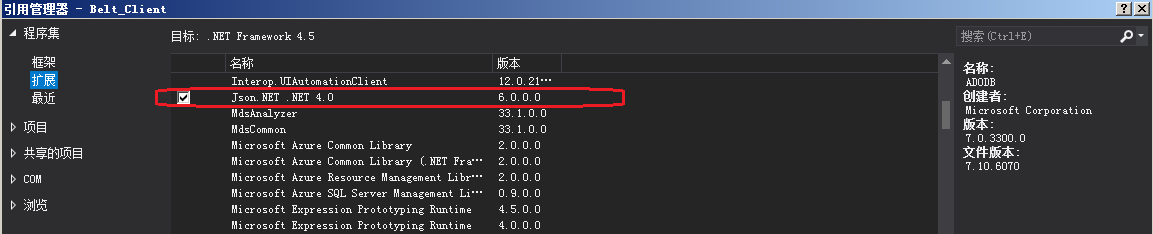
2.1、
        private void Click_JsonTest(object sender, RoutedEventArgs e)

        {

            IsoDateTimeConverter timeConverter = new IsoDateTimeConverter();

            timeConverter.DateTimeFormat = "yyyy-MM-dd HH:mm:ss.fff";

        // ***

            DateTime dt = DateTime.Now;

            RealTimeCoalFlowWidth cfw = new RealTimeCoalFlowWidth();

            cfw.CameraID = ;

            //Timestamp CoalFlowDateTime;

            cfw.CoalFlowDateTime = dt;

            cfw.CoalFlowWidth1 = ;

            cfw.CoalFlowSectionArea = ;

            cfw.CoalFlowVelocity = ;

            dt.AddDays(-);

            RealTimeCoalFlowWidth cfw1 = new RealTimeCoalFlowWidth();

            cfw1.CameraID = ;

            //Timestamp CoalFlowDateTime;

            cfw1.CoalFlowDateTime = dt.AddSeconds(-);

            cfw1.CoalFlowWidth1 = ;

            cfw1.CoalFlowSectionArea = ;

            cfw1.CoalFlowVelocity = ;

            RealTimeCoalFlowWidth[] cfws = { cfw, cfw1 };

            string str = JsonConvert.SerializeObject(cfws, timeConverter);

            Console.WriteLine(str);

            RealTimeCoalFlowWidth[] cfws1 = JsonConvert.DeserializeObject<RealTimeCoalFlowWidth[]>(str, timeConverter);

            Console.WriteLine("cfws1 : ");

            Console.WriteLine("\t" + cfws1[].CameraID);

            Console.WriteLine("\t" + cfws1[].CoalFlowDateTime.ToString("yyyy-MM-dd HH:mm:ss.fff"));

            Console.WriteLine("\t" + cfws1[].CoalFlowWidth1);

            Console.WriteLine("\t" + cfws1[].CoalFlowSectionArea);

            Console.WriteLine("\t" + cfws1[].CoalFlowVelocity);

            Console.WriteLine();

            Console.WriteLine("\t" + cfws1[].CameraID);

            Console.WriteLine("\t" + cfws1[].CoalFlowDateTime.ToString("yyyy-MM-dd HH:mm:ss.fff"));

            Console.WriteLine("\t" + cfws1[].CoalFlowWidth1);

            Console.WriteLine("\t" + cfws1[].CoalFlowSectionArea);

            Console.WriteLine("\t" + cfws1[].CoalFlowVelocity);

            // ***

            //DateTime dt = DateTime.Now;

            //string str = JsonConvert.SerializeObject(dt, GlobalParam.IsoDateTimeConverter1);

            //Console.WriteLine(str);

            ////string s = @"2019-12-17T12:45:07.8048002+08:00";

            //string s = "\"2019-12-17 12:45:07.888\"";

            //DateTime dt1 = JsonConvert.DeserializeObject<DateTime>(s, GlobalParam.IsoDateTimeConverter1);

            ////DateTime dt1 = JsonConvert.DeserializeObject<DateTime>(str, timeConverter);

            //Console.WriteLine(dt1.ToString("yyyy-MM-dd HH:mm:ss.fff"));

        }
2.2、
    public class RealTimeCoalFlowWidth

    {

        public int CameraID;

        //Timestamp CoalFlowDateTime;

        public DateTime CoalFlowDateTime;

        public short CoalFlowWidth1;

        public short CoalFlowSectionArea;

        public short CoalFlowVelocity;

    }
2.3、经测试,C#中 list转json 和 数组转json 生成的结果是一样的:
RealTimeCoalFlowWidth[] cfws = { cfw, cfw1 };
// 下面是 数组转json的结果

// [{"CameraID":1,"CoalFlowDateTime":"2019-12-24 08:31:50.879","CoalFlowWidth1":3,"CoalFlowSectionArea":4,"CoalFlowVelocity":5},{"CameraID":10,"CoalFlowDateTime":"2019-12-24 08:31:47.879","CoalFlowWidth1":30,"CoalFlowSectionArea":40,"CoalFlowVelocity":50}]

//List<RealTimeCoalFlowWidth> cfws = new List<RealTimeCoalFlowWidth>();

//cfws.Add(cfw);

//cfws.Add(cfw1);
// 下面是 List转json的结果

// [{"CameraID":1,"CoalFlowDateTime":"2019-12-24 08:31:23.328","CoalFlowWidth1":3,"CoalFlowSectionArea":4,"CoalFlowVelocity":5},{"CameraID":10,"CoalFlowDateTime":"2019-12-24 08:31:20.328","CoalFlowWidth1":30,"CoalFlowSectionArea":40,"CoalFlowVelocity":50}]

string str = JsonConvert.SerializeObject(cfws, timeConverter);

Console.WriteLine(str);
2.4、测试:
            string str = "{ \"CameraID\":\"1\",\"CoalFlowDateTime\":\"2019-12-24 08:31:50.879\",\"CoalFlowWidth1\":\"3\",\"CoalFlowSectionArea\":4,\"CoalFlowVelocity\":5}";

            RealTimeCoalFlowWidth cfw = JsonConvert.DeserializeObject<RealTimeCoalFlowWidth>(str, timeConverter);

            Console.WriteLine("\t" + cfw.CameraID);

            Console.WriteLine("\t" + cfw.CoalFlowDateTime.ToString("yyyy-MM-dd HH:mm:ss.fff"));

            Console.WriteLine("\t" + cfw.CoalFlowWidth1);

            Console.WriteLine("\t" + cfw.CoalFlowSectionArea);

            Console.WriteLine("\t" + cfw.CoalFlowVelocity);
输出:(这里测试,C#里面的 int型、short型 可以从 json的string型里面正确的转换得到,于是 java的服务端代码,可以无脑的将SQL查到的数据都转成string了 [未测试 时间上的转换能否OK...])
	1

	2019-12-24 08:31:50.879

	3

	4

	5
2.5、测试发现,Newtonsoft.Json 在执行 序列化操作时,无法指定是 序列化 子类还是基类。要想 只序列化 一个对象实例的基类部分属性的话,貌似 我没找到如何做...(反序列化 貌似倒是 可以指定使用具体哪种类型进行反序列化操作的...)
PS:我发现,需要 序列化的对象,如果 属性中 有代理(delegate)的话,序列化 操作会报错 ! ! !
现在想到一个 折中的方式:通过反射 创建基类实例X,然后 将子类中相关的属性赋值给 实例X,然后对 实例X 进行序列化,最后释放 实例X。
测试代码:
(1)、子类+基类:
    class Base

    {

        public int Base1 { get; set; }

        public int Base2 { get; set; }

        public virtual string SerializeSHH(Type baseType)

        {

            Type childType = this.GetType();

            object baseObj = Activator.CreateInstance(baseType);

            PropertyInfo[] basePI = baseType.GetProperties();

            for (int i = ; i < basePI.Length; i++)

            {

                PropertyInfo childPI = childType.GetProperty(basePI[i].Name);

                if (childPI != null)

                    basePI[i].SetValue(baseObj, childPI.GetValue(this));

            }

            string rst = JsonConvert.SerializeObject(baseObj);

            baseObj = null;

            return rst;

            //return null;

        }

    }

    class Child1 : Base

    {

        public int C1 { get; set; }

    }
(2)、序列化代码
            Child1 c1 = new Child1();

            Console.WriteLine(((Base)c1).SerializeSHH(typeof(Base)));

            Console.WriteLine(((Base)c1).SerializeSHH(typeof(Child1)));
(3)、控制台输出
{"Base1":0,"Base2":0}

{"Base1":0,"Base2":0,"C1":0}
3、
4、
5、
网络通讯数据.传输json(java<==>C#)的更多相关文章
- 如何在Windows系统上用抓包软件Wireshark截获iPhone等网络通讯数据
http://www.jb51.net/os/windows/189090.html 今天给大家介绍一种如何在Windows操作系统上使用著名的抓包工具软件Wireshark来截获iPhone.iPa ...
- android网络通讯数据封装之 json
Demo程序包括客户端和服务端 客户端按json数据格式封装数据传至服务端. 服务端为简单的servlet程序,负责接收客户端传到json数据,然后按原数据返回客户端. 实例代码如下: public ...
- 网络--三种网络通讯方式及Android的网络通讯机制
Android平台有三种网络接口可以使用,他们分别是:java.net.*(标准Java接口).Org.apache接口和Android.net.*(Android网络接口).下面分别介绍这些接口的功 ...
- Java后台使用httpclient入门HttpPost请求(form表单提交,File文件上传和传输Json数据)
一.HttpClient 简介 HttpClient 是 Apache Jakarta Common 下的子项目,用来提供高效的.最新的.功能丰富的支持 HTTP 协议的客户端编程工具包,并且它支持 ...
- Socket网络通讯开发总结之:Java 与 C进行Socket通讯 + [备忘] Java和C之间的通讯
Socket网络通讯开发总结之:Java 与 C进行Socket通讯 http://blog.sina.com.cn/s/blog_55934df80100i55l.html (2010-04-08 ...
- java基础54 网络通讯的三要素及网络/网页编程的概述
1.概述 网络编程注意解决的是计算机(手机.平板.....)之间的数据传输问题. 网络编程:不需要基于html基础上,就可以进行数据间的传输.比如:FeiQ.QQ.微信..... ...
- Android网络之数据解析----使用Google Gson解析Json数据
[声明] 欢迎转载,但请保留文章原始出处→_→ 生命壹号:http://www.cnblogs.com/smyhvae/ 文章来源:http://www.cnblogs.com/smyhvae/p/4 ...
- Java数据解析---JSON
一.Java数据解析分为:XML解析和JSON解析 XML解析即是对XML文件中的数据解析,而JSON解析即对规定形式的数据解析,比XML解析更加方便 JSON解析基于两种结构: 1.键值对类型 { ...
- Springboot+ajax传输json数组以及单条数据的方法
Springboot+ajax传输json数组以及单条数据的方法 下面是用ajax传输到后台单条以及多条数据的解析的Demo: 结构图如下: 下面是相关的代码: pom.xml: <?xml v ...
随机推荐
- GUI学习之三十四——QSS样式表
今天是一个大课题:QSS样式表 一.概念: QSS是Qt Style Sheet——Qt样式表,是用来自定义控件外观的一种机制;可以把他类比成CSS,但是不及其功能强大. 二.使用: 我们做一个模板, ...
- __name__='main' 这句代码是什么意思?《读书笔记》
当我们阅读 别人的python代码都会有 if name == "main"这么一行语句,但却不知道为什么要写这个?有什么用 想知道这段代码什么意思让我们来根据例子来测试一下 我们 ...
- spring AspectJ的Execution表达式(转载)
原文:http://blog.csdn.net/peng658890/article/details/7223046 在使用spring框架配置AOP的时候,不管是通过XML配置文件还是注解的方式都需 ...
- inoutfy与rsync进行实时同步
更新阿里epel源 安装镜像源 curl -o /etc/yum.repos.d/epel.repo http://mirrors.aliyun.com/repo/epel-7.repo --- 扩展 ...
- /etc/fstab 下的配置参数
第一列:分区的label或者UUID 若要查看/dev/sdb1设备的label或者UUID[root@localhost ~]# dumpe2fs -h /dev/sdb1dumpe2fs 1.42 ...
- 【CF461B】Appleman and Tree
题目大意:给定一棵 N 个节点的有根树,1 号节点为根节点,每个点有两种颜色(黑.白),现给出树上每个节点的颜色,求有多少种分割树的方式,使得分割出的每个联通块中有且仅有一个黑点. 题解:树形dp 由 ...
- git 清除缓存
清除git缓存 git config --local --unset credential.helper git config --global --unset credential.helper g ...
- 容器内安装nvidia,cuda,cudnn
/var/lib/docker/overlay2 占用很大,清理Docker占用的磁盘空间,迁移 /var/lib/docker 目录 du -hs /var/lib/docker/ 命令查看磁盘使用 ...
- Selenium 定位一组元素
到目前为止,我们已经知道了怎么去定位一个元素,有时候我们需要获取页面上的多个元素,该怎么办呢?难道还一个一个地去定位,那也太lower了吧. webdriver提供了定位一组元素的方法,跟前面讲的那八 ...
- Linux shell - 找到进程pid,然后杀掉(jps, grep, awk)
在应用服务器上,启动一个应用程序F3后,一直挂着,如果想要关闭它话,可以使用jps找到它的pid,然后,使用kill命令杀掉这个pid,例如: $> jps 17337 Jps 6660 Mai ...