
1.Dockerfile
1.docker build
docker build 这个动作有一个context 上下文的概念
docker build -f /path/to/a/Dockerfile .
这个动作 通过 -f 参数 指出我们的 Dockerfile 位置,同时指定我们当前的工作目录为构建上下文。如果以当前的目录非常大(构建启动过程会变慢,还会浪费多余的mem)
docker build -t shykes/myapp:1.0.2 -t shykes/myapp:latest .
构建时 可以给指定的 镜像打上相应的tag
下面的例子
[root@fdfs-1 ~]# docker build -t weaveworks/scope:1.11.2 -t weaveworks/scope:latest -f /tmp/Dockerfile /tmp/
Sending build context to Docker daemon 119.8kB 传送安全上下文
Step 1/3 : FROM weaveworks/scope:1.11.2
1.11.2: Pulling from weaveworks/scope
Digest: sha256:4cdc0bac4e83f61f1675cd8fbe0709ff0df473b81977650ed3a26772ff3c627a
Status: Downloaded newer image for weaveworks/scope:1.11.2
---> d165af1c2e55
Step 2/3 : ENV http_proxy="proxy3.bj.petrochina:8080"
---> Running in e0c36494eb6b
Removing intermediate container e0c36494eb6b
---> 045d14958d3c
Step 3/3 : ENV https_proxy="proxy3.bj.petrochina:8080"
---> Running in bd51305a33de
Removing intermediate container bd51305a33de
---> a3130b788869
Successfully built a3130b788869
Successfully tagged weaveworks/scope:1.11.2
Successfully tagged weaveworks/scope:latest
docker 18.09 为我们开启了 docker的新流程 非线性构建
[root@fdfs-1 ~]# export DOCKER_BUILDKIT=1
[root@fdfs-1 ~]# docker build -t weaveworks/scope:1.11.2 -t weaveworks/scope:latest -f /tmp/Dockerfile /tmp/
[+] Building 7.1s (5/5) FINISHED
=> [internal] load .dockerignore 0.7s
=> => transferring context: 2B 0.0s
=> [internal] load build definition from Dockerfile 0.5s
=> => transferring dockerfile: 155B 0.0s
=> [internal] load metadata for docker.io/weaveworks/scope:1.11.2 4.8s
=> [1/1] FROM docker.io/weaveworks/scope:1.11.2@sha256:4cdc0bac4e83f61f1675cd8fbe0709ff0df473b81977650ed3a26772ff3c627a 0.6s
=> => resolve docker.io/weaveworks/scope:1.11.2@sha256:4cdc0bac4e83f61f1675cd8fbe0709ff0df473b81977650ed3a26772ff3c627a 0.0s
=> exporting to image 0.5s
=> => exporting layers 0.0s
=> => writing image sha256:99f9e42918a0338f08a377a1b933e331c57275326471803f591944ed414b67df 0.0s
=> => naming to docker.io/weaveworks/scope:1.11.2 0.0s
=> => naming to docker.io/weaveworks/scope:latest 0.0s
2.Parser directives
没太搞懂的概念,dockefile可以指定指令的定制器。官方指令器必须出现在dockerfile的首行,且不能换行。目前只支持syntax和escape(转义字符)
3.ENV
FROM busybox

ENV foo /bar

WORKDIR ${foo}   # WORKDIR /bar

ADD . $foo       # ADD . /bar

COPY \$foo /quux # COPY $foo /quux
ENV abc=hello

ENV abc=bye def=$abc

ENV ghi=$abc
will result in def having a value of hello, not bye. However, ghi will have a value of byebecause it is not part of the same instruction that set abc to bye.
ENV 中有同步定义的概念 变量赋值不分先后顺序,他们都从上一层镜像中取值,而上层镜像和本层是independence的
4.FROM
语法格式

FROM <image>[:<tag>] [AS <name>]

FROM <image>[@<digest>] [AS <name>]
5.RUN 和 CMD
RUN <command> (shell form, the command is run in a shell, which by default is /bin/sh -c on Linux or cmd /S /C on Windows)

RUN ["executable", "param1", "param2"] (exec form)

CMD ["executable","param1","param2"] (exec form, this is the preferred form)

CMD ["param1","param2"] (as default parameters to ENTRYPOINT)

CMD command param1 param2 (shell form)
6.LABEL
LABEL <key>=<value> <key>=<value> <key>=<value> ...
7.EXPOSE
EXPOSE <port> [<port>/<protocol>...]

不真正暴露端口只是给使用镜像的人提供一份文档
8.COPY 和 ADD
ADD [--chown=<user>:<group>] <src>... <dest>

ADD [--chown=<user>:<group>] ["<src>",... "<dest>"] (this form is required for paths containing whitespace)

--chown 只能被用于linux 容器,且如果目标容器没有这些文件/etc/passwd or /etc/group 那么本次添加也是注定失败的。

. add文件必须出现在上下文中

. src 可以是url 但url必须又 反斜杠

. add 的目标未加 / 则认为是普通文件会被复写

. add 添加压缩文件会被解压

. add 目标文件加了/ 会被认为是一个文件夹,如果这个文件正好存在,那他将被复写,非常坑爹。
COPY [--chown=<user>:<group>] <src>... <dest>
COPY [--chown=<user>:<group>] ["<src>",... "<dest>"] (this form is required for paths containing whitespace)
很温和不会帮我们自动解压
9.ENTRYPOINT
ENTRYPOINT ["executable", "param1", "param2"] (exec form, preferred)

ENTRYPOINT command param1 param2 (shell form)
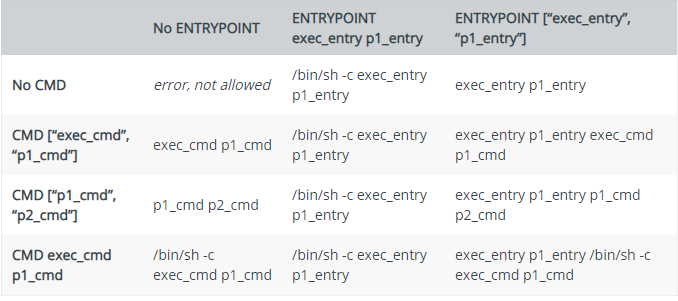
10.WORKDIR USER 略
11.HEALTHCHECK
HEALTHCHECK [OPTIONS] CMD command (check container health by running a command inside the container)

HEALTHCHECK NONE (disable any healthcheck inherited from the base image)
HEALTHCHECK --interval=5m --timeout=3s \

  CMD curl -f http://localhost/ || exit 1
health check 是非常重要的
1.Dockerfile的更多相关文章
- 如何用Dockerfile创建镜像
本文原创,原文地址为:http://www.cnblogs.com/fengzheng/p/5181222.html 创建镜像的目的 首先说DockerHub或其它一些镜像仓库已经提供了够多的镜像,有 ...
- Dockerfile初探
git上的asp.net samples工程已经写好了docker file,内容是如下 //任何dockersfile都要以FORM开头,约定是用大写. FROM microsoft/aspne ...
- ubuntu 16.04 Dockerfile 安装mysql
默认上MariaDB的包并没有在Ubuntu仓库中.要安装MariaDB,我们首先要设置MariaDB仓库. 配置MariaDB 仓库 # apt-get install software-prope ...
- 分析Mysql 5.6的Dockerfile
Docker官方的Mysql镜像的Dockerfile托管在Github上,地址如下: https://github.com/docker-library/mysql/tree/5836bc9af9d ...
- 利用Dockerfile构建一个基于centos 7,包括java 8, tomcat 7,php ,mysql+mycat的镜像
Dockerfile内容如下: FROM centos MAINTAINER Victor ivictor@foxmail.com WORKDIR /root RUN rm -f /etc/yum.r ...
- Docker dockerfile创建Eclipse镜像初试
抽空初步阅读了Docker技术入门与实战 [Kindle电子书] http://www.cnblogs.com/2018/p/4600116.html 现在想首先在开发环境下引入统一的环境,由于开发中 ...
- 安装Nginx的Dockerfile实例
#################################################Dockerfile to build Nginx Installed Containers##Bas ...
- 测试dockerfile
测试dockerfile是否ok(比如我的Dockerfile在deploy目录下) docker build -t my_image -f deploy/Dockerfile . docker im ...
- 通过Dockerfile建立.NET Core mvc Image
生成.NET core mvc code docker run -itd microsoft/dotnet:latestdocker psdocker attach containeridmkdir ...
- .Net Core+cenos7+Docker+Dockerfile 部署实践
因为这段时间比较忙,同时也在抽时间将开发框架转移到 .net Core 上 所以写博客的时间就少了,这次我利用dockerfile成功将.net Core程序部署到了cenos7容器中,特抽时间把我的 ...
随机推荐
- overflow:hidden失效问题
2018-08-03 Questions about work 这几天开发的时候遇到了个问题,如图1. 写了个demo demo 地址 由于页面并没有进行整体缩放,导致在小屏幕手机上显示会有异常.PM ...
- Python----公开课
# 构造函数- 类在实例化的时候,执行一些基础性的初始化的工作- 使用特殊的名称和写法- 在实例化的时候自动执行- 是在实例化的时候第一个被执行的函数- ----------------------- ...
- [CF286C] Main Sequence
问题描述 定义幸运数列: 空数列是幸运数列 如果 S 是幸运数列,那么 {r, S, -r} 也是幸运数列 (r > 0) 如果 S 和 T 都是幸运数列,那么 {S, T} 也是幸运数列 给定 ...
- git的初步研究1
工作中很多项目再往git上迁移,所以打算研究下git git是个版本控制系统 理解git工作区.暂存区.版本库的概念 工作区:在电脑中能看到的目录 暂存区:index即索引 即首先add加入暂存区 c ...
- IIS部署复盘(杂记)
首先,230是网站服务器,231主要放到是数据库:所以在230(部署的服务器)上部署不需要部署IIS和Oracle数据库, 231呢?231是数据库服务器:百度一下数据库服务器是什么? 文档第五步: ...
- 阿里重磅开源全球首个批流一体机器学习平台Alink,Blink功能已全部贡献至Flink
11月28日,Flink Forward Asia 2019 在北京国家会议中心召开,阿里在会上发布Flink 1.10版本功能前瞻,同时宣布基于Flink的机器学习算法平台Alink正式开源,这也是 ...
- jQuery 遍历 - 同胞(siblings)
同胞拥有相同的父元素. 通过 jQuery,您能够在 DOM 树中遍历元素的同胞元素. 在 DOM 树中水平遍历 有许多有用的方法让我们在 DOM 树进行水平遍历: siblings() next() ...
- Codeforces Round #350(Div 2)
因为当天的下午才看到所以没来得及请假所以这一场没有打...于是信息课就打了这场的模拟赛. A题: *题目描述: 火星上的一年有n天,问每年最少和最多有多少休息日(周六周天). *题解: 模7分类讨论一 ...
- 三十四、python中shutil模块的介绍
'''A.shutil:高级的文件 文件夹 压缩包 处理模块''' import shutil '''1.copyfileobj(a1,a2,lenth):将文件内容拷贝到另一个文件中''' shut ...
- KVM/QEMU/qemu-kvm/libvirt 概念全解
目录 目录 前言 KVM QEMU KVM 与 QEMU qemu-kvm Libvirt Libvirt 在 OpenStack 中的应用 前言 如果是刚开始接触虚拟机技术的话, 对上述的概念肯定会 ...