
jQuery操纵DOM元素属性 attr()和removeAtrr()方法使用详解
jQuery操纵DOM元素属性 attr()和removeAtrr()方法使用详解
attr()方法 读操作
<!DOCTYPE html>

<html>

<head>

    <script type="text/javascript" src="/jquery/jquery.js"></script>

    <script type="text/javascript">

        $(document).ready(function () {

            $("button").click(function () {

                alert($("p").attr("title"));//获取属性

                // this code can only get the first element's attribute.

            });

        });

    </script>

</head>

<body>

<p title="title1">paragraph 1</p>

<p title="title2">paragraph 2</p>

<br/>

<button>get title</button>

</body>

</html>
<script type="text/javascript">

    $(document).ready(function () {

        $("button").click(function () {

            //get attribute for every element in selection.

            $("p").each(function () {

                alert($(this).attr("title"));

            });

        });

    });

</script>
即可分别获取每个元素的属性.
attr()方法 写操作
<!DOCTYPE html>

<html>

<head>

    <script type="text/javascript" src="/jquery/jquery.js"></script>

    <script type="text/javascript">

        $(document).ready(function(){

            $("#button1").click(function(){

                $("p").attr("title","Hello World");

            });

        });

    </script>

</head>

<body>

<input type="button" id="button1" value="button1"></input>

<p>This is a paragraph.</p>

<div>This is a div.</div>

<p>This is another paragraph.</p>

<div>This is another div.</div>

</body>

</html>
<!DOCTYPE html>

<html>

<head>

    <script type="text/javascript" src="/jquery/jquery.js"></script>

    <script type="text/javascript">

        $(document).ready(function () {

            $("#button1").click(function () {

                $("p").attr("title", "Hello World");

            });

            $("#button2").click(function () {

                $("div").attr({"title": "some title for div", "hello": "World"});

            });

        });

    </script>

</head>

<body>

<input type="button" id="button1" value="button1"></input>

<input type="button" id="button2" value="button2"></input>

<p>This is a paragraph.</p>

<div>This is a div.</div>

<p>This is another paragraph.</p>

<div>This is another div.</div>

</body>

</html>

<!DOCTYPE html>

<html>

<head>

<style>

div {

color: blue;

}

span {

color: red;

}

b {

font-weight: bolder;

}

</style>

<script type="text/javascript" src="/jquery/jquery.js"></script>

<script type="text/javascript">

$(document).ready(function () {

$("div")

.attr("id", function (index, oldAttr) {

if (oldAttr) {

return "div-id" + index + oldAttr;

} else {

return "div-id" + index;

}

})

.each(function () {

$("span", this).html("(id = '<b>" + this.id + "</b>')");

});

});

</script>

</head>

<body>

<div id="someId">Zero-th <span></span></div>

<div>First <span></span></div>

<div>Second <span></span></div>

</body>

</html>
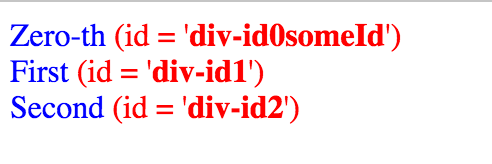
上面的例子,对应的页面结果如下:
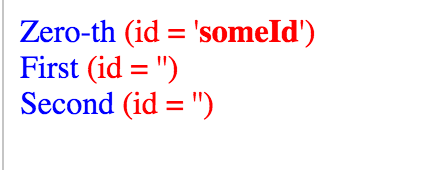
<script type="text/javascript">

    $(document).ready(function () {

        $("div").attr("id", function (index, oldAttr) {

            return undefined;

        }).each(function () {

            $("span", this).html("(id = '<b>" + this.id + "</b>')");

        });

    });

</script>
removeAttr()方法
<!DOCTYPE html>

<html>

<head>

    <script type="text/javascript" src="/jquery/jquery.js"></script>

    <script type="text/javascript">

        $(document).ready(function () {

            $("input[type=button]").click(function () {

                $("div").removeAttr("title");

            });

        });

    </script>

</head>

<body>

<input type="button" value="ClickMe"></input>

<div title="hello">Zero</div>

</body>

</html>
$element.prop( "onclick", null );

console.log( "onclick property: ", $element[ 0 ].onclick );
参考资料
jQuery操纵DOM元素属性 attr()和removeAtrr()方法使用详解的更多相关文章
- jquery中dom元素的attr和prop方法的理解
一.背景 在编写使用高版本[ jQuery 1.6 开始新增了一个方法 prop()]的jquery插件进行编写js代码的时候,经常不知道dom元素的attr和prop方法到底有什么区别?各自有什么应 ...
- JQuery处理DOM元素-属性操作
JQuery处理DOM元素-属性操作 //操作元素的属性: $('*').each(function(n){ this.id = this.tagName + n; }) //获取属性值: $('') ...
- jQuery对html元素的取值与赋值实例详解
jQuery对html元素的取值与赋值实例详解 转载 2015-12-18 作者:欢欢 我要评论 这篇文章主要介绍了jQuery对html元素的取值与赋值,较为详细的分析了jQuery针对常 ...
- Uploadify 3.2 参数属性、事件、方法函数详解
一.属性 属性名称 默认值 说明 auto true 设置为true当选择文件后就直接上传了,为false需要点击上传按钮才上传 . buttonClass ” 按钮样式 buttonCursor ‘ ...
- (转)Uploadify 3.2 参数属性、事件、方法函数详解
转自http://blog.sina.com.cn/s/blog_5079086b0101fkmh.html Hallelujah博客 一.属性 属性名称 默认值 说明 auto true 设置为tr ...
- Uploadify 3.2 参数属性、事件、方法函数详解以及配置
一.属性 属性名称 默认值 说明 auto true 设置为true当选择文件后就直接上传了,为false需要点击上传按钮才上传 . buttonClass ” 按钮样式 buttonCursor ‘ ...
- web进阶之jQuery操作DOM元素&&MySQL记录操作&&PHP面向对象学习笔记
hi 保持学习数量和质量 1.jQuery操作DOM元素 ----使用attr()方法控制元素的属性 attr()方法的作用是设置或者返回元素的属性,其中attr(属性名)格式是获取元素属性名的值,a ...
- JQUERY选择和操作DOM元素(利用正则表达式的方法匹配字符串中的一部分)
JQUERY选择和操作DOM元素(利用正则表达式的方法匹配字符串中的一部分) 1.匹配属性的开头 $("[attributeName^='value']"); 2.匹配属性的结尾 ...
- JS操作DOM元素属性和方法
Dom元素基本操作方法API,先记录下,方便以后使用. W3C DOM和JavaScript很容易混淆不清.DOM是面向HTML和XML文档的API,为文档提供了结构化表示,并定义了如何通过脚本来访 ...
随机推荐
- Polynomial Library in OpenCascade
Polynomial Library in OpenCascade eryar@163.com 摘要Abstract:分析幂基曲线即多项式曲线在OpenCascade中的计算方法,以及利用OpenSc ...
- 传智播客--高级控件--showdialog关闭(小白内容)
以往我在WPF里,用ShowDialog展示出一个页面,一般都是用Close()进行关闭. 今天看传智播客的视频时,了解到还能直接给DialogResult一个TRUE或者false的属性,使页面关闭 ...
- AngularJS之指令中controller与link(十二)
前言 在指令中存在controller和link属性,对这二者心生有点疑问,于是找了资料学习下. 话题 首先我们来看看代码再来分析分析. 第一次尝试 页面: <custom-directive& ...
- etlpy: 并行爬虫和数据清洗工具(开源)
etlpy是python编写的网页数据抓取和清洗工具,核心文件etl.py不超过500行,具备如下特点 爬虫和清洗逻辑基于xml定义,不需手工编写 基于python生成器,流式处理,对内存无要求 内置 ...
- Don't let self-built concept imprison yourself
If Self-inferiority is disease, but self-confidence is hazard. Leo moon personalities can be extreme ...
- 编写简单的ramdisk(选择IO调度器)
前言 目前linux中包含anticipatory.cfq.deadline和noop这4个I/O调度器.2.6.18之前的linux默认使用anticipatory,而之后的默认使用cfq.我们在前 ...
- Last-Modified、If-Modified-Since 实现缓存和 OutputCache 的区别
先梳理三个概念: OutputCache:页面输出缓存,一般 ASP.NET 应用程序会用到. Last-Modified:Http 响应头(Http Reponse Header),由服务器发给客户 ...
- geotrellis使用(十八)导入多波段Tiff、读取多波段Tile
Geotrellis系列文章链接地址http://www.cnblogs.com/shoufengwei/p/5619419.html 目录 前言 多波段数据导入 读取多波段瓦片 提取单波段 总结 一 ...
- 让自己也能使用Canvas
<canvas> 是 HTML5 新增的元素,可使用JavaScript脚本来绘制图形.例如:画图,合成照片,创建动画甚至实时视频处理与渲染. 兼容性方面,除了一些骨灰级浏览器IE6.IE ...
- 【集合框架】JDK1.8源码分析之HashMap & LinkedHashMap迭代器(三)
一.前言 在遍历HashMap与LinkedHashMap时,我们通常都会使用到迭代器,而HashMap的迭代器与LinkedHashMap迭代器是如何工作的呢?下面我们来一起分析分析. 二.迭代器继 ...