
安装InfoPath 2013后 SharePoint 2010 出现 “找不到 Microsoft.Office.InfoPath, Version=14.0.0....” 的错误的解决方案
1. 症状

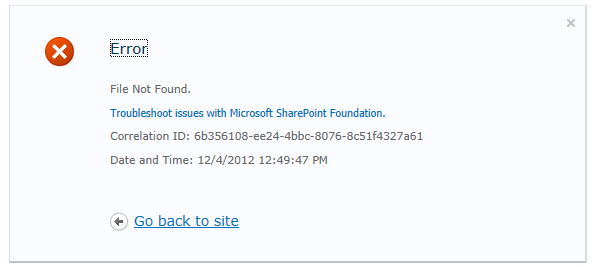
您的SharePoint 2010的服务器是不是最近一直出现这个错误呢?

Could not load file or assembly 'Microsoft.Office.InfoPath, Version=14.0.0.0' (...)
特别是当我们部署新的InfoPath解决方案时,我们突然之间发现,无法把模板上传到服务器当中去了,但是我们发现在GAC中,这个Microsoft.Office.InfoPath.dll 是存在的
问题出在哪里?
2.分析过程
在日志中有这么一句话:
System.IO.FileNotFoundException: Could not load file or assembly
'Microsoft.Office.InfoPath, Version=14.0.0.0, Culture=neutral,
PublicKeyToken=71e9bce111e9429c' or one of its dependencies. The system
cannot find the file specified.
根据前文分析,文件是一定存在的,但为什么呢,我们继续打开编译日志文件
报告如下:
*** Assembly Binder Log Entry (4/12/2012 @ 12:51:23) ***
The operation failed.
Bind result: hr = 0x80131040. No description available.
Assembly manager loaded from: C:\Windows\Microsoft.NET\Framework64\v2.0.50727\mscorwks.dll
Running under executable c:\windows\system32\inetsrv\w3wp.exe
--- A detailed error log follows.
=== Pre-bind state information ===
LOG: User = WINDEVSP2010\SPInstaller
LOG: DisplayName = Microsoft.Office.InfoPath, Version=14.0.0.0, Culture=neutral, PublicKeyToken=71e9bce111e9429c
(Fully-specified)
LOG: Appbase = file:///C:/inetpub/wwwroot/wss/VirtualDirectories/80741441fc-0d39-48f0-954e-96614c358095/
LOG: Initial PrivatePath = C:\inetpub\wwwroot\wss\VirtualDirectories\80741441fc-0d39-48f0-954e-96614c358095\bin
LOG: Dynamic Base = C:\Windows\Microsoft.NET\Framework64\v2.0.50727\Temporary ASP.NET Files\root\ef3f51d0
LOG: Cache Base = C:\Windows\Microsoft.NET\Framework64\v2.0.50727\Temporary ASP.NET Files\root\ef3f51d0
LOG: AppName = a6d35fbc
Calling assembly : (Unknown).
===
LOG: This bind starts in default load context.
LOG: Using application configuration file:
C:\inetpub\wwwroot\wss\VirtualDirectories\80741441fc-0d39-48f0-954e-96614c358095\web.config
LOG: Using host configuration file: C:\Windows\Microsoft.NET\Framework64\v2.0.50727\Aspnet.config
LOG: Using machine configuration file from C:\Windows\Microsoft.NET\Framework64\v2.0.50727\config\machine.config.
LOG: Publisher policy file is found at
C:\Windows\assembly\GAC_MSIL\Policy.14.0.Microsoft.Office.InfoPath\15.0.0.0__71e9bce111e9429c\Policy.14.0.Microsoft.Office.InfoPath.config.
LOG: Publisher policy file redirect is found: 14.0.0.0 redirected to 15.0.0.0.
LOG: ProcessorArchitecture is locked to MSIL.
LOG: Post-policy reference: Microsoft.Office.InfoPath, Version=15.0.0.0,
Culture=neutral, PublicKeyToken=71e9bce111e9429c,
processorArchitecture=MSIL
LOG: GAC Lookup was unsuccessful.
LOG: Attempting download of new URL
file:///C:/Windows/Microsoft.NET/Framework64/v2.0.50727/Temporary
ASP.NET Files/root/ef3f51d0/a6d35fbc/Microsoft.Office.InfoPath.DLL.
LOG: Attempting download of new URL
file:///C:/Windows/Microsoft.NET/Framework64/v2.0.50727/Temporary
ASP.NET
Files/root/ef3f51d0/a6d35fbc/Microsoft.Office.InfoPath/Microsoft.Office.InfoPath.DLL.
LOG: Attempting download of new URL
file:///C:/inetpub/wwwroot/wss/VirtualDirectories/80741441fc-0d39-48f0-954e-96614c358095/bin/Microsoft.Office.InfoPath.DLL.
LOG: Assembly download was successful. Attempting setup of file:
C:\inetpub\wwwroot\wss\VirtualDirectories\80741441fc-0d39-48f0-954e-96614c358095\bin\Microsoft.Office.InfoPath.dll
LOG: Entering download cache setup phase.
LOG: Assembly Name is: Microsoft.Office.InfoPath, Version=14.0.0.0, Culture=neutral, PublicKeyToken=71e9bce111e9429c
WRN: Comparing the assembly name resulted in the mismatch: Major Version
ERR: The assembly reference did not match the assembly definition found.
ERR: Setup failed with hr = 0x80131040.
ERR: Failed to complete setup of assembly (hr = 0x80131040). Probing terminated.
现在我们找到原因了!好像是GAC的某个设置把14.00重定向到15.000,但是这个DLL又不支持SharePoint 2010,呵呵。
我们在运行当中打开如下的目录:
C:\Windows\assembly\GAC_MSIL
我发现如下的文件夹:Policy.14.0.Microsoft.Office.InfoPath 有一个子文件夹 “15.0.0.0__71e9bce111e9429c”.
我继续查看web.config文件中的设置,设置中有这么一段:
<?xml version="1.0" encoding="UTF-16"?>

<configuration>

	<runtime>

		<assemblyBinding xmlns="urn:schemas-microsoft-com:asm.v1">

			<dependentAssembly>

				<assemblyIdentity publicKeyToken="71e9bce111e9429c" name="Microsoft.Office.InfoPath" culture="neutral"></assemblyIdentity>

				<bindingRedirect oldVersion="14.0.0.0" newVersion="15.0.0.0"></bindingRedirect>

			</dependentAssembly>

		</assemblyBinding>

	</runtime>

</configuration>
哈哈找到问题了!
3.解决方案
1. 打开“开始-运行” ,输入: C:\Windows\Assembly\GAC_MSIL
2.删除掉如下的文件夹:
Policy.14.0.Microsoft.Office.InfoPath
Policy.14.0.Microsoft.Office.InfoPath.Client.Internal.Host
Policy.14.0.Microsoft.Office.InfoPath.FormControl
3. 运行“ IISRESET /noforce” 重启IIS
哈哈哈,终于可以继续我的InfoPath的部署和开发拉!
安装InfoPath 2013后 SharePoint 2010 出现 “找不到 Microsoft.Office.InfoPath, Version=14.0.0....” 的错误的解决方案的更多相关文章
- CentOS7用yum安装wget命令后仍然提示命令找不到的解决方法
需求:用的AWS实例自带的CentOS7用yum安装wget命令后扔提示命令找不到,后面用源码安装方式解决,下面先讲解决方法,疑问及知识点扩展最后写出 1.问题(因是mini版本系统,有些基本命令扔需 ...
- SharePoint 2013 和 SharePoint 2010 功能对比
微软的网站找东西太麻烦了,在这记录一下. 从 SharePoint 2010 更改为 SharePoint 2013 http://technet.microsoft.com/zh-cn/librar ...
- VS编程中找不到Microsoft.Office.Core、Microsoft.Office.Interop.Word和VBIDE
在使用vs2005. vs2008. vs2010 制作包含 word等office的应用程序时,有时找不到对Microsoft.Office.Core. Microsoft.Office.Inter ...
- 安装php扩展后,执行时找不到扩展 class xxx no found
当编译安装一个新的php扩展,例如安装redis, 安装后 执行 new Redis(), 如果发现找不到class Redis,可以先检查redis.so文件是否在php的扩展目录下, 如果发现是, ...
- SQLYOG导入数据时报错,出现找不到Microsoft office 元驱动程式,并且无法安装64位office Access驱动
当我们使用mysql导入外部数据时(如Excel表),有时会出现如下的错误问题,即找不到64位access驱动.为了解决这个问题,我们需要下载相应的驱动,通过下图中的点击此链接即可进入下载页面(htt ...
- 关于SharePoint 2010体系架构的几个话题
转:http://www.cnblogs.com/chenxizhang/archive/2011/12/18/2291658.html?ADUIN=85650109&ADSESSION=13 ...
- 『SharePoint 2010』Sharepoint 2010 Form 身份认证的实现(基于AD)
一.进管理中心,创建一个应用程序,配置如下: 二.填端口号,和选择form身份认证,以及填写成员和角色,其他都默认就可以了 三.使用SharePoint 2010 Management Shell在里 ...
- sharepoint 2010 基于AD的Form验证
一.新建web应用程序 1.验证部分选择“基于声明的身份验证” 2.设置端口 3.选择“启用基于窗体的身份验证(FBA)” “ASP.NET 成员身份提供程序名称”下面填写“LdapMember” “ ...
- SharePoint 2010 ——自定义上传页面与多文件上传解决方案
最近项目遇到一个很麻烦的问题,原以为很容易解决,结果搞了那么久,先开个头,再慢慢写 SharePoint 2010 ——自定义上传页面与多文件上传解决方案 1.创建Sharepoint空白项目,创建应 ...
随机推荐
- Entity Framework 6 Code First新特性:支持存储过程
Entity Framework 6提供支持存储过程的新特性,本文具体演示Entity Framework 6 Code First的存储过程操作. Code First的插入/修改/删除存储过程 默 ...
- 外网访问原理分析 - 每天5分钟玩转 OpenStack(105)
本节我们会将上节创建的 ext_net 连接到 router,并验证内外网的连通性. 更重要的,我们会分析隐藏在表象之下的原理. 将外网连接到 Neutron 的虚拟路由器,这样 instance 才 ...
- 2、Redis入门介绍
1.什么是Redis Redis:REmote DIctionary Server(远程字典服务器) 是完全开源免费的,用C语言编写的,遵守BSD协议,是一个高性能的(key/value)分布式内存数 ...
- angularjs 锚点操作服务 $anchorScroll
在普通的html网页中,我们可以通过在url后边添加 #elementid 的方式,将页面显示定位到某个元素,也就是锚点. 但是在angularjs应用的网页中,页面路由的写法是 #route/ro ...
- ASP.NET MVC 6 一些不晓得的写法
今天在看 Scott Guthrie 的一篇博文<Introducing ASP.NET 5>,在 MVC 6 中,发现有些之前不晓得的写法,这边简单记录下,算是对自己知识的补充,有些我并 ...
- 【记录】GitHub/TortoiseGit 修改邮箱/提交者
我使用 Git 客户端工具是 TortoiseGit,在提交更新的时候,不知何时起会出现下面这种情况: 正常提交作者信息显示应该是: 本来也没怎么注意,但是在提交历史中,记录就不显示出来了,也就是在首 ...
- 软件工程-构建之法 理解C#一小段程序
一.前言 老师给出的要求: 阅读下面程序,请回答如下问题: 问题1:这个程序要找的是符合什么条件的数? 问题2:这样的数存在么?符合这一条件的最小的数是什么? 问题3:在电脑上运行这一程序,你估计多长 ...
- 【面试】输出"蛇形"矩阵
一.题目描述 腾讯实习在线笔试的一道题目. 根据输入的数字(< 1000),输出这样的"蛇形"矩阵,如下.输入n,输出(n * n)阶矩阵,满足由外到内依次增大. 如: 输入 ...
- spring boot 调试 - 热部署
maven gradle Maven: 命令行方式: mvn spring-boot:run -Drun.jvmArguments="-Xdebug -Xrunjdwp:transport= ...
- MVC学习系列11---验证系列之客户端验证
前面学习了,服务端验证,这篇文章中,我们接着学习客户端验证,客户端的验证,使用Jquery和Jquery插件来实现[jquery.validate.min.js and jquery.validate ...