
jmeter jdbc request使用详解
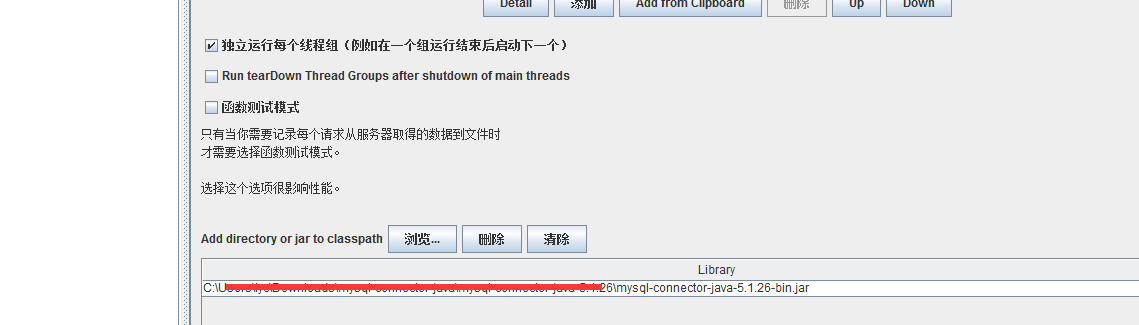
1、在使用 jdbc request之前需要加载一个jar包
在test plan中将jar包引入到classpath中
2、创建一个JDBC Connection Configuration
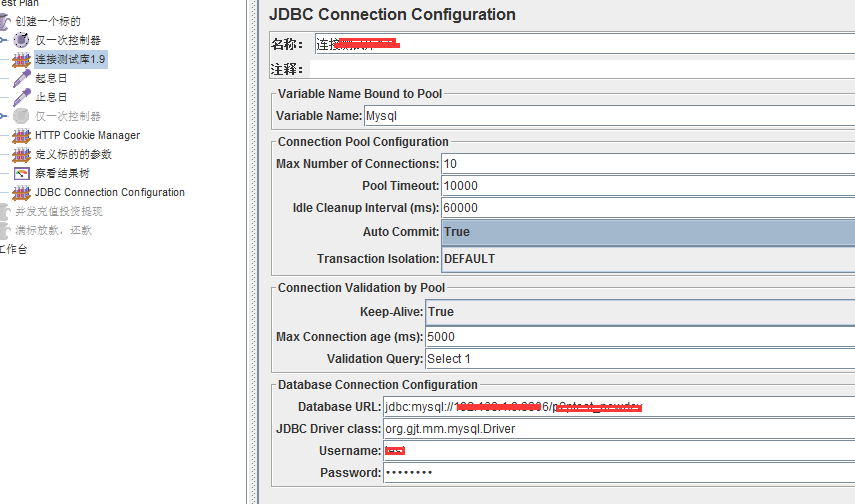
Variable Name: 变量名称,需要变量名绑定到池。需要唯一标识。与JDBC取样器中的相对应,决定JDBC取样的配置。简单理解就是在JDBC request的时候确定去哪个绑定的配置。
MaxNumber of Connection: 数据库最大链接数
PoolTimeout: 数据库链接超时,单位ms
Idle Cleanup Interval (ms): 数据库空闲清理的间隔时间,单位ms
Auto Commit:自动提交。有三个选项,true、false、编辑(自己通过jmeter提供的函数设置)
Transaction Isolation:
事务间隔级别设置,主要有如下几个选项:(对JMX加解密)
TRANSACTION_REPEATABLE_READ事务重复读、TRANSACTION_READ_COMMITTED事务已提交读 、TRANSACTION_SERIALIZABLE事务序列化 、TRANSACTION_READ_UNCOMMITTED事务未提交读、TRANSACTION_NODE 事务节点 、DEFAULT默认、编辑
Keep-Alive: 是否保持连接
Max Connection age (ms):最大连接时长,超过时长的会被拒绝
Validation Query:验证查询,检验连接是否有效(数据库重启后之前的连接都失效,需要验证查询)
Database URL:如jdbc:mysql://localhost:3306/test
表示本地数据库,3306端口,数据库名称为test
JDBCDriver Class: JDBC的类,如org.gjt.mm.mysql.Driver
3、创建 sampler - >jdbc request
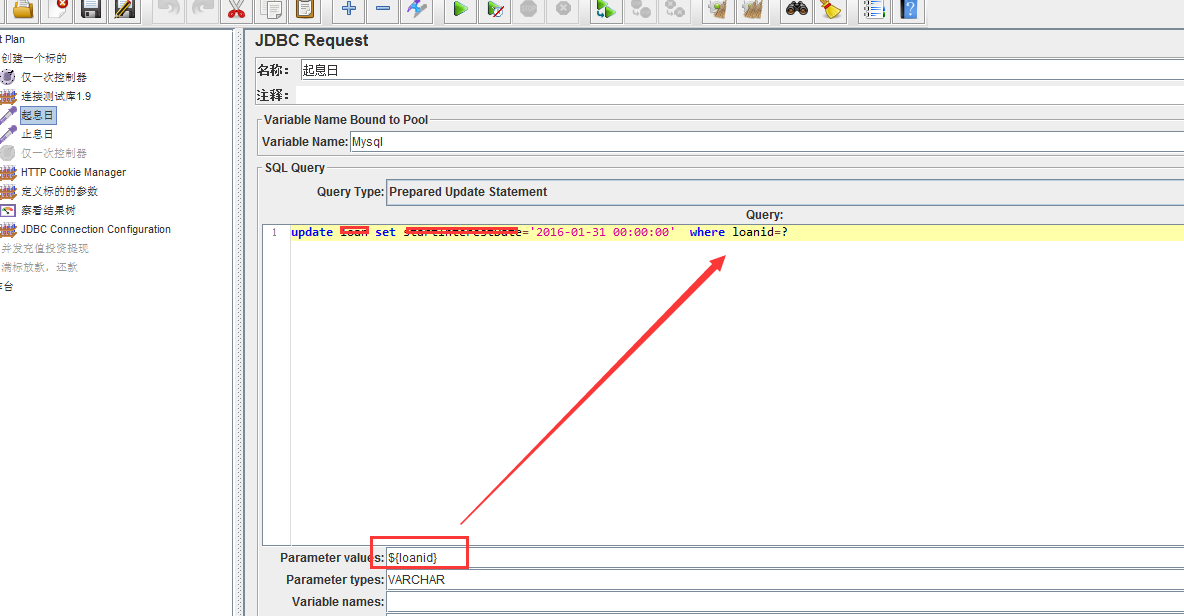
variable 需要填写的内容与前面的 variable name bound to pool 的内容一致
Query Type- Set this according to the statement type:
• Select Statement
• Update Statement - use this for Inserts and Deletes as well
• Callable Statement
• Prepared Select Statement
• Prepared Update Statement - use this for Inserts and Deletes as well
• Commit
• Rollback
• Autocommit(false)
• Autocommit(true)
• Edit - this should be a variable reference that evaluates to one of the above
Parameter values : 参数
Parameter types- Comma-separated list of SQL parameter types (e.g. INTEGER, DATE, VARCHAR, DOUBLE)
Variable Names- Comma-separated list of variable names to hold values returned by Select statements, Prepared Select Statements or CallableStatement. Note that when used with CallableStatement, list of variables must be in the same sequence as the OUT parameters returned by the call. If there are less variable names than OUT parameters only as many results shall be stored in the thread-context variables as variable names were supplied. If more variable names than OUT parameters exist, the additional variables will be ignored.
Result Variable Name- If specified, this will create an Object variable containing a list of row maps. Each map contains the column name as the key and the column data as the value. Usage:
columnValue = vars.getObject("resultObject").get(0).get("Column Name");
如果使用了select 结果有多条记录,需要对其中的某个结果进行操作:
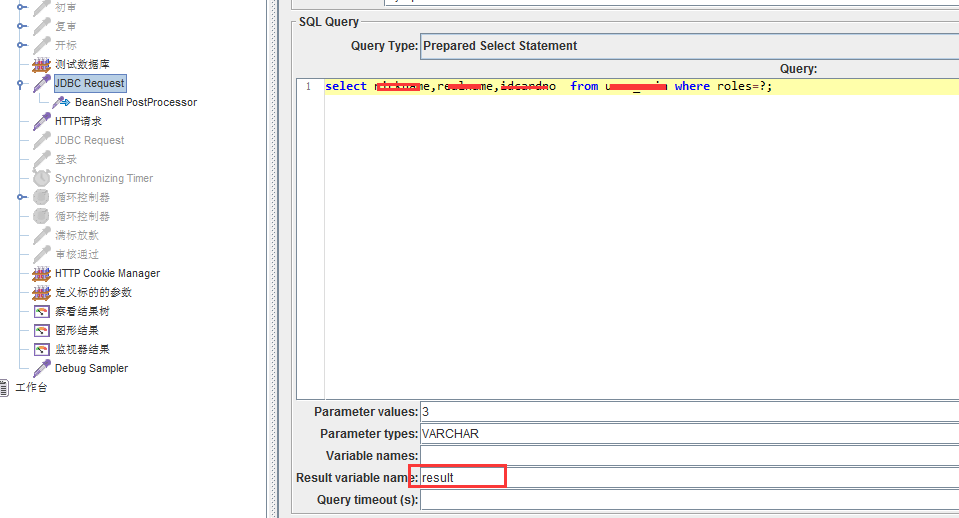
将结果存储在result中,result是以一个map形式进行的存储,需要对其中的某个数据进行操作的时候,可以在后面使用beanshellprocessor
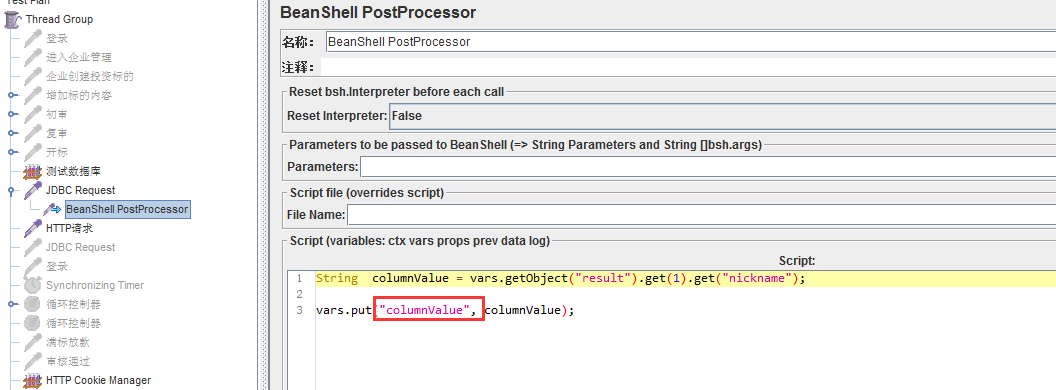
上面的columnvalue就存储了某些数据,可以作为变量进行使用 如:${columnValue}
http://www.cnblogs.com/yingchen/p/5124838.html
第二种方法使用:
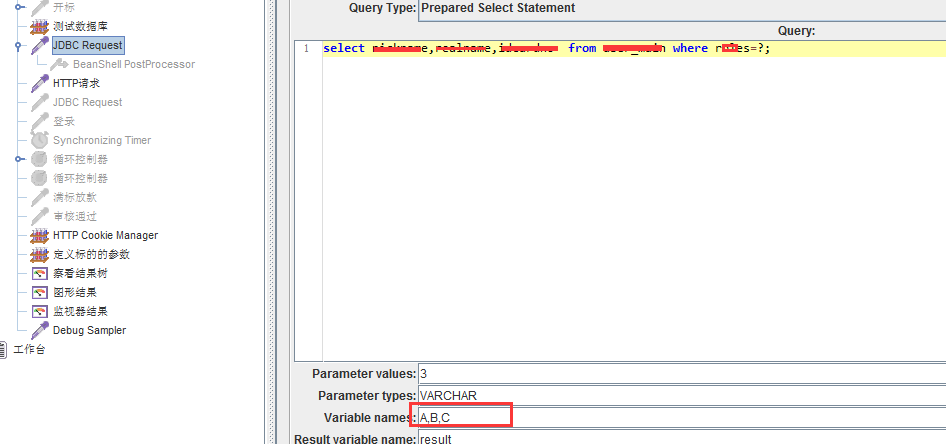
A,B,C对应的是上面sql查出来的三个字段
使用方法,在其他地方使用 ${A_#},${A_1},${A_2}分别表示,行数, 第一列,第一行,第一列第二行。
jmeter jdbc request使用详解的更多相关文章
- Jmeter JDBC Request 使用详解
本篇博文讲解以MySQL为例,搞懂JDBC Request中MySQL的使用方法,换成其它数据库, 如Oracle.PSQL也会很容易上手. 一.基本配置 1.首先我们先了解一下,不同数据库的驱动类和 ...
- Jmeter 正则表达式提取器详解(Regular Expression Exactor)
Jmeter 正则表达式提取器详解(Regular Expression Exactor) Name(名称):随意设置,最好有业务意义. Comments(注释):随意设置,可以为空 Apply to ...
- request.getcontextPath() 详解
request.getcontextPath() 详解 文章分类:Java编程 <%=request.getContextPath()%>是为了解决相对路径的问题,可返回站点的根路径. 但 ...
- IIS负载均衡-Application Request Route详解第四篇:使用ARR实现三层部署架构(转载)
IIS负载均衡-Application Request Route详解第四篇:使用ARR实现三层部署架构 系列文章链接: IIS负载均衡-Application Request Route详解第一篇: ...
- IIS负载均衡-Application Request Route详解第二篇:创建与配置Server Farm(转载)
IIS负载均衡-Application Request Route详解第二篇:创建与配置Server Farm 自从本系列发布之后,收到了很多的朋友的回复!非常感谢,同时很多朋友问到了一些问题,有些问 ...
- IIS负载均衡-Application Request Route详解第一篇: ARR介绍(转载)
IIS负载均衡-Application Request Route详解第一篇: ARR介绍 说到负载均衡,相信大家已经不再陌生了,本系列主要介绍在IIS中可以采用的负载均衡的软件:微软的Applica ...
- django中request对象详解(转载)
django中的request对象详解 Request 我们知道当URLconf文件匹配到用户输入的路径后,会调用对应的view函数,并将 HttpRequest对象 作为第一个参数传入该函数. ...
- jmeter—JDBC request动态参数设置
jmeter—JDBC request动态参数设置 重要参数说明: Variable Name:数据库连接池的名字,需要与JDBC Connection Configuration的Variable ...
- IIS负载均衡-Application Request Route详解第一篇: ARR介绍
IIS负载均衡-Application Request Route详解第一篇: ARR介绍 说到负载均衡,相信大家已经不再陌生了,本系列主要介绍在IIS中可以采用的负载均衡的软件:微软的Applica ...
随机推荐
- sharepoint2010升级到sharepoint2013的升级步骤和过程
- C语言的基本输入与输出函数
C语言中最常用最基础的输入输出函数:printf() 和 scanf(); 例子: #import <Foundation/Foundation.h> int main(int argc, ...
- iOS开发之多媒体API (转载)
视频格式可以分为适合本地播放的本地影像视频和适合在网络中播放的网络流媒体影像视频两大类.尽管后者在播放的稳定性和播放画面质量上可能没有前者 优秀,但网络流媒体影像视频的广泛传播性使之正被广泛应用于视频 ...
- 不用画线 设置UITableView的全屏分隔线
如图 添加如下代码 sTableView.separatorInset = UIEdgeInsetsZero; sTableView.layoutMargins = UIEdgeInsetsZero ...
- iOS中block的使用、实现底层、循环引用、存储位置
一.整体介绍 定义:C语言的匿名函数,
- 【原】Mac下统计任意文件夹中代码行数的工具——cloc
这里介绍一个Mac系统统计代码行数的工具cloc. 1.首先,安装homebrew,已安装的请跳过. 打开终端工具Terminal,输入下列命令.过程中会让你按RETURN键以及输入mac桌面密码,按 ...
- SQLite3的基本使用
|SQLite3简介 SQLite3只是一个轻型的嵌入式数据库引擎,占用资源非常低,处理速度比Mysql还快,专门用于移动设备上进行适量的数据存取,它只是一个文件,不需要服务器进程. 常用术语:表( ...
- 数据存储与IO(一)
应用程序沙盒简介:iOS应用程序只能在系统为它分配的文件区域内读写文件,这个区域就是此应用程序的沙盒,Application目录下的GUID文件夹就是沙盒,这个文件夹是系统随机命名的.程序所有的非代码 ...
- nodejs 小爬虫
编写爬虫示例: var http = require('http'); var cheerio = require('cheerio'); var url = 'http://www.cnblogs. ...
- Win8.1RTM英文版安装中文语言包的两种方法
Windows 8.1和Windows Server 2012 R2 RTM出来了,下载了个英文版的安装上了,发现远景上有朋友提供中文语言包,以下提供两种语言包的安装方法: 一.使用lpksetup命 ...