
OKhttp基本使用介绍
MainActivity.class
 package com.example.administrator.okhttp3;

 import android.support.v7.app.AppCompatActivity;

 import android.os.Bundle;

 import android.util.Log;

 import android.view.View;

 import android.widget.Button;

 import android.widget.TextView;

 import java.io.File;

 import java.io.FileOutputStream;

 import java.io.IOException;

 import java.io.InputStream;

 import okhttp3.Call;

 import okhttp3.Callback;

 import okhttp3.FormBody;

 import okhttp3.OkHttpClient;

 import okhttp3.Request;

 import okhttp3.RequestBody;

 import okhttp3.Response;

 public class MainActivity extends AppCompatActivity implements View.OnClickListener {

     private static OkHttpClient client = new OkHttpClient();

     private Request request;

     private Response response;

     private Button button1, button2, button3, button4;

     private TextView textView;

     @Override

     protected void onCreate(Bundle savedInstanceState) {

         super.onCreate(savedInstanceState);

         setContentView(R.layout.activity_main);

         button1 = (Button) findViewById(R.id.btn_one);

         button2 = (Button) findViewById(R.id.btn_two);

         button3 = (Button) findViewById(R.id.btn_three);

         button4 = (Button) findViewById(R.id.btn_four);

         button1.setOnClickListener(this);

         button2.setOnClickListener(this);

         button3.setOnClickListener(this);

         button4.setOnClickListener(this);

         textView = (TextView) findViewById(R.id.tv);

     }

     @Override

     public void onClick(View view) {

         switch (view.getId()) {

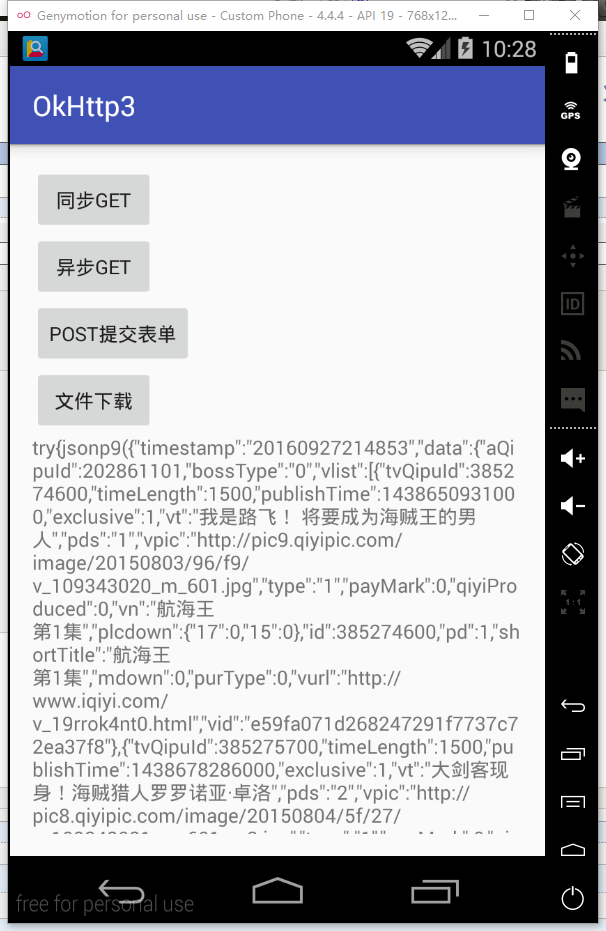
             case R.id.btn_one://同步get

                 client = new OkHttpClient();

                 request = new Request.Builder().url("http://cache.video.iqiyi.com/jp/avlist/202861101/1/?callback=jsonp9").build();

                 new Thread(new Runnable() {

                     @Override

                     public void run() {

                         try {

                             response = client.newCall(request).execute();

                             final String src = response.body().string();

                             Log.e("Tag", response.body().string());

                             runOnUiThread(new Runnable() {

                                 @Override

                                 public void run() {

                                     textView.setText(src);

                                 }

                             });

                         } catch (IOException e) {

                             e.printStackTrace();

                         }

                     }

                 }).start();

                 break;

             case R.id.btn_two://异步get

                 request = new Request.Builder().url("http://cache.video.iqiyi.com/jp/avlist/202861101/1/?callback=jsonp9").build();

                 client.newCall(request).enqueue(new Callback() {

                     @Override

                     public void onFailure(Call call, IOException e) {

                     }

                     @Override

                     public void onResponse(Call call, Response response) throws IOException {

                         final String src = response.body().string();

                         Log.e("Tag", response.body().string());

                         runOnUiThread(new Runnable() {

                             @Override

                             public void run() {

                                 textView.setText(src);

                             }

                         });

                     }

                 });

                 break;

             case R.id.btn_three://提交表单

                 RequestBody requestBody = new FormBody.Builder()

                         .add("search", "papap").build();

                 request = new Request.Builder().url("https://en.wikipedia.org/w/index.php").post(requestBody).build();

                 client.newCall(request).enqueue(new Callback() {

                     @Override

                     public void onFailure(Call call, IOException e) {

                     }

                     @Override

                     public void onResponse(Call call, Response response) throws IOException {

                         final String src = response.body().string();

                         runOnUiThread(new Runnable() {

                             @Override

                             public void run() {

                                 textView.setText(src);

                             }

                         });

                     }

                 });

                 break;

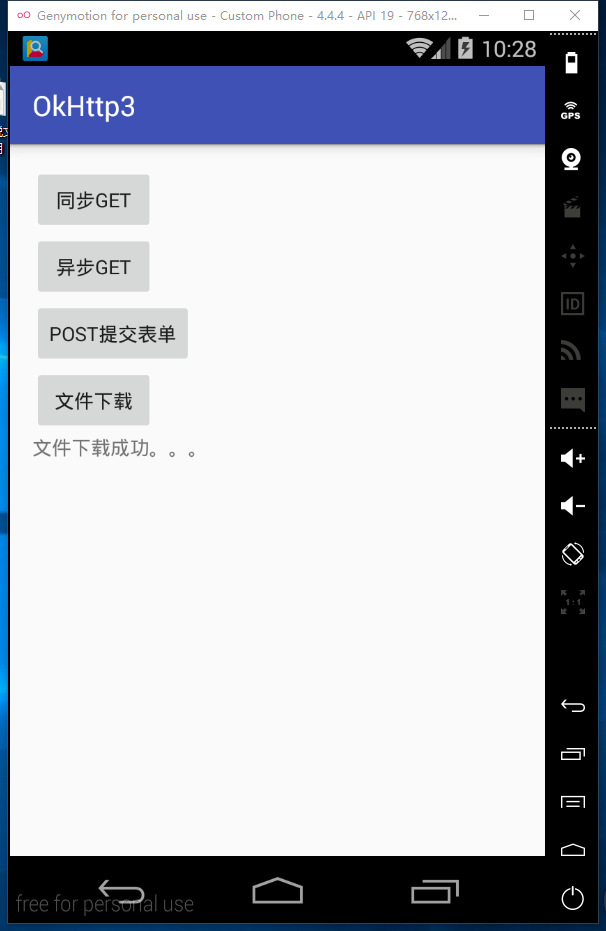
             case R.id.btn_four://文件下载

                 request = new Request.Builder().url("http://pic2.ooopic.com/10/18/01/04bOOOPICb3.jpg").build();

                 client.newCall(request).enqueue(new Callback() {

                     @Override

                     public void onFailure(Call call, IOException e) {

                     }

                     @Override

                     public void onResponse(Call call, Response response) throws IOException {

                         InputStream inputStream = response.body().byteStream();

                         FileOutputStream fileOutputStream = new FileOutputStream(new File("/sdcard/tupian.jpg"));

                         byte[] buffer = new byte[2048];//每次循环读取2K的数据

                         int len = 0;

                         while ((len = inputStream.read(buffer)) != -1) {

                             fileOutputStream.write(buffer, 0, len);

                         }

                         fileOutputStream.flush();

                         runOnUiThread(new Runnable() {

                             @Override

                             public void run() {

                                 textView.setText("文件下载成功。。。");

                             }

                         });

                     }

                 });

                 break;

         }

     }

 }
PS:需要注意的是,在进行同步Get网络请求时,因为都是一个耗时操作,所以需要建立一个子线程去进行请求; 并且,UI界面的更新,必须放在主线程去完成!
activity_main.xml
 <?xml version="1.0" encoding="utf-8"?>

 <LinearLayout xmlns:android="http://schemas.android.com/apk/res/android"

     xmlns:tools="http://schemas.android.com/tools"

     android:layout_width="match_parent"

     android:layout_height="match_parent"

     android:orientation="vertical"

     android:paddingBottom="@dimen/activity_vertical_margin"

     android:paddingLeft="@dimen/activity_horizontal_margin"

     android:paddingRight="@dimen/activity_horizontal_margin"

     android:paddingTop="@dimen/activity_vertical_margin"

     tools:context="com.example.administrator.okhttp3.MainActivity">

     <Button

         android:id="@+id/btn_one"

         android:layout_width="wrap_content"

         android:layout_height="wrap_content"

         android:text="同步get" />

     <Button

         android:id="@+id/btn_two"

         android:layout_width="wrap_content"

         android:layout_height="wrap_content"

         android:text="异步get" />

     <Button

         android:id="@+id/btn_three"

         android:layout_width="wrap_content"

         android:layout_height="wrap_content"

         android:text="Post提交表单" />

     <Button

         android:id="@+id/btn_four"

         android:layout_width="wrap_content"

         android:layout_height="wrap_content"

         android:text="文件下载" />

     <TextView

         android:id="@+id/tv"

         android:layout_width="wrap_content"

         android:layout_height="wrap_content"

         android:text="text"/>

 </LinearLayout>
OKhttp基本使用介绍的更多相关文章
- OKHttp使用简单介绍
如今android网络方面的第三方库非常多,volley.Retrofit.OKHttp等,各有各自的特点,这边博客就来简介下怎样使用OKHttp. 梗概 OKHttp是一款高效的HTTP客户端,支持 ...
- Android okHttp网络请求之Retrofit+Okhttp+RxJava组合
前言: 通过上面的学习,我们不难发现单纯使用okHttp来作为网络库还是多多少少有那么一点点不太方便,而且还需自己来管理接口,对于接口的使用的是哪种请求方式也不能一目了然,出于这个目的接下来学习一下R ...
- Android OkHttp使用与分析
安卓开发领域,很多重要的问题都有了很好的开源解决方案,例如网络请求 OkHttp + Retrofit 简直就是不二之选."我们不重复造轮子不表示我们不需要知道轮子该怎么造及如何更好的造!& ...
- 使用基于Android网络通信的OkHttp库实现Get和Post方式简单操作服务器JSON格式数据
目录 前言 1 Get方式和Post方式接口说明 2 OkHttp库简单介绍及环境配置 3 具体实现 前言 本文具体实现思路和大部分代码参考自<第一行代码>第2版,作者:郭霖:但是文中讲 ...
- Android的OkHttp开源框架的使用方法
前段时间研究了下Android里面非常火爆的网络请求库OkHttp,这篇文章主要来介绍下OkHttp的常用请求的使用方式,后面一篇文章会介绍本人基于OkHttp封装的一个操作更简单.更适用于项目的网络 ...
- OkHttp框架从入门到放弃,解析图片使用Picasso裁剪,二次封装OkHttpUtils,Post提交表单数据
OkHttp框架从入门到放弃,解析图片使用Picasso裁剪,二次封装OkHttpUtils,Post提交表单数据 我们这片博文就来聊聊这个反响很不错的OkHttp了,标题是我恶搞的,本篇将着重详细的 ...
- OKHttp概览
1,整体思路 从使用方法出发,首先是怎么使用,其次是我们使用的功能在内部是如何实现的,实现方案上有什么技巧,有什么范式.全文基本上是对 OkHttp 源码的一个分析与导读,非常建议大家下载 OkHtt ...
- 【转载】okhttp源码解析
转自:http://www.open-open.com/lib/view/open1472216742720.html https://blog.piasy.com/2016/07/11/Unders ...
- Android Okhttp POST提交键值对
以前的项目网络连接那块一直坚持使用HttpClient,总是会出现一些莫名奇妙的问题,现在新的项目使用了OKHttp网络框架,发现超级好用,上网再了解下,发现OkHttp口碑真的不错,对比之下Http ...
随机推荐
- solr多条件查询(二)
由于现在的 需求很变态需要N多条件的叠加,本人就用了一天时间摸索加求助,终于参透出这个q和fq的强大之处. 需求如下图,有三种关系:并且.或.不含 1.如果是或者也就是改变的q的查询条件: 2.如果是 ...
- hadoop安装实战(mac实操)
集群环境配置参考(http://blog.csdn.net/zcf1002797280/article/details/49500027) 参考:http://www.cnblogs.com/liul ...
- 浅谈checkpoint与内存缓存
事务日志存在检查点checkpoint,把内存中脏数据库写入磁盘,以减少故障恢复的时间,在此之前有必要提下SQL Server内存到底存放了哪些数据? SQL Server内存使用 对SQL Serv ...
- Cotex-M3内核STM32F10XX系列时钟及其配置方法
一.背景 最近做个项目,需要使用STM32,还是以前一样的观点,时钟就是MCU心脏,供血即时钟频率输出,想要弄明白一个MCU,时钟是一个非常好的切入点.言归正传,网上已经有太多大神详述过STM32的详 ...
- iOS企业级开发初级课程-表视图(13集)
首先了解了表视图的组成.表视图类的构成.表视图的分类以及表视图的两个重要协议(委托协议和数据源协议),对表视图有了一个整体上的认识.接下来我们掌握了如何实现简单表视图和分节表视图,以及表视图中索引.搜 ...
- BZOJ2730——[HNOI2012]矿场搭建
bzoj2730 & world final 2011 H 1.题目大意:就是有一个无向图,让你在里面选择点,使得,无论哪个点没了以后,其他的点都能到达你选择的任何一个点,输出最少 选择几个点 ...
- BZOJ1452——[JSOI2009]Count
1.题目大意: 就是给一个n×m的方格,然后一些平面上的 求和 修改操作 2.分析:二维树状数组裸题 #include <cstdio> #include <cstdlib> ...
- ex6的选择器
前面的话 尽管DOM作为API已经非常完善了,但是为了实现更多的功能,DOM仍然进行了扩展,其中一个重要的扩展就是对选择器API的扩展.人们对jQuery的称赞,很多是由于jQuery方便的元素选择器 ...
- qt-5.6.0 移植之实现板子与ubuntu主机通过网络进行文件传输
经过一上午的调试以及同事的帮助,终于实现板子与主机的文件传输. 第一步关闭所有的防火墙 在 Windows 里面是在控制面板->安全->Windows 防火墙->自定义设置 在ubu ...
- struts的学习笔记
Struts 2是在WebWork2基础发展而来的. 注意:struts 2和struts 1在代码风格上几乎不一样. Struts 2 相比Struts 1的优点: 1.在软件设计上Struts 2 ...