
WPF ItemsControl ListBox ListView比较
在进行列表信息展示时,WPF中提供多种列表可供选择。这篇博客将对WPF ItemsControl, ListBox, ListView进行比较。
相同点:
1. 这三个控件都是列表型控件,可以进行列表绑定(ItemsSource);
2. 这三个控件均使用ItemsPresenter来展示列表信息;
不同点:
控件层次关系:
System.Object
System.Windows.Threading.DispatcherObject
System.Windows.DependencyObject
System.Windows.Media.Visual
System.Windows.UIElement
System.Windows.FrameworkElement
System.Windows.Controls.Control
System.Windows.Controls.ItemsControl
System.Object
System.Windows.Threading.DispatcherObject
System.Windows.DependencyObject
System.Windows.Media.Visual
System.Windows.UIElement
System.Windows.FrameworkElement
System.Windows.Controls.Control
System.Windows.Controls.ItemsControl
System.Windows.Controls.Primitives.Selector
System.Windows.Controls.ListBox
ListBox 继承于ItemsControl,增加了一个Selector对象,ItemsControl中的Item是不支持选择的。而ListBox中Item是支持选择,并且可以单选,多选。
System.Object
System.Windows.Threading.DispatcherObject
System.Windows.DependencyObject
System.Windows.Media.Visual
System.Windows.UIElement
System.Windows.FrameworkElement
System.Windows.Controls.Control
System.Windows.Controls.ItemsControl
System.Windows.Controls.Primitives.Selector
System.Windows.Controls.ListBox
System.Windows.Controls.ListView
ListView继承与ListBox,增加了一个View依赖属性。
ItemsControl是不包含水平和垂直方向的滚动条的。ListBox和ListView有水平和垂直方向滚动条。
ItemControl的样式:
<ResourceDictionary

    xmlns="http://schemas.microsoft.com/winfx/2006/xaml/presentation"

    xmlns:x="http://schemas.microsoft.com/winfx/2006/xaml">

    <Style x:Key="ItemsControlDefaultStyle" TargetType="{x:Type ItemsControl}">

        <Setter Property="Template">

            <Setter.Value>

                <ControlTemplate TargetType="{x:Type ItemsControl}">

                    <Border BorderBrush="{TemplateBinding BorderBrush}" BorderThickness="{TemplateBinding BorderThickness}" Background="{TemplateBinding Background}"

Padding="{TemplateBinding Padding}" SnapsToDevicePixels="true">

                        <ItemsPresenter SnapsToDevicePixels="{TemplateBinding SnapsToDevicePixels}"/>

                    </Border>

                </ControlTemplate>

            </Setter.Value>

        </Setter>

    </Style>

    <!-- Resource dictionary entries should be defined here. -->

</ResourceDictionary>
ListBox和ListView的样式基本一样,除了TargetType外,
<ResourceDictionary

    xmlns="http://schemas.microsoft.com/winfx/2006/xaml/presentation"

    xmlns:x="http://schemas.microsoft.com/winfx/2006/xaml">

    <SolidColorBrush x:Key="ListBorder" Color="#828790"/>

    <Style x:Key="ListBoxDefaultStyle" TargetType="{x:Type ListBox}">

        <Setter Property="Background" Value="{DynamicResource {x:Static SystemColors.WindowBrushKey}}"/>

        <Setter Property="BorderBrush" Value="{StaticResource ListBorder}"/>

        <Setter Property="BorderThickness" Value="1"/>

        <Setter Property="Foreground" Value="{DynamicResource {x:Static SystemColors.ControlTextBrushKey}}"/>

        <Setter Property="ScrollViewer.HorizontalScrollBarVisibility" Value="Auto"/>

        <Setter Property="ScrollViewer.VerticalScrollBarVisibility" Value="Auto"/>

        <Setter Property="ScrollViewer.CanContentScroll" Value="true"/>

        <Setter Property="ScrollViewer.PanningMode" Value="Both"/>

        <Setter Property="Stylus.IsFlicksEnabled" Value="False"/>

        <Setter Property="VerticalContentAlignment" Value="Center"/>

        <Setter Property="Template">

            <Setter.Value>

                <ControlTemplate TargetType="{x:Type ListBox}">

                    <Border x:Name="Bd" BorderBrush="{TemplateBinding BorderBrush}" BorderThickness="{TemplateBinding BorderThickness}" Background="{TemplateBinding Background}" Padding="1"

SnapsToDevicePixels="true">

                        <ScrollViewer Focusable="false" Padding="{TemplateBinding Padding}">

                            <ItemsPresenter SnapsToDevicePixels="{TemplateBinding SnapsToDevicePixels}"/>

                        </ScrollViewer>

                    </Border>

                    <ControlTemplate.Triggers>

                        <Trigger Property="IsEnabled" Value="false">

                            <Setter Property="Background" TargetName="Bd" Value="{DynamicResource {x:Static SystemColors.ControlBrushKey}}"/>

                        </Trigger>

                        <Trigger Property="IsGrouping" Value="true">

                            <Setter Property="ScrollViewer.CanContentScroll" Value="false"/>

                        </Trigger>

                    </ControlTemplate.Triggers>

                </ControlTemplate>

            </Setter.Value>

        </Setter>

    </Style>

    <!-- Resource dictionary entries should be defined here. -->

</ResourceDictionary>
在项目中如何选择使用这三个控件;
1. 如果列表信息只做展示,但不提供选择功能,可以使用ItemsControl;
2. ListView比ListBox增加了一个View属性。
示例代码:
ItemsControl vs ListBox (Selector)
    <Grid>

        <Grid.RowDefinitions>

            <RowDefinition Height="Auto"/>

            <RowDefinition Height="Auto"/>

        </Grid.RowDefinitions>

        <!--ItemsControl-->

        <StackPanel>

            <TextBlock Text="ItemsControl" FontSize="18"/>

            <ItemsControl ItemsSource="{Binding .}">

                <ItemsControl.ItemTemplate>

                    <DataTemplate>

                        <Grid>

                            <Ellipse Width="110" Height="55" Fill="#ebebee"/>

                            <StackPanel>

                                <TextBlock Text="{Binding Priority}" FontSize="16" HorizontalAlignment="Center"/>

                                <TextBlock Text="{Binding Name}" FontSize="16" HorizontalAlignment="Center"/>

                            </StackPanel>

                        </Grid>

                    </DataTemplate>

                </ItemsControl.ItemTemplate>

                <ItemsControl.ItemsPanel>

                    <ItemsPanelTemplate>

                        <WrapPanel />

                    </ItemsPanelTemplate>

                </ItemsControl.ItemsPanel>

                <ItemsControl.ItemContainerStyle>

                    <Style>

                        <Setter Property="Control.Margin" Value="5"/>

                    </Style>

                </ItemsControl.ItemContainerStyle>

            </ItemsControl>

        </StackPanel>

        <!--ListBox-->

        <StackPanel Grid.Row="1">

            <TextBlock Text="ListBox" FontSize="18"/>

            <ListBox ItemsSource="{Binding .}">

                <ListBox.ItemTemplate>

                    <DataTemplate>

                        <Grid>

                            <Ellipse Width="110" Height="55" Fill="#ebebee"/>

                            <StackPanel>

                                <TextBlock Text="{Binding Priority}" FontSize="16" HorizontalAlignment="Center"/>

                                <TextBlock Text="{Binding Name}" FontSize="16" HorizontalAlignment="Center"/>

                            </StackPanel>

                        </Grid>

                    </DataTemplate>

                </ListBox.ItemTemplate>

                <ListBox.ItemsPanel>

                    <ItemsPanelTemplate>

                        <StackPanel/>

                    </ItemsPanelTemplate>

                </ListBox.ItemsPanel>

                <ListBox.ItemContainerStyle>

                    <Style>

                        <Setter Property="Control.Width" Value="120"/>

                        <Setter Property="Control.Margin" Value="5"/>

                    </Style>

                </ListBox.ItemContainerStyle>

                <ListBox.Template>

                    <ControlTemplate>

                        <ScrollViewer HorizontalScrollBarVisibility="Auto" VerticalScrollBarVisibility="Auto">

                            <ItemsPresenter/>

                        </ScrollViewer>

                    </ControlTemplate>

                </ListBox.Template>

            </ListBox>

        </StackPanel>

    </Grid>
C#
    public class Task

    {

        public string Name { get; set; }

        public int Priority { get; set; }

    }

    ObservableCollection<Task> _tasks = null;

    public MainWindow()

    {

        InitializeComponent();

        _tasks = new ObservableCollection<Task>()

        {

            new Task() { Name = "Shopping",Priority = 2 },

            new Task() { Name = "Laundry",Priority = 2 },

            new Task() { Name = "Email",Priority = 1 },

            new Task() { Name = "Writting",Priority = 2 },

            new Task() { Name = "Learning",Priority = 2 },

            new Task() { Name = "Working",Priority = 2 },

        };

        DataContext = _tasks;

    }
运行效果:
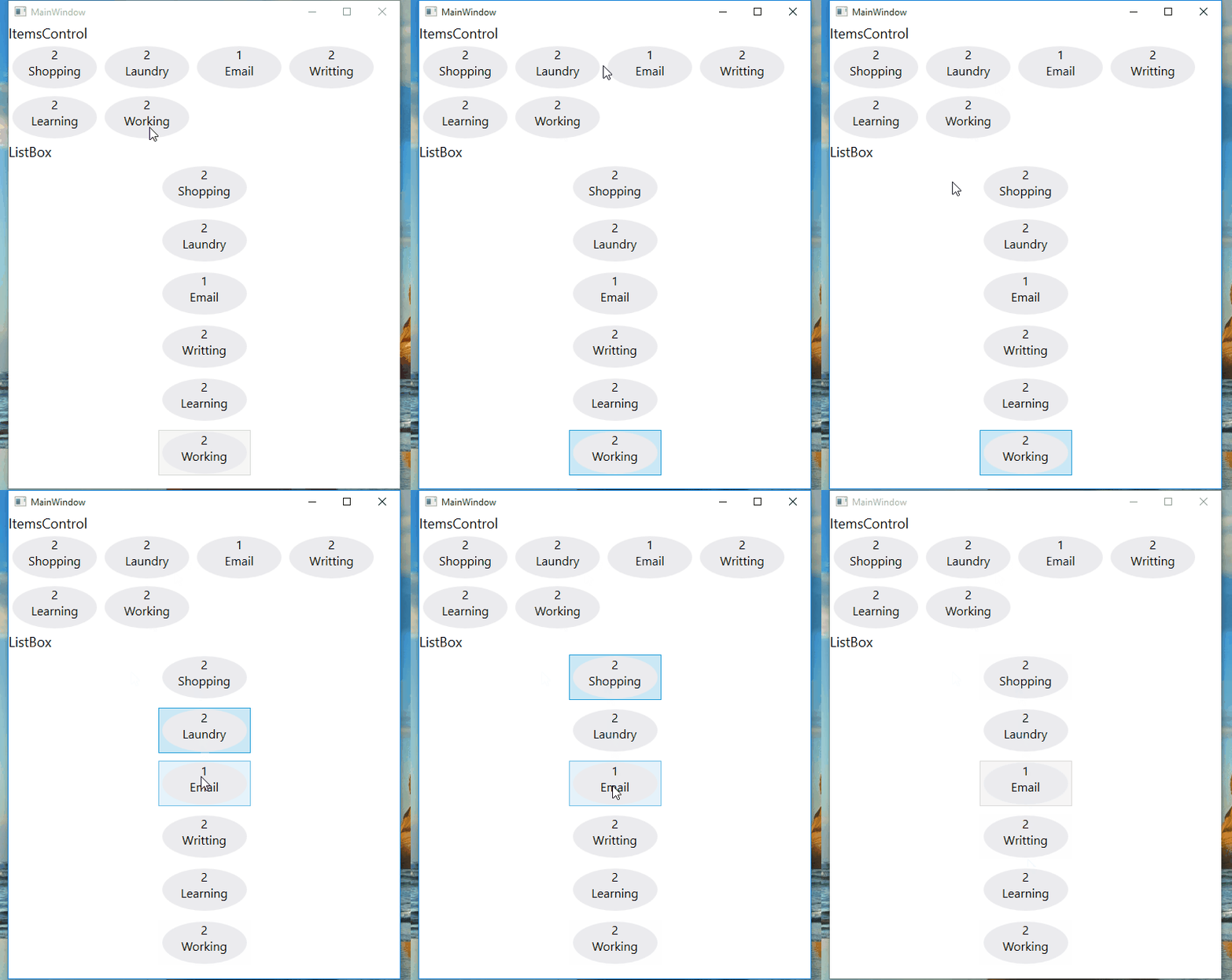
ListView View属性的使用
<ListView ItemsSource="{Binding .}">

    <ListView.View>

        <GridView>

            <GridView.Columns>

                <GridViewColumn Header="Task Name" DisplayMemberBinding="{Binding Name}" Width="100"/>

                <GridViewColumn Header="Task Priority" DisplayMemberBinding="{Binding Priority}" Width="100"/>

            </GridView.Columns>

        </GridView>

    </ListView.View>

</ListView>
运行效果:

感谢您的阅读,代码点击这里下载。
WPF ItemsControl ListBox ListView比较的更多相关文章
- WPF中ListBox /ListView如何改变选中条背景颜色
适用ListBox /ListView WPF中LISTVIEW如何改变选中条背景颜色 https://www.cnblogs.com/sjqq/p/7828119.html
- WPF 自定义ItemsControl/ListBox/ListView控件样式
一.前言 ItemsControl.ListBox.ListView这三种控件在WPF中都可作为列表信息展示控件.我们可以通过修改这三个控件的样式来展示我们的列表信息. 既然都是展示列表信息的控件,那 ...
- WPF中ListBox ListView数据翻页浏览笔记(强调:是数据翻页,非翻页动画)
ListBox和ListView在应用中,常常有需求关于每页显示固定数量的数据,然后通过Timer自动或者手动翻页操作,本文介绍到的就是该动作的实现. 一.重点 对于ListBox和ListView来 ...
- WPF ListBox/ListView/DataGrid 虚拟化时的滚动方式
ListBox的滚动方式 分为像素滚动和列表项滚动 通过ListBox的附加属性ScrollViewer.CanContentScroll来设置.因此ListBox的默认模板中,含有ScrollVie ...
- WPF ItemsControl 手动刷新
原文:WPF ItemsControl 手动刷新 遇到这样一个问题, 我的ItemsSource是绑定到一个ObservableCollection<T>类型的实力上去的. 但是T类型没有 ...
- C# WinForm开发系列 - ListBox/ListView/Panel
转自会飞的小猪文章 C# WinForm开发系列 - ListBox/ListView/Panel 在博客园看到了一篇博文,觉得很不错,就转载过来了. 包含自定义绘制的ListBox, 带拖动, ...
- WPF中ListBox的项ListBoxItem被选中的时候Background变化
使用WPF 中ListBox,点击ListBoxItem的时候,自定义它的背景色,曾经在网上找了一些方法, 不是很理想,后来在StackOverflow上找到了,贴出代码和效果图: 效果图:
- 继续聊WPF——如何获取ListView中选中的项
在WPF中获Listview中选中的项,与WinForm里面有着很大的区别,要亲身去研究一下在WPF中如果处理,其实也不难,来,下面我们一起来通过一个简单的示例来感悟一下吧. 第一步就是建立一个WPF ...
- 用WPF实现在ListView中的鼠标悬停Tooltip显示
原文:用WPF实现在ListView中的鼠标悬停Tooltip显示 一.具体需求描述 在WPF下实现,当鼠标悬停在ListView中的某一元素的时候能弹出一个ToolTip以显示需要的信息. 二.代码 ...
随机推荐
- Nagios+zabbix+ganglia的相关参数分析和优缺点介绍
转自: http://blog.csdn.net/messiaDemo/article/details/52046822?utm_source=itdadao&utm_medium=refer ...
- rabbitmq使用
1. 用户管理 用户管理包括增加用户,删除用户,查看用户列表,修改用户密码. 相应的命令 (1) 新增一个用户 rabbitmqctl add_user Username Password (2 ...
- pycharm 2016 注册码
43B4A73YYJ-eyJsaWNlbnNlSWQiOiI0M0I0QTczWVlKIiwibGljZW5zZWVOYW1lIjoibGFuIHl1IiwiYXNzaWduZWVOYW1lIjoiI ...
- c#之Insert字符串的三种写法
1.Format Format(String, Object) 将指定字符串中的一个或多个格式项替换为指定对象的字符串表示形式. ex1:简单示例怎么应用 private void btnTest_C ...
- spring + myBatis 常见错误:注解事务不回滚
最近项目在用springMVC+spring+myBatis框架,在配置事务的时候发现一个事务不能回滚的问题. 刚开始配置如下:springMVC.xml配置内容: spring.xml配置内容 从上 ...
- Django~urls.py--->views.py
The 'r' in front of each regular expression string is optional but recommended. It tells Python that ...
- AUTOSSH,ssh反向代理
在本地机器 1)ssh-keygen 2)ls ~/.ssh/ 应该有三个文件 id_rsa id_rsa.pub known_hosts 拷贝id_rsa.pub到远程服务器,然后在 ...
- FindinFiles - Windows文件内查找插件
FindInFiles for Windows 今天分享一个不错的插件工具:FindInFiles.如其名,其功能和Visual Studio的Ctrl+H快捷键类似,方便Windows使用者在资源管 ...
- HTML 样式表
样式代码 样式代码与属性代码区别 样式代码必须带单位 属性不需要 多个样式代码之间用分号隔开 同一个样式里面 用空格 多个属性之间用空格隔开 举例 1.背景样式 .r { backgr ...
- 【C语言】结构体
不能定义 struct Node { struct Node a; int b; } 这样的结构,因为为了建立Node 需要 建立一个新的Node a, 可为了建立Node a, 还需要再建立Node ...