
爬虫之 案列1补充(pipelines优化)
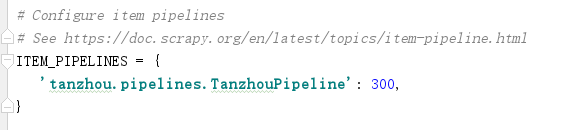
1. 先打开settings.py文件将 'ITEM_PIPELINES'启动(取消注释即可)
2. spider代码
# -*- coding: utf-8 -*-

import scrapy

import json

class TzcSpider(scrapy.Spider):

    # spider的名字,唯一

    name = 'tzc'

    # 起始地址

    start_urls = ['https://hr.tencent.com/position.php?keywords=python&tid=0&lid=2268']

    # 每个url爬取之后会调用这个方法

    def parse(self, response):

        tr = response.xpath( '//table[@class="tablelist"]/tr[@class = "even"]|//table[@class="tablelist"]/tr[@class = "odd"]')

        if tr:

            for i in tr:

                data = {

                    "jobName": i.xpath('./td[1]/a/text()').extract_first(),

                    "jobType":i.xpath('./td[2]/text()').extract_first(),

                    "Num":i.xpath('./td[3]/text()').extract_first(),

                    "Place":i.xpath('./td[4]/text()').extract_first(),

                    "Time":i.xpath('./td[5]/text()').extract_first()

                }

                # 将数据变成json数据便于存储

                # data = json.dumps(data,ensure_ascii=False)

                yield data

            # 寻找下一页标签

            url_next = response.xpath('//a[@id = "next"]/@href').extract_first()

            # 提取的是段标签,需要加上域名

            url_next = 'https://hr.tencent.com/{}'.format(url_next)

            # 返回下一页地址,scrapy会递归

            yield scrapy.Request(url_next)
3. pipelines.py代码
import json

class TanzhouPipeline(object):

    def process_item(self, item, spider):

        # 数据json化

        item = json.dumps(item,ensure_ascii=False)

        self.f.write(item)

        self.f.write('\n')

        return item

    # 爬虫开启时运行

    def open_spider(self,spider):

        # 打开文件

        self.f = open('info3.json','w')

    # 爬虫关闭时运行

    def close_spider(self,spider):

       #  关闭文件

       self.f.close()
4. 补充2,防止item不规范,可以使用items.py文件对其限制(还要改spider中的item代码)(还要修改pipelines中的代码,要先dict(item)转化成字典,再json转化)
pipeline.py中先转化成字典dict()再json转化:
item = json.dumps(dict(item),ensure_ascii=False)
items.py代码:
import scrapy

class TanzhouItem(scrapy.Item):

    # define the fields for your item here like:

    # name = scrapy.Field()

    jobName = scrapy.Field()

    jobType = scrapy.Field()

    Num = scrapy.Field()

    Place = scrapy.Field()

    Time =scrapy.Field()
spider代码:
import scrapy

import json

from ..items import TanzhouItem

class TzcSpider(scrapy.Spider):

    # spider的名字,唯一

    name = 'tzc'

    # 起始地址

    start_urls = ['https://hr.tencent.com/position.php?keywords=python&tid=0&lid=2268']

    # 每个url爬取之后会调用这个方法

    def parse(self, response):

        tr = response.xpath( '//table[@class="tablelist"]/tr[@class = "even"]|//table[@class="tablelist"]/tr[@class = "odd"]')

        if tr:

            for i in tr:

                # 自定义字典的方式,下面是第二种方式

                data = {

                    "jobName": i.xpath('./td[1]/a/text()').extract_first(),

                    "jobType":i.xpath('./td[2]/text()').extract_first(),

                    "Num":i.xpath('./td[3]/text()').extract_first(),

                    "Place":i.xpath('./td[4]/text()').extract_first(),

                    "Time":i.xpath('./td[5]/text()').extract_first()

                }

                # 第二种方式,用items.py约束

                # data = TanzhouItem()

                # data["jobName"] = i.xpath('./td[1]/a/text()').extract_first()

                # data["jobType"] = i.xpath('./td[2]/text()').extract_first()

                # data["Num"] = i.xpath('./td[3]/text()').extract_first()

                # data["Place"] = i.xpath('./td[4]/text()').extract_first()

                # data["Time"] = i.xpath('./td[5]/text()').extract_first()

                # 将数据变成json数据便于存储

                # data = json.dumps(data,ensure_ascii=False)

                yield data

            # 寻找下一页标签

            url_next = response.xpath('//a[@id = "next"]/@href').extract_first()

            # 提取的是段标签,需要加上域名

            url_next = 'https://hr.tencent.com/{}'.format(url_next)

            # 返回下一页地址,scrapy会递归

            yield scrapy.Request(url_next)
爬虫之 案列1补充(pipelines优化)的更多相关文章
- 2021年-在windwos下如何用TOMACT发布一个系统(完整配置案列)
2021年新年第一篇:博主@李宗盛-关于在Windwos下使用TOMCAT发布一个系统的完成配置案列. 之前写过关于TOMCAT的小篇幅文档,比较分散,可以作为对照与参考. 此篇整合在一起,一篇文档写 ...
- Spring MVC的配置文件(XML)的几个经典案列
1.既然是配置文件版的,那配置文件自然是必不可少,且应该会很复杂,那我们就以一个一个的来慢慢分析这些个经典案列吧! 01.实现Controller /* * 控制器 */ public class M ...
- js闭包的作用域以及闭包案列的介绍:
转载▼ 标签: it js闭包的作用域以及闭包案列的介绍: 首先我们根据前面的介绍来分析js闭包有什么作用,他会给我们编程带来什么好处? 闭包是为了更方便我们在处理js函数的时候会遇到以下的几 ...
- SAMSUNG某型号一千短信成功记录!对比其他软件恢复不成功的案列!
Hello! 大家好欢迎再次来到Dr.wonde的博客, 下面谈一下今天的案列,今年11月26号收到了一客户寄来的三星S4手机恢复里面短信, 如下图所示,用其他软件恢复以后,数据为零,没有恢复,,这下 ...
- php知识案列分享
今天再跟大家分享一下,以下案列. 使用array_flip函数生成随机数,可以去掉重复值. 1 2 3 4 5 6 7 8 9 10 11 12 13 14 15 16 17 18 19 20 < ...
- linux下mysql函数的详细案列
MYSQL * STDCALL mysql_real_connect(MYSQL *mysql, const char *host, const char *user, const char *pas ...
- axis1,xfire,jUnit 测试案列+开Web Service开发指南+axis1.jar下载 代码
axis1,xfire,jUnit 测试案列+Web Service开发指南(中).pdf+axis1.jar下载 代码 项目和资源文档+jar 下载:http://download.csdn. ...
- 大数据技术之_14_Oozie学习_Oozie 的简介+Oozie 的功能模块介绍+Oozie 的部署+Oozie 的使用案列
第1章 Oozie 的简介第2章 Oozie 的功能模块介绍2.1 模块2.2 常用节点第3章 Oozie 的部署3.1 部署 Hadoop(CDH版本的)3.1.1 解压缩 CDH 版本的 hado ...
- react 的安装和案列Todolist
react 的安装和案列Todolist 1.react的安装和环境的配置 首先检查有没有安装node.js和npm node -v npm -v 查看相关版本 2.安装脚手架工具 2.构建:crea ...
随机推荐
- PHP中使用Redis长连接笔记
pconnect函数声明 其中time_out表示客户端闲置多少秒后,就断开连接.函数连接成功返回true,失败返回false: pconnect(host, port, time_out, pers ...
- Android广播机制
原文出处: Android总结篇系列:Android广播机制 1.Android广播机制概述 Android广播分为两个方面:广播发送者和广播接收者,通常情况下,BroadcastReceiver指的 ...
- CSS margin合并
外边距合并 块的顶部外边距和底部外边距有时被组合(折叠)为单个外边距,其大小是组合到其中的最大外边距 发生外边距合并的三种基本情况 1. 相邻的兄弟姐妹元素 <div id="marg ...
- Windows服务启动进程----Cjwdev.WindowsApi.dll
windows服务下无法启动外部程序 做一个windows服务监听服务,涉及到windows服务启动外部程序的一个过程,但是调试测试发现,无法简单的用process.start()这种方法, 原因是在 ...
- Confluence 6 配置推荐更新邮件通知默认的初始化设置
Confluence 为订阅者发送常规邮件报告,这个邮件报告中包含有用户具有查看权限的空间的最新的内容.这个被称为 推荐更新(Recommended Updates)通知. 如果你具有 Conflue ...
- Confluence 6 PostgreSQL 输入你的数据库细节
在 Confluence 的设置安装向导中,将会指导你 Confluence 如何连接到你的数据库.请确定选择 "My own database". 使用 JDBC 连接(默认) ...
- python之+=与+(转载)
先看一个简单的例子 从程序分析,进行直接+操作后,python会重新生成一个对象,而进行+=操作并不改变原来的对象,是在原来对象的基础上进行操作,所以+=也称为就地加 除此之外+和+=还有不同: 从程 ...
- verilog-产生axis数据流
首先这是产生aixs数据流的代码 `timescale 1ps/1ps `default_nettype none module axis_switch_0_example_master #( ) ( ...
- PYMySQL的注册功能的实现
import pymysql conn = pymysql.connect( host = "127.0.0.1", port = 3306, user = "root& ...
- if __name__ == __'main'__: 判断讲解
"""王思聪作为消费者 要吃热狗生产者 负责做热狗问题:王思聪不清楚对方会生产多少热狗 """from multiprocessing im ...