
springmvc+ajax——第一讲(搭建)
下面是整个整合测试的代码:
ajax01.html
TestController
web.xml
springmvc.xml
applicationContext.xml
| <!DOCTYPE html> <html> <head> <title>index.html</title> <meta name="keywords" content="keyword1,keyword2,keyword3"> <meta name="description" content="this is my page"> <meta name="content-type" content="text/html; charset=gb2312"> <!--<link rel="stylesheet" type="text/css" href="./styles.css">--> <script type="text/javascript" charset="UTF-8"> var param = "ajaxget"; var xmlHttpRequest = null;//作为全局变量,否则在回调函数中报notdefined function ajaxSubmit(){ if(window.ActiveXObject){ xmlHttpRequest = new ActiveXObject("Microsoft.XMLHTTP"); }else if(window.XMLHttpRequest){ xmlHttpRequest = new XMLHttpRequest(); } if(xmlHttpRequest != null){ //document.write("xxx"); xmlHttpRequest.open("GET", "./testAjax?param="+param, true); xmlHttpRequest.onreadystatechange = ajaxCallBack;//没有括号 xmlHttpRequest.send(null); } } function ajaxCallBack(){ if(xmlHttpRequest.readyState == 4){ if(xmlHttpRequest.status == 200){ var responseText = xmlHttpRequest.responseText;//没有括号 document.getElementById("div1").innerHTML = responseText;//innerHTML没有括号 } } } </script> </head> <body> <input type="button" value="check" id="check" onclick="ajaxSubmit();"> <br> <div id="div1"></div> </body> </html> |
| package priv.lirenhe.js.controller; import java.io.IOException; import java.io.PrintWriter; import javax.servlet.http.HttpServletRequest; import javax.servlet.http.HttpServletResponse; import org.springframework.stereotype.Controller; import org.springframework.web.bind.annotation.RequestMapping; import org.springframework.web.bind.annotation.RequestMethod; @Controller public class TestController { public TestController() { System.out.println("------TestController------"); } @RequestMapping(value="/testAjax",method=RequestMethod.GET) public void testAjax(HttpServletRequest req,HttpServletResponse resp){ System.out.println("testAjax"); String param = null; param = req.getParameter("param"); System.out.println(param); PrintWriter pw = null; try { pw = resp.getWriter(); pw.print(param); } catch (IOException e) { e.printStackTrace(); }finally{ pw.flush(); pw.close(); System.out.println("finally"); } } } |
|
web.xml配置:注意不要使用<web:xxx>的标签 <?xml version="1.0" encoding="UTF-8"?> <web-app xmlns:xsi="http://www.w3.org/2001/XMLSchema-instance" |
| <?xml version="1.0" encoding="UTF-8"?> <!-- 必须有带mvc的 --> <beans xmlns="http://www.springframework.org/schema/beans" xmlns:xsi="http://www.w3.org/2001/XMLSchema-instance" xmlns:p="http://www.springframework.org/schema/p" xmlns:context="http://www.springframework.org/schema/context" xmlns:mvc="http://www.springframework.org/schema/mvc" xsi:schemaLocation="http://www.springframework.org/schema/beans http://www.springframework.org/schema/beans/spring-beans.xsd http://www.springframework.org/schema/mvc http://www.springframework.org/schema/mvc/spring-mvc-4.0.xsd http://www.springframework.org/schema/context http://www.springframework.org/schema/context/spring-context.xsd"> <context:component-scan base-package="priv.lirenhe.js.*"></context:component-scan> <mvc:annotation-driven /> <mvc:resources location="/" mapping="/**"/> <bean id="modelAndView" class="org.springframework.web.servlet.view.InternalResourceViewResolver"> <constructor-arg name="prefix" value="/"/> <constructor-arg name="suffix" value=".html"/> </bean> </beans> <!-- 包扫描器 注解驱动 静态资源 前缀后缀 --> |
|
applicationContext.xml配置: <?xml version="1.0" encoding="UTF-8"?> <beans xmlns="http://www.springframework.org/schema/beans" |
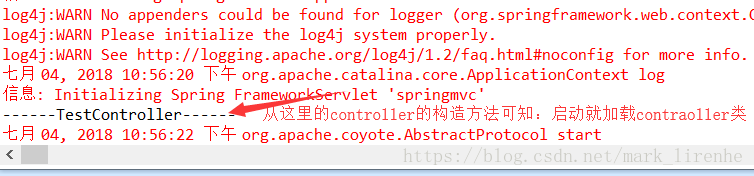
如果不能加载的话就是web.xml配置的问题。
springmvc+ajax——第一讲(搭建)的更多相关文章
- springmvc+ajax——第二讲(页面缓存)
springmvc+ajax+页面缓存(参考:https://www.cnblogs.com/liuling/archive/2013/07/25/2013-7-25-01.html) 必须设置响应头 ...
- bootstrap+Ajax+SSM(maven搭建)实现增删改查
https://www.jianshu.com/p/d76316b48e3e 源码: https://github.com/Ching-Lee/crud 功能点: 分页 数据校验 ajax Rest风 ...
- SpringMVC+Ajax实现文件批量上传和下载功能实例代码
需求: 文件批量上传,支持断点续传. 文件批量下载,支持断点续传. 使用JS能够实现批量下载,能够提供接口从指定url中下载文件并保存在本地指定路径中. 服务器不需要打包. 支持大文件断点下载.比如下 ...
- 《ArcGIS Engine+C#实例开发教程》第一讲桌面GIS应用程序框架的建立
原文:<ArcGIS Engine+C#实例开发教程>第一讲桌面GIS应用程序框架的建立 摘要:本讲主要是使用MapControl.PageLayoutControl.ToolbarCon ...
- 框架原理第一讲,熟悉常用的设计方式.(以MFC框架讲解)
框架原理第一讲,熟悉常用的设计方式.(以MFC框架讲解) 一丶什么是框架,以及框架的作用 什么是框架? 框架,简而言之就是把东西封装好了,使用框架开发可以快速开发程序,例如MFC程序的双击写代码. 为 ...
- 【AaronYang第一讲】ASP.NET MVC企业开发的基本环境[资源服务器概念]
学完了ASP.NET MVC4 IN ACTION 六波以后 企业开发演习 标签:AaronYang 茗洋 EasyUI1.3.4 ASP.NET MVC 3 本篇博客地址:http://ww ...
- SSM(Spring+SpringMVC+Mybatis)框架环境搭建(整合步骤)(一)
1. 前言 最近在写毕设过程中,重新梳理了一遍SSM框架,特此记录一下. 附上源码:https://gitee.com/niceyoo/jeenotes-ssm 2. 概述 在写代码之前我们先了解一下 ...
- SpringMVC笔记——SSM框架搭建简单实例
落叶枫桥 博客园 首页 新随笔 联系 订阅 管理 SpringMVC笔记——SSM框架搭建简单实例 简介 Spring+SpringMVC+MyBatis框架(SSM)是比较热门的中小型企业级项目开发 ...
- Spring+SpringMvc+Mybatis框架集成搭建教程
一.背景 最近有很多同学由于没有过SSM(Spring+SpringMvc+Mybatis , 以下简称SSM)框架的搭建的经历,所以在自己搭建SSM框架集成的时候,出现了这样或者那样的问题,很是苦恼 ...
随机推荐
- Python-数据库 基本SQL语句
1. 数据库是什么 2. MySQL安装 3. 用户授权 4. 数据库操作 - 数据表 - 数据类型 - 是否可以为空 - 自增 - 主键 - 外键 - 唯一索引 数据行 增 删 改 查 排序: or ...
- Golang的优雅重启
更新(2015年4月):Florian von Bock已将本文中描述的内容转换为一个名为endless的优秀Go包 . 如果您有Golang HTTP服务,可能需要重新启动它以升级二进制文件或更改某 ...
- Spring+SpringMVC+MyBatis的整合
1.基本概念 1.1.Spring Spring是一个开源框架,Spring是于2003 年兴起的一个轻量级的Java 开发框架,由Rod Johnson 在其著作Expert One-On-On ...
- (转)浅谈Hybrid技术的设计与实现
转载地址:https://www.cnblogs.com/yexiaochai/p/4921635.html 前言 浅谈Hybrid技术的设计与实现 浅谈Hybrid技术的设计与实现第二弹 浅谈Hyb ...
- swift 学习- 12 -- 方法
// 方法 是与某些特定类型相关的函数. 类, 结构体,枚举 都可以定义实例方法, 实例方法为给类型的实例封装了具体的任务与功能. 类, 结构体, 枚举 也可以定义类型方法, 类型方法与类型本身 ...
- js调用ajax案例2,使用ok
XMLHttpRequest 是 AJAX 的基础. XMLHttpRequest 对象所有现代浏览器均支持 XMLHttpRequest 对象(IE5 和 IE6 使用 ActiveXObject) ...
- C#概念总结(五)
1.C#特性 (Attribute) 特性适用于在运行时传递程序中的各中元素(比如 类.方法.结构.枚举.组件)的行为信息额声明性标签,可以通过使用特性向程序添加声明性信息,一个声明标签是通过放置在他 ...
- element-ui中用el-dialog+el-table+el-pagination实现文件默认选中且在分页的条件下有记忆功能
需求: 点击按钮,出现列表弹框,选择需要的选项确认后显示选中的选项.每次点击按钮,列表中默认显示之前选中的文件. el-table-column,设type属性为selection,实现表格中多行选择 ...
- java----Java的栈,堆,代码,静态存储区的存储顺序和位置
转载:https://blog.csdn.net/zhangbaoanhadoop/article/details/82193497
- ES6 Promise 全面总结
转载:点击查看原文 ES6 Promise对象 ES6中,新增了Promise对象,它主要用于处理异步回调代码,让代码不至于陷入回调嵌套的死路中. @-v-@ 1. Promise本质 Promise ...