
springmvc+ajax——第一讲(搭建)
下面是整个整合测试的代码:
ajax01.html
TestController
web.xml
springmvc.xml
applicationContext.xml
| <!DOCTYPE html> <html> <head> <title>index.html</title> <meta name="keywords" content="keyword1,keyword2,keyword3"> <meta name="description" content="this is my page"> <meta name="content-type" content="text/html; charset=gb2312"> <!--<link rel="stylesheet" type="text/css" href="./styles.css">--> <script type="text/javascript" charset="UTF-8"> var param = "ajaxget"; var xmlHttpRequest = null;//作为全局变量,否则在回调函数中报notdefined function ajaxSubmit(){ if(window.ActiveXObject){ xmlHttpRequest = new ActiveXObject("Microsoft.XMLHTTP"); }else if(window.XMLHttpRequest){ xmlHttpRequest = new XMLHttpRequest(); } if(xmlHttpRequest != null){ //document.write("xxx"); xmlHttpRequest.open("GET", "./testAjax?param="+param, true); xmlHttpRequest.onreadystatechange = ajaxCallBack;//没有括号 xmlHttpRequest.send(null); } } function ajaxCallBack(){ if(xmlHttpRequest.readyState == 4){ if(xmlHttpRequest.status == 200){ var responseText = xmlHttpRequest.responseText;//没有括号 document.getElementById("div1").innerHTML = responseText;//innerHTML没有括号 } } } </script> </head> <body> <input type="button" value="check" id="check" onclick="ajaxSubmit();"> <br> <div id="div1"></div> </body> </html> |
| package priv.lirenhe.js.controller; import java.io.IOException; import java.io.PrintWriter; import javax.servlet.http.HttpServletRequest; import javax.servlet.http.HttpServletResponse; import org.springframework.stereotype.Controller; import org.springframework.web.bind.annotation.RequestMapping; import org.springframework.web.bind.annotation.RequestMethod; @Controller public class TestController { public TestController() { System.out.println("------TestController------"); } @RequestMapping(value="/testAjax",method=RequestMethod.GET) public void testAjax(HttpServletRequest req,HttpServletResponse resp){ System.out.println("testAjax"); String param = null; param = req.getParameter("param"); System.out.println(param); PrintWriter pw = null; try { pw = resp.getWriter(); pw.print(param); } catch (IOException e) { e.printStackTrace(); }finally{ pw.flush(); pw.close(); System.out.println("finally"); } } } |
|
web.xml配置:注意不要使用<web:xxx>的标签 <?xml version="1.0" encoding="UTF-8"?> <web-app xmlns:xsi="http://www.w3.org/2001/XMLSchema-instance" |
| <?xml version="1.0" encoding="UTF-8"?> <!-- 必须有带mvc的 --> <beans xmlns="http://www.springframework.org/schema/beans" xmlns:xsi="http://www.w3.org/2001/XMLSchema-instance" xmlns:p="http://www.springframework.org/schema/p" xmlns:context="http://www.springframework.org/schema/context" xmlns:mvc="http://www.springframework.org/schema/mvc" xsi:schemaLocation="http://www.springframework.org/schema/beans http://www.springframework.org/schema/beans/spring-beans.xsd http://www.springframework.org/schema/mvc http://www.springframework.org/schema/mvc/spring-mvc-4.0.xsd http://www.springframework.org/schema/context http://www.springframework.org/schema/context/spring-context.xsd"> <context:component-scan base-package="priv.lirenhe.js.*"></context:component-scan> <mvc:annotation-driven /> <mvc:resources location="/" mapping="/**"/> <bean id="modelAndView" class="org.springframework.web.servlet.view.InternalResourceViewResolver"> <constructor-arg name="prefix" value="/"/> <constructor-arg name="suffix" value=".html"/> </bean> </beans> <!-- 包扫描器 注解驱动 静态资源 前缀后缀 --> |
|
applicationContext.xml配置: <?xml version="1.0" encoding="UTF-8"?> <beans xmlns="http://www.springframework.org/schema/beans" |
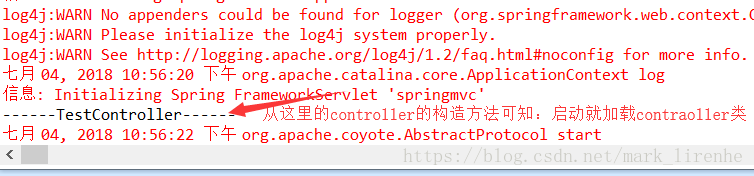
如果不能加载的话就是web.xml配置的问题。
springmvc+ajax——第一讲(搭建)的更多相关文章
- springmvc+ajax——第二讲(页面缓存)
springmvc+ajax+页面缓存(参考:https://www.cnblogs.com/liuling/archive/2013/07/25/2013-7-25-01.html) 必须设置响应头 ...
- bootstrap+Ajax+SSM(maven搭建)实现增删改查
https://www.jianshu.com/p/d76316b48e3e 源码: https://github.com/Ching-Lee/crud 功能点: 分页 数据校验 ajax Rest风 ...
- SpringMVC+Ajax实现文件批量上传和下载功能实例代码
需求: 文件批量上传,支持断点续传. 文件批量下载,支持断点续传. 使用JS能够实现批量下载,能够提供接口从指定url中下载文件并保存在本地指定路径中. 服务器不需要打包. 支持大文件断点下载.比如下 ...
- 《ArcGIS Engine+C#实例开发教程》第一讲桌面GIS应用程序框架的建立
原文:<ArcGIS Engine+C#实例开发教程>第一讲桌面GIS应用程序框架的建立 摘要:本讲主要是使用MapControl.PageLayoutControl.ToolbarCon ...
- 框架原理第一讲,熟悉常用的设计方式.(以MFC框架讲解)
框架原理第一讲,熟悉常用的设计方式.(以MFC框架讲解) 一丶什么是框架,以及框架的作用 什么是框架? 框架,简而言之就是把东西封装好了,使用框架开发可以快速开发程序,例如MFC程序的双击写代码. 为 ...
- 【AaronYang第一讲】ASP.NET MVC企业开发的基本环境[资源服务器概念]
学完了ASP.NET MVC4 IN ACTION 六波以后 企业开发演习 标签:AaronYang 茗洋 EasyUI1.3.4 ASP.NET MVC 3 本篇博客地址:http://ww ...
- SSM(Spring+SpringMVC+Mybatis)框架环境搭建(整合步骤)(一)
1. 前言 最近在写毕设过程中,重新梳理了一遍SSM框架,特此记录一下. 附上源码:https://gitee.com/niceyoo/jeenotes-ssm 2. 概述 在写代码之前我们先了解一下 ...
- SpringMVC笔记——SSM框架搭建简单实例
落叶枫桥 博客园 首页 新随笔 联系 订阅 管理 SpringMVC笔记——SSM框架搭建简单实例 简介 Spring+SpringMVC+MyBatis框架(SSM)是比较热门的中小型企业级项目开发 ...
- Spring+SpringMvc+Mybatis框架集成搭建教程
一.背景 最近有很多同学由于没有过SSM(Spring+SpringMvc+Mybatis , 以下简称SSM)框架的搭建的经历,所以在自己搭建SSM框架集成的时候,出现了这样或者那样的问题,很是苦恼 ...
随机推荐
- 纯CSS3轮播图
<!DOCTYPE html><html lang="en"><head> <meta charset="UTF-8" ...
- swift 实践- 04 -- UIButton
import UIKit class ViewController: UIViewController { // 按钮的创建 // UIButtonType.system: 前面不带图标, 默认文字为 ...
- js去除空格12种方法
注:本文非本人原著:原文作者: 黄卉 <js去除空格12种方法> //JS去除空格的方法目前共有12种: //实现1 String.prototype.trim = function() ...
- k倍区间
看大佬的代码看了半天,终于算是懂了 标题: k倍区间 给定一个长度为N的数列,A1, A2, … AN,如果其中一段连续的子序列Ai, Ai+1, … Aj(i <= j)之和是K的倍数,我们就 ...
- 获取checkbox勾选的id
需求描述:做批量删除或者批量修改的时候需要获得多个id,根据checkbox勾选来获取对应的d 两种方法: //html代码<table id="table1"> &l ...
- bzoj 4011
看了好多篇题解才看懂的题,我实在太菜了... 首先根据一个我不知道的算法,可以证明在没有加入新的边的时候,原图的所有生成树的方案数就是所有点(除1以外)的度之积 那么在新加入这条边之后,我们仍然可以这 ...
- time与datetime模块
在python中,通常用下面几种方式来表示时间: 时间戳(timestamp):通常来说,时间戳表示的是从1970年1月1日00:00:00开始按秒计算的偏移量. 格式化的时间字符串(format s ...
- Oracle下载 OPatch
今天被朋友问及,如何下载OPatch ...我当时有些凌乱的.事后想想,人与人的思维是不同的,对待同一个问题,有人觉得很简单,有人觉得无从下手 . 乱不多说了.开始说明下吧. 1. 首先要有一个MOS ...
- G: Dave的时空迷阵(next数组)
G: Dave的时空迷阵 Time Limit: 1 s Memory Limit: 128 MB Submit My Status Problem Description 皇家理工本部隐藏 ...
- lsattr chattr 文件安全设置
[root@test_android_client_download xianlaigames]# lsattr -------------e- ./jilinmj.apk[root@test_and ...