
第十六篇-使用CheckBox实现多项选择
话不多说,先上效果图
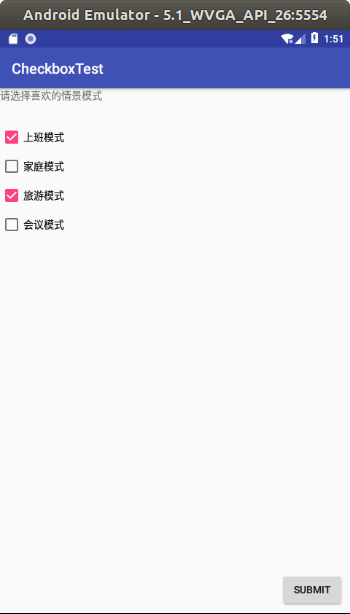
屏幕截图方法,全屏截图按键盘print screen就行,活动窗口截图,按住ALT+print screen。
图片默认保存在home/picture路径下。可以通过自带的图片处理软件shotwell打开
先建一个empty Activity的项目,然后修改MainActivity.java,res/String.xml,activity_main.xml。
MainActivity.java
package com.example.aimee.checkboxtest;

import android.app.Activity;

import android.support.v7.app.AppCompatActivity;

import android.os.Bundle;

import android.view.Gravity;

import android.view.View;

import android.widget.Button;

import android.widget.CheckBox;

import android.widget.CompoundButton;

import android.widget.RadioGroup;

import android.widget.Toast;

public class MainActivity extends AppCompatActivity {

    CheckBox checkbox1;

    CheckBox checkbox2;

    CheckBox checkbox3;

    CheckBox checkbox4;

    Button button;

    @Override

    protected void onCreate(Bundle savedInstanceState) {

        super.onCreate(savedInstanceState);

        setContentView(R.layout.activity_main);

        checkbox1=(CheckBox) findViewById(R.id.checkBox01);

        checkbox2=(CheckBox) findViewById(R.id.checkBox02);

        checkbox3=(CheckBox) findViewById(R.id.checkBox03);

        checkbox4=(CheckBox) findViewById(R.id.checkBox04);

        button=(Button) findViewById(R.id.Submit);

        checkbox1.setOnCheckedChangeListener(new CheckBoxListener());

        checkbox2.setOnCheckedChangeListener(new CheckBoxListener());

        checkbox3.setOnCheckedChangeListener(new CheckBoxListener());

        checkbox4.setOnCheckedChangeListener(new CheckBoxListener());

        button.setOnClickListener((View.OnClickListener) new ButtonClickListener());

    }

    class CheckBoxListener implements CompoundButton.OnCheckedChangeListener {

        public void onCheckedChanged(CompoundButton buttonView,boolean isChecked){

            if(isChecked){

                Toast toast=Toast.makeText(MainActivity.this,buttonView.getText()+"被选择",Toast.LENGTH_SHORT);

                toast.setGravity(Gravity.CENTER,5,5);

                toast.show();

            }else{

                Toast toast=Toast.makeText(MainActivity.this,buttonView.getText()+"取消选择",Toast.LENGTH_SHORT);

                toast.setGravity(Gravity.CENTER,5,5);

                toast.show();

            }

        }

    }

    class ButtonClickListener implements View.OnClickListener{

        public void onClick(View arg0){

            String str="";

            if(checkbox1.isChecked())

                str=str+checkbox1.getText();

            if(checkbox2.isChecked())

                str=str+checkbox2.getText();

            if(checkbox3.isChecked())

                str=str+checkbox3.getText();

            if(checkbox4.isChecked())

                str=str+checkbox4.getText();

            Toast.makeText(MainActivity.this,str+"被选择",Toast.LENGTH_LONG).show();

        }

    }

}
activity_main.xml
<?xml version="1.0" encoding="utf-8"?>

<android.support.constraint.ConstraintLayout xmlns:android="http://schemas.android.com/apk/res/android"

    xmlns:app="http://schemas.android.com/apk/res-auto"

    xmlns:tools="http://schemas.android.com/tools"

    android:layout_width="match_parent"

    android:layout_height="match_parent"

    tools:context=".MainActivity">

    <TextView

        android:id="@+id/textView"

        android:layout_width="match_parent"

        android:layout_height="wrap_content"

        android:text="@string/Title" />

    <CheckBox

        android:id="@+id/checkBox01"

        android:layout_width="wrap_content"

        android:layout_height="wrap_content"

        android:layout_marginTop="32dp"

        android:text="@string/Profile1"

        app:layout_constraintTop_toBottomOf="@+id/textView"

        tools:ignore="MissingConstraints"

        tools:layout_editor_absoluteX="135dp" />

    <CheckBox

        android:id="@+id/checkBox02"

        android:layout_width="wrap_content"

        android:layout_height="wrap_content"

        android:layout_marginTop="8dp"

        android:text="@string/Profile2"

        app:layout_constraintTop_toBottomOf="@+id/checkBox01"

        tools:layout_editor_absoluteX="135dp"

        tools:ignore="MissingConstraints" />

    <CheckBox

        android:id="@+id/checkBox03"

        android:layout_width="wrap_content"

        android:layout_height="wrap_content"

        android:layout_marginTop="8dp"

        android:text="@string/Profile3"

        app:layout_constraintTop_toBottomOf="@+id/checkBox02"

        tools:layout_editor_absoluteX="135dp"

        tools:ignore="MissingConstraints" />

    <CheckBox

        android:id="@+id/checkBox04"

        android:layout_width="wrap_content"

        android:layout_height="wrap_content"

        android:layout_marginTop="8dp"

        android:text="@string/Profile4"

        app:layout_constraintTop_toBottomOf="@+id/checkBox03"

        tools:layout_editor_absoluteX="135dp"

        tools:ignore="MissingConstraints" />

    <Button

        android:id="@+id/Submit"

        android:layout_width="wrap_content"

        android:layout_height="wrap_content"

        android:layout_marginBottom="8dp"

        android:layout_marginEnd="8dp"

        android:text="@string/Submit"

        app:layout_constraintBottom_toBottomOf="parent"

        app:layout_constraintEnd_toEndOf="parent" />

</android.support.constraint.ConstraintLayout>
String.xml
<resources>

    <string name="app_name">CheckboxTest</string>

    <string name="Title">请选择喜欢的情景模式</string>

    <string name="Profile1">上班模式</string>

    <string name="Profile2">家庭模式</string>

    <string name="Profile3">旅游模式</string>

    <string name="Profile4">会议模式</string>

    <string name="Submit">Submit</string>

</resources>
至此,一个简单的多项选择就完成了。
有兴趣也可以设置其他的项目。
第十六篇-使用CheckBox实现多项选择的更多相关文章
- 解剖SQLSERVER 第十六篇 OrcaMDF RawDatabase --MDF文件的瑞士军刀(译)
解剖SQLSERVER 第十六篇 OrcaMDF RawDatabase --MDF文件的瑞士军刀(译) http://improve.dk/orcamdf-rawdatabase-a-swiss-a ...
- Python之路【第十六篇】:Django【基础篇】
Python之路[第十六篇]:Django[基础篇] Python的WEB框架有Django.Tornado.Flask 等多种,Django相较与其他WEB框架其优势为:大而全,框架本身集成了O ...
- 跟我学SpringCloud | 第十六篇:微服务利剑之APM平台(二)Pinpoint
目录 SpringCloud系列教程 | 第十六篇:微服务利剑之APM平台(二)Pinpoint 1. Pinpoint概述 2. Pinpoint主要特性 3. Pinpoint优势 4. Pinp ...
- Egret入门学习日记 --- 第十六篇(书中 6.10~7.3节 内容)
第十六篇(书中 6.10~7.3节 内容) 昨天搞定了6.9节,今天就从6.10节开始. 其实这个蛮简单的. 这是程序员模式. 这是设计师模式. 至此,6.10节 完毕. 开始 6.11节. 有点没营 ...
- Python自动化 【第十六篇】:JavaScript作用域和Dom收尾
本节内容: javascript作用域 DOM收尾 JavaScript作用域 JavaScript的作用域一直以来是前端开发中比较难以理解的知识点,对于JavaScript的作用域主要记住几句话,走 ...
- Struts2(十六篇)
(一)Struts2框架概述 (二)Struts2配置文件 (三)Struts2的Action(简单讲解版) (四)Struts2的Action(深入讲解版) (五)Struts2处理结果管理 (六) ...
- 第十六篇 -- QListWidget与QToolButton(功能)
效果图: 添加的部分,就是对几个action绑定了槽函数,完成相应的功能. listWidget操作的都是item,添加一个item,删除一个item,插入一个item等等.那么只需要知道item的几 ...
- Python之路(第三十六篇)并发编程:进程、同步异步、阻塞非阻塞
一.理论基础 进程的概念起源于操作系统,是操作系统最核心的概念,也是操作系统提供的最古老也是最重要的抽象概念之一.操作系统的其他所有内容都是围绕进程的概念展开的. 即使可以利用的cpu只有一个(早期的 ...
- 【Python之路】第十六篇--Web框架之Tornado
概述 Tornado 是 FriendFeed 使用的可扩展的非阻塞式 web 服务器及其相关工具的开源版本.这个 Web 框架看起来有些像web.py 或者 Google 的 webapp,不过为了 ...
随机推荐
- MySQL in型子查询陷阱
现在有两个表,table1和table2,table1有1千万数据(id 主键索引),table2有三条数据(uid字段 3,5,7): select * from table1 where id i ...
- CSS边框效果
前面的话 本文将详细介绍CSS边框效果 半透明边框 border:10px solid hsla(0, 0%, 100%,.5); background-clip:padding-box; 缝边效果 ...
- Jquery实现检测用户输入用户名和密码不能为空
要求 1.用户名和密码为空点击登录时提示相应的提示 2.获取用户名输入框时,错误提示清除 思路 1.创建1个input-text标签和1个input-password标签,1个input-botton ...
- MySQL官方教程及各平台的安装教程和配置详解入口
官方文档入口: https://dev.mysql.com/doc/ 一般选择MySQL服务器版本入口: https://dev.mysql.com/doc/refman/en/ 在右侧有版本选择: ...
- jdk6使用WebSocket
pom.xml <dependency> <groupId>org.java-websocket</groupId> <artifactId>Java- ...
- 51Nod 1344 走格子
参考自:https://www.cnblogs.com/ECJTUACM-873284962/p/6445381.html 1344 走格子 基准时间限制:1 秒 空间限制:131072 KB 分值: ...
- 「洛谷P1516」 青蛙的约会
洛谷题号:P1516 出处:? 主要算法:数论 难度:4.4 思路分析: 典型的同余方程.由于是纬线,绕一圈是可以绕回来的,所以是可以取模的. 阅读题目,很容易得到同余方程$ x + tm ≡ y + ...
- 【XSY2701】异或图 线性基 容斥原理
题目描述 定义两个图\(G_1\)与\(G_2\)的异或图为一个图\(G\),其中图\(G\)的每条边在\(G_1\)与\(G_2\)中出现次数和为\(1\). 给你\(m\)个图,问你这\(m\)个 ...
- MT【289】含参绝对值的最大值之三
已知$a>0$,函数$f(x)=e^x+3ax^2-2e x-a+1$,(1)若$f(x)$在$[0,1]$上单调递减,求$a$的取值范围.(2)$|f(x)|\le1$对任意$x\in[0,1 ...
- LaTeX教程与下载
LaTeX教程与下载如下: 其实,下载好CTEX 的步骤只有三步.第一步下载好CTEX ,第二步下载编辑器Texstudio ,第三步安装配置TexStudio 详细步骤: 第一步:下载CTEX La ...