
position 小结
position:
- static
- fixed
- relative
- absolute
- sticky
1.static
static定位是HTML元素的默认值,即没有定位,元素出现在正常的流中。因此,这种定位不会受到top,bottom,left,right的影响
正常:
<!DOCTYPE html>

<html lang="en">

<head>

    <meta charset="UTF-8">

    <title>Document</title>

    <style type="text/css">

        div{

            width: 100px;

            height: 100px;

            background-color: red;

        }

    </style>

</head>

<body>

    <div></div>

</body>

</html>
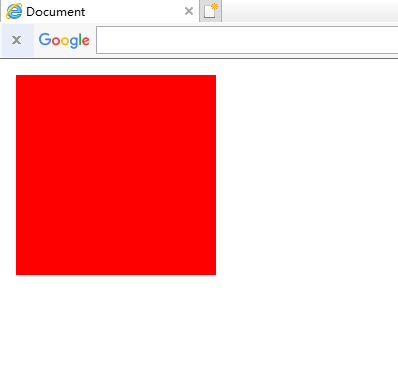
插入后:

<!DOCTYPE html>

<html lang="en">

<head>

    <meta charset="UTF-8">

    <title>Document</title>

    <style type="text/css">

        div{

            width: 100px;

            height: 100px;

            background-color: red;

            /*这里*/

            position: static;

            top: -100px;

            left: -100px;

        }

    </style>

</head>

<body>

    <div></div>

</body>

</html>
2.fixed
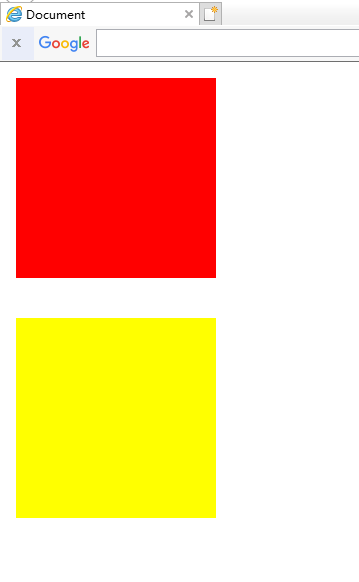
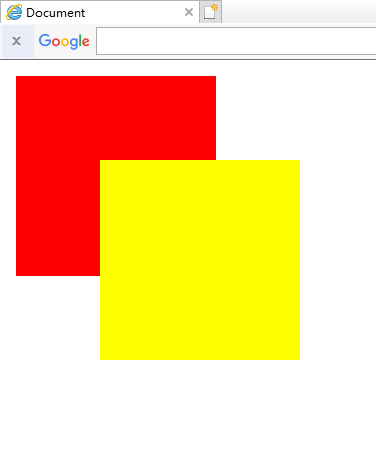
fixed定位是指元素的位置相对于浏览器窗口是固定的位置,即使窗口滚动它也不会滚动,且fixed定位会使元素脱离文档流,即,元素不占据空间,比如,网页经常跳出来的小广告。
正常:
<!DOCTYPE html>

<html lang="en">

<head>

    <meta charset="UTF-8">

    <title>Document</title>

    <style type="text/css">

        .top{

            width: 100px;

            height: 100px;

            background-color: red;

            margin-bottom: 20px;

        }

        .bottom{

            width: 100px;

            height: 100px;

            background-color: yellow;

            margin-bottom: 20px;

        }

    </style>

</head>

<body>

    <div class="top"></div>

    <div class="bottom"></div>

</body>

</html>
插入后:
<!DOCTYPE html>

<html lang="en">

<head>

    <meta charset="UTF-8">

    <title>Document</title>

    <style type="text/css">

        .top{

            width: 100px;

            height: 100px;

            background-color: red;

            margin-bottom: 20px;

        }

        .bottom{

            width: 100px;

            height: 100px;

            background-color: yellow;

            margin-bottom: 20px;

            /*这里*/

            position: fixed;

            top: 50px;

            left: 50px;

        }

    </style>

</head>

<body>

    <div class="top"></div>

    <div class="bottom"></div>

</body>

</html>
注意:fixed定位在IE7和IE8下需要描述!DOCTYPE才能支持
3.relative
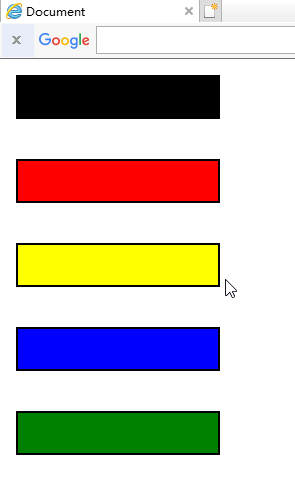
相对定位元素的定位是相对它自己的正常位置的定位
正常:
<!DOCTYPE html>

<html lang="en">

<head>

    <meta charset="UTF-8">

    <title>Document</title>

    <style type="text/css">

        .normal{

            width: 100px;

            height: 20px;

            background-color: black;

            border: 1px solid black;

            margin-bottom: 20px;

        }

        .top{

            width: 100px;

            height: 20px;

            background-color: red;

            border: 1px solid black;

            margin-bottom: 20px;

        }

        .bottom{

            width: 100px;

            height: 20px;

            background-color: yellow;

            border: 1px solid black;

            margin-bottom: 20px;

        }

        .left{

            width: 100px;

            height: 20px;

            background-color: blue;

            border: 1px solid black;

            margin-bottom: 20px;

        }

        .right{

            width: 100px;

            height: 20px;

            background-color: green;

            border: 1px solid black;

            margin-bottom: 20px;

        }

    </style>

</head>

<body>

    <div class="normal"></div>

    <div class="top"></div>

    <div class="bottom"></div>

    <div class="left"></div>

    <div class="right"></div>

</body>

</html>
插入后:
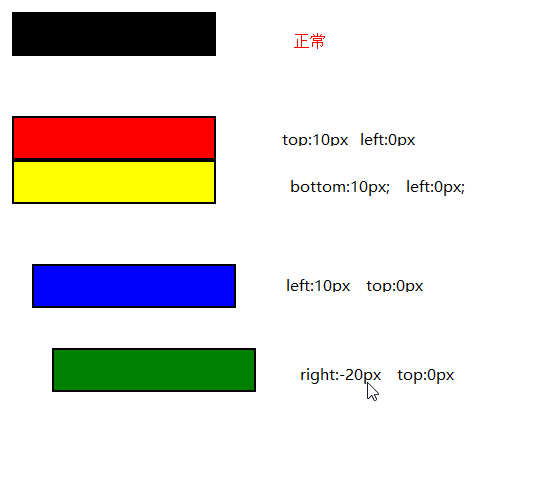
<!DOCTYPE html>

<html lang="en">

<head>

    <meta charset="UTF-8">

    <title>Document</title>

    <style type="text/css">

        .normal{

            width: 100px;

            height: 20px;

            background-color: black;

            border: 1px solid black;

            margin-bottom: 20px;

        }

        .top{

            width: 100px;

            height: 20px;

            background-color: red;

            border: 1px solid black;

            margin-bottom: 20px;

            /*这里*/

            position: relative;

            top: 10px;

            left: 0px;

        }

        .bottom{

            width: 100px;

            height: 20px;

            background-color: yellow;

            border: 1px solid black;

            margin-bottom: 20px;

            /*这里*/

            position: relative;

            left: 0px;

            bottom: 10px;

        }

        .left{

            width: 100px;

            height: 20px;

            background-color: blue;

            border: 1px solid black;

            margin-bottom: 20px;

            /*这里*/

            position: relative;

            left: 10px;

            top: 0px;

        }

        .right{

            width: 100px;

            height: 20px;

            background-color: green;

            border: 1px solid black;

            margin-bottom: 20px;

            /*这里*/

            position: relative;

            right: -20px;

            top: 0px;

        }

    </style>

</head>

<body>

    <div class="normal"></div>

    <div class="top"></div>

    <div class="bottom"></div>

    <div class="left"></div>

    <div class="right"></div>

</body>

</html>
注意:这里移动后是移动前的负的位置
移动后对于移动前:如果值为负数,则直接换成正数
如果值为正数,则直接改变为相反方向
即使相对元素的内容移动了,但是预留的空间的元素,仍然保持正常流动,也就是说相对移动后不会对下面的元素造成影响

可以对比一下,蓝色的框并没有因为黄色的框移上去而跟着移上去,黄色的框仍然保持原来的占位
4.absolute
绝对定位的元素相对于最近的已经定位的父元素,如果元素没有已经定位的父元素,那么它的位置相对于<html>
正常:

<!DOCTYPE html>

<html lang="en">

<head>

    <meta charset="UTF-8">

    <title>Document</title>

    <style type="text/css">

        .father{

            width: 100px;

            height: 100px;

            background-color: red;

            margin: 0 auto;

        }

        .son{

            width: 30px;

            height: 30px;

            background-color: yellow;

        }

    </style>

</head>

<body>

    <div class="father">

        <div class="son"></div>

    </div>

</body>

</html>
没有已经定位的父元素:

<!DOCTYPE html>

<html lang="en">

<head>

    <meta charset="UTF-8">

    <title>Document</title>

    <style type="text/css">

        .father{

            width: 100px;

            height: 100px;

            background-color: red;

            margin: 0 auto;

        }

        .son{

            width: 30px;

            height: 30px;

            background-color: yellow;

            /*这里*/

            position: absolute;

            top: 20px;

            left: 50px;

        }

    </style>

</head>

<body>

    <div class="father">

        <div class="son"></div>

    </div>

</body>

</html>
有已经定位的父元素:

<!DOCTYPE html>

<html lang="en">

<head>

    <meta charset="UTF-8">

    <title>Document</title>

    <style type="text/css">

        .father{

            width: 100px;

            height: 100px;

            background-color: red;

            margin: 0 auto;

            /*这里*/

            position: relative;

        }

        .son{

            width: 30px;

            height: 30px;

            background-color: yellow;

            /*这里*/

            position: absolute;

            top: 20px;

            left: 50px;

        }

    </style>

</head>

<body>

    <div class="father">

        <div class="son"></div>

    </div>

</body>

</html>
position 小结的更多相关文章
- css position小结
relative:可使top,right,bottom,left等相对于自身位置来进行偏移:若无则这些偏移都不会起作用 absolute:寻找离自己最近position为relative或absolu ...
- 定位属性position
定位属性position小结 1.元素为fixed(固定的),则是固定定位,即使是子元素,也不参考父元素的位置,即以浏览器作为参考定位.相当于电脑屏幕的一只蚂蚁,你无论怎么滑动屏幕,还是在原来的位置. ...
- position:absolute/relative/fixed小结
1.绝对定位:position:absolute; 当一个div块的位置被定义为绝对定位absolute时,也就意味着它失去了文档流的位置,后面的文档流会紧跟着补上来接替它的位置.如果上下左右的绝对偏 ...
- position和float小结
position属性值 Position的属性值共有四个static.relative.absolute.fixed. static 所有元素在默认的情况下position属性均为static,而我们 ...
- CSS - position属性小结
Relative: 属于文档流,针对自身进行偏移: Absolute: 脱离文档流,针对最近的定位元素进行偏移,如果没有,则针对根元素,即body标签尽心偏移: Fixed: 和absolute基本一 ...
- CSS属性小结之--半透明处理
项目中经常有遇到需求半透明的情况,如图片.文字.容器.背景等等,每次都要去翻以前的项目,不甚其烦.现在一次性做个小结,方便自己查阅,也同时分享给大家: 一. 元素容器透明 .div{ opacity: ...
- 关于用display:table让元素居中的小结
我们都知道让元素垂直居中有一种简单的方法:给需要居中的元素用一个父级包起来,并给它设置样式:display:table:同时给这个父级设置好高度:再给需要居中的元素一个display:table-ce ...
- position:absolute绝对定位解读
position:absolute绝对定位解读 摘要 用四段代码解释absolute的定位问题,进而从概念的角度切实解决html布局问题. 一.背景 常常遇到这样一些问题,很容易混淆.“浏览器屏 ...
- Spring boot中使用springfox来生成Swagger Specification小结
Rest接口对应Swagger Specification路径获取办法: 根据location的值获取api json描述文件 也许有同学会问,为什么搞的这么麻烦,api json描述文件不就是h ...
随机推荐
- 一些用Css实现的效果
今天写一个笔试题,其中有一个是用css实现直角梯形的效果,我给出的答案是: <style> .wrap{ width: 100px; height: 50px; border-top:90 ...
- HTML5代码段
<!DOCTYPE html> <html> <head> <meta charset="utf-8"> <title> ...
- JS-jquery对象和dom对象的属性操作区别
<label class="">时间1</label> <label class="">时间2</label> ...
- 这是一个新的开始at this very monment
简单的介绍下此时自己的情况,和对近几年所做的事做一个总结,并展望下自己的未来和对自己的期待.我会将我的博客分成两种,一个是我的学习笔记,另一个是我的生活记录. 2018年六月底我毕业于一个普通的二本, ...
- Tomcat服务相关配置
安装服务: 进入安装目录-> bin ,在空白处按住shift+鼠标右键 ->在此处运行DOS命令窗口,将service.bat文件拖拽到命令窗口中,按enter键运行, 出现了“Usag ...
- windows下的mongodb安装与配置
一.下载mongodb安装文件 https://www.mongodb.com/download-center/community 选择zip压缩包方式,如:mongodb-win32-x86_64- ...
- storm1.1.0 drpc 部署和调用测试
一.配置集群storm.yaml文件,配置drpc.server 二.部署到linux上,开启nimbus,drpc,supervisor 等服务 /opt/module/storm-1.1.0/bi ...
- 关于PHP架构师进阶的一些思考
相信大家都有感觉,就是当程序员写业务写了几年后,就会有想进阶的想法,技术方面当然就是架构师了,然后具体从哪些方面丰富自己才能个达到目的呢?大部分人可能会很迷茫,当然也包括我, 最近和很多大牛交流了一些 ...
- oracle的部分增删查改
1. 创建表空间 create tablespace (demo)表名 logging datafile( 表空间存放的位置) ‘D:\app\Administrator\oradata\orcl\ ...
- 关于sql优化的一些点
慢查询日志 参考:https://www.cnblogs.com/saneri/p/6656161.html 查询是否开启慢查询日志: show variables like '%slow_query ...