
position 小结
position:
- static
- fixed
- relative
- absolute
- sticky
1.static
static定位是HTML元素的默认值,即没有定位,元素出现在正常的流中。因此,这种定位不会受到top,bottom,left,right的影响
正常:
<!DOCTYPE html>

<html lang="en">

<head>

    <meta charset="UTF-8">

    <title>Document</title>

    <style type="text/css">

        div{

            width: 100px;

            height: 100px;

            background-color: red;

        }

    </style>

</head>

<body>

    <div></div>

</body>

</html>
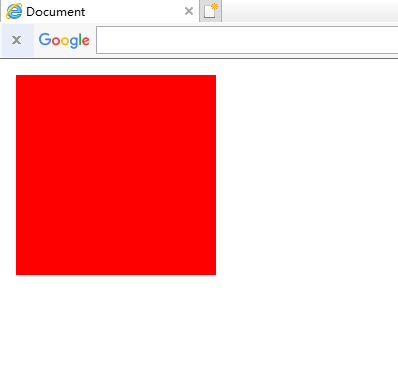
插入后:

<!DOCTYPE html>

<html lang="en">

<head>

    <meta charset="UTF-8">

    <title>Document</title>

    <style type="text/css">

        div{

            width: 100px;

            height: 100px;

            background-color: red;

            /*这里*/

            position: static;

            top: -100px;

            left: -100px;

        }

    </style>

</head>

<body>

    <div></div>

</body>

</html>
2.fixed
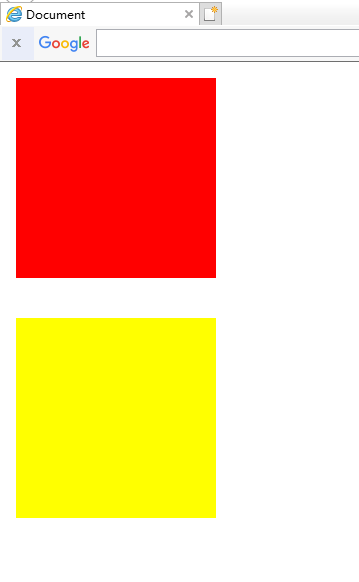
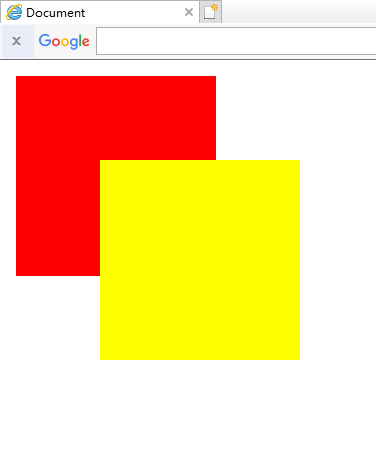
fixed定位是指元素的位置相对于浏览器窗口是固定的位置,即使窗口滚动它也不会滚动,且fixed定位会使元素脱离文档流,即,元素不占据空间,比如,网页经常跳出来的小广告。
正常:
<!DOCTYPE html>

<html lang="en">

<head>

    <meta charset="UTF-8">

    <title>Document</title>

    <style type="text/css">

        .top{

            width: 100px;

            height: 100px;

            background-color: red;

            margin-bottom: 20px;

        }

        .bottom{

            width: 100px;

            height: 100px;

            background-color: yellow;

            margin-bottom: 20px;

        }

    </style>

</head>

<body>

    <div class="top"></div>

    <div class="bottom"></div>

</body>

</html>
插入后:
<!DOCTYPE html>

<html lang="en">

<head>

    <meta charset="UTF-8">

    <title>Document</title>

    <style type="text/css">

        .top{

            width: 100px;

            height: 100px;

            background-color: red;

            margin-bottom: 20px;

        }

        .bottom{

            width: 100px;

            height: 100px;

            background-color: yellow;

            margin-bottom: 20px;

            /*这里*/

            position: fixed;

            top: 50px;

            left: 50px;

        }

    </style>

</head>

<body>

    <div class="top"></div>

    <div class="bottom"></div>

</body>

</html>
注意:fixed定位在IE7和IE8下需要描述!DOCTYPE才能支持
3.relative
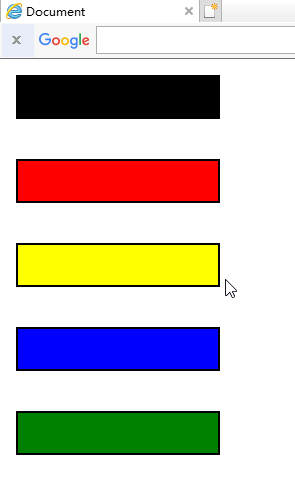
相对定位元素的定位是相对它自己的正常位置的定位
正常:
<!DOCTYPE html>

<html lang="en">

<head>

    <meta charset="UTF-8">

    <title>Document</title>

    <style type="text/css">

        .normal{

            width: 100px;

            height: 20px;

            background-color: black;

            border: 1px solid black;

            margin-bottom: 20px;

        }

        .top{

            width: 100px;

            height: 20px;

            background-color: red;

            border: 1px solid black;

            margin-bottom: 20px;

        }

        .bottom{

            width: 100px;

            height: 20px;

            background-color: yellow;

            border: 1px solid black;

            margin-bottom: 20px;

        }

        .left{

            width: 100px;

            height: 20px;

            background-color: blue;

            border: 1px solid black;

            margin-bottom: 20px;

        }

        .right{

            width: 100px;

            height: 20px;

            background-color: green;

            border: 1px solid black;

            margin-bottom: 20px;

        }

    </style>

</head>

<body>

    <div class="normal"></div>

    <div class="top"></div>

    <div class="bottom"></div>

    <div class="left"></div>

    <div class="right"></div>

</body>

</html>
插入后:
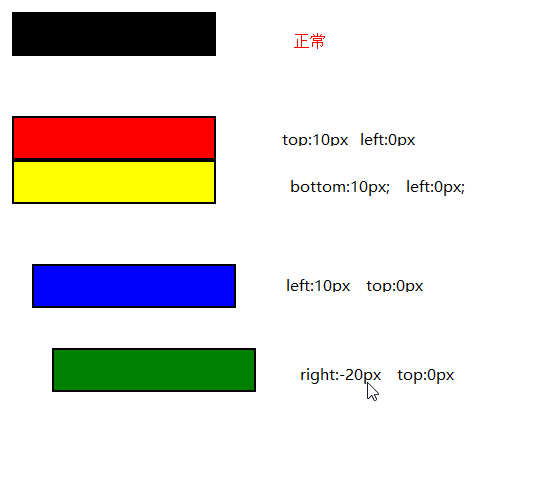
<!DOCTYPE html>

<html lang="en">

<head>

    <meta charset="UTF-8">

    <title>Document</title>

    <style type="text/css">

        .normal{

            width: 100px;

            height: 20px;

            background-color: black;

            border: 1px solid black;

            margin-bottom: 20px;

        }

        .top{

            width: 100px;

            height: 20px;

            background-color: red;

            border: 1px solid black;

            margin-bottom: 20px;

            /*这里*/

            position: relative;

            top: 10px;

            left: 0px;

        }

        .bottom{

            width: 100px;

            height: 20px;

            background-color: yellow;

            border: 1px solid black;

            margin-bottom: 20px;

            /*这里*/

            position: relative;

            left: 0px;

            bottom: 10px;

        }

        .left{

            width: 100px;

            height: 20px;

            background-color: blue;

            border: 1px solid black;

            margin-bottom: 20px;

            /*这里*/

            position: relative;

            left: 10px;

            top: 0px;

        }

        .right{

            width: 100px;

            height: 20px;

            background-color: green;

            border: 1px solid black;

            margin-bottom: 20px;

            /*这里*/

            position: relative;

            right: -20px;

            top: 0px;

        }

    </style>

</head>

<body>

    <div class="normal"></div>

    <div class="top"></div>

    <div class="bottom"></div>

    <div class="left"></div>

    <div class="right"></div>

</body>

</html>
注意:这里移动后是移动前的负的位置
移动后对于移动前:如果值为负数,则直接换成正数
如果值为正数,则直接改变为相反方向
即使相对元素的内容移动了,但是预留的空间的元素,仍然保持正常流动,也就是说相对移动后不会对下面的元素造成影响

可以对比一下,蓝色的框并没有因为黄色的框移上去而跟着移上去,黄色的框仍然保持原来的占位
4.absolute
绝对定位的元素相对于最近的已经定位的父元素,如果元素没有已经定位的父元素,那么它的位置相对于<html>
正常:

<!DOCTYPE html>

<html lang="en">

<head>

    <meta charset="UTF-8">

    <title>Document</title>

    <style type="text/css">

        .father{

            width: 100px;

            height: 100px;

            background-color: red;

            margin: 0 auto;

        }

        .son{

            width: 30px;

            height: 30px;

            background-color: yellow;

        }

    </style>

</head>

<body>

    <div class="father">

        <div class="son"></div>

    </div>

</body>

</html>
没有已经定位的父元素:

<!DOCTYPE html>

<html lang="en">

<head>

    <meta charset="UTF-8">

    <title>Document</title>

    <style type="text/css">

        .father{

            width: 100px;

            height: 100px;

            background-color: red;

            margin: 0 auto;

        }

        .son{

            width: 30px;

            height: 30px;

            background-color: yellow;

            /*这里*/

            position: absolute;

            top: 20px;

            left: 50px;

        }

    </style>

</head>

<body>

    <div class="father">

        <div class="son"></div>

    </div>

</body>

</html>
有已经定位的父元素:

<!DOCTYPE html>

<html lang="en">

<head>

    <meta charset="UTF-8">

    <title>Document</title>

    <style type="text/css">

        .father{

            width: 100px;

            height: 100px;

            background-color: red;

            margin: 0 auto;

            /*这里*/

            position: relative;

        }

        .son{

            width: 30px;

            height: 30px;

            background-color: yellow;

            /*这里*/

            position: absolute;

            top: 20px;

            left: 50px;

        }

    </style>

</head>

<body>

    <div class="father">

        <div class="son"></div>

    </div>

</body>

</html>
position 小结的更多相关文章
- css position小结
relative:可使top,right,bottom,left等相对于自身位置来进行偏移:若无则这些偏移都不会起作用 absolute:寻找离自己最近position为relative或absolu ...
- 定位属性position
定位属性position小结 1.元素为fixed(固定的),则是固定定位,即使是子元素,也不参考父元素的位置,即以浏览器作为参考定位.相当于电脑屏幕的一只蚂蚁,你无论怎么滑动屏幕,还是在原来的位置. ...
- position:absolute/relative/fixed小结
1.绝对定位:position:absolute; 当一个div块的位置被定义为绝对定位absolute时,也就意味着它失去了文档流的位置,后面的文档流会紧跟着补上来接替它的位置.如果上下左右的绝对偏 ...
- position和float小结
position属性值 Position的属性值共有四个static.relative.absolute.fixed. static 所有元素在默认的情况下position属性均为static,而我们 ...
- CSS - position属性小结
Relative: 属于文档流,针对自身进行偏移: Absolute: 脱离文档流,针对最近的定位元素进行偏移,如果没有,则针对根元素,即body标签尽心偏移: Fixed: 和absolute基本一 ...
- CSS属性小结之--半透明处理
项目中经常有遇到需求半透明的情况,如图片.文字.容器.背景等等,每次都要去翻以前的项目,不甚其烦.现在一次性做个小结,方便自己查阅,也同时分享给大家: 一. 元素容器透明 .div{ opacity: ...
- 关于用display:table让元素居中的小结
我们都知道让元素垂直居中有一种简单的方法:给需要居中的元素用一个父级包起来,并给它设置样式:display:table:同时给这个父级设置好高度:再给需要居中的元素一个display:table-ce ...
- position:absolute绝对定位解读
position:absolute绝对定位解读 摘要 用四段代码解释absolute的定位问题,进而从概念的角度切实解决html布局问题. 一.背景 常常遇到这样一些问题,很容易混淆.“浏览器屏 ...
- Spring boot中使用springfox来生成Swagger Specification小结
Rest接口对应Swagger Specification路径获取办法: 根据location的值获取api json描述文件 也许有同学会问,为什么搞的这么麻烦,api json描述文件不就是h ...
随机推荐
- VirtualBox 休眠恢复后无法联网解决办法
环境:lubuntu 首先ifconfig查看网卡名,我这里是enp0s3. 接着: sudo ifconfig enp0s3 down sudo ifconfig enp0s3 up sudo dh ...
- python--第十九天总结(Django)
1.静态资源导入 {#在顶部load 一个staticfiles#} {% load staticfiles %} {#在底部使用#} <script src='{% static " ...
- 神经网络训练tricks
神经网络构建好,训练不出好的效果怎么办?明明说好的拟合任意函数(一般连续)(为什么?可以参考http://neuralnetworksanddeeplearning.com/),说好的足够多的数据(h ...
- python跨平台注释
使python程序运行在window以外的平台上 !# user/bin/python
- aruba 开启802.1X认证
1.即在ac上指定一个radius server认证 2.创建本地账户测试
- 生成器函数yield
先看一个栗子: # -*- coding:UTF-8 -*- __autor__ = 'zhouli' __date__ = '2018/12/6 21:08' # 生成器函数,函数里只要有yield ...
- Oracle语言环境变量配置
创建系统环境变量,以下为GBK和UTF8两种模式: 变量名:NLS_LANG变量值:SIMPLIFIED CHINESE_CHINA.ZHS16GBK 变量名:NLS_LANG变量值:SIMPLIFI ...
- Linux-Centon7常用命令
查看本机IP # ip addr 进入目录 # cd /xxx/xxx 编辑文件,打开文件后,按“Insert”键,进入输入模式(最下面会显示INSERT),将ONBOOT选项改为yes,然后按“Es ...
- Day3 /2-4.10!一天水完毕设,焦虑略减,flag不能倒!
PS:毕设略水,接下来两周要找到生活规律,竹径以后抓紧深化毕设(4.16开始),周六出去玩一天吧,这就需要明天把图彻底分好!!!明天有点小期待,今天把Day3补更完,明天原本应该是Day4的,但是打算 ...
- day 1:计算机发展史和组成部分
本节内容: 1,计算机的发展史 2,计算机的组成 1,计算机的发展史 1946年2月14日,由美国军方定制的世界上第一台电子计算机“电子数字积分计算机”(ENIAC Electronic Numeri ...