
《笨方法学Python》加分题29
加分练习
猜一猜 “if 语句” 是什么,他有什么作用。在做下一道题之前,试着用自己的话回答下面的问题:
你认为 if 对他下一行代码做了什么?
为什么 if 语句的下一行需要 4 个空格缩进?
如果不缩进,会发生什么事情?
把练习 27 中的其它布尔表达式放到 if 语句中会不会也可以运行呢?试一下。
如果把变量 people, cats 和 dogs 的初始值改掉,会发生什么事情?
 people = 20

 cats = 30

 dogs = 15

 if people < cats:

     print("Too many cats! The world is doomed!")

 if people > cats:

     print("Not many cats! The world is saved!")

 if people < dogs:

     print("The world is drooled on!")

 if people > dogs:

     print("The world is dry!")

 dogs += 5

 if people >= dogs:

     print("People are greater than or equal to dogs.")

 if people <= dogs:

     print("People are less than or equal to dogs.")

 if people == dogs:

     print("People are dogs.")
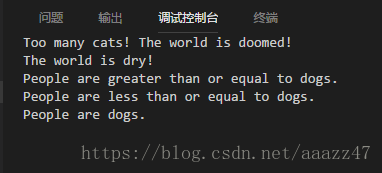
从打字上来说这一题挺简单的,不过重点在于理解 if 语句的使用。跑一下结果如下。
29.1 if 语句的作用
分析一下前四段 if 语句可以发现 if 语句的作用
if 语句会根据其中语句的布尔值(True、False)影响其下一行代码是否执行。
如果是真 (if something Ture),就执行下面的代码。否则不执行。
29.2 为什么 if 语句下面一行的代码需要 4 个空格? + 29.3 如果不缩进会怎样?
这和我们在函数里面遇到的情况一样,4 个空格表示了哪些代码属于此条 if 语句。
a = 1

b = 2

c = 3

if a < b:

    print("这是第一行")

    print("这是第二行")

    if c < a:

        print("这是第三行")

    print("这是第四行")

print("这是第五行")

print("-" * 10)

print("反过来条件试一下")

if a > b:

    print("这是第一行")

    print("这是第二行")

    if c > a:

        print("这是第三行")

    print("这是第四行")

print("这是第五行")
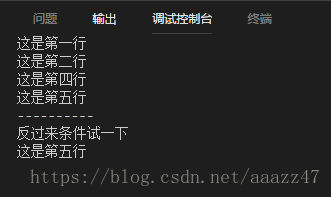
可以看到,没有缩进的第五行是不受 if 语句影响的,而在缩进中的部分是否执行则在于 if 语句的真伪。
29.4 把 27 题改 if 语句
 print("Is 'not False' True?")

 if not False:

     print("Yes! is True!")

 print("\n------------------------")

 print("Is 'not True' True?")

 if not True:

     print("Yes! is True!")

 print("\n------------------------")

 print("Is 'True or True' True?")

 if True or True:

     print("Yes! is True!")

 print("\n------------------------")

 print("Is 'True or False' True?")

 if True or False:

     print("Yes! is True!")

 print("\n------------------------")

 print("Is 'False or True' True?")

 if False or True:

     print("Yes! is True!")

 print("\n------------------------")

 print("Is 'False or False' True?")

 if False or False:

     print("Yes! is True!")

 print("\n------------------------")

 print("Is 'True and True' True?")

 if True and True:

     print("Yes! is True!")

 print("\n------------------------")

 print("Is 'True and False' True?")

 if True and False:

     print("Yes! is True!")

 print("\n------------------------")

 print("Is 'False and True' True?")

 if False and True:

     print("Yes! is True!")

 print("\n------------------------")

 print("Is 'False and False' True?")

 if False and False:

     print("Yes! is True!")

 print("\n------------------------")

 print("Is 'not (True or True)' True?")

 if not (True or True):

     print("Yes! is True!")

 print("\n------------------------")

 print("Is 'not (True or False)' True?")

 if not (True or False):

     print("Yes! is True!")

 print("\n------------------------")

 print("Is 'not (False or True)' True?")

 if not (False or True):

     print("Yes! is True!")

 print("\n------------------------")

 print("Is 'not (False or False)' True?")

 if not (False or False):

     print("Yes! is True!")

 print("\n------------------------")

 print("Is 'not (True and True)' True?")

 if not (True and True):

     print("Yes! is True!")

 print("\n------------------------")

 print("Is 'not (True and False)' True?")

 if not (True and False):

     print("Yes! is True!")

 print("\n------------------------")

 print("Is 'not (False and True)' True?")

 if not (False and True):

     print("Yes! is True!")

 print("\n------------------------")

 print("Is 'not (False and False)' True?")

 if not (False and False):

     print("Yes! is True!")

 print("\n------------------------")

 print("Is '1 != 1' True?")

 if 1 != 1:

     print("Yes! is True!")

 print("\n------------------------")

 print("Is '1 != 0' True?")

 if 1 != 0:

     print("Yes! is True!")

 print("\n------------------------")

 print("Is '0 != 1' True?")

 if 0 != 1:

     print("Yes! is True!")

 print("\n------------------------")

 print("Is '0 != 0' True?")

 if 0 != 0:

     print("Yes! is True!")

 print("\n------------------------")

 print("Is '1 == 1' True?")

 if 1 == 1:

     print("Yes! is True!")

 print("\n------------------------")

 print("Is '1 == 0' True?")

 if 1 == 0:

     print("Yes! is True!")

 print("\n------------------------")

 print("Is '0 == 1' True?")

 if 0 == 1:

     print("Yes! is True!")

 print("\n------------------------")

 print("Is '0 == 0' True?")

 if 0 == 0:

     print("Yes! is True!")
《笨方法学Python》加分题29的更多相关文章
- "笨方法学python"
<笨方法学python>.感觉里面的方法还可以.新手可以看看... 本书可以:教会你编程新手三种最重要的技能:读和写.注重细节.发现不同.
- 笨方法学python 22,前期知识点总结
对笨方法学python,前22讲自己的模糊的单词.函数进行梳理总结如下: 单词.函数 含义 print() 打印内容到屏幕 IDLE 是一个纯Python下自带的简洁的集成开发环境 variable ...
- 笨办法学python 13题:pycharm 运行
笨办法学python 13题 代码: # -*- coding: utf-8 -*- from sys import argv # argv--argument variable 参数变量 scrip ...
- 《笨方法学Python》加分题20
加分练习通读脚本,在每一行之前加注解,以理解脚本里发生的事情.每次 print_a_line 运行时,你都传递了一个叫 current_line 的变量,在每次调用时,打印出 current_line ...
- 《笨方法学Python》加分题17
题目通过前学习的文件操作把一个文件中的内容拷贝到另一个文件中,并使用 os.path.exists 在拷贝前判断被拷贝的文件是否已经存在,之后由用户判断是否继续完成拷贝. 新知识os.path.exi ...
- 《笨方法学Python》加分题15
本题本题开始涉及文件的操作,文件操作是一件危险的事情,需要仔细细心否则可能导致重要的文件损坏. 本题除了 ex15.py 这个脚本以外,还需要一个用来读取的文件 ex15_sample.txt 其内容 ...
- 《笨方法学Python》加分题33
while-leep 和我们接触过的 for-loop 类似,它们都会判断一个布尔表达式的真伪.也和 for 循环一样我们需要注意缩进,后续的练习会偏重这方面的练习.不同点在于 while 循环在执行 ...
- 《笨方法学Python》加分题28
#!usr/bin/python # -*-coding:utf-8-*- True and True print ("True") False and True print (& ...
- 《笨方法学Python》加分题16
基础部分 # 载入 sys.argv 模块,以获取脚本运行参数. from sys import argv # 将 argv 解包,并将脚本名赋值给变量 script :将参数赋值给变量 filena ...
随机推荐
- 1.1python解决数学建模之席位分配问题
一:上代码 #比例法def rate_method(p,n): lst =[] #保存各组席位数 sum_ =sum(p) #人数和 k =0#临时变量 for i in ...
- Oracle常见错误:ORA-06550、ORA-00911、ORA-02085
ORA-06550:检查标点符号,如果是在写存储过程时候,切记每行每条语句都应该以“;”结束 ORA-00911: invalid character 包含中文报错 ORA-02085:数据库连接 X ...
- Dao层抽取BaseDao公共方法
设计IBseDao接口,定义公共的CRUD方法. // IBaseDao 接口,定义公共的CRUD方法 public interface IBaseDao<T> { public void ...
- 7. mybatis:mapper-locations: 路径放在java路径下报错:org.apache.ibatis.binding.BindingException: Invalid bound statement (not found)
解决方案:在pom.xml文件中的<build>标签内加上以下的<resources>内容即可 <build> <resources> <reso ...
- .Net导出pdf文件,C#实现pdf导出 转载 http://www.cnblogs.com/hmYao/p/5842958.html
导出pdf文件. 在编码前需要在网上下载个itextsharp.dll,此程序集是必备的.楼主下载的是5.0版本,之前下了个5.4的似乎不好用. 下载之后直接添加引用. <%@ Page Lan ...
- 树莓派3使用openSUSE Ports 42.3 驱动GPIO注意事项
安装好opensuse 42.3以后,安装wiringPi库. 由于/proc/cpuinfo文件缺少“Hardware”信息,导致出现如下错误: Oops: Unable to determine ...
- mac eclipse中运行tomcat出现错误:-Djava.endorsed.dirs=D:\Tomcat 9.0\endorsed is not supported
-Djava.endorsed.dirs=D:\Tomcat 9.0\endorsed is not supported. Endorsed standards and standalone APIs ...
- python大法好——飞机大战完整吧
# -*- coding:utf-8 -*-import pygamefrom pygame.locals import *import time '''说明1.按下b键,让玩家飞机爆炸 2.爆炸效果 ...
- drf框架之跨域问题的解决与缓存问题
什么是跨域问题呢: 1. 跨域问题: CORS 跨域资源共享: 有简单请求 和非简单请求 简单请求: 只要符合如下两条,就是简单请求,否则则是非简单请求 (1) 请求方法是以下三种方法之一: HEAD ...
- html5 Sortable.js 拖拽排序源码分析
最近公司项目经常用到一个拖拽 Sortable.js插件,所以有空的时候看了 Sortable.js 源码,总共1300多行这样,写的挺完美的. 本帖属于原创,转载请出名出处. 官网http:// ...