
flink源码编译(windows环境)
前言
最新开始捣鼓flink,fucking the code之前,编译是第一步。
编译环境
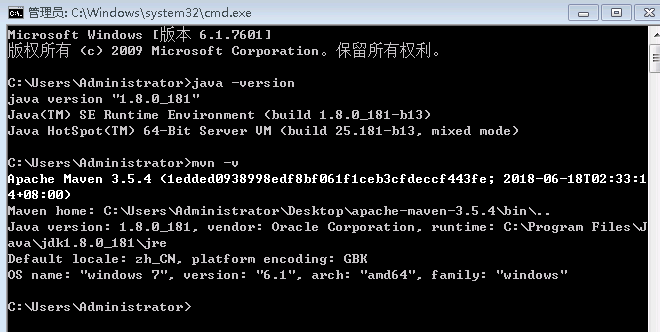
win7 java maven
编译步骤
https://ci.apache.org/projects/flink/flink-docs-release-1.6/start/building.html 官方文档搞起,如下:
Building Flink from Source
This page covers how to build Flink 1.6.1 from sources.
Build Flink
In order to build Flink you need the source code. Either download the source of a release or clone the git repository.
In addition you need Maven 3 and a JDK (Java Development Kit). Flink requires at least Java 8 to build.
NOTE: Maven 3.3.x can build Flink, but will not properly shade away certain dependencies. Maven 3.2.5 creates the libraries properly. To build unit tests use Java 8u51 or above to prevent failures in unit tests that use the PowerMock runner.
To clone from git, enter:
git clone https://github.com/apache/flinkThe simplest way of building Flink is by running:
mvn clean install -DskipTestsThis instructs Maven (mvn) to first remove all existing builds (clean) and then create a new Flink binary (install).
To speed up the build you can skip tests, QA plugins, and JavaDocs:
mvn clean install -DskipTests -DfastThe default build adds a Flink-specific JAR for Hadoop 2, to allow using Flink with HDFS and YARN.
Dependency Shading
Flink shades away some of the libraries it uses, in order to avoid version clashes with user programs that use different versions of these libraries. Among the shaded libraries are Google Guava, Asm, Apache Curator, Apache HTTP Components, Netty, and others.
The dependency shading mechanism was recently changed in Maven and requires users to build Flink slightly differently, depending on their Maven version:
Maven 3.0.x, 3.1.x, and 3.2.x It is sufficient to call mvn clean install -DskipTests in the root directory of Flink code base.
Maven 3.3.x The build has to be done in two steps: First in the base directory, then in the distribution project:
mvn clean install -DskipTests

cd flink-dist

mvn clean install
Note: To check your Maven version, run mvn --version.
Hadoop Versions
Info Most users do not need to do this manually. The download page contains binary packages for common Hadoop versions.
Flink has dependencies to HDFS and YARN which are both dependencies from Apache Hadoop. There exist many different versions of Hadoop (from both the upstream project and the different Hadoop distributions). If you are using a wrong combination of versions, exceptions can occur.
Hadoop is only supported from version 2.4.0 upwards. You can also specify a specific Hadoop version to build against:
mvn clean install -DskipTests -Dhadoop.version=2.6.1Vendor-specific Versions 指定hadoop发行商
To build Flink against a vendor specific Hadoop version, issue the following command:
mvn clean install -DskipTests -Pvendor-repos -Dhadoop.version=2.6.1-cdh5.0.0The -Pvendor-repos activates a Maven build profile that includes the repositories of popular Hadoop vendors such as Cloudera, Hortonworks, or MapR.
官网给出的是指定cdh发行商的版本,这里我给出一个hdp发行商的版本
mvn clean install -DskipTests -Pvendor-repos -Dhadoop.version=2.7.3.2.6.1.114-2
详细的版本信息可以从http://repo.hortonworks.com/content/repositories/releases/org/apache/hadoop/hadoop-common/查看Scala Versions
Info Users that purely use the Java APIs and libraries can ignore this section.
Flink has APIs, libraries, and runtime modules written in Scala. Users of the Scala API and libraries may have to match the Scala version of Flink with the Scala version of their projects (because Scala is not strictly backwards compatible).
Flink 1.4 currently builds only with Scala version 2.11.
We are working on supporting Scala 2.12, but certain breaking changes in Scala 2.12 make this a more involved effort. Please check out this JIRA issue for updates.
Encrypted File Systems
If your home directory is encrypted you might encounter a java.io.IOException: File name too long exception. Some encrypted file systems, like encfs used by Ubuntu, do not allow long filenames, which is the cause of this error.
The workaround is to add:
<args>

    <arg>-Xmax-classfile-name</arg>

    <arg>128</arg>

</args>
in the compiler configuration of the pom.xml file of the module causing the error. For example, if the error appears in the flink-yarn module, the above code should be added under the <configuration> tag of scala-maven-plugin. See this issue for more information.
编译结果
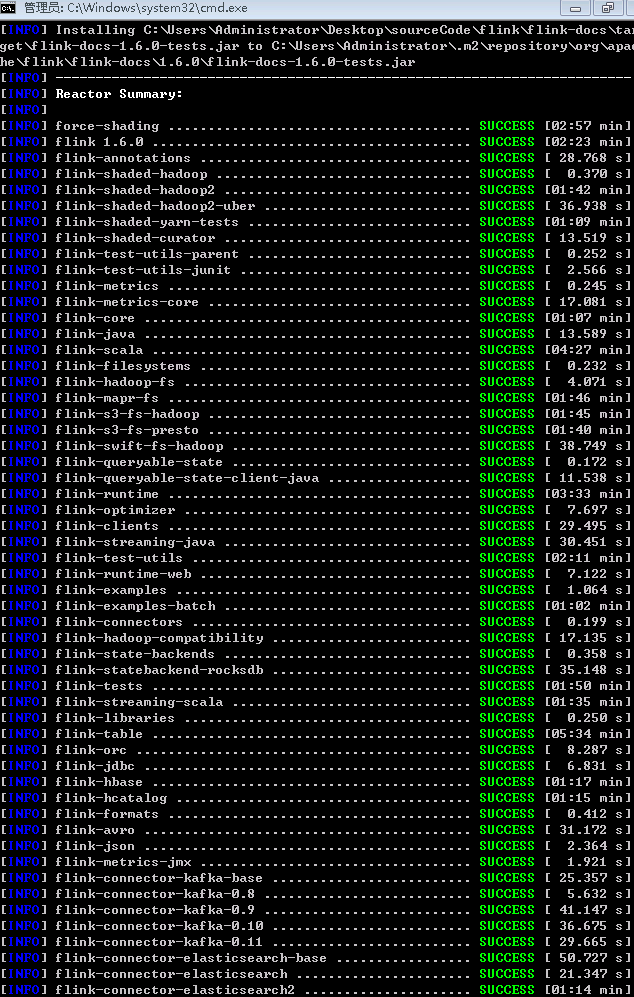

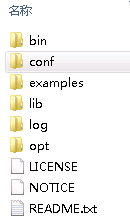
flink\flink-dist\target\flink-1.6.0-bin\flink-1.6.0下会有编译结果
flink源码编译(windows环境)的更多相关文章
- HBase-2.2.3源码编译-Windows版
源码环境一览 windows: 7 64Bit Java: 1.8.0_131 Maven:3.3.9 Git:2.24.0.windows.1 HBase:2.2.3 Hadoop:2.8.5 下载 ...
- 终于完成了 源码 编译lnmp环境
经过了大概一个星期的努力,终于按照海生的编译流程将lnmp环境源码安装出来了 nginx 和php 主要参考 http://hessian.cn/p/1273.html mysql 主要参考 http ...
- 查看android源码,windows环境下载源码
查看源码 参考: http://blog.csdn.net/janronehoo/article/details/8560304 步骤: 添加chrome插件 Android SDK Search 进 ...
- python在windows(双版本)及linux(源码编译)环境下安装
python下载 下载地址:https://www.python.org/downloads/ 可以下载需要的版本,这里选择2.7.12和3.6.2 下面第一个是linux版本,第二个是windows ...
- git在windows及linux(源码编译)环境下安装
git在windows下安装 下载地址:https://git-scm.com/ 默认安装即可 验证 git --version git在linux下安装 下载地址:https://mirrors.e ...
- TensorFlow Python2.7环境下的源码编译(一)环境准备
参考: https://blog.csdn.net/yhily2008/article/details/79967118 https://tensorflow.google.cn/install/in ...
- TensorFlow Python3.7环境下的源码编译(一)环境准备
参考: https://blog.csdn.net/yhily2008/article/details/79967118 https://tensorflow.google.cn/install/in ...
- vcmi(魔法门英雄无敌3 - 开源复刻版) 源码编译
vcmi源码编译 windows+cmake+mingw ##1 准备 HoMM3 gog.com CMake 官网 vcmi 源码 下载 QT5 with mingw 官网 Boost 源码1.55 ...
- 麒麟系统开发笔记(三):从Qt源码编译安装之编译安装Qt5.12
前言 上一篇,是使用Qt提供的安装包安装的,有些场景需要使用到从源码编译的Qt,所以本篇如何在银河麒麟系统V4上编译Qt5.12源码. 银河麒麟V4版本 系统版本: Qt源码下载 ...
随机推荐
- Java中的queue和deque对比详解
队列(queue)简述 队列(queue)是一种常用的数据结构,可以将队列看做是一种特殊的线性表,该结构遵循的先进先出原则.Java中,LinkedList实现了Queue接口,因为LinkedLis ...
- 初识函数库libpcap
由于工作上的需要,最近简单学习了抓包函数库libpcap,顺便记下笔记,方便以后查看 一.libpcap简介 libpcap(Packet Capture Library),即数据包捕获函数库, ...
- union 的两个用处
1 节约内存: 这一功能可以参考我的其它博文: https://i.cnblogs.com/EditPosts.aspx?postid=8545190&update=1 2 测试机器大小端: ...
- SpringBoot操作数据库 2017.12.14
http://blog.csdn.net/forezp/article/details/61472783
- 超实用的JavaScript代码段 Item1 --倒计时效果
现今团购网.电商网.门户网等,常使用时间记录重要的时刻,如时间显示.倒计时差.限时抢购等,本文分析不同倒计时效果的计算思路及方法,掌握日期对象Date,获取时间的方法,计算时差的方法,实现不同的倒时计 ...
- Connection reset by peer的常见原因
1,如果一端的Socket被关闭(或主动关闭,或因为异常退出而 引起的关闭),另一端仍发送数据,发送的第一个数据包引发该异常(Connect reset by peer). Socket默认连接60秒 ...
- 在echarts里在geojson绘制的地图上展示散点图(气泡)、线集。
先来要实现的效果图: 下方图1是官网的案例:http://www.echartsjs.com/gallery/editor.html?c=scatter-map 下图2是展示气泡类型为pin的效果: ...
- 开机进入grub命令行之后。。。。
最近由于经常整理自己电脑上的文件,难免都会遇到误删系统文件或者操作失误导致系统不能够正常进入的情况.这时就会出现grub错误的提示,只能输入命令才能进入系统.那么该输入什么命令呢?其实非常简单. gr ...
- BZOJ_1552_[Cerc2007]robotic sort_splay
BZOJ_1552_[Cerc2007]robotic sort_splay 题意: 分析: splay维护区间操作 可以先把编号排序,给每个编号分配一个固定的点,映射过去 查找编号的排名时先找到这个 ...
- Asp.Net 中Grid详解两种方法使用LigerUI加载数据库数据填充数据分页
1.关于LigerUI: LigerUI 是基于jQuery 的UI框架,其核心设计目标是快速开发.使用简单.功能强大.轻量级.易扩展.简单而又强大,致力于快速打造Web前端界面解决方案,可以应用于. ...