
flink源码编译(windows环境)
前言
最新开始捣鼓flink,fucking the code之前,编译是第一步。
编译环境
win7 java maven
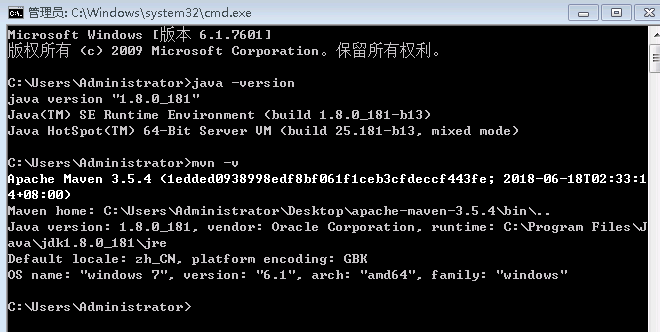
编译步骤
https://ci.apache.org/projects/flink/flink-docs-release-1.6/start/building.html 官方文档搞起,如下:
Building Flink from Source
This page covers how to build Flink 1.6.1 from sources.
Build Flink
In order to build Flink you need the source code. Either download the source of a release or clone the git repository.
In addition you need Maven 3 and a JDK (Java Development Kit). Flink requires at least Java 8 to build.
NOTE: Maven 3.3.x can build Flink, but will not properly shade away certain dependencies. Maven 3.2.5 creates the libraries properly. To build unit tests use Java 8u51 or above to prevent failures in unit tests that use the PowerMock runner.
To clone from git, enter:
git clone https://github.com/apache/flinkThe simplest way of building Flink is by running:
mvn clean install -DskipTestsThis instructs Maven (mvn) to first remove all existing builds (clean) and then create a new Flink binary (install).
To speed up the build you can skip tests, QA plugins, and JavaDocs:
mvn clean install -DskipTests -DfastThe default build adds a Flink-specific JAR for Hadoop 2, to allow using Flink with HDFS and YARN.
Dependency Shading
Flink shades away some of the libraries it uses, in order to avoid version clashes with user programs that use different versions of these libraries. Among the shaded libraries are Google Guava, Asm, Apache Curator, Apache HTTP Components, Netty, and others.
The dependency shading mechanism was recently changed in Maven and requires users to build Flink slightly differently, depending on their Maven version:
Maven 3.0.x, 3.1.x, and 3.2.x It is sufficient to call mvn clean install -DskipTests in the root directory of Flink code base.
Maven 3.3.x The build has to be done in two steps: First in the base directory, then in the distribution project:
mvn clean install -DskipTests

cd flink-dist

mvn clean install
Note: To check your Maven version, run mvn --version.
Hadoop Versions
Info Most users do not need to do this manually. The download page contains binary packages for common Hadoop versions.
Flink has dependencies to HDFS and YARN which are both dependencies from Apache Hadoop. There exist many different versions of Hadoop (from both the upstream project and the different Hadoop distributions). If you are using a wrong combination of versions, exceptions can occur.
Hadoop is only supported from version 2.4.0 upwards. You can also specify a specific Hadoop version to build against:
mvn clean install -DskipTests -Dhadoop.version=2.6.1Vendor-specific Versions 指定hadoop发行商
To build Flink against a vendor specific Hadoop version, issue the following command:
mvn clean install -DskipTests -Pvendor-repos -Dhadoop.version=2.6.1-cdh5.0.0The -Pvendor-repos activates a Maven build profile that includes the repositories of popular Hadoop vendors such as Cloudera, Hortonworks, or MapR.
官网给出的是指定cdh发行商的版本,这里我给出一个hdp发行商的版本
mvn clean install -DskipTests -Pvendor-repos -Dhadoop.version=2.7.3.2.6.1.114-2
详细的版本信息可以从http://repo.hortonworks.com/content/repositories/releases/org/apache/hadoop/hadoop-common/查看Scala Versions
Info Users that purely use the Java APIs and libraries can ignore this section.
Flink has APIs, libraries, and runtime modules written in Scala. Users of the Scala API and libraries may have to match the Scala version of Flink with the Scala version of their projects (because Scala is not strictly backwards compatible).
Flink 1.4 currently builds only with Scala version 2.11.
We are working on supporting Scala 2.12, but certain breaking changes in Scala 2.12 make this a more involved effort. Please check out this JIRA issue for updates.
Encrypted File Systems
If your home directory is encrypted you might encounter a java.io.IOException: File name too long exception. Some encrypted file systems, like encfs used by Ubuntu, do not allow long filenames, which is the cause of this error.
The workaround is to add:
<args>

    <arg>-Xmax-classfile-name</arg>

    <arg>128</arg>

</args>
in the compiler configuration of the pom.xml file of the module causing the error. For example, if the error appears in the flink-yarn module, the above code should be added under the <configuration> tag of scala-maven-plugin. See this issue for more information.
编译结果
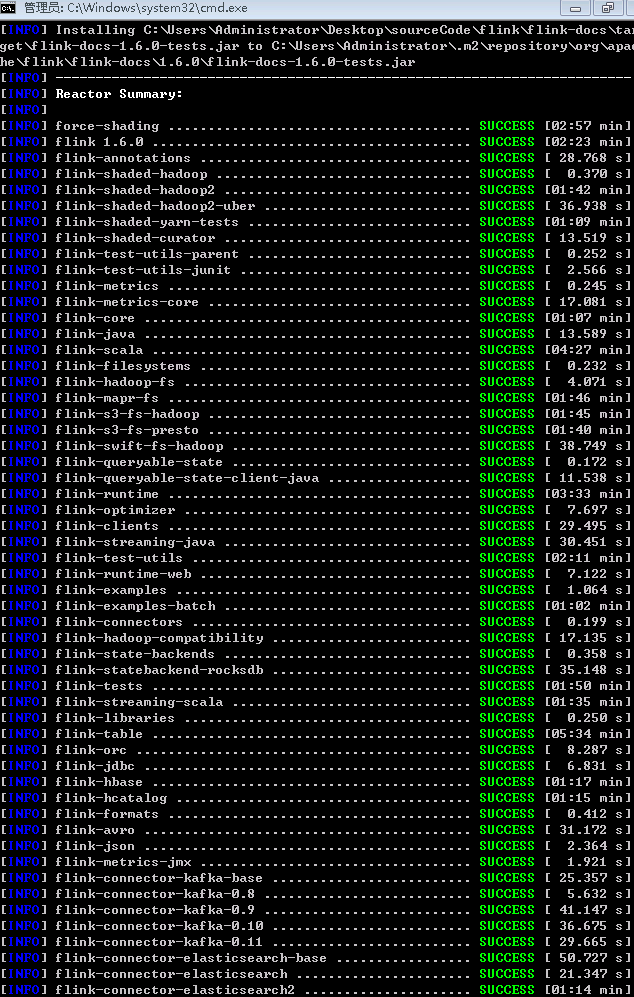

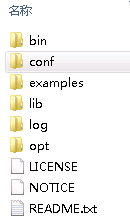
flink\flink-dist\target\flink-1.6.0-bin\flink-1.6.0下会有编译结果
flink源码编译(windows环境)的更多相关文章
- HBase-2.2.3源码编译-Windows版
源码环境一览 windows: 7 64Bit Java: 1.8.0_131 Maven:3.3.9 Git:2.24.0.windows.1 HBase:2.2.3 Hadoop:2.8.5 下载 ...
- 终于完成了 源码 编译lnmp环境
经过了大概一个星期的努力,终于按照海生的编译流程将lnmp环境源码安装出来了 nginx 和php 主要参考 http://hessian.cn/p/1273.html mysql 主要参考 http ...
- 查看android源码,windows环境下载源码
查看源码 参考: http://blog.csdn.net/janronehoo/article/details/8560304 步骤: 添加chrome插件 Android SDK Search 进 ...
- python在windows(双版本)及linux(源码编译)环境下安装
python下载 下载地址:https://www.python.org/downloads/ 可以下载需要的版本,这里选择2.7.12和3.6.2 下面第一个是linux版本,第二个是windows ...
- git在windows及linux(源码编译)环境下安装
git在windows下安装 下载地址:https://git-scm.com/ 默认安装即可 验证 git --version git在linux下安装 下载地址:https://mirrors.e ...
- TensorFlow Python2.7环境下的源码编译(一)环境准备
参考: https://blog.csdn.net/yhily2008/article/details/79967118 https://tensorflow.google.cn/install/in ...
- TensorFlow Python3.7环境下的源码编译(一)环境准备
参考: https://blog.csdn.net/yhily2008/article/details/79967118 https://tensorflow.google.cn/install/in ...
- vcmi(魔法门英雄无敌3 - 开源复刻版) 源码编译
vcmi源码编译 windows+cmake+mingw ##1 准备 HoMM3 gog.com CMake 官网 vcmi 源码 下载 QT5 with mingw 官网 Boost 源码1.55 ...
- 麒麟系统开发笔记(三):从Qt源码编译安装之编译安装Qt5.12
前言 上一篇,是使用Qt提供的安装包安装的,有些场景需要使用到从源码编译的Qt,所以本篇如何在银河麒麟系统V4上编译Qt5.12源码. 银河麒麟V4版本 系统版本: Qt源码下载 ...
随机推荐
- Redis配置文件中关于bind参数
在配置文件redis.conf中,默认的bind 接口是127.0.0.1,也就是本地回环地址.这样的话,访问redis服务只能通过本机的客户端连接,而无法通过远程连接,这样可以避免将redis服务暴 ...
- WPF 定义Command
直接上代码: public class LoginDelegateCommand : ICommand { private Action _execute; private Predicate< ...
- setInterval setTimeout 详解
JavaScript的setTimeout与setInterval是两个很容易欺骗别人感情的方法,因为我们开始常常以为调用了就会按既定的方式执行, 我想不少人都深有同感, 例如 setTimeout( ...
- 18.app后端如何实现LBS
移动互联网,除了一直在线这个特点外,还有一个重要特点,能定位到手机的位置.查找附近的人,附近的餐馆等服务,以及大量的o2o应用, 都需要使用LBS(Location Based Services).那 ...
- golang map的判断,删除
http://blog.sina.com.cn/s/blog_9e14446a01018q8p.html map是一种key-value的关系,一般都会使用make来初始化内存,有助于减少后续新增操作 ...
- Firefox driver 那些事~
1. selenium 3.x开始,webdriver/firefox/webdriver.py的init中,executable_path="geckodriver":而2.x是 ...
- Java RESTful 框架的性能比较
来源:鸟窝, colobu.com/2015/11/17/Jax-RS-Performance-Comparison/ 如有好文章投稿,请点击 → 这里了解详情 在微服务流行的今天,我们会从纵向和横向 ...
- 转载iOS开发中常见的警告及错误
iOS警告收录及科学快速的消除方法 前言:现在你维护的项目有多少警告?看着几百条警告觉得心里烦么?你真的觉得警告又不是错误可以完全不管么? 如果你也被这些问题困惑,可以和我一起进行下面的操作. ...
- 【爆料】-《伯明翰大学学院毕业证书》UCB一模一样原件
☞伯明翰大学学院毕业证书[微/Q:865121257◆WeChat:CC6669834]UC毕业证书/联系人Alice[查看点击百度快照查看][留信网学历认证&博士&硕士&海归 ...
- 如何在ST官网下载STM32固件库
1.首先要注册一个ST账号,下载的时候需要. 2.找到工具与软件 3.进去之后选"产品列表" 4.在产品列表里选STM32微控制器软件,直接点下图标号2,不要点左边的加号 5.进去 ...