
GetPathFromUri4kitkat【Android 4.4 kitkat以上及以下根据uri获取路径的方法】
版权声明:本文为HaiyuKing原创文章,转载请注明出处!
前言
在Android4.4之前和之后,通过Intent调用文件管理器选择文件,获取的文件uri地址形式是不同的。
Android6.0 content://com.android.providers.media.documents/document/image%3A593410
Android4.2.2 file:///storage/emulated/0/Pictures/Screenshots/Screenshot_2017-04-17-14-39-13.png
所以,当我们需要用到文件的绝对路径地址(/storage/emulated/0/Pictures/Screenshots/Screenshot_20170706-113240.png)的时候,则需要一个通用的方法。
效果图
| Android 6.0 | Android4.2.2 |

|

|
代码分析
一般使用getPath( context,uri)方法即可。
使用步骤
一、项目组织结构图
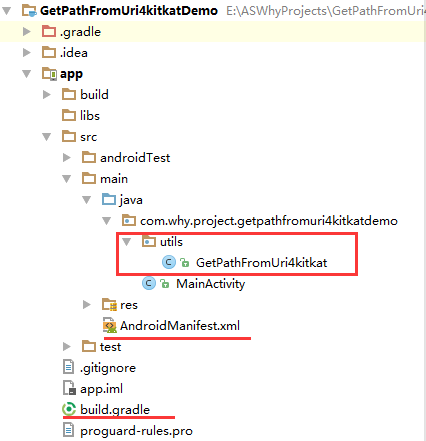
注意事项:
1、导入类文件后需要change包名以及重新import R文件路径
2、Values目录下的文件(strings.xml、dimens.xml、colors.xml等),如果项目中存在,则复制里面的内容,不要整个覆盖
二、导入步骤
将GetPathFromUri4kitkat.java文件复制到项目中
package com.why.project.getpathfromuri4kitkatdemo.utils;

import android.annotation.SuppressLint;

import android.content.ContentUris;

import android.content.Context;

import android.database.Cursor;

import android.net.Uri;

import android.os.Build;

import android.os.Environment;

import android.provider.DocumentsContract;

import android.provider.MediaStore;

import java.io.File;

/**

 * @CreateBy HaiyuKing

 * @Used Android 4.4 kitkat以上及以下根据uri获取路径的方法

 * @参考资料 http://www.2cto.com/kf/201502/376975.html

 */

public class GetPathFromUri4kitkat {

    /**

     * 专为Android4.4设计的从Uri获取文件绝对路径,以前的方法已不好使

     * @param uri - Android6.0 content://com.android.providers.media.documents/document/image%3A593410

     *            Android4.2.2 file:///storage/emulated/0/Pictures/Screenshots/Screenshot_2017-04-17-14-39-13.png

     * @return Android6.0 /storage/emulated/0/Pictures/Screenshots/Screenshot_20170706-113240.png

     *          Android4.2.2 /storage/emulated/0/Pictures/Screenshots/Screenshot_2017-04-17-14-39-13.png

     */

    @SuppressLint("NewApi")

    public static String getPath(final Context context, final Uri uri) {

        final boolean isKitKat = Build.VERSION.SDK_INT >= Build.VERSION_CODES.KITKAT;

        // DocumentProvider

        if (isKitKat && DocumentsContract.isDocumentUri(context, uri)) {

            // ExternalStorageProvider

            if (isExternalStorageDocument(uri)) {

                final String docId = DocumentsContract.getDocumentId(uri);

                final String[] split = docId.split(":");

                final String type = split[0];

                if ("primary".equalsIgnoreCase(type)) {

                    return Environment.getExternalStorageDirectory() + "/" + split[1];

                }

                // TODO handle non-primary volumes

            }

            // DownloadsProvider

            else if (isDownloadsDocument(uri)) {

                final String id = DocumentsContract.getDocumentId(uri);

                final Uri contentUri = ContentUris.withAppendedId(

                        Uri.parse("content://downloads/public_downloads"), Long.valueOf(id));

                return getDataColumn(context, contentUri, null, null);

            }

            // MediaProvider

            else if (isMediaDocument(uri)) {

                final String docId = DocumentsContract.getDocumentId(uri);

                final String[] split = docId.split(":");

                final String type = split[0];

                Uri contentUri = null;

                if ("image".equals(type)) {

                    contentUri = MediaStore.Images.Media.EXTERNAL_CONTENT_URI;

                } else if ("video".equals(type)) {

                    contentUri = MediaStore.Video.Media.EXTERNAL_CONTENT_URI;

                } else if ("audio".equals(type)) {

                    contentUri = MediaStore.Audio.Media.EXTERNAL_CONTENT_URI;

                }

                final String selection = "_id=?";

                final String[] selectionArgs = new String[] { split[1] };

                return getDataColumn(context, contentUri, selection, selectionArgs);

            }

        }

        // MediaStore (and general)

        else if ("content".equalsIgnoreCase(uri.getScheme())) {

            return getDataColumn(context, uri, null, null);

        }

        // File

        else if ("file".equalsIgnoreCase(uri.getScheme())) {

            return uri.getPath();

        }

        return null;

    }

    /**

     * Get the value of the data column for this Uri. This is useful for

     * MediaStore Uris, and other file-based ContentProviders.

     *

     * @param context

     *            The context.

     * @param uri

     *            The Uri to query.

     * @param selection

     *            (Optional) Filter used in the query. 构造筛选语句

     * @param selectionArgs

     *            (Optional) Selection arguments used in the query.

     * @return The value of the _data column, which is typically a file path.

     */

    public static String getDataColumn(Context context, Uri uri, String selection,

            String[] selectionArgs) {

        Cursor cursor = null;

        //筛选列

        final String column = MediaStore.Files.FileColumns.DATA;//"_data"

        final String[] projection = { column };

        try {

            cursor = context.getContentResolver().query(uri, projection, selection, selectionArgs,

                    null);

            if (cursor != null && cursor.moveToFirst()) {

                final int column_index = cursor.getColumnIndexOrThrow(column);

                return cursor.getString(column_index);

            }

        }catch (IllegalArgumentException e){

            //java.lang.IllegalArgumentException: column '_data' does not exist

            //华为的特殊处理:content://com.huawei.hidisk.fileprovider/root/storage/emulated/0/tencent/TIMfile_recv/xxx.doc

            String rootPre = File.separator + "root";// /root

            return uri.getPath().startsWith(rootPre) ? uri.getPath().replace(rootPre,"") : uri.getPath();

        } finally {

            if (cursor != null)

                cursor.close();

        }

        return null;

    }

    /**

     * @param uri

     *            The Uri to check.

     * @return Whether the Uri authority is ExternalStorageProvider.

     */

    public static boolean isExternalStorageDocument(Uri uri) {

        return "com.android.externalstorage.documents".equals(uri.getAuthority());

    }

    /**

     * @param uri

     *            The Uri to check.

     * @return Whether the Uri authority is DownloadsProvider.

     */

    public static boolean isDownloadsDocument(Uri uri) {

        return "com.android.providers.downloads.documents".equals(uri.getAuthority());

    }

    /**

     * @param uri

     *            The Uri to check.

     * @return Whether the Uri authority is MediaProvider.

     */

    public static boolean isMediaDocument(Uri uri) {

        return "com.android.providers.media.documents".equals(uri.getAuthority());

    }

}
GetPathFromUri4kitkat.java
在AndroidManifest.xml中添加权限
<?xml version="1.0" encoding="utf-8"?>

<manifest xmlns:android="http://schemas.android.com/apk/res/android"

          package="com.why.project.getpathfromuri4kitkatdemo">

    <!-- ======================(GetPathFromUri4kitkat)========================== -->

    <!-- 向SD卡读取数据权限 -->

    <uses-permission android:name="android.permission.READ_EXTERNAL_STORAGE"/>

    <application

        android:allowBackup="true"

        android:icon="@mipmap/ic_launcher"

        android:label="@string/app_name"

        android:supportsRtl="true"

        android:theme="@style/AppTheme">

        <activity android:name=".MainActivity">

            <intent-filter>

                <action android:name="android.intent.action.MAIN"/>

                <category android:name="android.intent.category.LAUNCHER"/>

            </intent-filter>

        </activity>

    </application>

</manifest>
添加运行时权限的处理(本demo中采用的是修改targetSDKVersion=22)
三、使用方法
package com.why.project.getpathfromuri4kitkatdemo;

import android.app.Activity;

import android.content.Intent;

import android.net.Uri;

import android.os.Bundle;

import android.support.v7.app.AppCompatActivity;

import android.util.Log;

import android.view.View;

import android.widget.Button;

import android.widget.TextView;

import com.why.project.getpathfromuri4kitkatdemo.utils.GetPathFromUri4kitkat;

public class MainActivity extends AppCompatActivity {

    private static final String TAG = "MainActivity";

    private Button btn_openFile;

    private TextView tv_filePath;

    @Override

    protected void onCreate(Bundle savedInstanceState) {

        super.onCreate(savedInstanceState);

        setContentView(R.layout.activity_main);

        initViews();

        initEvents();

    }

    private void initViews() {

        btn_openFile = (Button) findViewById(R.id.btn_openFile);

        tv_filePath = (TextView) findViewById(R.id.tv_filePath);

    }

    private void initEvents() {

        btn_openFile.setOnClickListener(new View.OnClickListener() {

            @Override

            public void onClick(View v) {

                Intent innerIntent = new Intent(Intent.ACTION_GET_CONTENT);

                String IMAGE_UNSPECIFIED = "*/*";

                innerIntent.setType(IMAGE_UNSPECIFIED); // 查看类型

                Intent wrapperIntent = Intent.createChooser(innerIntent, "File Browser");

                MainActivity.this.startActivityForResult(wrapperIntent, 1111);

            }

        });

    }

    /*=========================================实现打开文件管理器功能==============================================*/

    @Override

    public void onActivityResult(int requestCode, int resultCode, Intent data) {

        super.onActivityResult(requestCode, resultCode, data);

        Log.w(TAG, "{onActivityResult}resultCode=" + resultCode);

        Log.w(TAG, "{onActivityResult}requestCode=" + requestCode);

        if (resultCode == Activity.RESULT_OK) {

            //调用文件管理器选择文件的回调

            if (requestCode == 1111) {

                Uri result = data == null ? null : data.getData();

                Log.w(TAG, "{onActivityResult}result=" + result);

                tv_filePath.setText("Uri:"+result.toString());

                String pathStr = GetPathFromUri4kitkat.getPath(MainActivity.this,result);

                Log.w(TAG, "{onActivityResult}pathStr=" + pathStr);

                tv_filePath.setText(tv_filePath.getText() + "\n\n" + "Path:"+pathStr);

            }

        }

    }

}
混淆配置
无
参考资料
Android 4.4 kitkat以上及以下根据uri获取路径的方法
项目demo下载地址
https://github.com/haiyuKing/GetPathFromUri4kitkatDemo
GetPathFromUri4kitkat【Android 4.4 kitkat以上及以下根据uri获取路径的方法】的更多相关文章
- Android 4.4 根据uri获取路径的方法
当我们选择图片以后,返回的是Uri,此时我们要把路径存储到数据库,必须将其转换成String类型. URI: //content://com.android.providers.media.docu ...
- android 获取路径目录方法以及判断目录是否存在,创建目录
Environment 常用方法: * 方法:getDataDirectory()解释:返回 File ,获取 Android 数据目录.* 方法:getDownloadCacheDirectory( ...
- android红米等关于读取本地文件夹图片获取路径的问题的解决
在Android开发中,有从本地文件夹中读取图片的功能,使用一下代码打开图片选择列表: Intent intent = new Intent(); intent.setAction(Intent. ...
- android获取路径目录方法
Environment常用方法: getExternalStrongeDirectory() 返回File,获取外部存储目录即SDCard getDownloadCacheDirectory() 返回 ...
- Android Uri获取真实路径以及文件名的方法【转】
原文地址:https://blog.csdn.net/MikoGodZd/article/details/50979653 在Android 编程中经常会用到uri转化为文件路径 下面是4.4后通过U ...
- Android 4.4 KitKat 新特性
New in Android 4.4 KitKat 本文是一个概览,关于KitKat,也即Android4.4的新东西,先是功能型的,之后是设计上的. 很多特性本文并没有提到,很多提到的特性也只是简短 ...
- Android 4.4 KitKat, the browser and the Chrome WebView
Having V8 as the JavaScript engine for the new web view, the JavaScript performance if much better, ...
- 让你的短信应用迎接Android 4.4(KitKat)
原文地址:Getting Your SMS Apps Ready for KitKat 发送和接收短信是手机最基本的功能,很多的开发者也开发了很多成功的应用来增强Android这一方面的体验.你们当中 ...
- Using 1.7 requires compiling with Android 4.4 (KitKat); currently using API 10
今天编译一个project,我设置为api 14,可是编译报错: Using 1.7 requires compiling with Android 4.4 (KitKat); currently u ...
随机推荐
- n级阶梯,每次走一步或两步,问最多有多少种走法 二叉树实现
NodeTree类 public class NodeTree { private int num; private NodeTree left; private NodeTree right; pu ...
- maven国内镜像(国内oschina的maven服务器关了)
Maven是官方的库在国外,连下载速度很慢.国内oschina的maven服务器很早之前就关了.今天发现阿里云的一个中央仓库,亲测可用. 找到E:\maven\apache-maven-3.5.2\c ...
- Dubbo中服务消费者和服务提供者之间的请求和响应过程
服务提供者初始化完成之后,对外暴露Exporter.服务消费者初始化完成之后,得到的是Proxy代理,方法调用的时候就是调用代理. 服务消费者经过初始化之后,得到的是一个动态代理类,InvokerIn ...
- backend_queue.go
package nsqd // BackendQueue represents the behavior for the secondary message // storage system typ ...
- python 将os.getcwd()获取路径中的\替换成\\
通过os.getcwd()获取的路径为:D:\Auto\test\mobule,实际需要修改为:D://Auto//test//mobule 代码实现如下: import osb = os.getcw ...
- 分布式团队中沟通引发的问题, itest 解决之道
导读: 从问题场景和 itest 优雅解决办法及示例2部分来阐述 1.问题场景: 研发团队是分散在几地的分布式团队,经常会因沟通引来一些问题.如下三图是开发觉得测试进度太慢,一番对话之后, 接下来他们 ...
- 安全性测试入门:DVWA系列研究(二):Command Injection命令行注入攻击和防御
本篇继续对于安全性测试话题,结合DVWA进行研习. Command Injection:命令注入攻击. 1. Command Injection命令注入 命令注入是通过在应用中执行宿主操作系统的命令, ...
- Asp.NETCore轻松学系列阅读指引目录
前言 耗时两个多月,坚持写这个入门系列文章,就是想给后来者更好更快的上手体验,这个系列可以说是从入门到进阶,适合没有 .NETCore 编程经验到小白同学,也适合从 .NET Framework 迁移 ...
- 深度学习之Numpy整理
一.Numpy介绍.为什么要用Numpy 1.Numpy介绍 Numpy是Python的一个扩展包,语法和Matlab有很多相似之处.它支持高维数组和矩阵运算,也提供了许多数组和矩阵运算的函数.另外, ...
- 关于IT公司技术委员会职责
技术委员会的核心职责 组织人才相关 • 制定职级标准 - 能力框架:知识,技能,通用素质 - 职级标准:T2T3T4-P7P8P9- • 职级评审,对齐标准 • 高端招聘,对齐标准 • 校园招聘,对齐 ...