
从0开始构建你的api网关--Spring Cloud Gateway网关实战及原理解析
API 网关
API 网关出现的原因是微服务架构的出现,不同的微服务一般会有不同的网络地址,而外部客户端可能需要调用多个服务的接口才能完成一个业务需求,如果让客户端直接与各个微服务通信,会有以下的问题:
- 客户端会多次请求不同的微服务,增加了客户端的复杂性。
- 存在跨域请求,在一定场景下处理相对复杂。
- 认证复杂,每个服务都需要独立认证。
- 难以重构,随着项目的迭代,可能需要重新划分微服务。例如,可能将多个服务合并成一个或者将一个服务拆分成多个。如果客户端直接与微服务通信,那么重构将会很难实施。
- 某些微服务可能使用了防火墙 / 浏览器不友好的协议,直接访问会有一定的困难。
以上这些问题可以借助 API 网关解决。API 网关是介于客户端和服务器端之间的中间层,所有的外部请求都会先经过 API 网关这一层。也就是说,API 的实现方面更多的考虑业务逻辑,而安全、性能、监控可以交由 API 网关来做,这样既提高业务灵活性又不缺安全性,典型的架构图如图所示:
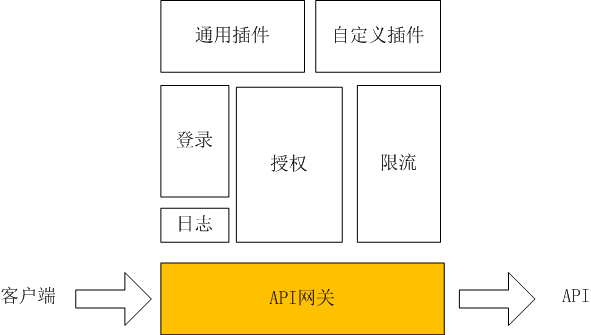
使用 API 网关后的优点如下:
- 易于监控。可以在网关收集监控数据并将其推送到外部系统进行分析。
- 易于认证。可以在网关上进行认证,然后再将请求转发到后端的微服务,而无须在每个微服务中进行认证。
- 减少了客户端与各个微服务之间的交互次数。
API 网关选型
业界的情况:
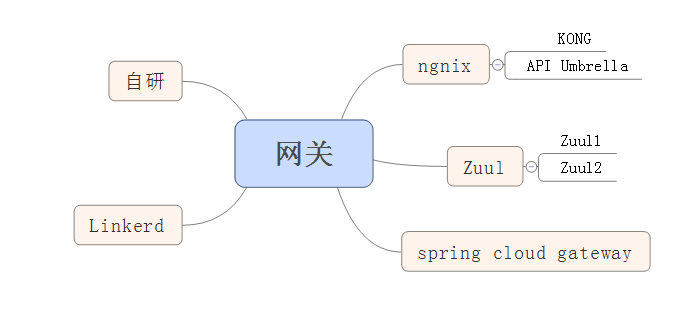
我前面的文章<Netflix网关zuul(1.x和2.x)全解析>已经介绍了zuul1 和zuul2,现在就尝试从实例入手介绍一下spring cloud gateway
首先我们一步步实现一个最简单的网关例子
步骤1:在http://start.spring.io网站上创建一个spring-cloud-gateway-example项目,依赖spring-cloud-gateway,如下图所示
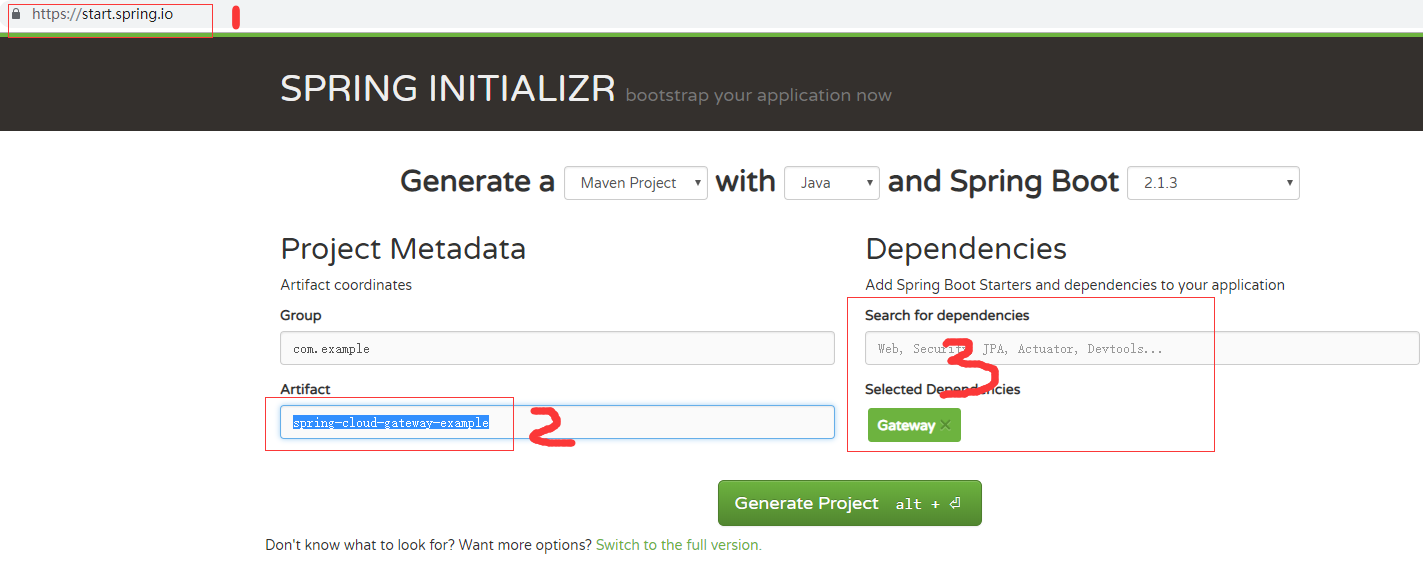
此时生产了一个spring-cloud-gateway-example的空项目包,pom.xml文件如下
<?xml version="1.0" encoding="UTF-8"?>

<project xmlns="http://maven.apache.org/POM/4.0.0" xmlns:xsi="http://www.w3.org/2001/XMLSchema-instance"

    xsi:schemaLocation="http://maven.apache.org/POM/4.0.0 http://maven.apache.org/xsd/maven-4.0.0.xsd">

    <modelVersion>4.0.0</modelVersion>

    <parent>

        <groupId>org.springframework.boot</groupId>

        <artifactId>spring-boot-starter-parent</artifactId>

        <version>2.1.3.RELEASE</version>

        <relativePath/> <!-- lookup parent from repository -->

    </parent>

    <groupId>com.example</groupId>

    <artifactId>spring-cloud-gateway-example</artifactId>

    <version>0.0.1-SNAPSHOT</version>

    <name>spring-cloud-gateway-example</name>

    <description>Demo project for Spring Boot</description>

    <properties>

        <java.version>1.8</java.version>

        <spring-cloud.version>Greenwich.RELEASE</spring-cloud.version>

    </properties>

    <dependencies>

        <dependency>

            <groupId>org.springframework.cloud</groupId>

            <artifactId>spring-cloud-starter-gateway</artifactId>

        </dependency>

        <dependency>

            <groupId>org.springframework.boot</groupId>

            <artifactId>spring-boot-starter-test</artifactId>

            <scope>test</scope>

        </dependency>

    </dependencies>

    <dependencyManagement>

        <dependencies>

            <dependency>

                <groupId>org.springframework.cloud</groupId>

                <artifactId>spring-cloud-dependencies</artifactId>

                <version>${spring-cloud.version}</version>

                <type>pom</type>

                <scope>import</scope>

            </dependency>

        </dependencies>

    </dependencyManagement>

    <build>

        <plugins>

            <plugin>

                <groupId>org.springframework.boot</groupId>

                <artifactId>spring-boot-maven-plugin</artifactId>

            </plugin>

        </plugins>

    </build>

    <repositories>

        <repository>

            <id>spring-milestones</id>

            <name>Spring Milestones</name>

            <url>https://repo.spring.io/milestone</url>

        </repository>

    </repositories>

</project>
2.创建一个Route实例的配置类GatewayRoutes
package com.example.springcloudgatewayexample;

import org.springframework.cloud.gateway.route.RouteLocator;

import org.springframework.cloud.gateway.route.builder.RouteLocatorBuilder;

import org.springframework.context.annotation.Bean;

import org.springframework.context.annotation.Configuration;

@Configuration

public class GatewayRoutes {

    @Bean

    public RouteLocator routeLocator(RouteLocatorBuilder builder) {

        return builder.routes()

                .route(r ->

                        r.path("/java/**")

                                .filters(

                                        f -> f.stripPrefix(1)

                                )

                                .uri("http://localhost:8090/helloWorld")

                )

                .build();

    }

}
当然,也可以不适用配置类,使用配置文件,如下图所示
spring:

  cloud:

    gateway:

      routes:

        - predicates:

            - Path=/java/**

          filters:

            - StripPrefix=1

          uri: "http://localhost:8090/helloWorld"
不过,为了调试方便,我们使用配置类方式。
此时项目已经完成,足够简单吧。
3.启动此项目
>>因api网关需要转发到一个服务上,本文为http://localhost:8090/helloWorld,那需要先启动我上文<spring boot整合spring5-webflux从0开始的实战及源码解析>,你也可以创建一个普通的web项目,启动端口设置为8090,然后启动。
. ____ _ __ _ _

/\\ / ___'_ __ _ _(_)_ __ __ _ \ \ \ \

( ( )\___ | '_ | '_| | '_ \/ _` | \ \ \ \

\\/ ___)| |_)| | | | | || (_| | ) ) ) )

' |____| .__|_| |_|_| |_\__, | / / / /

=========|_|==============|___/=/_/_/_/

:: Spring Boot :: (v2.1.3.RELEASE)

2019-02-21 09:29:07.450 INFO 11704 --- [ main] c.e.demo.Spring5WebfluxApplication : Starting Spring5WebfluxApplication on DESKTOP-405G2C8 with PID 11704 (E:\workspaceForCloud\spring5-webflux\target\classes started by dell in E:\workspaceForCloud\spring5-webflux)

2019-02-21 09:29:07.455 INFO 11704 --- [ main] c.e.demo.Spring5WebfluxApplication : No active profile set, falling back to default profiles: default

2019-02-21 09:29:09.409 INFO 11704 --- [ main] o.s.b.web.embedded.netty.NettyWebServer : Netty started on port(s): 8090

2019-02-21 09:29:09.413 INFO 11704 --- [ main] c.e.demo.Spring5WebfluxApplication : Started Spring5WebfluxApplication in 2.304 seconds (JVM running for 7.311)
>>以spring boot方式启动spring-cloud-gateway-example项目,日志如下
2019-02-21 10:34:33.435  INFO 8580 --- [           main] trationDelegate$BeanPostProcessorChecker : Bean 'org.springframework.cloud.autoconfigure.ConfigurationPropertiesRebinderAutoConfiguration' of type [org.springframework.cloud.autoconfigure.ConfigurationPropertiesRebinderAutoConfiguration$$EnhancerBySpringCGLIB$$1e059320] is not eligible for getting processed by all BeanPostProcessors (for example: not eligible for auto-proxying)

  .   ____          _            __ _ _

 /\\ / ___'_ __ _ _(_)_ __  __ _ \ \ \ \

( ( )\___ | '_ | '_| | '_ \/ _` | \ \ \ \

 \\/  ___)| |_)| | | | | || (_| |  ) ) ) )

  '  |____| .__|_| |_|_| |_\__, | / / / /

 =========|_|==============|___/=/_/_/_/

 :: Spring Boot ::        (v2.1.3.RELEASE)

2019-02-21 10:34:33.767  INFO 8580 --- [           main] e.s.SpringCloudGatewayExampleApplication : No active profile set, falling back to default profiles: default

2019-02-21 10:34:34.219  INFO 8580 --- [           main] o.s.cloud.context.scope.GenericScope     : BeanFactory id=d98183ec-3e46-38ba-ba4c-e976a1017dce

2019-02-21 10:34:34.243  INFO 8580 --- [           main] trationDelegate$BeanPostProcessorChecker : Bean 'org.springframework.cloud.autoconfigure.ConfigurationPropertiesRebinderAutoConfiguration' of type [org.springframework.cloud.autoconfigure.ConfigurationPropertiesRebinderAutoConfiguration$$EnhancerBySpringCGLIB$$1e059320] is not eligible for getting processed by all BeanPostProcessors (for example: not eligible for auto-proxying)

2019-02-21 10:34:44.367  INFO 8580 --- [           main] o.s.c.g.r.RouteDefinitionRouteLocator    : Loaded RoutePredicateFactory [After]

2019-02-21 10:34:44.367  INFO 8580 --- [           main] o.s.c.g.r.RouteDefinitionRouteLocator    : Loaded RoutePredicateFactory [Before]

2019-02-21 10:34:44.367  INFO 8580 --- [           main] o.s.c.g.r.RouteDefinitionRouteLocator    : Loaded RoutePredicateFactory [Between]

2019-02-21 10:34:44.367  INFO 8580 --- [           main] o.s.c.g.r.RouteDefinitionRouteLocator    : Loaded RoutePredicateFactory [Cookie]

2019-02-21 10:34:44.367  INFO 8580 --- [           main] o.s.c.g.r.RouteDefinitionRouteLocator    : Loaded RoutePredicateFactory [Header]

2019-02-21 10:34:44.368  INFO 8580 --- [           main] o.s.c.g.r.RouteDefinitionRouteLocator    : Loaded RoutePredicateFactory [Host]

2019-02-21 10:34:44.368  INFO 8580 --- [           main] o.s.c.g.r.RouteDefinitionRouteLocator    : Loaded RoutePredicateFactory [Method]

2019-02-21 10:34:44.368  INFO 8580 --- [           main] o.s.c.g.r.RouteDefinitionRouteLocator    : Loaded RoutePredicateFactory [Path]

2019-02-21 10:34:44.368  INFO 8580 --- [           main] o.s.c.g.r.RouteDefinitionRouteLocator    : Loaded RoutePredicateFactory [Query]

2019-02-21 10:34:44.368  INFO 8580 --- [           main] o.s.c.g.r.RouteDefinitionRouteLocator    : Loaded RoutePredicateFactory [ReadBodyPredicateFactory]

2019-02-21 10:34:44.368  INFO 8580 --- [           main] o.s.c.g.r.RouteDefinitionRouteLocator    : Loaded RoutePredicateFactory [RemoteAddr]

2019-02-21 10:34:44.368  INFO 8580 --- [           main] o.s.c.g.r.RouteDefinitionRouteLocator    : Loaded RoutePredicateFactory [Weight]

2019-02-21 10:34:44.368  INFO 8580 --- [           main] o.s.c.g.r.RouteDefinitionRouteLocator    : Loaded RoutePredicateFactory [CloudFoundryRouteService]

2019-02-21 10:34:44.920  INFO 8580 --- [           main] o.s.b.web.embedded.netty.NettyWebServer  : Netty started on port(s): 8080

2019-02-21 10:34:44.923  INFO 8580 --- [           main] e.s.SpringCloudGatewayExampleApplication : Started SpringCloudGatewayExampleApplication in 12.329 seconds (JVM running for 13.126)
4.测试,浏览器访问http://localhost:8080/java/helloWorld
返回hello world !
5.从上面的代码和配置及实例中,我们可以看出spring cloud gateway处理request请求的流程如下所示:
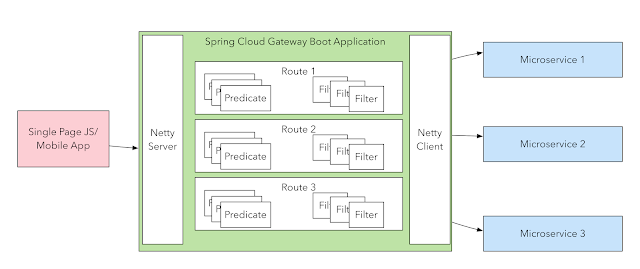
即在最前端,启动一个netty server(默认端口为8080)接受请求,然后通过Routes(每个Route由Predicate(等同于HandlerMapping)和Filter(等同于HandlerAdapter))处理后通过Netty Client发给响应的微服务。
那么在gateway本身最重要的应该是Route(Netty Server和Client已经封装好了),它由RouteLocatorBuilder构建,内部包含Predicate和Filter,
    private Route(String id, URI uri, int order, AsyncPredicate<ServerWebExchange> predicate, List<GatewayFilter> gatewayFilters) {

        this.id = id;

        this.uri = uri;

        this.order = order;

        this.predicate = predicate;

        this.gatewayFilters = gatewayFilters;

    }
那么我们就来探讨一下这两个组件吧
5.1.Predicate
Predicte由PredicateSpec来构建,主要实现有:
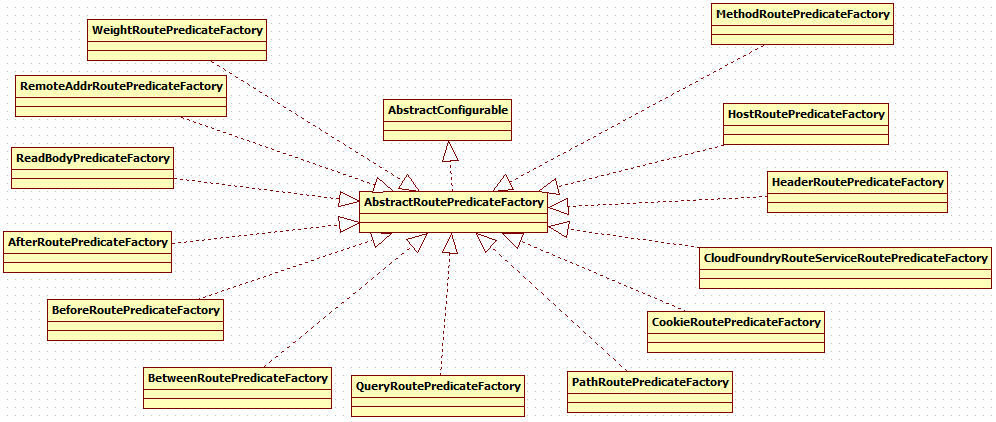
以path为例
    /**

     * A predicate that checks if the path of the request matches the given pattern

     * @param patterns the pattern to check the path against.

     *                The pattern is a {@link org.springframework.util.PathMatcher} pattern

     * @return a {@link BooleanSpec} to be used to add logical operators

     */

    public BooleanSpec path(String... patterns) {

        return asyncPredicate(getBean(PathRoutePredicateFactory.class)

                .applyAsync(c -> c.setPatterns(Arrays.asList(patterns))));

    }
PathRoutePredicateFactory中执行
    @Override

    public Predicate<ServerWebExchange> apply(Config config) {

        final ArrayList<PathPattern> pathPatterns = new ArrayList<>();

        synchronized (this.pathPatternParser) {

            pathPatternParser.setMatchOptionalTrailingSeparator(

                    config.isMatchOptionalTrailingSeparator());

            config.getPatterns().forEach(pattern -> {

                PathPattern pathPattern = this.pathPatternParser.parse(pattern);

                pathPatterns.add(pathPattern);

            });

        }

        return exchange -> {

            PathContainer path = parsePath(exchange.getRequest().getURI().getPath());

            Optional<PathPattern> optionalPathPattern = pathPatterns.stream()

                    .filter(pattern -> pattern.matches(path)).findFirst();

            if (optionalPathPattern.isPresent()) {

                PathPattern pathPattern = optionalPathPattern.get();

                traceMatch("Pattern", pathPattern.getPatternString(), path, true);

                PathMatchInfo pathMatchInfo = pathPattern.matchAndExtract(path);

                putUriTemplateVariables(exchange, pathMatchInfo.getUriVariables());

                return true;

            }

            else {

                traceMatch("Pattern", config.getPatterns(), path, false);

                return false;

            }

        };

    }
5.2.Filter
Filter分两种,一种GatewayFilter,一种GlobalFilter
5.2.1 GatewayFilter
GatewayFilter由GatewayFilterSpec构建,GatewayFilter的构建器

5.2.2 GlobalFilter
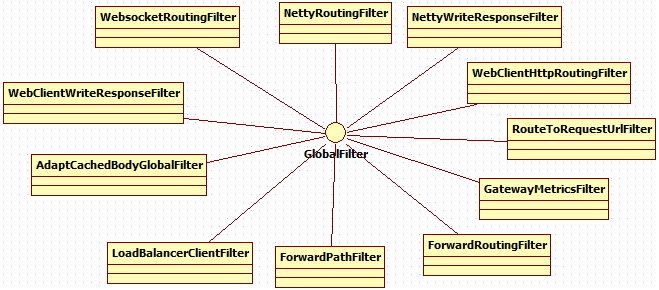
5.3 GlobalFilter和GatewayFilter的联系
FilteringWebHandler.GatewayFilterAdapter代理了GlobalFilter
6.总结
本文从一个spring-cloud-gateway实例入手,深入浅出的介绍了spring-cloud-gateway的组件,并从源码角度给出了实现的原理。
spring-cloud-gateway在最前端,启动一个netty server(默认端口为8080)接受请求,然后通过Routes(每个Route由Predicate(等同于HandlerMapping)和Filter(等同于HandlerAdapter))处理后通过Netty Client发给响应的微服务。
Predicate和Filter的各个实现定义了spring-cloud-gateway拥有的功能。
参考资料:
【1】https://www.infoq.cn/article/comparing-api-gateway-performances
【2】https://dzone.com/articles/spring-cloud-gateway-configuring-a-simple-route
从0开始构建你的api网关--Spring Cloud Gateway网关实战及原理解析的更多相关文章
- spring cloud:服务网关 Spring Cloud GateWay 入门
Spring 官方最终还是按捺不住推出了自己的网关组件:Spring Cloud Gateway ,相比之前我们使用的 Zuul(1.x) 它有哪些优势呢?Zuul(1.x) 基于 Servlet,使 ...
- Spring Cloud实战 | 第十一篇:Spring Cloud Gateway 网关实现对RESTful接口权限控制和按钮权限控制
一. 前言 hi,大家好,这应该是农历年前的关于开源项目 的最后一篇文章了. 有来商城 是基于 Spring Cloud OAuth2 + Spring Cloud Gateway + JWT实现的统 ...
- Spring Cloud gateway 网关服务二 断言、过滤器
微服务当前这么火爆的程度,如果不能学会一种微服务框架技术.怎么能升职加薪,增加简历的筹码?spring cloud 和 Dubbo 需要单独学习.说没有时间?没有精力?要学俩个框架?而Spring C ...
- .net core下,Ocelot网关与Spring Cloud Gateway网关的对比测试
有感于 myzony 发布的 针对 Ocelot 网关的性能测试 ,并且公司下一步也需要对.net和java的应用做一定的整合,于是对Ocelot网关.Spring Cloud Gateway网关做个 ...
- Spring Cloud gateway 网关四 动态路由
微服务当前这么火爆的程度,如果不能学会一种微服务框架技术.怎么能升职加薪,增加简历的筹码?spring cloud 和 Dubbo 需要单独学习.说没有时间?没有精力?要学俩个框架?而Spring C ...
- Spring Cloud 微服务三: API网关Spring cloud gateway
前言:前面介绍了一款API网关组件zuul,不过发现spring cloud自己开发了一个新网关gateway,貌似要取代zuul,spring官网上也已经没有zuul的组件了(虽然在仓库中可以更新到 ...
- API网关spring cloud gateway和负载均衡框架ribbon实战
通常我们如果有一个服务,会部署到多台服务器上,这些微服务如果都暴露给客户,是非常难以管理的,我们系统需要有一个唯一的出口,API网关是一个服务,是系统的唯一出口.API网关封装了系统内部的微服务,为客 ...
- 微服务网关 Spring Cloud Gateway
1. 为什么是Spring Cloud Gateway 一句话,Spring Cloud已经放弃Netflix Zuul了.现在Spring Cloud中引用的还是Zuul 1.x版本,而这个版本是 ...
- Spring Cloud gateway 网关服务 一
之前我们介绍了 zuul网关服务,今天聊聊spring cloud gateway 作为spring cloud的亲儿子网关服务.很多的想法都是参照zuul,为了考虑zuul 迁移到gateway 提 ...
随机推荐
- Eeffective C++ 读书笔记( 32-38)
条款三十二:确定你的public继承塑模出is-a关系 1.所谓最佳设计,取决于系统希望做什么事,包括现在和未来. 2.好的接口可以防止无效的代码通过编译,因此你应该宁可采取“在编译期拒绝企鹅飞行”的 ...
- (ospf、rip、isis、EIGRP)常见的动态路由协议简介
路由器要转发数据必须先配置路由数据,通常根据网络规模的大小可设置静态路由或设置动态路由.静态路由配置方便,对系统要求低,适用于拓扑结构简单并且稳定的小型网络.缺点是不能自动适应网络拓扑的变化,需要人工 ...
- Flask入门之结构重组(瘦身)-第13讲笔记
1. pip list Flask 0.10.1 Flask-Bootstrap 3.3.5.6 Flask-SQLAlchemy 2 Flask-Script 2.0.5 Flask-WTF 0.1 ...
- linux基础-系统安装教程篇(centos6.5)
一.linux系统简介: Linux是一套免费使用和自由传播的类Unix操作系统,是一个基于POSIX和UNIX的多用户.多任务.支持多线程和多CPU的操作系统.它能运行主要的UNIX工具软件.应用程 ...
- 洛谷 P1490 解题报告
P1490 买蛋糕 题目描述 野猫过生日,大家当然会送礼物了(咳咳,没送礼物的同志注意了哈!!),由于不知道送什么好,又考虑到实用性等其他问题,大家决定合伙给野猫买一个生日蛋糕.大家不知道最后要买的蛋 ...
- HTML结构及基础语法
一.HTML结构 <!DOCTYPE html><html lang="en"><head> <meta charset="UT ...
- 【转】搭建自己的 sentry 服务
1. 安装 docker 首先要确认你的 Ubuntu 版本是否符合安装 Docker 的前提条件.如果没有问题,你可以通过下边的方式来安装 Docker : 使用具有 sudo 权限的用户来登录你的 ...
- explicit的作用
用来修饰类的构造函数,被修饰的构造函数的类,不能发生相应的隐式类型转换,只能以显示的方式进行类型转换,例如:不加:Circle A = Circle(1.23) 加上之后:只能写:Circle A(1 ...
- SSM-SpringMVC-20:SpringMVC中处理器方法之返回值void篇
------------吾亦无他,唯手熟尔,谦卑若愚,好学若饥------------- 处理器的方法我们之前做过,返回值为String的,返回值为ModelAndView的,我们这个讲的这个返回 ...
- log4j的配置与使用
配置log4j的步骤如下: 1.导入jar包 如log4j-1.2.15.jar 2.在src下添加log4j.properties 使用时把下面内容中的注释去掉: //日志级别及位置 log4j.r ...