
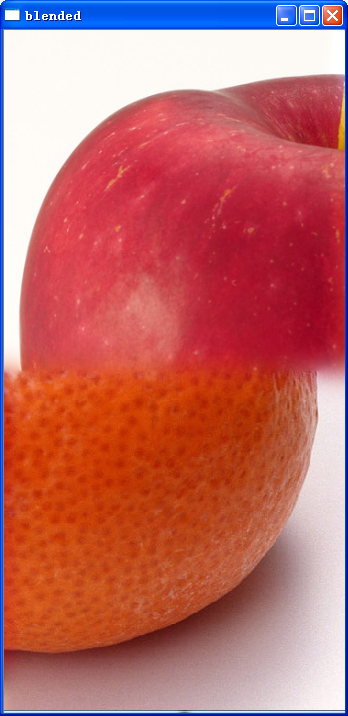
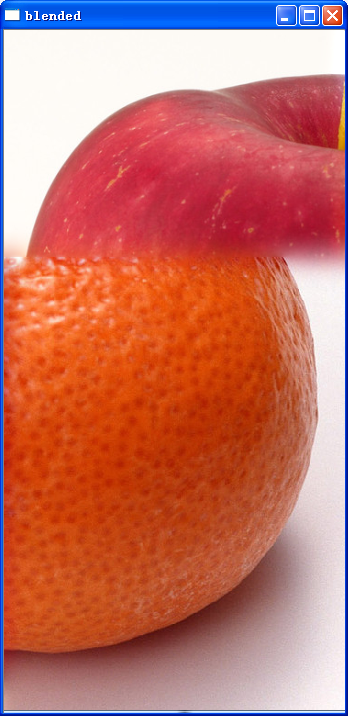
使用liner、feather、multiband对已经拼接的数据进行融合(下)
#include "stdafx.h"
#include <iostream>
#include <vector>
#include <opencv2/core/core.hpp>
#include <opencv2/imgproc/imgproc.hpp>
#include <opencv2/highgui/highgui.hpp>
#include <opencv2/features2d/features2d.hpp>
#include <opencv2/calib3d/calib3d.hpp>
using namespace cv;
#ifdef _DEBUG
#define new DEBUG_NEW
#endif
#define DllExport _declspec (dllexport)


/*
1.设计一个mask(一半全1,一半全0),并计算level层的gaussion_mask[i];
2.计算两幅图像每一层的Laplacian[i],并与gaussion_mask[i]相乘,合成一幅result_lapacian[i];
3.对两幅图像不断求prydown,并把最高层保存在gaussion[i],与gaussion_mask[i]相乘,合成一幅result_gaussion;
4,对result_gaussion不断求pryup,每一层都与result_lapacian[i]合成,最后得到原-图像大小的融合图像。
*/


class LaplacianBlending {
private:
                Mat_<Vec3f> top;
                Mat_<Vec3f> down;
                Mat_<);


                                maskGaussianPyramid.clear();
                                Mat currentImg;
                                 //blendMask就是掩码
                                cvtColor(blendMask, currentImg, CV_GRAY2BGR); //store color img of blend mask into maskGaussianPyramid
                                maskGaussianPyramid.push_back(currentImg); //0-level


                                currentImg = blendMask;
                                 for (int l=1; l<levels+1; l++) {
                                                Mat _down;
                                                 if (topLapPyr.size() > l)
                                                                pyrDown(currentImg, _down, topLapPyr[l].size());
                                                 else
                                                                pyrDown(currentImg, _down, topHighestLevel.size()); //lowest level


                                                Mat down;
                                                cvtColor(_down, down, CV_GRAY2BGR);
                                                maskGaussianPyramid.push_back(down); //add color blend mask into mask Pyramid
                                                currentImg = _down;
                                }
                }


                 //创建laplacian金字塔
                 void buildLaplacianPyramid(const Mat& img, vector<Mat_<Vec3f>; l<levels; l++) {
                                                Mat down,up;
                                                pyrDown(currentImg, down);
                                                pyrUp(down, up,currentImg.size());
                                                Mat lap = currentImg - up;  //存储的就是残D差
                                                lapPyr.push_back(lap);
                                                currentImg = down;
                                }
                                currentImg.copyTo(HighestLevel);
                }


                Mat_<Vec3f> reconstructImgFromLapPyramid() {
                                 //将左右laplacian图像拼成的resultLapPyr金字塔中每一层
                                 //从上到下插值放大并相加,即得blend图像结果
                                Mat currentImg = resultHighestLevel;
                                 for (int l=levels-1; l>=0; l--) {
                                                Mat up;
                                                pyrUp(currentImg, up, resultLapPyr[l].size());
                                                currentImg = up + resultLapPyr[l];
                                }
                                 return currentImg;
                }


                 void blendLapPyrs() {
                                 //获得每层金字塔中直接用左右两图Laplacian变换拼成的图像
                                 //一半的一半就是在这个地方计算的。 是基于掩模的方式进行的.
                                resultHighestLevel = topHighestLevel.mul(maskGaussianPyramid.back()) +
                                                downHighestLevel.mul(Scalar(1.0,1.0,1.0) - maskGaussianPyramid.back());
                                 for (int l=0; l<levels; l++) {
                                                Mat A = topLapPyr[l].mul(maskGaussianPyramid[l]);
                                                Mat antiMask = Scalar(1.0,1.0,1.0) - maskGaussianPyramid[l];
                                                Mat B = downLapPyr[l].mul(antiMask);
                                                Mat_<Vec3f> blendedLevel = A + B;
                                                resultLapPyr.push_back(blendedLevel);
                                }
                }


public:
                LaplacianBlending( const Mat_<Vec3f>& _top, const Mat_<Vec3f>& _down, const Mat_<);
                 return lb.blend();
}


DllExport double aValue =1.5;
DllExport int dlladd()
{
                 return;
}
DllExport int dlladd( int a,int b)
{
                 return a+b;
}
DllExport cv::Mat imagetest()
{
                cv::Mat image1= cv::imread( "C:\\apple.png",1);
                cv::Mat image2= cv::imread( "C:\\orange.png",1);


                Mat_<Vec3f> t; image1.convertTo(t,CV_32F,1.0/255.0); //Vec3f表示有三个通道,即 [row][column][depth]
                Mat_<Vec3f> d; image2.convertTo(d,CV_32F,1.0/255.0);


                Mat_<.0);                 //将m全部赋3值为a0
                 //m(Range::all(),Range(0,m.cols/2)) = 1.0;    //原来初始的掩码是在这里
                m(Range(0,m.rows/2),Range::all())=1.0;
                Mat_<Vec3f> blend = LaplacianBlend(t,d, m);


                imshow( "blended",blend);
                 return blend;
}
 ;
;
使用liner、feather、multiband对已经拼接的数据进行融合(下)的更多相关文章
- 使用liner、feather、multiband对已经拼接的数据进行融合
所谓"blend",英文解释为“vt. 混合vi. 混合:协调n. 混合:掺合物”这里应该理解为是图像数据的融合.这是“识别->对准->融合”的最后一步.融合是决定拼接 ...
- 关于json动态拼接响应数据
在EasyUI http://www.jeasyui.com/demo/main/get_users.php 响应数据如下格式: { "total": "11" ...
- 使用concat做字符串拼接和数据迁移
作用: 解决一开始数据库建立不合理造成的字段冗余,从而提取部分字段,数据迁移.拼接字符串的功能. 格式: concat(字段1,'间隔符',字段2....) concat_ws('间隔符',字段1,字 ...
- Python接口测试-以&连接拼接字典数据(get中url请求数据)
get请求的utl数据是这样的,例如:/banner/findBanner?bannerType=1&_=1556107073181 ''' 1-banner图-banner/findBann ...
- python 手动拼接json数据
第一步:分别拼接为字符串 第二步:将字符串转化为list 第三歩:将两个list合并为dict 第四步:将dict转换为接送数据 如: import json keys = ['a', 'b', ' ...
- udp拼接传递数据包
1.拼接项少 pl = ["<0112>","<32>","<1024x768>","< ...
- sql server full join拼接表数据,按组加序号
--查询所有数据select A.*,B.* from(select z.id,z.requestId,z.FBillNo,dt5.FCauseAndProcess,dt5.FEquipmentNo, ...
- SQL拼接字段数据
查询语句: SELECT STUFF ( ( SELECT ',' + --分隔符 KeyID --查询字段 FROM #tmp --查询数据表 WITH(NOLOCK) --查询条件 FOR XML ...
- C#拼接SQL语句,SQL Server 2005+,多行多列大数据量情况下,使用ROW_NUMBER实现的高效分页排序
/// <summary>/// 单表(视图)获取分页SQL语句/// </summary>/// <param name="tableName"&g ...
随机推荐
- 3.C#的访问权限修饰符
C#里类及类成员的修饰符有以下五个如下:public 公开 类及类成员的修饰符 对访问成员没有级别限制private 私有 类成员的修饰符 只能在类的内部访问protected 受保护的 类成员的修饰 ...
- centos make error: fatal error: curses.h: No such file or directory
yum install ncurses.x86_64 yum install ncurses-devel.x86_64 yum install ncurses-libs.x86_64 yum inst ...
- 有关于异常捕获点滴,plus我也揭揭java的短
▄︻┻┳═一『异常捕获系列』Agenda: ▄︻┻┳═一有关于异常捕获点滴,plus我也揭揭java的短 ▄︻┻┳═一根据异常自定义处理逻辑([附]java异常处理规范) ▄︻┻┳═一利用自定义异常来 ...
- unity之让obj旋转自转等操作
1.让cube沿着矩形四个点运动 using System.Collections; using System.Collections.Generic; using UnityEngine; publ ...
- .NET 黑魔法 - asp.net core 日志系统
asp.net core 里如何记录日志呢? 这要从asp.net core的依赖注入说起,在asp.net core里的依赖注入真是无所不在,各种面向切面的接口与事件. 好吧,来点干货. 首先,我们 ...
- C#6.0中10大新特性的应用和总结
微软发布C#6.0.VS2015等系列产品也有一段时间了,但是网上的教程却不多,这里真对C#6.0给大家做了一些示例,分享给大家. 微软于2015年7月21日发布了Visual Studio 20 ...
- Oracle数据库备份实验笔记[不完整,内容乱]
rman target / log=/orasoft/backup/${DATE}backup1.log <<EOFrun {allocate channel c1 device type ...
- python --- 字符编码学习小结
上半年的KPI,是用python做一个测试桩系统,现在系统框架基本也差不多定下来了.里面有用到新学的工厂设计模式以及以及常用的大牛写框架的业务逻辑和python小技巧.发现之前自己写的代码还是面向过程 ...
- 学习笔记<3>View接触
一.View基本概念 1.界面上显示所有的控件都是用对象表示的,即有类,这些类都是View的子类. 2.View的种类 二.在Activity当中获取代表View的对象 1.根据ID可以用方法获取到对 ...
- django admin 处理文本换行空格
使用 linebreaks filter <p>{{ blogpassage.content|linebreaksbr }}<p>