
Solution for unable to create "dead-letter-exchange" in RabbitMQ
在参考 Dead-Letter-Exchange 进行Dead-letter-exchange的理解,
在本地时,想要创建 Dead-letter-exchange 时,一直报错,错误如下:
Unhandled Exception: RabbitMQ.Client.Exceptions.OperationInterruptedException: The AMQP operation was interrupted: AMQP close-reason, initiated by Peer, code=406, text="PRECONDITION_FAILED - inequivalent arg 'x-dead-letter-exchange' for queue 'q_test' in vhost '/': received the value 'q-dead-letter-exchange' of type 'longstr' but current is none", classId=50, methodId=10, cause=

   at RabbitMQ.Client.Impl.SimpleBlockingRpcContinuation.GetReply(TimeSpan timeout)

   at RabbitMQ.Client.Impl.ModelBase.QueueDeclare(String queue, Boolean passive, Boolean durable, Boolean exclusive, Boolean autoDelete, IDictionary`2 arguments)

   at RabbitMQ.Client.Impl.AutorecoveringModel.QueueDeclare(String queue, Boolean durable, Boolean exclusive, Boolean autoDelete, IDictionary`2 arguments)

   at CNBlogs.Question.EventBusRabbitMQ.EventBusRabbitMQ.CreateConsumerChannel()
去官网查了查,姿势也正确,先声明一个Exchange
channel.ExchangeDeclare("q-dead-letter-exchange", type: "direct");
然后再指定 x-dead-letter-exchange 参数
var args = new Dictionary<string, object>()

            {

                {"x-dead-letter-exchange", "q-dead-letter-exchange"}

            };
最后放到队列声明里面:
 channel.QueueDeclare(queue: _queueName,

                                 durable: true,

                                 exclusive: false,

                                 autoDelete: false,

                                 arguments: args);
然而,每次一运行就报上面那个错误,最后子啊Github上找到了答案
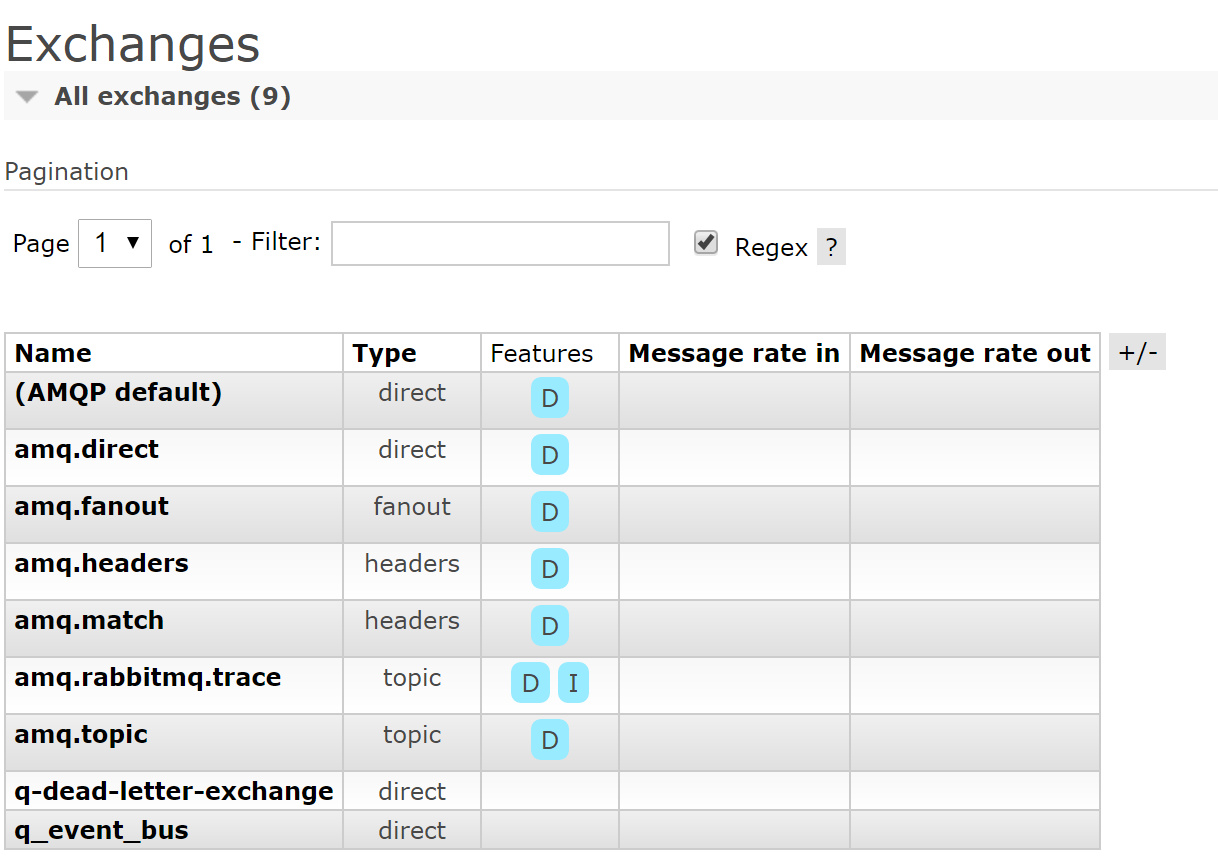
原因可能是我原来的队列中,因为有尚未确认的消息在。然后,把RabbitMQ 中的Queue 和Exchange 删除,重新运行程序就成功了。下面是Queue和Exchange 的截图

Solution for unable to create "dead-letter-exchange" in RabbitMQ的更多相关文章
- ORA-09925: Unable to create audit trail file汇总
今天一兄弟的库报ORA-09925: Unable to create audit trail file,当时查 df -h有可用空间,文件夹的权限也正确,未df -i查看Inodes使用情况,审计文 ...
- ODA: After Apply ODA 12.2.1.2.0 Patch, Unable to Create TableSpace Due to [ORA-15001: diskgroup "DATA" does not exist or is not mounted | ORA-15040: diskgroup is incomplete] (Doc ID 2375553.1)
ODA: After Apply ODA 12.2.1.2.0 Patch, Unable to Create TableSpace Due to [ORA-15001: diskgroup &quo ...
- Fatal error in launcher Unable to create process using 'dapppythonpython37python
Fatal error in launcher: Unable to create process using '"d:\app\python\python37\python.exe&quo ...
- 【Azure 服务总线】Azure Service Bus中私信(DLQ - Dead Letter Queue)如何快速清理
在博文ServiceBus 队列中死信(DLQ - Dead Letter Queue)问题一文中,介绍了服务总线产生私信的原因及可以通过代码的方式来清楚私信队列中的消息,避免长期占用空间(因为私信中 ...
- 记一次tomcat线程创建异常调优:unable to create new native thread
测试在进行一次性能测试的时候发现并发300个请求时出现了下面的异常: HTTP Status 500 - Handler processing failed; nested exception is ...
- 解决Unable to create new native thread
两种类型的Out of Memory java.lang.OutOfMemoryError: Java heap space error 当JVM尝试在堆中分配对象,堆中空间不足时抛出.一般通过设定J ...
- ArcEngine编辑保存错误:Unable to create logfile system tables
通过ArcEngine对多个SDE中多个图层进行批量编辑处理,其中有部分图层在结束编辑的时候出现错误提示(部分图层可以,只有两个数据较多的图层保存失败). 错误信息:Unable to create ...
- Fatal error in launcher: Unable to create process using '"'
今天遇到了 Fatal error in launcher: Unable to create process using '"' 这个问题,原来是我上次装python3.5的时候,pyth ...
- Genymotion创建下载模拟器的时候出现Unable to create Genymotion virtual devices:Connection timeout错误
如图,如果Genymotion创建下载模拟器的时候出现Unable to create Genymotion virtual devices:Connection timeout错误,具体解决方法如下 ...
随机推荐
- SpringBoot PUT请求
(1)配置HiddenHttpMethodFilter(SpringMVC需要配置,SpringBoot已经为我们自动配置了) (2)在视图页面创建一个Post Form表单,在表单中创建一个inpu ...
- string替换字符串,路径的斜杠替换为下划线
场景 替换某个路径的所有"\"为"_". 很多时候取证需要把恶意代码文件取回来,然后清除. 如果在D:\WEB\模板制作插件\需要覆盖\CodeColoring ...
- Nodejs+定时截图+发送邮件
功能 每天定时截图,并把截到的图片自动通过邮件发送. 说明 代码注释已经非常详细,就不多做说明,需要的朋友自己查看代码即可,主文件Mail.js,截图文件capturePart1.js,capture ...
- nodejs 访问网站并操作xpath
var xpath = require('xpath'); //引用xpath包 var dom = require('xmldom-silent').DOMParser;//引用xmldom包 va ...
- dubbo系列一、dubbo背景介绍、微服务拆分
一.背景 随着互联网的发展,网站应用的规模不断扩大,常规的垂直应用架构已无法应对,分布式服务架构以及流动计算架构势在必行,亟需一个治理系统确保架构有条不紊的演进. 二.传统应用到分布式应用的演进过程 ...
- git安装及基础用法
1.安装GitGit-2.9.3-64-bit.exe 2.打开Git Bash,设置用户名,Email $ git config --global user.name "Your Name ...
- 对比synchronized与java.util.concurrent.locks.Lock 的异同
主要区别 1.Lock能完成几乎所有synchronized的功能,并有一些后者不具备的功能,如公平锁.等待可中断.锁绑定多个条件等: 2.synchronized 是Java 语言层面的,是内置的关 ...
- Windows Mac地址伪装步骤
本文介绍Windows上Mac地址修改方法,适用于网络环境绑定了Mac地址需要修改上网的情况. 工具/原料 PC电脑一台 Windows系统 方法/步骤 点击右下角图标. 点击打开网络和共享中心. 点 ...
- Laravel框架中的event事件操作
有时候当我们单纯的看 Laravel 手册的时候会有一些疑惑,比如说系统服务下的授权和事件,这些功能服务的应用场景是什么,其实如果没有经历过一定的开发经验有这些疑惑是很正常的事情,但是当我们在工作中多 ...
- 模拟js中注册表单验证
示例1 <!DOCTYPE html> <html lang="en"> <head> <meta charset="UTF-8 ...