
Solution for unable to create "dead-letter-exchange" in RabbitMQ
在参考 Dead-Letter-Exchange 进行Dead-letter-exchange的理解,
在本地时,想要创建 Dead-letter-exchange 时,一直报错,错误如下:
Unhandled Exception: RabbitMQ.Client.Exceptions.OperationInterruptedException: The AMQP operation was interrupted: AMQP close-reason, initiated by Peer, code=406, text="PRECONDITION_FAILED - inequivalent arg 'x-dead-letter-exchange' for queue 'q_test' in vhost '/': received the value 'q-dead-letter-exchange' of type 'longstr' but current is none", classId=50, methodId=10, cause=

   at RabbitMQ.Client.Impl.SimpleBlockingRpcContinuation.GetReply(TimeSpan timeout)

   at RabbitMQ.Client.Impl.ModelBase.QueueDeclare(String queue, Boolean passive, Boolean durable, Boolean exclusive, Boolean autoDelete, IDictionary`2 arguments)

   at RabbitMQ.Client.Impl.AutorecoveringModel.QueueDeclare(String queue, Boolean durable, Boolean exclusive, Boolean autoDelete, IDictionary`2 arguments)

   at CNBlogs.Question.EventBusRabbitMQ.EventBusRabbitMQ.CreateConsumerChannel()
去官网查了查,姿势也正确,先声明一个Exchange
channel.ExchangeDeclare("q-dead-letter-exchange", type: "direct");
然后再指定 x-dead-letter-exchange 参数
var args = new Dictionary<string, object>()

            {

                {"x-dead-letter-exchange", "q-dead-letter-exchange"}

            };
最后放到队列声明里面:
 channel.QueueDeclare(queue: _queueName,

                                 durable: true,

                                 exclusive: false,

                                 autoDelete: false,

                                 arguments: args);
然而,每次一运行就报上面那个错误,最后子啊Github上找到了答案
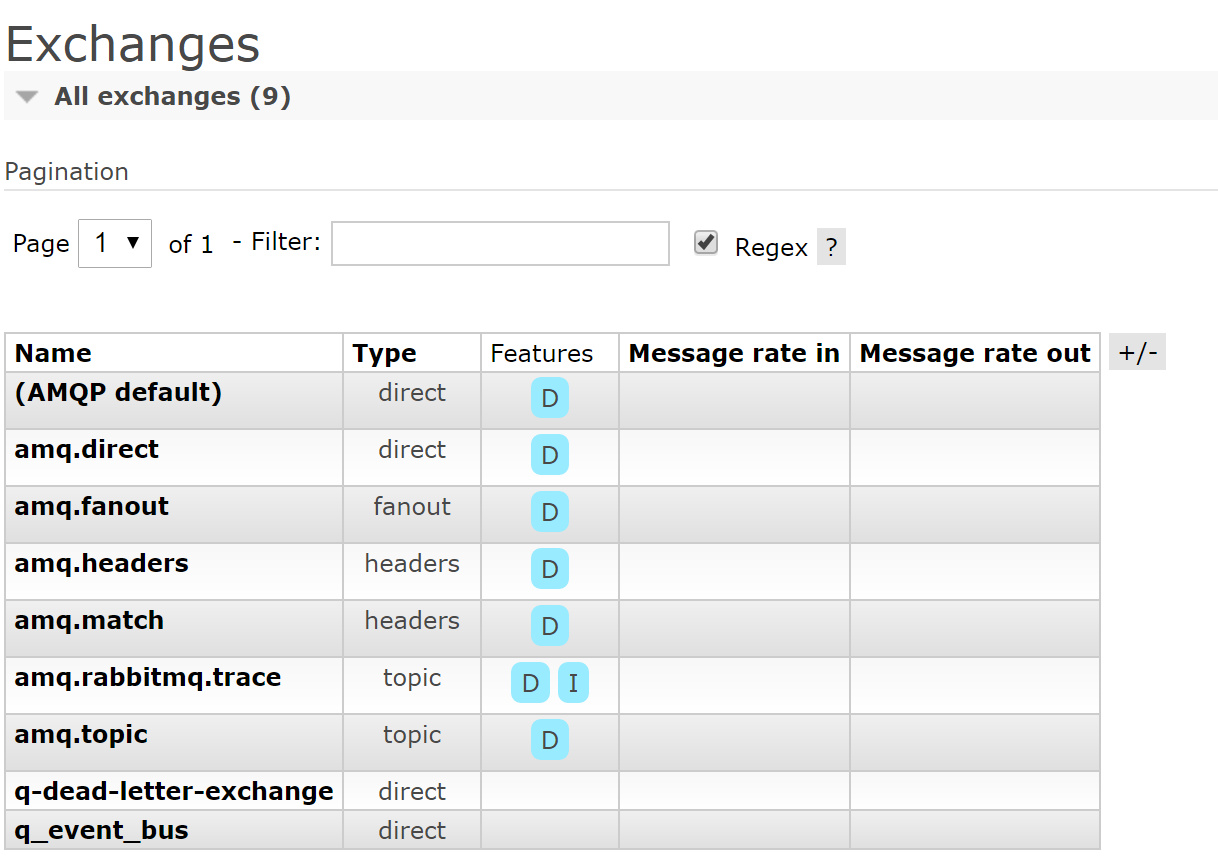
原因可能是我原来的队列中,因为有尚未确认的消息在。然后,把RabbitMQ 中的Queue 和Exchange 删除,重新运行程序就成功了。下面是Queue和Exchange 的截图

Solution for unable to create "dead-letter-exchange" in RabbitMQ的更多相关文章
- ORA-09925: Unable to create audit trail file汇总
今天一兄弟的库报ORA-09925: Unable to create audit trail file,当时查 df -h有可用空间,文件夹的权限也正确,未df -i查看Inodes使用情况,审计文 ...
- ODA: After Apply ODA 12.2.1.2.0 Patch, Unable to Create TableSpace Due to [ORA-15001: diskgroup "DATA" does not exist or is not mounted | ORA-15040: diskgroup is incomplete] (Doc ID 2375553.1)
ODA: After Apply ODA 12.2.1.2.0 Patch, Unable to Create TableSpace Due to [ORA-15001: diskgroup &quo ...
- Fatal error in launcher Unable to create process using 'dapppythonpython37python
Fatal error in launcher: Unable to create process using '"d:\app\python\python37\python.exe&quo ...
- 【Azure 服务总线】Azure Service Bus中私信(DLQ - Dead Letter Queue)如何快速清理
在博文ServiceBus 队列中死信(DLQ - Dead Letter Queue)问题一文中,介绍了服务总线产生私信的原因及可以通过代码的方式来清楚私信队列中的消息,避免长期占用空间(因为私信中 ...
- 记一次tomcat线程创建异常调优:unable to create new native thread
测试在进行一次性能测试的时候发现并发300个请求时出现了下面的异常: HTTP Status 500 - Handler processing failed; nested exception is ...
- 解决Unable to create new native thread
两种类型的Out of Memory java.lang.OutOfMemoryError: Java heap space error 当JVM尝试在堆中分配对象,堆中空间不足时抛出.一般通过设定J ...
- ArcEngine编辑保存错误:Unable to create logfile system tables
通过ArcEngine对多个SDE中多个图层进行批量编辑处理,其中有部分图层在结束编辑的时候出现错误提示(部分图层可以,只有两个数据较多的图层保存失败). 错误信息:Unable to create ...
- Fatal error in launcher: Unable to create process using '"'
今天遇到了 Fatal error in launcher: Unable to create process using '"' 这个问题,原来是我上次装python3.5的时候,pyth ...
- Genymotion创建下载模拟器的时候出现Unable to create Genymotion virtual devices:Connection timeout错误
如图,如果Genymotion创建下载模拟器的时候出现Unable to create Genymotion virtual devices:Connection timeout错误,具体解决方法如下 ...
随机推荐
- J - Long Long Message (最长公共子串)
题目链接:https://cn.vjudge.net/contest/283743#problem/J 题目大意:给你两个字符串,问你两个字符串的最长的公共子串. 具体思路:把两个字符串合在一起,然后 ...
- Linux用户相关指令
⒈添加用户 ①useradd [Options] 用户名 useradd -d 指定用户目录 用户名 useradd -g 用户组 用户名 ⒉指定/修改用户密码 ①passwd 用户名 ⒊删除用户(建 ...
- UML和模式应用4:初始阶段(6)--迭代方法中如何使用用例
1.前言 用例是UP和其他众多迭代方法的核心.UP提倡用例驱动开发. 2. 迭代方法中如何使用用例 功能需求首先定义在用例中 用例是迭代计划的重要部分,迭代是通过选择一些用例场景或整个用例来定义的 用 ...
- Android手势滑动Tab
Android手势滑动Tab //MainActivity.java public class MainActivity extends TabActivity { ; ; ; private Ges ...
- PYTHON-模块 sys os random shutil-练习
# 作业:# 添加工程根目录至环境变量 要求可以跨平台# import sys,os# BATH_DIR=os.path.dirname(os.path.dirname(__file__))# sys ...
- vue系列之生命周期
代码: <body> <div id="app"> {{message}} </div> <script type="text/ ...
- JavaScript 使用 mediaDevices API 选择摄像头
大多数智能手机都有前置和后置摄像头,当你在创建视频应用时你可能想要选择或者切换前置.后置摄像头. 如果你开发的是一款聊天应用,你很可能会想调用前置摄像头,但如果你开发的是一款拍照软件,那么你会更倾向于 ...
- php和NodeJs共存的开发环境
1 折腾 php nodejs 到一起 nodejs当然很火,就像着火了一样,但是必须承认要搭建一个前端的demo开发环境还是PHP靠谱, windows下可以非常的集成套件,比如http://www ...
- C++ code:数组初始化
具有初始化的数组定义,其元素个数可以省略,即方括号中的表达式可以省略.这时候,最后确定的元素个数取决于初始化值的个数.例如: #include<iostream> using namesp ...
- JVM内存管理概述
1.概述 java不在需要开发人员显示的分配内存和回收内存,而是由JVM自动管理内存的分配和回收(又称为垃圾回收-GC),这简化了编程难度,但同时可能使得程序员在不知不觉中浪费了很多内存,导致JVM花 ...