
iOS App让自己的应用在其它应用中打开列表中显示
像百度网盘等应用,里面的文件打开时,都能够通过以下应用再打开文件。以下红色框框内的我的jpg就是我做的一个样例。
由于样例没有提供Icon,所以显示的是默认icon。
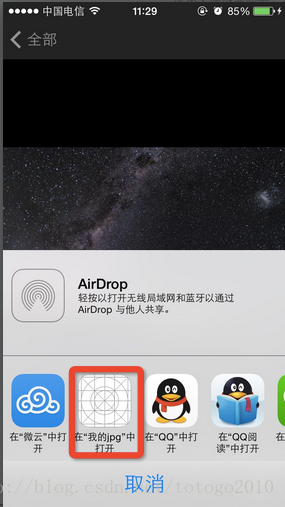
以下就是这样例的主要步骤和代码。
样例是一个打开jpg图片程序。
1、在项目的**info.plist文件里加入:
<key>CFBundleDocumentTypes</key>

	<array>

		<dict>

			<key>CFBundleTypeIconFiles</key>

			<array>

				<string>icon@2x.png</string>

				<string>icon.png</string>

			</array>

			<key>CFBundleTypeName</key>

			<string>Molecules Structure File</string>

			<key>CFBundleTypeRole</key>

			<string>Viewer</string>

			<key>LSHandlerRank</key>

			<string>Owner</string>

			<key>LSItemContentTypes</key>

			<array>

				<string>com.fzrong.jpg</string>

				<string>org.gnu.gnu-zip-archive</string>

			</array>

		</dict>

	</array>

	<key>UTExportedTypeDeclarations</key>

	<array>

		<dict>

			<key>UTTypeConformsTo</key>

			<array>

				<string>public.plain-text</string>

				<string>public.text</string>

			</array>

			<key>UTTypeDescription</key>

			<string>Molecules Structure File</string>

			<key>UTTypeIdentifier</key>

			<string>com.fzrong.jpg</string>

			<key>UTTypeTagSpecification</key>

			<dict>

				<key>public.filename-extension</key>

				<string>jpg</string>

				<key>public.mime-type</key>

				<string>image/jpg</string>

			</dict>

		</dict>

	</array>
这就是告诉系统,你能打开 jpg这个文件类型。
2、打开到自己的app时,要截取到过来资源的文件路径:
在Appdelegate里加入代码例如以下:
- (BOOL)application:(UIApplication *)application openURL:(NSURL *)url sourceApplication:(NSString *)sourceApplication annotation:(id)annotation

{

    if (url != nil) {

        NSString *path = [url absoluteString];

        NSMutableString *string = [[NSMutableString alloc] initWithString:path];

        if ([path hasPrefix:@"file://"]) {

            [string replaceOccurrencesOfString:@"file://" withString:@"" options:NSCaseInsensitiveSearch  range:NSMakeRange(0, path.length)];

        }

        [self.viewController openPng:string];

    }

    return YES;

}
要去掉file://文件路径的头。要不然找不到资源。
3、在自己的ViewController里打开jgp显示:
- (void)openPng:(NSString*)string

{

    UIImage *image = [[UIImage alloc] initWithContentsOfFile:string];

    float width = image.size.width;

    float height = image.size.height;

    if (width > 320) {

        height = (height/width) * 300;

        width = 300;

    }

    CGRect frame = CGRectMake(0, 20, width, height);

    imageView.frame = frame;

    imageView.image = image;

}
打开之后的效果是这种:
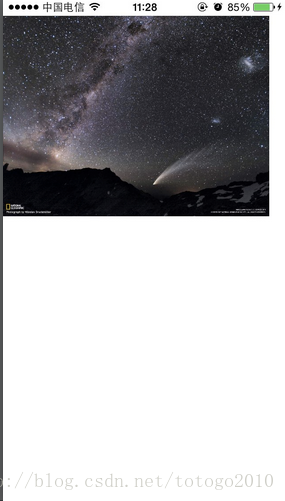
注意:这都是在真机上演示的。
这里样例咱们能够扩展,怎么打开网盘里的gif图片啊。还有其它自己自己定义的格式也能够。
项目完整代码已经上传到:http://download.csdn.net/detail/totogo2010/7460929
或者github: https://github.com/schelling/openFileType
參考:
https://developer.apple.com/library/ios/qa/qa1587/_index.html
http://stackoverflow.com/questions/20869815/open-file-from-local-file-system-with-default-application-ios
iOS App让自己的应用在其它应用中打开列表中显示的更多相关文章
- 在app中打开appStore中其他app
var str = "https://itunes.apple.com/cn/app/zhang-jiange-hao-tou-zi-ke/id402382976?mt=8"//这 ...
- Vim 写 iOS App
Vim 写 iOS App 我们都知道 Vim 和 Emacs 都是文本编辑器中的上古神器,你也许用 ctags,cscopes 配合 Vim 完成过大型 C 或者 C++ 的开发,你也许配合过其他插 ...
- iOS app内存分析套路
iOS app内存分析套路 Xcode下查看app内存使用情况有2中方法: Navigator导航栏中的Debug navigator中的Memory Instruments 一.Debug navi ...
- iOS App引导页功能实现
一.写作原因 以前都没有想着来写点东西,今天遇到件事情让我决定每次还是要做记录.因为以前自己可以轻松的完成pod spec的配置,但是今天在做的时候还是忘了遇到了很多坑.pod spec配置遇到的坑不 ...
- iOS APP 如何做才安全
本来 写了一篇<iOS 如何做才安全--逆向工程 - Reveal.IDA.Hopper.https抓包 等>,发现文章有点杂,并且“iOS 如何做才安全”这部分写的越来越多,觉得 分出来 ...
- Xcode7.1环境下上架iOS App到AppStore 流程② (Part 二)
前言部分 part二部分主要讲解 iOS App IDs 的创建.概要文件的配置.以及概要文件安装的过程. 一.iOS App IDs 的创建 1)进入如图1所示界面点击右上角箭头所指的加号 进入iO ...
- iOS App上架流程(2016详细版)
iOS App上架流程(2016详细版) 原文地址:http://www.jianshu.com/p/b1b77d804254 感谢大神整理的这么详细 一.前言: 作为一名iOSer,把开发出来的Ap ...
- 用Model-View-ViewModel构建iOS App(转)
转载自 Model-View-ViewModel for iOS [译] 如果你已经开发一段时间的iOS应用,你一定听说过Model-View-Controller, 即MVC.MVC是构建iOS a ...
- 用Model-View-ViewModel构建iOS App
如果你已经开发一段时间的iOS应用,你一定听说过Model-View-Controller,即MVC.MVC是构建iOS App的标准模式.然而,最近我已经越来越厌倦MVC的一些缺点.在本文,我将重温 ...
随机推荐
- [Stats385] Lecture 01-02, warm up with some questions
Theories of Deep Learning 借该课程,进入战略要地的局部战斗中,采用红色字体表示值得深究的概念,以及想起的一些需要注意的地方. Lecture 01 Lecture01: De ...
- [IR] What is XML
Concept: http://www.w3school.com.cn/xml/xml_cdata.asp Semistructured: 和普通纯文本相比,半结构化数据具有一定的结构性.OEM(Ob ...
- 【!Important】Java线程死锁查看分析方法
一.Jconsole Jconsole是JDK自带的图形化界面工具,使用JDK给我们提过的工具JConsole,可以通过cmd打开命令框然后输入Jconsole打开图形工具 然后点击检测死锁就可以查看 ...
- 网页使用思源字体 CSS
在知乎上再次看到这门字体的提问,想想中文字体过得多么艰辛,中文软件过得多么艰辛. 思源字体 2014年7月,Adobe与Google宣布推出一款新的开源字体思源黑体, 有七种字体粗细(ExtraLig ...
- [原]Jenkins(二)---jenkins之Git+maven+jdk+tomcat
/** * lihaibo * 文章内容都是根据自己工作情况实践得出. *版权声明:本博客欢迎转发,但请保留原作者信息! http://www.cnblogs.com/horizonli/p/5331 ...
- js中parseInt和Number
昨天在项目中遇到一个问题,有关字符串准换成数字的问题,具体如下: 页面中<input type="number" id="bankNum" ng-mode ...
- ARM Linux Oops使用小结(转)
出现Oops消息的大部分错误时因为对NULL指针取值或者因为用了其他不正确的指针值. Oops如何产生的解释如下: 由于处理器使用的地址几乎都是虚拟地址,这些地址通过一个被称为“页表”的结构被 ...
- 京东无人超市的成长之路 如何利用AI技术在零售业做产品创新?
随着消费及用户体验的需求升级.人货场的运营效率需求提升.人工智能技术的突破以及零售基础设施的变革等因素共同推动了第四次零售革命的到来,不仅在国内,国外一线巨头互联网亚马逊等企业都在研发无人驾驶.无人超 ...
- 联想y720 淋了雨,字体变得模糊了
显卡驱动没有问题 重新校准显示器问题解决 事实上,可能是某些软件 扰乱了系统字体,请安装上述来重新调整显示器的字体清晰度
- 石子合并 区间dp模板
题意:中文题 Description 在操场上沿一直线排列着 n堆石子.现要将石子有次序地合并成一堆.规定每次只能选相邻的两堆石子合并成新的一堆, 并将新的一堆石子数记为该次合并的得分.允许在第一次合 ...