
Redis在SSM项目中的简单使用
一、基于SSM的Redis环境配置
前提是你的开发电脑安装和配置好了redis,如果没安装请看Window配置Redis环境和简单使用
1.1、pom文件中引入redis客户端jar包(pom.xml)
 <!-- https://mvnrepository.com/artifact/redis.clients/jedis -->

    <dependency>

      <groupId>redis.clients</groupId>

      <artifactId>jedis</artifactId>

      <version>2.9.</version>

    </dependency>
1.2、redis属性配置文件(redis.properties)
#redis.host=127.0.0.1

redis.host=localhost

redis.port=

redis.password=你的redis密码

redis.maxIdle=

redis.maxTotal=

redis.maxWaitMillis=

redis.testOnBorrow=true

redis.timeout=
1.3、spring和redis的配置文件(spring-redis.xml)
指定了redis属性配置文件的路径
<?xml version="1.0" encoding="UTF-8"?>

<beans xmlns="http://www.springframework.org/schema/beans"

       xmlns:xsi="http://www.w3.org/2001/XMLSchema-instance"

       xmlns:util="http://www.springframework.org/schema/util"

       xmlns:p="http://www.springframework.org/schema/p"

       xsi:schemaLocation="

             http://www.springframework.org/schema/beans

             http://www.springframework.org/schema/beans/spring-beans.xsd

             http://www.springframework.org/schema/util

             http://www.springframework.org/schema/util/spring-util.xsd">

    <util:properties id="redisConfig" location="classpath:/config/redis.properties"></util:properties>

    <bean id="jedisPoolConfig" class="redis.clients.jedis.JedisPoolConfig">

        <property name="maxIdle" value="#{redisConfig['redis.maxIdle']}" />

        <property name="maxTotal" value="#{redisConfig['redis.maxTotal']}" />

        <property name="maxWaitMillis" value="#{redisConfig['redis.maxWaitMillis']}" />

        <property name="testOnBorrow" value="#{redisConfig['redis.testOnBorrow']}" />

    </bean>

    <bean id="jedisPool" class="redis.clients.jedis.JedisPool">

        <constructor-arg index="" ref="jedisPoolConfig" />

        <!-- 端口,默认6379 -->

        <constructor-arg index="" value="#{redisConfig['redis.host']}" name="host" type="java.lang.String"/>

        <constructor-arg index="" value="#{redisConfig['redis.port']}"  name="port" type="int"/>

        <constructor-arg index="" value="#{redisConfig['redis.timeout']}"  name="timeout" type="int"/>

        <constructor-arg index="" value="#{redisConfig['redis.password']}"  name="password" type="java.lang.String"/>

    </bean>

</beans>
1.4、springmvc中引入Spring和redis的配置(spring-mvc.xml)
最下方利用import标签引入redis的配置文件
<?xml version="1.0" encoding="UTF-8"?>

<beans xmlns="http://www.springframework.org/schema/beans"

    xmlns:xsi="http://www.w3.org/2001/XMLSchema-instance" xmlns:context="http://www.springframework.org/schema/context"

    xmlns:mvc="http://www.springframework.org/schema/mvc"

    xsi:schemaLocation="http://www.springframework.org/schema/beans

    http://www.springframework.org/schema/beans/spring-beans.xsd

    http://www.springframework.org/schema/context

    http://www.springframework.org/schema/context/spring-context-4.0.xsd

    http://www.springframework.org/schema/mvc

    http://www.springframework.org/schema/mvc/spring-mvc-4.0.xsd">

    <!-- 注解扫描包 -->

    <context:component-scan base-package="com.king.weixin"/>

    <!-- 开启注解 -->

    <mvc:annotation-driven/>

    <!--

    配置静态资源,直接映射到对应的文件夹,不被DispatcherServlet处理,.04新增功能,需要重新设置spring-mvc-3.0.xsd

    -->

    <mvc:resources mapping="/img/**" location="/img/" />

    <mvc:resources mapping="/js/**" location="/js/" />

    <mvc:resources mapping="/css/**" location="/css/" />

    <mvc:resources mapping="/html/**" location="/html/" />

    <mvc:resources mapping="/tinymce/**" location="/tinymce/" />

    <mvc:resources mapping="/upload/**" location="/upload/" />

    <!-- 定义跳转的文件的前后缀 ,视图模式配置-->

    <bean id="viewResolver"

        class="org.springframework.web.servlet.view.InternalResourceViewResolver">

        <!-- 这里的配置我的理解是自动给后面action的方法return的字符串加上前缀和后缀,变成一个 可用的url地址 -->

        <property name="prefix" value="/" />

        <property name="suffix" value=".jsp" />

    </bean>

    <!-- redis配置 -->

    <import resource="spring-redis.xml"/>

</beans>
二、测试和验证
采用jedis获取redis资源和操作redis,添加值并且给值设置生命周期
public String addStringValue(String key, String value, int expireSeconds) {

        String result = null;

        Jedis jedis = null;

        try {

            jedis = jedisManager.getResource();

            //result = jedis.set(key, value);

            result = jedis.set(key,value).toString();

            if (expireSeconds != ) {

                //EXPIRE key seconds 为给定 key 设置生存时间,当 key 过期时(生存时间为 0 ),它会被自动删除。

                jedis.expire(key, expireSeconds);

            }

        } catch (Exception e) {

            e.printStackTrace();

        } finally {

            jedisManager.returnResource(jedis);

        }

        return result;

    }
获取值得生命周期方法,ttl (key)
  public long getStringValueTTLByKey(String key){

        long result = ;

        Jedis jedis = null;

        try {

            jedis = jedisManager.getResource();

            //Redis TTL 命令以秒为单位返回 key 的剩余过期时间。

            result  = jedis.ttl(key);

        } catch (Exception e) {

            e.printStackTrace();

        } finally {

            jedisManager.returnResource(jedis);

        }

        return result;

    }
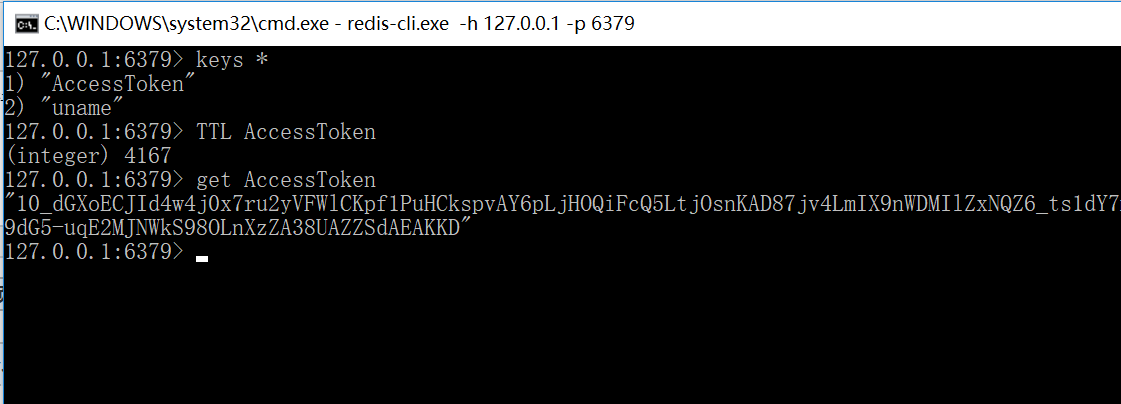
在命令行查看redis中的所有key值和剩余生命周期,如下图可以使用keys * 查看所有缓存的key ,利用TTL key可以查看该key值对应对象的剩余生命周期
Redis在SSM项目中的简单使用的更多相关文章
- redis在java项目中的使用
在上一篇文章中已经讲了redis的spring配置,这篇将会描述redis在java项目中的使用. redis存储形式都是key-value(键值对),按照存储的内容分为两种,一种是存简单数据,即数字 ...
- Jwt在Java项目中的简单实际应用
1.什么是jwt 双方之间传递安全信息的简洁的.URL安全的表述性声明规范.JWT作为一个开放的标准(RFC 7519),定义了一种简洁的,自包含的方法用于通信双方之间以Json对象的形式安全的传递信 ...
- ssm项目中遇到微信用户名称带有表情,插入失败问题
ssm项目中遇到微信用户名称带有表情,插入失败问题 问题 Mysql的utf8编码最多3个字节,而Emoji表情或者某些特殊字符是4个字节. 因此会导致带有表情的昵称插入数据库时出错. 解决方法 一. ...
- Redis在新项目中的使用场景
Redis在新项目中的使用场景 数据类型 使用场景 string 比如说,我想知道什么时候封锁一个Ip地址,Incrby命令(使用这个命令记录被访问的次数) Hash 存储用户的信息[id,name, ...
- ssm项目中中文字符乱码
昨天给同学改一个错,在SSM项目中,表单输入的String类型中,中文字符值,总是乱码,在控制器层获取的数据就开始乱码,先后进行了如下排查: web.xml中配置设置字符编码的监听器(过滤器), js ...
- 当你的SSM项目中的springmvc.xml发生第一行错误解决方案
当你新建了一个SSM项目,你复制网上的xml文件来配置或者你下载了一个SSM项目打开发现xml文件错误,打开是第一行报错的时候你是不是很懵逼 或者是这样 总之就是xml文件中<?xml vers ...
- python JoinableQueue在生产者消费者项目中的简单应用
class multiprocessing.JoinableQueue([maxsize]) JoinableQueue, a Queue subclass, is a queue which add ...
- Redis在实际项目中的一应用场景
1.在游戏的等级排名,可以将用户信息放入到redis的有序集合中,然后取得相应的排名,不用自己写代码去排序. 2.利用rediss的数据特性的自增,自减属性,可以将项目中的一些列入阅读数,点赞数放入到 ...
- redis缓存在项目中的使用
关于redis为什么能作为缓存这个问题我们就不说了,直接来说一下redis缓存到底如何在项目中使用吧: 1.redis缓存如何在项目中配置? 1.1redis缓存单机版和集群版配置?(redis的客户 ...
随机推荐
- Linux学习笔记:使用prompt关闭ftp中mget和mput的确认提醒
当使用mget和mput上传或下载多个文件时,为了关闭确认提醒,可使用prompt命令. ftp prompt -- 切换提示 切换交谈式指令(使用mput/mget 时不用每个文件皆询问yes/n ...
- 委托Func和Action【转】
平时我们如果要用到委托一般都是先声明一个委托类型,比如: private delegate string Say(); string说明适用于这个委托的方法的返回类型是string类型,委托名Say后 ...
- 判断上学和放假的demo
var today = new Date(); var xq = today.getDay(); var Now = today.getHours(); if (xq >= 1 &&am ...
- [转] 可跨域的单点登录(SSO)实现方案
SSO简介 定义: 传统的单站点登录访问授权机制是:登录成功后将用户信息保存在session中,sessionId保存在cookie中,每次访问需要登录访问的资源(url)时判断当前session是否 ...
- la 4394
题解: 区间dp 令f[i][j]表示搞好i-j的最小值 首先如果不用涂色 那么可以从f[i][k] f[k+1][j]转移 如果要涂色,那么就从f[i][k][a](表示i-k全为a)+f[k+1] ...
- asp.net core2.0大白话带你入门
本系列包括: 1.新建asp.net core项目2.web项目目录解读3.配置访问地址4.环境变量详解5.配置文件6.日志7.DI容器8.服务的生命周期9.session的使用10.cookie的使 ...
- Codeforces Round #317 (div 2)
Problem A Arrays 思路:水一水. #include<bits/stdc++.h> using namespace std; ; int n1,n2,k,m,a[N],b[N ...
- 【Java】 剑指offer(58-2) 左旋转字符串
本文参考自<剑指offer>一书,代码采用Java语言. 更多:<剑指Offer>Java实现合集 题目 字符串的左旋转操作是把字符串前面的若干个字符转移到字符串的尾部 ...
- Redis数据结构之list
一:介绍 1.存储list ArrayList使用数组的方式 LinkedList使用双向链接的方式 二:Redis客户端 1.左端与右端插入 2.左端查询 3.左端与右端弹出 4.长度 5.在头部插 ...
- MySQL 5.7.14 net start mysql 服务无法启动
解决方法: 1.mysqld --initialize 初始化data目录 2.重新输入net start mysql命令 补充,服务停止的方法:net stop mysql