
spring cloud: 升级到spring boot 2.x/Finchley.RELEASE遇到的坑
spring boot2.x已经出来好一阵了,而且spring cloud 的最新Release版本Finchley.RELEASE,默认集成的就是spring boot 2.x,这几天将一个旧项目尝试着从低版本升级到 2.x,踩坑无数,记录一下:
一、gradle的问题
spring boot 2.x 要求gradle版本不能太旧,先把gradle升级到4.6版本,然后编译,各种问题,到gradle官网上查了下,build.gradle有几个小地方要调整
1.1 java-libary 的项目
即:纯工具包这种公用jar,plugins{}必须放在第1行(有buildscript的除外),类似:
plugins {

    id 'java-library'

}
然后按官网的教程,compile最好换成implementation
dependencies {

    implementation(

            ...

    )

}
1.2 常规java项目(指带容器能独立运行的项目)
buildscript {

    ext {

        springBootVersion = '2.0.1.RELEASE'

    }

    repositories {

        maven {

            url "http://maven.aliyun.com/nexus/content/groups/public/"

        }

       ...

    }

    dependencies {

        classpath("org.springframework.boot:spring-boot-gradle-plugin:${springBootVersion}")

    }

}

apply plugin: 'java'

apply plugin: 'org.springframework.boot'

apply plugin: 'io.spring.dependency-management'

dependencyManagement {

    imports {

        mavenBom 'org.springframework.cloud:spring-cloud-dependencies:Finchley.RELEASE'

    }

}
...
另外,gradle 高版本编译时,总会有一行讨厌的提示:
Deprecated Gradle features were used in this build, making it incompatible with Gradle 5.0.
编译时,可以加参数:--warning-mode=none 禁止掉,即类似:
gradle build --warning-mode=none -x test
二、依赖jar包版本的问题
dependencies {

    ...

    implementation(

            ...

            'org.springframework.cloud:spring-cloud-starter-consul-discovery',

            'org.springframework.cloud:spring-cloud-starter-consul-config',

            'org.springframework.cloud:spring-cloud-starter-bus-kafka',

            'org.springframework.cloud:spring-cloud-starter-sleuth',

            'org.springframework.cloud:spring-cloud-sleuth-stream:1.3.4.RELEASE',

            'org.springframework.cloud:spring-cloud-starter-hystrix:1.4.4.RELEASE',

            'org.springframework.cloud:spring-cloud-netflix-hystrix-stream',

            'org.springframework.boot:spring-boot-starter-actuator',

            'org.springframework.boot:spring-boot-starter-undertow',

            'org.springframework.boot:spring-boot-starter-mail',

            'org.springframework.boot:spring-boot-starter-jdbc',

            'org.springframework.boot:spring-boot-starter-security',

            'org.slf4j:slf4j-api:1.7.25',

            'ch.qos.logback:logback-core:1.2.3',

            'org.thymeleaf:thymeleaf-spring5:3.0.9.RELEASE',

            'org.mybatis.spring.boot:mybatis-spring-boot-starter:1.3.1',

            'tk.mybatis:mapper-spring-boot-starter:1.2.4',

            'com.github.pagehelper:pagehelper-spring-boot-starter:1.2.3'

    )

    implementation('com.alibaba:druid:1.1.9') {

        exclude group: "com.alibaba", module: "jconsole"

        exclude group: "com.alibaba", module: "tools"

    }

    implementation('org.springframework.boot:spring-boot-starter-web') {

        exclude module: "spring-boot-starter-tomcat"

        exclude module: "spring-boot-starter-jetty"

    }

    testCompile 'org.springframework.boot:spring-boot-starter-test'

}
其中
'org.springframework.cloud:spring-cloud-sleuth-stream:1.3.4.RELEASE',
'org.springframework.cloud:spring-cloud-starter-hystrix:1.4.4.RELEASE',
这二项必须指定版本号,否则编译不过。(应该最新的2.x版本的jar包,还没上传到中央仓库,无法自动识别依赖),另外pagehelper这个常用的分页组件,也建议按上面的版本来配置,否则运行时,可能会报错。
三、log4j/log4j2的问题
升级到spring boot 2.x后,不管是配置log4j还是log4j2,运行时总是报堆栈溢出的error,换成logback后,启动正常,建议大家尽量采用默认的logback,依赖项的配置参考上面的。
四、DataSourceBuilder类找不到的问题
spring boot 2.x把这个类换了package,所以找不到了,详情见:
https://stackoverflow.com/questions/50011577/spring-boot-2-0-0-datasourcebuilder-not-found-in-autoconfigure-jar
https://docs.spring.io/spring-boot/docs/current/api/org/springframework/boot/jdbc/DataSourceBuilder.html
解决办法就是引用: org.springframework.boot:spring-boot-starter-jdbc
同时修改代码import新的package: org.springframework.boot.jdbc.DataSourceBuilder
五、安全性的问题
spring boot 2.x加强了安全性,不管访问什么rest url,默认都要求登录,在application.yml里无法通过配置关闭,只能写代码调整:
import org.springframework.context.annotation.Configuration;

import org.springframework.security.config.annotation.web.builders.HttpSecurity;

import org.springframework.security.config.annotation.web.configuration.EnableWebSecurity;

import org.springframework.security.config.annotation.web.configuration.WebSecurityConfigurerAdapter;

@Configuration

@EnableWebSecurity

public class SecurityConfiguration extends WebSecurityConfigurerAdapter {

    @Override

    protected void configure(HttpSecurity http) throws Exception {

        http.authorizeRequests()

                .anyRequest()

                .permitAll()

                .and()

                .csrf()

                .disable();

    }

}
这样,默认所有url都允许访问(如果是暴露在外网的服务,请慎用)
六、各类actuator监控endpoint的路径变化
spring boot 2.x 里,actuator的endpoint默认路径变成/actuator开头,如果要使用以前的风格,放在/根下,可以在applicatino.yml里参考下面的配置:
management:

  ...

  endpoints:

    web:

      base-path: /

      exposure:

        include: "*"
另外/health节点,默认情况下,只能输出很少的信息,详细信息,需要通过配置打开
management:

  ...

  endpoint:

    health:

      show-details: always

  ...
七、${spring.cloud.client.ipAddress} 无法识别
spring cloud 2.x里,${spring.cloud.client.ipAddress} 这个写法不识别,一启动就会报错,尝试了多次,无意发现,把A改成小写,居然可以了:
spring:

 ...

  application:

    name: sr-menu-service:${spring.cloud.client.ipaddress}
感觉这应该是个bug,新版本里估计会修复。
八、MetricWriter、SystemPublicMetrics类找不到的问题
spring boot 2.x里metrics默认换成了micrometer,原来的MetricWriter之类的全干掉了,详情参考官网文档
management:

  metrics:

    export:

      statsd:

        host: 10.0.*.*

        port: 8125

        flavor: etsy
上面的配置是启用statsd,然后跑起来就能看到效果,见下图
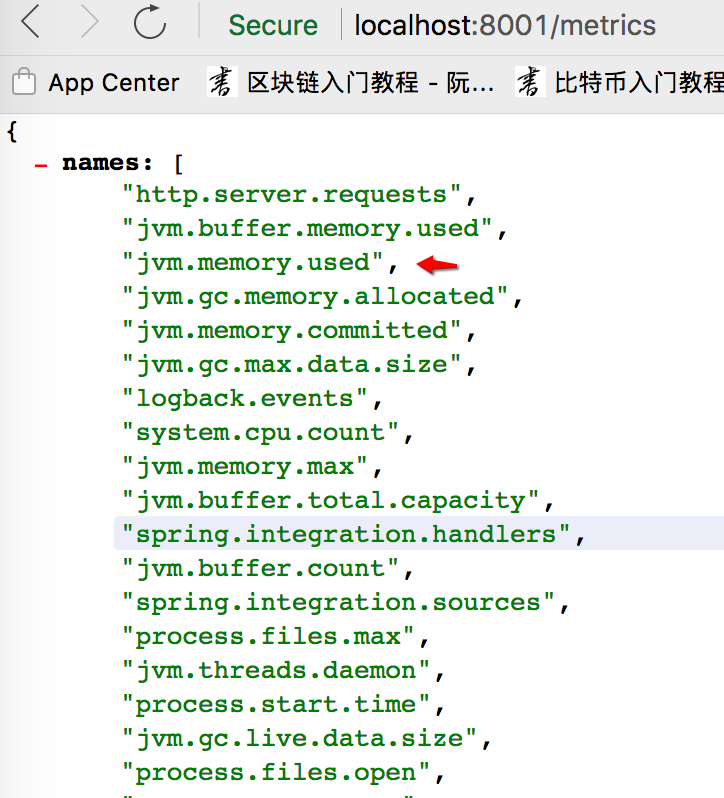
但是与spring boot 1.x相比,并不会直接输出具体值,要看具体值,可以用 http://localhost:8001/metrics/jvm.memory.used
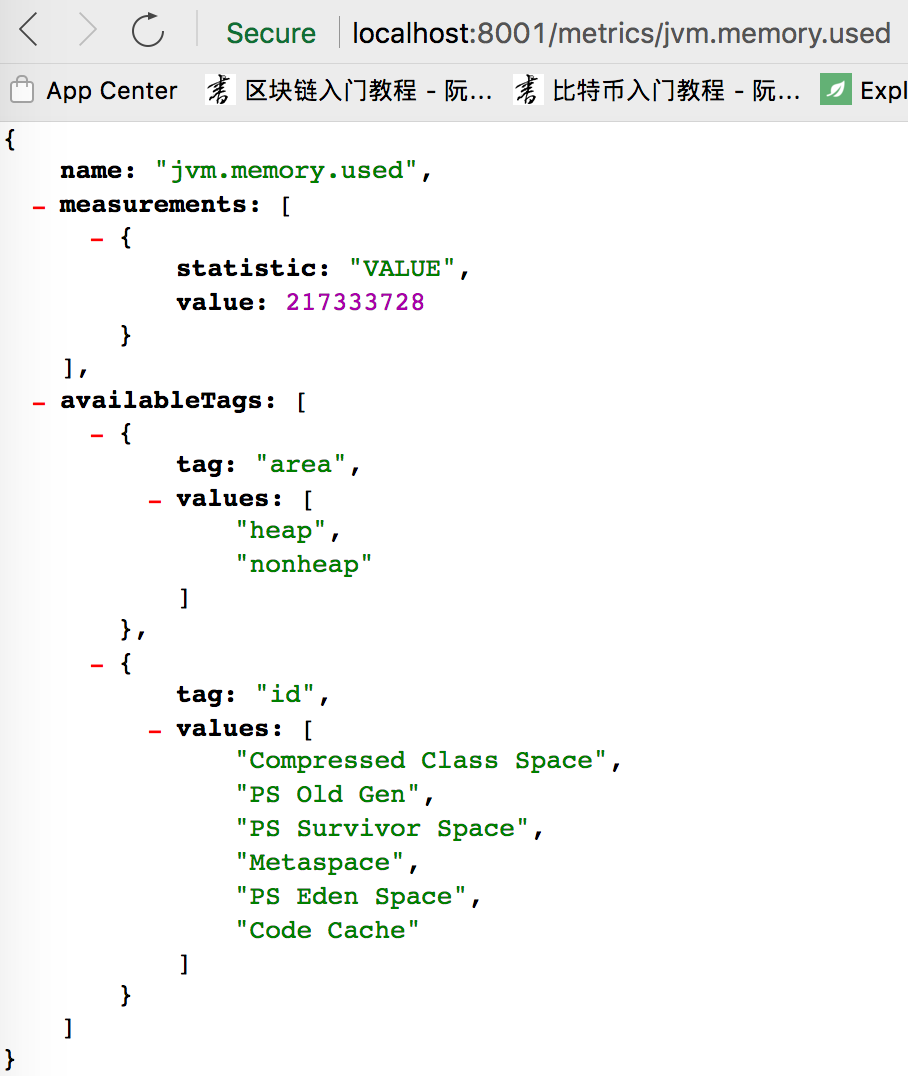
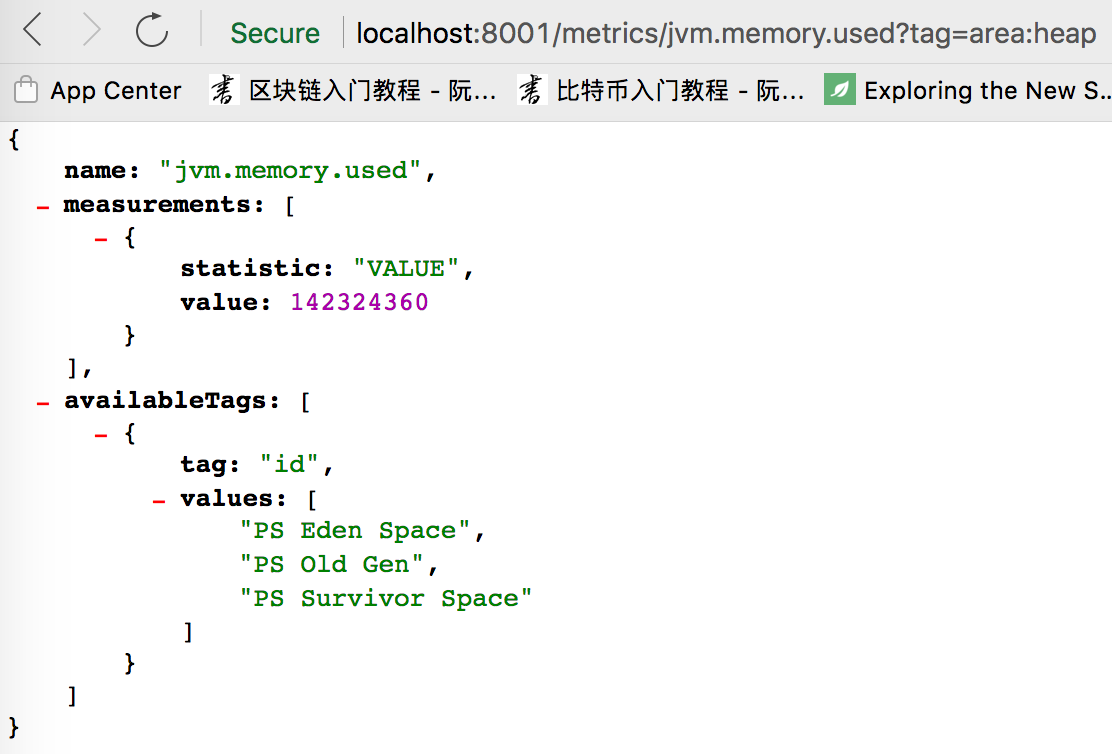
这其中的VALUE中是jvm占用的内存(包括heap + noheap),如果只想看heap区(即:堆上的内存),可以用
http://localhost:8001/metrics/jvm.memory.used?tag=area:heap
同时在grafana里也能看到效果:
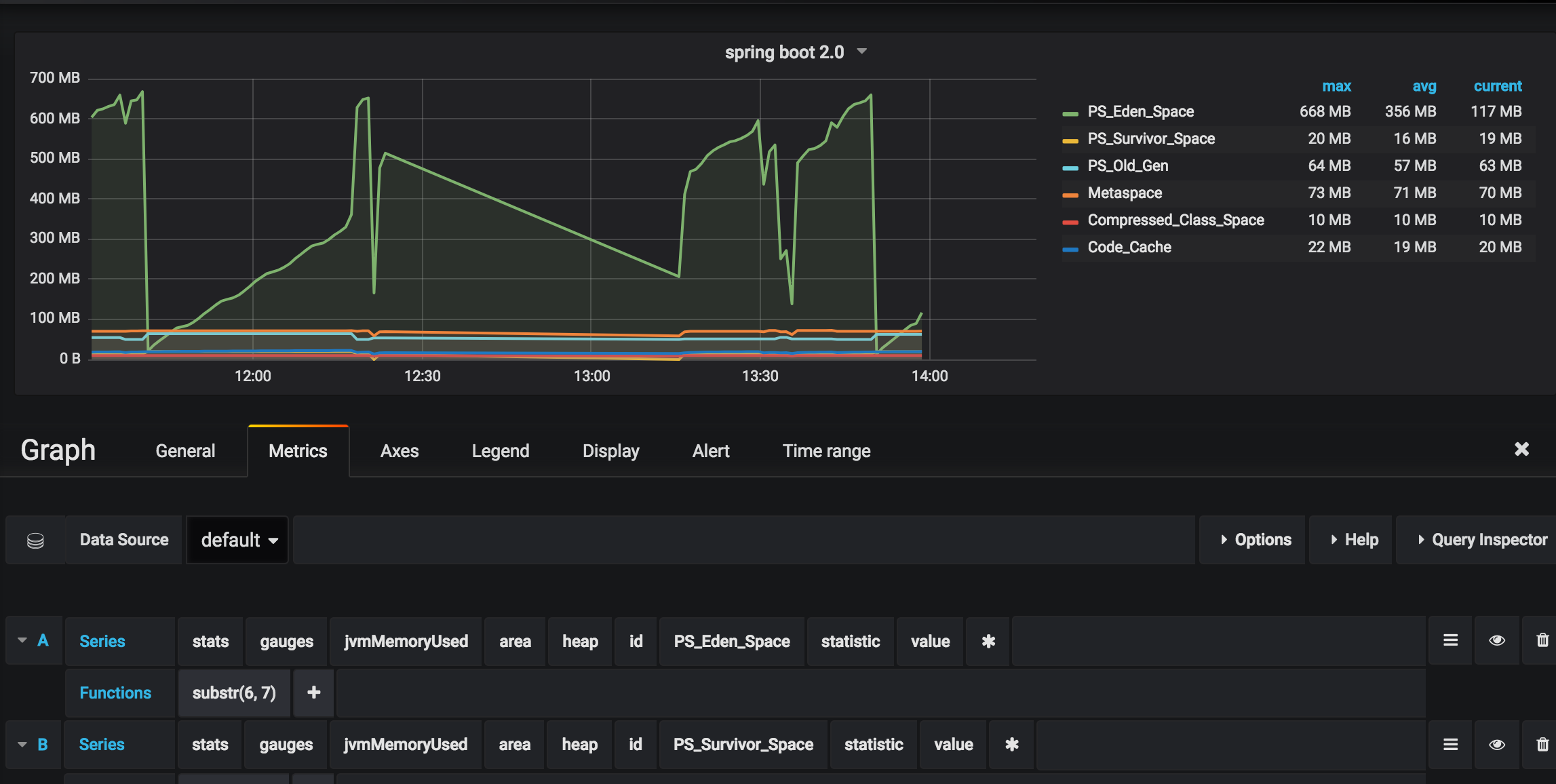
注:目前statsd里的前缀无法修改,代码写死的statsd
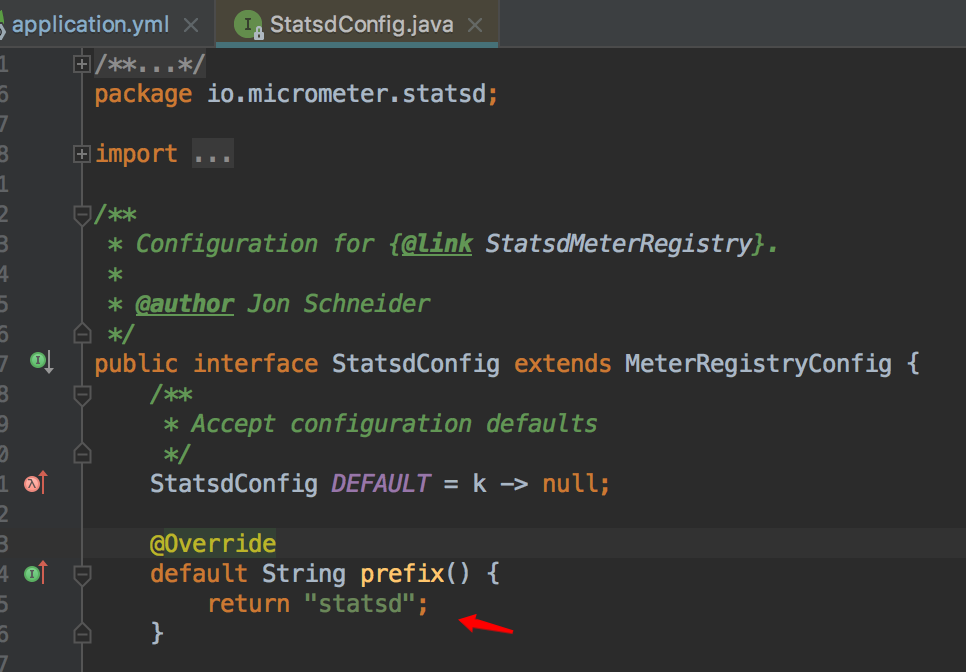
如果一台机器上部署多个spring cloud 微服务,grafana里就分不出来了(个人估计以后会改进)。
另外,如果希望通过代码获取这些metrics里具体指标值,可以参考下面的代码:
import io.micrometer.core.instrument.Meter;

import io.micrometer.core.instrument.MeterRegistry;

import io.micrometer.core.instrument.Statistic;

import org.junit.Test;

import org.springframework.beans.factory.annotation.Autowired;

import java.util.LinkedHashMap;

import java.util.Map;

import java.util.function.BiFunction;

public class MetricsTest extends BaseTest {

    private String METRIC_MSG_FORMAT = "Metric >> %s = %d";

    @Autowired

    private MeterRegistry meterRegistry;

    @Test

    public void testStatsdConfig() {

        String metric = "jvm.memory.used";

        Meter meter = meterRegistry.find(metric).meter();

        Map<Statistic, Double> stats = getSamples(meter);

        logger.info(String.format(METRIC_MSG_FORMAT, metric, stats.get(Statistic.VALUE).longValue()));

    }

    private Map<Statistic, Double> getSamples(Meter meter) {

        Map<Statistic, Double> samples = new LinkedHashMap<>();

        mergeMeasurements(samples, meter);

        return samples;

    }

    private void mergeMeasurements(Map<Statistic, Double> samples, Meter meter) {

        meter.measure().forEach((measurement) -> samples.merge(measurement.getStatistic(),

                measurement.getValue(), mergeFunction(measurement.getStatistic())));

    }

    private BiFunction<Double, Double, Double> mergeFunction(Statistic statistic) {

        return Statistic.MAX.equals(statistic) ? Double::max : Double::sum;

    }

}
九、swagger里WebMvcConfigurerAdapter过时的问题
WebMvcConfigurerAdapter这个类在最新的spring boot里已经被标识为过时,正常用法参考以下:
import org.springframework.context.annotation.Bean;

import org.springframework.context.annotation.Configuration;

import org.springframework.web.servlet.config.annotation.ResourceHandlerRegistry;

import org.springframework.web.servlet.config.annotation.WebMvcConfigurationSupport;

import springfox.documentation.builders.ApiInfoBuilder;

import springfox.documentation.builders.PathSelectors;

import springfox.documentation.builders.RequestHandlerSelectors;

import springfox.documentation.service.ApiInfo;

import springfox.documentation.service.Contact;

import springfox.documentation.spi.DocumentationType;

import springfox.documentation.spring.web.plugins.Docket;

import springfox.documentation.swagger2.annotations.EnableSwagger2;

/**

 * @author yangjunming

 * @date 13/10/2017

 */

@Configuration

@EnableSwagger2

public class SwaggerConfig extends WebMvcConfigurationSupport {

    @Override

    protected void addResourceHandlers(ResourceHandlerRegistry registry) {

        registry.addResourceHandler("swagger-ui.html")

                .addResourceLocations("classpath:/META-INF/resources/");

        registry.addResourceHandler("/webjars/**")

                .addResourceLocations("classpath:/META-INF/resources/webjars/");

    }

    @Bean

    public Docket createRestApi() {

        return new Docket(DocumentationType.SWAGGER_2)

                .apiInfo(apiInfo())

                .select()

                .apis(RequestHandlerSelectors.basePackage("sr.service.menu.controller"))

                .paths(PathSelectors.any())

                .build();

    }

    private ApiInfo apiInfo() {

        return new ApiInfoBuilder()

                .title("menu-service online api document")

                .description("测试服务")

                .contact(new Contact("菩提树下的杨过", "http://yjmyzz.cnblogs.com/", "yjmyzz@126.com"))

                .version("1.0.0")

                .build();

    }

}
附:一些参考文档:
https://github.com/spring-projects/spring-boot/wiki/Spring-Boot-2.0-Migration-Guide
https://spring.io/blog/2017/09/15/security-changes-in-spring-boot-2-0-m4
https://github.com/spring-projects/spring-boot/wiki/Spring-Boot-Security-2.0
https://docs.spring.io/spring-boot/docs/2.0.4.RELEASE/reference/htmlsingle/#production-ready-metrics-getting-started
https://github.com/pagehelper/pagehelper-spring-boot
spring cloud: 升级到spring boot 2.x/Finchley.RELEASE遇到的坑的更多相关文章
- Spring Cloud 升级最新 Finchley 版本,踩了所有的坑!
Spring Boot 2.x 已经发布了很久,现在 Spring Cloud 也发布了 基于 Spring Boot 2.x 的 Finchley 版本,现在一起为项目做一次整体框架升级. 升级前 ...
- 【Finchley】【升级变更】Spring Cloud 升级到Finchley版本后需要注意的地方
Spring Boot 2.x 已经发布了很久,现在 Spring Cloud 也发布了 基于 Spring Boot 2.x 的 Finchley 版本,现在一起为项目做一次整体框架升级. 升级前 ...
- Spring Cloud 升级最新 Finchley 版本,踩坑指南!
https://blog.csdn.net/youanyyou/article/details/81530240 Spring Cloud 升级最新 Finchley 版本,踩了所有的坑! 2018年 ...
- Spring Cloud 升级最新 Greenwich 版本,舒服了~
去年将 Spring Cloud 升级到了 Finchley 版本: Spring Cloud 升级最新 Finchley 版本,踩了所有的坑! 这个大版本栈长是踩了非常多的坑啊,帮助了不少小伙伴. ...
- Spring Cloud 升级之路 - 2020.0.x - 1. 背景知识、需求描述与公共依赖
1. 背景知识.需求描述与公共依赖 1.1. 背景知识 & 需求描述 Spring Cloud 官方文档说了,它是一个完整的微服务体系,用户可以通过使用 Spring Cloud 快速搭建一个 ...
- Spring Cloud 升级之路 - 2020.0.x - 4. 使用 Eureka 作为注册中心
Eureka 目前的状态:Eureka 目前 1.x 版本还在更新,但是应该不会更新新的功能了,只是对现有功能进行维护,升级并兼容所需的依赖. Eureka 2.x 已经胎死腹中了.但是,这也不代表 ...
- Spring Cloud学习笔记--Spring Boot初次搭建
1. Spring Boot简介 初次接触Spring的时候,我感觉这是一个很难接触的框架,因为其庞杂的配置文件,我最不喜欢的就是xml文件,这种文件的可读性很不好.所以很久以来我的Spring学习都 ...
- Spring Cloud 升级之路 - 2020.0.x - 6. 使用 Spring Cloud LoadBalancer (1)
本项目代码地址:https://github.com/HashZhang/spring-cloud-scaffold/tree/master/spring-cloud-iiford 我们使用 Spri ...
- spring Cloud网关之Spring Cloud Gateway
Spring Cloud Gateway是什么?(官网地址:https://cloud.spring.io/spring-cloud-gateway/reference/html/) Spring C ...
随机推荐
- [转] MachingLearning中的距离相似性计算以及python实现
参考:https://blog.csdn.net/gamer_gyt/article/details/75165842#t16 https://blog.csdn.net/ymlgrss/artic ...
- Android之 看“马达”如何贯通Android系统 (从硬件设计 --> 驱动 --> HAL --> JNI --> Framework --> Application)
在Android 2.3(Gingerbread) 系统的时候,我写过一篇关于“Android 震动马达系统“的文章,当时的Linux内核还是2.6版本的.写那篇文章的目的,是想彻底的了解从硬件到驱动 ...
- JQuery简易轮播图
html <!DOCTYPE html> <html> <head> <meta charset="utf-8"> <titl ...
- DNS java
https://www.cnblogs.com/549294286/p/5307316.html https://www.cnblogs.com/crazyacking/p/5672032.html
- canvas抛物线运动轨迹
本来是想做一个贝塞尔曲线运动轨迹的 公式太复杂了,懒得算,公式在最后 我先画了一个抛物线,我确定了两个点,起点(0,0),终点(200,200) 用坐标系可算出方程 y=-0.005x^2 现在找出终 ...
- POJ - 1185 敌兵炮阵
POJ - 3254 中文题.. 思路:这题可把我恶心坏了,我刚开始的思路其实是正确的... 首先我想开个dp[i][s1][s2]保存到 i行 为止当前行状态为s1,上一行状态为s2 的最大个数,然 ...
- Nordic Collegiate Programming Contest NCPC 2017-Problem G Galactic Collegiate Programming Contest
题目大意:有n( n<1e5 )只队伍参加程序竞赛,然后给m个信息,每个信息告诉你第p 个队伍过了一题,并且告诉你罚时是多少,让你输入每个信息之后,第一个队伍的 排名. 思路:一眼看过去就像数据 ...
- Python作业-选课系统
目录 Python作业-选课系统 days6作业-选课系统: 1. 程序说明 2. 思路和程序限制 3. 选课系统程序目录结构 4. 测试帐户说明 5. 程序测试过程 title: Python作业- ...
- 为Kubernetes集群部署本地镜像仓库
目录贴:Kubernetes学习系列 经过之前两篇文章:Centos7部署Kubernetes集群.基于kubernetes集群部署DashBoard,我们基本上已经能够在k8s的集群上部署一个应用了 ...
- jquery中方法扩展 ($.fn & $.extend) 学习笔记
A.$.fn 1.$.fn.method() 函数为jQuery对象扩展一个属性和方法(主要用于扩展方法) :method 为自定义方法名 ($.fn 等效 $.prototype) $.fn.bor ...