
Hadoop - Mac OSX下配置和启动hadoop以及常见错误解决
0. 安装JDK
参考网上教程在OSX下安装jdk
1. 下载及安装hadoop
a) 下载地址:
http://hadoop.apache.org
b) 配置ssh环境
在terminal里面输入: ssh localhost
如果有错误提示信息,表示当前用户没有权限。这个多半是系统为安全考虑,默认设置的。
更改设置如下:进入system preference --> sharing --> 勾选remote login,并设置allow access for all users。
再次输入“ssh localhost",再输入密码并确认之后,可以看到ssh成功。
c) ssh免登陆配置
命令行输入:
ssh-keygen -t dsa -P '' -f ~/.ssh/id_dsa
ssh-keygen表示生成秘钥;-t表示秘钥类型;-P用于提供密语;-f指定生成的秘钥文件。
这个命令在”~/.ssh/“文件夹下创建两个文件id_dsa和id_dsa.pub,是ssh的一对儿私钥和公钥。
接下来,将公钥追加到授权的key中去,输入:
cat ~/.ssh/id_dsa.pub >> ~/.ssh/authorized_keys
********************************************************************************
免密码登录localhost
1. ssh-keygen -t rsa Press enter for each line 提示输入直接按回车就好
2. cat ~/.ssh/id_rsa.pub >> ~/.ssh/authorized_keys
3. chmod og-wx ~/.ssh/authorized_keys
测试 ssh localhost如果仍然提示要输入密码,那么可以vim ~/.ssh/config文件,添加以下代码。
Host localhost

   AddKeysToAgent yes

   UseKeychain yes

   IdentityFile ~/.ssh/id_rsa
测试 ssh localhost,不再提示需要输入密码。
********************************************************************************
d) 设置环境变量
在实际启动Hadoop之前,有三个文件需要进行配置。
但在这之前,我们需要在我们的bash_profile中配置如下几个配置
命令行输入:
open ~/.bash_profile;
# hadoop
export HADOOP_HOME=/Users/YourUserName/Documents/Dev/hadoop-2.7.3
export PATH=$PATH:$HADOOP_HOME/bin:$HADOOP_HOME/sbin
e) 配置hadoop-env.sh
在${HADOOP_HOME}/etc/hadoop目录下,找到hadoop-env.sh,打开编辑确认如下设置是否正确:
export JAVA_HOME=${JAVA_HOME}
export HADOOP_HEAPSIZE=2000(去掉注释)
export HADOOP_OPTS="-Djava.security.krb5.realm=OX.AC.UK -Djava.security.krb5.kdc=kdc0.ox.ac.uk:kdc1.ox.ac.uk"(去掉注释)
f) 配置core-site.xml——指定了NameNode的主机名与端口
<?xml version="1.0" encoding="UTF-8"?>

<?xml-stylesheet type="text/xsl" href="configuration.xsl"?>

<!--

  Licensed under the Apache License, Version 2.0 (the "License");

  you may not use this file except in compliance with the License.

  You may obtain a copy of the License at

    http://www.apache.org/licenses/LICENSE-2.0

  Unless required by applicable law or agreed to in writing, software

  distributed under the License is distributed on an "AS IS" BASIS,

  WITHOUT WARRANTIES OR CONDITIONS OF ANY KIND, either express or implied.

  See the License for the specific language governing permissions and

  limitations under the License. See accompanying LICENSE file.

-->

<!-- Put site-specific property overrides in this file. -->

<configuration>

    <property>

        <name>/Users/YourUserName/Documents/Dev/hadoop-2.7.3/hadoop-${user.name}</name>

        <value>hdfs://localhost:9000</value>

        <description>A base for other temporary directories.</description>

    </property>

    <property>

        <name>fs.default.name</name>

        <value>hdfs://localhost:8020</value>

    </property>

</configuration>
g) 配置hdfs-site.xml——指定了HDFS的默认参数副本数,因为仅运行在一个节点上,所以这里的副本数为1
<?xml version="1.0" encoding="UTF-8"?>

<?xml-stylesheet type="text/xsl" href="configuration.xsl"?>

<!--

  Licensed under the Apache License, Version 2.0 (the "License");

  you may not use this file except in compliance with the License.

  You may obtain a copy of the License at

    http://www.apache.org/licenses/LICENSE-2.0

  Unless required by applicable law or agreed to in writing, software

  distributed under the License is distributed on an "AS IS" BASIS,

  WITHOUT WARRANTIES OR CONDITIONS OF ANY KIND, either express or implied.

  See the License for the specific language governing permissions and

  limitations under the License. See accompanying LICENSE file.

-->

<!-- Put site-specific property overrides in this file. -->

<configuration>

    <property>

        <name>dfs.replication</name>

        <value>1</value>

    </property>

</configuration>
h) 配置mapred-site.xml——指定了JobTracker的主机名与端口
<?xml version="1.0"?>

<?xml-stylesheet type="text/xsl" href="configuration.xsl"?>

<!--

  Licensed under the Apache License, Version 2.0 (the "License");

  you may not use this file except in compliance with the License.

  You may obtain a copy of the License at

    http://www.apache.org/licenses/LICENSE-2.0

  Unless required by applicable law or agreed to in writing, software

  distributed under the License is distributed on an "AS IS" BASIS,

  WITHOUT WARRANTIES OR CONDITIONS OF ANY KIND, either express or implied.

  See the License for the specific language governing permissions and

  limitations under the License. See accompanying LICENSE file.

-->

<!-- Put site-specific property overrides in this file. -->

<configuration>

    <property>

        <name>mapred.job.tracker</name>

        <value>hdfs://localhost:9001</value>

    </property>

    <property>

        <name>mapred.tasktracker.map.tasks.maximum</name>

        <value>2</value>

    </property>

    <property>

        <name>mapred.tasktracker.reduce.tasks.maximum</name>

        <value>2</value>

    </property>

</configuration>
i) 安装HDFS
经过以上的配置,就可以进行HDFS的安装了
命令行输入:
cd $HADOOP_HOME/bin
hadoop namenode -format
如果出现下图, 说明你的HDFS已经安装成功了

j) 启动Hadoop
cd ${HADOOP_HOME}/sbin
start-dfs.sh
start-yarn.sh
k) 验证hadoop
如果在启动过程中没有发生任何错误
启动完成之后,在命令行输入: jps
如果结果如下:
3761 DataNode
4100 Jps
3878 SecondaryNameNode
3673 NameNode
4074 NodeManager
3323 ResourceManager
以上几个节点都打印出来,那么恭喜你,你已经成功安装和启动hadoop了!
最后,我们可以在浏览器通过http的方式进行验证
浏览器输入:
http://localhost:8088/
结果如下:

浏览器输入:
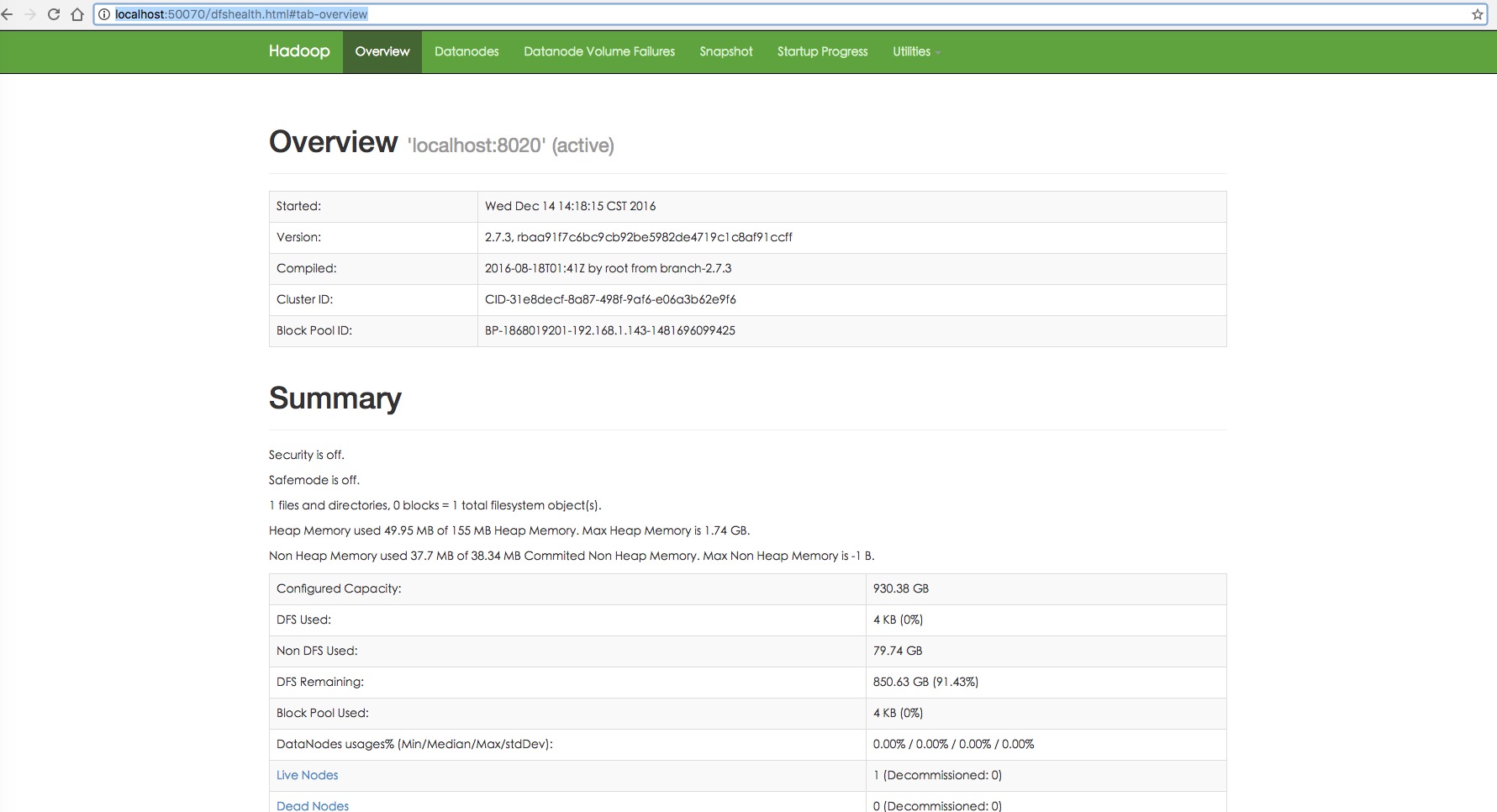
http://localhost:50070/
结果如下:
2. 常见错误解决
hadoop namenode不能启动
org.apache.hadoop.hdfs.server.common.InconsistentFSStateException: Directory /tmp/hadoop-javoft/dfs/name is in an inconsistent state: storage di rectory does not exist or is not accessible.
原因在于core-site.xml
你必须覆盖hadoop.tmp.dir为你自己的hadoop目录
...
hadoop.tmp.dir
/home/javoft/Documents/hadoop/hadoop-${user.name}
Hadoop - Mac OSX下配置和启动hadoop以及常见错误解决的更多相关文章
- Mac OSX 下配置 LNMP开发环境
不久前负责了一个项目需要配置PHP7的开发环境,因为之前所有的项目用的是PHP5的,所以研究了这些东西,但是很遗憾,电脑出了问题,不得已重装了系统,然后你懂得...什么都没有了,要重新来过.. 虽然本 ...
- Linux环境下配置及启动Hadoop(伪集群)
1.下载tag软件包后,我习惯放到software文件夹下,并建立app文件夹2.通过tar -zxvf hadoop-2.6.0-cdh5.7.0.tar.gz -C ~/app/ 命令解压到app ...
- 日常工作问题解决:配置NTP服务器以及一些常见错误解决
1.配置NTP服务端 环境:redhat 6.5 服务器主机名 ip地址 说明 server 192.168.57.20 NTP服务端 client 192.168.57.21 NTP客户端 搭建说明 ...
- Mac osx 下配置ANT
一般安装过程如下: 1:sudo sh (会提示你输入当前用户的密码) 2:cp apache-ant.1.8.2-bin.zip /usr/local 3:cd /usr/local 4:unzip ...
- Mac OSX 下用 Homebrew 安装 MongoDB 并配置到 WebStorm 中
1. 安装 Ruby OSX 操作系统内置 Ruby,但如果没有 Ruby,则需先输入以下命令安装能够进行多版本ruby环境安装.管理和切换的命令行工具 RVM. 1.1 安装 RVM 打开终端输入以 ...
- Mac OSX下Sublime Text配置使用Ctags实现代码跳转
1. 先用brew工具安装ctags,安装路径在/user/local/bin The default ctags executable in OSX does not support recursi ...
- 在Mac OSX下使用ssh建立隧道(在Windows下建立隧道可以使用putty,其间会用到ppk文件)
在Windows下建立隧道可以使用putty,其间会用到ppk文件.在Mac OSX下,同样的功能可以用ssh命令实现.具体是: ssh -D 8088 -Nf user@ip -i myppk.ss ...
- MAC OSX 下安装 CTAGS
由于本子跟风换了骚货MBP,因而开发要迁移到MAC OSX下,mac os 下的ctags不一样,所以需要自己编译一个 Lion内置了ctags,但是不我所需要,因此得在网上去弄,最新的版本是 5 ...
- 在Mac OSX下安装Microsoft Calibri字体
参考: Where can I find default Microsoft fonts Calibri, Cambria? 在Mac OSX下安装Microsoft Calibri字体 1.下载: ...
随机推荐
- View的事件处理流程
一直对view的事件处理流程迷迷糊糊,今天花了点时间写了个栗子把它弄明白了. 1.view的常用的事件分为:单击事件(onClick).长按事件(onLongClick).触摸事件(onTouch), ...
- struts2的运行原理及配置文件
struts2官方运行原理图: 1,客户发送请求(url地址就是请求),tomcat接到请求会找到相应的应用web.xml配置文件. 2,web.xml中filter拦截器把你的请求接收到,并进入Fi ...
- 黑马程序员——for循环的使用与理解
Console.WriteLine("请输入要打印菱形的行数(不能是偶数)");---------------------- <a href="http://edu ...
- SQLSERVER复制的要点
SQLSERVER复制的要点 在论坛里经常有人问:SQLSERVER复制出问题了!!SQLSERVER复制不运行了!!SQLSERVER复制遇到阻塞了!! 然后最后来一句:“怎麽办?????????? ...
- Dynamic CRM 2013学习笔记(三)快速创建实体 EntityCreater
一.实体简介 实体用于在 Microsoft Dynamics CRM 中建立业务数据模型和管理业务数据.例如,可以使用客户.市场活动和事件(案例)等实体跟踪和支持销售.市场营销和服务活动.实体具有一 ...
- why add \n to http response.responseText
这是今天我们公司线上出现的问题,http response 的信息,都添加了一个\n换行,我找了好久呢 才发现,我把php页面的结束符?>去掉之后,一切正常,这个?>,我平时也是很少加上的 ...
- git删除push到远程服务器的commit
如果不小心把不该提交的代码或者敏感的数据(如密码)提交到远程git服务器上,可以使用git reset回滚到上一个commit,并且commit history不留下任何痕迹. 具体做法: # 1.通 ...
- YUI Compressor for Sublime text2
YUI Compressor 是一个用来压缩 JS 和 CSS 文件的工具,采用Java开发. 最近压缩文件,常使用在线压缩的方式来压缩文件,一来多有不便,二来如果没有网络,只能搁置了.本文来描述如何 ...
- Qt之Dialog\widget\ mainwindow的区别和布局管理器 & 分裂器的区别
1.Dialog\widget\ mainwindow的区别 注意mainwindow和widget的区别,mainwindow都工具栏和菜单栏 Dialog and mainwinodws 都是继承 ...
- 转 CSS hack:针对IE6,IE7,firefox显示不同效果
CSS hack:针对IE6,IE7,firefox显示不同效果 做网站时经常会用到,衡量一个DIV+CSS架构师的水平时,这个也很重要. 区别不同浏览器的CSS hack写法: 区别IE6与FF: ...